All the team joins me in wishing you a happy new year 2017!
This year, nothing will block us !
Once again, we want to thank you very much for your support in 2016. We will do our best to surprise even more in 2017!
https://www.stellar-overload.com/fr/news/180/
#stellaroverload #happynewyear2017
The Cubical Challenges
We would like to test a new type of "sharing event" with the community.
Codename: The Cubical Challenges.
What is this thing?
Simple: you challenge us with some construction ideas, and we have a short amount of time to take up the challenge.
You post your ideas on a dedicated thread on the forum, on Facebook, on Twitter or even here on Steam.
Each team member who wishes to participate chooses one challenge and has a limited amount of time to build and post his creation on the workshop.
The first challenge will take place on Thursday, January 5, at 2 pm (Paris time): 2h to take up one of your challenges!
Early Access Update 2 Fix - 0.8.6.1
Just before going on vacation, we deliver some minor improvements to the last version (about 40 bug fix and about 20 new minor "features").
Main improvements:
- localized shortcuts: by default, the shortcut configuration now takes your local language into account. And a new button appeared in the option panel: to reset the shortcuts depending on the keyboard layout (QWERTY for example)
- Workshop window: ergonomics update, bigger blueprints' preview
- We now receive a notification when another player discovers a new secret in a dungeon
- The orange destruction ghost now disappears when it's not necessary (when targeting a metablock with no gauntlet in hands for example)
- Recorder's ghost is now purple (blue is for construction, orange is for destruction)
- You can now use the N key when placing blueprints, which gives access to a new placement mode
- When recording a blueprint, you can now define the pivot point
Fuuuuuusion!
I am proud to announce that two new members joined the team some weeks ago : Bley and Angetsu.
Bley is here for the level design. Angetsu will handle the quest design.
Bley and Angetsu, fusion attempt... Bletsu?
Steam Early Access Update 2 : it's today!
We are glad to present the 0.8.6.0 early access update!
Here are the main new features you will find:
Istara
Our second planet, Istara, has been highly improved, graphically and technically.
Istara is a cold forest planet with three biomes in it: the swamps, the sequoïa forest and snowy forest.
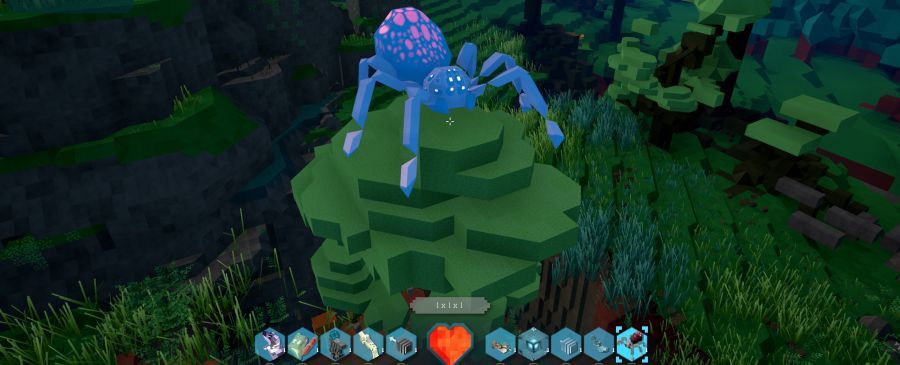
A new population of animals appeared : spiders, brakhs (a local boar) and bees.
New trees were also added: pines, spruces and above all, the giants sequoïas.
New vehicle : the Spacejet
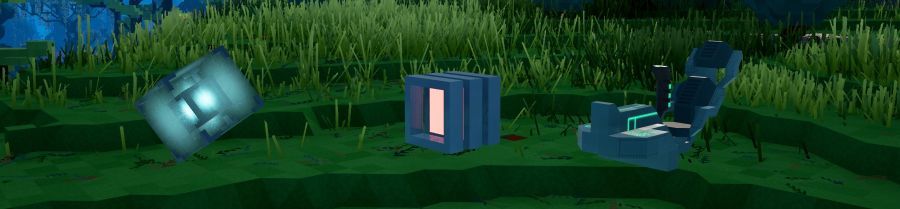
3 new control blocks have been added: the Gyrograv block, the Spacejet cockpit and a directionnal thruster.
You can now get into space by building a spacejet with those new elements!
The thrusters allow you to control the direction of your ship. You will need 6 thrusters, one for each direction to fully control your ship (Forward, backward, move laterally to the left, or to the right, up and down).
If you put only 2 blocks forward and backward for instance, you will just be able to go forward or backward.
Do not forget to check the key bindings options: we added a vehicle section so you can set your bindings according to your preferences, with no effect to the character bindings (on foot).
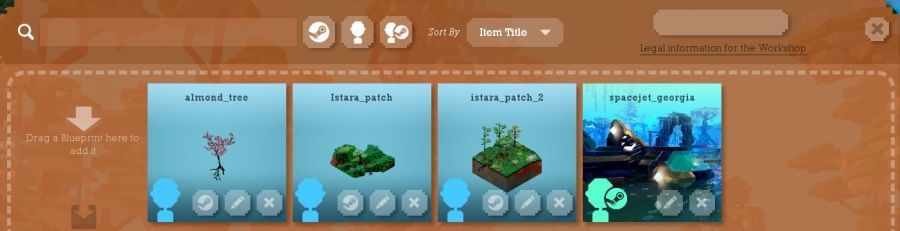
Workshop on Steam feature : Share your plans with the community!
You want to show to the community your brand new spaceship you just made? You want to try a house a friend of yours did?
By pressing the “P” key while in game, you will open the plan sharing tool.
This tool allow you to share every plans you created with all your local saves, but also with the rest of the world directly on Steam Workshop.
Just drag and drop a plan from this new screen to your inventory and put it in your world (if you have the right blocks to build it!)
Just drag and drop a plan from your inventory to the workshop, add it and bam! It’s online!
New community feature: Transforming a creative universe into a custom universe
Build your world in creative mode, then transform it into a custom universe (“C” button on the universe’s list). The custom mode is your universe with no scenario. You will start with an empty inventory and a knowledge of every recipes.
More options to customise this mode will be added in the future.
New features for the creative mode
You can now put creatures to create your own swarming dungeon! Eww... !
You can now define the spawn point for the players by using the /setspawn command. Use it for example to set the spawn point in front of your dungeon.
You can also enable or disable the inertia using the command /togglemomentum. Our artist team asked for this option, and some of you will definitely like it too!
Recorder improvement, and plan setting enhancement
Right click now registers automatically an object. The algorithm now spreads to all the blocks linked to the one you are targeting. You’d better separate your object from the ground before you do that ;)
New death system
Death is always hard to balance and above all, today we don’t have every tool to do it.
From now on, when you die, you will loose all your inventory but your weapons, ammo and armor.
You will need to come back where you died and click on the bag to loot your inventory.
Make some backup chests before you go kill some monsters, who knows ;)
New quest log
You can now follow a secondary quest by selecting it from the journal (press “J” key) and by clicking on the “Follow” button on the top right corner.
3 characters will wave at you at a moment during the adventure (at the end).
Keep an eye open ;)
You can also check every modifications and improvements we have done in the last seven weeks on the detailed release note of this new update here.
We hope you will enjoy these new features as much as we enjoyed making them!
Note for all the AZERTY players: You need to reset your key bindings manually in the game options, due to the new spacejets mechanics, we currently can’t mix US and FR key settings anymore. We will provide a fix in a future patch regarding this issue.
Note for the builders: you can now access the old “EA1” version to create all the blueprints you want, and then copy them to the new version folder. To access the old version: right-click on Stellar Overload in your game list, choose “properties”, and go to the “betas” tab. Select the “steam_ea1_v0.8.5.2” version in the dropdown list.
As usual, we have open a new section on the forum. Do not hesitate to tell us your feelings about this new version of the game.
And most importantly : Have fun!
Istara Preview
Today we show you Istara, the second planet.
https://www.stellar-overload.com/news/176/
Death upgraded
Death is now coming with loss of your equipement.
https://www.stellar-overload.com/news/172/
New building contest: a Treehouse
A new building contest starts today! And it's theme is:
The shape of the house in the picture is only an example.
The contest’s rules and some building advice can be found here.
One of the challenges of this contest will be to display the full potential of your construction in only one image. Take a lot of screenshots and choose the best!
The 5 houses elected by the community will be integrated to the game, most likely in the EA2.
Version 0.8.5.2 (EA1 Fix) : Mac Version + bug fix
Today we release a new fix for Stellar Overload EA1.
Mac users will finally be able to play the game on their computer!
And we corrected some other bugs:
Fixed a crash when loading or saving a game.
Updated the game's icon.
Fixed an issue preventing to loot level 2 recipes and above.
Removed access to /settime command in story mode.
Removed green flashes when looking at a vehicle's cockpit or thruster.
Version 0.8.5.1 (Fix EA1), first corrective update: freezes & other bugs & new features
We have fixed about 40 bugs that you encountered this last week (you can read the complete patch note here).
The major one was the problem of freezes some of you encountered, it now should never appear again.
Thank you for all your feedbacks!
We also implemented some new small but useful features during this week:
Possibility to use healing items in the action bar, without having to select them. Just use the key shortcut, and it will heal you. You can keep your weapon in your hands!
A research field on every inventory (the new button on the left)
A new camera tool in creative mode! We decided to give you access to our dev tool, which we used to make the trailer. But only in creative mode. See commands /addTravellingWP, /addTravellingTimedWP, /startTravelling, /resetTravelling, /saveTravelling and /loadTravelling
There is now a close button on every window in game
There is now an icon on the map for each vehicle allowing you to find them quickly
Last added element: a free DLC with a music selection.
It's a selection of 24 tracks that can be heard in the game. From the vast plains of Merx to the dark hallways of the dungeons, you can now enjoy the music without playing the game. Hope you'll like it! (Songs will be placed in your Stellar Overload folder in the Steam Directory: ...Steam\steamapps\common\Stellar Overload\Sound Selection)
Also, it seems that you had some difficulties to find the different updates we released before being on Steam. You have two pages for that on our website:
The roadmap page showing major features of each “big” updates (and the planned features of the next update)
The release notes page, where you can inspect in detail each updates since the beginning of the project