The survey results are in. I'm going to post them here and let you know what I plan to do about each of these. Many of you provided a lot of commentary and suggestions which I am still reading through. Thank you all for participating. There will be more survey's in the future.
First, Blocking:
The majority of all players felt they would enjoy blocking as a game mechanic more if there were more visual indicators in the game environment. This will be a good sized block of work for me to do, so it won't go in soon. Likely during Alpha or even Beta - by it will go in!
Second was character movement:
As you can see, a majority of people felt that movement could be increased slightly. I'll make sure to increase movement speed a bit - perhaps 10-15% so the animations do not look comical and the feet don't appear to be sliding. This will go in during Alpha.
And finally, the pace of combat:
As you can see, the majority felt the pace of combat was fine as it is. I have already promised to do some work to optimize enemy combat animations and merge attacks so enemies do not return to idle before making their next attack if multiple attacks are made. That should increase the pace of combat a bit. The results were really close so I think upping the pace a little won't hurt.
Engine Upgrade!
This build is only available on the "Publictest" depot for now - see instructions below to opt in.
I have good news and bad news!
The bad news first!
There is no good way to say this, so I'm just going to say it. Better now than later.
THE ENGINE UPGRADE WILL WIPE YOUR SAVE GAMES (sort of)
In order to prepare the game for Steam Cloud Saves, I had to move the save game folders and data. I don't expect that I'll need to do this again, however, I cannot guarantee that there won't be save game wipes in the future while in EA. I'll always provide a way for you to recover you're old saves if possible (see below). NOTE: Cloud saves will go live when this build is ready to be released. There will be no cloud saves while testing on the "Public test branch".
This engine upgrade was crucial for KZ-MR7 and moving forward towards alpha.
I am providing a way for you to manually recover your save's if you must. See the section below.
The good news!
I am posting a major engine upgrade to the "Publictest" depot! Instructions for accessing the updated version are noted below for anyone willing to test the new build. Please read below, opt-in and give me feedback on the new engine. I'll be providing a pinned thread in the general forums for feedback.
There are too many fixes/changes to list here. I'm just going to list the major updates for you.
Reworked Load/Save folders for accessibility and future Steam Cloud Saves
64 Bit support - steam will automatically choose between 32bit and 64bit depending on your systems capabilities
Better support for Windows screen resolutions and tabbing
4k support (Experimental)
Better performance overall
Stability fixes
Better support for zoomed state in Windows 10
Faster execution of scripts
Lower memory overhead
Better support for lower end video cards (Yeah Intel - that's you, though I still cannot officially support you!)
Updated Steam Libraries
Load/Save games are now much faster
By default, space graphics are set to low resolution (for those with limited VRAM]. For those of you with 2GB or more VRAM, just open the options menu and under video select "HiRes Space" and apply settings. The next time you enter space, you will be using the high resolution graphics
Opting into Public Test
To access the public test build:
In steam navigate to your Library
Right click Stellar Tactics
Select properties
Select the "Betas" tab
From the drop down list, select "publictest - Public Testing Branch"
No code is required. Click the "Check code" button
Close the properties window, exit Steam and log back in. The updated build should start downloading.
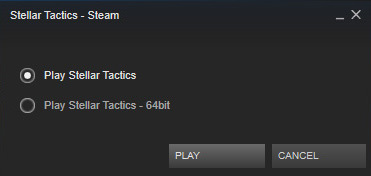
For now, when you launch the public test build, you must launch the game from within Steam - do not use your desktop icon. A popup window will appear - select either the default or 64bit versions. When this build goes to the default depot, Steam will choose the appropriate version for you. If for any reason you have a problem with the 64bit version, please report a bug in the forums and then choose the default version (32bit version) of the game.
Fixes etc. released with this build
UPDATED: FPS cap raised from 30fps to 60fps - nice and smooth on fast systems.
UPDATED: Physics now automatically scales to your systems performance.
FIXED: Major fix for enemies skipping their turns
FIXED: Fix for missed movement clicks. Much more responsive overall.
FIXED: Healing icon no longer appears when rolling over KO'd team members when a med kit is equipped.
ADJUSTED: Enemies that do not have weapons equipped no longer gain a large H2H melee bonus.
ADJUSTED: Spiders are a little less likely to poison
ADJUSTED: Better loot from bosses on Dauntless.
ADJUSTED: Weapon and armor wear is now 1/2 of what it was before until crafting and repair go in.
MANUALLY RECOVERING YOUR OLD SAVE GAMES
NOTE: Do not attempt this if you do not feel technically competent with the Windows file system!
This update will NOT delete your old save games. If you must have them, you can manually move them to the new save folder. I recommend starting again from scratch, but if you absolutely must have your old saves, then you will need to take these steps.
First, backup your savdat.xml - In Steam, under Library, right click Stellar tactics and select "Properties" -> Select the "Local files" tab - > Click "Browse local files". Now, copy the "savdat.xml" file somewhere safe.
Now, open "savdat.xml" file in "Notepad" and then "File->Save As" and overwrite "sav_dat.xml" file in the Steam installation folder (note that this file is named slightly different with a "_" between "sav" and "dat"). Leave the "savdat.xml" file in the folder in case you want to go back to the public build. - Ok that's the first part, now to get your save files.
Access "Users\"YourUserName"\AppData\Local\Abyss" - in this folder search for "Saves" (hint: it should be in one of the subfolders. (see below if you are having problems seeing the AppData folder).
Copy everything in the saves folder - all the ".sts" files. Make sure to leave the "Saves" folder and its contents in case you want to go back to the public build.
Go back to your Steam install folder (instructions above) and paste all of your save games (".sts" files) into the "Save" folder
That's it, you should now be able to access your old saves in the new engine.