I'm posting a few fixes and updates in todays patch before I lock everything down and start integrating the chapter 3 content. I've completed all assets for the new content update and it's time to put everything together.
This update adds pre-caching for all space content. You will notice that resources are being loaded when the game launches. This means a longer load to the main menu of the game, however, load times to space while in the game with be much faster. I also did a bit of work on load times for transitions between ground locations and will continue to work on this.
You will also find a new "Dark Space" option on the video options screen. This will set a single high resolution sky throughout the game. I felt this was a good option for players who would prefer a more realistic experience when flying through space. If you enable this at the main menu, loading a save will apply the new setting. If already in the game and in space, you will need to save and reload to see the changes.
Join Bumpy McSquigums as he streams Stellar Tactics live on the store page over the holidays. Here is the full schedule:
All streams will start at 2PM EST and last 2 hours assuming no technical issues. December 21 December 22 December 23 December 27 December 28
As always, thank you for supporting Stellar Tactics.
Notes for this patch: UPDATED: The game now pre-caches content when first loading the game. This results in transitions from ground to space loading much faster than before. Your mileage may vary. UPDATED: Improvements in loading speed between ground mission areas. UPDATED: Using the character info, inventory, log, and ship UI now pauses the game while in space. UPDATED: Asteroid fields indicated by [AF] in the star system object list on the star map and in space are now named "Asteroid Field [AF]". [AF] wasn't good enough. ADDED: The video options screen now has an option for "Dark Space". This will set a single space material taken from public domain imagery of the Milky Way galaxy. I'm adding this for those of you who would prefer a more realistic space background. When enabling this option, you will need to exit and launch the game again for the option to take effect. FIXED - Raider base story location - lighting and transition from last level to previous level location. FIXED - Crew members would occasionally spawn above floor level in some areas. FIXED - Map zoom in/out now matches the environment zoom mouse wheel settings. In - mouse wheel forward. Out - mouse wheel back. FIXED - Disabling autosaves from the options menu was not functioning as expected. FIXED - In a few instances, NPC's turned hostile could end up invisible. For example, Lazlo Eklund. FIXED - Crew members equipped with armor, weapons, devices, and shields cannot be dismissed. You must remove all gear from a crew member before dismissing them in the crew manager. This resolves a problem where the crew could be dismissed, destroying story-critical devices like the Aznari Scanner and Psionic Amplifier. FIXED - Missing planetary description info when targeting Coven base during story content mission. FIXED - Ship pitch control would invert when flying in certain directions while using the keyboard controls. Tuned keyboard controls so they are more responsive. FIXED - A bug that would fail to display planetary mining node scan data.
Other recent patches: 11/14/23 - 0.722b Fixed: Cargo volume on the "Ship" screen was not displayed correctly when various sorting filters were applied. Fixed: Ship equipment on the "Ship" screen did not display the correct quality indicators in the cargo list. Fixed: If you had very high skill in mining, and perks selected (+Mining speed), it was possible that you could depleted an asteroid before fully heating the asteroid. I adjusted the minimum bracket scaling to compensate for this.
11/3/23 - 0.722 Fixed - Ship repair components should not be rewarded from asteroids - really - I really hope so this time :) Fixed - When mining, the asteroid "heat" bar would flash and disappear when mining. A bit of tuning on the new mining system:
--The "Lower" indicator of the "sweet spot" when mining is decreased further with mining skill. At higher levels of mining skill, it was possible that an asteroid could be depleted before it even warmed enough to enter the "ideal heated" state.
--Increased the amount of ore generated overall when mining. The new system feels a bit slower because asteroids are being depleted at a slower rate - however, the amount of ore mined is greater than before over the same amount of time. Increasing the amount of heat (changed above) and increasing the amount of ore generated should bring things back to where they were before - if not better.
--Increased the amount of heat generated during a pulse.
--I should mention, some asteroids are "clunkers". This is by design. You can usually tell when you crank the energy on a turret to max and after a few pulses, it has not heated significantly. It's best to stop mining that asteroid and move on...
11/1/23 - 0.721 Fixed - Cargo inventory was not being displayed correctly. This was a display only issue and did not affect the items in your cargo. Let me know if you see any further issues related to ship cargo not being displayed. Fixed - If an asteroid was clicked rather than actually targeted by first selecting a turret, the asteroid would incorrectly think it was already targeted and could not be mined. Fixed - In some cases, stopping mining could leave an asteroid in a state where it could not be targeted by other mining turrets. Fixed - Asteroids were rewarding ship repair components - ooops!
Updated mining, FTL fast travel, advanced gameplay settings and more...
This update brings the updated mining system, fixes, advanced options and QOL changes.
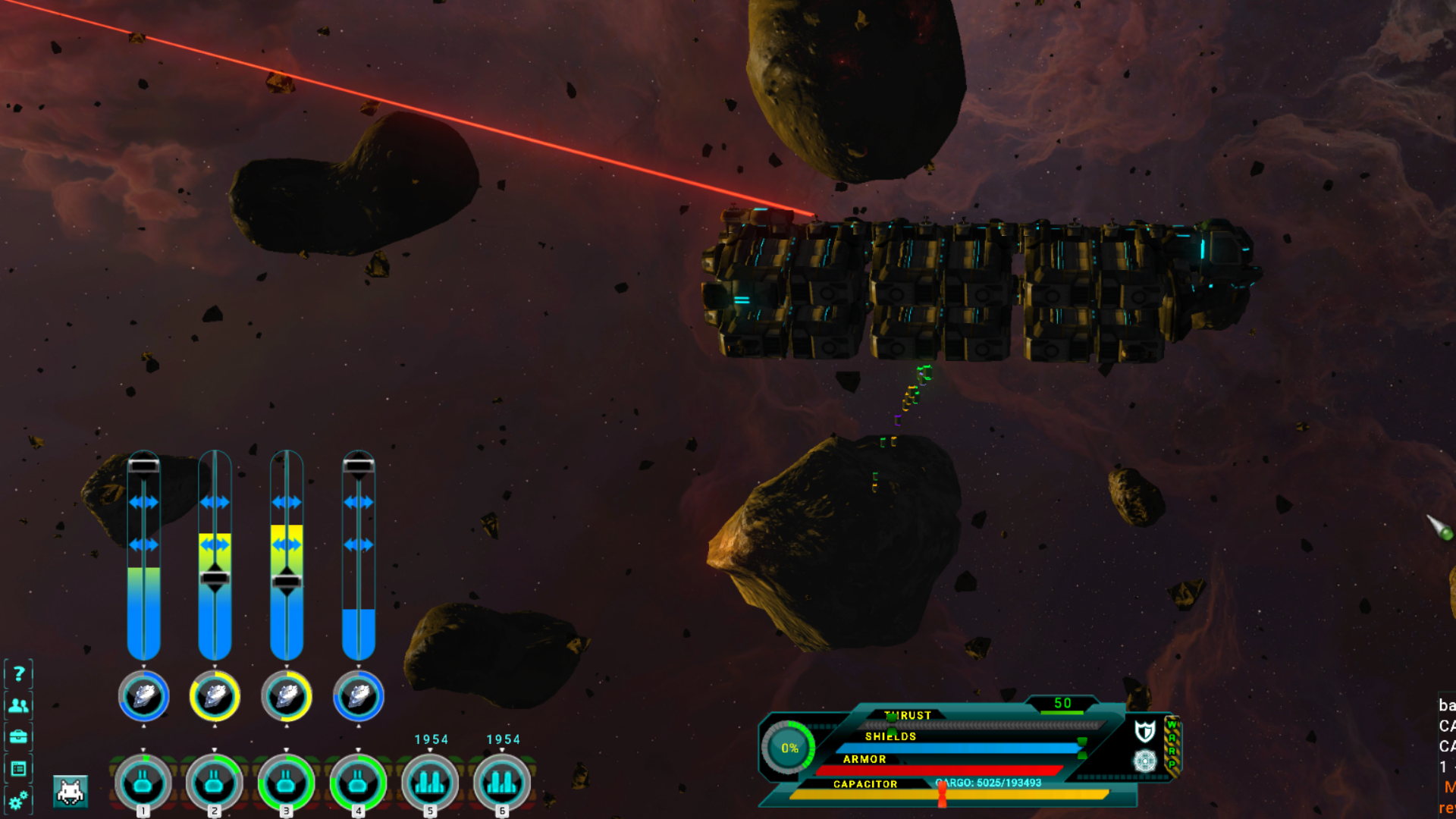
Updated mining system: The old mining systems was pretty much click and forget. That's still the case with wrecks, however, asteroid mining has changed. The new system uses "heat". As the turret pulses, the asteroid is heated. You have control over how much power you allocate to your turrets, which in turn controls the ideal temperature of the asteroid.
You can only target asteroids with a single turret. Attempting to target an asteroid that is being mined will generate an error message in the log.
Increase power to your turret to quickly heat the asteroid.
As you approach the ideal temperature, back off a bit on the power until turret pulses remain between the "sweet spot" brackets. The bottom bracket will extend downward as you gain more mining experience making it easier to keep asteroid heat under control.
Some asteroids are bit more unstable than others and the amount of energy required to maintain ideal temperatures will vary.
Overheating asteroids will quickly deplete the asteroid and result in lower yields.
If the asteroid is too cool (temperature below the bottom bracket) less ore is produced.
You can see the remaining amount of ore left in the asteroid in the circular progress bar. The bar is also color coded - red=too hot, yellow=ideal, blue=temperature too low.
When mining wrecks, you can target all turrets, so, no major changes in salvaging these objects. There are a few changes:
Reduced the amount of ore produced by wreckage.
Increased the number of ship repair components harvested.
Changed the color of the mining turret beam when mining wreckage.
FLT fast travel You can now choose to fast travel in FTL space. There are two limits:
You cannot fast travel to nearby star systems.
There is a maximum range for fast travel.
To fast travel, enter FTL space. Choose a target star system by either selecting the star system on the Universe Map, or if a story/mission location, select the mission in the objective tracker. The upper left panel will display the targeted star system. There will be a new icon that can be selected that will move your ship near the selected system. There is a short delay while universe data is generated when traveling between star systems using the fast travel icon.
Advanced gameplay options I've added advanced gameplay options to the options menu. These options are only visible when in a loaded game - not at the main menu. These are not global settings and only apply to the save game they are set in. You can reset these advanced settings at any time. All gameplay options now have rollover help.
Adjustments to the advanced options modify the currently selected difficulty. In some cases, you may need to save and reload and/or exit the current mission area and re-enter to see the changes take place.
If any of these options are enabled, the game will stop tracking Achievement progress. Resetting the advanced options to default will re-enable achievement tracking Currently the game is tracking a number of things like enemy deaths, ships destroyed etc. Any progress in existing saves will reward achievements when achievements are enabled later in the roadmap.
GROUND COMBAT:
Increase/Decrease enemy damage
Increase/Decrease enemy health
Enable/Disable enemy missile launchers
Enable/Disable enemy grenades
SPACE COMBAT:
Increase/Decrease enemy ship damage
Increase/Decrease enemy ship shields
Increase/Decrease enemy ship armor
Increase/Decrease enemy ship systems (boarding systems)
EXPERIENCE MODIFIERS:
Increase/Decrease general experience rewarded
Increase/Decrease space skill experience rewarded
Increase/Decrease support skill experience rewarded
VENDOR PRICES- Note that any modifiers adjusted are applied after faction and charisma bonuses.
Increase/Decrease vendor prices for items sold by vendors
Increase/Decrease vendor purchase prices for loot and gear
Increase/Decrease ship prices at vendors
QOL Items
You are now warned if you enter a star system or a ground combat location that is well above your crews average level.
Date and time have been added to save games. This is not retroactive and only new saves will register the date and time.
Sorting options have been added to the cargo hold column headers.
Repairing equipment only requires a single click now and will repair items as long as repair components are in your inventory.
Increased ship repair components rewarded when mining wreckage. The number of components harvested are not displayed in the log.
Things that didn't make it Crew missions did not make it into this build. This system needs more time in the oven before I can release it. I'll get this done as soon as I can and release a patch when it's ready.
Added: When on the FTL map, you can now fast travel to star systems within a certain range. If fast travel is available for the selected star system, a new icon is displayed to the right of the "APPROACH/ENTER SYSTEM" icon under the selected star system panel in the upper left of the screen. This allows players to move quickly through FTL space to story mission locations and other star systems. Whether or not you use it is up to you. Azimuth does not recharge in FTL space when fast traveling. Piloting experience is not granted when fast traveling. (See piloting EXP below) Added: Date and time added to load/save interface. This is not a retroactive fix. Saves that have no date/time data associated will display the date as "---". Added: You can now sort alphabetically, by value and quantity on the ship cargo screen [K] by selecting the column headings. Added: If you unintentionally stray into a star system that is above your average crew level, a message is displayed to the screen and your log letting you know you will be annihilated forthwith.
Updated: Repairing equipment now requires a single click and will automatically complete the repair process for the selected item if enough materials are available for the repair. Updated: Jump point models. Updated: NPC ship navigation updated for better collision avoidance with planets and other objects. They will now prioritize avoidance with planets adjusting course as necessary. Updated: NPC ships are less likely to ram you in space combat. Updated: Piloting EXP is no longer earned by entering or leaving FTL space. Instead it is calculated by distance traveled over time both in star systems and on the FTL map. Piloting EXP rewarded from space combat has not changed. Updated: Increased overall ship repair components when mining ship wreckage. Updated: Asteroid mining now uses "heat" to determine yield of asteroids. Keeping the asteroids heat levels within acceptable tolerances increases the yield of asteroids. If the asteroid is cool (below the bottom bracket) less ore is generated. If the asteroid is too hot (above the upper bracket), the yield is lowered and the asteroid is destroyed faster. Updated: Only one turret can be targeted to an asteroid now with the changes to the heat system. You can mine multiple asteroids at the same type by selecting the turret and targeting asteroids. If an asteroid is already being mined by a turret, a message is displayed to the screen that the asteroid cannot be mined by more than one mining turret. --If you are too aggressive with heating, asteroids can get in a state where they are very hard to cool. You may need to stop mining the asteroid and let it cool down. Updated: Reduced overall ore yield when mining ship wreckage. Note that you can target all mining turrets to wreckage. Updated: Changed beam color to blue when mining ship wreckage. Updated: When awarded ship repair components, the number of components rewarded is now displayed in the log. Updated: If your ship is not moving, you will take additional damage in space combat. Some ships may be able to tank this additional damage if they have excellent shields and armor equipped. Updated: Reduced general EXP gain from space combat applied to crew in ship station slots.
Fixed: The in-game guide is now accessible in the middle of space combat and will pause the game. This also applies if space combat is currently paused with the [P} key. Fixed: Collisions with objects in FTL space and in star systems now return control to player much faster. Fixed: When loading a save game in a star system, NPC ships could spawn in the center of the sun. Fixed: In some cases, mining beams were not displayed when mining ship wrecks. Fixed: In some rare cases, it was possible to spawn in the wrong universe position when first launching your ship from the planets surface. Fixed: If stun immunity through Azimuth was active, and NPC's used stun grenades, crew members were partially stunned leading to various UI elements not working as intended. Fixed: Initial ground exploration camera rotation values could be set to zero, locking the camera from rotating in new playthroughs. This required players manually set the camera rotation value in the gameplay options menu. Fixed: Incorrect display of pooled experience toggle in options menu selection box. Fixed: Crew member in ship repair slot was not receiving general experience from space combat. Fixed: Crew member combat state was not completely cleared after combat in rare cases resulting in various errors. Most visible was that crew member was stuck in combat idle stance with no weapon in hands.
There will be bugs. Please, if you see anything - post a bug report here - > https://steamcommunity.com/app/465490/discussions/7/
Thats all I have for now. I'll keep an eye on the forums and address any issues that pop up. Thanks as always for supporting Stellar Tactics!
Roadmap to release
Well, Fall is here in the Northern hemisphere and I'm excited to post the remaining development tasks for Stellar Tactics over the next few months. There has been an absolute flurry of activity here on my part preparing content for Chapter 3, delivering on promises I made for a crew mission system and a bunch of QOL adjustments based on player feedback.
Stellar Tactics has been in EA for a long time. I realize for some, this has been annoying. People want to play a final game - right? Others don't mind contributing to the game with ideas, feedback and bug reports. I have a lot to be thankful for in that the community has been incredibly helpful in so many ways.
However, I need to be realistic. By that I mean, development needs a clear and final end point. There are so many great ideas from players and of course I have ideas myself. Unfortunately, not all of these can be realized or I would spend the rest of my life in Early Access. Up to this point, I've been very clear about what I wanted to accomplish, I've had fixed goals, an end point in mind and we are closing in on that vision - finally.
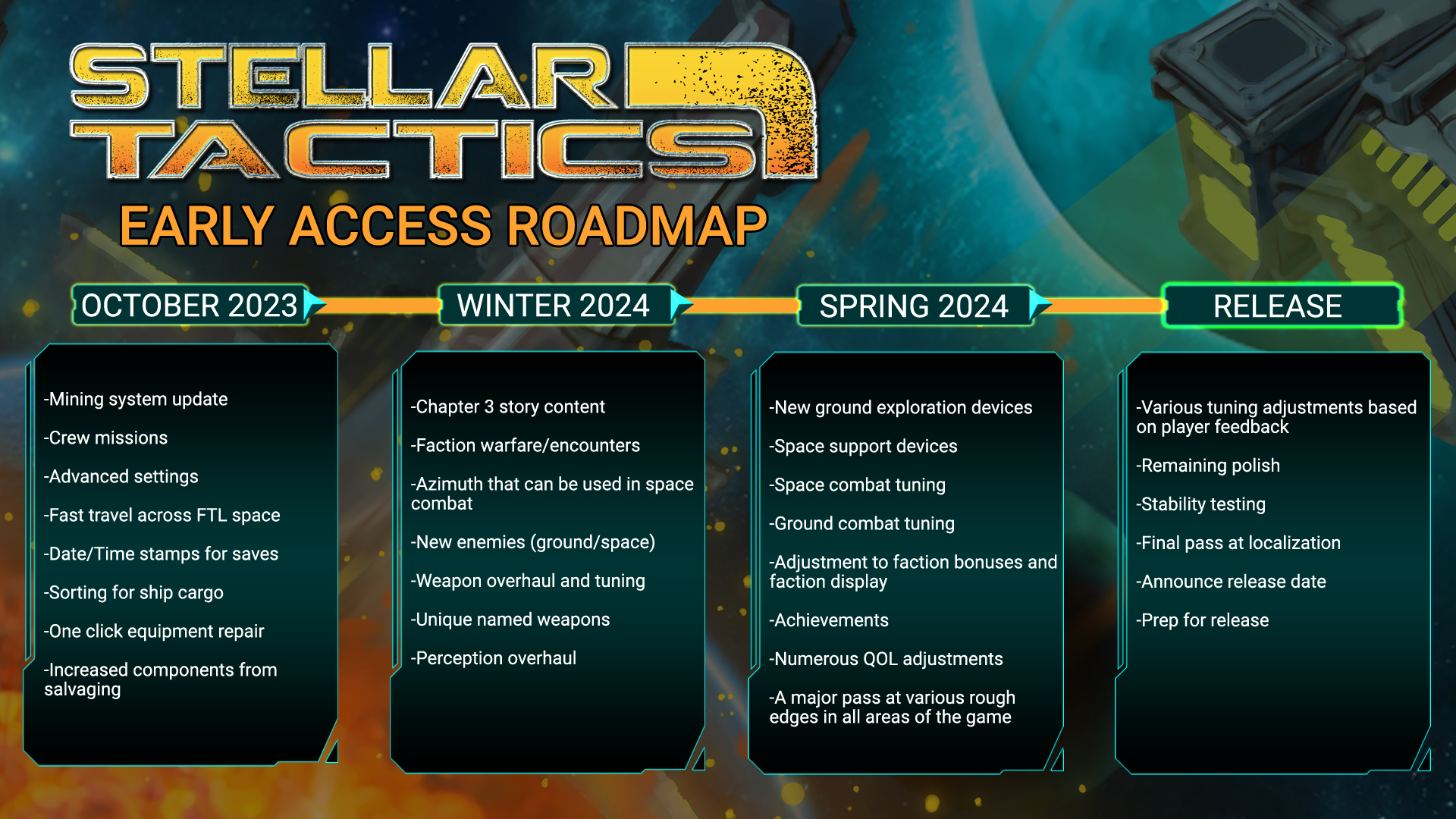
What does this mean? It means I'm going to be focused on the last chapter of the game, final features, a lot of cleanup, stability, tuning and various other bits that should polish the game up nicely in coming months. Here is the roadmap:
As you can see, I have a patch coming in October with a few new features, quality of life improvements and a good number of bug fixes.
The mining system update changes the mining system from a passive to an active process. A few notes and of course more details will come when the patch is release
--You manage the energy of each turret to keep the asteroids temperature in a "sweet spot" --This "sweet spot" is initially small and expands as you gain levels in the mining skill. --Below the ideal temperature, you mine less ore. --Above the ideal temperature, you mine less ore and the asteroid is depleted much faster. --Asteroids at an ideal mining temperature provide bonus ore. --Your perks will work as they always have. --Asteroids can only be targeted by a single turret. You can target multiple turrets to separate asteroids. --Salvaging derelict ships works as it always has - you can target all turrets at one time
The crew mission system will allow players to assign inactive crew members (crew members not assigned to ground crew or ship stations) to various mission types. Crew members will always receive EXP even if they fail the mission, however, failed missions will reward fewer credits and less experience. An example would be to send a inactive crew member on a rescue mission where they have a chance to gain combat experience in the weapon types they currently have equipped. Over time, crew members rank up and harder missions become available that reward better rewards.
I think the "Advanced settings" will be a welcome addition. Players will be able to tweak many things in their game, including the cost of ships, how much experience you gain for various activities, combat difficulty, and much more. In a sandbox, I believe there is no perfect default setting for everyone. More options are always better. You will be able to reset to defaults at any time.
Fast travel - Really, for me, it cannot be space if there is no time spent...well...traveling. However, so many players have commented that it takes too long to travel in FTL space. So, I've added a way to target a star system, within a certain range of course, and immediately travel to that location. This can only be done in FTL space from point to point. Notice the new icon below the Star System info screen in the upper left. Whether or not you use it is up to you.
That's all I have for now. I'll keep you posted as I get closer to releasing the October update.
Recent patch notes and latest - pooled EXP.
6/15/23 - 0.715 UPDATED: Pooled experience. Pooled experience will even out general experience gain between dedicated ground crew members so they level at an equivalent pace. --General experience is now rewarded at the end of each combat session and the pooled total experience will be divided equally between each crew member regardless of KO. --Leveling will progress a bit faster with pooled experience. --Crew members who are behind will slowly catch up to the rest of the team. --Skill gain will remain as it is now. --Pooled experience is enabled by DEFAULT. --You can switch to the original method of gaining ground combat experience by turning of "POOL COMBAT EXP BETWEEN CREW" option in the options->gameplay menu if you prefer to micro-manage EXP.
UPDATED: Crew members in ship station slots will now recieve a small amount of general level experience along with the usual skill experience when a ship is destroyed. UPDATED: Any mission that gives a reward (loot) will now also reward a small amount of general level experience when completed/turned in. UPDATED: A few changes to the option settings being saved and loaded. I've also added debug info to help track options not being saved correctly on some systems. If you do have any problems with settings, please send your log from that game session to support@stellartactics.com. You can find the log in the game install folder->"Log" folder. UPDATED: Enemies no long fade when they die, and remain until you leave the area. FIXED: A bug related to the combat queue when initializing the combat queue with an attack requiring more ammo than the weapon has loaded. FIXED: Crew member Azimuth AP bonuses were not being applied when reloading the area from a save where the Azimuth effect was triggered. FIXED: When ending a turn quickly, it was possible that the UI would end in a state where the end turn hotkeys would not respond and you had to manually click a end turn option.
6/2/23 - 0.714 UPDATED: Raised level cap from 60 to 80 UPDATED: Adjustments to initiative to level out how INT affects turn order. FIXED: Shields and mods once again display item quality borders in the shared inventory. FIXED: Various pressed key inputs will not activate ship functions while in inventory, log, ship and character info screens. FIXED: Azimuth screen can no longer be opened while hacking. FIXED: Ship component wear was not being copied from and to ship storage correctly. Note, in some cases the game may reset a ships equipment wear values when tranferred to/from storage if needed to 100% the first time this is done. FIXED: Possible fix for rare state where a player character could be unable to move after transitioning to a new ground location. FIXED: A bug related to universe data load on 32bit systems. FIXED: A fix for a case where speaking with Rhamus and then Rodger Crayson during the main campaign could block progression. FIXED: A few translation errors.
5/25/23 - 0.713 UPDATED - Increased the number of bonus equipment repair components received from salvaging. UPDATED - Some work done on shotgun AOE related to enemy position above or below player position. I'm still looking at this closely. FIXED - Grenades not damaging or applying effects to enemies. This bug applied to all grenade types - frag, stun, etc. FIXED - Missiles not damaging or applying effects to enemies. FIXED - Missiles could get caught on world geometry and explode prematurely when you had clear LOS to the enemy target. FIXED - Aznari shards had no rollover info and were not displayed in the stash. FIXED - Aznari shards are now visible in inventory after using the sort option and are sortable in stash. FIXED - Aznari shards that were sold to vendors did not show in vendor inventory immediately after selling the shard.
5/22/23 - 0.712 FIXED - The game would lock up when boarding incursion ships. FIXED - Phestus was not delivering boarding mission rewards when when you sold a ship to Arkus. FIXED - The game would lock up if you opened the crew manager [J] and then opened the inventory, log, character info or ship UI.
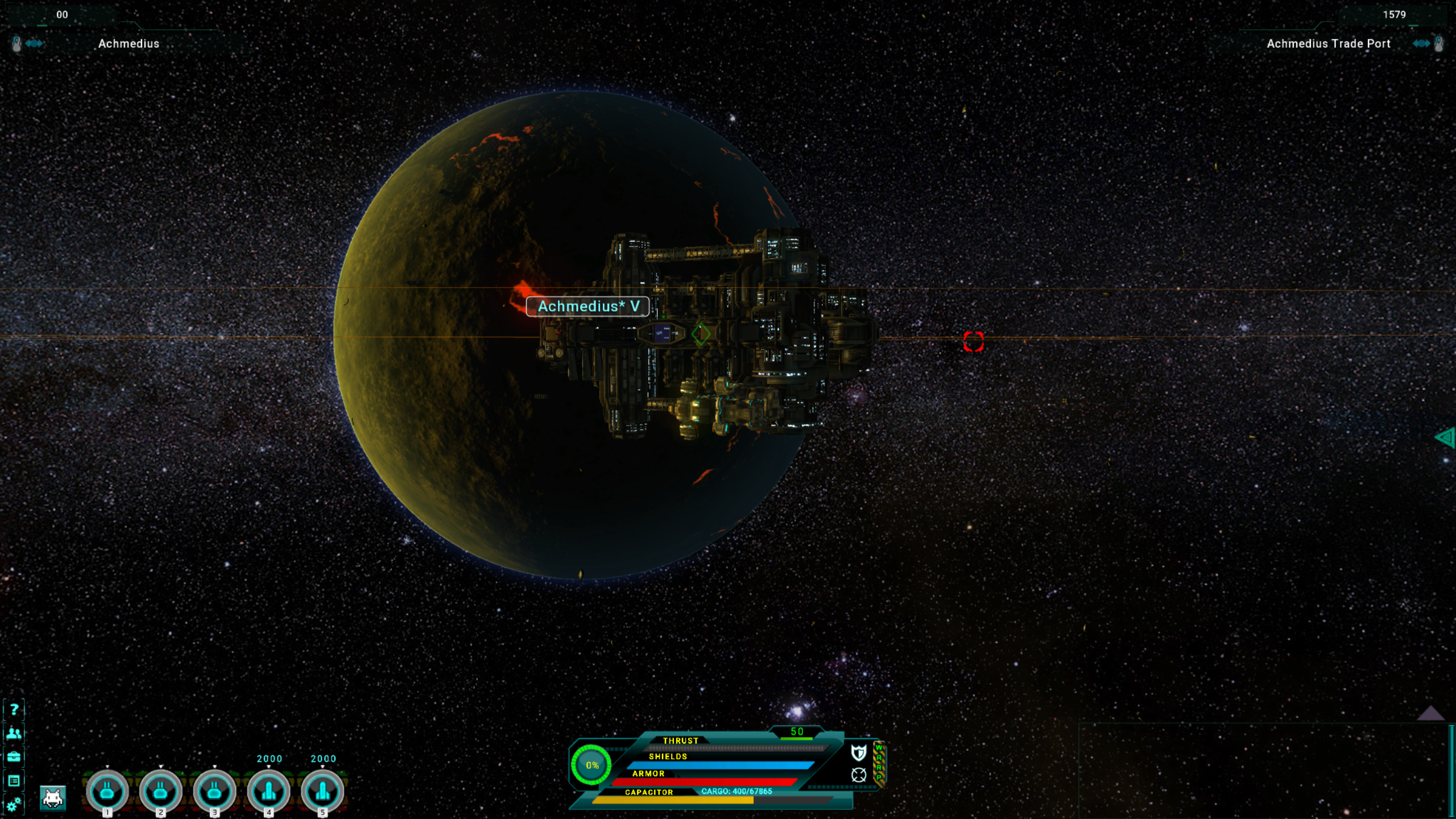
HOTFIX 5/21/23 - 0.710 NPC's were issuing new procedural missions at the Achmedius Trade station. While that was not intended (and is now fixed) and generally would not break anything - a procedural mission from Forley Coresh would break the dialog needed to progress with the chapter 1 story.
If you took a procedural mission from Forley Coresh and he now responds with a "." in the dialog window, just save your game next to him, reload that save and all should proceed as normal.
If you have taken procedural missions from NPC's on Achmedius Trade Port, I recommend opening the log, selecting these missions (missions with a persons name followed by a x/x where x is a number, and then abandon the missions. Missions will not be issued by NPC's on that particular trade station any more.
Chapter 2 released!
I'm pleased to release Chapter 2 today. It's been a long road and I do hope everyone enjoys the new content. As always, it is likely a few bugs will surface over the next few days so I will keep an eye on the forums for any issues. If you do find any issues, please post on the bug forums here. Any details and screenshots you can provide will help: https://steamcommunity.com/app/465490/discussions/7/
Localization - The English and German versions of the game are in good shape at this time. French, Spanish and Russian translations will be very rough. If you are interested in translating any of these three languages, send a note to support@stellartactics.com and I'll get back to you.
CHAPTER 2 - Pick up where you left off after completing chapter 1 with a message when entering space. Note that there are some very tough battles in this chapter so, grenades, Azimuth (when you get it) and Psionics will really help.
AZIMUTH - The final ground combat system to be implemented. Azimuth is a reward received during the chapter 2 story. It provides you with a variety of powerful effects that can be mixed and matched to both benefit your crew during combat and to debuff enemies. Effects last through an entire combat area so they are best used either at the start of an area or when you have tough enemies to defeat. Azimuth uses energy gathered over time through combat, space travel and by charging Azimuth with Aznari Shards. Chapter 3 (the final chapter) will introduce Azimuth which can be used in space combat.
MISSION NPCs - Mission NPC's can now be found on stations. When pressing the highlight key (TAB by default), mission NPC's are highlighted in BLUE. These missions offer cash rewards, loot, faction tokens and general faction. All of these missions have several stages/locations that need to be visited with different objectives and pay out rewards based on the number of stages required to complete the mission for the NPC. This is the first pass at NPC missions. I expect that I will be expanding on and refining the NPC mission system over time.
TRADE AND SMUGGLING MISSIONS - Trade and smuggling missions will be offered occasionally when entering a star system that has orbiting stations. These missions are only offered if a star system does not have an ACCEPTED buy or sell order registered in your Trade Net. Expand your trade network using beacons to take advantage of these missions.
These missions always pay out bonuses that are above market value so it is always worthwhile taking the missions when offered.
There is no timer so you can have as many as 20 of these missions available at any time. 20 is the maximum number of active trades allowed via the Trade-Net.
Note that you can fulfil ore and refined ore missions by mining and refining ore yourself. Or, you can just buy the goods on the Trade Net. Of course, mining and refining ore will offer the most profit from these contracts.
The volume required by these missions - that is the number of items needed to fulfil a contract, is based on your current cargo capacity. Ships with more cargo will be offered larger batches of commodities to trade.
Trade contracts scale based on the amount of credits you have available when the contract is offered.
There are special contracts that reward a very high return. These are offered by NPCs you have met through the games story content.
Trade contracts can be canceled in the Trade-Net with no penalty.
BOARDING MISSIONS - Phestus will offer simple boarding missions - so he can retire, you know. He will start giving you missions once you have a FTL Drive after you complete his story mission in Achmedius.
Only one boarding mission is offered at a time.
To receive the reward, board any ship of the type that Phestus needs parts for. When selling the ship to Arkus, Arkus will route the parts to Phestus and Phestus will reward you.
These missions cannot be abandoned. To get another mission, you should complete the current mission provided by Phestus.
These missions are basically a bonus to the payout you receive and give players specific ships to target.
Pick your targets carefully. Boarding ships will reduce your standing with the owners main faction.
A NEW MISSION TYPE related to the chapter 2 story line. This is a ongoing permanent mission in your log. You will know what it is when you you get it.
ACCESS STATION CARGO FROM SPACE: You can now approach any non-hostile station and access the stations cargo terminal without boarding. This makes it a lot easier to store ore you are mining and deliver trade goods between stations. To display the cargo icon, click the station itself in space when you are close enough to board. A new icon will be displayed allowing you access to the cargo interface.
ADDED NOTES ON THE STAR MAP: You can now add notes to star systems on the star map. Selecting any star system will display a notes area above the lower-center detail console. Star systems that have notes will display a green box around the star system.
YOU CAN NOW VIEW SHIP REPAIR COMPONENTS: Harvested ship repair components used for boarding can now be viewed on the ship menu [K] by selecting the new button under the ore refinery. Note that ship repair components used to repair boarded ships can be harvested from other ships, or, ideally by salvaging wreckage in Star Systems. Salvaging wreckages is the best way to gather these materials.
GENERAL PATCH NOTES: UPDATED - Additional checks are now in place to avoid bad enemy target clicks that lead to movement instead of attacks. In addition, when rolling over an enemy in combat, the enemy will pause animation so you can get a very "clean" target selection. Previously, some enemies animations could lead to bad information at the moment a player would click, leading to an unintended move. Hopefully this reduces or eliminates these annoyances. Let me know what you think on the forums. Is this better, worse? UPDATED - Fog of war data on the ground area map [M] now persists between areas and saves. UPDATED - Phestus will now give you a mission to meet with Forley Coresh in Achmedius after you purchase the FTL drive from him when exiting his station. This fixes the missing quest link that would lead players to the start of Chapter 1. Regardless of when you got your FTL drive, the next time you enter a star system, the new mission will be triggered if you have not already spoken with Forley Coresh. UPDATED - Added directional indicators to the mini-map/radar for N,S,E and W. The "camera" FOV indicator now has a arrow tick mark for identifying the direction your camera is facing. UPDATED - Reduced INT bonuses to initiative for player and NPC's. This still needs work as INT is generating too much initiative. UPDATED - When pressing the highlight key bind, NPC's that can be recruited are now highlighted in green. NPC's that have procedural missions are highlighted in blue. Faction agents are highlighted in blue. UPDATED - Ship loot containers now display distance to the players ship. UPDATED - Moved star system player spawn point and jump points away from planetary orbits to avoid possibly intersecting with a planets on spawn. UPDATED - No random attacks when entering Achmedius - this is to smooth out the starting experience in the game. This also applies to attacks related to carrying contraband. UPDATED - Added more responses when selecting NPCs. FIXED - Removed shields from creature type enemies. FIXED - A number of typos in the English language files. FIXED - Multiple clicks on exits and during loading could lead to a level lockup or misaligned camera. FIXED - Corrected feedback text to log when delivering trade contracts. FIXED - Several localization errors. FIXED - Various areas - map and mini-map did not correctly display the map background. FIXED - A non-critical bug related to experience when selling ships to Arkus. FIXED - Visual error with Psionic bleed projectiles. FIXED - Mission objectives UI under radar/map for boarded areas and new areas that use the UI is now correctly displayed when entering or re-entering these areas.
AND FINALLY, A SUPPORTER DLC I am also releasing a supporter pack for Stellar Tactics today. I've been asked many times to add a way to help support the game. I finally decided to put together a few things that I think people would like. It contains a unique ship not found elsewhere in the universe, poster art, 3D printer models for those of you who have 3D printers and a few other things. For those of you who do decide to purchase the DLC, many thanks. And as always, regardless of whether you purchase the DLC, thank you for supporting the game.
WHATS NEXT: Well, Chapter 3 of course! Here is a list of things I'll be looking at. Some of these may be released between now and the Chapter 3 content.
With Azimuth in the game, I'll be able to make final adjustments to the combat system.
Adjusting the initiative system and exposing more information when rolling initiative.
Better STAT descriptions that are in line with any changes I make above.
Mining system changes. The current mining system is fairly basic. I'd like to make this a bit more interesting.
Adjustments to various effects in the game.
Tweaks to space combat.
Knocking off rough edges everywhere. That includes final passes at the various game systems.
Expanded faction warfare system and FTL map events.
Advanced game settings.
Two answer two common questions I see: [Q] When will achievements be added. [A] After chapter 3 is complete so I can tie achievements into all the game content.
[Q] When will custom portrait support be added. [A] With chapter 3.
Many will ask - when? When will chapter 3 be finished? December. Of course, I may need more time - we will see. I'll keep everyone posted as I make progress.
Progress Update - Chapter 2
Chapter 2 is in the works and I'm putting the finishing touches on everything. A large part of this will be the new procedural mission system which is taking longer than expected. Here is a quick overview of current progress:
100% - Chapter 2 content (locations, characters, etc.) 100% - Chapter 2 story integrated - can play through Chapter 2 100% - Azimuth – The last major ground combat system completed. 30% - Procedural mission system 0% - Testing, adjustments and cleanup
Chapter 2 will focus on the Aznari, the Jhemm and fleshing out the story around your place in the Universe. Eventually, you will acquire “Azimuth” – the very last combat system to go in the game. There will be a few surprises in this chapter and I really hope everyone enjoys the story as it sets the premise for the end game.
What is Azimuth? Well, without spoiling the story, it is a form of Ultimate. You charge energy by traveling through FTL space, fighting enemies or using Aznari Shards. When the gauge is filled, you can build a series of effects including heals and immunities, AP bonuses for your crew, AP penalties for enemies – or, just unleash all your power to annihilate an enemy squad. Some bonus effects persist through the entire area until you leave to a new section of the map.
Chapter 3 will include “Azimuth” for space combat with a number of effects you can use against enemy ships. Once this is introduced, space combat will receive a major tuning pass.
Chapter 2 also introduces several new characters, additional locations to explore, and various activities related to the core game story.
A very large part of Chapter 2 will be introducing branching procedural missions. This has been very challenging and one of the main reasons for delaying Chapter 2. My goal is to provide a number of mission trigger types (looting, exploration etc. ) that will initiate missions with multiple objectives. Once these missions are completed, the payoff needs to be worthwhile as you will be traveling to a variety of locations to complete various tasks.
For those of you with existing saves, you will be able to pick the game up where you left off and continue your journey.
That’s all I have for now. Thank you for supporting Stellar Tactics! I'll keep everyone updated as I finalize Chapter 2.
Engine update, radar mini-map, career bonuses and starting ship selections
Lots of changes today and a few bug fixes. Meanwhile, I am working on the Chapter 2 content which should be released late December or January. Notes below.
GAME ENGINE UPDATED: Much smoother gameplay even with saves that have hundreds of hours played. In general, the updated core engine will provide better visual fidelity and smoother camera movement
Camera smoothing updated.
The game engine now requests the highest power GPU for laptops and systems that have both Intel and NVidia/ATI GPU's. In the past, this was a problem. In many cases the default settings on Laptops were trying to render the game on the Intel GPU which was much slower and in some cases did not fully support the shaders required to render game effects, causing crashes on these systems. The work around was to manually force high power rendering through the control panels. NOTE: The new engine only supports 64bit OS. For 32bit OS, the game will fall back to the older renderer/engine.
RADAR MINI-MAP: The radar now includes a mini-map of the area.
CHARACTER CREATION UPDATED: When starting a new game, you are now presented with three options that set both a starting ship and career bonuses. When exiting the Aznari ruins, your career choice will set the ship type you find waiting for you on the planets surface. Career bonuses can be found below:
NOTES: The Tarsus MRCH-2 has had it's turrets adjusted. When a Tarsus MRCH-2 is reviewed at a ship vendor, when purchased, or as the starter ship, the turret configuration will be 4 light turret and 2 light missile hard points. The missile turrets have been downgraded to light mount points from heavy hardpoints. If you have already purchased a Tarsus MRCH-2, the heavy mountpoints will remain as they were before the patch until you swap them for another turret. This was done to balance the starting ships and bring the ship in line with the cost/value.
The Pharris Starhawk EXG-3 has had its default cargo increased from 850 to 1170 cargo so drone ore cargo can be retrieved. Though really, if you want to retrieve ore instead of auto-sell, you are better off with more cargo space.
CAREER BONUSES: When loading an existing save, you will be given the option to select a CAREER BONUS. These are the same bonuses applied by selecting your starting career in character creation - less the choice of your starting ship. These bonuses are permanent:
EXPLORER SCAN MASTERY: FACTION AGENTS PAY DOUBLE FOR YOUR SCAN DATA. KEEN EYE: YOU TEND TO FIND BETTER EQUIPMENT WHEN LOOTING CHESTS AND LOCKERS
MERCHANT NEGOTIATOR: +10% PROFIT WHEN DELIVERING TRADE ORDERS FOUND ON THE TRADE-NET. CHARISMATIC: VENDORS CHARGE 10% LESS FOR EVERYTHING – EVEN SHIPS
SHIP CLASS BONUSES: All ships now have ship class bonuses: INTERCEPTOR, LIGHT FIGHTER, MEDIUM FIGHTER, HEAVY FIGHTER: AFTERBURNERS DO NOT DEPLETE CAPACITOR (This was always the case with Interceptors and Light Fighters). +10% BONUS TO SPEED IN STAR SYSTEMS.
EXPLORER +10% SPEED BONUS IN FTL SPACE +50% SCAN RANGE
LIGHT MERCHANT, MEDIUM, HEAVY MERCHANT AND CARGO CARRIER: +10% MINING TURRET SPEED. +10% DRONE MINING SPEED.
QUICK TUTORIALS: New mini tutorials that quickly walk players through basic systems. - extended information is still available in the in-game guide and on the Wiki https://stellartactics.fandom.com/wiki/Stellar_Tactics_Wiki. You can disable tutorials in the options menu.
When first entering space. Basic ship systems and navigation.
First entering space combat. Basic ship combat and combat systems.
When entering a star system once your FTL drive is equipped. How to enter FTL space and basic information about travel, faction agents and Star System recommended levels.
A tutorial when first entering FTL space. Basic FTL navigation.
A tutorial for beacons. Information related to placing and using beacons for fast travel and initializing the Trade-Net.
Additional tutorials will be available in future patches for ground exploration, ground combat, hacking, salvaging, crew management, crafting, Trade-Net, boarding, mining and drones.
WANDERING NPC'S: Mercs for hire now wander around stations. Mercs have a YELLOW dot on radar - other NPC's that are not merchants or faction agents have a BLUE dot. These NPC's will issue random missions in a future update.
UPDATED - Improved load times. UPDATED - NPC ships regardless of faction are no longer hostile to the player until Dr. Rhamus and Dr. Jensen leave your crew. Note that incursions will also not be generated until the Dr's leave your crew. You can still attack ships at which point ships will become hostile. UPDATED - The game radar was overhauled. It now includes a map of the area in the background. UPDATED - Cursor lock for multiple monitors is enabled again. UPDATED - Excess weapon ammo will not be generated as loot. FIXED - After collecting the scanner from Dr. Rhamus, you could return to Crayson's Depot and Dr. Rhamus would still be at this location. FIXED - Rolling over the Aznari scanner would not display the mission percent complete. FIXED - An exploit when buying faction equipment and selling to merchants.
LOCALIZATION NOTE: New strings in languages other than English and German will be rough until a new round of localization is completed.
First Chapter, Psionics and more!
The first major story update since the game released is now available. Over the last few years I have been primarily focused on all the core game systems - ground and space combat, salvaging, crafting, trade, special attacks, perks, progression, the ship boarding system and more. It's been great to spend the last few months actually working on the story...finally. This is the first of three major story content updates what will bring the game closer to final release. I hope you all enjoy the new content!
KEY FEATURES Chapter 1 of the Stellar Tactics story. New missions, new encounters. To trigger the story content you must: 1) Unlock the FTL drive 2) Unlock smuggling. Speak with Forley Coresh on Achmedius trade station standing near the bar area of the station by the stairs and complete his mission. Everyone should be able to smuggle contraband...right? Doesn't mean you need to do it.
There are several places in the narrative where you will need to wait for a NPC to contact you. Just go about your business for a 1/2 hour or so, and eventually, when entering FTL space, you will receive a communication that moves the story forward. This includes the start of the new content where you will be contacted after a period of time.
You will be heading into deep space and there will be higher level ships in various areas you will travel through. Remember, you can always micro-warp to escape ship combat. So, not a big deal...really.
I highly recommend getting the best FTL drive you can afford. Slogging through FTL space with a low tier FTL drive is - well...slow. The piloting perk tree has ship speed perks and tiers that increase your speed.
Just my 2 credits - don't rush the content. Take time to place beacons, take missions if you can and build your crew.
Make sure to place beacons in the systems you will visit. You may need to return and translocating is the fastest way to get back when you need to.
PSIONICS --Psionics are powered by a special device - the Psionic Amplifier - a reward granted when playing through the story. This device is equipped in the sidearm slot on any one crew member. --There is only one Psionic Amplifier. There are no upgrades and they do not drop as loot. --Instead of improved variants dropping, the player is given a lot of control over how the device works. --The device cannot be sold or destroyed. --The Psionic Amplifier requires at least 20 BASE INT to equip. That is a PURE 20 INT not modified by equipment bonuses. It does not have a skill type that levels like other weapons. It does not have perks or mod slots. Instead, the device has a rudimentary interface that lets you create and edit psionic amplifications - the Psionic Editor. The higher your INT/PER, the more power you have to overload and to add a secondary effect to amplifications. --The power of psionic amplifications is governed by INT and partially by PER. Bonus INT and PER above your BASE INT does affect your amplifications. --INT and PER are the key STATS for psionics. INT has the greatest effect and PER provides a lower bonus. So, respec to INT/PER and loot that +INT/+PER gear. --The power of your amplifications related to INT/PER is expressed as available MIND. As your stats increase, the amount of available MIND increases. Through the use of the Psionic Editor, you will notice that INT/PER increase the power of amplifications and reduce the possibility of damaging your crew member. --There is no limiting resource to Psionic amplifications. That is, you can use psionics indefinitely unless you are overloading and then Medkits are a resource you want available. --Psionics cannot sprint. Instead, their specials for the sidearm slot are locked and used as reference and to access the Psionic Editor. --For psionics, it's important to understand "Initiative" which is used to calculate turn order. Initiative is calculated primarily from DEX and AGI with a bonus from INT. So, you will likely want to pump some stat points into DEX or AGI depending on whether or not your primary weapon is ranged or melee.
PSIONIC EDITOR: The editor can be accessed after equipping the amplifier in your sidearm slot. The amplifier needs to be selected as your active weapon. You will find an icon on the toolbar where special attacks are usually located. Your currently equipped amplification is displayed in the first of the two special attack slots. The editor icon is the second icon in the special attack area. To edit an amplification: --Open the editor by selecting the "cog" icon on the toolbar. --Select the amplification you want to edit in the list and select "EDIT AMPLIFICATION". --You can now select the attack type, effect type and a secondary effect from the lists on the left. --You can edit the name of the amplification. --You can edit the description of the amplification. --You can overload the amplification by sliding the bar to the right. Note that you can actually harm your crew member if the mind cost enters the "HEALTH COST PER CAST" area. --You can select a icon for the amplification by clicking the icon. When you are done, select "SAVE AMPLIFICATION"
To create a amplification: Same process as above. The only difference is that you will select "CREATE AMPLIFICATION" and save a new amplification by clicking "SAVE".
Ordering the amplification bar: The amplification bar is displayed in and out of combat when the amplifier is equipped and your sidearm is selected. Damage amplifications cannot be used when out of combat. You can change the order of amplifications in the bar by opening the Psionic Editor and dragging the icons from the list at the top of the editor to the bar at the bottom of the UI.
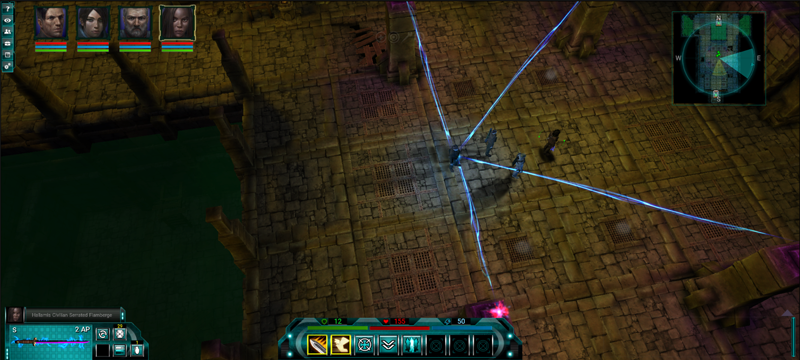
Amplifications toolbar: Damage amplifications - Select a amplification from the bar (or use the hotkeys 1 - 8). Note that amplification is loaded into the toolbar below. Like any ranged weapon, just target the enemy and fire. You can queue multiple amplifications and targets using the combat queue (Shift-Click and then space bar to unleash).
Heals and cleanses. Select a heal or cleanse from the hot bar. Note the icon is flashing. Like medkits, these amplifications require you to click a target or portrait. If you want to disable the amplification, you must select another amplification. Subsequent uses of the amplification can be triggered by clicking or using the hotkey for that amplification. Note that while a heal or cleanse amplification is selected and active, weapon swap, medkits and grenades cannot be used.
Psionic GROUP amplifications can target a single enemy and damage all enemies in that group, even if they are not visible. Heals, buffs and cleanses target your entire crew regardless of visibility.
Psionic PBAoE amplifications deal damage in a area around the targeted enemy. Heals, buffs and cleanses target crew in the area of the targeted crew member. Overloading a psionic amplification can damage a crew member. In certain circumstances, this may be useful for additional negative or positive effects. I'm leaving it to you to decide.
Psionics can heal, remove status effects and buff stats. Buffs last through the entire area. When you transition between areas, the buff is lost.
For now, there is no indication that a buff is active. I'll be adding this in a future update. You can reference your base stats to see if a bonus is active.
An important note: This is the first pass of Psionics. I'll be making adjustments over time to the system. I will be looking at expanding on the system to add other effects and upgrades through Chapter 2 of the story.
FACTION AGENTS Faction agents for Houses Conrair, Aralion and Cilivon are now active. You can spend your tokens on legendary ship equipment. Epic ship ship equipment must be crafted. Each faction specializes in various equipment types.
Faction agent vendors for Houses Halamis, Shikaru and Varadyne now also trade high tier weapons, shields and mods for faction tokens. They can occasionally carry high quality level 1 weapons if you are considering swapping your weapon spec. You can always find level 1 weapons on a vendor at Achmedius Trade Station.
RESPEC You can now reset crew stats. For now, this is free and you can reset your STATS at any time for all crew members. You will find a new button on the character information panel [C] in the upper left corner above the stat allocation area of the UI.
Some Phage and all Coven enemies use psionic attacks.
The Coven are now included in the main game story. They can also be found in various random mission locations and as targets for random missions assigned by faction agents.
SALVAGING WRECKS Wrecks can now be found in star systems. These can be mined and offer higher quality ore and random ship repair components used to repair equipment on boarded ships. These are discovery locations. Scanning a planet or ship may show a green highlight briefly indicating the location of a wreck. Salvaging wrecks completely will generate a loot crate.
AZNARI RUINS Aznari ruins can be found after triggering a certain mission in the main story. These areas have new enemy types.
NEW LOOT In ground combat, skull enemies may occasionally drop loot chests with high quality gear.
QOL CHANGES
SALVAGE UI QoL
Schematics that are being learned through salvaging are now displayed on the salvaging UI with percent complete in the Schematics view on the right of the screen. Completed schematics show no % complete.
Selecting an item to salvage now displays items that can be salvaged in the disassembly pane of the salvage UI.
When selecting an item to salvage, pressing ESC will cancel that item rather than exiting the salvage UI allowing you to select another item to disassemble.
Right clicking an equip-able item other than mods in your inventory will equip it. Double click still works to equip items.
The stat allocation widget now allocates stats quickly when you click and hold the mouse over the allocation arrows.
Your ships now accelerate immediately when micro-warping.
When looting, if you do not have the room in inventory for all ammo, the loot container will close and a message will be sent to display that you do not have enough room in inventory for the ammo. Just a note that there is a ammo converter in the game that you can purchase from one of the faction vendors. I leave ammo in the containers in case you have an ammo converter and want to convert ammo in inventory to another ammo type to make room.
Sorting:
Added sorting for the stash. You can now sort by quality, name, value, type and quantity.
Added sorting to vendors. You can sort by quality, type, value and quantity.
Added a compact inventory icon to the upper right of the shared inventory area. This organizes in the following order - med kits, grenades, devices, armor, melee weapons, ranged weapons and finally - vendor trash.
I will be adding improved sorting to the cargo, cargo storage and other areas in the next update.
Removed the annoying vendor dialog. When you click a vendor, the vendor UI is displayed immediately.
When out of combat, pressing the reload hotkey [R] will reload all weapons for all crew members. Right click to reload all still works.
GENERAL NOTES
Translations for the new content will be rough for a while. I'll post updates over the next month as translations to German, Spanish, Russian and French languages progress.
Updated - When boarding a ship, space combat experience is rewarded when selling the ship to Arkus. You can still get experience by exiting the ship and not selling to Arkus, then blowing up the ship. Or, as usual, by destroying ships in space combat without boarding. Updated - Difficulty setting modifications to NPC's now kick in at level 1. Previously, difficulty settings for hard and extreme had no effect on NPC's until your crews average level was level 5 or greater. Updated - Ramped up Extreme difficulty mode. Updated - Various enemy types have Psionic skills - especially Coven and Phage. Updated - You will no longer be able to swap weapons from inventory during combat. Weapons, armor and shields cannot be unequipped during combat. You can swap mods and devices while in combat. For example, swapping a damage type mod to adjust melee weapon damage types based on enemy weaknesses. Swapping heavy weapons to avoid reload penalties was OP. Also, with special attacks added, this could in some cases lead to triggering multiple special attacks in a single combat scenario making content trivial. Updated - Dauntless - Removed grenades from "Captain". Updated - Added cave areas to random missions at the Facility in Achmedius. Updated - Devices can not be destroyed or sold. They are considered key items. Updated - Replaced some of the Arach sound effects. Updated - Grenade damage adjusted -> down. Updated - Increased 2 hand melee CTH and damage. Updated - You can now rollover status effects for descriptions (bleeding, defend, poisoned etc.) in the extended targeting UI. Updated - Increased LOS visual angle for NPC's and PC's so they do not have tunnel vision. Updated - Performance improvements in space. - LOD, distance clipping, UI performance related to NPC ship labels etc. Updated - In space, when a target is selected and obstructed by a planet, the target reticle is faded to let you know the target is on the other side of the planet. Updated - In space, if a ship is obstructed by a planetary object, the label is faded. Updated - When rolling over repair material icons in the equipment repair UI, the name of the repair material is displayed. Updated - Reduced chance of a random attack taking place when entering a star system from a station, ground location and FTL space.
Fixed - When a grenade is active, occasionally you would move instead of throw the grenade when you clicked. Fixed - When gaining piloting skill in space combat, the log was displaying the incorrect string - WEAPONRY. Piloting skill gains were not affected - just the display string in the log. Fixed - If armor was unequipped in combat, the player was invulnerable to damage. This was related to an error in the equipment wear system. Fixed - Universe search now responds correctly to enter key - searching the existing list of systems with beacons first and if no result, entire universe database. Fixed - Arach parts are now considered vendor trash and are sold when selling all junk. Fixed - After clearing the slice mines for Scarby, the return location is selected when choosing the mission in the objectives tracker in space. Fixed - The approach button is now displayed after scanning a planet. Previously a scan would hide the approach button until you selected the planet again. Fixed - Cleaned up various sub faction agents that should not be giving missions at this time. They will return eventually and provide alternate mission types (The Syndicate, The Church etc...). Fixed - When boarding the Frontier CG-1 several doors on this ship could not be hacked/opened. Fixed - In some cases, when looting a ship equipment crate on boarded ships - not all equipment was being moved to the cargo hold. Fixed - You can now craft "Rare" weapons with up to 3 mod slots.
Progress update
Chapter 1 has been a long time coming. A lot of work went into this and I'm finally at a point where everything is in the game and I'm testing and cleaning things up.
The video below is work in progress so expect a few typos and issues. I'm still cleaning up some of the Psionic UI, dialogue and various text used.
Lets talk about what you can expect.
First, new story content. The game story previously ended in Achmedius. The story now continues as things start to ramp up in the Universe. Old acquaintances, new friends and a continuation of the Phage and Jhemm story lines - among other things.
Psionics can be unlocked through the main story of The Coven. The Psionic Amplifier is a weapon of sorts that gets equipped in your sidearm slot. Holding the device allows a crew member with appropriate stats (minimum 20 INT) cast amplifications.
Beyond that, you can edit and create your own amplifications in the Psionic Editor. The device has several already loaded. Intelligence and Perception are the primary stats for the amplifier and as you apply points to these stats, you are able to overload the amplifier without damaging yourself. This gives you access to secondary effects like status effects and buffs that can be applied to crew members. Buffs remain on crew members until you transition to a new area. The editor also lets you arrange your effects on the toolbar.
Psionics include: Single Target, Point Blank Area, Group - Note that the Group type effect will target all enemies, even enemies that are not in line of sight.
Effect: Heal - Heals damage and can buff all stats (STR, AGI etc.) Cleanse - Chance to remove negative status effects. Buffs various resistances. Damage - Kinetic, electro, bleed, explosive, thermal and toxic. Applies various status effects.
You can overload any amplification, just be aware that doing this could harm your crewmember and even knock them out. That said, it may be useful to set up a few "Hail Mary" amplifications for those critical moments.
A few other things you can expect: Aznari Ruins have been added to the Universe. These locations can be found as part of the main story where you receive a device that lets you pinpoint these ruins on planet surfaces. Eventually these will lead you to Aznari Hubs where the Jhemm are located. One thing that will not make it into this build is Azimuth system. That will come in the Chapter 2 update.
A simple re-spec has been added to the character information screen. I'll eventually add a side mission and a cost to re-specs. For now, I thought it was appropriate to add this so you can tinker with various builds.
Salvaging wrecks has been added. These are somewhat hard to find as you cannot scan for them, so look for them as you travel through Star Systems. If you do find one, you can mine the wreckage for high quality ore, rare earth minerals and bonus ship repair materials (used to repair boarded ships). Most systems will have wreckage floating around.
Many new enemies - specifically in the Aznari Ruins and caves.
The Coven have arrived and will show up in mission areas where Scavvers are found.
Some Phage are Psionic now. Beware...
Of course, there will be a myriad of fixes and updates to various systems in the game including the highly requested Arach screech fix, immediate movement on Micro-Warp and a few other things people have requested.
That's all I have for now. Thanks as always for supporting Stellar Tactics!
Patch notes 3/4/22 0.599g
A good number of fixes posted today while I continue working on the Chapter 1 content patch.
Here are the notes: Updated - Reduced the value of crafted ship equipment when selling to vendors. Crafted ship equipment has a lower value than looted space equipment. Overall, selling crafted ship equipment was OP and still is. This will all be adjusted with a major pass at the overall economy. The value of these items is still high and a very good way to earn a lot of money in the game if you want to skill up crafting/salvaging and gather the resources. It's important to note that there are salvage perks you can enable that increase the chance to loot schematics by as much as 10% when you have a high level of salvage skill. Updated - Increased reward values for boarded ships salvaged/repaired and sold to Arkus. I will be expanding your interactions with Arkus through the game story to allow players to earn a ship rather than paying for one. Updated - Depleted planetary nodes now have an icon - drone with red "X". Fixed - A rare case where incursions would stop spawning. Fixed - Salvaging Helmets in languages other than English would not generate "strap" resources. Fixed - Switching languages from the main menu in the same session would not correctly populate foreign language strings for crafting and salvaging. Fixed - The ammo converter device was not working in languages other than English. Thanks for reporting this! Fixed - When activating the taunt weapon skill and switching weapons, the range circle effect was not disappearing.
Localization: Updated - Translations for French, Russian, Spanish and German. Fixed - The stats of crafted items were extending over the numbers numbers in some cases. Fixed - Adjusted fonts for lists in scanned data UI's (planets and ships) Fixed - Adjusted font size of "Click to re-roll item's attributes[...]". Fixed - The names of crafted items were partial untranslated. Fixed - When crafting mods, e.g. trigger groups, "WEAPON TYPE" was not translated. and "PISTOL/SMG" was untranslated Fixed - When crafting beam weapons, "BEAM TYPE" and "ELECTRON" was untranslated when first displayed. Fixed - When crafting turrets, "TURRET MOUNT" and "TURRET TYPE" were not translated. When changing from "LIGHT" to "HEAVY" labels were untranslated. Fixed - Log when mining was not translated Fixed - When editing the portrait of a crew member, several UI elements were untranslated. Fixed - "Objectives" in the objective tracker from the trade net were not translated ("pick up" and "deliver"). Fixed - When a beacon is placed in a boarded ship the button "Initialize beacon" was not translated. Fixed - "Repairing Shields" was not translated. Fixed - In the boarding objectives panel, the headline was not translated. Fixed - "Repair Progress", "Repair", "Salvage" and "Exit Repairs" are now translated. Fixed - Headline for "item name" in storage on bases was cut off. Fixed - In the transfer screen for storage on stations/bases, "Quantity" and "Cancel" are now translated. Fixed - Mouse overs of vendors were not translated. Fixed - Vendor name label expanded for cases where text exceeds label limit. Fixed - The right button when dismissing a crew member was not displaying the correct translated text. Fixed - The cancel button when trading was displaying the incorrect translation string. Fixed - Perk award popups were not displaying correct translated text. Fixed - Reduced size of status effects below the portrait so foreign language strings are not cut off. Fixed - On the salvage screen, "schematic" was not translated. Fixed - When deleting items from the inventory, the "cancel" button was not translated. Fixed - Mouse over of data cards was not translated. Going forward - data cards that swap will be correctly translated. Fixed - "You find a basic XXX schematic" was not translated in the log and splash screen. Fixed - Flash screen for "objectives completed" was only partly translated. Fixed - Quality level of equipment in the description popups was not translated.