

Stream Games
Update February/14/2024 v1.9.3.0
v1.9.3.0
Mini Games Corrections
Mage
For some Streamers, the shots were not colliding with the players.
- Collision mode has been changed.
This behavior does not occur for all customers.
Bomb
Unable to distinguish Current Player on Turn
- Current Player name displayed next to Turn Time
- Created script to set individual position for
each Player
- Highlighted Player Name above the Sprite
Fixed players' Life Bar size
___________________________________________________________________
PT-BR
Mage
Para alguns Streamers, os tiros não estavam colidindo com os jogadores.
- O modo de colisão foi alterado.
Esse comportamento não acorre para todos os clientes.
Bomb
Não era possível distinguir Jogador Atual no Turno
- Exibido nome Jogador Atual ao lado do Tempo do Turno
- Criado script para setar Posição individual para
cada Jogador
- Destacado Nome do Jogador acima da Sprite
Corrigido tamanho da Barra de Vida dos jogadores
Brazilian Indie Games Skins (v 1.9.1.0)
I added Players skins for four Brazilian Indie Games (Be Hero, DIninho Adventures, Raccoo Venure and Ravva and the Phantom Library) .
See details about them clicking the button "What characters are these ?", on Customization screen for Players.
You can also enable and disable them any time by the Customization screen for Players.
Stay Safe.
Update November/23/2023
Greetings.
I added a new Battle mini-game.
Players can move and attack via chat command.
The available mode is with two teams, battle per turn and only allows 18 players.
I will add a new Solo Mode in which players have the same range of time
to perform actions and allows up to 400 players.
This new mini game is being tested and will need corrections and improvements.
Examples of commands have been added to the Game Screen, but it is necessary
look at the Tutorial and explain to your viewers how to play.
Feel free to provide corrections and suggest new ideas.
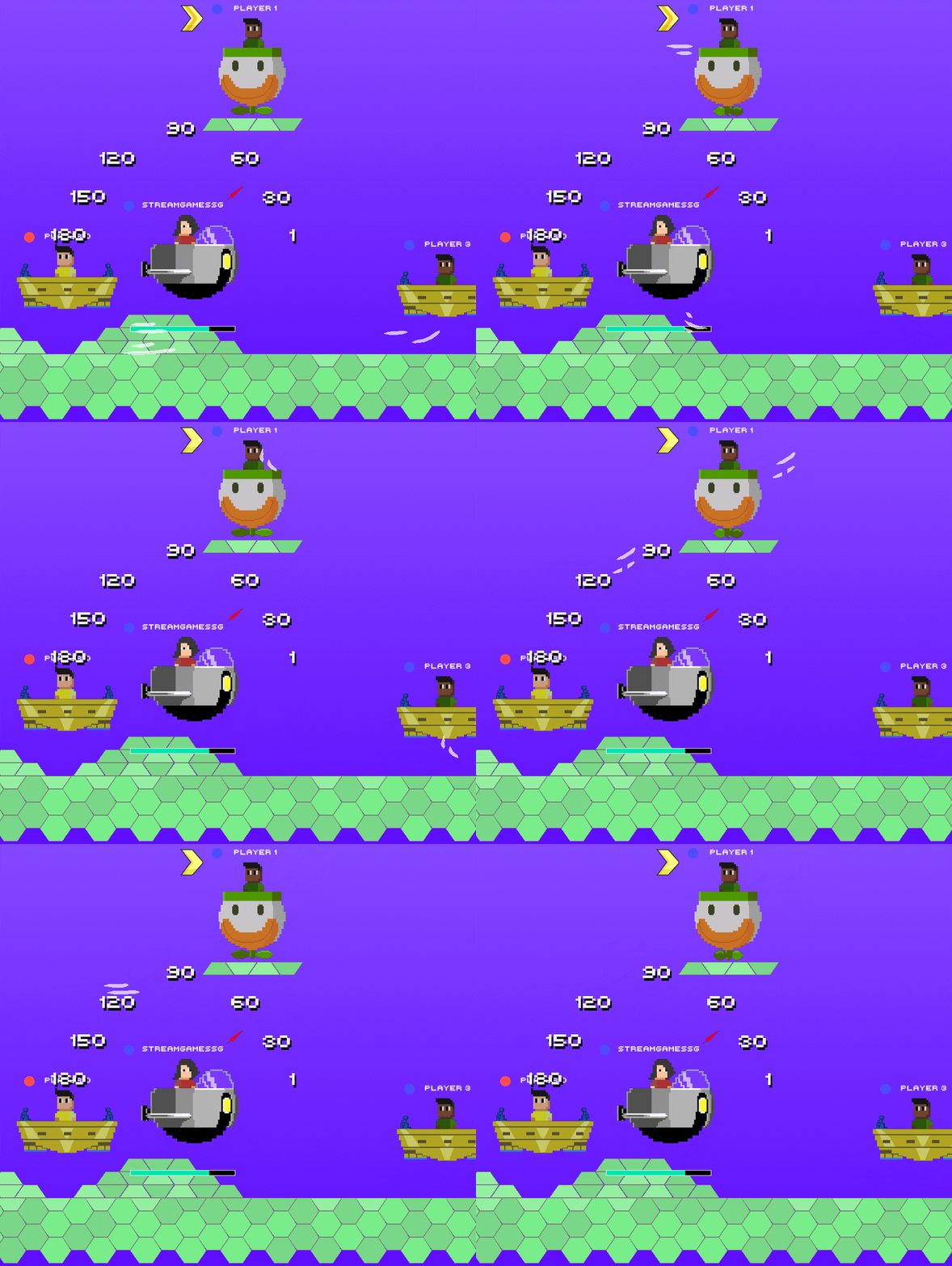
Image Customization
I added an Image and Background Customization Screen
for mini-games.
You can more easily enable and disable images and
external backgrounds.
On each screen there is a button to display a tutorial on how to import
these images.
These external images and backgrounds are files that the user
can create and place in the Stream Games folder to be imported
automatically.
On this screen you can also view player images
created to represent Brazilian Indie Games.

Be Hero, Dininho Adventures and Raccoo Venture. All
present here on Steam.
Created Screens:
Players
Enable and disable images for players that are used in
several mini-games.
Boss
Enable and disable images for Boss.
Survive
Enable and disable images for Death.
Shot
Enable and disable images for Target, Background
of the game, and for the Rule of Directions.
Bomb
Enable and disable images for Vehicles and Background
about the game.
Roulette
Enable and disable images for the Roulette screen background.
Each Mini-Game/Tool Screen has a button to
access its respective Customization screen.

If you find any error or problem, as well as suggestions,
You can send them through our Discord, Twitter or Email.
See you soon.

Português - BR
Novo Mini Game - Bomb Battle
Saudações.
Adicionei um novo mini-game de Batalha .
Os jogadores podem se mover e atacar através de comando no chat.
O Modo disponível é com dois Times, batalha por Turno e permite apenas 18 Jogadores.
Adicionarei um novo Modo Solo no qual os jogadores possuem o mesmo intervalo
para executar as ações e permite até 400 jogadores.
Esse mini game novo está em teste e precisará de correções e melhorias.
Foram adicionados exemplos de comandos na Tela do jogo, mas é necessário
olhar o Tutorial e explicar para seus viewers como jogar.
Fiquem a vontade para informar correções e sugerir novas ideias.
Customização de Imagens
Adicionei uma Tela de Customização de imagens e Planos de fundos
para os mini-games.
É possível habilitar e desabilitar mais facilmente imagens e
backgrounds externos.
Em cada tela há um botão pra exibir um Tutorial de como importar
essas imagens.
Essas imagens e backgrounds externos são arquivos que o usuário
pode criar e colocar na pasta do Stream Games para serem importados
automaticamente.
Nessa tela também é possível visualizar as imagens de jogadores
criadas para representar Jogos Indies brasileiros:
Be Hero, Dininho Adventures e Raccoo Venture. Todos
presentes aqui na Steam.
Telas Criadas:
Players
Habilitar e desabilitar imagens para jogadores que são usadas em
diversos mini-games.
Boss
Habilitar e desabilitar imagens para Boss.
Survive
Habilitar e desabilitar imagens para a Morte.
Shot
Habilitar e desabilitar imagens para o Alvo, para o Plano de Fundo
do jogo, e para a Regua de Direções.
Bomb
Habilitar e desabilitar imagens para Veículos e para o Plano de Fundo
do jogo.
Roleta
Habilitar e desabilitar imagens para o Plano de Fundo da tela da Roleta.
Cada Tela de Mini-Game / Ferramenta possui um botão para
acessar sua respectiva tela de Customização.
Se encontrarem qualquer erro ou problema, assim como sugestões,
podem enviar através do nosso Discord, Twitter ou Email.
Até breve.
Update Feb/01/2022
v1.8.1.0
Persistence for minigames configuration
Greetings.
Now the information of the fields and settings of each minigame
are permanently saved.
To save the options it is necessary to click on the "Start" button on the
configuration screen of each minigame. In the Boss and
Dungeon is used the "Save" button.
Automatic mode ("Auto" button) is also saved. so it is possible to
configure and select auto mode for the minigames you want,
and next time you open StreamGames they will run
automatically.
This option should have been implemented a long time ago,
we ended up prioritizing other items, improvements and fixes.
Sorry for the delay.
Drop Ball
When the restart button is used the field for the participant
name is not cleared any more. It makes easier to raffle something
to the same viewer over and over again.
If you find any errors or problems, as well as suggestions,
can send via our Discord, Twitter or Email.
See you soon.
_______________________________________________________
Português - BR
Persistência de configuração dos minigames
Saudações.
Agora as informações dos campos e configurações de cada minigame
ficam salvas permanentemente.
Para salvar as opções é necessário clicar no botão "Start" na
tela de configuração de cada minigame. Nos minigames Boss e
Dungeon é utilizado o botão "Save".
O modo Automatico (botão "Auto") também é salvo. Assim é possível
configurar e selecionar o modo auto para os minigames que deseja,
e na próxima vez que abrir o StreamGames, eles serão executados
automaticamente.
Essa opção deveria ter sido implementada há muito tempo,
acabamos dando prioridade para outros itens, melhorias e correções.
Desculpem nos pela demora.
Drop Ball
Quando o botão reiniciar é usado, o campo para o nome do participante
não é mais limpo. Isso torna mais fácil sortear algo para o mesmo
viewer seguidas vezes.
Se encontrarem qualquer erro ou problema, assim como sugestões,
podem enviar através do nosso Discord, Twitter ou Email.
Até breve.
Update November/21/2021
Update November/21/2021
v1.8.0.2
OAuth Token and Discord address
Greetings.
Some users have problems to
access the page to generate the OAuth Token,
and access our Discord.
When clicking on the buttons, the browser opens,
and the error adds "%22" to the address bar.
This engine bug occurs for Google Chrome and MS Edge users.
Changes:
Buttons keep copying addresses to ClipBoard.
We've added a message to make the copy more explicit.
We removed the Browser automatic opening,
to prevent this from getting in the way of users.
We've also added a button with our support email.
in the Menu for easy access.


Português - BR
Update 21/11/2021
v1.8.0.2
Endereços do OAuth Token e Discord
Saudações.
Alguns usuários tiverem problemas para
acessar a pagina para gerar o OAuth Token,
e acessar nosso Discord .
Ao clicar nos botões, o navegador é aberto,
e o erro adiciona "%22" na barra de endereços.
Este bug da engine ocorre para usuários do Google Chrome e MS Edge.
Mudanças:
Os botões continuam copiando endereços para o ClipBoard.
Adicionamos uma mensagem para deixar mais explícito a cópia.
Removemos a abertura automática do Navegador,
para impedir que isso atrapalhe os usuários.
Também adicionamos um botão com nosso email de suporte
no Menu, para facilitar o acesso.
Update August/04/2021
v1.8.0.1
Bugs Fixes
Connection :
- Some times, when starting the SG, the automatic connection
was not performed.
We make changes so that the automatic connection takes place without
a problem.
Dungeon:
- In the room with Chest, after the end of the choice time, the game
flow does not followed and the game was stuck in the room.
Fixed error.
Dungeon
Improvements made at Dungeon:
- Added Field to choose the time players will have to make choices.
As the number of players increased, it was often necessary to wait for
Time to run out.
The wait is interrupted if ALL players send their choice, as it was
before.
- The Chest will now always be in one of the Rooms.
If the "Chest Points" Field is filled, the chance to get Gold is
added to it.
- Texts and commands for Directions and for Open Chest Now
appear in Portuguese if the language "Portuguese" is selected.
____________________________________________________________
Português - BR
Update 04/08/2021
v1.8.0.1
Correção de Bugs
Conexão :
- Em diversos momentos, ao iniciar o SG, a conexão automática
não era realizada.
Realizamos alterações para que a conexão automática ocorra sem problema.
Dungeon :
- Na sala com Baú, após o término do tempo de escolha, o fluxo do jogo não
seguia e a partida ficava presa na sala.
Erro corrigido.
Dungeon
Melhorias realizadas na Dungeon :
- Adicionado Campo para Streamer escolher o tempo que os jogadores
terão para fazer as escolhas.
Como o número de jogadores aumentou, em muitos momentos era necessário
esperar o Tempo terminar.
A espera é interrompida caso TODOS os jogadores enviem sua escolha,
como era anteriormente.
- O Baú agora sempre estará em alguma das Salas.
Caso o Campo "Pontos Baú" seja preenchido, a chance obter Ouro é
adicionada a ele.
- Os textos e comandos para as Direções e para Abrir baú agora
aparecem em português, caso o idioma "Português" esteja selecionado.
Update 05/23/2021
We decided to increase the number of players to make
the most viable Dungeon to be used by the Streamer.
You can still choose which viewers to enter, as before,
and the limit has also been increased.
We added other elements to make what happens more visible
during and at the end of the game.
- Participant limit increased to 200 - Open to all mode
- Choose Players Mode - Limit increased to 8
- Added field for Streamer to choose the number of Rooms
- Added option to send Points to Each Player or Points to
all Chat (to avoid spamming messages)
- We make visible on the screen information about the available
directions, about Victory and Defeat
- We added to the Chest the chance to receive a Potion
(heals 1 life of the players), or a Map (shows if there are monsters
around and in which room the gold is)

Audio Control
The Music muting button also mutes the sound effects,
so that StreamGames can be easily silenced.
It is possible to control the volumes of Music and Sound Effects
separately on the Settings screen.

Mage
We added on-screen messages during the game to make it easier for new
users to understand.
________________________________________________________________
Português - BR
Atualização 23/05/2021
v1.8.0.0
Dungeon
Decidimos aumentar a quantidade de jogadores para tornar
a Dungeon mais viável de ser usada pelo Streamer.
Ainda é possível escolher quais viewers irão entrar, como antes,
e o limite também foi aumentado.
Adicionamos outros elementos para deixar mais visível o que ocorre
durante e no término do jogo.
- Limite de Participantes aumentado para 200 - Modo Aberto a Todos
- Modo Escolher Jogadores - Limite aumentado para 8
- Adicionado campo para Streamer escolher a quantidade de Salas
- Adicionado opção de enviar Pontos para Cada Jogador ou Pontos para
todo o Chat (para evitar spam de mensagens)
- Deixamos visíveis na tela informações sobre as direções disponíveis,
sobre a Vitória e Derrota
- Adicionamos ao Baú a chance de receber uma Poção (cura 1 vida dos
jogadores), ou um Mapa (exibe se há monstros ao redor e em qual sala
está o ouro)
Controle de Audio
O botão de mutar as Músicas também silencia os efeitos sonoros,
para que o StreamGames possa ser facilmente silenciado.
É possível controlar os volumes de Músicas e Efeitos sonoros
separadamente na tela de Configurações.
Mage
Adicionamos mensagens na tela durante o jogo para tornar a compreensão
mais fácil para novos usuários.
Update - Versão 1.7.3.0
- Boss minigame
Change in the option for import Image to Boss.
Only PNG extension files can be used.
We limit the image format to prevent crash
that occurs when some images with JPG extension
were imported.
___________________________________________________
Portuguese
Correção de Bug
- Minigame Boss
Alteração na opção para importar Imagem para o Boss.
Somente arquivos de extensão PNG podem ser usados.
Limitamos o formato de imagens para impedir o crash
que ocorria quando algumas imagens de extensão JPG
eram importadas.
___________________________________________________
Update Nov/30/20
v1.7.0.0
- Interface improvements
- Images about How to Play
We added images to the help buttons,
to demonstrate what each mini game looks like.
- Change in charging points for entry into mini games
Point Charging now needs to be enabled.
We added the On / Off button on the Settings screen.
The change will avoid error when entering viewers at first,
when the field is filled without the necessary configuration.
- Tutorial Videos
We added tutorial videos on our Discord, about connection,
configuration of adding and collecting points.
- Bug Fixes
. Boss - Error when pressing "Delete" key in the "Points" field
caused the game to crash.
. Configuration Screen - By clicking on the StreamLabs Chatbot button,
filled in the commands for Adding Points wrongly,
with an extra "!" .
. Twitch Connection - In some situations, non-Latin characters
are inserted in the "Twitch User" and "Oauth Code" fields, preventing the
connection to Twitch.
We added a correction to check the fields and correct the problem.
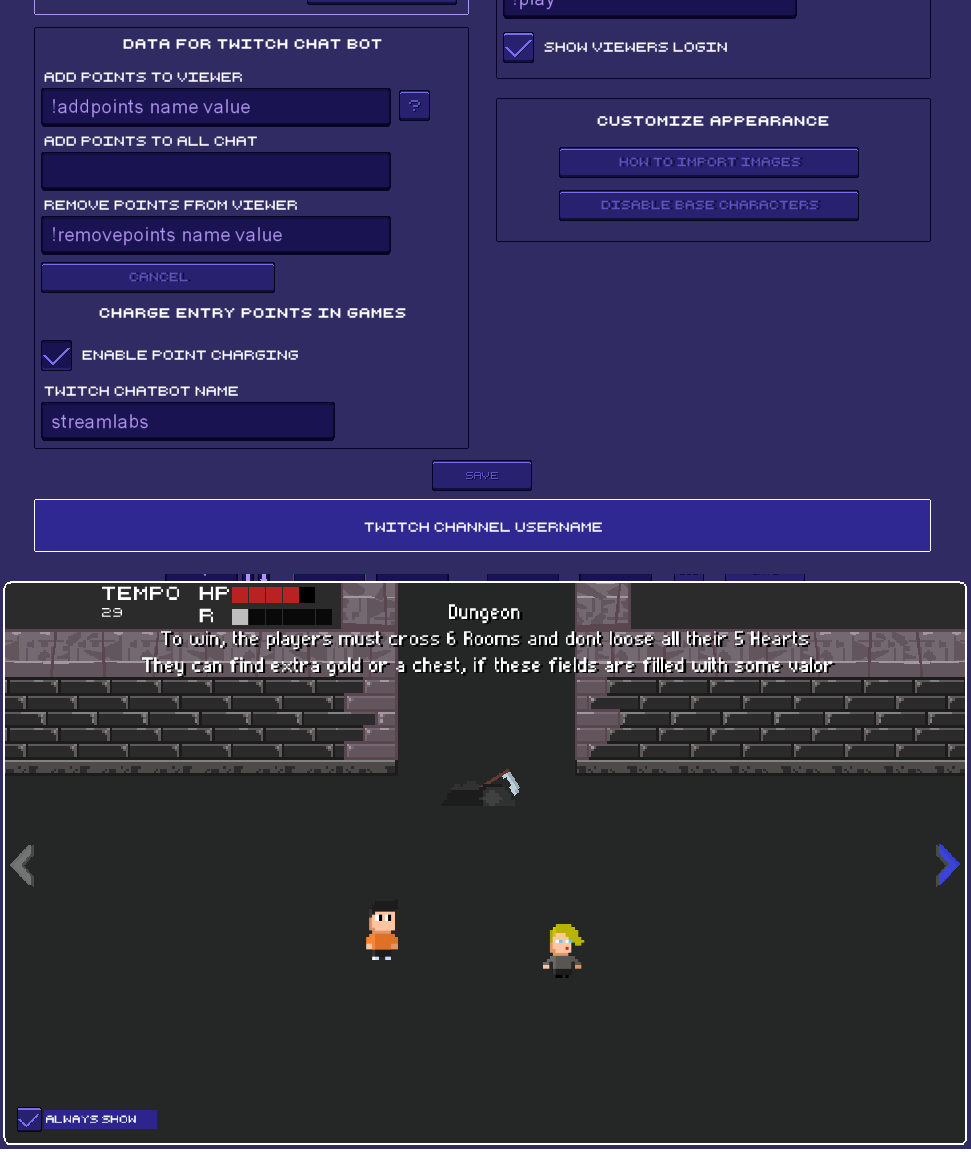
Update Aug/20/20
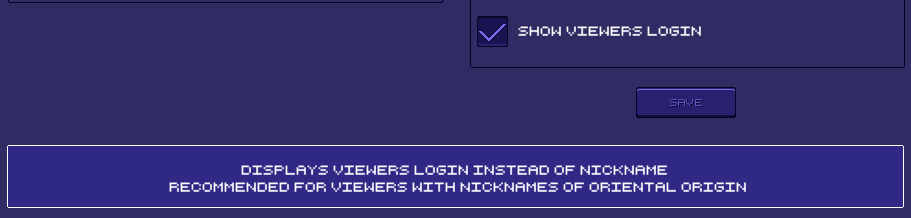
Update Aug/20/20
v1.6.0.0
- Display login of participating viewers
We added the option to display the viewer's login instead of the nickname.
Recommended for Lives with viewers whose nickname is not the Latin alphabet,
such as Japanese, Chinese, Korean, etc.
This allows these viewers to be identified on the Stream Games screen.
- Use of special characters
We enable the use of special characters on the Setup and Giveaway screens.
This allows the use of "!" and accented letters for pre-existing commands,
supporting words from languages like Spanish, German and others.

- Disable base character images
Added button for Disable / Enable base characters in the Configuration screen.
It was a suggestion from Streamers who use their own images for the players' avatars.
- Removal of connection with the Mixer
On July 22, Mixer ended its services as a streaming platform.
We removed the field for connection.
- Bug Fixes
. Drop - Error allowed command to be executed in the chat by the previous participant.
. Giveaway - Bug prevented viewers from entering the giveaway during the Menu screen.
. Boss - Error when pressing "Delete" key caused the game to crash.
___________________________________________________________________
Português - BR
Update 20/Agosto/20
v1.6.0.0
- Exibir login dos viewers participantes
Adicionamos a opção de exibir o login do viewer no lugar do apelido.
Recomendado para Lives com viewers cujo apelido Não é do alfabeto latino,
como Japonês, Chinês, Coreano, etc.
Isso permite que esses viewers sejam identificados na tela do Stream Games.
- Uso de caracteres especiais
Habilitamos o uso de caracteres especiais nas telas de Configuração e Sorteio.
Isso permite o uso de "!" e letras com acento para comandos pré existentes,
dando suporte para palavras de idiomas como espanhol, alemão e outros.
- Desabilitar imagens de personagens base
Adicionado botão para Desabilitar / Habilitar personagens base na tela de Configuração.
Foi uma sugestão de Streamers que usam suas próprias imagens para os avatares dos jogadores.
- Remoção de conexão com a Mixer
Em 22 de Julho a Mixer encerrou seus serviços como plataforma de streaming.
Removemos o campo para conexão.
- Correções de Bugs
. Drop - Erro permitia que comando fosse executado no chat pelo participante anterior.
. Giveaway - Bug impedia que viewers entrassem no sorteio durante a tela de Menu.
. Boss - Erro ao pressionar tecla "Delete" causava crash do jogo.