

Sumo
Sumo Summer Sale!
We've also just released Update #18, which brings a ton of UI revamps and visual upgrades to the game. Check out the patch notes in the previous post!
Sumo Update #18 - Lookin’ Good!
In-Game Shader
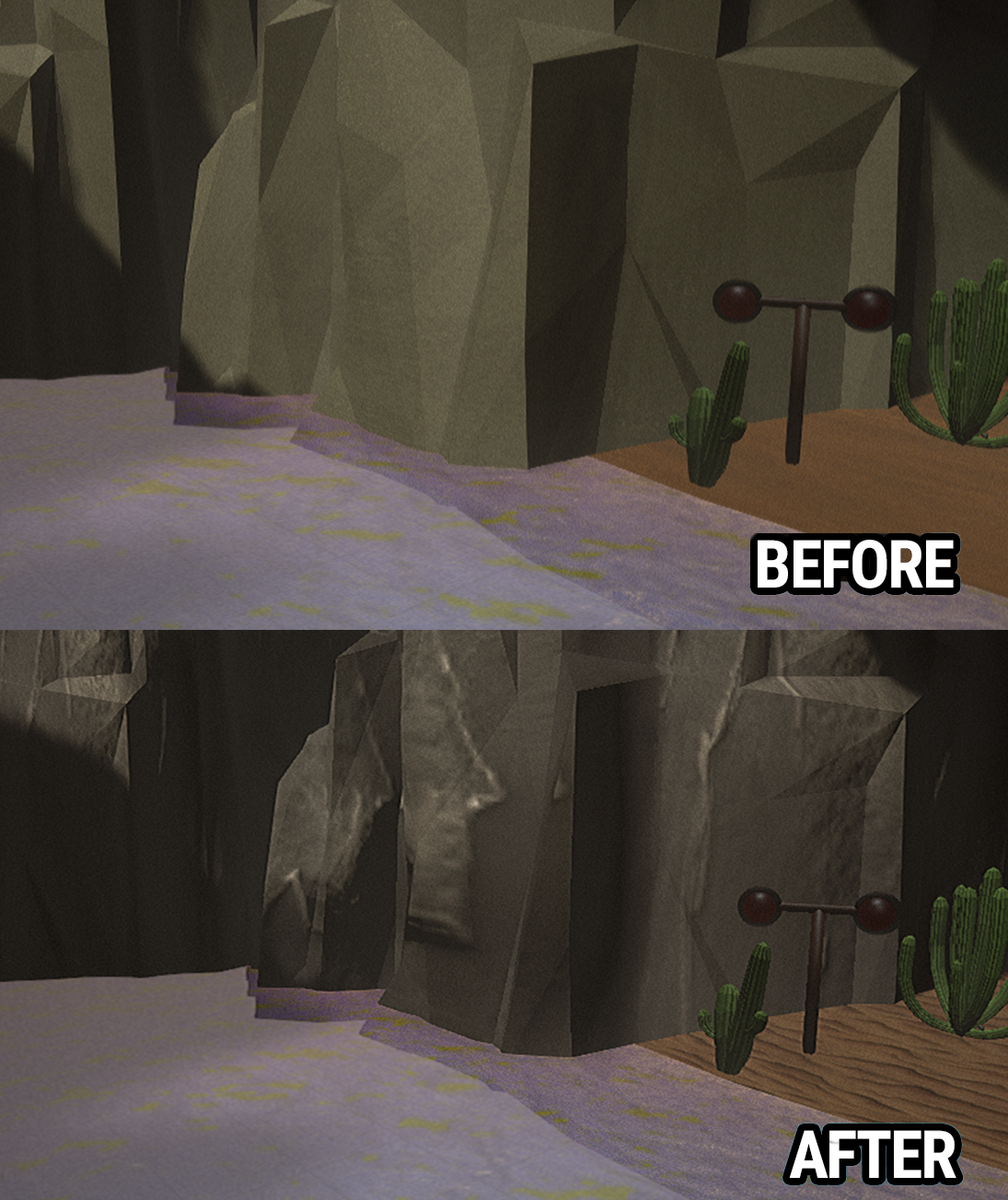
Prior to Early Access, Sumo used a cel shader to stylize the game’s visuals, but it was too large of an impact on performance. We have introduced a brand new shader that is better on performance, creates the cel outline we wanted, and improves the game’s overall visual quality. If you have any performance issues with this build, please let us know.
Environment Textures
The Skirmish Arenas ‘Classic’, ‘Railway Rumble’, and ‘WaterWorks’ have been updated with all-new textures and materials on the environment and arena components, giving them a fresh updated look. These new materials also have a much lower performance impact than the previous textures. The other maps will also have a texture and material pass in the next update.
User Interface
All UI elements and game inputs are now handled by a master UI class, resolving a large number of bugs related to inputs being sent to the wrong UI under certain cases.
Button Prompts - All button prompts are now directly integrated into the UI itself rather than having a list of button prompts at the bottom of the screen at all times.
Pre-Game UI - The entire UI from the Main Menu to Level Select has new transition animations when moving from one screen to the next.
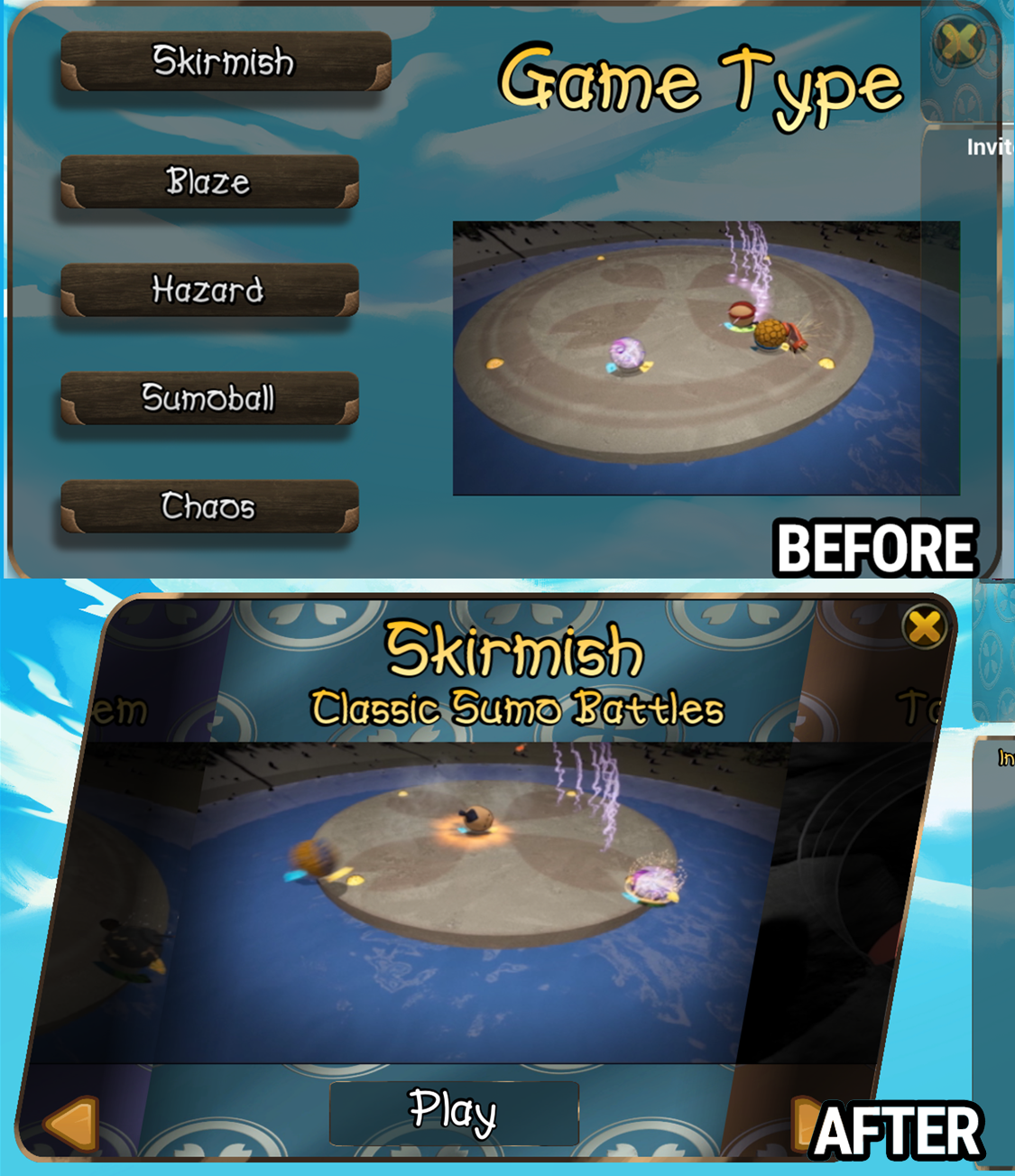
Game Mode Select - Brand new UI. The preview movies are now loaded at all times in this new version, reducing some performance issues when rapidly cycling through modes.
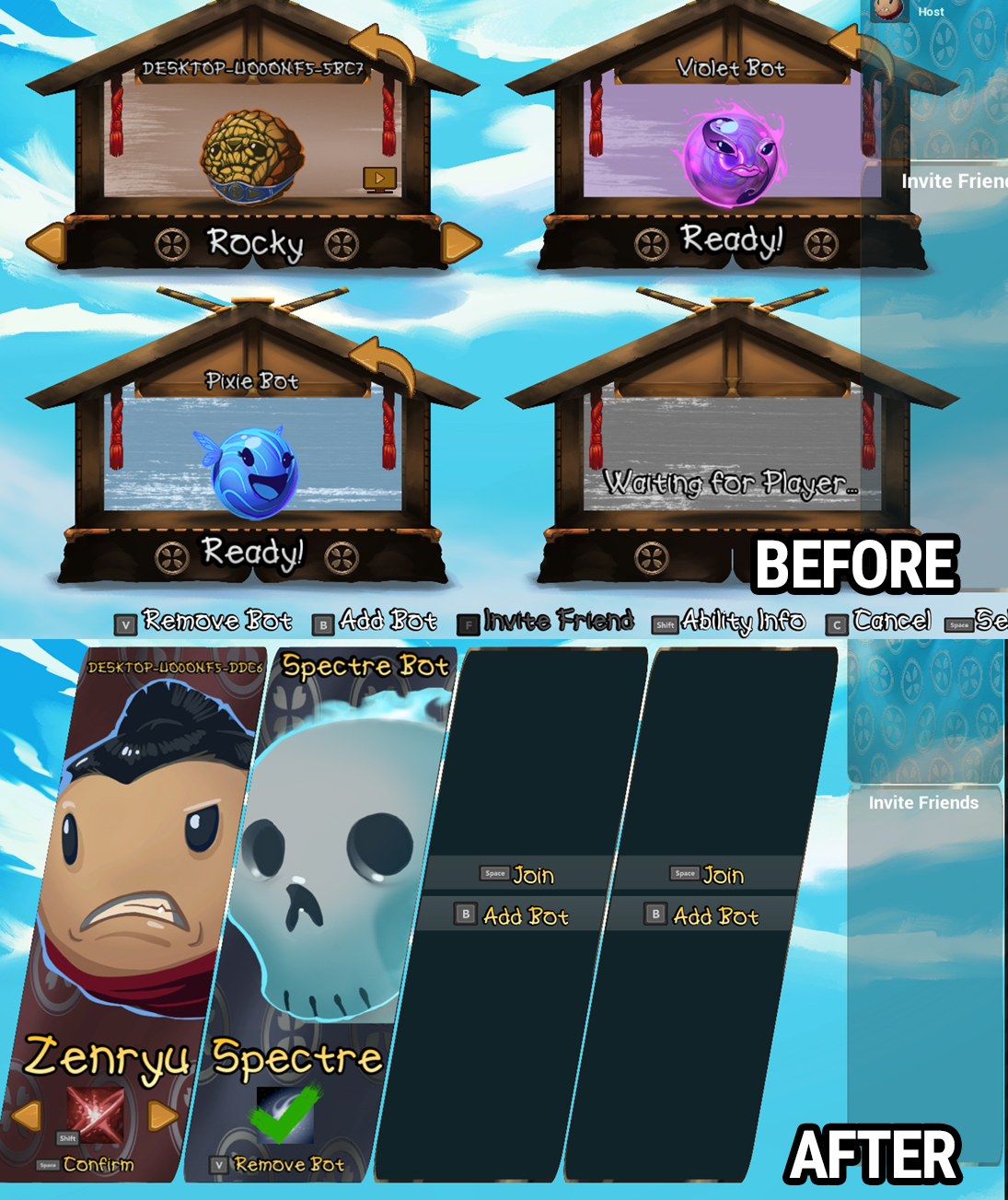
Character Select - Brand new UI. Each character now shows an icon summarizing their character ability, and multiple players can highlight the same character while scrolling through the list. When a character has already been selected, anyone else who has highlighted that character will not be able to pick them, but can still review their character ability. The ability previews will be re-recorded in a future update to fit in this new UI size.
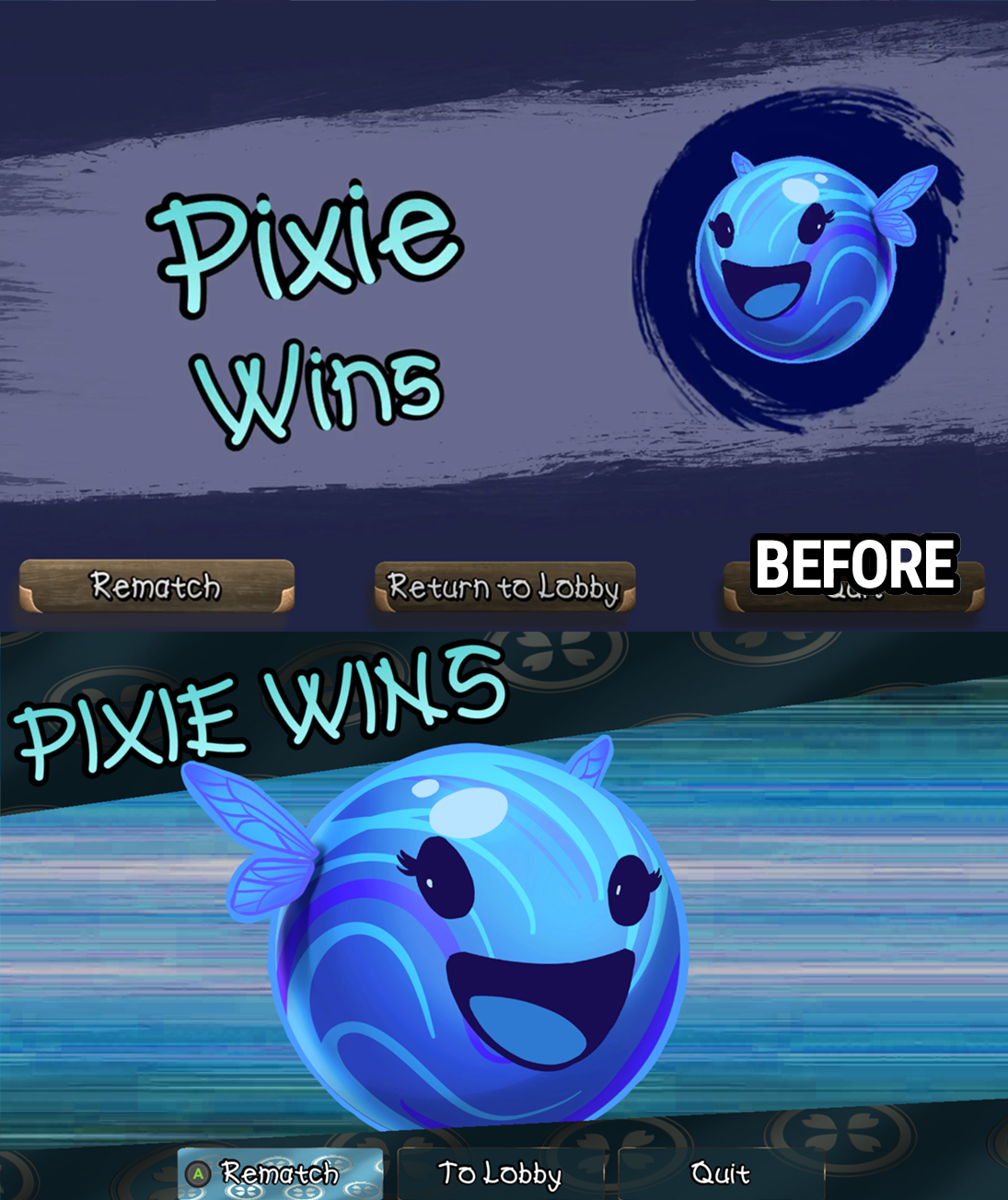
Victory Screen - Brand new UI, complete with new animations for the intro to the victory screen.
Other Changes
Pausing while in online multiplayer will now actively suspend the game, rather than just displaying the pause menu.
The game can no longer be paused while in certain animated sequences, such as the opening ceremony or the presenting of the round score at the end of a round.
In an online multiplayer game, pausing the game will no longer show the pause buttons for the other players who did not pause. The pausing player retains full control over resuming the game.
Significantly reduced the memory and disk load of the Blaze game mode’s environment.
Fixed the Opening Ceremony skipping all players beyond player 1 in any games beyond the first played in a game session.
Fixed an issue in Respawn-enabled maps where dashing, jumping, and using abilities was not disabled while respawning.
The multiplayer friends list and lobby no longer pull avatars from user’s Steam profiles. This may return in the future, but is being removed for now.
Fixed an issue where character inputs were still processed during a pause, resulting in unintended dashing and ability use after unpausing.
Known Issues / What’s Next
The in-game videos need to be re-recorded across the board to show the latest visual game style, and to fit within the new UI windows. The character ability previews in particular are very difficult to see in the new character select UI.
Many new features require more localization work, so non-English language support is spotty for awhile.
Button prompts may not immediately switch off of Controller mode for keyboard users. If this happens, try clicking in the window anywhere to switch to Mouse mode. Future button prompts should then always switch to the correct images.
The size on disk requirements have jumped with this update. We will work to get this reduced in future patches.
The next update will continue to focus on polish similar to what we have done in this patch, including more focus on gameplay elements.
Sumo Update #17 - Let the Games Begin
Sumoball
Taking place on a new sports-arena-themed environment, Sumoball presents a less violent mode of play in the form of a sports match. At the center of the arena, a ball will appear - grab the ball and take it to your goal, located on one of the four corners of the arena, in order to score a point. But beware - any touch from an opponent will cause the ball to transfer to them!
If a player is knocked off of the arena in Sumoball mode, the same respawn system used in the Hazard mode will allow them to get back into the action within a few seconds. The first player to score 5 points wins the game.

Chaos
In many tests, especially in the younger crowd, we’ve seen an affinity towards playing against the bots as a team, and we’re supporting that with a dedicated game mode. In Chaos, which is played on any of the standard Skirmish arenas, all players (whether human or bot) are teamed up together against an opposing team of the same size. If there are four players on the team, they will be against 4 AI players on the enemy team - an eight-player chaotic brawl.
There is no scoring system in Chaos mode - instead, each team is granted a fixed number of Respawns. Once the respawns have been depleted, the battle comes down to whoever is left standing, as being knocked out from that point on will keep you out of the game until it ends. When all members of a team have been knocked out and they have no respawns remaining, the opposing team wins.

Bug Fixes
The first gamepad is now once again assigned to Player 1 rather than Player 2. Player 1 can be controlled by either mouse and keyboard or the first connected gamepad.
Fixed an issue where starting a Rematch from a Hazard mode would cause the camera to not be reset properly.
Fixed an issue in Hazard mode where Naps clones would respawn, and Naps’ repossession mechanic was not working.
Fixed a network sync error with Zenryu’s targeting decal being only half-synced on connected network clients.
Fixed Blaze death explosion SFX being too loud.
What’s Next?
As of this point, we are pretty happy with calling Sumo “content complete”. 9 characters, 5 game modes, spanning across 8 environments - that’s enough content for a launch delivery. From here on out, we will be focusing on polish, starting with a complete overhaul of the game’s UI in the next update.
Sumo Update #16 - Blaze Mode, Hazard Mode, Localization and more!
A new game mode selection screen now lets you choose between the THREE game modes Sumo now offers. Skirmish remains as the default Sumo experience, but in addition, you may now play…
Blaze - Flying high above the surface of the Moon in a brand new environment, players are contained within a glass arena, completely surrounded by walls. Unlike Skirmish, there is no ‘ring out’ - you must actively defeat your opponents by utilizing a trail of light emitting from your character at all times. The arena will continually shrink over time, ultimately leading to a close-quarters cage match.
In Blaze, characters always move - you can’t stay still at any point. This means maneuvering around the arena is more difficult than in Skirmish arenas, but utilize the walls lining the edge of the arena to your advantage - hitting one will repel your character away from the wall, gaining a swift directional boost. Try jumping into the wall to avoid getting boxed in by your opponents.
Jumping and Dashing are still enabled in Blaze, but there are no Boost Pads, and thus no special Abilities for this mode.

Hazard - Taking a tour through the worlds of Sumo, Hazard features an endlessly looping track that progresses from the background of the level towards the players. On this track, walls will appear, forcing players to maneuver around them or jump over them to avoid getting pushed off. The longer the match goes on, the faster the track moves, and the more walls will appear.
Unlike Skirmish maps, Hazard matches use a Lives system rather than a point system. Each player has 5 Lives, and will respawn a few seconds after being knocked off. Whoever outlives their opponents the longest wins the match.
Boost Pads remain in Hazard matches, but all characters have a completely different Ability. Collect 3 Boost and activate your ability to spawn a brand new Hazard unique to your character, which will stay in the level indefinitely. The track loops back onto itself after some time, so your previously placed Hazards will still be around to waylay your opponents.

New Content - 9th Character
Although not enabled yet, the 9th character is complete and will be enabled very soon. This character is paired with a particular event coming up and will be enabled once that date is reached.
Worldwide Sumo!
Sumo is now available in 25 languages! In the Options menu, select your language of choice, and all text should be updated. Please report any cases to our discussion boards of localization errors or any instances of untranslated text. Note that the countdown announcer still only speaks in English… for now.
The game’s primary font has been changed to a font that supports characters in more languages.
Physics
Unreal Engine version updated to 4.21.
Updated the controls physics for character movement, resulting in some minor changes to how quickly a player can turn and accelerate.
A physics update for character collision has increased character max speed by a small amount, and more importantly, resolved some issues regarding not rolling smoothly on surfaces (resolving the occasional jump into the air like you rolled onto a jagged surface).
Quality of Life
When playing in Online multiplayer, the character select lobby now requires a press-and-hold to leave the lobby (or disband it as the host). This should help to prevent accidental disconnects.
Spectre’s Ghost Form portion of his ability now prevents Jumping while active, since his height is constantly being adjusted automatically to get him back to the arena’s safe height. This prevents the Jump cooldown from getting wasted. Spectre now also hovers a bit higher than before during Ghost Form, ensuring he can safely get back onto the arena.
Aesthetics & Music
The tutorial screen has been visually updated for better clarity of information.
The tutorial screen has been updated to show different videos and information for Race and Hazard game modes.
The special bar has been visually reworked, now showing a curved bar under the character rather than a flat bar in front of them. This gives a bit more screen space to both the bar and the characters, since the bar isn’t obscuring the bottom of the character models any more. The jump and dash portions of the bar now completely fade away when inactive, and all three portions will brightly flash whenever they are ready to be used.
New Main Menu music has been installed.
Many of the game’s sounds have been retrofitted to properly use 3D sounds, so action happening on the left side of the screen should play louder on a left speaker.
New sound effects have been added to support the Blaze and Hazard game modes.
AI
All Bots have been updated to function on Blaze and Hazard matches. They still aren’t quite as good as they are in Skirmish matches, but they will be improved in future updates.
Bug Fixes
Fixed an issue that would cause the Opening Ceremony to show no one at the start if no player was in the upper left character slot.
Fixed a bug where the network status pop-up (connecting/disconnecting) for Online multiplayer was displayed in black and white rather than in color.
Fixed the lobby exit button in the Character Select screen not respecting the swiping fade out/fade in animations in some circumstances, clipping in and out instead.
Fixed the character select screen’s player name text bleeding off the edges of the UI if the player’s name was long enough. The player name is now scaled to fit into the UI.
Fixed a bug with Pixie’s ability continually rotating even if no input was pressed in a direction.
Fixed an issue with Air Control maneuverability not being active immediately, but requiring being hit, dashing, or any other high-physics effect before the control would kick in.
Fixed an issue where splash effects when players hit water would stop working after the first round of a match.
Fixed a large number of various compile errors and network replication errors, which should improve frame performance and network performance.
What’s Next?
We definitely learned some lessons here about the amount of ‘stuff’ to pack into a single build. Our goal was to update in February, but the amount of content in this update required more time to iterate and bugfix than initially expected.
The next update won’t take 3 more months - we’re shooting for no later than the end of April. The primary feature of that update will be two MORE game modes, getting us to a total of 5 modes, at which point we will be content-complete - 9 Characters, 4 Arenas for the primary game mode, and 4 alternate game modes, many of which offer their own unique environments and gameplay mechanics. After that, we’ll be switching our focus to polishing up the existing aspects of the game.
Sumo Update #15 - Early Access Initial Bugfixing
This update focuses on some early bugs that cropped up in the initial Early Access build we wanted to squash, but we’re already hard at work on new content updates, including a new Sumo challenger…
Patch Notes
All background music now fades out and fade in at appropriate times rather than cutting out.
Bug Fixes
Fixed an issue that could sometimes cause Right inputs to fail in the character select screen if all 4 slots had been filled.
Fixed an issue where the main menu button prompts appeared during gameplay if using a gamepad.
Fixed an issue in Character Select where the confirm button would still be displayed, if all current players were ready, and a new player joined the lobby. The confirm button will now correctly fade out until the new player is ready.
Fixed an issue where additional local players in the Character Select Lobby would not have left and right arrows indicating to press left or right to switch characters.
Fixed several issues miscellaneous issues regarding any time a connected online player also had additional local players on their end.
Fixed the background music continuing to play forever (along with new instances of said music being played) when you were forcibly disconnected from an online session due to the host exiting the game.
Sumo Update #14 - Early Access Launch!
More updates, more content, and more features are on the way. Our community forums are now set up, so feel free to start discussions and post feedback.
Changes
The long-standing placeholder countdown announcer has been replaced with a new unique countdown, recorded by one of our friends and contributors.
New music has been added for the Classic Map, the Opening Ceremony, and the post-round score screen / victory ceremony.
The automatic in-game voice chat for network play has been disabled. We may bring this back in the future with more polish, but for now, using Steam overlay voice chat, Discord, or another app of your choice is a better solution than what the in-game options can offer.
After getting hit with any bump, using a character abiliity, or using a Quick Dash, the air control maneuverability of the character is reduced for half a second. This is to prevent seemingly high air drag, resulting from the air control system fighting too hard against the high momentum.
Sumo in Space has new environmental sound effects.
Chuf & Naps’ projectiles now have sound effects on impact.
Final pass on sound balance across the game - all sound effects and music should now be at a correct volume level.
Optimization
Made some improvements on the WaterWorks FPS hitch when the arena is spawned. This is still more of a performance hit than it makes sense to be so more investigation is needed, but it’s much less severe of a hitch now.
Bug Fixes
Fixed a major networking bug where a player who entered the character select lobby (and thus was Hosting a game) could not join another network game.
Fixed a major networking bug where a player who left a lobby could not rejoin the same lobby.
Fixed a bug where Chuf, Naps, Boom-Boom and Spectre were not casting shadows.
Fixed a bug where Chuf, Naps, and Boom-Boom’s bump sound effects were missing.
Fixed a bug where boost stations may not have appeared in the right places for connected online players in WaterWorks and Sumo in Space.
Fixed the boost stations not dematerializing after a round on Railway Rumble.
Fixed an issue where if you quickly exited the Score Screen on Railway Rumble, the arena will not have been fully reset and animations would pop.
Fixed the WaterWorks arena components not deactivating when a round was over, sometimes leading to pipe gush or hex explosion sounds and visuals still playing.
Fixed the WaterWorks pipe showing a ‘replacing the cork’ animation as soon as a round was over, even if the cork was already there.
Fixed an issue with the air control system that was placing a hard cap on the amount of momentum a character could have in the air (from all sources). The system has been refactored to only affect momentum from the air control thruster, so it doesn’t adversely affect being hit by character abilities or environmental hazards.
Fixed Violet Lightning Walls having collision during the wind-down fade out portion of the visual.
Sumo Update #13 - Early Access RC 3
Massive Performance Improvement
Well… apologies on this if anyone on a lower end machine has played recently. A change made several weeks ago had no noticeable impact on my PC, retaining a strong 60FPS, but what I did not realize was that 60 FPS was suddenly pushing my GPU to its absolute limit. Unlocking FPS to benchmark test only got me up to 70-80 FPS. A simple flag in the post processing effect was eating a ton of resources for almost no visual gain. That same benchmark test on my machine now runs the base environments at 220-250 FPS. So, I’m happy to write the patch note…
- Fixed an issue that was cutting your framerate in half or more!
And while we were in an optimization mode…
- Classic Map - Removed two dynamic lights that weren’t providing anything that couldn’t be done with finer settings on the main lights and post processing, reducing lighting rendering time.
- WaterWorks - Culled one unnecessary dynamic light.
- Railway - Culled one unnecessary dynamic light.
- Sumo in Space - Culled one unnecessary dynamic light.
- Classic Map - Culled about 70% of the grass meshes on the foliage and reduced all remaining foliage shadowmap resolution by 50%, reducing the high shadow rendering time this map had.
- All maps - Reduced the frequency of navigation mesh updates by… a lot. This was a source of a large FPS loss in Railway Rumble during the platform collapsing, as the navigation mesh was updating nearly every frame rather than just waiting until the collapse was over to recalculate. In other maps, this fix will still cause a small performance improvement.
We still have more optimization tasks ahead of us but this covers the bulk of the framerate loss that has been hitting some testers recently.
Art Updates
Polished the lengths and timings of the smear frame feature and made it framerate-independent, fixing the smear being more elongated than intended at lower FPS.
Naps’ UI portrait has been updated to show her new lotus flower accessory.
Audio levels have been rebalanced across the board for all sound effects.
Naps and Chuf’s ability visuals, specifically the projectile spit, have been updated with the same vertex morphing smear technique as characters, giving them a much more polished look as a fluid moving object rather than a solid static shape.
Network Improvements
Further improvement has been made to the client update sync functions, this time targeting handling packet loss and better immediate response times for small inputs, like a minor quarter-strength tap on a joystick.
Gameplay Updates
Adjusted offensive quick dashing of the AI to use parameters more in-line with current physics settings. In total, they’ll be willing to try to dash for a kill more often and from slightly farther away, and will now try to ‘overkill’ - dashing into you even if you are already headed off the edge. This used to cause a lot of bot self-kills but with the addition of jumping and better mobility, they can recover if you juke their attempt at a risky offensive dash.
When you hit an AI opponent with any ability or quick dash bump, they will take a minimum of 0.2 seconds to react with a dash, jump, or ability activation. This makes them slightly more human in their reaction time rather than immediately calculating and reacting to lethal velocity.
Bug Fixes
Fixed a bug where Naps’ clones could spawn with a rotated or offset boost bar UI, which stayed rotated or offset if the clone was possessed. This only occurred in online multiplayer on a connected client player.
Fixed the score screen UI being layered above the pause menu UI and options menu UI, making it difficult to navigate if you pause at the score screen.
Fixed an AI bug where characters would sometimes use abilities regardless of range to their target. This was most apparent when fighting Spectre Bot or Boom-Boom Bot but affected all bots to some degree.
Fixed Railway Rumble trains not having any shadows.
Fixed two UI resolution bugs, one on the main menu button prompts and the other on the score screen UI, where any resolution other than 1920x1080 caused UI elements to get incorrectly positioned in relation to each other.
Fixed the friends list panel showing up when playing offline.
Sumo Update #12 - Early Access RC 2
“First Impressions” Update
A polish pass has been made on the core gameplay, specifically looking to improve the first impressions of a new player or new group of players. This resulted in the following changes:
Friction amount on character movement increased 5x. This is a pretty drastic increase, but after much debate, the decision is that it doesn’t take away from the momentum and inertia-based gameplay of Sumo, but does make the game easier to control for a first timer. Turning and stopping your momentum will be significantly easier from here on out.
The Classic Map is now 20% larger. This makes it more in line with the other arenas in terms of total play space. Since most new players are likely to start here, it didn’t feel right for it to be the smallest (and thus most likely difficult) arena for a first impression.
The Classic Map’s initial boost stations are now about twice as far from the edge of the arena. They are still on the ring that will collapse first, but they are a good 2 full character lengths away from the edge, giving more time for a new player to get used to the momentum and inertia of the controls when attempting to snag boosts without rolling themselves right off of the edge.
Gameplay Changes
Increased the amount of physics force on two characters bumping into each other by about 25%.
Reduced the hit radius of Violet’s ability initial knockback down to a 130 degree cone instead of 180 degree cone, better matching the visual effects.
Naps’ clones now have 20% less physics mass and 50% less knockback strength when bumping other characters. Now that the bug has been fixed so they can dash again, this change will make them not immediately overpowered.
Network Improvements
For connected clients, character positions will now correct their locations from the server over time rather than instantly. This will help to prevent character jitteriness for clients who are connected to a host with lower FPS or high ping.
Art Changes
With some cool new changes to our character shader, velocity-based smear effects have been added across the board! These will trigger whenever any event with a lot of velocity happens, such as using a jump or dash, bumping into another player after a dash, or using a character ability. An effect like this really helps to sell impacts and speed even though it has a subtle touch.
All of the new wave of sound effects have been added. We still have a few more to finish, such as a non-placeholder countdown announcer, but we’re much happier with where the sound FX quality of the game is at now. The volume levels of these will be updated very soon in a global pass.
Ambient sound has been added to all four arenas.
The spawning ramps at the start of a round have received a new texture and are now color-matched to the arena they are spawned in.
Each arena can now deviate starting character positions in terms of height and distance from center, so small adjustments have been made to each arena to better match it’s particular size.
Bug Fixes
Fixed a positioning issue with the button prompts in the main menu sometimes sliding too far to the right and being cut off.
Fixed a bug where Naps clones had nearly twice the mass of normal characters, making them much harder to shove.
Fixed a bug where Naps clones could not activate Quick Dash.
Fixed an issue where activating gamepad/keyboard friends invite mode in the character select lobby would not dark the mouse go back button, would darken the button prompts portion of the UI, and wouldn’t display the correct prompts for interacting with the friends list menu.
Fixed an issue where activating gamepad/keyboard friends invite mode in the character select lobby would not disable mouse clicking for the darkened UI elements. While in this friends invite mode, none of the UI can be used except for the friends list.
Fixed connected clients in a multiplayer game not being able to activate the character ability previews with a keyboard or gamepad press.
Fixed an issue with the Character Select UI not showing the prompt for ability previews for connected client players in multiplayer games.
Fixed an issue where the ability preview prompt would get highlighted on the host if a connected client player took a character slot. The ability preview prompt should only ever get highlighted if you can press the associated button and start the ability preview movie.
Fixed an issue with Spectre’s ability where you’d lose all control of the character if he lost contact with the ground during his intangibility phase, then made contact with the ground again before it was over.
Fixed an issue in online multiplayer where some characters in the closing ceremony (score screen) were incorrectly rotated.
Fixed several issues in online multiplayer related to Chuf and Naps’ slime projectiles not staying in sync across the network, or sometimes not appearing at all.
Fixed Naps’ slime projectile spawning a 2nd dummy clone that didn’t actually exist on the host server in online multiplayer, only for connected client players.
Fixed Naps’ not repossessing an AI clone properly on death for online multiplayer if the Naps player was a connected client.
Fixed another instance of Naps earring physics breaking in the closing ceremony (score area) of the Sumo in Space arena due to the lack of gravity.
Sumo Update #11 - Early Access RC 1
Today’s update is focused on making testing easier for new beta players by way of updating the tutorial and fixing the character ability preview system.
New Features
Credits - The game’s credits have been implemented and are now accessible from the Main Menu.
Gameplay Changes
When a player is furthest behind, they now begin the next round with a fully loaded boost bar rather than gaining just a single increment of the bar. They can use their ability immediately at the start of the round.
Art Updates
In the Character and Level Select UI menus, the button that exits back to the previous menu has been changed to an ‘X’ button.
The ability preview system should be back online and operational, with all new preview videos recorded for each character. A mouse button has been added to toggle the ability preview as a mouse-only UI user. In an online game, the UI should now update if other players are watching ability previews.
Updated level select screenshot images to reflect the latest changes to the environments.
The tutorial has been finally updated - Jump is listed on the tutorial, and Quick Dash no longer refers to requiring boost. The old screenshot images have been replaced with small quick videos demonstrating each aspect of the game’s controls.
Improved the visuals when a player is the farthest behind after a given round. This information is now reflected directly in the score screen, with a sparkle and floating up arrow animation on the character portrait, followed by that portrait glowing yellow until the next round begins. The old ‘Bonus Boost!’ text popup has been removed.
Altered the VFX of the WaterWorks pipe water blast to be less noisy and more water-like.
Changed the physics of destroyed WaterWorks hexes to scatter a bit more and be less floaty. Bits of former hexes still on the battlefield will now properly be affected if the hex they are sitting on explodes, rather than just dropping down to the water. The destructibles now use a random seed, so each one will explode in a different manner than the rest.
Added more facial expression triggers during all character abilities.
Bug Fixes
Fixed a semi-rare game crash that could trigger at the end of any game round.
Optimized media textures used for character ability previews and the new tutorial, which should fix some hitching that happened when the UI was first loaded.
The tutorial screen will now update to instruct mouse controls if you are actively using the mouse to navigate the UI.
Fixed an issue that caused the Victory screen’s Return to Lobby button to have an odd hitbox for clicking.
Fixed an issue where the main game camera didn’t reset back to its starting position and continued to track positions of players during the countdown after the first round of a new match. The camera now always resets back to starting position and will remain there until characters are moving.
Fixed an issue where Level Select screen would not gain mouse usability when triggered after returning to lobby from in-game.
Fixed a bug where it was possible to transition to the score screen area and back to gameplay in Railway Rumble and still have trains incoming from the previous match.
Fixed performance issues in WaterWorks, specifically regarding when hexes blew up. The VFX of the water geysers beneath each exploded hex are much less obscuring as a result.
Fixed character facial expressions never triggering for connected online players (who were not the host player).
Fixed an issue that caused the lower left player panel in the character select screen to have an odd mouse hitbox on it’s Go Back button.
Fixed an issue where pressing F to activate keyboard or gamepad-based friend inviting mode did not darken the character select panels. The friends list should be the only highlighted feature in friend invite mode.
Fixed an issue where mousing over a button would not de-highlight the former active button from keyboard/gamepad controls.
Fixed an issue in Classic where the water splash VFX and audio would trigger on the pawns floating in the water during the score screen.
Fixed a lot of unnecessary log printing in crash/debug logs.
Sumo Update #10 - Pre-Beta Polish
New Features
Mouse Controls - The game’s UI and character controls now support Mouse and Keyboard rather than just Keyboard-only.
Gameplay Mouse Controls
Left Click can be used to Dash to the cursor location, and Right Click can be used to activate your character ability to the cursor location. Jump can be activated with middle mouse button or either Mouse 3/Mouse 4 (usually the first two thumb buttons on the left). Characters with channeled abilities will continue to use cursor location instead of keyboard turning if Right Click is used to activate. WASD is still used for character movement. Both forms of controls are automatically active and will seamlessly switch mid-game - try for yourself whether using mouse clicks or space/R for dashing and abilities feels better for you. Remapping controls will likely not come for awhile still.
UI Mouse Controls
All components of the UI are now usable with mouse-only. If mouse input is your preference, you can load up a match with AI opponents and get into a game without ever pressing the keyboard. Additional human players cannot be added with any other method than pressing start on additional connected gamepads.
Art Updates
Took a minor pass at the character shader, removing the contrasting gradient front-light, and reducing the thickness of the black outlines on characters. The goal of this was to make the characters feel more consistent with environment updates that took place this update.
Naps has a new accessory - a pink flower attached to her head. Naps’ clones now no longer display either her earrings or the flower, and are 15% smaller than the real one, making clones easier to identify. If Naps is defeated and takes possession of a clone, the flower and earrings reappear, and she returns to normal size.
A new wave of mixed and mastered sound effects have been added, replacing a bulk of the previous sound effects. More are on the way, and after all have been added, an overall volume mastering pass will take place. Until then, apologies for some sounds being louder than they should be.
Opening ceremony nameplates are now dynamically scaled, so the text of a player with a long Steam name won’t run off of the backdrop paint splash.
The current build number of your client is now displayed in the lower left corner of the main menu.
The main menu background art now fades in on load rather than immediately clipping in, making for a better transition from the studio logo intro.
Railway Rumble now has two train crossing warning lights on either side of the arena, giving a bit more heads up and an audio cue when a train has spawned and will be hitting the play space soon.
All maps environment art polish - Added atmospheric fog and a light anti-contrast filter to give more focus onto the characters.
Classic Map environment art polish - all-new foliage models have been added that divert away from the low-poly look, with animated grass and trees being blown by an ocean breeze. Added rocks to the beach, added some more mountainous islands in the background, and updated the water texture.
Railway Rumble environment art polish - grass, rocks, and cacti have been added to the area where the Train appears. Lighting has been updated for the closing ceremony canyon scene and some additional foliage added to the top of the canyon. Water texture slightly edited to be a bit less transparent and less blue.
WaterWorks environment art polish - Part of the surrounding rock landscape has been removed, allowing sight to a horizon and trees in the distance during the opening and closing ceremony. Metal pipes and valve assets have been added, and the main dangerous pipe has been updated with better textures and detail struts/connectors. Small waterfall rivulets have been added falling down the surrounding rock walls. Removed the treasure chest from the closing ceremony, it was out of place with the rest of the theme.
Sumo in Space environment art polish - Reduced the brightness of background stars, updated lighting for the closing ceremony.
Toned down and made partially transparent most of the particles associated with Chuf & Naps’ abilities to prevent them from being too obscuring.
Changed the ambient character rolling sounds to more naturally wind down when a character steps off of or jumps off of an arena, rather than instantly clipping out.
Gameplay Changes
Using a Quick Dash to bump into another character now causes that character to receive additional physics force, twice as much as a normal bump. This gives more benefit to attempting a risky offensive bump.
Rocky’s Boxing Glove ability no longer takes the same amount of time regardless of distance to travel to the end location (formerly resulting in slow punch-dashes when travelling only a short distance).
Added a strong physics force to the front of the trains in Railway Rumble, making them fling characters in the way, moreso than what would normally applied by the physics system.
Railway Rumble’s trains now continually spawn faster and faster for each train spawned, rather than the spawn rate only increasing when some of the platforms faded away. This causes the final phase of the arena to get much more hectic and dangerous, even getting to the point to where both train rails have incoming trains next to each other. Very careful maneuvering, including diving off of the rails to avoid a double-train and jumping back on, will be key to winning Railway endgame.
Balance Changes
Violet’s windup time for her ability has been reduced to 0.75 seconds (from 1.5 seconds).
Pixie’s channel duration for her beam now lasts 2 seconds (down from 4).
Zenryu’s area-of-effect targeting decal now moves 25% faster.
Spectre can now move while channeling his ability. Channel duration reduced to 1.2 seconds (from 1.6). Intangibility buff duration reduced to 3 seconds (down from 5).
Naps’ clones can no longer jump. They are restricted to Quick Dash only.
Slightly increased the amount of height gained from a Jump.
Bug Fixes
Fixed all characters no longer being able to maneuver in air (including Spectre not being able to move at all during his intangible phase)
Fixed collision issues causing small edges in the circles of the Classic map, causing small bumps and ridges when characters Quick Dash across the map.
Cleaned up extraneous foliage appearing below the world in the Classic map.
Fixed the Opening Ceremony camera having black bars at the top and bottom of the screen in all maps except for Classic.
Fixed an issue where if a player left an online lobby, they would not be able to rejoin that same lobby.
Fixed some visual artifacting that could happen with the UI transition animations, leaving little bits of an old UI still on screen for several seconds instead of fully wiping to a new screen.
Fixed several issues with Rocky’s Boxing Glove not colliding properly with other pawns.
Fixed an issue with Rocky’s Boxing Glove having collision as it is rearing back in the channeled animation for the ability.
Fixed an issue with Spectre’s ability-end visual appearing whenever his model was spawned.
Fixed an issue where Spectre’s intangibility did not make him lose collision with Railway Rumble trains.
Fixed an issue that caused Railway Rumble trains to spawn at an inconsistent rate.
Fixed an issue that caused characters in the score screen ceremony to not show certain visual effects, such as Boom-Boom’s eyebrow flames.
Fixed an issue where the front-most character in the Score Screen would not be the ultimate winner of the game, only when a player reached the maxed points required to win AND sudden death was not triggered AND that player did not take first place in the current round, which ended up showing the wrong end-game victory panel for the player who really won the match.
Fixed an issue where spawned Naps clones wouldn’t get cleaned up at the end of a round.
Fixed an issue that caused Naps’ ability projectile-splash-on-impact VFX to be switched to green last patch.
Fixed an issue where repossessing a Naps clone after dying as the real one would cause the Dash cooldown UI to not reset to its correct original position.
Fixed additional local players and connected network players being able to add and remove bots. Only the host (or player 1 in local games) can do that now.
Fixed a visual issue where Rocky’s Boxing Glove would sometimes teleport to the center of the map after connecting with a player.
Fixed a visual issue where all falling rings after the 1st one in the Classic Map would not flash bright red just before falling.
Fixed an issue where Sumo in Space’s background stars would raise in brightness over time.
Fixed an issue where Naps’ earring physics would break during the score screen while floating in the background in Sumo in Space