Genre: Role-playing (RPG), Hack and slash/Beat 'em up
Superfuse
Item Modification Dev Diary
Hello Enforcers!
In this monthly dev diary we’re going to be talking about Item Modifications and Augments.
Item Modifications
During your adventures in Superfuse, you will come across numerous powerful items that you may want to enhance further. With our new Item Modification feature, you can take these items to new heights by customising and empowering them. However, be warned that with great power comes great responsibility!
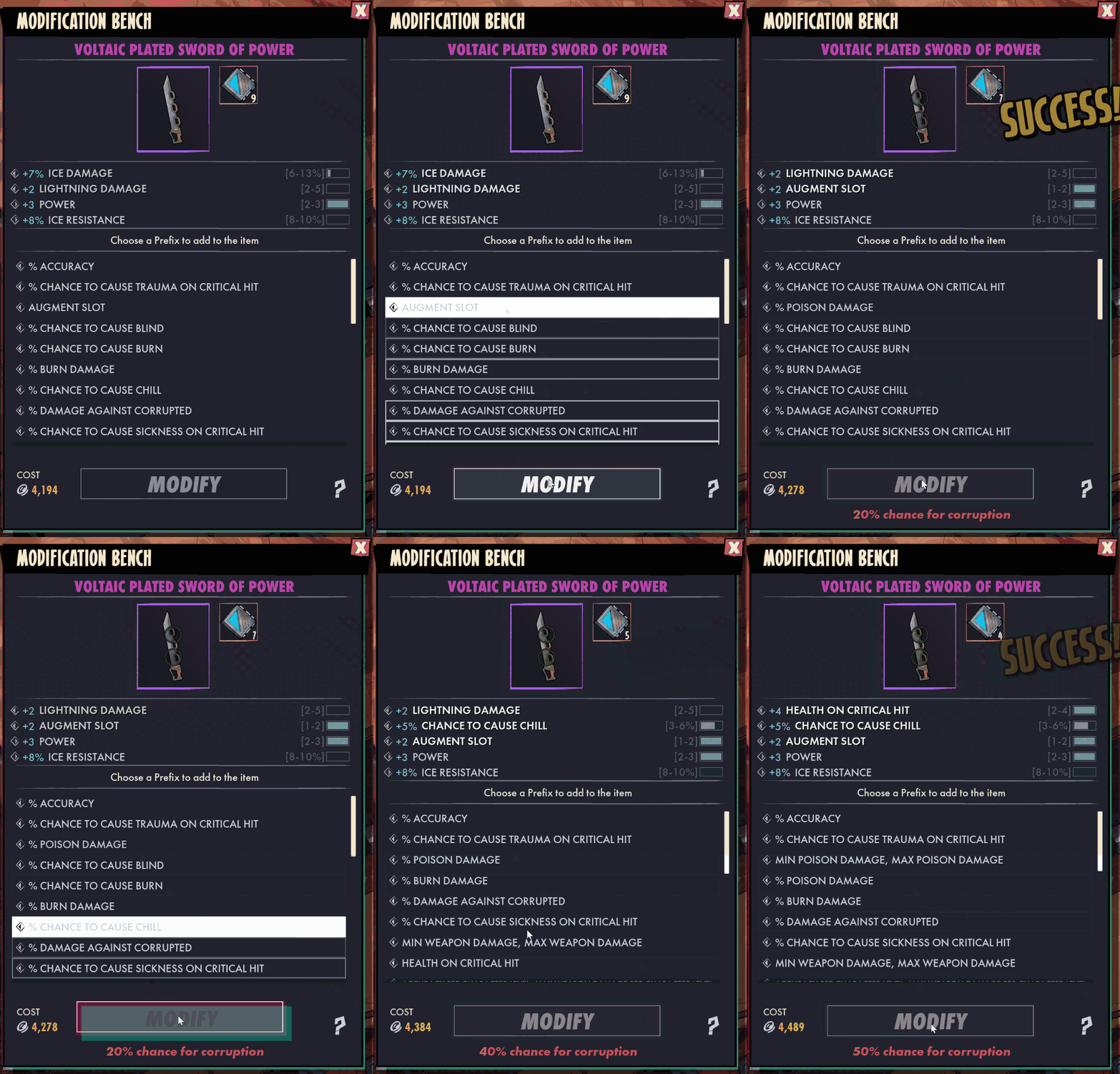
When you place an item on the Modification Bench with a stat modification material, you will be prompted to select a stat to apply. However, if the item already has a maximum amount of stats then one will be replaced at random, injecting an element of chaos into the mix. With each modification made, the item will accumulate corruption, progressively raising the likelihood of it becoming corrupted during the modification process.
What happens when an item becomes corrupted?
If an item succumbs to corruption through modification, all of its stats will be randomly replaced, acquiring an additional corrupted stat, and rendering it unmodifiable. This means that as you tweak your item, you must vigilantly monitor its corruption chance, carefully balancing risk versus reward, and decide how far you are willing to push it in pursuit of the perfect outcome.
Augments and Augment Slots
Now, let's delve into augments!
Augments are new modification items which can be found by defeating enemies and looting chests in the upcoming update. These items can be placed into augment slots on your gear, thereby bestowing additional stats upon them. Furthermore, we will introduce new modification materials that grant you the ability to add Augment Slots or remove Augments from your gear.
And behold, Rare Materials…
Within this update we’ll also be including two new rare high risk versus reward materials. These materials possess captivating and unpredictable interactions that can make or break your item, but we shall leave their secrets for you to discover in our forthcoming update.
We sincerely hope that you have thoroughly enjoyed this Dev Diary and we look forward to talking to you on the next one!
Dev Diary - Spaceship Hideout
Hello Enforcers!
Thanks for joining us for our newest Superfuse Dev Diary! Let's talk about a brand new feature that will be coming to Superfuse, spaceship hideouts!
After completing the thrilling campaign, your Enforcer will be rewarded with their very own customizable spaceship hideout, a sanctuary where they can continue their adventure by accessing the expansive solar map. This spaceship serves as a hub for all their interstellar adventures, allowing them to explore the cosmos at their leisure.
The interior of the hideout is entirely customizable, providing players with a vast array of options to decorate it with, including tables, beds, item modification benches, and various other objects that can be purchased for credits.
This level of personalization adds a unique touch to each player's hideout, making it a reflection of their individual taste and the hero within them.
What good is an awesome spaceship hideout without a crew?
Throughout their journey in Superfuse, players will encounter various intriguing vendors, each possessing unique wares or services. With the hideout system, players can bring these memorable characters on board to run shops within their spaceship. This not only adds life to the space but also continues that sense of connection players have developed with them during their travels.
As the hideout becomes populated with these vendors, it evolves into a bustling hub of commerce, making it more engaging and immersive for players to navigate and interact with between their solar map contracts.
Thank you for joining us for another dev diary! We hope you've enjoyed diving into this new feature. Stay tuned for the next one and we’ll see you soon, Enforcers!
Dev Diary - Earth
Hello Enforcers!
We are happy to share our first content packed Superfuse Dev Diary! Today we’re going to be talking about the desolated world known as Earth!
In the wake of Earth's cataclysmic disasters, the wealthiest elite sought refuge among the stars, leaving the disheartened populace behind to grapple with the ruins of their once-thriving world. Amidst the crumbling remains of Earth, an unknown threat began to spread - the Corruption, plunging the remains of society into turmoil. With accusations of its origin flying in every direction, blame and distrust became currency in this fractured world, pitting neighbour against neighbour. To stem the tide of decay and restore a glimmer of hope, a bold initiative by the billionaires - now known as Genetically Optimised Directors (GODS) - birthed the Enforcer Program, a courageous group of superheroes determined to confront the Corruption head-on and protect the vulnerable.
But as the Enforcers continue their mission on Earth, they would soon uncover the darkest secrets behind the origins of the Corruption, revealing that the true battle for Earth's survival had only just begun.
During the development of Earth, we placed significant emphasis on creating distinct environmental contrasts, ensuring that each region offers a unique and captivating experience. Prepare to step into a world of desolation and hope, where your actions will shape the fate of this once-thriving world.
With our upcoming update, players will respond to a distress call from Earth originating from the post-apocalyptic town of New Eden. Moved by the plea for help, they embark on a courageous mission to aid the town's forgotten populace in their fight against Earth’s Corruption.
Upon reaching New Eden, players immediately face a harsh reality - the wastelands are not only plagued by the Corruption, but also infested with dangerous Raiders, who think of themselves as apex predators of humanity preying on what they perceive to be “weaker” Settlers. These cunning adversaries come in various types, each presenting unique challenges that demand specific approaches. In the upcoming section, we’ll give you a sneak peek of some of the dangers to come.
When creating Earth’s enemies our primary aim was to ensure their behaviour truly stood out from one another, making each encounter feel different from the last. As you venture into the barren world, you'll encounter a diverse range of adversaries, varying from colossal and highly menacing foes with more telegraphed attacks to agile, nimble Raiders who can strike you down in an instant.
Some of these enemies are not just seeking survival, but are eager to shred their way through the apocalypse, wielding guitars as their instruments of chaos! Prepare for an electrifying encounter with these audacious foes, who bring a whole new level of excitement to the wastelands by strengthening their allies with the power of heavy metal!
Thank you for joining us in today's dev diary! We hope you've enjoyed this deep dive, and we can't wait to have you with us on the next one.
See you soon, Enforcers!
What’s Next for Superfuse
Hello Enforcers,
We know it’s been a while since we last wrote, and we wanted to start off by thanking you all for your patience during this period.
Following our release and with the feedback that came in, the team has been busy working on new content and features across the board. We wanted to make sure we presented a plan that we were confident we could deliver on, but due to unexpected challenges this turned out to be more complex than anticipated.
Despite this, we were able to implement many of the changes we wanted and are proud to announce a significant update to the game, coming this autumn. This will include everything from new areas and new heroes to improvements and tweaks to a variety of systems. We are therefore excited to share a more extensive overview of our plans for the update below:
For those of you struggling to read the asset or need to Google Translate it, you can also find the listed changes below:
New Heroes
New Chapters "Earth" and "Ceres" - New Bosses, New Enemies, New Levels, New Towns, New Quests
Item Modification & Player Hideouts
Game Improvements:
Increased Level Cap
Combat & Targeting Improvements
Obstacle Avoidance
Increased Eros Content Variation
Improved Fuse Progression & Fuse Rerolling
Additional Item Stats
Updated Waypoint Menu
Booster (Charge) Changes
Instanced Loot Drops
Quality of Life Improvements
Additional Game Modes
Additional Customization Options
And more!
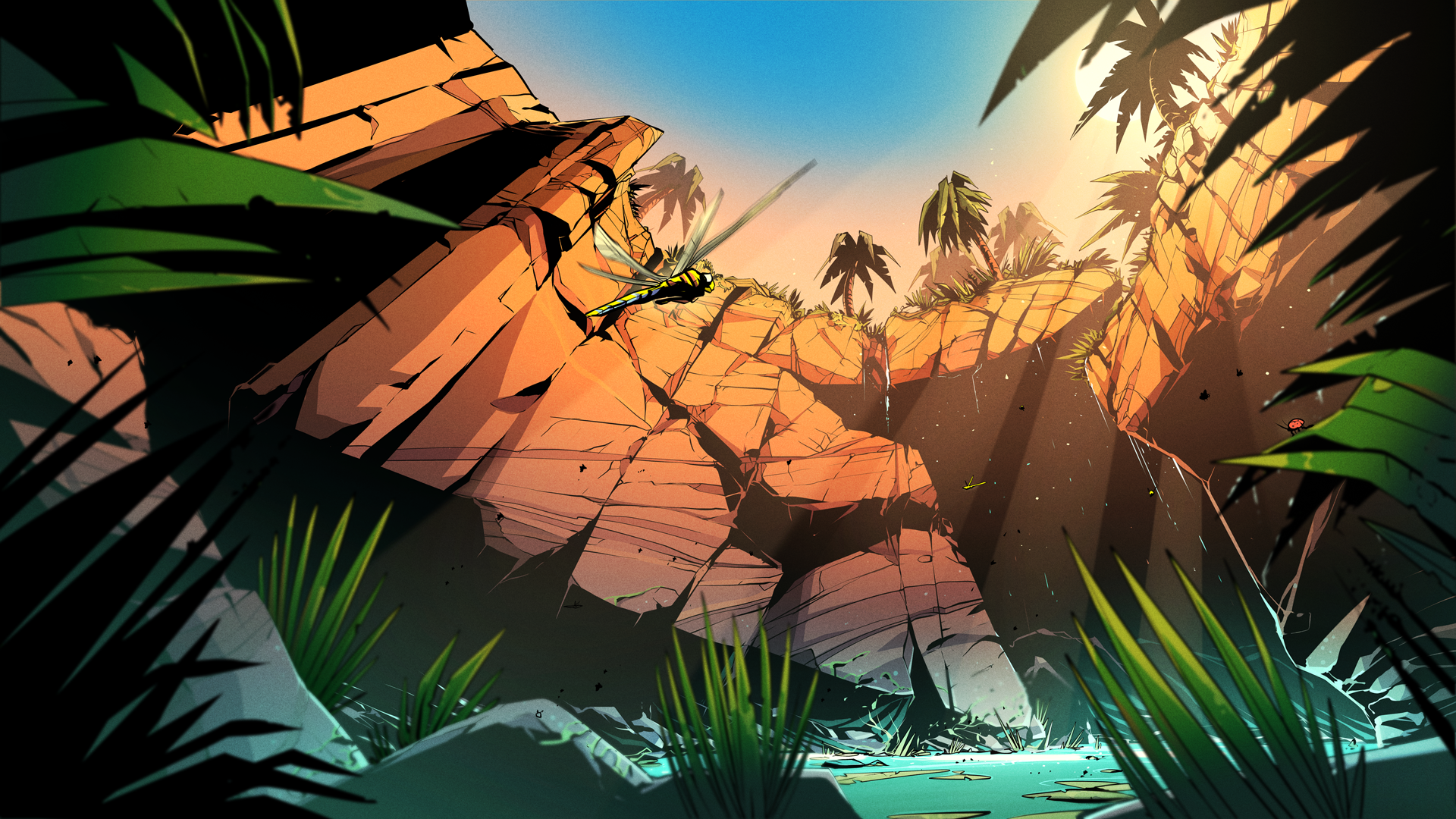
As a sneak peek of things to come, here's a first look at Earth; a brand new location to visit in Superfuse. From a new town to explore to desert ruins and stunning caves, there's plenty to discover. Stay tuned to find out more about what lurks in humanity's old home.
We appreciate your understanding and hope this post has managed to shed a little more light on what the future holds for Superfuse. Expect monthly update posts in the future as we dive deeper into our autumn update and what it will contain.
- Stitch Heads & Raw Fury
Patch 0.1.4 is live!
Hello Enforcers,
With today's patch, we’ve focused mostly on Quality of Life improvements and have made a ton of changes regarding Boosters based on community feedback! Booster charges will now automatically be picked up and each player will have their own instanced booster drops creating a more consistent supply of charges in those multiplayer experiences. We’ve also increased the stack sizes, thereby reducing clutter in your inventory, and have made some general tweaks as to how they function as well.
We’re continuing to improve tooltips and have made several modifications in this patch to improve clarity across the board which we hope will be well received.
Lastly we heard you all enjoyed the previous credits auto pick up range so we’ve listened to your feedback and brought it back at its previous values!
Please continue to post your feedback as we are looking into it all and your voice helps improve the game as a whole while we continue to produce more patches and content.
The Stitch Heads Team
Tooltips
Skill Tooltips now correctly display Energy drain per second
Skill Tooltips now correctly display Cooldown duration
Skill Tooltips will now display "Casts per second" and "Summons per second" when relevant instead of all skills showing "Attacks per second"
Skill Tooltips now have their stats better sorted with subcategory (e.g. Minion and Effect)
Skill Tooltip now displays the Minion's primary ability attacks per second. This was wrongly displaying the Summons per second before
Fixed damage stats not always showing in skill tooltips for skills that are not equipped
Changed Fuse item tooltips to now only show the Fuse icon within the item icon container around it.
Changed Fuse item tooltip to now display the Fuse trigger type
Fixed Mastery tooltip icons being black
HUD & Input
Fixed the pause menu button prompt not functioning within the Solar Map
Fixed some talent passives not displaying all their modifiers in the tooltip
Fixed "Windowed Fullscreen" visual bug of whitespace getting removed when changing other video settings
Setting menu text now scales with localised text
Talent Tree button text now scales with localised text
Popup Buttons text now scales with localised text
Item tooltip text now scales with localised text
Fixed issue with offline and hardcore hero selection boxes overlapping with other menu elements
Fixed players being displayed as lvl 1 in online session while they're in the solar map
Changed Portal Beacons to be usable by clicking on it in the Inventory
Added the item tooltip button prompts back but smaller
Added "Identify" button prompt when relevant using the ID Scanner hover on items
Paint Shop
Paintshop UI visual overhaul
Items & Drop Rates
Fixed cases of non-uniques equipment rolling as uniques without stats
Updated “Fiero’s Balance” unique sword to have the correct orientation
Increased credit auto-pickup radius back from 70 to 200
Boosters
Added auto-pickup for booster charges
Will not auto-pickup if dropped by the player to prevent not being able to drop charges.
Booster charges are now instanced per player
When a charge drops it will drop for both players however only the owning player can see theirs
Added popup notifications similar to credits upon picking up booster charges
Fixed resource booster buffs showing total duration of 0s for clients
Increased booster charge stack sizes from 20 to 100
Fixed booster animation playing even when failing to use it
Added booster on cooldown feedback text
Changed boosters to no longer visualise the recharge duration while there are no charges in the player inventory
Changed booster recharge cooldown for resource boosters (Health, Energy, Hybrid) to be consistent between each charge
Increased intermittent booster recharge time from 2 seconds to 3 seconds
Fuses
Fixed issue where fuses failed to load causing them to be lost for the players.
Enemy
Fixed dismembered body parts floating in the air
Fixed enemies sometimes getting stuck in place on clients after dying
Other
Fixed expected collision sweeps duration on clients being off for durations smaller than tick rate
Technomancer
Salvage Skill
Now displaying healing over time value in Salvage skill tooltip
Berserker
Tornado Skill
Fixed Tornado's attacks per second not representing the actual tick rate
Fixed Tornado tickrate not scaling from attack speed
Fixed Tornado's damage being dependant on tick rate
Fixed Tornado's damage in tooltip not representing the actual damage dealt per tick
Patch 0.1.3 is out!
Hello Enforcers,
We're back with another patch! This time one with a few more elaborate changes you've been requesting. We are far from done with looking through your feedback though, so expect more patches to come. Additionally, this patch hasn't looked at assisting you with your auto-aiming needs (this is for the Homing Fuse aficionados in the comment section, this patch does not include any homing changes).
We’ve made improvements to combat and skill input responsiveness, this primarily addresses your skills activating when you expect them to and attacking consecutive nearby targets rather than going into a “move only” when an enemy is killed. On top of that, this patch is also tackling a range of tooltips issues, specifically regarding skill buff details and inconsistencies. Skills will now also display any tags that get added through fuses.
Lastly, we’ve added some much needed (and requested) quality of life features such as UI scaling in the settings menu, clicking to use boosters in the action bar, and FOV / Widescreen support. Please Note: we're only supporting a maximum of 21/9 aspect ratio resolutions, so wider aspect ratios will see black bars on the far edges of their screen, forcing it to 21/9 max. This aspect ratio decision is to avoid giving those few players on mega ultra widescreens too much of an advantage compared to other resolutions.
Oh, and shields drop now. Leon's also restocked some fuses, and we squashed quite a few bugs.
TL;DR: This patch focuses on Combat/Skill Responsiveness, Tooltips, Widescreen support, UI Scaling in settings, Shields drop now, and more tooltip improvements coming.
As always, keep the feedback coming and thank you for your continued patience as we continue on this Early Access Journey!
The Stitch Heads Team
Combat and Character Movement
Improved and addressed issues for input handling of skill inputs:
Fixed Channeling Skills such as Tornado never activating when starting to hold the action down while it was not ready to activate yet. It will now activate when ready.
Fixed issue where single activation Skills such as Provoke would not activate until performing another action.
Fixed a bug where the Hero moving to a target to use a Skill with setting “Use Skill on Target” could not be interrupted at all.
Fixed Hero moving to a target to use a Skill with setting “Use Skill on Target” not being interrupted when doing move action too close to the Hero.
Now when holding down a Skill with setting “Use Skill on Target” and being locked onto a target, when this target dies the next hovered target will get locked onto, instead of always going into movement.
Improved the way Skills set the rotation of the Character, which fixes the Hero sometimes not rotating to the new attack direction.
Fixed Channeling Skills such as Tornado continuously activating after having gone into a menu with the ability active.
Fixed an issue that was causing Force Move to be ineffective on interactables
Tooltips
Fixed damage conversion fuses not displaying their effect in the skill tooltip
Fixed skills not displaying correct stat values when not equipped
Removed AttacksPerSecond from Decoy skill tooltip
Fixed Inferno skill not showing damage stat in the Skill Menu
Fixed Salvage buff tooltip not displaying the buff effect
Fixed various buff tooltips not displaying a description
Fixed Move Only skill tooltip lingering on screen when dragging a skill onto the Move Only slot
Fixed damage values in Skill Tooltips not reflecting melee and ranged damage modifiers
Fixed inconsistent spelling styles of the word armour
Added new Icons to movement speed and resistance booster tooltips
Clarified Strength and Power tooltips granting % damage increases instead of flat values
Added visualisation of added compatibility tags in fuse tooltip
HUD & Input
Updated the hybrid booster icon
Fixed issue with booster buffs using incorrect icons
Improved icons for skill and megaspeed shrine
Fixed Overlay Map having inconsistent sizes between areas
Added Player level to party member character portraits
Fixed hero requirement text on fuse tooltips often clipping off screen
Fixed issue where a scrollbar would appear in the player inventory.
Fixed Inventory items not being moveable into storage
Added functionality for using boosters by clicking them in the actionbar with RMB
Added UI scaling setting to the Settings Menu.
Fixed issues with Comic book header text wrapping
Changed Font for the create game and join private game section in the server browser to support capitalisation.
Added fallback fonts for Chinese, Russian and Korean to prevent characters being replaced by blocks
Improved feedback when failing to slot a fuse if the fuse overlaps with the skill node in the centre
Fixed ‘Failed to Slot fuse’ error message not showing up when a fuse node overlaps the skill node in the centre
Fixed skill node in the centre not being highlighted red when fuse is trying to be placed and overlapping it
Fixed skill node not vibrating (placement failure feedback) when trying to place fuse overlapping it.
Fixed throbber in popups overlapping with text
Added Ping and FPS counters in the HUD
Fixed Dropdown menus not supporting localised text
Fixed camera being stuck when transitioning from Gamma settings straight to Main Menu
Fixed main menu camera transition when going from Gamma settings Class Selection menu
Server Browser & Multiplayer
Fixed players not ragdolling on clients
Items & Drop rates
Fixed issue where shields were not dropping
Adjusted display names of some Powerglove item types to be shorter
Adjusted scaling of unique item icons to match the base item more
Fixed issue where Credit Pickup range was unintentionally large, reducing the range from 200 to 70.
Improved booster item tooltips
Adjusted Gambler item rarities to have fewer common items and more uncommon
Fuses
Fixed Leon not selling any fuses other than Strike passive fuses
Ferrokinesis fuse now adds the buff compatibility tag to the skill
Added descriptions to the Bombardier fuse
Split max fuse per type reduced from 3 to 1
Localization
Added many missing translations
Most UI now scales with localization
Missions
Fixed kill contracts from being completable by people not doing the contract
Removed the requirement to click the door to Conduit 1 in order to progress the mission “Rogue Enforcer”.
Fixed Kettu Assassin being completable by one person leaving the game in multiplayer
Fixed a case where a mission reward menu could incorrectly appear for "Reactivate the Waypoint" in multiplayer
Enemy
Fixed Razor sometimes getting stuck in a Power Punch pose
Fixed Razor sometimes sliding during Slam animation
Other
Fixed an issue with regions not unloading when travelling to the Solar Map
Fixed a crash related to the map updating
Fixed the camera zooming in for ultrawide displays
Fixed rebuying items causing them to identify
Changed experience gain curve from killing monsters from 120 per level above enemy level 14 to 150 per enemy level above 10
Technomancer Idle Animations:: Fixed 1H weapons being rotated incorrectly in the inventory and menu idles for the Technomancer
Fixed an issue related to decals being attached to players, minions and enemies
Elementalist
Fire Tree
Fixed fire mastery passive (stat modifiers) not being applied sometimes
Frostblade Skill
Fixed issues with Frost Blades getting stuck in an animation
Combust Skill
Base cast animation reduced from 0.86 seconds to .06
Blaze Skill
Fixed an animation bug related to dashing in place
Fireball Skill
Fixed a bug that would cause the Elementalist to slide at the end of a fireball cast
Berserker
Polished Berserker Fallback animations
Frenzy Skill
Fixed issues with Frenzy getting stuck in an animation
Heavy Strike Skill
Fixed the hitbox being too close to the character
Fixed Heavy Strike sometimes getting stuck in an animation
Lightning Shield Skill
Improved the animation desync issue with Lightning Shield
Power Punch Skill
Fixed Powerpunch not rotating when keeping the button pressed down
Provoke Skill
Added an Icon to provoke enemy debuff
Rally Skill
Radius increased by 20%
Base duration increased from 30 seconds to 60
Base energy regeneration reduced from +50% to +10%
Minor polish to rally VFX
Tornado Skill
Improved the fade out of the trail VFX
Technomancer
Fixed Technomancer’s Summon Melee Minion animations not scaling with cast speed
Fixed minions health not being applied correctly. The displayed number in the skill tooltip should now match the health of newly spawned minions
Fixed minions being incorrectly killed when +max minions stats change and are being recalculated
Fixed displayed minion amount not being updated when minions are killed due to max minion stat
Fixed minions not being killed if having more than max due to unequipping an item with +max minion stats
Fixed max minion amount stats of items not working for some minion types
Minions Tree
Gear lock: max tiers reduced (0/8 to 0/5)
Battery pack: max tiers reduced (0/5 to 0/3 and 0/8 to 0/3) (Note that Technomancer have 2x Battery Pack talent)
Artillery: max tiers reduced (0/5 to 0/3)
Well oiled machine: max tiers reduced (0/8 node to 0/5)
Metal Tree
Fixed Spare Parts talent spawning an extra piece of scrap at the player's feet
Buzzjaw Skill
Fixed an issue where BigBoy Melee Minion didn’t use their melee attack animations
Now has the Physical Damage tag
Lazerbeak Skill
Now has the Physical Damage tag
Tekhead Skill
Fixed Tekhead damage increase buff not working (This also fixes other occurrences of buffs or stat modifiers not working on skills/projectiles)
Changed Fire Damage tag to Lightning Damage tag
Construct Skill
Fixed contract Bosses/Villains being constructable
Meet the Enforcers
Hello Enforcers,
We are about to dive head-first into the weekend, which feels like a great time to do some recaps of older posts that could still be fun to those of you who are new to our community.
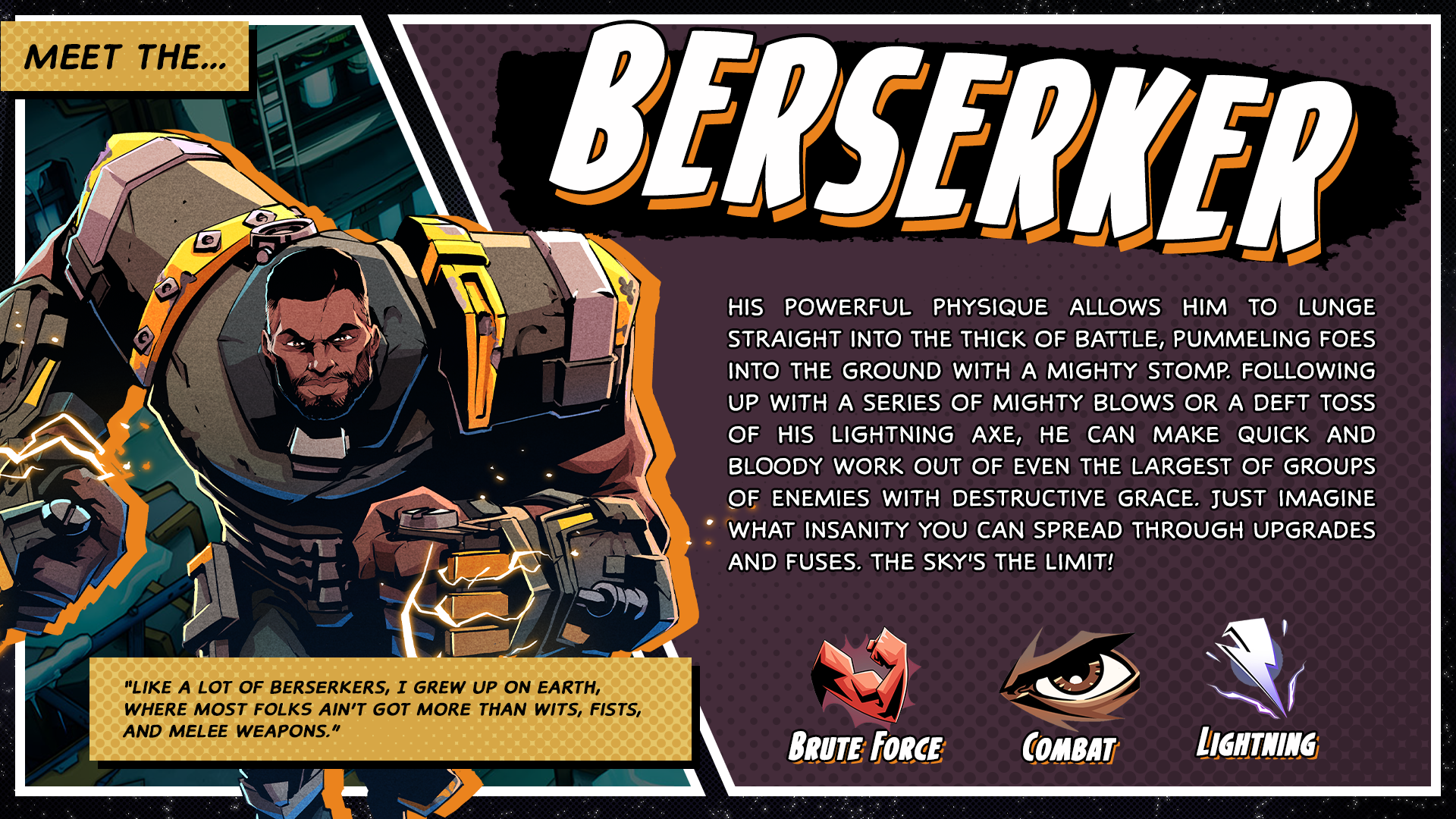
While we imagine you are more than familiar with the Berserker, Elementalist, and Technomancer by now, here are some short posts we put together about their skills and backstories.
Hope you all have a fuse-filled weekend, and see you all next week for more news.
Fuse Combinations
Hello Enforcers,
While the devs are busy working on the next patch (more information on that coming soon), we wanted to do a quick shout-out to the fun new fuses we added in last week’s patch. The fuses in question were Scorch, Contaminate, and Flash Freeze.
The aim of these was to add fun new variations, especially for more melee-centric skills. Below, you will see some of the combinations you can do:
Why not create a shower of blood with the Scorch-enhanced Blaze ability:
Or how about combining the Flash Freeze fuse with Ice Shard for explosive results:
Or maybe enhance your Frenzy with the Contaminate fuse:
The options are endless and we look forward to seeing what crazy combinations you come up with!
Content Shared this Weekend
Hello Enforcers,
It's the start of a new week, which feels like a good time to share some of the content that trickled out this past weekend. So while the team is busy looking through your feedback and working on the next patch, why not spend some time reading and watching what the media had to say.
Let's Play from Eurogamer
We teamed up with Eurogamer to see what they would think of Superfuse and especially the multiplayer experience. So watch this chaotic group of three tackle enemies, loot at more.
Additional Articles
We also so saw both a preview from Escapist as well as one from CBR release this week.
Keep Reaching Out
Whether you have screenshots you're proud of, had a really fun capturing session you want to share, or just want to give us feedback on what you like and what you want to see changed in the game, please don't hesitate to share this with us. We love to see and hear from all of you all, so please keep it coming.
Beginner’s Guide to Fuses
Fuses are one of Superfuse’s unique features, which allow you to tailor the hero’s abilities to your preferred play style. But what are fuses, and how do they work?
Each hero will have specific skills acquired through their talent trees. These will stretch from offensive to defensive, jumping great distances or slowing enemies down and allowing you to play your Berserker, Elementalist, and Technomancer to your liking.
However, this is only the foundation and also where the fuse system comes into play. Using fuses, you can customize your specific abilities with incredible detail, allowing you to tailor the experience even further.
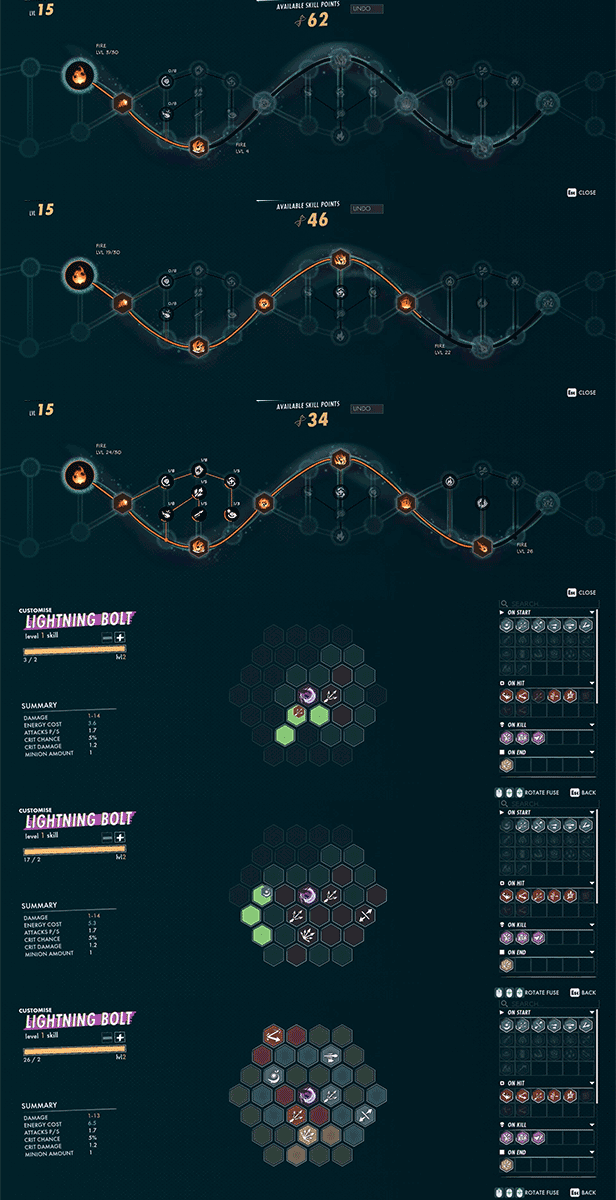
By left-clicking on an ability in your Equip Skills menu (press S), you will enter the fuse skill screen with your selection of available fuses featured on the right. These will stretch from “On Start”, “On Hit”, “On Kill”, “On End” and “Passive”, meaning that the way your skill looks and acts will be completely different from what another player might have.
Click on your desired fuse and place it on the node you want to lock it to. You can also rotate the fuse using the mouse wheel before clicking again to fuse it to the ability. And if you regret your choice, you can easily remove it again by right-clicking it. There will be certain fuses that will be greyed out for your hero, which means they are not useable for your specific hero.
Fuses will drop like any other kind of loot from various enemies around the world, so we encourage you to experiment to your heart's content. And that is it, as far as fuses go, so don’t hesitate to play around with your abilities and see what works best for you!