This update brings a new turn system and adds whisper tabs to the chat, alongside the usual fixes and scripting improvements:
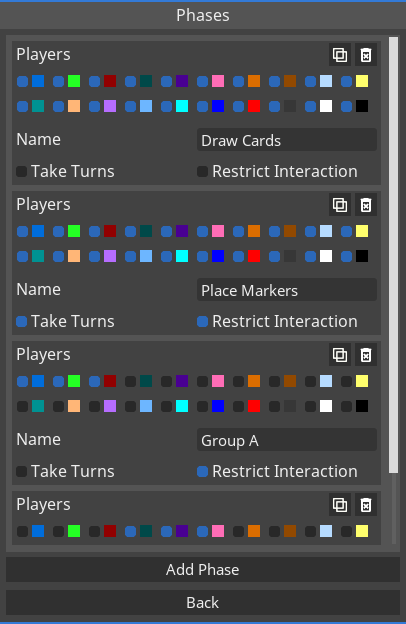
• The new turn system allows you to create phases to keep track of the state of your game and restrict interactions to players whose turn it is. Find out more about rounds, phases, and turns in the knowledge base: https://tabletop-playground.com/knowledge-base/turns-phases-and-rounds/
• The chat now supports whisper tabs: When you send a whisper message to another player or receive a whisper message, a new chat tab will open. You can have your private conversation in that chat. This keeps all messages with a player together and doesn't require you to use the `/w` command to whisper. The old behavior with both public and private messages in the main chat tab is still supported, you can disable tabs in the advanced interface options. • Show template names in dialog for copying from other package
Scripting • Add new `TurnSystem` class accessible through `GameWorld.turns` that enables access to the turn system • Add `GameWorld.addCustomAction` and `GameWorld.removeCustomAction` to manipulate actions in the global context menu (right click menu when not clicking on an object) • Add new parameter `identifier` to `GameObject.addCustomAction`, allowing to separate the visible name of the action from how it is identified in the code • Add `DrawingLine.players` to allow restricting line visibility to certain players or teams • Fix: node_modules folder was missing after last update
Fixes • Installed packages from mod.io were not available when offline • In rare cases the game could crash when removing an item from a container
---
These new updates we've added are just some of the many features on our early access development roadmap for Tabletop Playground, which you can check out on our Trello HERE.
Don't forget to join our community Discord to chat with the dev team and give us your suggestions for new features for the game!
February Update: In-game mod browser
The February update has landed! The main new feature is a new in-game mod browser that allows you to find, subscribe to and unsubscribe from game packages on mod.io without using the Steam browser or an external browser. As usual, there's also a number of further improvements and fixes:
• Add in-game mod browser: from the main menu, a comprehensive UI allows you to browse available mods and subscribe or rate, or manage your existing subscriptions. Currently the mod browser is only available on Windows, Mac and Linux support will follow. • Move save/load state from context menu to main menu • Keep additional autosaves (for a total of 5 minutes of play time) • Don't show tooltip with description of card objects when they are face down • Automatically simplify drawn lines, improving performance and allowing more lines to be drawn • Only load templates in packages on demand. Reduces startup time and allows multiple packages with the same templates (for example a development and release version), as long as both pacakges aren't used within the same game. • Improved performance of loading save state folders, reducing small stutters when opening large lists of states (like autosaves) • Show card front in object zoom when zooming to a card in a container explorer that shows card fronts • Automatically wrap long object descriptions in tooltips • The "Zoom to ground" option (in the advanced interface settings) is now a "Ground interaction" setting. Apart from using object mode for ground objects while in regular cursor mode, it also allows you to open the context menu for ground objects.
Scripting • `Card.onRemoved` wasn't called in a few circumstances: when grabbing an additional card from a stack while holding cards or when dropping cards from a held stack to the table or to a card holder.
Fixes • FBX files were not supported on Linux • Objects with description but no name briefly showed an empty tooltip before the description became visible • Uploads to mod.io occasionally had issues on Windows • Games with lots of drawn lines (close to the drawing limit) could prevent clients from joining • Objects with scripted UI could get spawned below their container when dragged out from a container explorer window
---
These new updates we've added are just some of the many features on our early access development roadmap for Tabletop Playground, which you can check out on our Trello HERE.
Don't forget to join our community Discord to chat with the dev team and give us your suggestions for new features for the game!
January Update
The January update is here! It comes with a new permission option, scripting UI widgets, important bug fixes and more:
• Add new permission for saving the game on clients. This can be useful to prevent cheating by clients inspecting or loading the save file to access hidden information like hand cards of other players. • Allow selecting cards in (locked) card holders using drag selection • Show card tooltips in the on-screen hand • Show card fronts in object zoom for holders of other players if they are set to show card fronts (instead of hiding cards) • Add an option for snap grids in addition to rectangular and hexagonal: circular grids can be used to quickly create circles of snap points • Clearer images for checkboxes, sliders, and selection boxes on UI scales larger than 100% • Add a warning when exiting template editor while a snap grid hasn't been added • Log files are now enabled for Linux and Mac (they only existed on Windows before)
Scripting • Add `RichText`: a text widget that allows BBCode style text to control text appearance. The tags are the same as in the in-game notes and can modify font size, text color, and bold/italic. • Add `ContentButton`: a type of button where you can add another widget as child (similar to a border) • Add `WidgetSwitcher`: a widget that can contain multiple child widgets and switch between them, showing only one at a time • Add `UIElement.zoomVisibility`, allowing you to control whether UI elements are visible for regular or zoomed objects • Add `Color.toHex()` • Add `Player.getOwnedObjects()` • Add `GameWorld.getPlayerByName()` • Visual elements of `CheckBox`, `SelectionBox`, and `Slider` are now automatically scaled when using large font sizes
Fixes • Objects in containers were sometimes not visible in container explorer and spawned at the wrong location after the container was repeatedly copied and pasted, or the object was repeatedly taken out of the container • Widgets from UIs could remain in memory the background in multiplayer games, causing increased processing time and memory consumption over time • Object zoom could cause glass tables to become brighter for some objects on some maps
---
These new updates we've added are just some of the many features on our early access development roadmap for Tabletop Playground, which you can check out on our Trello HERE.
Don't forget to join our community Discord to chat with the dev team and give us your suggestions for new features for the game!
November Update: Switchers
Update time! This time the main new feature are switchers, which allow you to create switchable objects in-game. As usual, there's also additional features, convenience improvements, and bug fixes:
• Add a new object type: Switchers allow you to switch between multiple objects. You create switchers in-game (or in preview mode) by selecting multiple objects and clicking "Create Switcher" in the context menu. The selected objects will be combined into a single object which you can switch from the context menu or using the object action hotkeys (R / Ctrl+R). The context menu also allows you to switch to a random object, or remove the switcher. You can learn more on the new knowledge base page. • Allow object zoom in the container explorer • Add new button in card and multistate object details in the editor to quickly add all remaining cards or states from the image sheet • Add ability to cycle through previously written messages by using the up and down keys in the chat window (similar to the command history in the JavaScript console) • Allow changing size of cards in stack explorer using two new buttons • Save whether to show names in container explorer for session • Support Chinese, Japanese, and Korean characters in text fields
Scripting • Add a new class `Switcher` and two methods `GameObject.createSwitcher` and `GameObject.getSwitcher` to allow interacting with switchers from scripts • Add anchor properties for `ScreenUIElement`, similar to the properties in `UIElement` • Add `Widget.setVisible` and `Widget.isVisible` • Add `TextWidgetBase.getFontFileName` and `TextWidgetBase.getFontPackageId` • Ensure that an empty `exports` object always exists to avoid issues with transpiled TypeScript • Allow passing `undefined` to `Border.setChild` and `LayoutBox.setChild` in order to remove the current child widget
Fixes • After shuffling a card stack, an additional card could remain visible in rare cases • Don't allow changing size of cards in holders • Dropping cards in the on-screen hand with the screen mode cursor required an additional click
---
These new updates we've added are just some of the many features on our early access development roadmap for Tabletop Playground, which you can check out on our Trello HERE.
Don't forget to join our community Discord to chat with the dev team and give us your suggestions for new features for the game!
October update hotfix
This update addresses a couple of recently identified issues:
• Remove issues with PlayerPermission objects not being recognized correctly on clients • Fix a potential crahs when re-using UIElement objects after a new client joined • Relative position and size in ScreenUIElement did not work correctly for very small or very large resolutions • Card rotation was reset when editing template in preview mode • Not all controls in the grid options were deactivated for clients • Folder names in object library were not sorted alphabetically on Mac
October Update: Grids and custom lighting
The October update brings several new features: grids, custom lighting, and 2D scripted UIs are now available!
• The session options now contain a new "Grid" button where you can set options for a global snap grid: it can be hexagonal or rectangular with adjustable size, offset, and rotation as well as different visibility and snap settings. • The session options now contain a new "Lighting" button. Here you can set the color, intensity, specular intensity, and direction of the main light. The settings are stored in the game state. • When arranging objects from the coordinates or by pressing a number button while holding a group of objects, try to keep their current arrangement as intact as possible • Split horizontal and vertical camera sensitivity options
Scripting • Add new functionality to create on-screen UIs, with methods like `GameWorld.addScreenUI` and a new class `ScreenUIElement`. On-screen UIs are not visible for VR players. • Add `Player.isUsingVR` to detect whether a player is using a VR headset • Add several methods to `GameWorld` to set and read ligthing options (for example `GameWorld.setMainLightIntensity*) • Add new `GlobalGrid` object to read and modify snap grid properties. Accessed through `GameWorld.grid`. • Add new `GlobalGrid` object to read and modify snap grid properties. Accessed through `GameWorld.grid`. • Add `GameObject.onSnappedToGrid` • Add `SelectionBox.removeOption`, `SelectionBox.setOptions`, and `SelectionBox.getOptions` • Fix crash in `SelectionBox.getSelectedOption` when no options exist
Fixes • Updated to a new mod.io version that fixes a mod extraction error on Mac • Fixed a memory leak from filled containers that caused RAM consumption to slowly rise over time • Fixed lighting for .obj models with no textures and no normals • Labels could have clipping artefacts on clients • When using the object properties window for multiple selected objects, object name and description would always be applied to all objects
---
These new updates we've added are just some of the many features on our early access development roadmap for Tabletop Playground, which you can check out on our Trello HERE.
Don't forget to join our community Discord to chat with the dev team and give us your suggestions for new features for the game!
September Update
This update focuses mostly on bug fixes, but also introduces an option for two sided materials:
• Add a new option for models in the editor: two sided. If checked, geometry from the model is visible from both sides. This is only needed in special cases (vegetation models often use two-sided geometry) and should usually be left unchecked. • Reduce influence of resolution aspect ratio on size of certain zoomed in objects (such as dice and PDFs) • Don't allow stacking ground cards and regular cards • Fix: Cards did not always stay in card holders on clients when loading a state • Fix: Mac users could not upload new versions of their packages since the last update • Fix: Snapped measurements did not show correctly for other players • Fix: Dealing cards from a stack could sometimes knock over nearby objects on clients • Potential fix for rare issue where a dropped object would still show up as held for other players • Improved error messages and logs for mod.io HTTP errors on Windows • Fix: `GameObject.getExtent` returned a zero vector instead of the correct object size when called in the same frame when the object was being created from a template
August Update: Labels and in-game browser
The August update is out now! With text labels and an in-game web browser, two big new features are available. But it doesn't stop there: a lot of additional UI and usability improvements, more VR settings, scripting features, and bug fixes are all part of the package.
• Moved to a new mod.io version. It brings faster download and progress updates while installing games, with more features to come in future updates! Your mods will be re-downloaded once the first time you start the game after this update. The old download folder is removed automatically. • You can now place text labels. Labels can have different colors and sizes as well as custom fonts. They don't get blurry at larger sizes or zoom levels. Apart from a fixed text, you can also set labels to show the name of the player in a selected slot. Press K to toggle label mode. • A new UI element for cursor modes is available in the upper left corner. It allows you to see your current mode and quickly switch to other cursor modes without memorizing the hotkeys. • There is now a tablet object available among the "General" objects. It allows you to browse the web while playing, the active website URL is synchronized with all players. • Drawing now supports glowing lines: a new checkbox in the drawing dialog allows you to turn up the emissive value of your lines to make them glow • Add new permission for editing labels • Changed emissive map format to be easier to use: now the red color channel simply makes the color at that point emissive, the larger the red value is the more emissive the part of the model becomes. Fully red will make most colors glow. The other channels in the emissive map are not used for now. • Add a new option for measuring angles (in measure move mode, selected in session options): you can measure the rotation of the movement compared to a straight line as before, or the rotation of the object. • Angle measurements are now logged together with distance measurements in measure move mode • Multistate objects have a new option in the editor: Circular. When checked, the states loop around so you can go forward from the last state to get back to the first state and vice versa. • Add a new option in the video settings to use low resolution textures. This can be useful to allow old systems to run large games that may not run properly with full texture resolution. • Add support for TGA textures. TGA files are generally larger than PNG, but they can be useful when using an alpha channel as a mask (in the extra map/mask map) because some graphics tools don't save colors properly in PNGs when the alpha channel is zero. • Use natural sorting in all places where names are ordered (filenames, templates, tags). With natural sorting, numbers in the names are sorted by magnitude and not alphabetically (so 10 comes after 2). • The drag selection box for the screen cursor is now much more accurate and doesn't glitch for objects behind the camera • When dice faces are named with a number, use that number instead of the index of the face when deciding how to rotate the dice when a player uses a number action (by pressing a number key while highlighting or holding dice) • When angle measurement is on, include measured angle in measure move message • Move measurement number to the cursor (from the middle of the measured line) • The container explorer now remembers if it was switched to showing card fronts in the same session • Add new option in advanced interface settings for lowering the drag selection box. Hold Ctrl and use the mouse wheel while drag-selecting to change the setting quickly. Dragging new zones is also affected by the setting, and the value can be changed creating a zone. • Use sliders instead of text boxes for cell width and height when creating a snap grid • Hold invert key to rotate objects very slowly instead of the regular speed • Don't allow changing background in 3D maps because it doesn't have an effect
VR • Add new cursor mode buttons to standard UI menu that opens when you press the menu button without highlighting an object • New setting: motion controller dead zone • New setting: height offset allows you to raise or lower your viewpoint by a constant offset when not flying
Scripting • Add new class `Label` to control in-game text labels • Add `GameWorld.createLabel`, `GameWorld.getLabelById`, and `GameWorld.getAllLabels` • Add `WebBrowser` widget to create web browser UIs • Add `DrawingLine.emissive` to allow creating glowing lines from scripts • Add `Canvas.getChildren` • Add `Card.canAddCards` • `Canvas.updateChild`, `Canvas.removeChild`, and `Panel.removeChild` now work immediately after adding the child widget. Previously, these methods only worked after the widget had been built a few ticks later. • Dice faces can now get metadata assigned in the editor. Add `Dice.getCurrentFaceMetadata` and `Dice.getallFaceMetadata` • Ensure that players see the correct UIs when they switch slots after player restricted UIs have been created • Add `CardHolder.isCardFaceUp` and `CardHolder.isCardUpsideDown` • Fix: Playing a sound for the host player played it for all players • Fix: In some circumstances, scripting UIs on objects could remain after reloading, leading to duplicate UIs which could cause input issues
Fixes • Joining games through the Steam friend list did not work for all players • Resizing the whole object in the editor did not work properly for Multistate objects • In screen cursor mode, moving the mouse quickly while rotating the zoomed object could end the zoom • Flip back the order of cards in the editor UI • Fix issue with dragging objects in screen cursor mode after using Escape key to close "Edit Template" screen in preview mode • Fix graphical glitches in the cyberpunk environment • Fix lighting for thumbnails and zoomed objects in 3D environments • Zoomed cards would sometimes flicker • Reduce force with which dice are thrown apart when rolling multiple dice at once • Import file dialog did not always remember previous directory • Drag selection with 3D cursor could select ground objects with drawings on them while cursor was in regular mode • Reworked "Friendship" achievement trigger to be more robust - it did not work for all players
---
These new updates we've added are just some of the many features on our early access development roadmap for Tabletop Playground, which you can check out on our Trello HERE.
Don't forget to join our community Discord to chat with the dev team and give us your suggestions for new features for the game!
June Update: emissive materials
The June update is here: It brings glowing objects, improvements to editor and snap points, new keybindings, new scripting UI options, and more!
• You can now add Emissive Maps to models in the editor: They work like a regular texture, but emissive colors are not affected by lighting and look like the object is lit by itself. When used without a regular texture or Normal/Extra map, the object is not lit at all, which looks less realistic but keeps colors closer to the original image. The alpha channel of the emissive map acts as a brightness multiplier: when it is lower than 1 (parts of the image are transparent), both the regular color at that spot and the color from the emissive map are multiplied. Erasing parts of the emissive map completely leads to a high multiplier, allowing you to make parts of the object glow! • Cards and multistate objects have a switch in the editor to make them emissive, effectively switching off lighting for them • Add buttons in the card editor to increase or decrease card index by one • Add buttons in the card editor and snap point editor to apply tags to all cards • New options for snap point rotation: snapping upright or upside down without further rotating the snapped object • Add keybindings for rotating the camera (not set by default) • Add keybinding for toggling drawing mode (by default "I") • New rotation option for taking objects out of containers: in addition to default rotation and container rotation, you can now select "Flipped" in the container properties • Improved network traffic for smoother play on slow connections • "Rotate thumbnails" setting now affects container explorer as well • The object coordinates window now allows arranging object into a hexagonal grid • Scaling Gizmo now scales uniformly when uniform scaling is active in the object coordinates window • Add keybindings for HP Reverb motion controllers • A new option in the advanced interface settings allow you to change the behavior of the Flip/Upright key (middle mouse/F) when holding a group of objects: instead of flipping or turning to their default rotation, align all held objects to the rotation of the grabbed object • Flip order of cards in the stack explorer when the inspected stack is face down, so the first card in the explorer is always the card at the top
Scripting • Add new `PlayerPermission` class and use it in the play methods of `Sound` to determine for what players a sound is played, and in `UIElement.players` to control which players can see a UI • Add `UIElement.presentationStyle`, allowing UIs to automatically align to the camera or to be shown directly on screen • Add new parameters to `GlobalScriptingEvents.onScriptButtonPressed` to indicate whether modifier keys (Shift, Ctrl, Alt) were held while pressing the button • Return whether a line was added successfully on `GameWorld.addDrawingLine` and `GameObject.addDrawingLine` • `World.getTableHeight` did include ground objects (in addition to just the table) in the height calculation
Fixes • Object Coordinates > Arrange Grid > "Keep rotation" function is reversed • Blindfolding was allowed while editing a template in preview mode • Autosaves were generated while in main menu • Physics for tables with custom colliders could get activated when loading a state in-game • When changing the back image type for cards in preview mode, the card wasn't updated visually. Sometimes this could also happen in the editor. • Loading stored camera setups in very quick succession would cause a wrong result • Pressing "Save as new" for a new template resulted in an error • Player rotation could remain snapped when changing the snap angle setting in-game • Since the last update, cursors of other players were hidden when in screen cursor mode • In some circumstances, zones did not prevent snapping or hide cursors on clients • Cards with square shape could show slight ghosting of the back image on the front • Fix a crash related to accessing online URLs from scripts • Held dice and other clumped together objects could knock over other objects at low hold heights • Clients changing object descriptions did not have an effect for other players
---
These new updates we've added are just some of the many features on our early access development roadmap for Tabletop Playground, which you can check out on our Trello HERE.
Don't forget to join our community Discord to chat with the dev team and give us your suggestions for new features for the game!
May Update
The May update upgrades to the latest version of Unreal Engine 4, future-proofing the game and fixing a few issues with the previous Unreal version. In addition, you now have more options for player slots, a color palette, improved object rotation, and more:
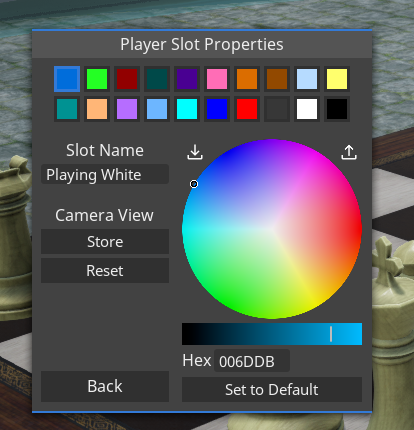
• Updated Unreal Engine to 4.27 • Slot names now have names and default camera setups: the "Player Colors" button in the session options has been renamed to "Player Slots". The window accessed through the button now allows to set a name and store the current camera setup in addition to adjusting the color for each player slot. The slot name can be used to whisper in the chat to the player currently occupying that slot, in the same way as player names are used. By default, all player slots are named with their index (1 to 20). When a player slot has a stored perspective, a player who joins the game in that slot or switches to the slot through the player options will move to the stored perspective. This can be used to emphasize where on the table a player in a given slot is seated. • Holding down rotation keys (Q/E/Arrows by default) now continues to rotate objects • Color pickers now have a color palette where you can store and load your own selection of 36 colors • Increase speed of turn-in-place animation (when presseing Q/E or arrows while highlighting, not holding, an object) and keep the rotated object in place in relation to other objects - it used to land on top of objects above. • Store hold height between sessions • When editing snap points in preview mode for an object with global snap points enabled, allow adding points snapped to other objects that aren't on top of the edited object
Scripting • Add `GameObject.removeDrawingLineObject` and `GameWorld.removeDrawingLineObject´ • Add `Player.setDrawingColor` and `Player.setDrawingThickness` • Add `DrawingLine.tag` property • Extend the occasions when `Card.onRemoved` is called to all actions where players remove cards (dragging a card off the stack or the container explorer, drawing or dealing cards, or when a player cuts/splits/divides the stack) • `Text.setAutowrap` did not work for clients (only affected host player) • `Player.getSlot` and `Player.getName` did not return correct results for players who rejoined games in progress • Don't allow setting primary color on card holders (the color is determined by the owning player) • Increase time that `Player.showMessage` messages stay on screen
Fixed • Autosaves were not available to load on Linux • Using keyboard shortcuts for editing card decks in the editor made previously edited cards re-appear • UI elements for properties of snap points in a new grid were not enabled when the object had no snap points • After closing the chat using the Enter key, it couldn't be opened again using enter until clicking with the mouse
---
These new updates we've added are just some of the many features on our early access development roadmap for Tabletop Playground, which you can check out on our Trello HERE.
Don't forget to join our community Discord to chat with the dev team and give us your suggestions for new features for the game!