

Tabletop Simulator
New DLC - One Night Ultimate Werewolf
Only the host needs to own the DLC
3 - 10 Players | Ages 13 & Up | 10 Minutes Playing Time
This DLC includes the Daybreak expansion.
One Night Ultimate Werewolf is a fast-paced game for 3-10 players where everyone is dealt a secret role. Many of these roles have special abilities that will aid that player in gaining information. In the course of only one night and the following morning, the players will determine who among them is a werewolf...hopefully. One Night Ultimate Werewolf is a condensed version of the party game Ultimate Werewolf that does not require a moderator. There's no elimination, and each game lasts about 10 minutes.
Check out One Night Ultimate Werewolf here:
https://store.steampowered.com/app/610708/Tabletop_Simulator__One_Night_Ultimate_Werewolf/
Lunar New Year Sale

Lunar New Year Sale!
To Celebrate the Lunar New Year Tabletop Simulator is 50% off! All DLCs are on sale (excluding Down In Flames: Locked- On). No matter where you are in the world, kick off the Year of the Ox by playing games with friends and family near and far.
Shop Now!
https://store.steampowered.com/app/286160/Tabletop_Simulator/
New DLC - Down In Flames: Locked-On
Only the host needs to own the DLC
1 - 6 Players | Ages 13 & Up | 15-30 Minutes Playing Time
Down in Flames: Locked-On brings the Down In Flames system to the jet age, by adding missile combat and range. The "one hit one kill" sudden death nature of modern combat, makes this game very different than earlier versions of Down In Flames! Multiple campaigns from the 1970s through modern day give players a variety of scenarios. During these campaigns, players will perform air combat missions to escort their strike aircraft to the target. Down in Flames: Jets provides the fast-paced feel of air combat developed during the other games in the series, with streamlined rules and an intuitive, fast-playing game system.
Check out Down In Flames: Locked-On here:
https://store.steampowered.com/app/610706/Tabletop_Simulator__Down_in_Flames_LockedOn/
Update v13.0 - Translations, Engine Upgrade, Layout Zones, Object Tags & More!
Hey everyone it's been a while, but we have a huge patch for you guys today!
The headline feature is Tabletop Simulator now supports translations for all 29 languages supported by Steam. The game has been translated with the help of google translate but we also added support for creating your own translations and sharing them on the Workshop. Using google translate is an exciting jumping off point for a more global user friendly experience, however, recognizing google translate’s limitations we are also excited to see what native speakers in the community can come up with for the most authentic multilingual game play experience. Furthermore, the translation support is extended to all of your great mods out there. Now players can participate in the same game with different localized text or assets based on their selected language.
We've also upgraded the game's engine (everything should run smoother), added layout zones (automatically lay out cards easily), and added object tags (easily filter system interactions).
We have a bunch of other great new features, upgrades, and fixes you can read about all below.
Finally we are launching a new method for collecting user feedback and bug reports found at https://tabletopsimulator.nolt.io/.
This will allow us to better connect with the community for a more fluid and streamlined feedback loop, including increased visibility into our process. The new system allows you to easily make suggestions and upvote and downvote other community member ideas in a similar style to reddit. Additionally, the community will now be able to see our progress on implementing suggestions, fixes, and new features through the roadmap tool.
Updates, Optimizations, and Cleanup
- Updated Unity version to 2019.4 LTS.
- Enable graphics jobs, free performance by multi-threading the rendering (benchmarked up to 25% increase in fps).
- PhysX version upgrade gives better accuracy and performance in a variety of cases.
- Video player is now using hardware decoding on the gpu making video textures more performant.
- Updated tablet chromium version which now supports mp3.
- Updated Dissonance voice chat plugin.
- Voice chat is now working on Linux again.
- Updated Lua Moonsharp to 2.0.
- Lots of code refractoring and cleanup to facilitate faster updates in the future.
- Reduced ram usage, by lower the number of variants for our custom DXT5nm Standard shader.
- Optimized a lot of physics code to use non gc allocing functions.
- Greatly sped up updating Workshop mods on initial load.
- Optimized the netcode to be more performant on the cpu.
Translation
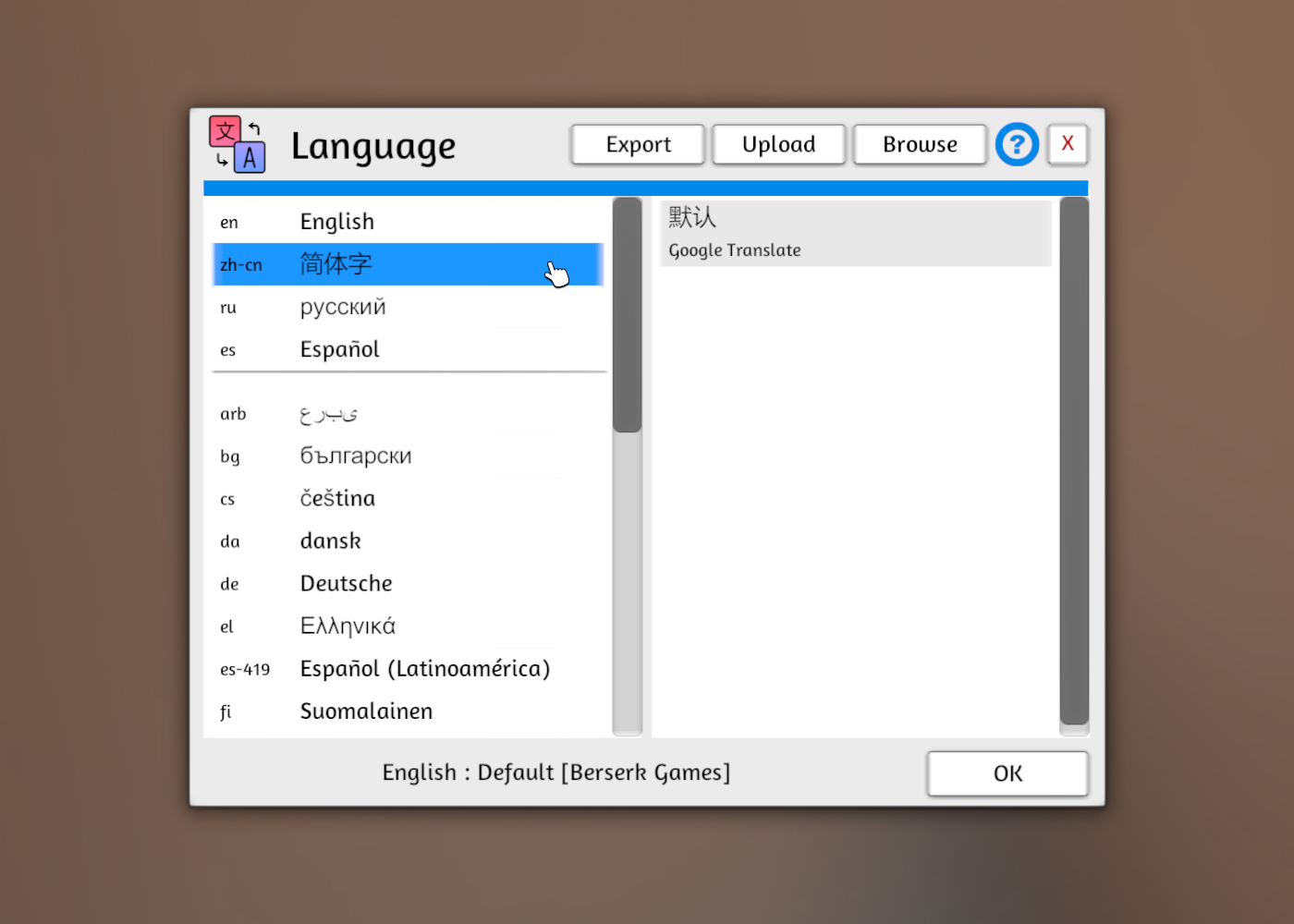
- Added translations for most common languages using google translate. Access Language menu via the button in the bottom right of the main menu, or in the menu bar of the Configuration window.
- Added the ability to create your own translations for the default UI and share them on the Workshop.
- Added localization support for your text fields. This allows you to translate your mods for different languages. Example: {en}Hello {fr}Bonjour {de}Hallo
This also works in url fields if you need to change assets based on the language.
Example: {en}url1 {fr}url2
Supported languages: [en]English, [zh-cn]Chinese (Simplified), [ru]Russian, [es]Spanish, [pt-br]Portuguese (Brazil), [de]German, [fr]French, [ko]Korean, [pl]Polish, [tr]Turkish, [ja]Japanese, [zh-tw]Chinese (Traditional), [th]Thai, [it]Italian, [pt]Portuguese, [cs]Czech, [hu]Hungarian, [sv]Swedish, [nl]Dutch, [es-419]Spanish (Latin America), [da]Danish, [fi]Finnish, [nb]Norwegian, [ro]Romanian, [uk]Ukrainian, [el]Greek, [vi]Vietnamese, [bg]Bulgarian, [arb] Arabic
Object Tags

New mechanics which allows objects to selectively interact with game systems. If a system (e.g. a hidden zone, a hand zone, etc.) has a tag set, then only objects which share a tag with it will interact with it.
Taggable systems:
- Hidden zones
- Randomize zones
- Hand zones
- Layout zones
- Fog-of-War zones
- Scripting zones
- Snap points
Set what tags a object or system has by right-clicking it and selecting Tags from the menu. You may access all tags present at the table via the Modding->Tags window.
Added Snap-Point Creation Tags window: new snap points will automatically gain whatever tags you set here.
Zones
Hand, Hidden, and Random zones should perform much faster and no longer slow down the game.
Zones now work correctly when there are multiple colliders attached to the same Object. (TODO: LayoutZone and FogOfWarZone)
Zones now all have a right-click context menu. Left-click will open the zone-specific menu that used to be on right-click.
Layout Zones

New Zone tool (in the zone tool popout) which allows you to automatically lay out objects (primarily cards) across the table. Deploy like any other zone, then left-click and hit the cog to change its settings. Especially useful for card games in which you lay melds on the table (like Gin) or which have trick-taking (Whist, Bridge, etc.), but can also be used to simply arrange a bunch of objects in a grid without locking them to it.
Features include:
- Filter affected objects (face-up/down, non-cards, etc)
- Split/Combine decks.
- Set to Manual Only for one-off arranging.
- Automatic sorting of objects inside groups based on Name, Description, etc.
Layout Zones can triggered by using the Layout Zone tool and left-clicking the zone then hitting the big Layout button, or by right-clicking a object inside a zone it interacts with and selecting the Layout option in its context menu.
Mouse pointer shows icon indicating when you are holding an object inside a layout zone: will also show the zone's name if it has one.
Hotseat
- Improved turn transitions.
- Added ability to set player names.
- End Turn button now shows current player instead.
- Added some Misc Settings, detailed below.
- Fixed object visibility.
- Fixed a bunch of bugs in the Lua API relating to Hotseat mode.
General
- Added "Order" option to contextual menu for bags (LIFO, FIFO, and Random).
- Spawn mode now works off objects in the void.
- Picking up objects that are teleported from out bounds now snap to the mouse nicer.
- When cloning/spawning objects you may hold the left mouse button down and move the mouse to spawn multiple objects.
- Buttons will now only appear on Books (i.e. PDF objects) when you hover the mouse over them. This can be disabled in Misc Settings.
- Decks now have a Spread action in the right-click menu; spreads the cards out across the table. Distance between cards is set in Misc Settings.
- NGUI now shows up on objects in the onscreen hand view and optimized it when alt zooming. (XML UI still doesn't work)
- Added description to the tooltip when searching a container.
- Workshop loading wheel above chat is always spinning now when updating.
Lua:
- HandZones are now Objects like everything else.
- Added Lua Hands.getHands() and get/setValue() string Color for Hands Objects.
- Added Lua WebRequest.custom(string url, string method, bool download, string data, Dictionary headers, Closure callbackFunction)
- Lua getAllObjects() is now instantly updated to add or remove when an object is spawned or destroyed.
- Added Hands class to Lua with members (bool enable, bool disable_unused, int hiding) sames as the hands menu.
- Deck no longer populates cards with its script and script state.
- Added tryRandomize(player_color) and tryObjectRandomize(object, player_color) for when someone tries to shuffle/roll/randomize an object. Returning false will prevent randomization.
- Added onBlindfold(player, blindfolded) event, triggered when a player puts on or takes off blindfold.
- Added object.alt_view_angle property: when non-zero the Alt view will use the specified Euler angle to look at the object.
- Added object.getPositionSmooth() and object.getRotationSmooth() return the current smooth move target and null if not moving.
- Added object.isDestroyed() returns true if an object is (or will be) destroyed.
- Deprecated object.tag property: use object.type instead.
- Deprecated filter... commands: now use prefix try.... e.g. tryObjectEnter.
- Added object.memo, a string you can store info in on an object.
- Stopped the ability to spawn Tables using spawnObject.
Added Lua Global classes Tables and Backgrounds.
Tables:
<*> string getTable()
<*> bool setTable(string name)
<*> string getCustomURL()
<*> bool setCustomURL(string url)
<*> Object getTableObject()
<*> Backgrounds:
<*> string getBackground()
<*> bool setBackground(string name)
<*> string getCustomURL()
<*> bool setCustomURL(string url)
Added Info global static class exposing Info menu.
<*> string name
<*> string type
<*> string complexity
<*> int[] playing_time
<*> int[] number_of_players
<*> List tags
Added calls for working with Tags:
- object.getTags() -> Table gets the Tags attached to an object.
- object.setTags(Table tags) sets the Tags attached to an object.
- object.addTag(string label) adds the Tag to the object.
- object.removeTag(string label) removes the Tag from the object.
- object.hasTag(string label) -> bool checks if the object has the Tag.
- object.hasAnyTag() -> bool checks if the object has any Tags.
- object.hasMatchingTag(other) -> bool checks if the other object has a matching Tag with this object.
- scripting_zone.getObjects() will utilize Tags attached to the zone, unless you override with scripting_zone.getObjects(true)
- deck.spread(distance) uses the spread action on the deck.
- getObjectsWithTag(string tag)
- getObjectsWithAnyTags({tag, tag...})
- getObjectsWithAllTags({tag, tag...})
Lua Fixes:
- Fixed network sync bug with Xml UI by adding null check to Xml setAttribute(s) and setValue.
- Fixed object.getSnapPoints() throwing when having no snap points.
- Fixed loading_custom to work with custom decks and cards.
- Fixed object.clone() sound parameter not working.
- Fixed MusicPlayer.playlistIndex to MusicPlayer.playlist_index (old way still works).
- Fixed Grid calls not working over network.
- Fixed Grid.snapping not working.
- Fixed showHotkeyConfig working over network. Added color parameter; dialog will be shown to that player.
- Fixed onObjectRandomize and onRandomize not returning correct player colour.
- Fixed Physics.cast not returning list in correct order.
- Fixed Group action ignoring tryObjectEnter and tryObjectEnterContainer.
System Console
- Added commands for options detailed in Misc Settings above.
- Added language, language_... commands for selecting current language.
- Added translation_export, translation_import, translation_for... commands for working on translations.
- Added translate command to translate an English term into the current language (if TTS knows it).
- Added hotseat_name_..., hotseat_start_turn, and hotseat_end_turn commands.
- Added pointer_position command.
- Added lift_height and rotation_degrees commands.
- Added action_spread and action_layout commands.
- Added ui_clear command to clear UI generated by other commands (e.g. ui_button)
Fixes
- Fixed major bug when saving stuff to cache not overwriting but writing on top of and maybe deleting garbage at the end.
- Fixed url redirect issue when trying to load assets from the web with expired certs error. (Curl error 51: Cert verify failed: UNITYTLS_X509VERIFY_FLAG_EXPIRED)
- Fixed chat breaking and being uninteractable.
- Fixed bug when uploading steam cloud image thumbnail for Workshop by only allowing local files.
- Fixed being unable to click through magnify ui to pick up objects.
- Fixed issues with states number 95 being 96.
- Fixed rotation values not syncing on connecting client.
- Fixed null reference when downloading old workshop files that had null width and height deck info.
- Fixed issue when downloading a bunch of mods with the games menu open causing an insane number of threads to spawn and blow up the game.
- Fixed bug with FogOfWarZone and child colliders not working correctly.
- Fixed objects with Measure Movement working on clients.
- Fixed measuring tool logging revealing hidden object info.
- Fixed Lift Height slider not hiding when you click away from it.
- Fixed Pan key not working while holding a object (as long as it is not on the same binding as Flip)
- Fixed Camera Hold Rotate key not working while holding a object (as long as it is not on the same binding as Tap)
Known Issues:
- Mac performance reduced and steam overlay not working. (Try using the Metal option when launching the game)
Hotfix v13.0.1
- Fixed not being able to put objects back into infinite bags.
- Fixed card peek not working correctly.
- Fixed cards not flipping correctly in Hand Zones.
- Fixed {verifycache} not working on URLs.
- Fixed scripting zones getObjects() not working on interactable == false.
- Fixed VR highlighting displaying incorrectly.
v13.0.1 Hotfix 1
- Fixed issues when going from one hand zone into another.
- Fixed reversed scroll direction on Linux.
- Fixed exception issue that caused not being able to load a game.
v13.0.1 Hotfix 2
General:
- If you are having performance issue on your Mac check your resolution in Configuration -> Graphics and lower it.
- Fixed bag order contextual not hiding correctly.
- Fixed tooltip for bag order.
- Fixed `Spread` context menu item.
- Fixed layout zone hotkey with F3.
- Fixed using localize codes in global chat.
Lua:
- Forgot to add this in the main patch notes but GUIDs are now stable.
- Fixed scripting zone working on other zones or tables.
- Fixed lua spawnObject callback by delaying it one frame.
- Fixed putObject memo field no longer contributes toward object equality.
- Fixed script_state on global not clearing between loads.
Hotfix v13.0.2
General:
- Language will not be automatically set to a google translated language but default to English.
- Added a cloud url check for workshop upload so that it doesn't get stuck uploading.
- Added knowledge base articles for Object Tags and Layout Zones.
Fixes:
- Fixed hand zones interactions to be more consistent when overlapping multiple zones.
- Fixed issues with hand zones eating other hand zones cards being dealt to them.
- Fixed tablets being governed by Digital permission instead of Tablet.
- Fixed objects sometimes not being visible when searching a container due to a scrolling issue.
- Fixed crash cashed from using a custom lut with incorrect dimensions.
- Fixed Layout Zone not working on rotations other than 0 and 180.
- Fixed lua issue when a client removed an item from a bag it wouldn't trigger onPickUp() event.
- Fixed Spread contextual tooltip.
- Fixed physics menu sliders not working correctly.
Hotfix v13.0.3
General:
- Updated Unity to 2019.4.19.
- Updated Dissonance voice chat plugin.
- Updated Steamworks.net steam plugin.
- Updated Skyshop rendering plugin.
- Add "Metal" launch option for Macs, that should run the game faster but with some graphical issues.
Fixes:
- Fixed issue with player hand named and portrait not updating correctly.
- Fixed issue with guids ending up empty if the json of an object was missing the guid.
- Fixed translating card images not working.
- Fixed issues with server type UI messing up.
- Fixed being able to mess around with non-active players from top-right menu in hotseat mode.
- Fixed searching from one object to another messing up scroll position.
- Fixed zone tooltips.
Hotfix v13.0.4
General:
Zones now instantly respond to settings that cause an object to interact with the zone without it having to go in and out.
Lua deprecated getAllObjects() with getObjects(), old function doesn't return hand zones for compatability. (Global.getObjects() works too)
Added lua tags to getObjects() on all container returns.
Hand Zones now functions like all other Objects and are saved as such.
Added misc setting controlling randomize zone prompt-on-load.
Fixes:
Fixed issue with hands not hiding for clients.
Fixed up the last of the hand zone name and potrait positioning.
Fixed randomize zone not prompting on load.
Fixed title issue with custom translations.
Fixed issue with translations exporting more than it should when uploading.
Fixed issue if invalid hidden colors were being set for Hand and Hidden zones.
Fixed turns menu help button link.
Fixed tags getting translated version of Game Type & Complexity
Fixed lua tryObjectEnter only firing on first dropped object if it returned false.
Fixed lua getObjects() not working correctly with onObjectPickUp() by delaying it a frame to match prior version.
Fixed lua Wait.frames() to work correctly if it was called after the Update() loop.
Hotfix v13.0.5
Hey everyone this is likely the last hotfix for this update unless something else comes up majorly broken. With that said we will be likely be turning off the old version of the game on the "public beta" by the end of the week. So if you have any further issue caused by this update please report them here: https://tabletopsimulator.nolt.io/
Changes:
Alt zoom doesn't hide other player's pointers anymore.
Disabled the appearance of being able to turn off turns while in hotseat mode.
Fixes:
Fixed voice chat not working on Mac. (Make sure to accept the allow mic dialog that pops up)
Fixed issue with not being able to put objects in searched container.
Fixed duping bug with cards.
Fixed issue with pure white color tint not syncing correctly.
Fixed PDF buttons not displaying for all players.
Fixed pointers not hiding correctly in hidden zones when setting is enabled.
Fixed not being able to flip a Table after leaving and joining a new game.
Fixed lua turn events in hotseat mode.
Fixed UI click-through issue with XML UI blocking 2d UI interaction.
Fixed blurry text on Language menu.
Fixed contextual menu clipping off the screen.
Fixed contextual menu material options text being clipped.
Fixed elapsed typo on mod loading.
Known Issues:
Mac performance reduced and steam overlay not working. (Try using the Metal option when launching the game)
Winter Sale!
The Winter Sale is here for all the last minute shoppers!
Bring your family closer this holiday season through the gift of playing games together even while being apart. Head over to the Sale Now!
Check out Tabletop Simulator's Ultimate Gift Guide for Board Game Lovers for any other last minute gifts too!
https://store.steampowered.com/app/286160/Tabletop_Simulator/
Autumn Sale!

Autumn Sale!
Start your holiday shopping early with the Steam Autumn Sale. Get Tabletop Simulator for half off and all DLCs at discounted rates. Take advantage of Black Friday prices from November 25th, 9:55 am PT through December 1st, 10:05 am PT.
Head Over to the Autumn Sale Now!
https://store.steampowered.com/app/286160/Tabletop_Simulator/
$1,000 GIF and Meme Contest!

We are celebrating the launch of our Instagram @tabletop_simulator by holding the first of many contests to showcase the community’s work!
Share your cleverest Tabletop Simulator memes and goofiest gifs using all three hashtags: #tabletopsimulatorcontest, #tabletopsimulator, and #boardgames ending Monday 8/17/20. Make sure to follow us to see the announcement of the winners and different upcoming contests!
First prize - $500, Second prize - $300, Third prize - $200
Gifs and memes can be posted on Instagram, Twitter, or Facebook using the hashtags.
Tabletop Simulator 50% OFF & Deals on all DLC Games!
Hey everyone, hope you're all doing great this summer!
The Steam sale is live and we've got some big discounts for you to enjoy. Tabletop Simulator is 50% off and our entire DLC library is on sale with discounts up to 80%! - Check out our DLC deals here!
https://store.steampowered.com/app/286160/Tabletop_Simulator/
Check out our official Discord over at discord.gg/tabletopsimulator
Have a great summer and enjoy lots of tabletop games!
New DLC - Dawn of the Zeds
The postcards in every local drug store read, "Welcome to Fabulous Farmingdale!", an ad campaign that was the brainchild of Mayor Hernandez (who coincidentally employed his wife's public relations firm to market their community). But right now, things are far from fabulous in Farmingdale and, for once, everyone isn't blaming the Mayor. Some kind of virus or poison is turning ordinary people into vicious, zombie-like killers. It is not clear how the disease spreads (though it seems that physical contact is certainly one way), but it is obvious what the illness does to its victims.
These undead, nicknamed "Zeds" from the local newscasts as the acronym for "Zombie Epidemic Disease," are now converging on your corner of the world around Farmingdale. As best you can tell, you have been left to your own devices to stop them while the National Guard organizes a relief column, but that could take days, perhaps weeks, for them to fight their way to you and until then, what can you do?
With little choice between survival and a gruesome (un)death, you realize that you must coordinate the defense of the town of Farmingdale and its surrounding villages. You must lead the good citizens and emerging heroes of these communities to halt the Zeds' advances by (re)killing them, attempt to coordinate the discovery of a cure to this vile scourge, and preserve as much of the area and as many of its inhabitants as possible. There's no time to lose...
Check out Dawn of the Zeds here:
https://store.steampowered.com/app/610705/Tabletop_Simulator__Dawn_of_the_Zeds/
Update v12.4 Line Tool Revamp, Ghost Preview, Tags, Physics Improvements & More!
We got a great patch you guys today with a ton of great features, improvements, and fixes.
Summary:
You can now make your games friends or invite only, no longer requiring a password.
We have a ton of great new features to the line tool making it awesome for all your wargaming needs.
There are a lot of great physics improvements to make everything feel a lot more stable.
Workshop tags have been revamped and have many more options making it easier to find your games.
Custom Card shapes have been added hex, circle, and square.
Spawning overhaul where you can see a ghost preview where the object will appear.
And much more all covered below!
General
- The game will now show a ghost object where your object will drop when snapping to grid or snap points.
- You may still drag components out of the component window, but if you click one instead you will enter Spawn mode. Click the left mouse to place a copy of that object. Hit right mouse or escape to end.
- New context menu for objects: Clone. Puts you in Spawn mode for that object.
- When holding an object, hitting escape will return it to where you picked it up.
- Snap points are now editable for promoted players.
- New feature where when you press a number key while holding a bunch of objects it will arrange it in a grid based on the number of rows specified with the number key.
- Settings added for various new features present in the patch.
- Misc setting added to make containers (decks, bags, etc.) respond to the first number typed on them.
Server
- Added new server types public, friends, and invite.
- Public servers are just how you are used to anyone can join, but you can have an optional password.
- Friends server means only friends can join, no password required.
- Invite server means only people you choose to invite can join the game, no password required.
- Server browser loading should be faster because there will be less public servers that need to fetched with the new friends and invite servers.
- Server browser will now always get your friends servers instantly first.
- Server browser is now available while you are in a game, in the escape menu.
- Server browser now shows the total number of people in-game.
- Fixed connecting to a new game while you are already in one.
Line Tool
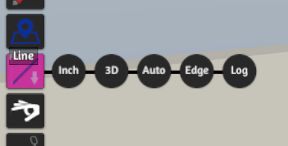
- Moved measurement options from Misc menu to the Line Tool button.
- Added Grid units alongside Inches and Metric, Will measure according to the size of the grid.
- Added 2D/3D modes. In 2D all measurements are flattened to the horizontal plane. In 3D height is included.
- Added ruler mode: Auto or Free. In Auto mode the ruler will take advantage of objects you hover over, snapping to them where appropriate. You can hold down ctrl to override this behaviour.
- Objects now have a Measure Movement toggle, which if enabled will mean whenever that object is picked up (and you are in Auto mode) a measurement will be started.
- When in Auto mode, if you start measuring while holding an object (by holding tab), it will measure from the pickup location.
- You may hold down shift while measuring to view the orthogonal axes (2D mode) or the flat distance + height (3D mode). Holding ctrl at the same time will show the other.
- Fixed being stuck in Line Tool after using it while holding an object.
Line Tool: Options
Line Tool: Object Snapping

Line Tool: Orthogonal Components

Line Tool: Flat Distance + Height

Pure Mode
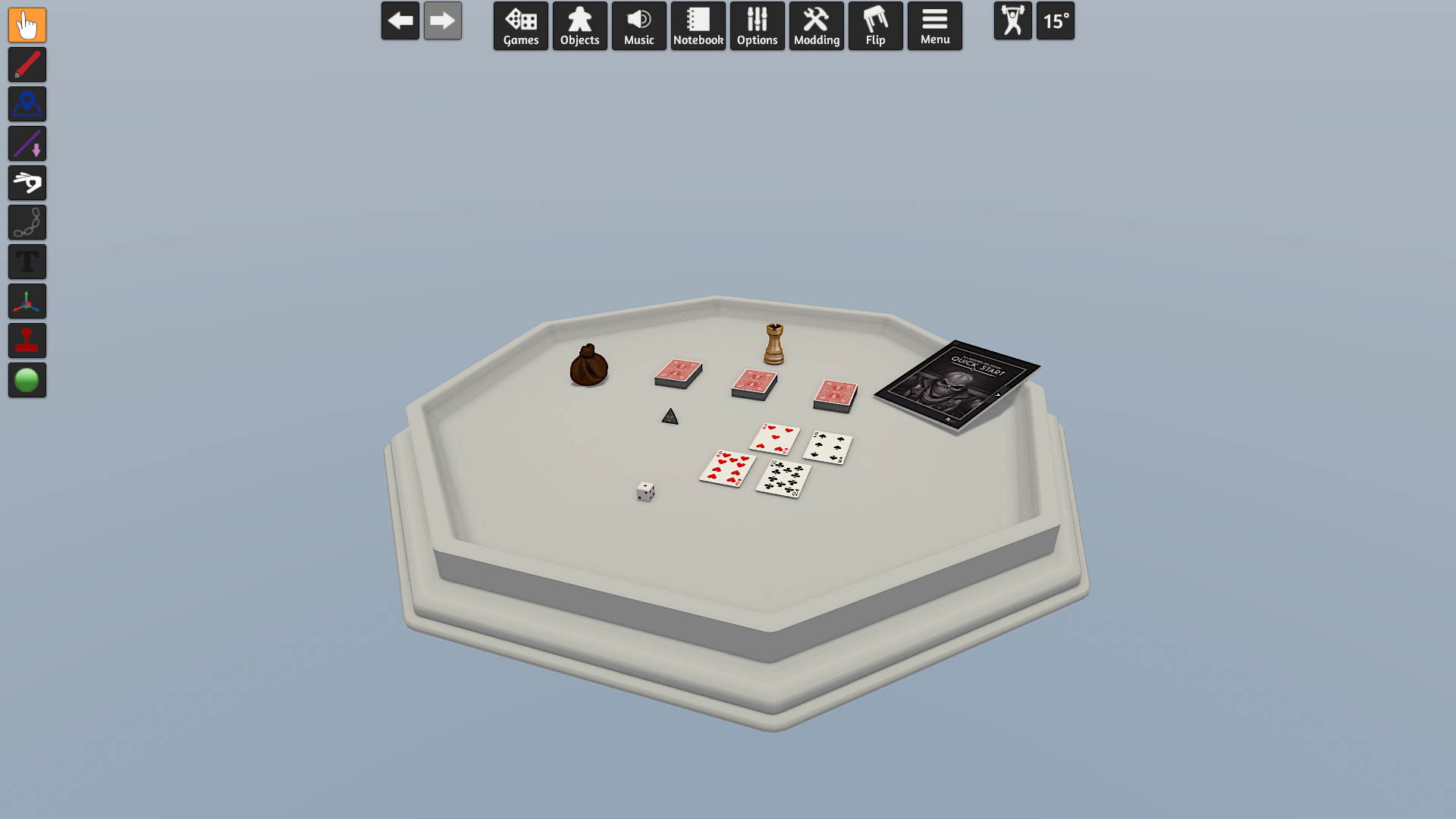
- Added Pure Mode, a simpler view of the table, tunable in the Theme Editor. Supports all built-in tables.
Pure Mode: Light Theme
Pure Mode: Dark Theme

Hand Zones
- On-screen Hand View now shrinks when you are not hovering over it.
- Optimized Hand Zones with lots of objects in them.
- Hands Zones are much snappier with their movement.
- Fixed issue where object you were holding would go below objects in your Hand Zone.
- Fixed sub components of cards/dominoes/pachisi (drawings, decals, attached objects, etc.) not hiding in hands.
Spectator View
- Picture-in-Picture window now allows you to interact with the game through it.
- For example, you could set it to look at a dice, and whenever you want you can hover over the dice and hit R to roll.
Physics
- Greatly improved the reliability of physics collisions especially for thin objects.
- Consolidated physics settings under a new menu called Physics.
- Gravity slider goes twice as high now for stronger gravity.
- Cards collider thickness is now the actual size instead of being much thicker.
- Cards will no longer stack if their scale differ by 15%.
- Made it so you have to be more precise when placing objects into a bag / infinite bag to reduce accidents especially on large objects.
- Revamped teleporting when objects fall off the table to now place it floating at the edge of the table where it flew off to reduce disruption.
Tags
- Revamped the workshop tags with a bunch more and now available in the new Options -> Info menu.
- These tags are now embedded in the save file and will be in the future searchable and filterable in-game just like the Workshop.
- New tags categories: Type, Game Category, Complexity, Number of Players, Play Time, and Assets.
UI
- Add an all search to the games menu.
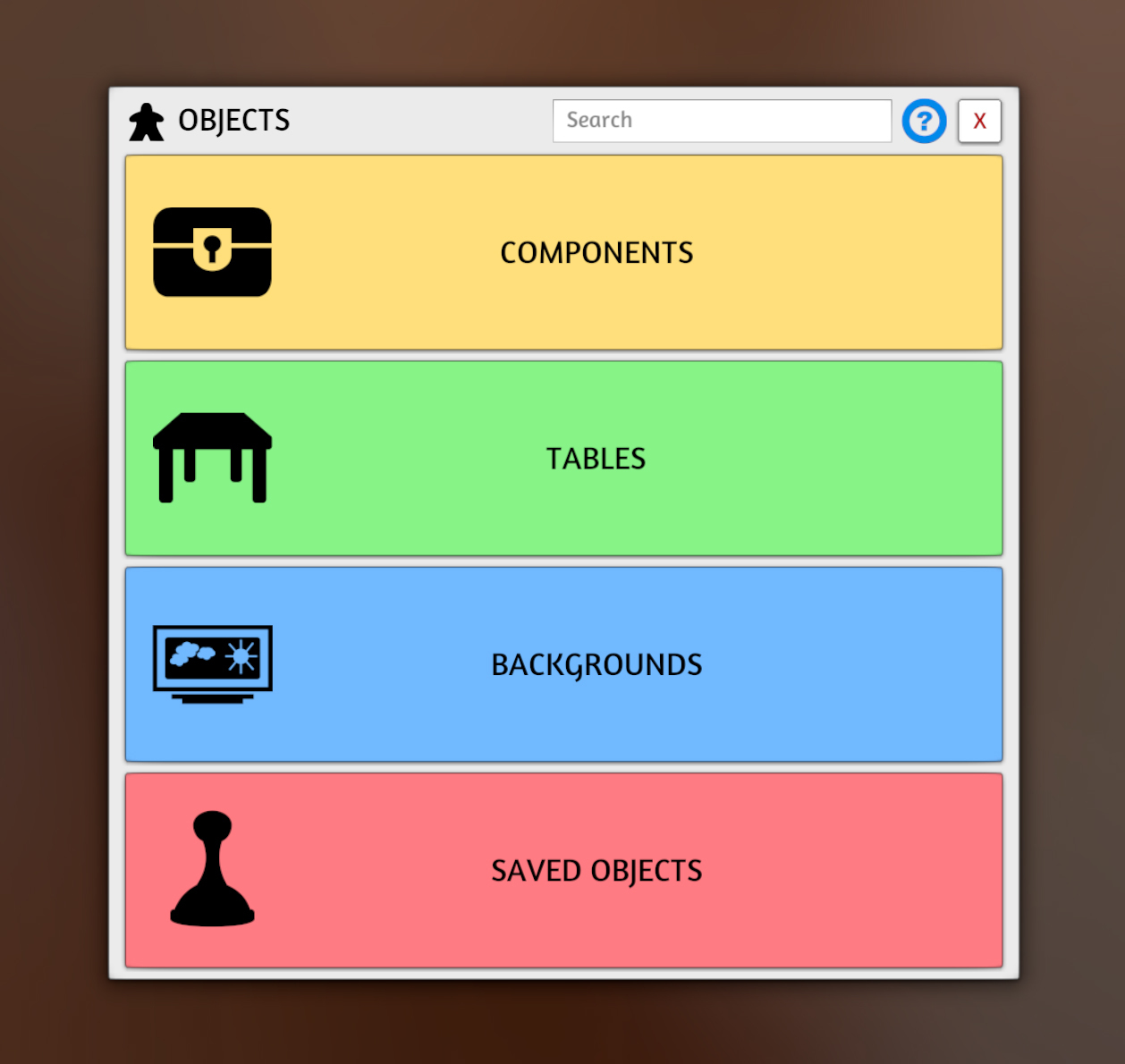
- Objects menu revamp completed by merging all Object Menus into the same menu that is searchable.
- Search for Games and Objects menu has been improved.
- Physics options have now been moved into Options -> Physics.
- When you have a folder open on the UI popup menus will have it default selected for you.
- Added hover icons for buttons and input fields for 3d Xml UI matching 3d NGUI.
- Added tooltips to Tablet UI buttons.
- Renamed vector paint to just draw.
- Can now hold down rotate snap point buttons for continuous rotation.
- Fixed Saved Objects that are wider than taller now save their thumbnails correctly.
- Fixed decks making shuffling sounds in the components menu.
- Fixed PDF popout window working at any UI scale.
- Fixed hand opening up like you can grab on a 3d UI element overlapping an object.
- Fixed scaling alt zoom on UI objects.
- Fixed performance issue when alt zooming objects on the UI.
- Fixed when having the Components -> Boards open causing snap in the middle of the table.
New Searchable Objects Menu
Custom Objects
- Added Custom Card/Deck shape types: Rectangle (Rounded), Rectangle, Hex (Rounded), Hex, Circle.
- Added Stand Up toggle to Custom Token, that stands the token up like a meeple.
- Optimized Custom Token to load instantly for images with no transparency.
- When updating an Custom Object, if there exists any objects with matching custom object properties, a popup will appear and ask if you also want to update them.
Lua
- Updated Color and Vector types: https://github.com/Berserk-Games/Tabletop-Simulator-Lua-Classes
- object.measure_movement - access the Measure Movement object toggle.
- Vector held_position_offset - position offset from pointer, lift height and object bounds still modify distance from surface.
- Vector held_rotation_offset - rotation offset from pointer. This in combination with held_spin_index and held_flip_index determine rotation.
- int held_spin_index - 0-23 value, 15 degrees Y axis. Upside down is 12, right side up is 0. Changes when a player rotates.
- int held_flip_index - 0-23 value, 15 degrees Z or X axis depending on the object. Face down is 12, face up is 0. Changes when a player hits flip or alt + rotate.
- Vector pick_up_position - The position the object was picked up at.
- Vector pick_up_rotation - The rotation the object was picked up at.
- bool held_reduce_force - When the Object collides with something while moving this is automatically enabled and reduces the movement force.
- Added Object.getData() and spawnObjectData({ data = Object.GetData()}), which is the same thing as getJson() and spawnObjectJson() except that is working with tables and you don't have to convert in Lua which should be more performant.
- Added type to getCustomObject() from cards.
- Fixed filterObjectEnter and filterObjectEnterContainer not working while game is loading.
System Console
- Added action_cut, action_deal, action_draw, action_flip, action_group, action_lock, action_randomize, action_rotate, action_search, action_split, action_state_next, action_state_prev commands, which will trigger that action on the currently selected object.
- For example, you could do bind f action_search, and then would open the search window.
- Fixed edit command messing up {` `} characters.
Fixes
- Fixed Fog of War sync on load.
- Fixed objects not revealing when being dragged out from underneath Fog of War.
- Fixed Cloud Manager not loading for people that had a corrupted cloud after uploading a save.
- Fixed Search and expand working with non decks that aren't loaded already on the table.
- Fixed black spectator hidden zone bug.
- Fixed SSAO not being enabled correctly for cameras besides main.
- Fixed bug with PDFs breaking in search / expand and dummy mode.
- Fixed networking issues with the attach tool.
- Fixed AssetBundle not hiding correctly that don't have a mesh filter.
- Fixed AssetBundles that are attached not having colliders.
- Fixed Fog of War cut paste issue.
- Fix FoW issue where the fog was not lifting for clients
- Fix FoW issue where the faraway objects were incorrectly not revealed
- Fixed color picker display of low-alpha colors.
- Fixed Attached Objects not getting converted when doing upload all on the cloud manager.
- Fixed up issues with stacking custom tiles as chips.
- Fixed rotation of cards in hands on the poker table.
- Fixed touchscript exceptions being thrown.
- Fixed timer sound not playing the digital clock.
- Fixed putting objects into the search windows for decks or bags not deleting the object for clients.
- Fixed visual objects now working decals in Search, UI, Attach, etc.