

Tales of Wild
The server has now been restored
About server fixing progress and follow-up compensation
We are so sorry for this long-term server outage, which had a great impact on players. While we are working hard to repair it, we are also preparing to provide players with a better in-game compensation package. The specific content will be updated later. published later.
Once again, I sincerely apologize for the server outage!
We are fixing the server data uploading problems, it may take another few hours
Server failure! we need more time to fix the problem
Temporary maintenance of server
Due to the overheating of the computer room, the server needs to be temporarily shut down for maintenance after receiving the message, which is expected to be completed in half an hour. Due to the lack of notice due to time constraints, this maintenance treatment will compensate spark hammer · dark night skin.
Notice about the adjustment of character and kingdom system
1. After being removed from the kingdom by the kingdom owner, the player can retain personal character data (status, Artifact, skills, Spells, etc.), including personal level and equipment, but cannot bring out any items that belongs to kingdom.
2. After being removed from the kingdom by the kingdom owner, the personal character data can be inherited to the player’s own kingdom. If you have already established a kingdom of your own, you can choose whether to replace the character data of the personal kingdom or not.
The relevant work may take two weeks due to various issues involved. During this period, if the owner removes members maliciously, you can report to the administrator through the official discord channel, and we will try to deal with it manually.
Quick answers to frequently asked questions
Solution: Try to delete the entire folder C:\Users\username\AppData\Local\TalesOfWild.
This directory can be accessible by running %appdata% through cmd to open the C:\Users\Admin\AppData\Roaming path of your computer. Then go back to the parent directory and enter the Local directory, delete the entire TalesOfWild folder.
Please try it, maybe it will help you.
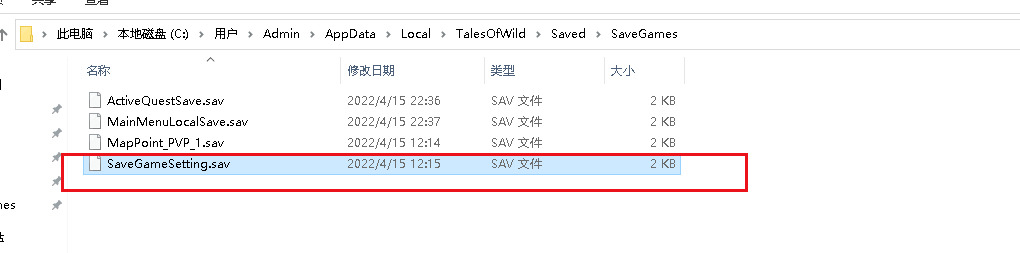
Delete the file that shown in the red box.
Prompt to download and install c++ problem: deal with the download and installation according to the prompt, download the Baidu network disk download processing package link: https://pan.baidu.com/s/1cSrFGTpOl4RDHJuMY99KdQ
Extraction code: e8pw
Q2: Other game crashes as below


Solution:
When encounter such UE4 fatal error, try to solve as below:
Try a low image quality setting.

1.Set FrameRateLimit less than 60,and turn on the VSync

2. Enter NVIDIA control panel,and select “Use the advanced 3D image settings”

3.Switch to “Manage 3D settings”→”Program Settings”,select(or add) Cultivation Tales.exe startup file

Setting
Triple buffering On
Anisotropic Filtering Off
Low Latency Mode Ultra
Texture Filtering-Quality High Quality
Save it
Notice,
After conducting tests, this method can solve the rendering crash problem of some computer configurations, which can not be completely solved. AMD users need to adjust similar settings by themselves
The official apologized for the server problem in the release of "too wasteland"
Thank you for your feedback to the players who support the purchase for the first time and then give a bad refund. I'm very sorry to bring you a bad experience. The production team never dreamed that the players were so enthusiastic about our game that we made a serious mistake in estimating the number of players, resulting in a server crash. This is our problem. You are right. After our game is improved, you are welcome to return at any time.
For the players who have been patient and tolerant to us so far, thank you for your support. We promise that as long as the game doesn't die, we will always pay attention to the feedback and improvement of players, Polish slowly and update frequently, and live up to your expectations.
Today, many players can't log in because they receive the "version is too low" prompt when logging in. For this, we have made urgent troubleshooting and repair for the problem. At present, the pressure bearing capacity of the server has temporarily reached a balanced state, and players can log in normally. We are also working hard to solve the problem of waiting in line. I'm very sorry for the inconvenience caused to players by the forbidden behavior of the official QQ group before. Please believe that our original intention is not a cold prohibition, but an emergency. The first reaction is to avoid swiping the screen and let players miss the notice uniformly sent by the administrator. I hope you will understand!
Thank you again for your tolerance and support for "Taihuang Chujing". I'm ashamed that our small studio has limited capacity. After today's events, I don't dare to boast that there are no problems at all, but what we can guarantee is that we will actively collect feedback and try our best to solve and improve problems at the first time. As long as we can live, we will update the game until the producer is bald and the studio can't live!
We hereby declare that we will not run away! Can't run! Can't run!
For the experience impact caused by this accident, we have brainstormed the compensation scheme for players, and we will give back to you to apologize at that time.
Thank you again for your tolerance and support!