This is probably one of the most important updates we've ever made. Not to be too overdramatic or emotional, but having an automated ladder system was the entire dream of this game from the get-go. You see, this game started off as a mod on Insurgency called Resurgence. It was a total conversion mod for Insurgency that created an entire 3rd person mode along with a robust server infrastructure that offered stats, rankings, and a custom clan ladder. We had our own website where players could register their clans, send/accept challenges, and schedule ladder matches.
These players would then join any set of "war servers" where they could type "!ready" in the chat, and if the remote website could find a scheduled match, it would reserve the "war server" for that match, almost like going to a basketball court in a public park and starting up a game. It would download the entire roster list, prevent any players that weren't on the rosters from joining the server, and automate the entire match process. You couldn't switch teams, the maps were already preset, and everything just ran according to the rules of the ladder.
However, this system was very limiting because it required a set of pre-allocated servers to basically just "sit around" waiting for people to claim them. It wasn't scalable, and couldn't be rolled out on a mass scale. But it was literally at this exact moment that we saw the future of what we were trying to create. It was essentially the complete merger of both SOCOM and GameBattles, where clans could play ladder matches without the need to have the losing team "report the loss" or require a staff of admins/referees just to deal with all that bullshit.
And it is today that we finally have the modern re-creation of this system, one that we pioneered over 9 years ago on Resurgence, fully working and integrated into OUR OWN GAME BUILT FROM SCRATCH...Task Force! So without further ado, we present to you, the Task Force Competitive Ladder System!!!
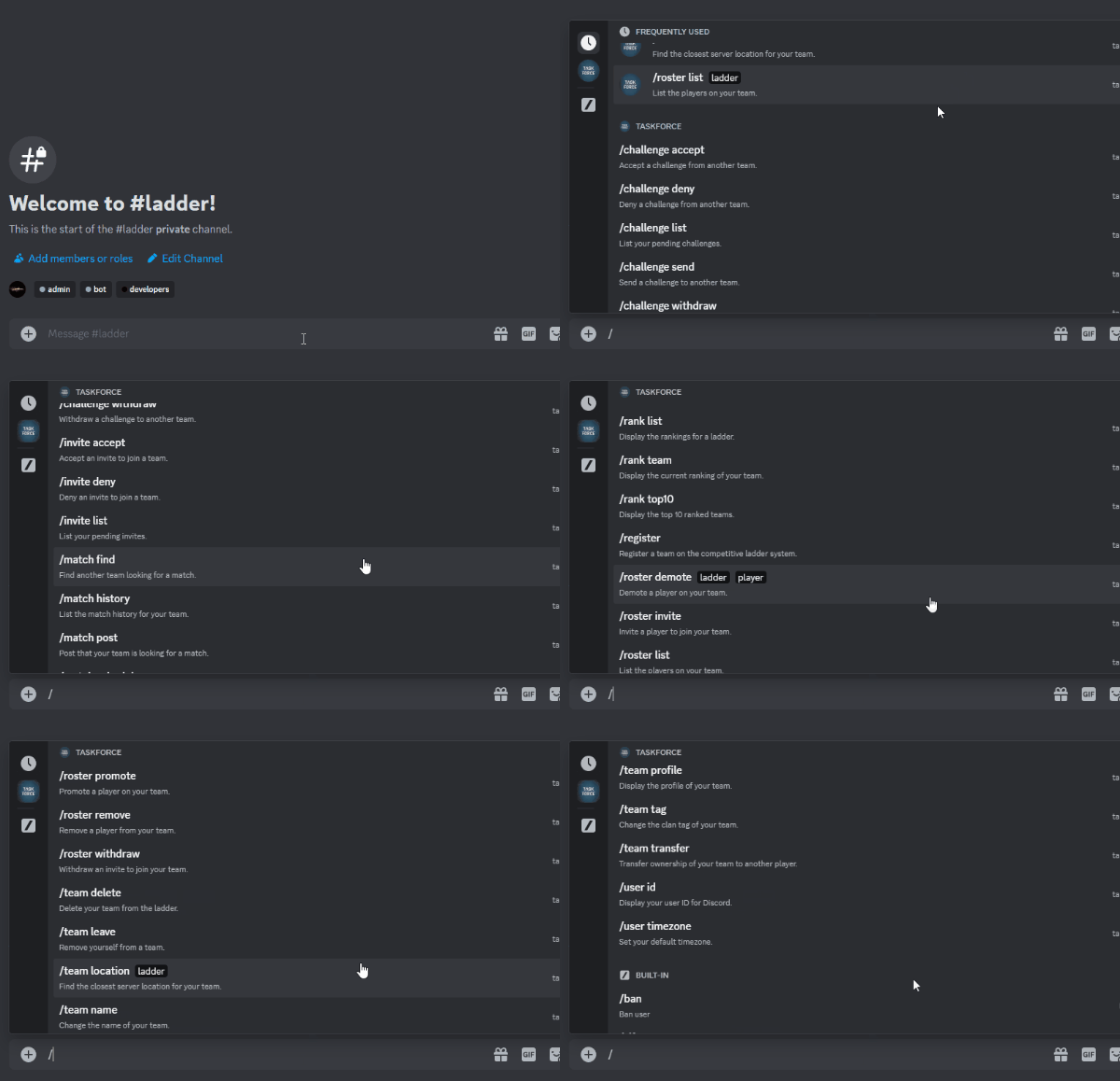
We've setup an entirely temporary system that allows complete access to the ladder via a Discord Bot. That means you can access the ladder even while on-the-go from anywhere, using the Discord mobile app. This system will eventually be integrated into the game itself, with custom menus, ect.
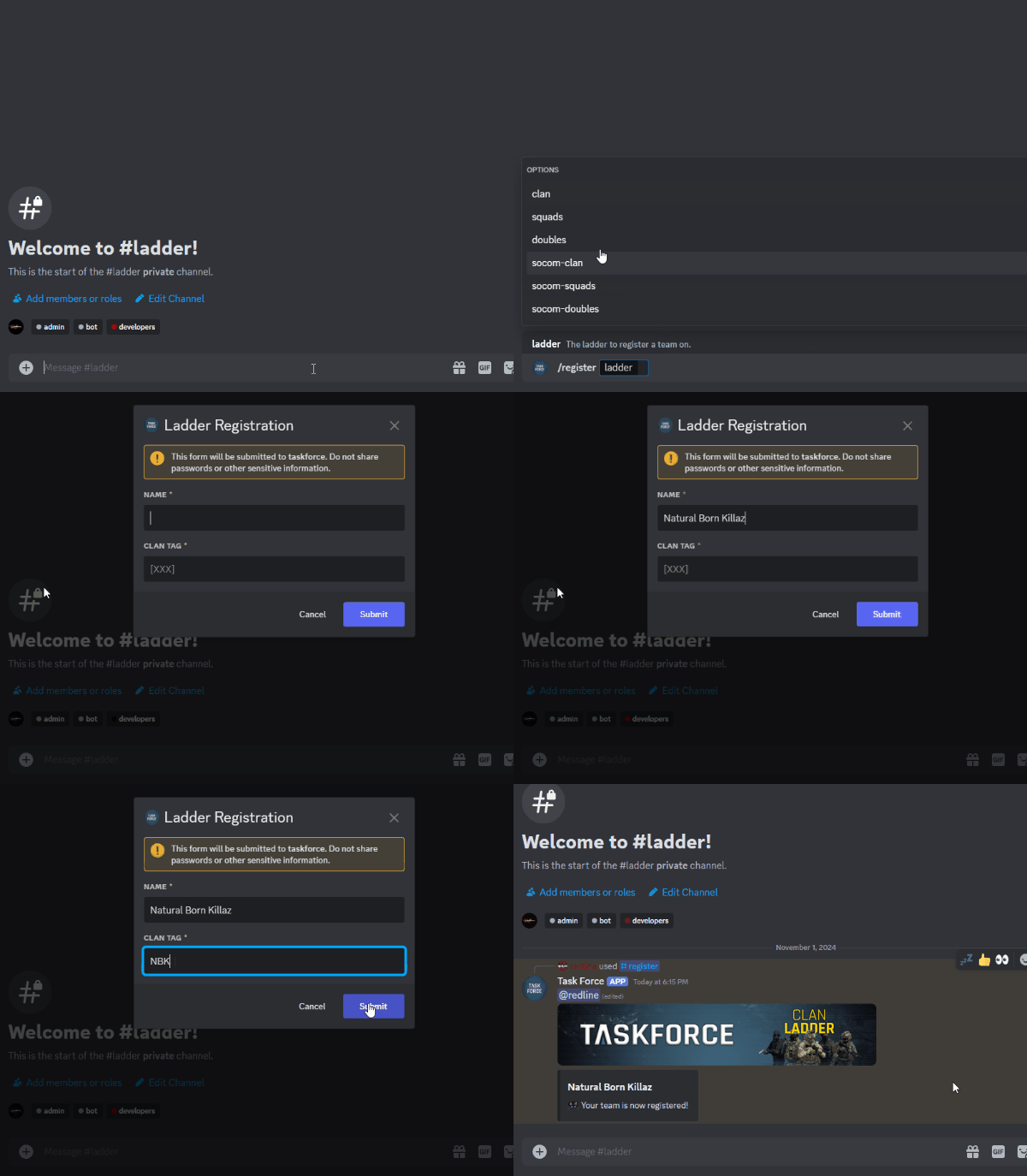
You start by registering a team using the `/register` command in the chat. You can create any type of team you wish, whether it's an entire clan, squads team, doubles team, or singles profile. If you're registering a clan, you can reserve a clan tag on the ladder that NO OTHER TEAM CAN USE. It will be unique to your clan, and only members of your clan will have this tag.
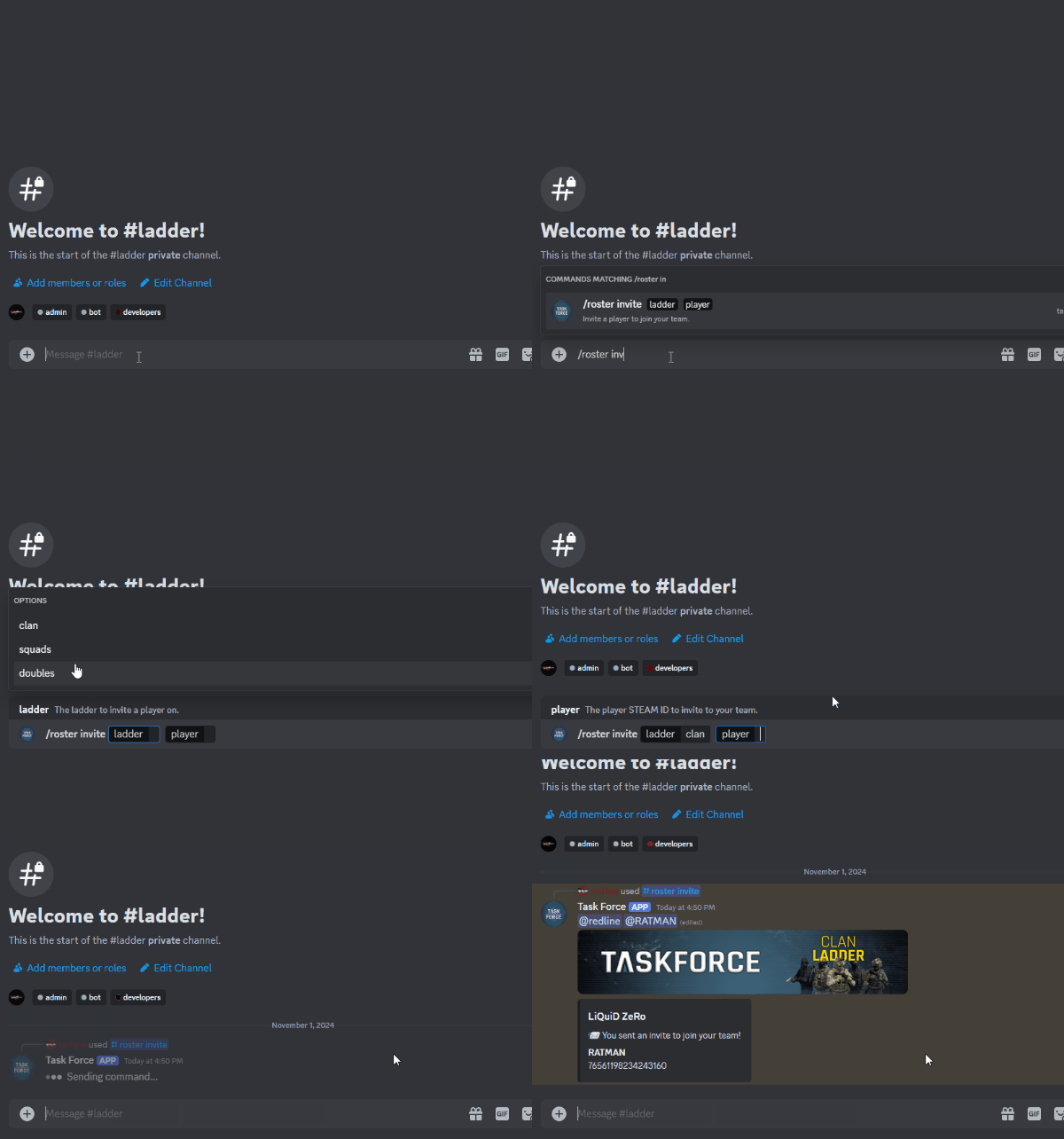
You can then send roster invites to other players in the game using their Steam IDs:
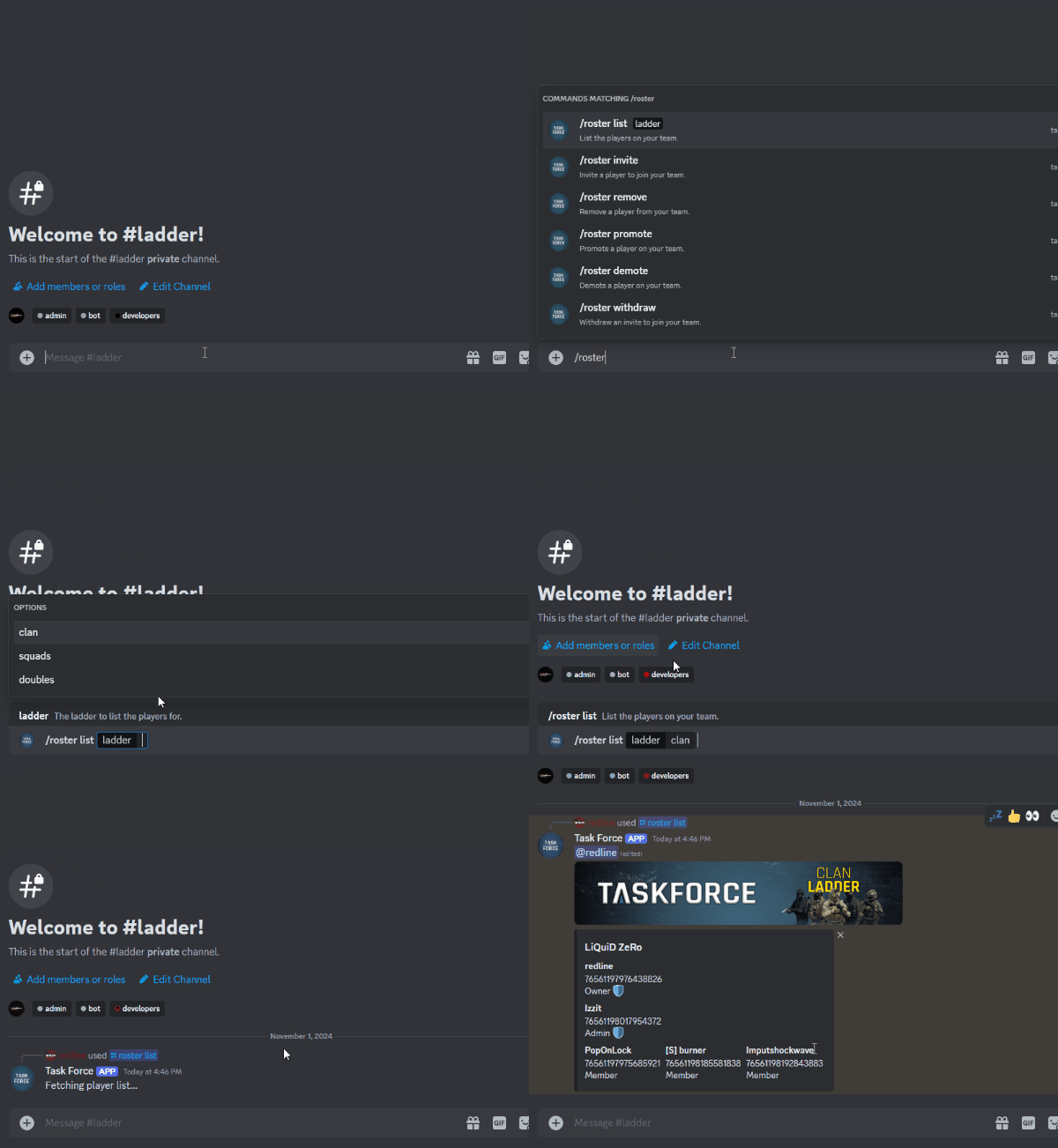
You can use the `/roster list` command to view your roster for a specific ladder type:
You can also promote members to "admins" so that they can send/accept challenges and schedule matches for your team, since basic members do not have the ability to manage your clan (and can only play in scheduled matches). Most importantly, to reduce the abuse of "ringers" you must register a player 12 hours in advance prior to a match for them to be on the roster for that match.
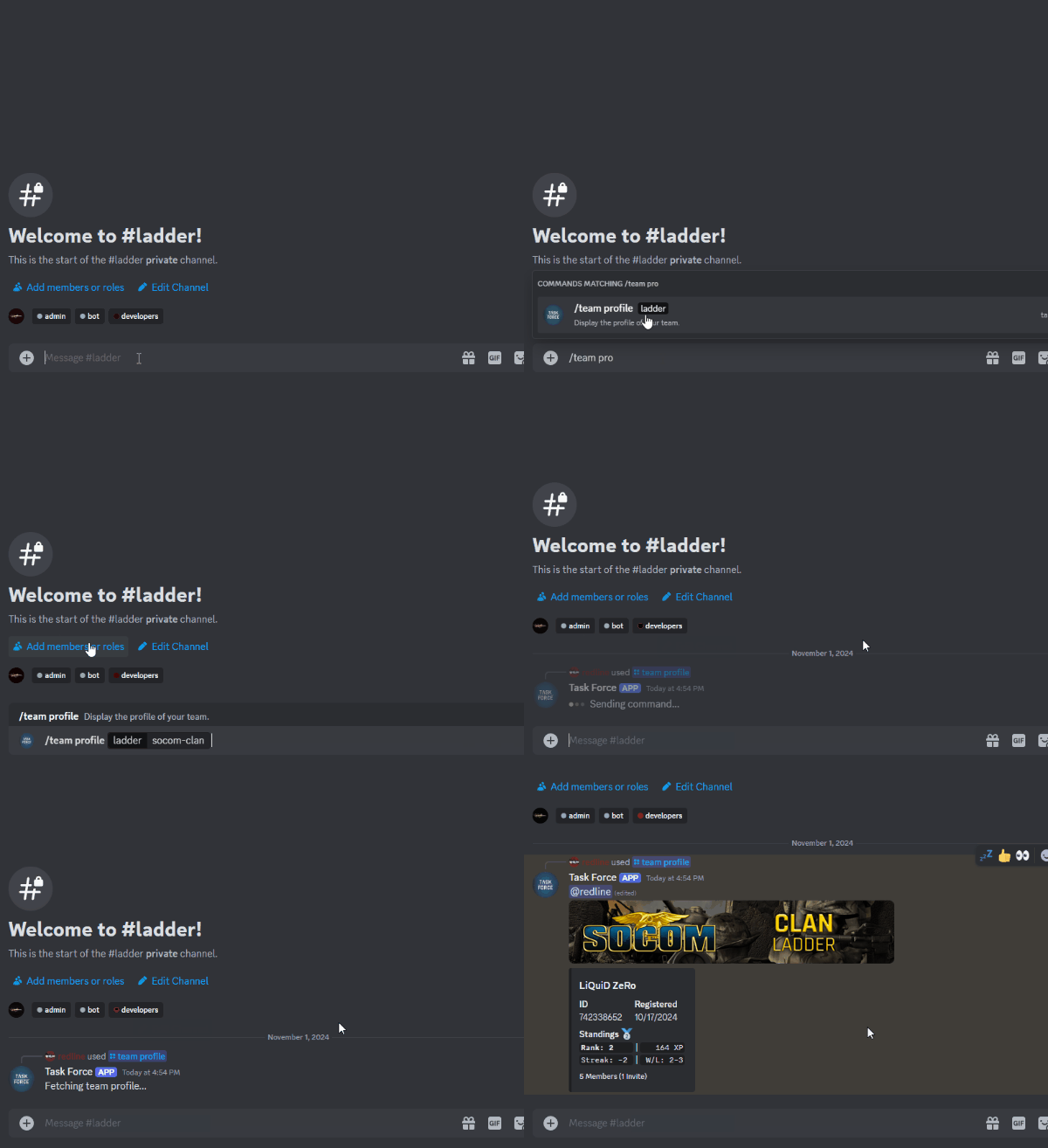
You can view the current stats/ranking of your team using the `/team profile` command:
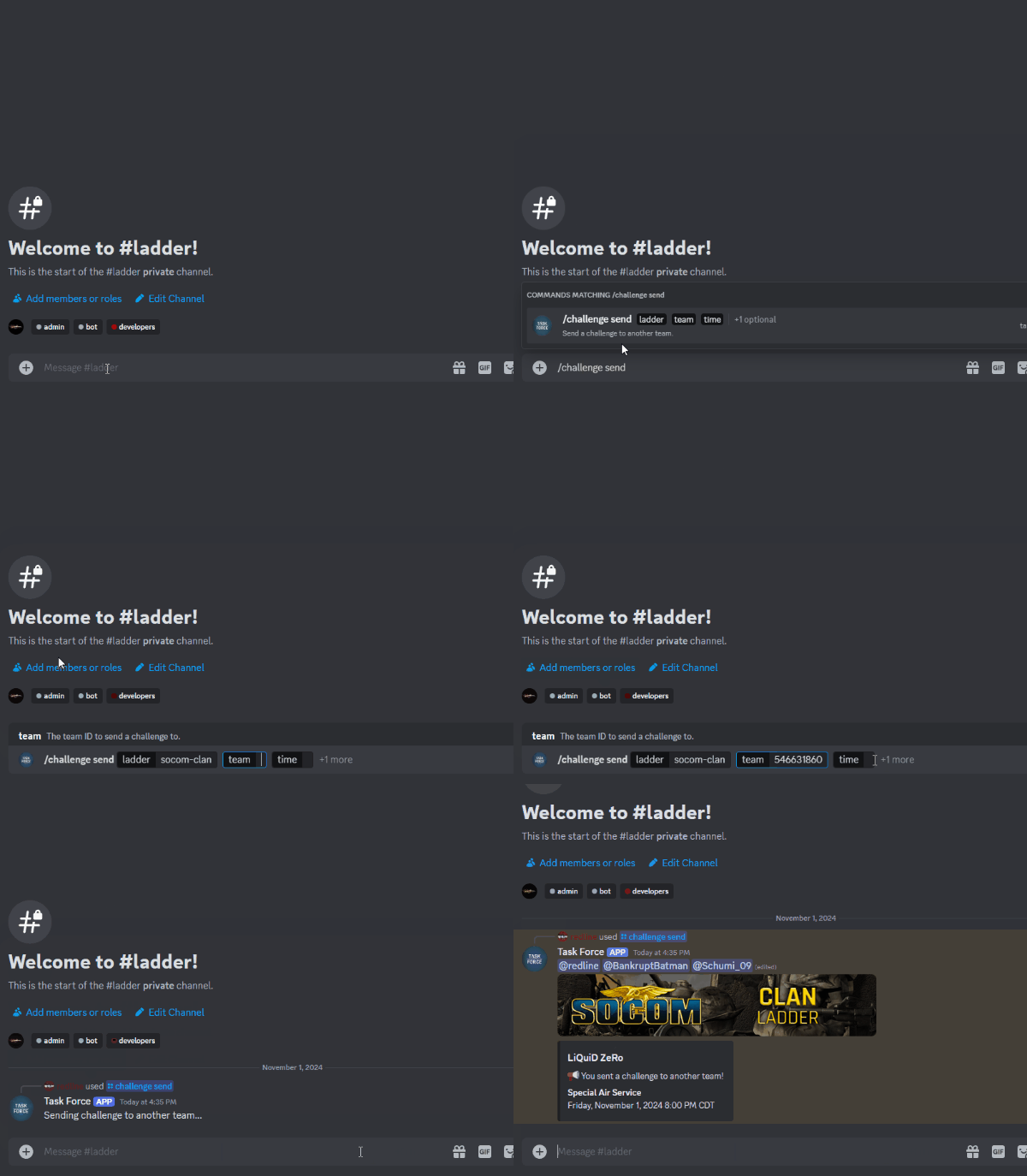
Once you post on the match finder and organize a scheduled match with another team, you can send them a "challenge" using the `/challenge send` command:
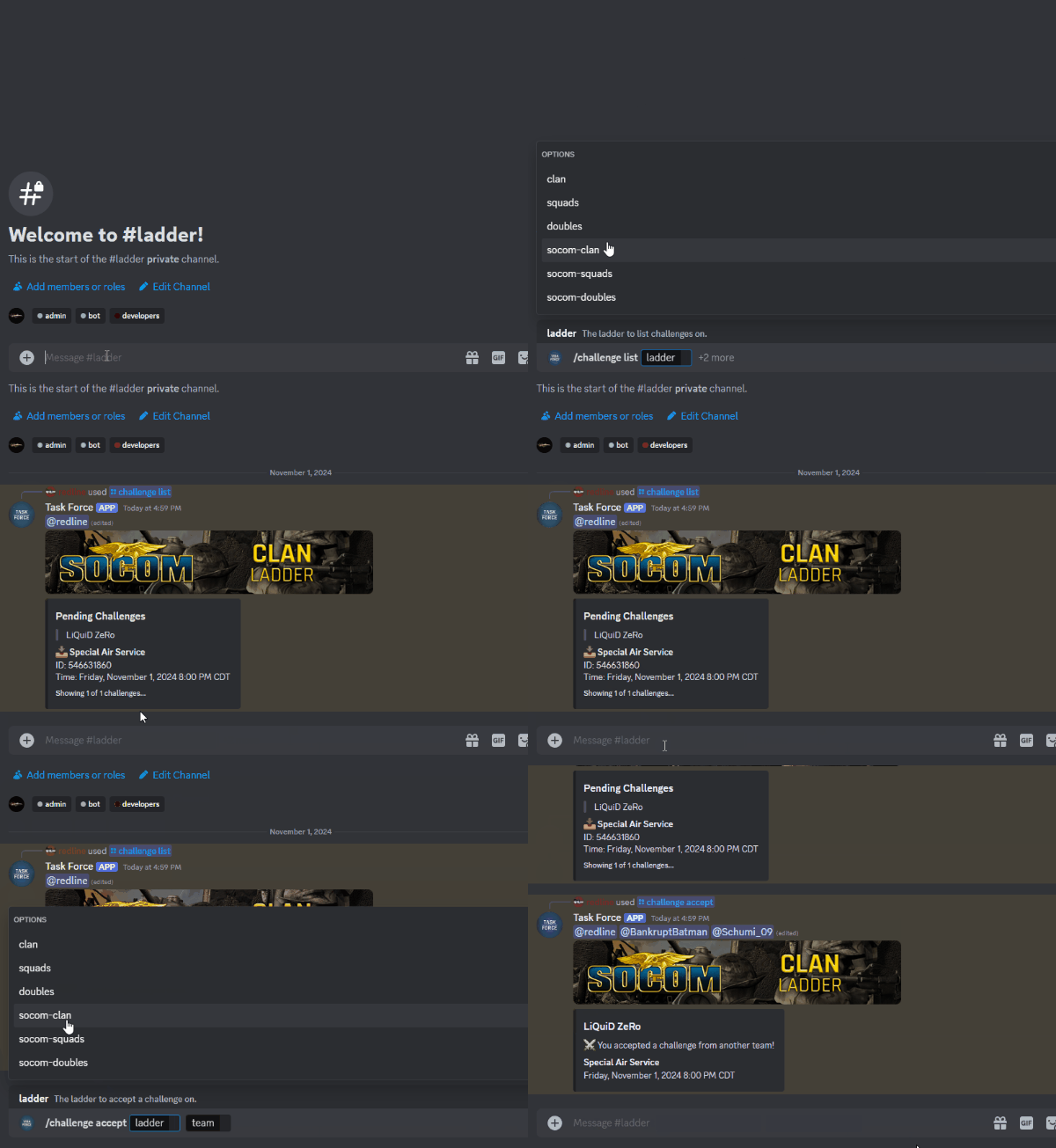
The opposing team can then "accept" this challenge using the `/challenge accept` command:
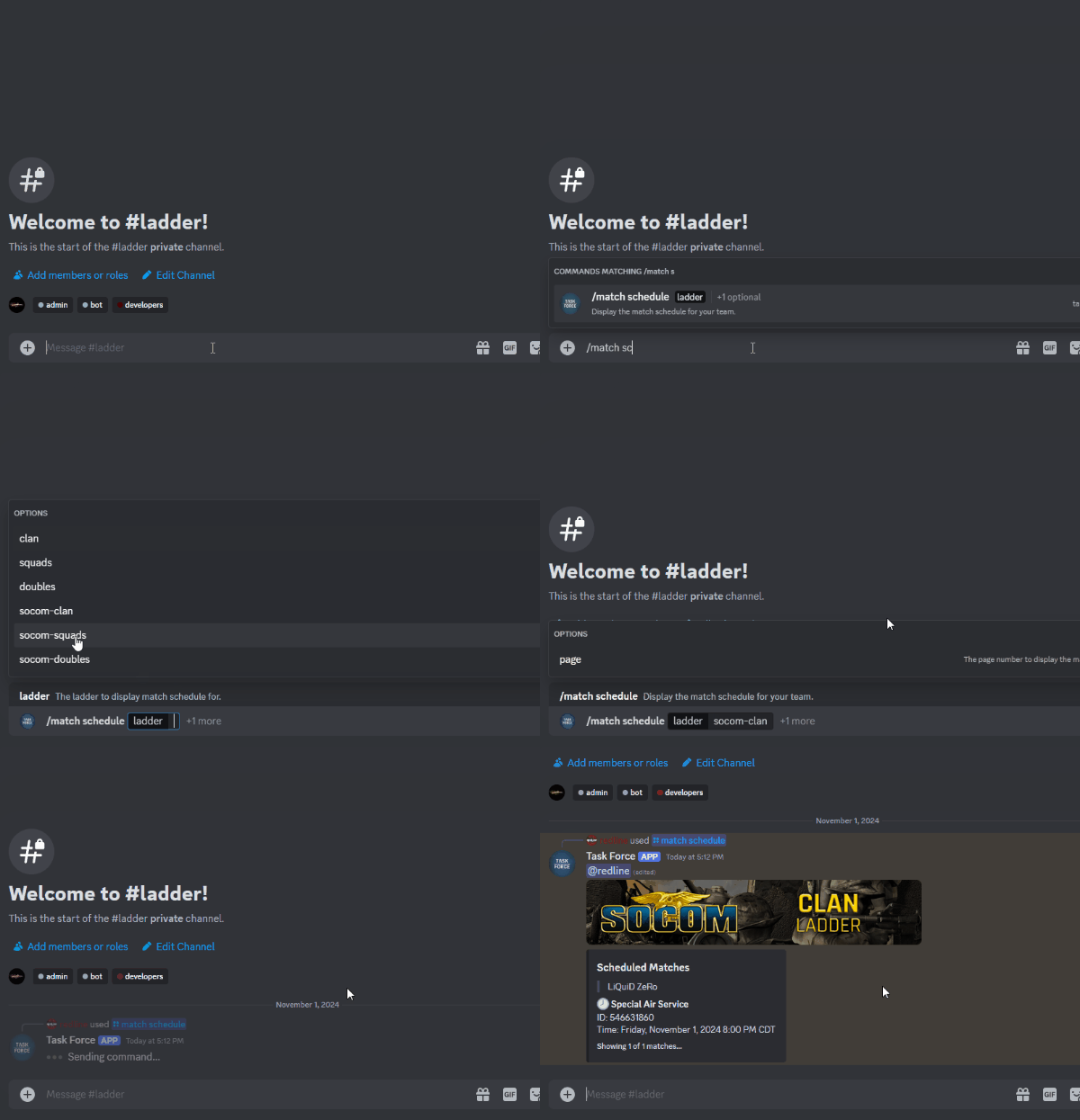
Once a challenge is accepted, an official match will be scheduled on the ladder. You can check the upcoming matches for your team using the `/match schedule` command:
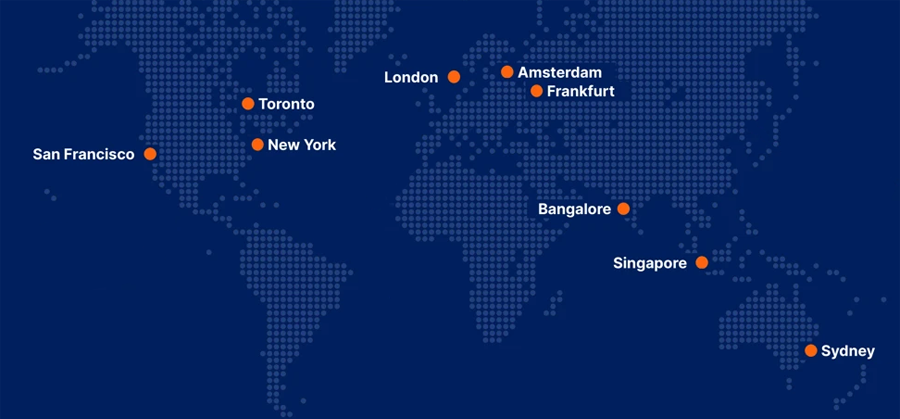
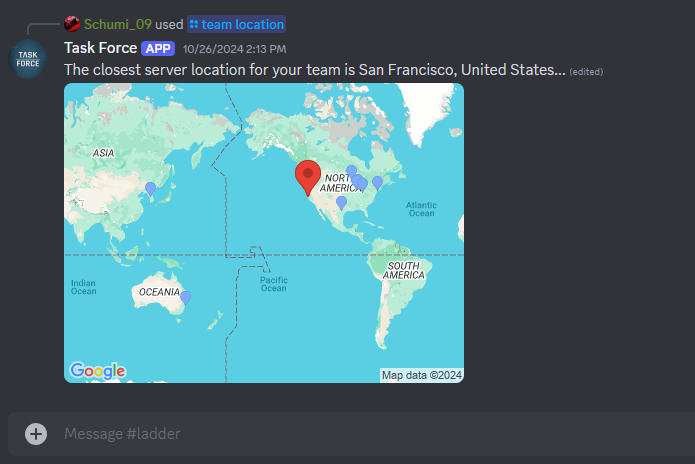
Now that a match is scheduled, here is where the real magic happens! When it's close to the time for your match, our entirely AUTOMATED SERVER INFRASTRUCTURE will just create a server for your match, INSTANTLY! We've setup an entire geo-location service that calculates the optimal location for the server, based on the location of all the players on each roster:
It will automatically cross-reference this information with your entire team along with the entire opposing team in order to select the most optimal server location for everyone in the match:
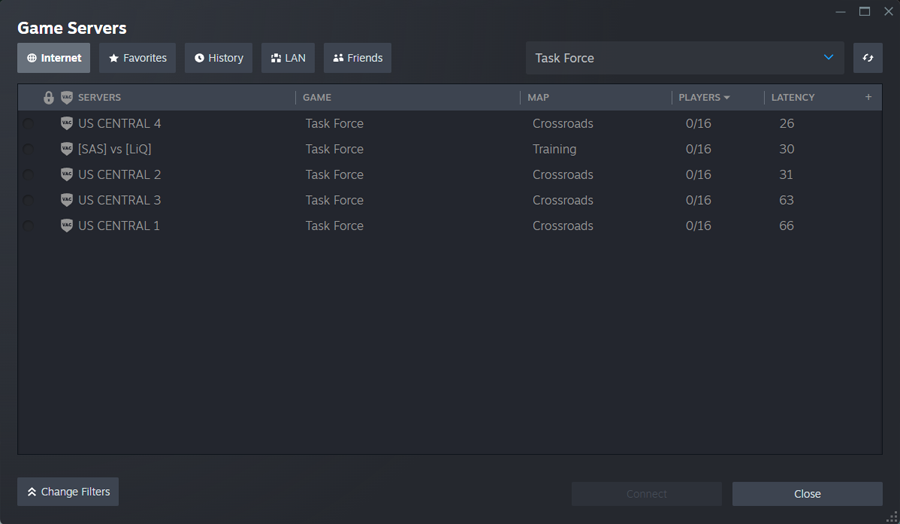
You just boot up the game right before your match is scheduled to start, and you'll see a server for your teams. Nobody else can join this server, it's completely restricted to only the authorized players on each rosters, so no password or anything is required to join:
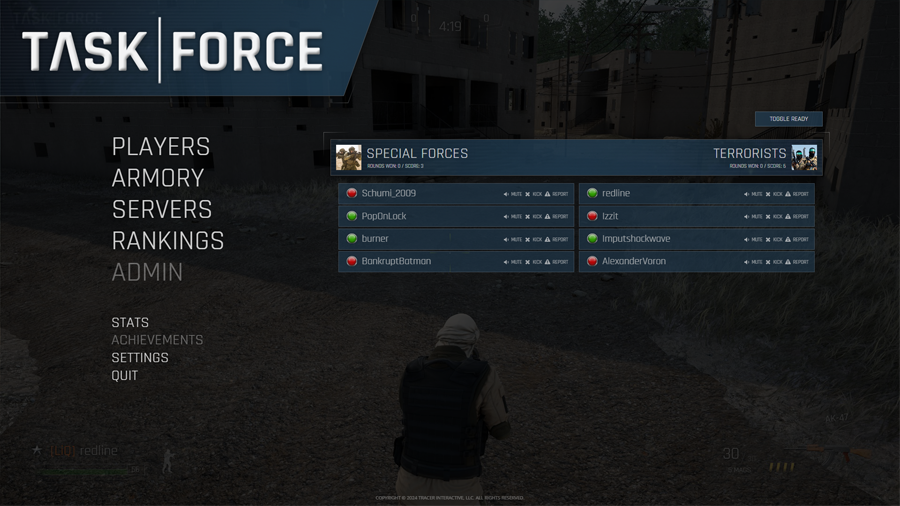
Once in the match server you'll be in a temporary "respawn lobby" where everyone is waiting for the match to start. You can go to the "players" screen to see a bunch of "green up" icons, where each player has to "green up" in order to start the match. After every player in the game is ready, the match will start:
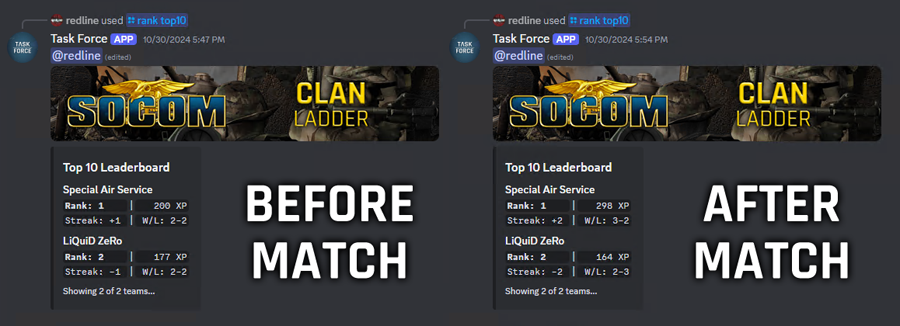
Then you just play out the entire match, without worrying about anything! After the match is over, all the stats data will be logged for the match, including the final outcome of which teams won/lost. The losing team DOES NOT need to head over to the website to "report the loss" it just does everything automatically:
Once the match is over, the server will be automatically destroyed after 5 minutes, so that more servers can be created for upcoming matches. And that's it! The process is really that simple, it's an entirely AUTOMATED LADDER SYSTEM!!! Just the way we dreamed of it many years ago, now finally ready for testing! If you want to get in early and help test the new ladder system, be sure to join the official Task Force Discord for more information: discord.gg/zGha2gtFzX
Task Force 0.6.7.2078
This update includes a temporary workaround for a critical issue with accelerated paint that would cause some players with both dedicated and integrated graphics (usually laptops) to experience a "black screen" when booting the game. You would still hear the main menu music in the background shortly after the opening logo animation, but the entire game screen would remain black.
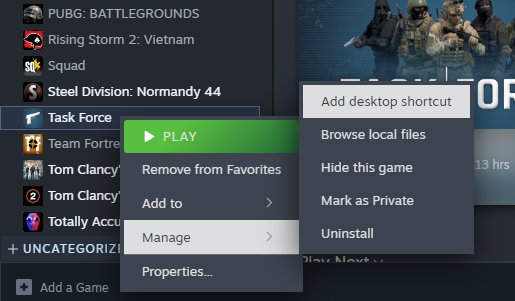
We now have a workaround in place that detects when accelerated paint isn't working and will show a temporary popup to reinitialize the user interface with accelerated paint disabled. This means users experiencing this issue can now play the game without needing to create any kind of annoying desktop shortcut. We still plan to actually fix this problem in a future update, but for now at least players have a way to get around the issue without having to troubleshoot anything.
The update also addresses a few performance-related issues that were encountered in the previous update. We rolled back a few important changes and then slowly re-implemented them with our testing group to figure out what was causing the problem, and now performance should be back to normal.
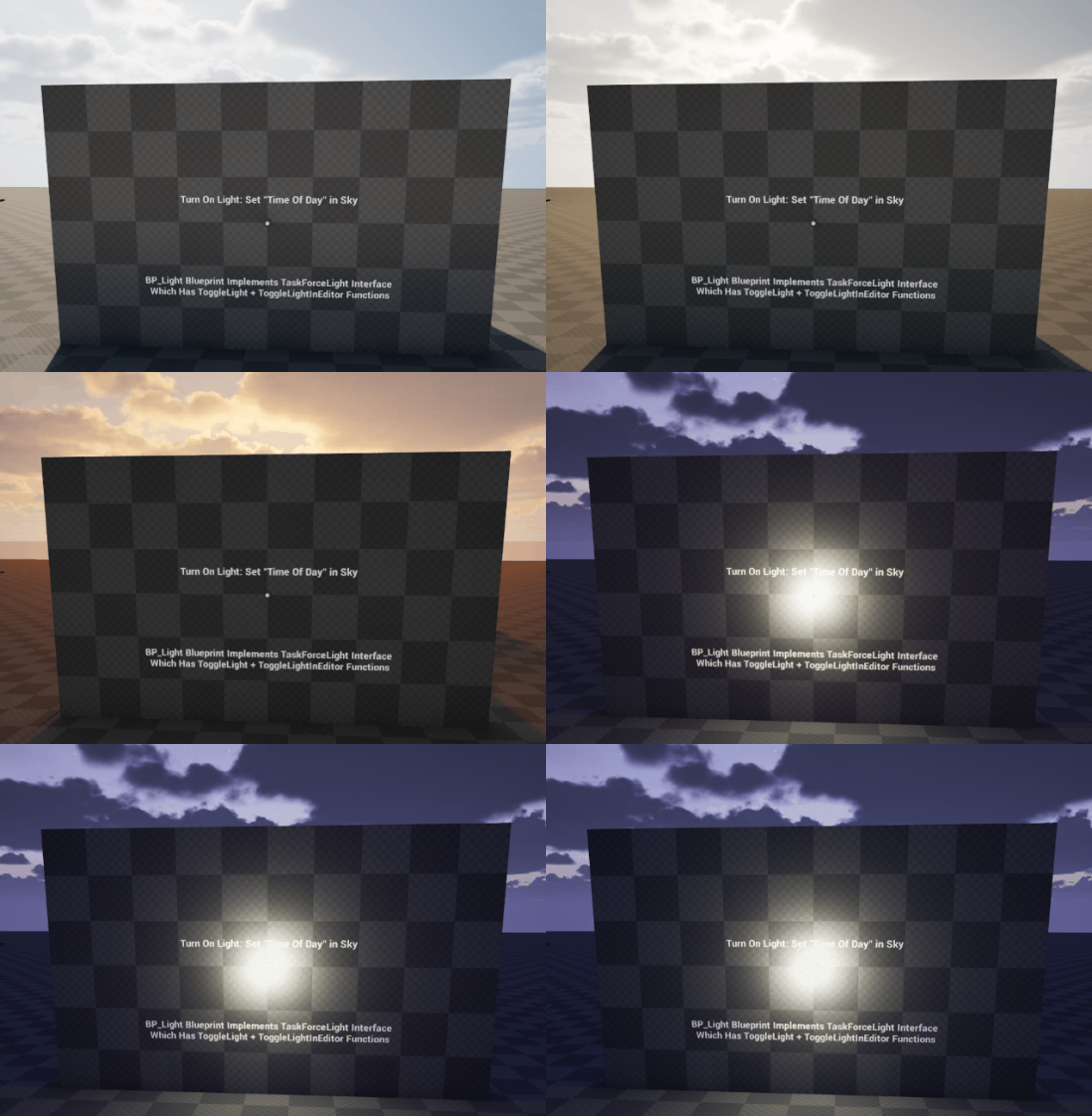
There's a new TaskForceLight blueprint interface that we've added to workshop projects as well. This allows workshop mappers to setup environments with lights that will automatically turn on and off based on the "time of day" when using the built-in sky system that comes with the game.
Finally there's an all new update system integrated into our custom workshop launcher. You can now update your workshop projects with the click of a button, rather than needing to create a new project entirely and move your files over.
This makes updating workshop projects a lot easier than before, and everything is carefully outlined in the documentation on GitHub:
This update makes some very significant optimizations across various systems. The character rotation system, which sends quite a lot of data, has now been optimized so it no longer floods the network (as it was the first thing to start dropping in low bandwidth scenarios). The audio systems for bullet impacts and footstep sounds have also been optimized. This means footstep sounds or impact sounds will be completely ignored when they aren't within a certain radius of your point-of-view. The automatic level bounds system has been updated as well to include the "relevant to level bounds" option within the engine, which provides workshop mappers with more control over determining the bottom of the map.
The "audio glitch" has been fixed! We've completely removed "bink audio" so it can no longer cause us any problems. Previously if you played for a certain amount of time (or a lot of audio data was being loaded) it would cause your weapon sounds to no longer play. This means you would hear bullets impacting around you, but even though you saw your weapon firing it wouldn't make any sounds. It also was the primary reason your game would crash. This issue even required a full restart of the game in order to fix and happened quite frequently. So having it corrected is a major step forward towards being ready to put the buy button back up on the store.
We've made a very significant optimization pass on our petrochemical plant map. It should now get a much higher FPS than before as we're now properly instancing many of the modular meshes used throughout the map. There's also an initial optimization pass performed on our military outpost map since the landscape and road meshes were causing extreme FPS drops and preventing the map from being tested.
The climbing system has been updated so you can now press your action button to "pull up" when hanging on a ledge. Previously you would have to either move forwards or backwards to either "pull up" or "drop down" but this wasn't very intuitive for new players. So now when hanging the climb system will display another popup that says "press to climb" for those that are unaware of the existing gameplay mechanics.
An issue where death replication wouldn't trigger has now been corrected. This would occasionally cause players to go into T-pose rather than ragdoll after dying. It was due to some network replication delays but should no longer be an issue. Another bug was also corrected that would cause your weapon trigger to get stuck when spamming buttons. This should no longer happen since the weapon system doesn't have the ability to artificially delay shots anymore.
Finally the workshop system has been updated so you can setup custom "player skins" without actually including any skins at all. This means you can customize the audio queues of the existing character skins that come with the game. Therefore workshop mappers can now include custom grenade callouts and dynamic voice taunts as well. However keep in mind that using voice taunts before the round is over will give away your position on the map.
Task Force 0.6.5.2041
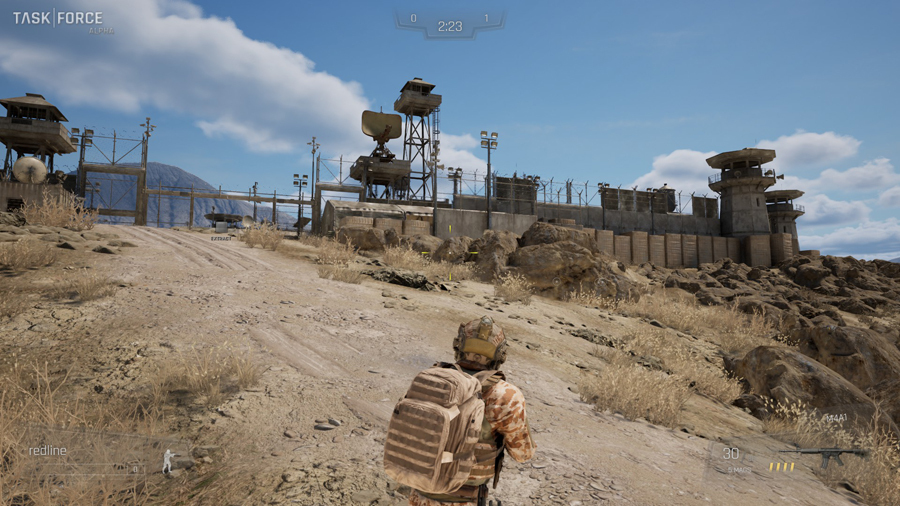
This update includes a ton of new Unreal Engine 5 assets that we're testing. Here's an example of a new map we're planning for a military outpost:
There's also dynamic weather that we've setup so the map is sometimes day time or night time, which will automatically enable/disable dynamic lighting such as industrial lights and spotlights.
We plan to add a lot more assets over the coming weeks as well. This should make the game feel fresh and up-to-date prior to re-releasing back on the store.
This update also addresses a critical issue with throwables falling through the ground when landing in water. It fixes a problem with footsteps as well that caused them to sound as if they're behind the player when spectating another player.
Task Force 0.6.4.2037
This update fixes a critical bug with water volumes interacting with bullets and the new lean mechanic. If a player was leaning in water it would cause them to "go sliding" due to the lean pushaway system hitting all the water. It was also not possible to shoot through water using the current bullet mechanics. We've now corrected these issues and leaning in water should no longer be a problem and bullets should currently ignore water completely until we implement proper penetration mechanics and particle effects for this special case scenario.
The update also includes water noises when the player is moving through deep water. These sounds will scale based on the depth of the water and trigger whenever you're moving or turning in water.
Finally this update addresses an important issue with footsteps sounding as if they're behind the player. We've corrected the problem and the new footstep audio system should properly keep these sounds in front of the camera for the currently visible player.
Task Force 0.6.3.2034
This update fixes a critical issue with water replication. There were some inconsistencies with the networking between servers and clients with these new movement mechanics, so now these issues have been addressed. We've also utilized the integrated water system that comes with the engine for determining water depth which means custom water volumes are no longer required since everything just automatically works now.
We've addressed another issue with workshop maps that prevented certain engine assets from loading due to the content not being part of the game. Now workshop mappers should be able to utilize all types of water assets without having any broken materials after cooking and uploading your map.
Task Force 0.6.2.2028
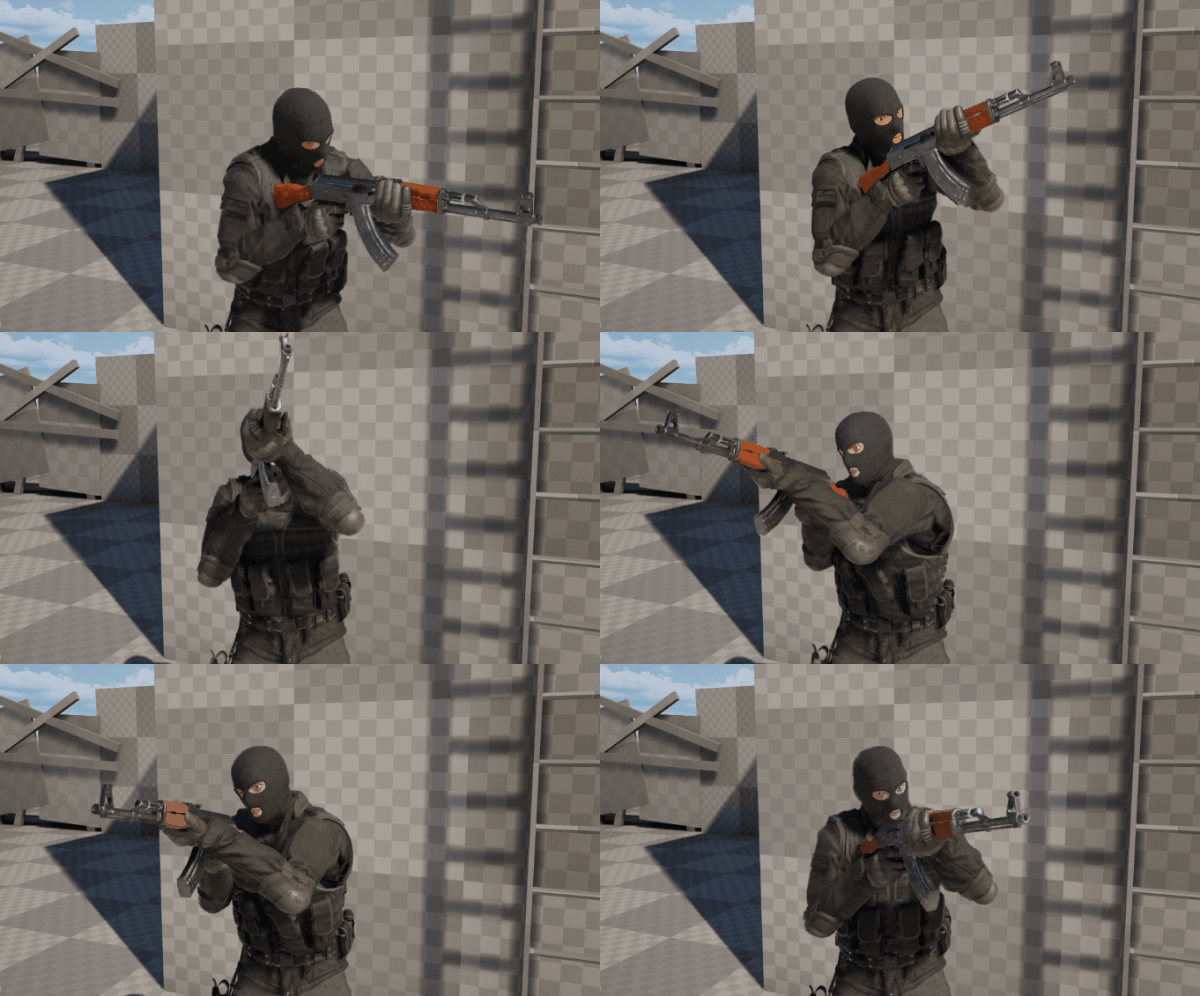
This update overhauls all the animations for the new leaning system. The character will now keep their feet more planted and actually moves the weapon to the left when leaning to the left. So now your "other right" (left) can finally shoot around corners too!
Please note this is a slowed down view of the animation. We also have an all new ADS system coming in a future update with new FPS arms along with sights, scopes, and snipers. So until then the animation only needs to support hip fire for the time being.
The update includes all new water mechanics as well. There are now "water volumes" available which slow down player movement based on the water depth. If the water is not shallow enough then you will be prevented from proning. The same goes for crouching where you cannot crouch in water that's deep enough to put your weapon underwater. In both these situations the movement system will automatically force the character to stand up.
If you find yourself in water that is so deep you cannot even stand in it without your weapon being underwater, then you will be killed with a "has drowned" killfeed message. So don't tread out too far!
This should prevent players from abusing water areas on various maps. The footsteps system has been updated as well so that you make proper splashing sounds when moving through shallow water. However we haven't setup any special effects for deep water scenarios just yet, such as ripples and whooshing noises.
We've setup buoyancy for ragdolls too!
There's also a new water blueprint that's available for workshop mappers to designate which areas of their map consist of water. In a future update we'll include more buoyancy support for other physics-based objects as well.
Finally the update addresses an issue with footsteps not registering when running downhill on certain types of objects. Now these sounds should register a bit more often, but there's still some testing and fine tuning required for things such as staircases.
Task Force 0.6.1.2015
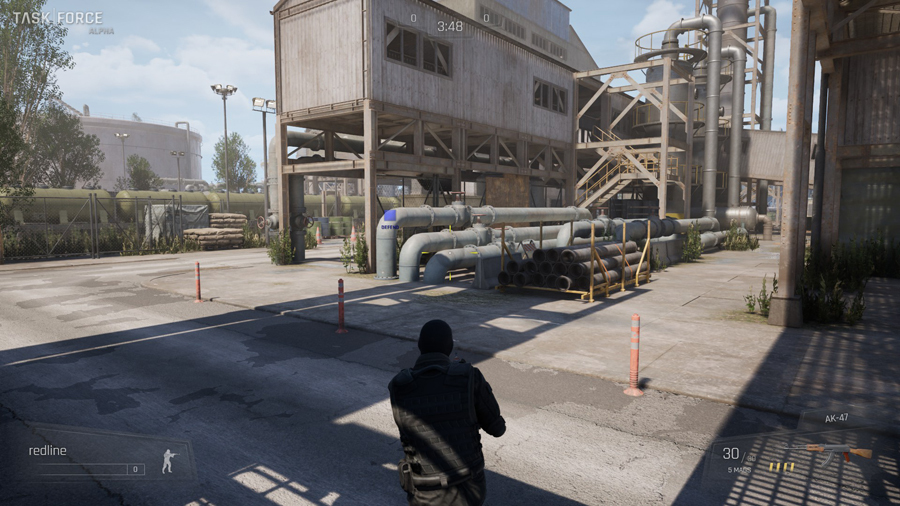
This update includes a ton of new Unreal Engine 5 assets that we're testing. Here's an example of a new map we're planning for a petrochemical plant:
There's also dynamic weather that we've setup so the map is sometimes party cloudy, raining, or even an all out thunderstorm.
We plan to add a lot more assets over the coming weeks as well. This should make the game feel fresh and up-to-date prior to re-releasing back on the store.
The update also makes some critical changes to explosive forces, which will apply most specifically to grenade damage priorities. The previous system would just randomly loop through each player on the map and didn't provide any concrete output in terms of the order that players were killed.
Now explosive forces will apply any and all damage to each hostage or VIP inside the damage radius before applying damage to each individual player based on their distance. This means an explosion will damage the closest player and then work outwards applying damage as a real explosion would. However this also prevents players from abusing the mechanic by killing a player first even though that explosion would have actually killed the hostages or VIPs as well.
The update implements a new system for console messages that allows dedicated servers to redirect output to clients. This is very important to admin commands as there was previously no information being provided when a command was submitted, which made it quite difficult to know why a command wasn't actually working.
We've added an automatic AFK kicking system that monitors whether or not players are actually playing each round. If a player is AFK for a certain period of time the server will kick this player while still allowing them to rejoin, whereas the admin kick command would prevent the player from rejoining for a certain period of time. There's also a custom disconnect message that says that player was "kicked for being AFK" rather than "disconnected" so other players can know when someone was kicked automatically rather than by an admin.
There's now a physics restriction on weapons when dropping them to the ground which limits the speed at which they can move. This should prevent weapons from flying very far or unrealistically whereas they should now fall to the ground more appropriately. We've also added some important debug output for the new user interface system as more DirectX 12 functionality is built out behind the scenes until we make the switch back from DirectX 11 later this year.
Task Force 0.6.0.2001
This update changes the default renderer from DirectX 12 to DirectX 11. We're making this change because after extensive testing we've determined that the game runs smoother this way without really losing too many new UE5 features that we don't necessarily need right now. That's because we value performance much more than graphics, even though we want to make a game that still has good graphics. So until we update from UE5.2 to UE5.4 later this year for some extensive performance updates to DirectX 12 in UE5, we plan to keep everything defaulted to DirectX 11 until then.
If you would like to test the game on DirectX 12 then you can use a special command line parameter via a desktop shortcut in order to launch the game in this graphics mode:
There are still some significant benefits to DirectX 12 along with many optimizations that save developers time so they don't have to optimize their assets as much. So by falling back to DirectX 11 you do lose some of these newer benefits, and it's worth trying out which mode works best for your current system. But again based on all of our tester feedback it appears that DirectX 11 was the preferred renderer a majority of the time, with players noticing very little change in how good the graphics actually looked.
This update also overhauls the entire audio system with some very significant optimizations and reorganizations. We've setup audio priorities for every single audio sample in the game so the engine can know which sounds are most important in order to prioritize them over others to ensure they always play. This is because audio engines are limited by a certain number of channels that they can mix together before the engine has to start choosing which sounds to play and which sounds to drop.
The weapon optimizations are very significant as we're no long spamming the game world with audio and particle components to simulate weapon fire. Instead we now have a much more robust system that properly cycles through preallocated audio and particle effects that repeat in order to simulate the effect of constant firing. This should make the shooting feel a bit snappier as the entire system is now using a lot less resources. We've also added new "dry fire" sounds to the weapons which should trigger when you try to fire the weapon when it's out of ammo.
We've included accelerated paint support for DirectX 12 now as well. This means the DirectX 12 user interface will be just as snappy and quick as the DirectX 11 user interface after our previous update last week. This means accelerated paint mode is being officially rolled out across both rendering platforms and ensures that your web-based user interface (a web browser floating on top of the game engine) works at full 4K 60FPS. That's because the underlying system is now sharing a live texture from the web browser with the game engine, which allows for instant graphics copying rather than the extremely slow process that previously had to go through the CPU. Now that everything stays on the GPU the entire user interface system is extremely quick and snappy compared to before, and will work just as fluidly at 4K resolutions.
This also means we've removed the temporary 90 FPS cap in the game, which was in place to prevent the game engine from overloading the web browser and causing the entire user interface to lock up. Now with accelerated paint we no longer have to worry about the game engine and the web browser fighting for CPU power, and you can run your entire game now with a completely uncapped FPS if you'd like.
We fixed a critical issue with workshop blueprints breaking between map changes. This caused doors and other workshop components to glitch out and have multiple copies on the map, because the "fake" ones that are used in-editor to place around were accidentally showing up in-game when they shouldn't. This also made it difficult to pick up the bomb at times as it would appear that there were two different bombs on the ground. The grenade arc has been fixed up as well and should now no longer appear overly dark or create any kind of "glowing" effect in the game world. We've also disabled all post processes on workshop maps which should prevent custom maps from using undesired features such as motion blur, film grain, vignettes, auto exposure, and more.
This update makes some very significant performance optimizations for Steam Deck. We've completely reconfigured the entire graphics system in UE5 for Steam Deck with automatic detection of the platform and implementing default settings that provide a smooth gameplay experience on Steam Deck. There's even special graphics modes that we're using to provide the best performance possible which would normally not be necessary on PC, so hopefully these updates really help to provide the best experience possible on Steam Deck.
A small issue in the training map was corrected where you'd keep your weapon from the previous round. This should no longer be the case in the training map anymore. Another bug was also addressed regarding the HUD completely freezing. This was not because of any user interface issues, but because of a certain data connection breaking between the server and your game client. However there's still some extensive testing required for us to confirm this issue is indeed fixed, as there might be more to it depending on how testing goes.
The "map" command has been fixed so that it will now look for existing maps in the maplist prior to loading the requested map. This allows the command to maintain the existing round timer and total rounds from the maplist rather than using the default 3 rounds as was previously happening. It's also very smart in that if a map appears on the maplist multiple times but with different game modes, it will actually pick the proper settings from the maplist that match the desired game mode rather than picking the first match in the maplist.
Finally this update overhauls the entire collision and physics of the third-person camera. We've added an entire "smooth gliding" system that prevents the camera from stuttering or glitching out for quick instants, which especially happens when running through doors or underneath other objects. Now the camera will pop forward but slowly slide outwards to create a very subtle effect that allows the player to focus more on their aiming and less on their camera collision.
Task Force 0.5.16.1986
This update makes some significant performance enhancements to the user interface system. We are now using something called "accelerated paint" in order to provide a much more responsive and snappier UI. However this system is currently only in place for DirectX 11 and is not finalized on DirectX 12, which means you would have to manually switch into this graphics mode for the time being. However this is a huge step forward for us to ensure we have a user interface that runs smoothly at a similar FPS to the game.
There's also been some adjustments to smoke grenades, which should now deploy faster than before, as the timer has been reduced by 1 second. We've added some new graphics commands as well to disable some newer features such as virtual shadow maps via the graphics_vsm command.