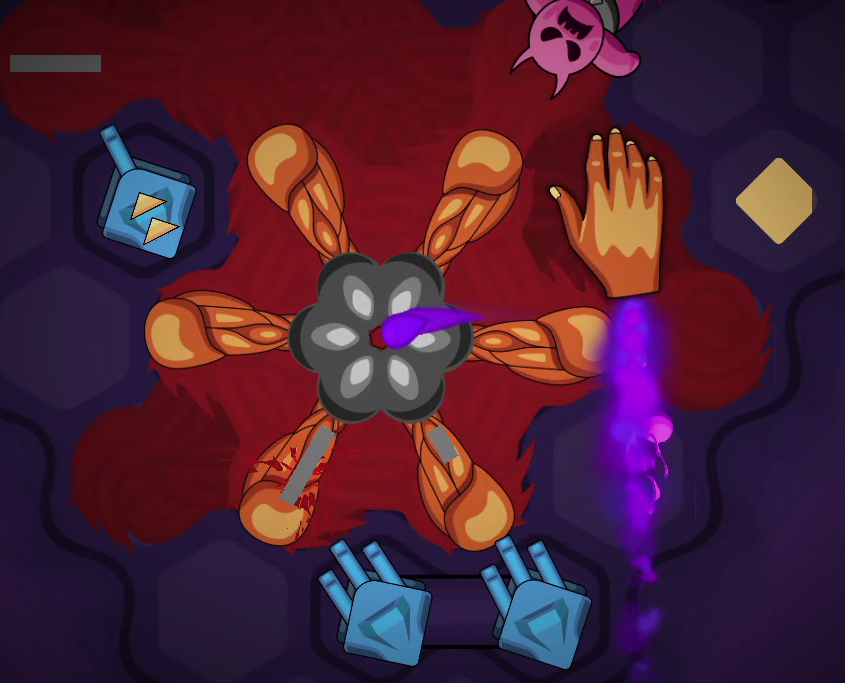
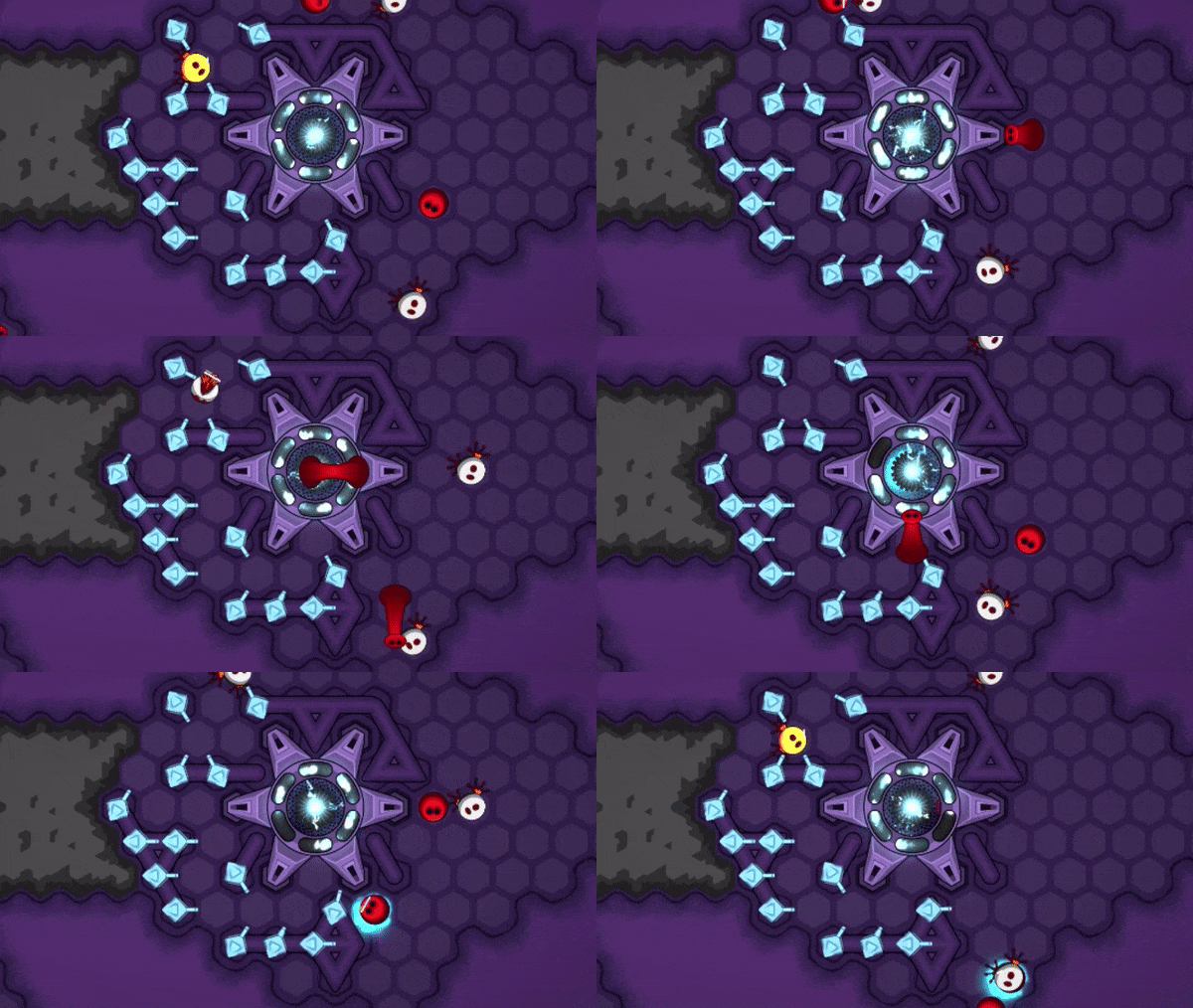
In the past iterations of this game, I had implemented a certain kind of mechanism for the enemy to destroy tower. It was usually in the form of some big enemy that will go around killing the towers. Recently when I wanted to implement the same functionality I tried to think how it could be made fun and how it could serve multiple gameplay purposes. That's how the Demon hand was born.
A restless hand roams around the map doing things on whim. One of them is trolling the towers. It takes fancy to a certain tower. It will approach it. Ponder for a few moments making up its mind. If it doesn't like the look of the tower, it will turn into a fist and crush the tower in an instant. This may destroy the carefully crafted maze of yours, thus leaking a flow of enemy to your precious cores at the most inopportune moment. But the hand may as likely loose all the interest in the tower and spare you the agony. Who knows!
But that's not the only thing it's good for. Whenever the enemy gate you are attacking is about to fall, it issues a rescue call to any demon hands that might be listening. Yes, this hand is also a good listener. Upon receiving such a call, the hand will drop everything that it's doing and will fly to the rescue of the gate. It will carefully lift the gate up and relocate it somewhere else.
The gate will be restored to its full health. Its enemy waves will be reset too. Now you will have to kill it all over again. But as it nears to another explosion, it will again call the hand for rescue and will be rescued once more. Unless... you have already destroyed the Demon hand.
This Boss has added several key aspects to the gameplay than just adding to the difficulty.
As you will find out, there are multiple strategic solutions to winning on such maps. Sometimes, you have to kill the hand first. But other times you have to kill the gate even though it will be rescued by the hand.
You have to build a more resilient maze that will have some redundancies. This way when the hand crushes some of the towers, your maze won't leak the flood of enemies right away. A more robust plan, will give you time to repair the damage done by the hand.
Without the Hand the gameplay has a "rushing" kind of quality to it. The enemy waves keep getting stronger and stronger. You have to destroy the gate as soon as you can. However with the introduction of the gate rescue and respawn mechanism, the enemy waves reset. This lull in enemy action opens up new strategic opportunities.
For every match there's a minimum number of cores that you have to save in order to win. However that number is not very meaningful so far. This is due to the ever-increasing intensity of the enemy waves. Even if you are required to typically save 4 cores, as soon as you loose one or two cores the energy production reduces. In many cases this leads to eventual defeat. It just takes longer. However the gate respawn and reset fixes this flaw. Even if you loose a few cores and your energy production drops, the gate might reset next and you will get another chance to gain upper hand. In the maps with Core Mint, you can even replenish the lost cores.
That's all I will say about the new Boss for now. You will have to try it for yourself to really understand the new tactical layers that it adds.
There are 3 new levels in Sector 2 that feature the Demon Hand. Check them out.
Other changes
2 new levels were added in Sector 1. "Merry go around" - This is a more fun level that introduces the player to Pyro tower. "Jumping Jack" (a new level that uses the old name), that introduces the Worm enemy for the first time.
Some levels were revised to highlight the new mechanic they are introducing. ("Honey Squeeze" that introduces parachutes, "No straight lines" that introduces the Rollers, "Deer head" with more sprinters in it)
Fixed the editor brushes for water, lava and hard ground, so that the preview of tile being drawn is rendered correctly
New VFX for tower destruction. There are now 3 ways in which a tower can get destroyed - 1) you can manually reclaim them 2) creep can flood them 3) Demon hand can crush them. For each case, a special VFX was added that fits the cause of destruction
Extra creep - A map can now have extra creep. Until now the creep was only sourced from the emergence of enemy gates. But now there could be some extra creep on the map. You will find a new brush in level editor to draw the creep. This could be put to more creative uses than you think.
The creep health parameter is now specified per level, instead of per enemy gate. This was required in order to implement the extra creep feature.
Added maxOverseers slider to the level. (Overseer is the eye in the sky that spoils the towers)
Reorganized some sliders in the level editor to make better sense.
Updated the discharged battery color in Core Mint
Healing effects now douse fire
Updated skydrill cursor with a hex shape
Performance improvements - After some profiling I discovered some expensive segments of code running every frame. It was the code in Worm's hop analysis. It was causing FPS drop every time the worm would hop. It was introduced in the new path finding library introduced in last build. It was fixed. Moreover some other algorithmic changes in enemy movement helped improve the overall performance.
This feature took a bit longer than I thought. But I managed to do some more bits besides the main thing too.
This was the final game mechanic that I wanted to add. Now I'm going to focus on more level design. So you expect new levels in next few weeks. I've also made some progress on Steam workshop. Coming month is going to be exciting as Dofense comes near to the final release.
Stay tuned. Play the game. And let me know your suggestions.
Have a happy weekend everyone. Cheers!
Devlog: What's coming next?
Hi all,
It has been a couple of weeks since the last release. I've been working on a new feature. I was hoping to finish it by now, but it'll take some more work. This will be the last game mechanic before the release of the game. This mechanic will allow for longer battles with some fun elements. It's a new boss which has the ability to destroy towers and do some other nasty things. But is quirky enough to be fun. After this mechanic is done, I'll be able to focus on adding more levels.
I've also started working on the Steam workshop support. It'll be ready soon too.
Until then, stay tuned and play Dofense.
Cheers!
v0.11.0 - Cloud Saves, New Pathfinding AI, 2 new levels
Hi all,
The new build is here. v0.11.0.
Two highlights: Cloud Saves and new Pathfinding AI
Cloud Saves
Your game progress and settings are now saved safely in the cumulonimbus. When you install the game on a new machine your progress and settings will instantly rain there. Automatically! Thank you Steam.
New Pathfinding AI
As you may have read in last week's post, I have replaced the Pathfinding AI of Dofense from a third-party library to my custom solution. Since this is a deep change I spent many days testing different aspects of the enemy movement. As a result I found and fixed a lot of issues. Here are some bullets:
It's possible to corner enemies so that they have nowhere to go. (No, this is not the same as blocking the path from the gate to the energy center). Such enemies go into stranded state and then they just move around aimlessly within the isolated area of their confinement. This behaviour is now implemented in detail for all types of enemies
Worms and Rollers are special types of enemies, because their movement is very different from the others. They had to be accounted for in all the special scenarios, especially the stranded state. I also fixed the worm hopping animation so that it doesn't flicker in some cases like it used to.
Parachutes now have a half second launch sequence that makes it clear that they spawn from the gate.
The diggers have their own special requirements when finding their way around. Moreover their behaviour is peculiar when they are stranded. Unlike other enemies they can dig their way back to the rest of the map. At least they can try. Play "Mountain passes" to see what I mean.
The new AI also comes with new Penalty system. This is what makes the enemies find paths that keep them away from the reach of the towers. It's now very effective for the enemy and they will stay away from harm as long as they can. Try it out.
Other changes
Added 2 new levels in the second sector - "Pink Potions" and "Well Done".
Changed the color of Diggers so that they can appear distinct from other Walkers.
Fixed issues with Blackhole placement (The game now prevents placing black holes on other black holes or other towers)
Updated Skydrill mark sprite
That's all in this build. Give it a try and let me know.
Peace!
Devlog: Pathfinding rewrite
Hi all,
I spent the last week replacing the Pathfinding AI from a 3rd party library (Astar Pathfinding asset for Unity) to my own. The Astar library is great for all the pathfinding AI it provides. However the requirements for Dofense are a very small subset of them. The Astar API is too high level to do some optimizations. Moreover its Asynchronous nature made the code unnecessarily complicated.
I've written many simple path finding solutions for Tower Defense in the past 3 years. I had chose Astar over them because I thought its visualization gizmos will be a good feature to have and I won't have to debug issues at low level. But over the time that benefit wore off. In certain maps I saw the library failing to give correct results and I couldn't find the root cause. I tried some workarounds, which were ugly due to the asynchronous nature of the code. So I finally decided to switch back to my home made solution. I would still use Astar in future for other projects, if there is a need for more advanced pathfinding. But for now I'm happy to use my custom little library for Dofense.
The new code will fix a lot of pending issues. You may have seen them sometimes in the form of stranded enemies walking all over the map without regard to the towers and terrain. Those issues will be fixed after this update. Moreover I expect some improvement in performance too. That will enable large crowds of enemies without slowing down the game.
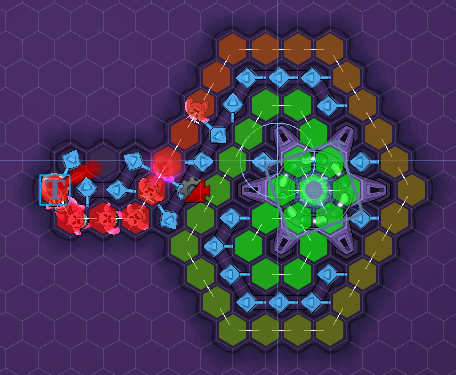
Here's a picture of the under-the-hood view of a typical map for your viewing pleasure.
Have a great weekend!
v0.10.1 - Balancing the economy, 12 new levels, 4 new music tracks
Hi all,
v0.10.1 is here and it's filled with lots of new content.
New levels
There are 12 new levels - 8 in the first sector, 4 in the second. Two of them are replacements of old levels. If you watched me streaming during the "Games of Quebec" sale event, you may have seen me design some of these levels. It was a lot of fun. Each of these new levels is a kind of a unique puzzle.
Balancing
I spent most of the past week pulling my hair out as I was trying to balance the numbers that determine damage levels of each tower. ːsteammockingː I started by creating a spreadsheet and tried to estimate the equivalent damage that each tower would deal to enemies within a given amount of time. This was a good direction, but it wasn't much help eventually. That is because, if the damage dealt by these towers was so easily comparable, then the game would have been very boring. I'll try to explain.
Out of the eight tower types, there are five which can be considered primary attack towers - Gun, Pyro, Shock, Laser, Spikes. The whole balancing exercise was meant to justify the raison-d'etre of each of these towers. On the one hand they have to deal comparable damage without being too powerful and on the other hand they have to excel above their counterparts in certain specific situations. The only way to achieve that was playing a lot of levels in controlled settings. I believe I've achieved that balance now.
I don't know, if I should explain any of this here or I should let you discover these strategies on your own. I'll give some bold points.
Let's consider Gun as a reference tower and compare the others with it. Note that all towers cost the same.
Spikes do the same damage as Guns, but they don't block the enemies' path. They pause enemy briefly, possibly exposing them to other kind of damage.
Pyro is weaker than Gun, but note that its fire damages health directly irrespective of the shield and the fire is caught by everyone in the cone of fire. So Pyro is good against crowds.
Shock and Laser each are significantly more powerful than the Gun. However they are crippled by the fact that Shock cannot damage health while Laser cannot damage shield. Therefore typically they are most useful when used together. Also because of this conditional nature of damage, they are useful in certain scenarios, namely larger maps and concentrated enemy waves. Imagine that you have 20 crystals for the loadout. You can either choose a Gun-only strategy by assigning 20 crystals to Gun damage OR you could choose a Shock-Laser strategy with 10 crystals assigned to each of their damage attributes. Both these strategies will perform comparably if the map is big enough and enemies are spread evenly. However Shock-Laser strategy can deal significantly greater damage if enemy waves are concentrated and you have enough time to build big enough maze. This can prove very useful if you are trying to set a "Crowd Crusher" time record.
Removal of the "Delay" attribute
Just like different towers, I thought hard about different tower attributes and if they really need to be there. One attribute didn't pass that test. The "Delay" attribute defines the time taken for construction and upgrade of towers. It's a legitimate thing to minimize using crystals, however its effect is not apparent compared to the other attributes. Moreover its effect overlaps with the effect of the "Cost" attribute. In fact the "Cost" attribute plays major role in the player's perception of how long it takes to build the tower. For all these reasons I decided to discard this attribute altogether.
Pyro simplification
One part of balancing the damage was to simplify the damage mechanic. I had a detailed fire damage mechanism in place. Each enemy type had a different susceptibility to the fire and each had a different fire extinguish rate. This made the model rich, but it made balancing difficult. They are also hard to expose to the players in order to inform their strategic thinking. So I removed these variations and now fire affects similarly to all the enemy types.
Moreover the "Reload" attribute didn't make sense for the Pyro. This is because the fire burst is not instantaneous, like the Gun shot. It happens over a period of time. That doesn't play well with the reload/cooldown parameter. Therefore now the fire burst is of constant length in time and the cooldown between the bursts is constant too.
Laser Logic
A big chunk of my time was spent in redoing the Laser logic. You may have noticed that upgrading a laser increases its muzzle count. Each of these muzzles are independent of each other. This makes the implementation of laser a bit complex. My first take at this implementation was incomplete. Now that's fixed. Laser muzzles can now destroy all four types of targets - enemies, creep, gates and spoils. The laser muzzles also have a different policy on preemptive re-targeting than other towers. Once they latch on to a target, they won't let it go until it's either dead or out of range. This makes them more or less useful depending upon the situation.
Music
I had a lot of fun with Loopcloud in the past week. I bought loops from this one label called "Ghost Syndicate" and composed 4 new background scores. You now have total 6 different background scores to listen to while playing the levels. I personally enjoy these scores. They linger in my head long time after I've stopped playing.
Other stuff
Fixed the issues with Train physics. The enemies now don't run into the train carriages or do other silly stuff. They either wait politely or get butchered in style!
New explosion VFX for grinder and train deaths. The new ones look more decent than their predecessors in a way.
Fixed some bugs in the cleanup code when levels are finished abruptly
Increased the max range of enemy Wave amplitude in the editor
The Shock and Laser are now introduced in the same level and that level has been replaced by a new one called "Shocking carnage". This should highlight the fact that they are complimentary to each other. Another level named "Swirling Mass" replaces the previous laser introduction level.
Updated the shock wave VFX so that it's subtly different based on Shock tower level
The Laser muzzles park themselves at 120 deg from each other, which makes it easy to know the current upgrade level of the Laser
Reduced the glow in some VFX to avoid headache (subjective!)
Updated Enemy's rigid body physics to follow good practice guidelines
Whoa... that was a long list.
Take care everyone.
Until next time.
v0.9.1
Fixed the lava luck criteria to make the probability of catching fire on lava tiles fair.
Fixed the interaction logic during skydrill input phase
v0.9.0 Revamped level editor, rebalancing exec Actions, new music
Hi all,
Here's a new batch of feature updates
Level Editor
Rearranged the UI elements for the level editor to conform to standards. Various buttons are now arranged in toolbars. The parameter panels are now tucked away into the context aware menus
Implemented the validation checks. The connectivity between Enemy gate and Energy center is now tested before saving the level. I used my custom path finding code for this job. I will soon use it to replace the 3rd party path finding solution I use in the main gameplay, which will fix some pending bugs and improve the performance.
Fixed several bugs and removed some drawing inconsistencies in the level editor.
Executive actions update
Re-implemented the Skydrill action that is used to destroy the terrain tiles and create new pathways. This is a unique strategic tool in Dofense and it needs some thoughtful planning. So the game now automatically pauses to give you all the time. You can carefully mark and unmark the terrain that you want to destroy. Once you are ready, just click the drill button and the game will resume with the laser beams doing their jobs.
The old implementation of Sniper shot let you kill enemies within a circle with a gun from the sky. This could be useful sometimes, however it wasn't worth spending 1 crystal on. In this build I've tried to correct that flaw with a minor change in behaviour. When you kill the enemies with a sniper shot, any cores that are being carried by them are released and they fly back to the Energy center without getting intercepted by other enemies. This can turn the game around if you know how to use it.
The flying return of cores is also applicable if the enemy is killed by black holes
Music
Simplified the background music code. Added two new tracks for in-game background music. More tracks will be added in future.
Other
Updated all terrain tiles to match the flat color style
New portal tube tiles with flat color style
Tower spoil gradual disappearance
Creep mass laser damage fix
Changed the glow of some explosion VFX (train and grinder kills) so that they appear in background without occluding other elements
Change the randomness criteria of when the lava tiles put enemy on fire.
Let me know how do you like the new Level editor. And what do you think about the music?
Cheers!
v0.8.4
Fix tower range issues. A crash that was observed when a laser is built within range of creep. This change will fix it. It should also fix some other behaviour, where enemies were sometimes ignored even if they were within range.
Enabled support for resizing the screen. The game can be played at any resolution as long as the aspect ratio is 16:9. On some non-standard screen resolutions this may cause a problem. Now you can exit fullscreen mode by hitting "Alt+Enter" and then resize the game window to match your screen size. Please try to match 16:9 aspect ratio to avoid seeing misaligned UI panels
Added a max limit of 4 on shock tower crowd damage for better balance
Update hit VFX of laser on Creep
removed "Shift+tab" hotkey to change timescale in reverse direction. This hotkey is used by steam overlay, so it's not a good idea for the game to use it in any other way.
v0.8.3
A quick fix for the bug introduced in the last build that broke the multi-gate levels.
Gate AI Complacency (v0.8.2)
Hi all,
I have been thinking about some changes to the Gate AI algorithm in order to make the gameplay more fun and not unreasonably mean. I tried one simple change yesterday and it worked quite well. This morning I refined it further and made it more fluid. Here are more details on all the changes.
Gate AI Complacency
The spawn strength of the enemy Gate is now adjusted according to the status of the cores. If the enemy units have captured a number of cores and they are in the process of carrying it to the gate, then the gate becomes more complacent about victory and starts cooling down. This results in the reduction of spawn strength. This gives the player some chance to recover from a bad situation. If he succeeds in freeing the stolen cores, then the gate starts becoming more agitated and regains its spawning power. This mechanism allows for interesting tug-of-war mechanism between two sides.
Other changes
Fixed the flickering of the selection rings on the widgets in the level editor
Added a chance mechanism to the fire damage that lava tiles can deal. Without this, it's possible to create long lava fields that the enemies will never be able to cross, thus leading to infinitely running levels.
Reduced the maximum number of enemies that get fire damage in the cone of fire of the Pyro towers. It used to be 7, now it's 4. This keeps the strength of the Pyro balanced, especially now that it costs same as the Gun (since last build)
Adjusted the Grinder blade physics so that the enemy unit comes close enough before getting splattered
Fixed an issues with the "Show health bars" setting change. You don't have to restart the game for this change to take effect now.
Cleanup progress ring on towers when they are destroyed. This was causing some unfinished progress rings displayed across levels
Restart the pending upgrades indicator, if the tower is moved. This indicator used to disappear once the tower was relocated, even though the upgrades were in the queue.
Ok. I'm now off to host this afternoon's streaming session. Feel free to tune in and say hello.