An update file for Teravit was released on October 20th, 2023, at 16:15 (JST). The following changes have been made in this update.
The game version will be "001.40" after the update.
New Additions & Changes
・A new category of worlds called 'Story' has been released.Players can enjoy exploring vast worlds while making use of crafting in 'Warrior of Hope'. A new feature has been implemented in this world, allowing each room owner to save information about the world's terrain and more. This feature will be gradually rolled out to all players in the future.
・Added a dedicated column at the top of the world list for navigating to 'Warrior of Hope'.
・With the release of the RPG world 'Warrior of Hope', we have extended the duration of the Closed Beta Test. This is a great opportunity to try playing 'Warrior of Hope' on smartphones. Please share your thoughts and suggestions with us. Closed Beta Test End Date Friday, October 27th, 2023 15:00 (JST)
・Descriptions for the items 'Beginner's Saddle', 'Intermediate Saddle', and 'Advanced Saddle' have been updated to provide information about each item's performance.
・Added phrases like 'Create' and 'Play' below the icons on each screen.
・Added a button to allow navigation between the 'Character' screen and the 'Market' screen.
・Made a change to display the default settings for scores in the 'World' section of the menu.
・Added a feature that allows players to move the control panel that appears when moving various 'Launch Rings', 'Teleport Portals', and 'Assets' in front of the player. A similar update is planned at a later date for the control panel displayed when placing a 'Marker'.
・Added the following settings to the 'Basic World Settings' in Build Mode: -Block Destruction: Set the ability to destroy blocks on a world-wide basis. -Block Placement: Set the ability to place blocks on a world-wide basis.
・The following changes have been made to some items: - Changed 'Stone Fragment' and "Wood" from items that can only be possessed to items that can be placed as blocks. - 'Stone Fragment' has been renamed to 'Stone'. - Modified the item details of items that increase 'Satiety' upon use to display the amount of increase in 'Satiety'. - Changed the effect of the item 'Bomb'.
・The following changes have been made regarding 'Map Pins' in the Event Editor: - Some of the icons that can be set for Map Pins have been modified to have different appearances on the map and in the world. - Added 3 additionaltypes of icons that can be set for Map Pins.
・Modified the display of the currently selected Item Slot to make it more noticable.
・Made the following changes to some monsters: -Changed the voice of 'Ghost'. -Modified the attack effect of 'Red Skellie'. -Changed the type of 'Omega Tribot' to 'Flying Type'.
・Changed the animation for the 'sleep' status effect.
・Adjusted various parameters such as stats, attack frequency, and vulnerability after attacks to better reflect the content of the 'difficulty' status in relation to the overall strength of monsters.
・Adjusted flying monsters to fly at lower heights, making it easier to land attacks compared to before.
・ Made a change to ensure that attacking an enemy from behind will always result in a critical hit.
・The following adjustments have been made to the weapon category 'Axes': - Damage can now be inflicted without regard to the enemy's guard. - For the weapon 'Atom Axe', the value of attack that increases with each enhancement has been raised from 2 to 3. - The effectiveness of the weapons 'Wooden Axe', 'Stone Axe', 'Bronze Axe', 'Iron Axe', 'Golden Axe', 'Diamond Axe', and 'Ancient Axe' has been adjusted.
・The following adjustments have been made to the weapon category 'Great Sword': - Increased movement speed during attacks. - Made the attack animations more compact. - Expanded the attack range. The final attack can now be performed as a 360-degree area attack."
・The following adjustments have been made to the weapon category 'Spear': - Increased the movement speed during attacks. - Reduced the attack intervals for combo attacks.
・Increased the ammunition capacity for the weapon 'Longbow' and various types of large bows from 3 rounds to 5 rounds.
・Made a change to display the speed for the weapon category 'Pickaxe'.
・Made adjustments to remove the effect of 'Demon Slayer' on the weapon 'Ninja Sword'.
・Made the following changes regarding the HP recovery effects of dishes and ingredients: -Changed the recovery method to 'Gradual HP Restoration'. -Added a display in the item details showing the number of times HP is restored with 'Gradual HP Restoration'.
・Made changes to speed up recovery from the 'Satiety State'.
・ Increased the satiety level that rises when using the following items: - Healing Extract - Healing Potion - Raindrop of Healing - Medicinal Herb"
・Made changes so that attack items now drop from the following furniture: -Weapons Rack, Gun Shelf Drops any of the following: 'Throwing Torch', 'Bomb', 'Boomerang' -Small Weapons Rack, Pop-up Weapons Rack Drops any of the following: 'Freeze Bomb', 'Bomb', 'Boomerang'
・Changed the exchange rate for certain items like 'Wood' and 'Stone' from 10 Gems to 1 Gem.
Bugs Fixed
・Fized the following issues in the Event Editor: - Issue where setting a group in the 'Counter' command prevented the event monster count from being properly aggregated. - Issue where, when using a gamepad, pop-ups for selecting system variables, item quantities, etc., other than global variables, could not open.
・Fixed an issue where the message 'Out of ammo!' would sometimes be displayed after the event's 'Message Display' was executed immediately upon entering the world.
・The following adjustments have been made for when a controller is connected in the mobile version: - Fixed the issue where after turning on 'Reverse Confirm/Cancel' and then restarting, the setting wasn't applied. - Modified the behavior where pressing the Control Setting button in the in-world menu now open the settings for the controller instead of for the virtual pad. - For those using a PlayStation controller, the icon for the menu button has been changed from 'Touchpad Button' to 'Options Button'. - For those using a PlayStation controller, the default setting for camera vertical inversion in control settings has been changed from ON to OFF.
・In iOS version 17, fixed an issue where the colors of plants were not displayed correctly when riding certain vehicles.
・Fixed the issue where selecting "Effect" as the prize type in the Premium Gacha lineup settings would result in "Fire Fist" being chosen. After this fix, if "Fire Fist" is in the lineup, it will not be possible to save the settings when configuring the lineup.
There will be no changes to already established lineups and behaviors."
・The following issues have been fixed regarding Monsters: - Addressed the problem where the eyes of monsters 'Flaherd' and 'Pink Flaherd' would remain black and not return to their original state. - Fixed the issue with the monster 'Pink Jellie' where a positional shift would occur during the monster's appearance. - Fixed the problem where some monsters would temporarily become unable to take action.
・Regarding 'Blacksmith Clerk',the issue where the default registered equipment with levels had a display of 0 was fixed.
・fixed the issue where items were not dropping when breaking bedding-related blocks.
・Fixed the issue where the tools 'Wooden Pickaxe' and 'Stone Pickaxe' were unable to break some free blocks.
Thank you for your continued support of Teravit.
Notice of Update
Hi everyone. This is the Teravit Operation Team.
An update file for Teravit was released on October 12th, 2023, at 16:00 (JST). The following changes have been made in this update.
The game version will be "001.39" after the update.
New Additions & Changes
・In the Event Editor, a new feature has been added to the "Message Display" command. When setting the "Window Type" to "Conversation" or "Conversation: Loud", the "Speaker's Name" can now be specified.
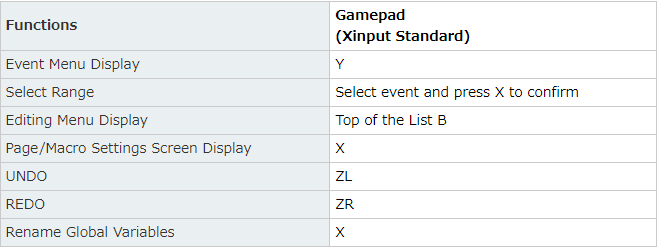
・Enabled some functions of the Event Editor to be operated using a gamepad.
Plans for future support regarding the help button are in the works. "
・Added support for the following actions in the smartphone version of the Event Editor:
・The following changes and additions to the ""Set States"" in the ""Map Pin Settings"" command of the Event Editor: -Wording of the existing settings has been modified to better align with the functionality. There have been no changes to the functionality itself. -Added a setting to display only icons on the map and in the world without showing lines when setting a map pin as a destination.
・ Added support for controlling Event 'Options' while using a gamepad.
Bugs Fixed
・Fixed the issue where 'Launch Rings' were not displayed correctly when confirmed without adjusting the position under 'Adjust Launch Ring Position'.
・The following adjustments have been made in the Event Editor: -Fixed an issue in the 'Calculate Variable' command where if the result of the calculation exceeded the range of values that could be handled by the variable, it would lead to incorrect calculation results. -Fixed the issue where, when using the 'Item Configuration' command and selecting 'Target Setting' as 'Slot (excluding equipment slots)' and adding the selected item, it would be added to the Inventory."
・Fixed the issue where, when using the 'Item Configuration' command and selecting 'Target Setting' as 'Slot (excluding equipment slots)' and adding the selected item, it would be added to the Inventory.
・Fixed the issue where the 'Exchange Price' values of various shopkeepers could be changed while playing with a gamepad.
・Fixed the issue where, when the 'Motion Type' of 'Moving Assets' was set to 'Square' and the 'X, Y, Z Movement' was all set to 0, the asset would disappear and the world's behavior would become unstable.
After the update, when entering a world where issues were occurring, assets that were not displayed will be visible again, and their settings can be modified. Make adjustments in Build Mode to any assets that were experiencing issues.
Other
・Program adjustments for improved stability have been made. For players who continue to encounter any issues with the PC version, try downloading the installer again from the official website and reinstalling the game.
Thank you for your continued support of Teravit.
Notice of Update
Hi everyone. This is the Teravit Operation Team.
An update file for Teravit was released on October 5th, 2023, at 15:00 (JST). The following changes have been made in this update.
The game version will be "001.38" after the update.
New Additions & Changes
・In the smartphone version, holding down on an item slot during Build Mode will display a menu for selecting item patterns and tools.
・The following changes have been made to the room list: - Full rooms will now be displayed. - Rooms will now be sorted in the following order: rooms with available slots, rooms where friends are playing, and rooms with a high number of players.
・The input digit capacity for Event Editor constants has been changed from 6 digits to 9 digits.
・Added the option to perform actions on items in the selected slots in the ""Item Settings"" command of the Event Editor. This change will only apply after the update, so there is no impact on existing settings."
・Made a change in the 'Warp' command of the Event Editor to prevent the next command from executing until the player's warp is complete.
・Made changes to monster spawners so that players can now configure the same types of items as they can for treasure chests.
・The types of items that can be set to be acquired in score settings can now be the same as the items eligible for Events.
・Players can now specify the acquisition level when selecting equipment items with the following settings: -Event (Item Settings - Drop Items) -Quest Rewards -Initial Items -Monster Spawner Drop Items"
・Added the ability to control the camera even while chatting.
Bugs Fixed
・Fixed an issue in the PC version where enabling 'Decision/Cancel Reversal' in the control settings, then restarting the game, would not apply the 'Decision/Cancel Reversal' setting.
・Fixed the issue where the values became incorrect when a large number of scores were obtained.
・Fixed the issue where scores were not being awarded when items were obtained during events.
・Fixed the issue where items were not dropping when certain objects were destroyed.
・Fixed the issue where, when BGM is set to "Random" in the "World's Basic Settings," the BGM would not play when the specified BGM in event commands or the "BGM Speaker" finished playing.
・Fixed an issue in the 'Warp' command of the Event Editor where there was a possibility of falling immediately after warping due to a specific combination of commands.
・When performing calculations on variables, if the result exceeds the range of values that can be handled by the variable, it will now be adjusted to fit within the allowable range of values.
・Fixed the issue preventing some worlds from starting up properly.
Thank you for your continued support of Teravit.
Notice of Update
Hi everyone. This is the Teravit Operation Team.
An update file for Teravit was released on September 28th, 2023, at 15:00 (JST). The following changes have been made in this update.
The game version will be "001.37" after the update.
New Additions & Changes
・Added the tool "Craft NPC" to Build Mode in the Inventory under 'Tool and Gimmick'; this enables crafting upon placement. - Freely set crafting recipes and required materials for each of the 8 types of Craft Tables.
・Added equipment made from various types of wood and minerals as materials. The new equipment can be obtained through crafting.
・Added items that allow 'Coal Ore', 'Flint', 'Copper Ore', and 'Iron Ore' to be placed in the 'Basic Block' section of the Inventory in Build Mode.
・New command 'Change Event Appearance' has been added to the Event Editor. This allows players to temporarily switch the appearance of an event to a different one. The options available are equivalent to those that can be set for the event's appearance. The appearance will reset to its original state when the player moves away from the event.
・Added the 'Number of Event Monsters' command to the Event Editor's count retrieval commands. Players can count the number of monsters spawned from spawners triggered by events.
A setting that allows effects to be applied to the spawned monsters when activating a monster spawner in an event was also added.
・ Added the following settings to the status configuration command of the Event Editor: -Max HP -Max Stamina Limit Inventory menu has been modified to display the current stamina limit.
・Made changes in the Event Editor to allow players to retrieve the current defeat count for each monster from variables.
・Added a new system variable, 'Item Location: ITEMSLOT_IDX' to the Event Editor. -Players can now get the location of the item they have in the iteration and the item selected as a numerical value.
・Following the implementation of the crafting feature, the following updates have been made: - Added more items that can be referenced in the Event Editor Beta, such as 'Item Quantity'. - Included additional items that can be set in chests. - Expanded the range of items that can be sold by Clerk NPCs. - Added more items that can be configured in the 'Item Settings' of Build Mode.
・Adjusted the value retrieved from the system variable 'Character's NPC ID: CHR_NPCID' in the Event Editor. Due to this change, values obtained in previously set events may not function correctly. Please review and make any necessary adjustments to events."
・Added a feature in the Event Editor that allows Treasure Chests to be enabled by reacquiring them when using the 'Activate Gimmick' function.
・The following changes have been made to Treasure Chest settings: - Renamed the 'Reacquire on Signal' option to 'Change on Signal'. - Added a 'Display Toggle' to switch the display on the 'Change on Signal' option.
These changes won't affect chests that have already been placed."
・Adjusted so that when various spawners are activated from events, regardless of the respawn interval set, the targets will now spawn up to the maximum limit at the time of activation.
・In the Event Editor players can now specify the system variable ITEM_ID for the following commands: -Item Settings -Drop Item -Delete Drop Item
However, if a non-event item is selected, an error will occur in Item Settings, and the Drop Item and Clear Drop Item commands will not be executed.
・Added the following settings to the 'Control Settings' in the menu: -Added 'Reverse Confirm/Cancel' setting for when using a gamepad. -Added 'Reverse Vertical Camera Rotation' and 'Reverse Horizontal Camera Rotation' settings for when using a mouse/keyboard."
・Made changes to the following settings so that the Green Gem is set as the default: -Within the menu under 'Quest Settings', in the 'Clear Rewards' setting for each quest -In the default Drop Item settings for Treasure Chests. -In the item settings for the ☆5 Lineup in Premium Gacha.
This change will only apply when configuring settings after the update; there is no impact on current settings that are already in place.
・Made adjustments to take into account the difference in elevation when changing the 'Object Display Range' setting in video settings.
・The following updates have been made in the Shop's product settings: -Added display of gem exchange prices. -An alert will now be displayed if the gem exchange price is lower than the selling gem price.
・ Made adjustments to prevent the playback of monster or animal sound effects during the loading process when entering the World.
・Players can now emerge from underwater when jumping while riding an animal.
Bugs Fixed
・Regarding events, the following issues have been fixed: -The system variable ""PTIME"" did not reflect the user's playtime in the world. -Monsters would enter a T-pose when selected in the Event Editor. - Multiple non-stackable items were dropped but not acquired correctly.
・The following issues with Conversation NPCs have been fixed: -The set text was not subject to automatic translation. -The preview direction always faced the same way when making positional adjustments
・Fixed the issue where the game exit button was displayed on the 'Menu/Settings' screen on iOS devices. Fixed the issue where frequent switching of screens on the World List page would slow down the loading of thumbnails..
・Fixed the issue where participants in the Build Room were experiencing disappearances of the following items when canceling their position adjustments:: -BGM Speaker -Information Board -Moving Object Assets -Conversation NPC -Trade NPC
・Fixed the following issues regarding room hosts: -Damage received by build participants was displayed on the host's game screen regardless of how far away the host was. -Certain objects in the vicinity would not respond when the host teleports to the build participants who are located far away.
・Fixed the issue where in worlds using the Spawner Dispersion Tool, the area would occasionally fail to load when the dispersed spawners were repositioned.
・Fixed the issue where unintended sound effects would continuously play while touching spider webs.
Thank you for your continued support of Teravit.
Notice of Update
Hi everyone. This is the Teravit Operation Team.
An update file for Teravit was released on September 21st, 2023, at 15:00 (JST). The following changes have been made in this update.
The game version will be "001.36" after the update.
New Additions & Changes
"・In the previous update, changes were made to the sales settings for the following items, allowing them to be sold only through the 'Premium Gacha' and making it so that they could not be purchased from Clerk NPCs or acquired from Treasure Chests. However, these changes have now been reverted. These items are now available for sale through 'Regular Gacha’ and Event Commands. We apologize for the inconvenience this has caused for creators. The sales settings for other items are also currently being considered. - Omni-directional Hookshot - Long Hookshot - Aerial Hookshot - High Performance Paraglider - Magic Broomstick - Angel Wings - Super Laser - Barrier Pearl
・Updated the UI that displays the control keys on the right side of the screen within the World in the PC/Steam version. When riding a vehicle, the controls specific to that vehicle will now be displayed.
Bugs Fixed
・The issue of a different item dropping when destroying the following blocks has been fixed: - Cobblestone - White Cobble - Silver Cobble - Blue Cobble - Aqua Cobble - Ivory Cobble - Tan Cobblestone - Gray Cobble - Temple Road - Black Brick Cobblestone
・Fixed the issue where Diamond Ore that was placed in Build Mode or randomly generated would sometimes drop 'Coal' instead when broken with a pickaxe. ・Fixed the issue where, when rapidly moving near a goddess statue via teleportation or other means, monsters would sometimes spawn despite there being an effect preventing them from spawning. ・Fixed the issue of the model for the accessory 'High Performance Paraglider' not appearing. ・Fixed the issue where it was not possible to equip accessories via quick move in the inventory when the slot for shields was empty.
・Fixed the issue where entering and exiting multiple rooms in a running multi-room world could cause the save data to be rewound. - We have received reports of items obtained from gacha in worlds disappearing due to a certain bug. Players who have experienced this issue will be compensated with jewels equivalent to the value of the lost items (limited to gachas that can be played with jewels). Please submit reports through the support form below. After conducting an investigation, we will reach out to players via email regarding the compensation.
・Fixed an issue in the Event Editor Beta where, when an event became hidden due to none of the trigger conditions being met, certain parts of the skin were not hidden in the world's appearance. ・Fixed the issue in the Event Editor Beta where the camera's positioning would be unintentionally fixed on the wrong location if the player's character died or teleported.
Thank you for your continued support of Teravit.
Notice of Update
Hi everyone. This is the Teravit Operation Team.
An update file for Teravit was released on September 14th, 2023, at 18:15 (JST). The following changes have been made in this update.
The game version will be 001.35 after the update.
■New Additions & Changes
Adjustments have been made to the quantity of the following consumable items introduced in the default lineup for the Regular Gacha and Premium Gacha. This adjustment applies to gacha machines newly set after this update. This change will not be applied if adjustments have already been set for the lineup.
・Quantity has changed from 1 to 10. - Spark Bomb - Torch - Antidote - Freeze Bomb - Homing Beetle - Sage's Potion - Land Mine - Healing Extract - Speed Up - Double Jump - Boomerang
・Quantity has changed from 1 to 5. - Giga Thunder - Heal Area - Icicle Barrette - Flame Circle - Icicle Rain
Thank you for your continued support of Teravit.
Notice of Update
Hi everyone. This is the Teravit Operation Team.
An update file for Teravit was released on September 14th, 2023, at 15:00 (JST). The following changes have been made in this update.
The game version will be 001.34 after the update.
■New Additions & Changes
・Added the items 'Regular Gacha' and 'Premium Gacha' to the 'Tool and Gimmick' section under 'Inventory' in Build Mode; these items allow you to set up gachas with any lineup in created worlds. ・The following items can no longer be configured for sale by Clerk NPCs or obtained from Treasure Chests. Their availability can be set in the new Premium Gacha feature. These items can continue to be sold in worlds where they have already been configured for sale. - Omni-directional Hookshot - Long Hookshot - Aerial Hookshot - High Performance Paraglider - Magic Broomstick - Angel Wings - Super Laser - Barrier Pearl ・The following items are now being sold; purchase and change them from the 'Effects' section in the Skin editing screen: - Fire Fist - Sparkle ・The following new items have been added: -Archery Enhancement Stone -Impact Enhancement Stone -Slashing Enhancement Stone -Defense Enhancement Stone -Mega Boomerang -Black King's Sword -Black King's Axe -Black King's Bow -Black King's Long Sword -Black King's Spear -Black King's Shield -Black King's Pickaxe -Giga Thunder -Flame Circle -Heal Area -Icicle Rain -Flame Tornado -Meteor Swarm -Icicle Bullet -Block Road -Block Wall -Mega Block Throw
*These can be made available for sale in the newly implemented 'Premium Gacha'.
・Adjusted so that if a player has blocked the room owner, they will automatically exit the world. ・The following changes have been made in the Event Editor: -Macros can now only be edited by the host. Players other than the host can only view and copy the contents of the macros. -It is no longer possible for multiple players to edit the same event simultaneously. -An option has been added to display an exclamation mark (!) above the event NPC's head if the event page is playable from the page settings. -Constant values can now be entered using keyboard input. -Enabled only the host to rename global variables. (Updated 9/14 15:20 ) ・Changed the max limit for drop items that can be set on monster spawners to match the stack limit of each item. ・The default setting for the newly added spawners in the wide-area spawner has been changed to Do Not Disperse. ・When the enhancement button is pressed and no item has been selected, equipment that can be enhanced automatically will now be selected. ・Made the following changes to Quick Move for weapons, armor, and accessories. -When a weapon cannot be placed in the weapon slot during Quick Move, it will now go into the inventory or item slot. -When armor or accessories are quickly moved from the item slots and do not fit in the equipment slots, they will now go into the inventory.
■Bugs Fixed
・Implemented additional measures to address the issue of crashes occurring during water surface rendering on iOS. ・ Have taken measures to address the issue of screen noise occurring on some iOS devices. *The frequency of occurrence has decreased compared to before, but we will continue to investigate for further improvements. ・Changed the icon for the accessory 'Necklace of Dreams'. ・The following issues have been fixed in the Event Editor: -Scores set in Score Settings were not reflected in the rankings for free quests. -Resetting a variable from its state resulted in a discrepancy between the displayed variable state and the actual value used. -Values exceeding the maximum HP could be set when configuring HP. -Some models would remain the same even after the event appearance was changed. ・Fixed the issue where 'Command Insertion' couldn't be performed in the smartphone version of the 'Event Editor'. When performing command operations in the smartphone version of the 'Event Editor', press and hold the 'Command List' on the right side of the event screen to display the 'Editing Menu' for further options. ・Fixed the issue where there was a lack of gamepad support during the listing process for trade NPCs.
Thank you for your continued support of Teravit.
Notice of Update
Hi everyone. This is the Teravit Operation Team.
An update file for Teravit was released on September 7th, 2023, at 15:00 (JST). The following changes have been made in this update.
The game version will be "001.33" after the update.
New Additions & Changes
・ Added a new feature called the ""Event Editor,"" which allows players to perform various tasks by combining commands. Additionally, the following items have been added for Build Mode:
- Event Editor - Map Pins
*Please note that the Event Editor is in its ""beta version"" and may have some instability. *The Event Editor beta version does not support gamepads. *The ""Command Insertion"" feature is currently not available in the smartphone version but is planned to be added in the future update.
・On the inventory screen, weapons, shields, and accessories will now be placed in their respective equipment slots when quickly moved. ・Added category icons next to the category names in the item details. ・The category name for shields has been changed from "Accessories" to "Shields". ・Added a button to open the WEB manual on the Build Play screen. ・Monsters and villagers have been adjusted to collide with the player. ・ Implemented speech bubbles to appear above the speaker's head when they speak in the chat. ・The following automatically generated structures in the world have been removed: -Crafting Tables -Treasure Chests -Some Village NPCs
・Added an animation to indicate download progress during package downloads. ・Implemented an attention mark on buttons like the Enhancement button when the equipment is in a state where it can be enhanced. Additionally, a message will be displayed if the enhancement button is pushed when enhancement is not yet possible.
Bugs Fixed
・ Fixed the issue where displaying the water surface while playing on an iPhone could cause a crash. ・Removed the option to set the language to Turkish, as it was causing character encoding issues. If Turkish was previously set, the language will now default to English. ・Fixed the issue where placing a button between the Item Slot and the Mini-Map in both Android and iOS resulted in the button becoming unresponsive. ・Fixed the issue where the displayed content for download size on Android and iOS was incorrect.
Other
・As part of preparations for upcoming updates, adjustments have been made to exclude the "Red Workbench" that was included in the build item list.
Thank you for your continued support of Teravit.
Notice of Update
Hi everyone. This is the Teravit Operation Team.
An update file for Teravit was released on August 31st, 2023, at 15:00 (JST). The following changes have been made in this update.
The game version will be "001.32" after the update.
New Additions & Changes
・ Added the following items for Build Mode: "Trade NPC" ・ Added an attention mark when available quest rewards can be received. Quest rewards that can be received on the quest list are now sorted at the top. ・Added the review date and time to World Reviews. Players can now delete their own reviews as well. ・Reduced the load of Freezing Gas Traps. ・In rooms a display for keys that open chats has been added on the right side of the screen.
Bugs Fixed
・Fixed the issue where performing specific actions in the Tutorial World would prevent the tutorial window from opening even when inside the red frame. ・ Fixed the issue where, during operations like duplicating in Builder Selector, pressing the virtual pad's descent button would only result in normal descent. ・Fixed the issue where the Web manual was not displaying properly on the tutorial screen. ・ Fixed the issue where dialogue NPC text settings could not be properly configured when using Android and iOS.
Thank you for your continued support of Teravit.
Notice of Update
Hi everyone. This is the Teravit Operation Team.
An update file for Teravit was released on August 24th, 2023, at 15:00 (JST). The following changes have been made in this update.
The game version will be "001.31" after the update.
New Additions & Changes
・Added an option to the video settings that allows players to set the display range of objects.
・Added support for the following additional languages in the Steam version: -Korean -German -Spanish -Turkish -Portuguese -Russian -Indonesian -Vietnamese
・Implemented a rank-up animation to be displayed when opening the World Details screen if your own ranking or score has increased.
Bugs Fixed
・Fixed the issue where sometimes the items displayed during a quest were not shown again when the quest was restarted after completion. ・Fixed the issue where equipment slots may not be displayed when switching from Build Mode to Test Mode. ・Fixed the issue where players could not favorite skins being sold on the market.
・The following issues regarding the detail dialogue display of world descriptions have been fixed: -The issue where the layout of the description was disrupted within the dialogue if there were empty lines in the description text. - Fixed the issue where the display of certain world names was overflowing.
・Fixed the issue where the counts of the following subquests were not being correctly recorded when clearing the main quest for the first time within the world: -Complete the course -Clear the game -Reach the goal within the time limit -Clear within the time limit -Achieve a high score