This update we have lots of new features, systems, and changes to The Black Death. We have updates to our movement system, new combat abilities, revamped Item quality system, Quick Slot Bar, dragging & dropping in menus, loads of UI updates. new pillage areas and more!
WARNING THIS UPDATE WILL INCUR A CHARACTER WIPE!
There is a known issue where some players will experience being stuck in a loading screen when joining a server, please close the game and re-join then the issue should no longer occur, we are currently working on a hot fix to address this issue.
A Note For Admins Of Community Hosted Servers
If you own a Community Server please note that you will need to update your server with the latest update. To do this you will need to update the folder/files on your Server or update using our Steam Server Build in SteamCMD.
If you do not have the latest update to The Black Death your server will not appear in our in game Server Browser.
Updated Movement System
We have updated our Movement system! You are now able to sprint in all directions, with an update to our sprinting animations, jumping should also now feel smoother.
Each Weapon type now has it's now combat pose which includes varying speeds for each of these. If you are wielding a dagger or knife the weapons movement will be much faster, but for two handers movement will be slower. The camera also adjusts to be slightly different when you are walking, sprinting and blocking.
Below are our improved animations for sprinting forwards, back peddling and also sprinting and turning.
New Combat Abilities
Our Combat attacks and abilities have been updated! These are unique to each weapon type ranging from Clubs, Swords, Maces, Axes, Knifes and more. Each weapon type now has it's own set of attacks. Some weapons such as the Knifes can be aimed and thrown using the third attack!
These range from bleeding attacks, stuns, knock-backs and knock-downs. These are represented on the HUD on the left of the Quick Slot Bar. If you mouse over these attack icons, each one has it's own tooltip which can be viewed by hovering over the icons when in your Inventory.
Check out our GIFs below to see our new Unarmed, Sword and Mace attacks.
New Improved AI & Rats!
AI are now fully procedural in terms of where they spawn, however harder A.I. will spawn in more dangerous parts of Mercia. All AI now have new logic and have been given a combat overhaul, new types of AI include, spearmen, archers, crossbowman, two handed bandits and more.
Procedural Friendly AI types have been added, these include; Guards, Hunters, Infected Peasants, Peasants and Wandering Merchants.
Large A.I. improvements have been made with their logic and large increases in population including a new wide variety such as:
Groups of Infected Beggars that spread infection and hound you for much needed gold but will retreat with fear if attacked.
Deadly Beggars that will kill in sheer desperation, only with fists they will punch their way out of any fight.
Bandit Spearman that deal large amounts of damage and flank violently.
Outlaw Crossbowman that tactically seek distance and cover between them and their targets.
Shielded Templars that push forward with shield in hand putting pressure on even the most advanced player
Templar Knights that wield giant two handed weapons dealing large amounts of damage but are slower and more calculative.
Need a good amount of building materials? track down the new bandit
woodsman that carry copious amounts of wood.
Rats! Rats now spawn procedurally and wander the streets and villages, they can infect you with proximity. Rats can also be found scuttling around within the front area of Bandit houses! You may find some NPCs chasing them through town. They may also chase you if you are close enough, these rats can infect you quickly so beware!
Item Quality System Update & Crafting Stacks
Crafted Item quality system added, there is a chance of crafting various types of the same item that provide various values, such as the extremely rare Greater Silver Chest Plate which physically looks different and adds more armour. This is only applied to a few items currently, such as the stick club, bone club, water and silver chest plate.
When you have levelled up your ability to craft armour more, you will notice that the higher quality armour is crafted with more experience as you progress you should have a higher chance of crafting the higher tier gear.
The Armours above from left to right are: Rusty, Normal and Greater Silver chest plate.
We have decided to change up how our item Rarities work in The Black Death. Crafted and purchased items, weapons and armour will now have set rarities, this also includes harvested resources in the wild.
Common (Grey)
Uncommon (Green)
Rare (Blue)
Epic (Purple)
Mythic (Yellow)
Legendary (Orange)
New mythic tier Armour has also been added and is craft-able through fully leveling up the blacksmith. The royal chest plate:
Crafting Stacks It is now possible to craft a stack of an item if you have the required number of materials to do so. For example, if you have 5x Dirty Water, you can now queue these up and craft 5 Clean Water. In the future the time it takes to craft these stacks will be changed.
Changes To Gold Gold, the currency of Mercia and that thing that Bandits want has had a couple of changes. Gold is now more of a physical item as seen in the new Inventory rework just under the Equipment Slots.
Resources & Lootables Resources are now fully procedural and will randomly spawn throughout the world depending on the rarity of the resource. This means that if you find a Berry or Cotton Bush in one place chances are something different will spawn in its place when you return, or there might be no resource in that spot at all! This also includes Wood Logs and Mining Nodes.
This is to encourage exploration around Mercia and make gameplay feel more fluid so players are not returning to the same exact spots for materials and loot. Along with our big AI revamp we feel this will make for some great gameplay sessions and experiences.
To make gameplay feel more fluid and for a different kind of play session loot should now feel more rewarding when you stumble across something good. We have also added new loot items that can be found around the world and Player written books should now appear more often!
Loot item drops will spawn procedurally throughout the world within bandit camps, caves and beggar houses.
Quick Slot Bar, Drag And Drop, Splitting Stacks & Equipment Slots
Quick Slot Bar
A new feature being introduced with V0.24 is the Quick Slot Bar! This will now allow Players to click and drag Weapons, Food, Drinks and Tools to their Quick Slot Bar for easy one click use. You can now switch between Weapons and Tools with out needing to go into your Inventory or Context Wheel making for a smoother gameplay
Food and Drink items will have their rotting status updating whilst they are on your Quick Slot Bar saving you entering the Inventory when checking on your food. With our new item stacking system it is possible to have a stack of Water and Bread Rolls on your Quick Slot Bar for easy use. Weapons and Tools will also display their respective durability status so with once glance when in Combat you can track your weapons status.
The central nature and placement of the Quick Slot Bar shows a more compact view of your stats such as Days Survived, Gold, Skill Points and XP which is displayed as a thin green line.
Drag & Drop
It is now possible to drag and drop items from a Shopkeepers window to your Inventory to purchase them and drag items to the Shopkeepers window to sell them for speedy transactions.
Items now stack in your Inventory making space much easier to manage. Items can now also be split from their stacks by right clicking on the stack and Selecting Split. You can use the plus and minus buttons to increase or decrease the amount you would like to split from the stack. Items can also be dropped by using this same right click context menu.
Equipment Slots
From introducing the ability to now drag and drop items from your Inventory to your Quick Slot Bar, here is our other system that now uses a drag and drop feature, Equipment Slots!
Our new equipment slots now free up your visual Inventory space by having your armour in it’s own tab. Armour values are also now show correctly on items in your Inventory. The Epic Kettle Helmet and Mythic Lamellar show off our new colour tabs on items too for a quick glance on item qualities.
New UI Changes & Chat Box
Our UI and HUD have undergone some changes. Here is our refreshed Main Menu in game. The videos section has been removed and the options and social links are more centralised. Our Death Screen has also been given a refresh. In game Icons have also been given a revamp, giving them a more rustic feel.
The "Days Survived" pop-up is now more subtle and appears above the Quick Slot Bar at the bottom of the screen. This still displays your earned Gold, XP and Skill Point, with a less intrusive notification. Our HUD, Journal and other UI elements are now more thematic in their style.
We have added an option to change the size of the Chat Box text for Players using larger resolution monitor setups, or for Players may find it hard to read the default size text.
This setting can be changed in game and switched between x1 and x1.25. Pressing Esc whilst in game and bringing up the Settings menu, then going to "Game" you will see the Chat Box Scale option.
If you do use this new option in game and are still experiencing issues with the text size on your resolution or setup, please send us a Bug Report here and include your Resolution.
New Pillage Areas & Polished Areas
The Bandits, Beggars and Peasants of Mercia have decided to take the abandoned house strewn across Mercia from victims of the Plague and reside their themselves. They are very protective of their new homes and bases! Should you dare to try and loot their possessions they will not hesitate to attack you and throw rocks and fire arrows from afar!
More pillage/raid areas have been added to Mercia in the form of Beggar Hovels, Bandit Bases, abandoned farms and even deep in caves. Always carry a weapon or two when adventuring around these parts.
St. John's Monastery Revisit
St.John's Monastery has been taken over by the local crazed Monk's and Templars and is now in disarray. It's doors now branded with the Templar sigil, a strong weapon is needed to break into the Monastery. Rotting rats, smashed doors, spiked barricades, dead bodies and more awaits in store behind these closed doors.
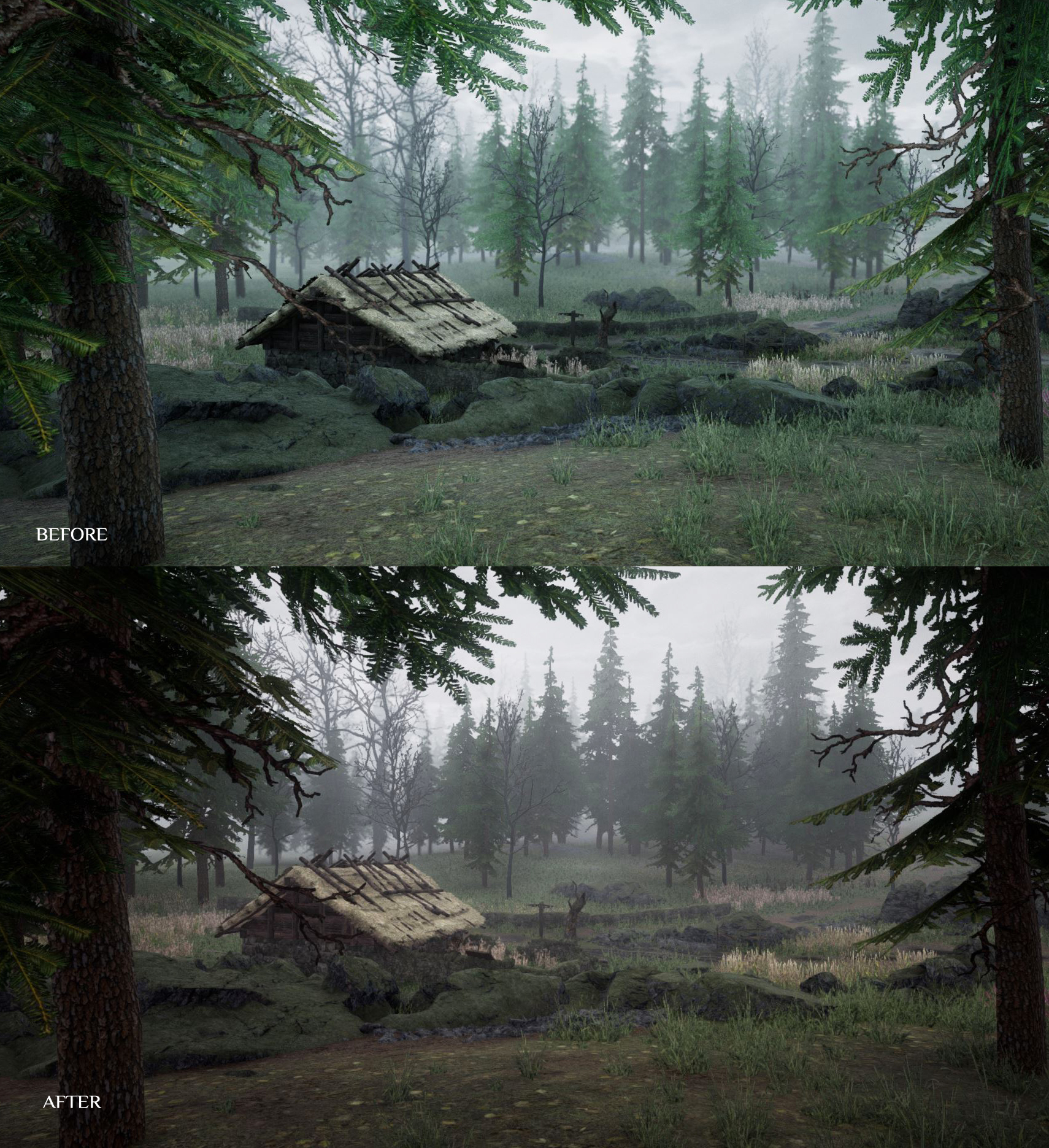
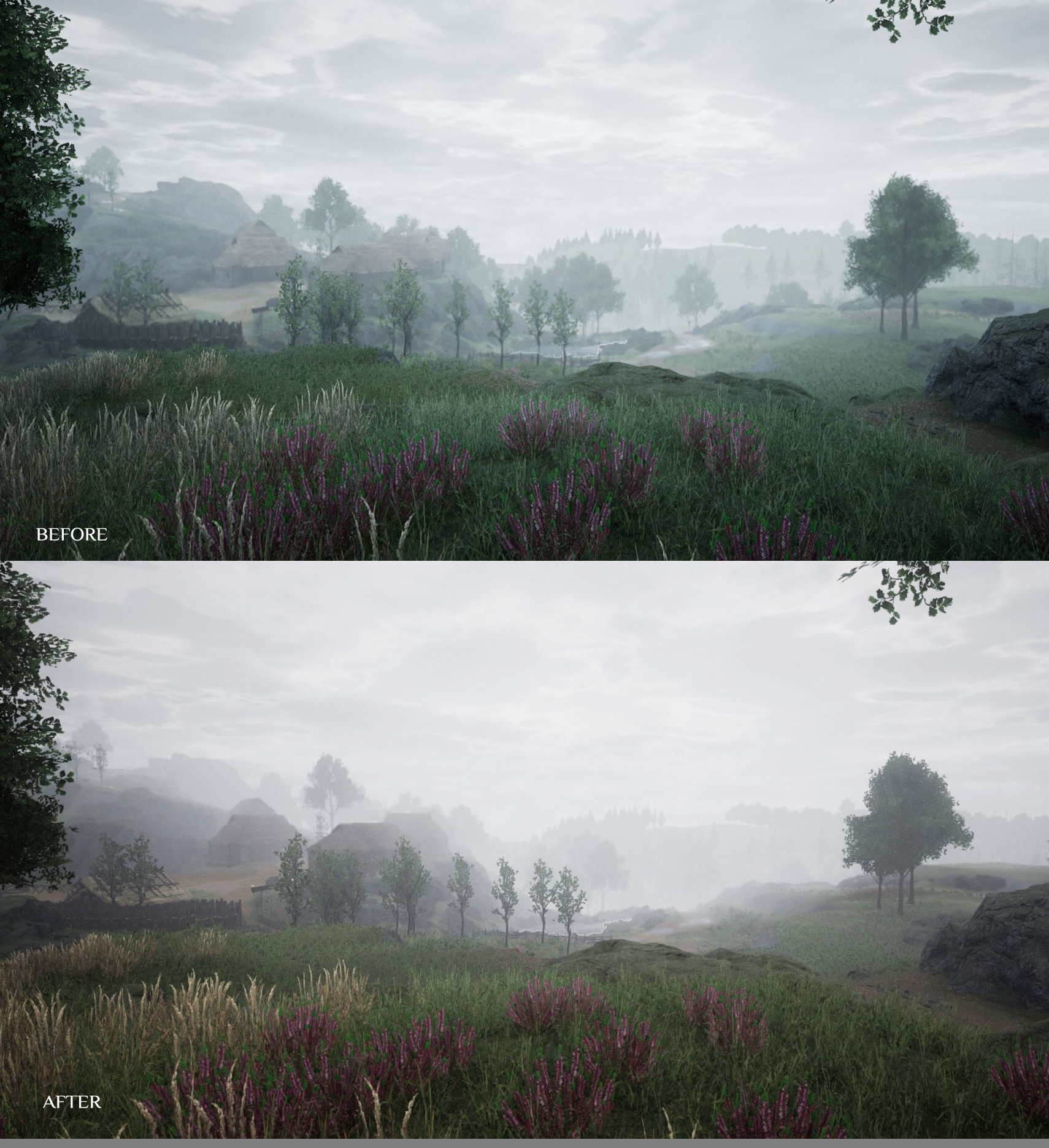
Post Processing Updates These graphical updates include changes to our lighting and fog effects as well as our new post processing. Below are some before and after shots of our new post process, lighting and fog effects.
We have been adjusting ambient occlusion and applying a volumetric fog technique to get distance shots to give a more immersive weather condition, this is especially effective on forests.
Updated
Updated/polished a large numbers of areas around the world
Coughing ai now has a cough particle VFX to make them more disgusting
Crossbow rigged up and usable by player
Updated bark textures for 2 types of trees
Updated ai so they have aim offsets: now they can aim up and down to hit you
Arrow count should always show on projectile weapons in the quick slots
Updated the UI in the main menu to be more streamlined
Increased view distance/replication cull range on loot bags so they dont pop in
Updated Exit menu UI to match the main menu changes
Increased collision size on a few weapon pickups
Updated the UI for the Loot and shop windows to the new cleaner paper look
Updated the death UI screen to match the main menu changes
Animals now make sounds and can be heard from a fair distance, to give you warning
Updated the large attenuation volume used in sound effects to be bigger but have a smaller inner radius
Updated speed of player to be slightly slower when you have a tool equipped in your hand
Updated the distance/network settings at which other players render at so you can see them from further away and they are less likely to pop in
Updated the camera distance to the player
Updated the punching aim offset angle so you can punch lower down (e.g. to hit people knocked out on the floor or, rats etc)
Updated player character physics asset should be less buggy now
Updated the sounds on pickups, so they match better the type of material they are
Updated the attenuation size of combat sounds so players watching a battle from a short distance away can hear it
Updated the rat ai to have squeaking sounds so you get warnings that a infectious rat is near
Updated vfx and sounds in weapon impacts types, to add a different feel between weapon types
Added camera shake into attack recoils and swings that might have missed
Removed holster/unholster from the context wheel as it was causing bugs and didnt work with the new quickslot system
All ai can now play the heavy hit reacts animations
The players aim offset now does not affect the pickup animations
Balancing
Adjusted the procedural resources spawn rates/chances
Adjusted the procedural ai spawn rates/chances
Adjusted the procedural loot pickups rates/chances
Resources requiring a tool now take multiple hits to break and give resources each time
Optimising
Optimised UI widgets
Optimised tick rates
Optimised concurrency of sounds
Optimised audio components in the character
Continued to remove hard blueprint references
Optimised ai
Optimised day/night
Fixes
Fixed several server crashes
Fixed a crash that could happen when equipping a bow
Numerous environment art bug fixes
Fixed seam from fog cubemap
Fix added for when knocked out to make sure you don't spin around on the spot from other clients view when you rotate the camera around
Fix to stop a bug where jumping and swinging at the same time could leave you unable to swing a weapon/punch anymore
Fixed bug with putting resources stacks into house work bench number being incorrect
Fix added to make sure splitting stacks always works as intended in code
Fix to bug with shields that meant that ai projectiles got through your block
Fixed a bug that stopped you being able place a campfire
Fix added to stop the ai leaning so much when walking on angled slopes
Fix added to gore system so spawned meshes shouldn't move violently/unrealistically
Fixed gore meshes spawn offset so they are closer to where the player body parts are
Fix for items durability not visually updating if you get them from a lootable or a lootbag
Stopped a few VFX from spawning on the server that slipped through
Fixed a bug that stopped you from walking up some staircases (in particular the staircase leading to part of the tutorial of the game, tutorial can now be completed again)
Fix for stack collapsing when you die and they are created in your lootbag
Fixed an audio setting bug for music, where if you brought the slider value to 0 it would never play music again in that play session
Fixed collision on gore arm that would cause it to hover in the air on spawn
Fix added to stop loading screen getting stuck up when you are in character create
Fix added to try and stop rare case where death screen not popping up when you die
Fixed a bug where animals would have human names
Fixed errors that were slowing down the cooking process
Fixed a bug that stopped sickness animations playing on the player when they were sick
when you hit person/animal with a arrow, the hit ui either side of the crosshair will now play
Put in a fix to stop the crosshair ever showing “None” as a name
Fixed a bug that would make an error sound when you put a weapon or tool from invent to the quick slot bar
Fix added for not being able to change Keybinds for 1,2,3,4,5,6
Fixed bug that would cause the equipped highlight to get stuck constantly on once a item was equipped through the quick slots on the hud
Fixed various log errors caused by UI backend
Group blend spaces for temporary upper body combat stuff/walk running speed stuff so they stay in sync
Fixed bug that caused you to only put in one resource at a time into the house workbench
Fixed bug where proc cotton swab pickup would give you a wooden sword item
Fixed a bug which could cause you to not be able to swing your weapon after being hit
Fixed a bug which meant you could split a stack by more than is possible creating a null inventory object
Fixed some misc spelling mistakes
Fixed the Ai bow angle in hand being incorrect
Fixed collision error with arrows
Fixed a slot node in the anim bp for the character
Fixed the main menu twitter link being incorrect web address
Fixed bug where f you run then go straight into a crouch your upper body would still animate at running speed
Fixed the incorrect pickup mesh for wooden training sword
Fixed foraging for water playing the drop anim instead of a pickup anim
Fixed friendly ai (Guards, villagers) hit reacts not playing correctly
Fixed a bug so now you can hit the ai rats that spread sickness to you
As always, thanks for playing!
…See you in Mercia!
// The SIG Team
Dev Blog #57: Mini Dev Update, Beta Patch Notes, Wiki Revival
Greetings citizens of Mercia and welcome to Dev Blog #57!
We’ve got a mini Dev Update, info on our Wiki Revival & our Beta Patch notes for both the current build and our next build.
Mini Dev Update
This week we will be having a look at our new graphical updates and a teaser on trees!
Graphical Updates
These graphical updates include changes to our lighting and fog effects as well as our new post processing. Below are some before and after shots of our new post process, lighting and fog effects.
We have been adjusting ambient occlusion and appling a volumentric fog technique to get distance shots to give a more immersive weather condition, this is especially effective on forests.
Contrast now gives a more realistic result where before the darkest parts of the image were too dark.
Update On Trees
We are working on the ability to cut down every tree in Mercia and give a realistic result when they fall which varies greatly depending on the tree type and size.
Wiki Revival
We are currently setting up our Wiki for the Community to kickstart a Wiki Revival! We will have more details on this in a future post.
We want to work with you, the Community to make The Black Death Wiki a place where players can find information, contribute and discuss ideas and to help grow the Wiki into a rich and informative hub. To see our past Steam Forum sticky post on our Wiki check it out here: The Black Death Wiki – Mercia Needs You! The Black Death Wiki – Mercia Needs You!
Updates In The Current Beta Build
These are the updates from our last Dev Blog that made it into the Beta build along with some more up to date notes:
Made the player model look more sickly when they are infected
Updated/fixes to recipes to do with the quantity crafting and stacking
Working on sick beggar AI type movement and animations
Updated/balanced thirst rate
Fixed naming error with milk procedural pickup
Fixed naming error with Wooden Duck procedural pickup
Updated shopkeeper item tooltip to stop it covering up the items in the shop
Fixed
Fix to make AI have death sounds
Fixed a bug which stopped you using a bandage while you are poisoned
Fixed naming error with milk procedural pickup
Fixed naming error with Wooden Duck procedural pickup
Fixed a server crash
Fixed a Fatal error when using a house built campfire
Fixed a bug where resources wouldn’t get used up when you created something
Fixed bug which stopped you being able to block the new AI types
Fixed bug that stopped you being able to rotate the camera around with the “Alt” button
Fixed bug where AI when killed by a projectile would instantly disappear without animation/physics
Fixed bug that stopped you equipping shields (Cannot currently equip a weapon and a shield though)
Fixed bug that stopped thirst being affected by running
Fixed a bug where AI, would only agro on one person
Fixed bug that stopped you jumping after using a tool as a weapon
Fixed bug that meant if you got thrown up on twice it would make you healthy again
Updated
Updated shopkeeper item tooltip to help stop it covering the items in the shop
Made the player model look more sickly when they are infected
Updated/fixes to recipes to do with the quantity crafting and stacking
Updated/balanced thirst rate
Updated the UI infected screen effect so it moves and is no longer static
Added more contrast into the post effect
Removed wood, iron and stone house upkeep costs, now only Wheat and Gold
Adjusted skinning on sick beggar mesh
Updated sick beggar AI movement, animations, sounds, VFX
Punching now has its own unique impact sounds that are more realistic
Icons update to put in line with paper UI
AI move more smoothly around (they path less regularly)
Beggars don’t throw weapons when they are in punching distance from you
New
New AI types now have Health bars and names
New wolf AI type added to the test map
New cow AI type added to the test map
New boar AI type added to the test map
New rat AI type added to the test map
New deer AI type added to the test map
Added a glow on resources that you can use/interact with
New books added “Plague Medical Notes For Apprentice Doctors – I” and “Plague Medical Notes For Apprentice Doctors – II”
New AI type sick bandit
New AI type monk crossbowman
New AI type spear man
New AI Type Bandit Miner
Balanced
Balanced the cost of the basic blacksmith iron ingots
Adjusted loot that new AI types drop to sometimes include rope
Optimised
Optimised sounds cues
Sound concurrency limits
Reduced loaded assets total by removing hard links between blueprints
Optimised AI weapons
Updates For The Next Beta Build
These are fixes that we have been working on that will be in the next Beta build:
Main character movement and animations
Throwing weapons (for the player)
Trees that you can chop down
Optimised camera manager tick rates
Optimisations, continued removing blueprint hard references
Fix for AI having human names
Fixed errors that were slowing down the cooking process
How To Download Our Beta Branch & Send Bug Reports
As always, if you do find any bugs or issues when playing on our Beta Test Server please fill in a Bug Report over on our Google Bug Form , every bug counts! When submitting bugs make sure to select “Version V0.xx (Beta)”.
For details on how to get onto our Beta branch check out this Steam post here.
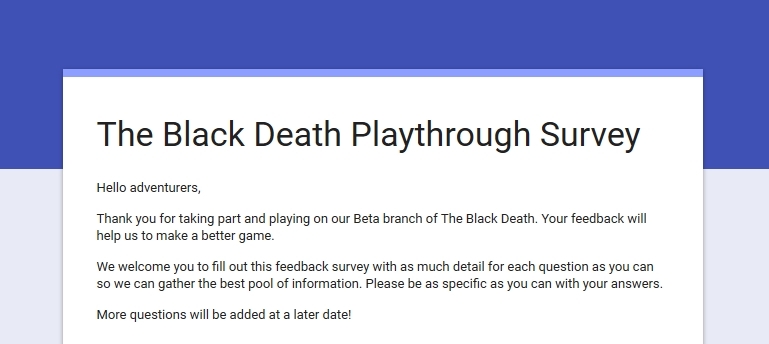
There is now a Google Form that will appear in your web browser once The black Death has been closed after playing. This form will only load in your browser if you have been playing on the Beta branch. It is designed to help us gather feedback whilst it is still fresh in your thoughts after playing so we can get a clear impression on Player thoughts. We greatly appreciate your feedback and suggestions. Thank you in advance for your submissions.
That’s all for now, thanks for reading and see you next time!
// The SIG Team
Beta Patch Notes - 28th January 2018 Build
Hello adventurers,
Here are the Beta Patch Notes for our Beta update on the 28th January 2018 on our Test_Beta Server.
Send A Bug Report If you do find any bugs or issues when playing on our Beta Test Server please fill in a Bug Report over on our Black Death Bug Form , every bug counts! When submitting bugs make sure to select “Version V0.xx (Beta)”.
Beta Server Feedback There is now a Google Form that will appear in your web browser once The black Death has been closed after playing. This form will only load in your browser if you have been playing on the Beta branch. It is designed to help us gather feedback whilst it is still fresh in your thoughts after playing so we can get a clear impression on Player thoughts. We greatly appreciate your feedback and suggestions. Thank you in advance for your submissions.
Version V0.24 (Beta) # 180128.164000 (Build Date: 28/01/2018)
Fixed
Fix to make AI have death sounds
Fixed a bug which stopped you using a bandage while you are poisoned
Fixed naming error with milk procedural pickup
Fixed naming error with Wooden Duck procedural pickup
Fixed a server crash
Fixed a Fatal error when using a house built campfire
Fixed a bug where resources wouldn't get used up when you created something
Fixed bug which stopped you being able to block the new AI types
Fixed bug that stopped you being able to rotate the camera around with the “Alt” button
Fixed bug where AI when killed by a projectile would instantly disappear without animation/physics
Fixed bug that stopped you equipping shields (Cannot currently equip a weapon and a shield though)
Fixed bug that stopped thirst being affected by running
Fixed a bug where AI, would only agro on one person
Fixed bug that stopped you jumping after using a tool as a weapon
Fixed bug that meant if you got thrown up on twice it would make you healthy again
Updated
Updated shopkeeper item tooltip to help stop it covering the items in the shop
Made the player model look more sickly when they are infected
Updated/fixes to recipes to do with the quantity crafting and stacking
Updated/balanced thirst rate
Updated the UI infected screen effect so it moves and is no longer static
Added more contrast into the post effect
Removed wood, iron and stone house upkeep costs, now only Wheat and Gold
Adjusted skinning on sick beggar mesh
Updated sick beggar AI movement, animations, sounds, VFX
Punching now has its own unique impact sounds that are more realistic
Icons update to put in line with paper UI
AI move more smoothly around (they path less regularly)
Beggars don't throw weapons when they are in punching distance from you
New
new AI types now have Health bars and names
New wolf AI type added to the test map
New cow AI type added to the test map
New boar AI type added to the test map
New rat AI type added to the test map
New deer AI type added to the test map
Added a glow on resources that you can use/interact with
New books added “Plague Medical Notes For Apprentice Doctors – I” and “Plague Medical Notes For Apprentice Doctors – II”
New AI type sick bandit
New AI type monk crossbowman
New AI type spear man
New AI Type Bandit Miner
Balanced
Balanced the cost of the basic blacksmith iron ingots
Adjusted loot that new AI types drop to sometimes include rope
Optimised
Optimised sounds cues
Sound concurrency limits
Reduced loaded assets total by removing hard links between blueprints
Optimised AI weapons
As always, thanks for playing and for your support!
// The SIG Team
Dev Blog #56: Dev Updates, Ongoing Beta Features & Beta Patch Notes
Greetings citizens of Mercia and welcome to Dev Blog #56!
Today’s Dev Blog will be smaller than our last as we had our extra issue on Monday in the form of Dev Blog #55, if you missed it check it out here.
We’ve got a mini Beta update, our Beta Patch notes for both the current build and our next build.
Dev Update – New Look Item Icons
Here is a mini Dev Update in the form of our Item Icons! We have given our item icons a more rustic-ish look to them (312 icons updated in total). For both columns, the images on the left are the previous versions and the images on the right are our new versions.
1. Bread Roll
2. Thread
3. Garlic
4. Wooden Animal Trap
5. Royal Tunic
6. Decorated Sallet Helmet
7. Book
8. Round Shield
Ongoing Beta Features
New Enemy Areas
Just as a little something here are a few examples of what some of our new enemy NPC locations will look like in our upcoming update. As these screenshots were taken from our Beta Test Map over on our Beta_Test server these layouts may change for the final versions.
As we mentioned in our previous Dev Blog #55 there will be more loot for players to find in our upcoming update. These new enemy areas will be dotted around the world of Mercia and will feature our new AI types, they won’t be giving up their loot easily!
This first screenshot shows an old farmyard barn that has been claimed by the Outlaws and Bandits of Mercia. The doorway to these barns will be barricaded up, these are comprised of three separate wooden planks that need to be smashed individually to break into these places rather than a door. As there are gaps between the planks you will be able to have a peek at what enemies are camped inside as well as their loot.
Down in the caves be sure to take a torch and a good weapon. Here lies rotting corpses, wooden crates, tables of loot and of course Bandits or deadly Beggars waiting to ambush you in the depths below.
Some areas such as these enemy Beggar houses have a new type of barricade, much like the Bandit barn hideouts, they even have their own farmland plots. If you venture on their land they will not hesitate to start a brawl with you.
These areas are more fortified featuring high fences and many enemies camping inside. These places have many buildings to explore, but as the Beggars and Bandits call it their home do not expect a warm welcome when stepping foot in these areas!
Lastly you may recognise these burnt out shells of buildings and houses. Monk Fanatics may be found lurking around here. These Monks wield maces that pack quite the hit, run away and you will be pelted with rocks they loot from the ground!
Increasing the Chat Box Text Size
As mentioned in our previous Dev Blog #55 , we have added a new option for Players that may be using larger resolution monitors when playing The Black Death, or for Players who may find it hard to read the default chat box text size.
We have also changed the way that the chat text appears in the chat box. Players will no longer look as though they are shouting! We have changed the font we use for text chat and Players can now optionally use the caps lock key when chatting.
If you do test this out on our Beta Test server and find that you are still having issues with the Chat box with your resolution, please send us a Bug Report here .
This setting can be changed in game by pressing the Esc key, then going to “Settings” and then the “Gameplay” tab. The option for “x1.25” and back to “x1” (default) are now available on our Beta server to test out!
This is what our x1.25 text size setting looks like for the Chat Box in game. This screenshot is from a monitor that has the resolution of 1920 x 1080. If you right click on this image and select “View Image…” it should load full size so you can see how large the text looks like. Or you could use “Set As Desktop Wallpaper…” to see a preview.
This is what our x1 text size setting looks like for the Chat Box in game. This screenshot is from a monitor that has the resolution of 1920 x 1080. If you right click on this image and select “View Image…” it should load full size so you can see how large the text looks like. Or you could use “Set As Desktop Wallpaper…” to see a preview.
New Player Written Book
A big thank you to Turev Schrodinger for sending in a Player written book! This is being added in game to our upcoming update. Keep an eye out for this one on your travels!
Turev Schrodinger – Plague Medical Notes For The Apprentice Doctor – Volume 1
Turev Schrodinger – Plague Medical Notes For The Apprentice Doctor – Volume 2
To send us your stories of Mercia please contact SIG_Emily by email at this address: Emily@small-impact.com. We look forward to reading your entries!
These are the updates from our last Dev Blog that made it into the Beta build:
Updated
HUD fades in after loading screen has finished to be more fluid
Lowered the opacity of the chat when it is not active so that it doesn’t draw the players attention away from gameplay.
New
Poison now effects the player over time (similarly to how bandages do), updated UI to show the effects.
Fixed
Fixed visual bug in UI when entering exiting an area, also reduced volume of sound effect that plays
Fixed bug which caused items to be already partly damaged when you pick them up/craft them
Fixes to the AI spawning
Updates For The Next Beta Build
These are fixes that we have been working on that will be in the next Beta build:
Made the player model look more sickly when they are infected
Updated/fixes to recipes to do with the quantity crafting and stacking
Working on sick beggar AI type movement and animations
Updated/balanced thirst rate
Fixed naming error with milk procedural pickup
Fixed naming error with Wooden Duck procedural pickup
Updated shopkeeper item tooltip to stop it covering up the items in the shop
How To Download Our Beta Branch & Send Bug Reports
As always, if you do find any bugs or issues when playing on our Beta Test Server please fill in a Bug Report over on our Google Bug Form , every bug counts! When submitting bugs make sure to select “Version V0.xx (Beta)”.
For details on how to get onto our Beta branch check out this Steam post here.
There is now a Google Form that will appear in your web browser once The black Death has been closed after playing. This form will only load in your browser if you have been playing on the Beta branch. It is designed to help us gather feedback whilst it is still fresh in your thoughts after playing so we can get a clear impression on Player thoughts. We greatly appreciate your feedback and suggestions. Thank you in advance for your submissions.
That’s all for now, thanks for reading and see you next time!
// The SIG Team
Dev Blog #55: Ongoing Beta Features, Current Beta Build Notes & Beta Build Progress
Greetings citizens of Mercia and welcome to Dev Blog #55!
This is a bonus Dev Blog issue for you all that will be focusing on our Beta branch and what we are working on with our upcoming update. We've got our ongoing Beta features section with what we have been working on and adding to the Beta, our current development build notes and some recent Beta updates in the form of patch notes too.
In today's Dev Blog we will be covering: Item Rarity, Equipment Slots, AI Types, Resources, Comparing UI from Live to Beta, Updates in the current Beta build, Updates for the next Beta build, How to download our Beta branch & Submitting Beta bugs to the team.
Ongoing Beta Features
New AI Improvements
Large A.I. improvements made with their logic and large increases in population including a new wide variety such as:
Groups of Infected Beggars that spread infection and hound you for much needed gold but will retreat with fear if attacked.
Deadly Beggars that will kill in sheer desperation, only with fists they will punch their way out of any fight.
Bandit Spearman that deal large amounts of damage and flank violently.
Outlaw Crossbowman that tactically seek distance and cover between them and their targets.
Shielded Templars that push forward with shield in hand putting pressure on even the most advanced player
Templar Knights that wield giant two handed weapons dealing large amounts of damage but are slower and more calculative.
Need a good amount of building materials? track down the new bandit woodsman that carry copious amounts of wood.
Our high quality GIFs are too large for Steam's upload limit! To see them in their full glory simply click on the links below to jump to the GIFs from our Dev Blog on our website.
Here are a couple of new GIFs showing off more of our new AI types, that’s right ranged enemies are back in business! Here is our new Outlaw Crossbowman, those bolts pack a punch.
Resources are now fully procedural to ensure no matter where you are in the map there will have plenty to find, this also allows us to tweak how rare or even how common a certain resource is making sure there is always enough. Lots of tweaks have been made to make sure they don't spawn in unreachable or unrealistic places. However don't fret, our procedural spawning system also allows some resources to spawn more likely in certain areas such as ore near a mine.
Item Rarity
We have decided to change up how our item Rarities work in The Black Death. Crafted and purchased items, weapons and armour will now have set rarities, this also includes harvested resources in the wild.
The item quality system was causing problems which we wanted to address. The core being:
The underlying system meant that we weren't able to stack items
Balancing items was complex as we had to balance the same item 5 times (the values for each quality)
There was no clear order as to what item was better than another (e.g. was a rare stick better than an awful sword?)
Having multiple durability bars, colours and names was convoluting the UI
After much discussion in the office we decided to pivot the design into item rarity instead. With item rarity we only have to balance an item once. This allowed us to create a clear order of what item is better than what. We assigned each item a specific rarity; Common (Grey), Uncommon (Green), Rare (Blue), Epic (Purple) and Mythic (Yellow). This relates to how good the item is and allows people to quickly read in the UI its value. The other important outcome of this is adjustment was that it allowed us to implement item stacking, which has improved the flow of the game and helped to make the UI easier to read.
Our new system:
Common (Grey)
Uncommon (Green)
Rare (Blue)
Epic (Purple)
Mythic (Yellow)
Equipment Slots
Our new equipment slots now free up your visual Inventory space by having your armour in it's own tab. Armour values are also now show correctly on items in your Inventory. The Epic Kettle Helmet and Mythic Lamellar show off our new colour tabs on items too for a quick glance on item qualities.
It is also now possible to right click on items to drop, split and use them.
Speaking of loot, there is more loot in the world for Players to find, use, craft with or sell too! Make sure you get out there and explore the world of Mercia.
Here is a quick GIF showing how easy it is to click and drag your armour to the equipment slots at the top of your Inventory panel!
Here are some screenshots of our current Live build (V0.23) compared with our Beta (V0.24), using our sliders you can see the differences between our old and new HUD.
Note: The Screenshot Sliders are only functional over on our website! To view these check out the link below, otherwise you can view them here and simply scroll down! The top images are V0.23 (Live) and the bottom images are V0.24 (Beta).
Starting things off, this is our main HUD in game. We have took our old HUD and given it the theming and style of our Inventory and recipe UI. With the addition of our new Quick Slot Bar and tidy information surrounding it we feel this makes it much cleaner. The green bar in the centre of the Quick Slot Bar is your XP bar! This is now more visible and can also be seen at the top of the Journal tab for classes too.
Moving on to our Shopkeeper window, notice how the items feel more separate in the new layout, along with item qualities now being displayed by coloured tags on their item icons.
To show some of our smaller changes here is our Camp Fire utility. You now have the ability to craft more than one of an item if you have the required resources to do so.
Here is a comparison of our old Plague Doctor recipe window. The new UI is much sharper than the previous one, with some of the dirt effects on the journal cleared up for text clarity.
Our last slider is a smaller change. This one simply shows when you enter and exit an area the pop-up tab at the centre top of the screen now matches with our new UI theme and also features an audio effect when these appear.
Here is a quick GIF showing our new Days Survived pop up. This version is more compact and tidy with it’s information and does not cover your Health and wellness any more. It is now situated above our new Quick Slot Bar.
Updates In The Current Beta Build
New
Made it so you can upscale the chat window size for people with bigger resolutions, see in game settings under “gameplay”
Items now stack in inventory (apart from tools, clothes and weapons)
Added a survey on game close, when on beta branch, to help us identify key problems/areas
Money is now an item and not a separate system. E.g. money can be taken from a lootable when you click loot all rather than being a separate thing you have to click at the top. Money can be split dropped and split added to chests.
Inventory items/shop items/lootable items can now be right clicked to bring up contextual options such as, use, drop, split etc
Inventory now has a tooltip, when hovering over items and recipes so that you can learn more about the item.
There is no longer a combat mode when you draw a weapon, this is to help the flow of player based combat.
Damage is effected by the material being hit and the material being used to strike with. E.g. wood against metal is not very effective but metal against wood is effective.
It is now possible to craft more than one of an item if you have enough materials in your Inventory
Being stunned by projectile weapons now stuns you and slows you for a brief moment
There is now lots more loot in the world for players to find, use, craft with or sell.
Updated
update – centre the mouse out when enter the inventory, Exit Menu, House menu, to be more fluid
Removed timer for holding E to bring up context wheel. now instant, only shows if object has more than 2 interact options
You can now move while picking stuff up, instead of pausing for a full body animation
Doors that you own can now be open/closed quickly with just a press of E (No context wheel)
Removed use, equip and un-equip from the context wheel now that we have quickslots
Removed background from the inventory and house workbench menus so you can see through
Infection system updated, now the player only has one stage to infection and the timer for being infected has been reduced. Instead of instantly taking away health it drains your food and hunger which when they hit 0% it causes you to take damage.
Tweaked size of text on the main menu initial message
Made layout tweaks to the house ui to help make it easier to read
Made it so you can now see your xp bar and how many points you have to spend in your HUD, so you can see how close you are to leveling up. Also made it so you can see the number of xp you get when you do a task
[8] Moved around hud elements, now pickup item info is in the centerplace in the screen so its easier to see.
Updated the UI of the inventory to be cleaner and easier to read.
Added small camera shakes to the player when hit in combat, making strikes and landing from jumps
Updated the bow mechanics to make more smooth and include more audio feedback
Now show Arrow count throughout the UI
Adjusted the rate at which the stamina drains and regens during combat
Did a quick update for the stick club striking anims
Optimisation
Optimised the tick rate of the main menu level blueprint
Optimised the UI (Exit Menu, )
Optimised Traps tick rate
Optimising textures
Streaming audio changes
Compressed animations
Deleted old resources blueprints
Deleted old AI blueprints
Balanced
Adjusted player speeds
Fixes
Fixed up a bug which would cause the camera to freeze if you brought up the interaction menu while in the exit menu
Fixed errors that slowed the game down when it is being cooked off
Fixed using well water pickup sound and vfx not playing
Fixed emote wheel so it opens up.
Fixed problem that stopped you moving when using the bow
Updates For The Next Beta Build
We are hoping to have a Beta build today (22/01/2018) on our Test Beta Server. These are fixes that we have done today that will be in the new build:
Updated
HUD fades in after loading screen has finished to be more fluid
Lowered the opacity of the chat when it is not active so that it doesn’t draw the players attention away from gameplay.
New
Poison now effects the player over time (similarly to how bandages do), updated UI to show the effects.
Fixed
Fixed visual bug in UI when entering exiting an area, also reduced volume of sound effect that plays
Fixed bug which caused items to be already partly damaged when you pick them up/craft them
Fixes to the AI spawning
How To Download Our Beta Branch & Send Bug Reports
As always, if you do find any bugs or issues when playing on our Beta Test Server please fill in a Bug Report over on our Google Bug Form , every bug counts! When submitting bugs make sure to select “Version V0.xx (Beta)”.
For details on how to get onto our Beta branch check out this Steam post here.
There is now a Google Form that will appear in your web browser once The black Death has been closed after playing. This form will only load in your browser if you have been playing on the Beta branch. It is designed to help us gather feedback whilst it is still fresh in your thoughts after playing so we can get a clear impression on Player thoughts. We greatly appreciate your feedback and suggestions. Thank you in advance for your submissions.
That’s all for now, thanks for reading and see you next time!
// The SIG Team
Dev Blog #54: Dev Update, Beta Test Server Reminder & Steam Guide
Greetings citizens of Mercia and welcome to Dev Blog #54!
We’ve got a Dev Update, a reminder on our Beta Test server and also a Steam Guide for those of you having issues with getting the Console Command window to appear in game for using Admin controls on private/LAN servers.
Dev Updates
We are currently working on a range of things for The Black Death. These include: Resource balancing, more fluid gameplay, AI changes/additions, UI/HUD changes, Quick Slot Bar, Revamped Rarity system and more!
In the next Dev Blog we hope to show you more information on how our revamped item rarity system works and also our new Equipment Slots in the Inventory. Today’s teasers are a few GIFs showing the new animations for gathered resources and lootables too.
All of our resources including lootable crates, barrels and chests in our upcoming update are now procedurally placed in the world of Mercia. This means that if you find a Berry or Cotton Bush in one place chances are something different will spawn in its place when you return, or there might be no resource in that spot at all! This also includes Wood Logs and Mining Nodes.
This is to encourage exploration around Mercia and make gameplay feel more fluid so players are not returning to the same exact spots for materials and loot. Along with our big AI revamp we feel this will make for some great gameplay sessions and experiences.
Resources
To show off the way resources look when gathered here are a few GIFs to show just that. We hope players will find it clearer to see when a resource has been harvested before getting close for an inspection.
In our full Patch Notes for our upcoming update we will be featuring comparisons in the form of GIFs and screenshot sliders to show changes such as resources and our HUD.
Please note that as these are taken from our Beta Test server some elements of what we show may be changed/tweaked in the final versions.
Our high quality GIFs are too large for Steam's upload limit! To see them in their full glory simply click on the links below to jump to the GIFs from our Dev Blog on our website.
First off here is our signature Berry Bush resource. Notice how it now collapses into a pile rather than just the actual berries themselves being removed. We wanted to give the resources a makeover with them feeling more like you had actually harvested them.
The Ore node in this GIF is Iron Ore. These are also procedural in their placement around the world. Instead of the node magically shrinking with each strike of your pickaxe, the node will now fall apart and crumble on the ground. You can now only harvest an ore node once before it crumbles, this is for balancing and to make some materials more valuable.
Lastly for our resource teasers here is the Wood Log. When struck with your woodaxe these logs will now split into 3 sections instead of having missing pieces of wood. Wood Logs along with Ore nodes now feature physics on them, see how the logs roll down the hill!
Lootables
As mentioned above, all of our resources including lootable crates, barrels and chests in our upcoming update are now procedurally placed in the world of Mercia. This means that if you found a sweet spot with a few crates, these may be barrels next time or they may not spawn at that spot at all!
To make gameplay feel more fluid and for a different kind of play session loot should now feel more rewarding when you stumble across something good. We have also added new loot items that can be found around the world and Player written books should now appear more often!
Do you recognise either of these paintings? These can be found hanging on the walls of abandoned houses in Mercia or for example on the walls of The Black Goat Tavern in Raven’s Reach! Eagle eyed adventurers may remember that paintings used to spawn in the wooden crates scattered around the coastal areas. We have now brought them back as physical items that you can loot and sell for some extra Gold!
Much like our resource nodes, our lootable containers have been given a revival too. When you loot one of these you instantly receive the goodies inside without the need of an extra loot menu. After looting these crates they will collapse in on themselves, barrels will lose their lids too. When approaching one of these in the world it should be clear if they have be claimed or if the loot is ripe for the taking!
Beta Server Build Reminder
We hope to bring you a new Beta build on our Test_Beta server again soon. When we have uploaded a new Beta build to our test server we hope to provide you all with some form of patch notes to inform you of the additions and changes to the Beta build.
When we do have updates to our Beta server we hope that you will all understand if there are issues present. This is of course intended as a testing ground for updates and patches. If you do find anything be sure to report it over on our Google Bug Form , and make sure you select “Version V0.xx (Beta)”
There is now a Google Form that will appear in your web browser once The black Death has been closed after playing. This form will only load in your browser if you have been playing on the Beta branch. It is designed to help us gather feedback whilst it is still fresh in your thoughts after playing so we can get a clear impression on Player thoughts. We greatly appreciate your feedback and suggestions. Thank you in advance for your submissions.
Steam Guide – Using The Tilde Key With Non English Keyboards
As a little extra [SIG]_Emily has created a Steam Guide on getting the Console Command Window working for players who are not using an English (United Kingdom) layout keyboard.
This guide should allow players who are not using a UK English layout keyboard to use the Windows Console Command when playing The Black Death. This unlocks the ability to use Admin commands when playing on a private server, LAN server or player owned/hosted/rented server.
I understand that this guide is written in UK English and this may not be easy for some players to read and understand, apologies in advance! I did not want to run this guide through a tool such as Google Translate as the translation may not have been accurate.
If you have any questions or feel any information in this guide is incorrect, or needs updating please do not hesitate to drop me an email at: Emily@small-impact.com.
That’s all for this week, see you next time!
// The SIG Team
Dev Blog #53: Dev Updates, Beta Server Build & Dev Blog Special Part 2
Greetings citizens of Mercia and welcome to Dev Blog #53!
We’ve got a Dev Update, Beta Server Build and our Part 2 Dev Blog Special.
Dev Updates
We are currently working on a range of things for The Black Death, one of the main things is improving the way gameplay flows, both in combat and in general.
More things can be done whilst moving around, such as looting and picking up items as the animations for these have been removed to allow for a more fluid gameplay experience.
Here are a few teasers!
Resources are now procedurally placed
New AI types! (Sick Beggars, Monk Fanatics, Shield Wielding Templars & more!)
HUD Revamp
Quick Slot Bar
Added a new system & functionality that allows dragging and dropping of armour, weapons, tools and items to the Quick Slot Bar
Functionality added for right clicking on items in the Inventory
Resources/Materials now stack in the Inventory
New revamped Rarity System
Some of these are as follows: Procedural loot system, Combat/fighting and also work on our AI. All of these tie into core areas of The Black Death so these may take some time for us to refine as we work on improving them.
From the desk of SIG_Mac here is a GIF showing off our new Quick Slot Bar and also our dragging and dropping system! Notice the new icons and Inventory layout, as well as slots for armour, bag and ammo too. There has also been a rework to the centre page of our Inventory/Crafting window.
From the desk of SIG_JC, here is a teaser of one of the new areas currently being worked on. These areas will be home to outlaws and bandits a' plenty! Make sure to take a few torches on your travels to these overrun hotspots.
From the desk of SIG_Mac, here is a teaser of the new "Greater Armour Set" that will be introduced in our upcoming update! This will be craftable as a high tier set under the Blacksmith's recipe tab.
Here are some teasers for our new AI types!
Sadly, our GIF's are too high quality for Steams upload tool! To see our GIF's in all their glory head on over to the links below to see them on our Website.
Here's our last AI teaser, featuring our Two Handed Templar's! Going ranged to deal with these baddies is a must.
Beta Server Build
We hope to bring you a new Beta build on our Test_Beta server soon with some of these new additions and changes in.
When we do have updates to our Beta server we hope that you will all understand if there are issues present. This is of course intended as a testing ground for updates and patches. If you do find anything be sure to report it over on our Google Bug Form and make sure you select
"Version V0.xx (Beta)"
There is now a Google Form that will appear in your web browser once The black Death has been closed after playing. This form will only load in your browser if you have been playing on the Beta branch. It is designed to help us gather feedback whilst it is still fresh in your thoughts after playing so we can get a clear impression on Player thoughts. We greatly appreciate your feedback and suggestions. Thank you in advance for your submissions.
Dev Blog Special: The Journey So Far... [Part 2]
Join us once again in this special edition Dev Blog as we go back in time through the ages of Mercia and thank our amazing community for being with us on this epic journey. So grab a nice hot mug of your favourite brew and join us as we take a look back on 2017…
Dev Blog #52: Dev Update, Founder’s Name Closure & Community Moments 2017 Submissions
Greetings citizens of Mercia and welcome to Dev Blog #52!
We’ve got a Dev Update, our Founder’s name closure, a new form open for your Black Death moments and memories of 2017 and details of our next Blog posts!
Dev Updates
There is a lot going on behind the scenes here at SIG. We have been gathering your feedback from the Steam Forums and also our feedback survey that we ran. We are currently working on a range of things for The Black Death. Some of these are as follows: Procedural loot system, Combat/fighting and also work on our AI. All of these tie into core areas of The Black Death so these may take some time for us to refine as we work on improving them.
We hope to bring you a Beta build on our Test_Beta server this weekend with some new changes added. As this is the weekend just before Christmas, if we do have an update to our Beta server we hope that you will all understand if there are issues present. This is of course intended as a testing ground for updates and patches. If you do find anything be sure to report it over on our
Our Weekly Q&A will also be making a return to our Dev Blog’s in the new year, thank you for all your submitted questions. We certainly do have a pool to fish from!
Founder’s Discord Channel Locked
Thank you to everyone who sent in their Steam Usernames/ID’s on our Founder’s Channel over on our Discord. This channel is now locked and set to a read only state for archiving.
As a reminder these were the categories for submissions, if you fell into one of these or all of these you could submit your name to us, before the 15th December 2017 at 11:59pm GMT time.
– Are a long standing member of the Community
– Have been helpful to other Community members and shown kindness
– Have submitted Bug Reports to us through our Google Form or by Email
We will be checking through all of the names submitted to us, and your Steam ID’s to check against the above to verify the status of your submissions. These will then be added to a future update of The Black Death and those selected will be included in our Patch Notes.
Your Community Moments & Memories of 2017 – Entries
It’s coming up to the end of 2017, it’s gone so fast! There has been a lot that been going on and just like last year everything will be documented into our “end of year” Blog Special in a Part 2.
These questions and your responses will be included in our Plague Moments & Memories Community section, just like last year! But this time with extra information!
Please include your Steam Username in the last question if you would like your name to be credited with your responses and screenshots too.
Closing date on submissions: 2nd January 2018 at 11:59pm GMT time!
The Dev Blog Special Part 2 will be posted out on the 3rd January 2018 at 6pm GMT time!
If you head on over to our Website to view this Dev Blog, you should see this form embedded directly into your web browser, like magic!
If you cannot see this form on our Website for some reason there is a link below that will open the Google Form into another tab. Thank you in advance for all of your submissions!
That’s all for this week! Just to let you all know there will not be a Dev Blog next week as the SIG team are off on their Christmas break. You can look forward to our Dev Blog Special Part 2 arriving on the 3rd January 2018 at 6pm GMT time!
From us all here at Small Impact Games we wish you all a very Merry Christmas/Happy Holidays and a Happy New Year 2018!
// The SIG Team
Update V 0.23
Hello there Mercia,
This week's update has been a primary focus on further optimisations and fixes issues that can cause various crashes.
Here are the patch notes in full:
Fixes:
Fix added to stop you getting kicked to main menu when using inventory via the context wheel
Fix for a crash happening on game startup
Fix to Royal Tunic item so that you can repair it at an anvil
Fix to stop previously owned houses keeping collisions and nodes when bought by someone new
Fixed an exploit with tool durability through equipping/unequipping
Fixed a bug which would let you use tools after they had broken
Fixed some UI chat stuff that you could interact with while in inventory that you shouldn't have been able to
Fixed bug which stopped you being able to perform dissections on bandits/NPCS
Fixed formatting of some timers in the UI
Misc spelling fixes in the chat trees
Updated:
If an “E” interaction has only one action that can be taken we made this happen automatically without having to select it from the wheel
Added a popup to the house workbench to warn players that if they remove all people from the permissions then the house will have to be bought again
Updated some icons for house node items
Small visual updates to the context wheel UI
Updates to the inventory UI
Optimisations
Big optimisation to network traffic
Known Issues:
We have temporarily removed steam to in-game chat while we hunt down a crash related to it