I hope you are enjoying Trails of Cold Steel III! We just released a minor update which fixes a startup crash issue on uncommon system configurations:
Fixed a crash on startup when launching the game on a system with no audio devices while having video playback enabled.
Note on Reverting to Previous Versions While we of course aim for each new version to only solve issues and provide improvements over all previous ones, it is always possible for something to break on some particular configuration. Therefore, we keep all versions available as Beta branches in Steam. Should an update lead to issues on your system, you can revert to a previous branch by selecting "Properties" -> "Betas" in the Steam library and choosing a version from the drop down menu. If you can confirm that the new version caused a problem, please report it as a regression.
- Durante
Trails of Cold Steel III Version 1.04 Patch Notes
Hi everyone!
I hope you are enjoying Trails of Cold Steel III! We just released a minor update which fixes issues related to DLC packaging and the localization system used for DLCs:
Fixed an issue which could cause crashes upon loading some DLC content.
Fixed a rendering issue with portraits for characters wearing DLC costumes.
Note on Reverting to Previous Versions While we of course aim for each new version to only solve issues and provide improvements over all previous ones, it is always possible for something to break on some particular configuration. Therefore, we keep all versions available as Beta branches in Steam. Should an update lead to issues on your system, you can revert to a previous branch by selecting "Properties" -> "Betas" in the Steam library and choosing a version from the drop down menu. If you can confirm that the new version caused a problem, please report it as a regression.
- Durante
Trails of Cold Steel III PC Technology Deep Dive
Trails of Cold Steel 3 for PC will be released in a couple of days, but before that happens, we wanted to provide a bit of insight into the specifics of the PC version.
Returning Favourites
Just like the ports of its predecessors, ToCS3 on PC adds a number of graphical and convenience features unique to the platform. These returning ToCS PC favourites include:
A timed autosave feature with custom save intervals.
Configurable turbo modes with separate factors for battles and other gameplay.
Arbitrary framerate support up to 480 FPS.
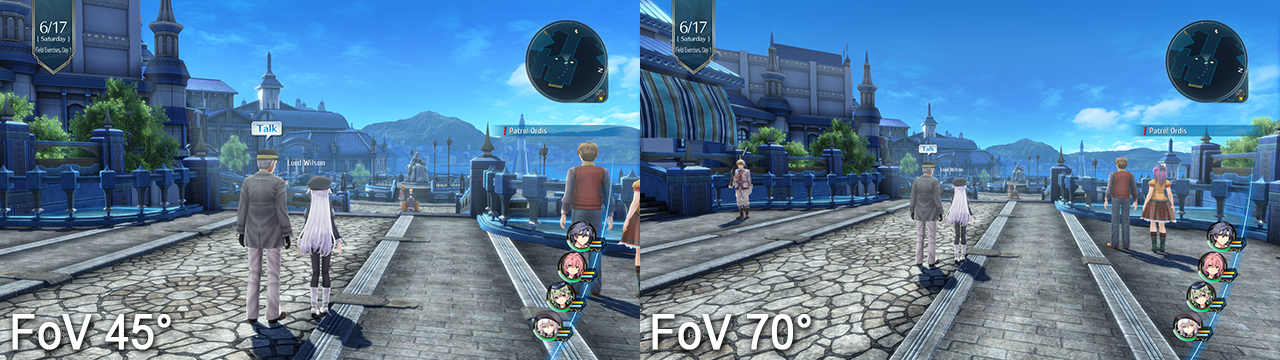
A large range of Field of View adjustments.
Arbitrary resolution support (tested up to 8k), with all secondary rendertargets scaling correctly with the main resolution.
Several MSAA modes, and optional transparency supersampling.
High-quality ambient occlusion in the form of HBAO+.
A high-quality postprocessing effects option.
Flexible input rebinding for both keyboard/mouse inputs and gamepads, with the correct re-bound prompts showing up in all in-game tutorials.
An unlimited drawing range option for high-end systems to eliminate pop-in.
Support for utrawide 21:9 aspect ratios.
Asset Compression
One of the new challenges with ToCS3 is the sheer size of its assets. The Trails of Cold Steel games are long and intricate, and the third entry pairs this large amount of content with significantly more detailed assets designed for more modern hardware.
With just normal texture compression, the 3D model assets and textures alone (excluding e.g. movies and all sound/voice acting) take up over 60 GiB of space -- and that's only for the Japanese version. While Steam and GoG would reduce the download size a bit, that would still be a rather large chunk of space to dedicate to a single game.
As such, early on in the port development we investigated and implemented many options for asset compression. Good compression in this use case needs to fulfill several criteria: (i) it should be lossless, so that we can apply it to arbitrary assets without worry; (ii) it should not increase load times significantly, even on lower-end systems; and of course, (iii) it needs to actually meaningfully decrease the storage space required.
Some options, like LZMA compression, failed early on the load time criteria. Other simple options did not provide a sufficient reduction in size.
Ultimately, the field narrowed to LZ4 and ZSTD as compression schemes, with the addition of our engine-specific PKA format which primarily performs hash-based deduplication on game assets.
As the image above shows, measuring loading performance correctly for PC games is not trivial. Windows caches all file accesses in RAM as long as any unused space is left, which means that repeated ("hot") loads will be much faster than initial ("cold") loads. Also, for cold loads, the HDD/SSD access and read time is a significant factor, which is not the case for hot loads. During gameplay, players will encounter a mixture of hot and cold loads depending on how they traverse maps and even how much available RAM their system has.
ZSTD-PKA reduces the asset file size to ~16 GiB from over 60 GiB, but roughly doubles hot load times, and also decreases cold load performance compared to ZSTD without packaging. Based on this result, we changed the sorting of data within the PKA (PKA-S), which achieved improved cold load times without any other drawbacks. Finally, we actually took a step back to LZ4, to trade some compression effectiveness for greatly improved hot load times.
Ultimately, LZ4-PKA-S gives us a very acceptable asset package size of ~18 GB, with the best cold load times of all options -- a huge improvement in cold load times over no compression at all! -- and very acceptable hot load performance. We hope you enjoy the work that went into this aspect while playing the game!
Screen-space Anti Aliasing
For previous ToCS games on PC, various levels of MSAA (with optional transparency supersampling) were sufficient for most use cases. These games were built to run on a PS3, and as such most PCs had ample headroom for such high-quality, but relatively performance-intensive anti-aliasing options.
Trails of Cold Steel III was originally built for PS4, which means that its baseline resource requirements are significantly higher. Therefore, on many current PC systems MSAA might not be the ideal trade-off between image quality and performance.
As you can see above, at "high" game settings 8xMSAA with transparency supersampling alone can reduce performance by more than half. Even 4xMSAA can have an almost 30% performance impact. 2xMSAA is cheaper, but its effect is rather weak for long and high-contrast aliasing.
To provide more options for these use cases, we've also implemented an FXAA option into the game. This implementation is tuned for a minimal impact on overall image quality while providing good anti-aliasing for most obvious geometry edges, with a minor performance impact.
Other Improvements and Final Notes
We also made several other improvements during the development of ToCS3 for PC, such as higher-quality shadow filtering with deterministic screen-space dithering. On a more obscure note, I added some logging output for speedrunning purposes, as I was asked to do so by members of the ToCS speedrunning community.
I would like to take this opportunity to remind everyone that ToCS3 was originally built for a platform almost an order of magnitude faster than the target hardware of its two predecessors. As such, please do not expect to get the same performance at the same settings which you were able to achieve in ToCS1 and 2 -- given the improvements in asset detail and quality as well as rendering technology, that is an unrealistic goal.
Finally, I would like to thank our beta testers for their in-depth testing, reporting and general responsiveness during the long testing period of this game.
- Peter "Durante" Thoman, PH3
Trails of Cold Steel III Demo Update 1.02
Hi everyone!
I hope you are enjoying the demo for Trails of Cold Steel III on Steam. We just released another minor update which fixes an issue discovered on some specific hardware configurations:
Fixed a rendering problem where battle area indicators were corrupted when using MSAA modes on some AMD graphics cards.
- Durante
Trails of Cold Steel III Demo Update 1.01
Hi everyone!
I hope you are enjoying the demo for Trails of Cold Steel III on Steam. We just released a minor update which makes the following improvements:
Added an FXAA anti-aliasing option. This gives you a more performance-efficient choice for anti-aliasing in addition to the previously available MSAA modes.
Fixed an issue which could cause the background music to be interrupted or stop playing in some scenes on some systems.
Fixed an issue where a required dependency was not being installed, preventing the game from launching on some systems.
I've also seen some questions regarding demo save files which I'd like to answer here. Yes, your progress in the demo carries over to the full game! You will be able to pick up exactly where you left off.
- Durante
Trails of Cold Steel III is Coming to PC!
Prepare for battle! The Legend of Heroes: Trails of Cold Steel III is coming to PC on March 23, 2020! This port is packed with various improvements and new features, including:
Ultrawide screen support
Fully customizable key bindings
Enhanced visuals
Additional High-Speed Mode Options (now up to 6x faster)
Auto-Save functionality
Check out the announcement trailer for more information about the new features, as well as DLC items that will be available in-game at launch! You can also visit our Steam® page to put this game on your wishlist!