

The Persistence
The Persistence Enhanced: Patch 1.01
Updated to Nvidia DLSS v2.2
Online/Offline Saving
- Fixed issues relating to Offline save functionality.
Missing Keycard
- Fix implemented for a keycard periodically vanishing, preventing overall progress.
Resolution Options
- Fixed a specific issue relating to playing in 2560x1440 resolution.
VR Comfort Options
- Fixed issues relating to VR Comfort Options being saved within the title.
HTC Vive and Oculus Rift/Rift S
- Implemented fix for Oculus Rift and HTC Vive headsets and removed occasional stutter encountered during gameplay.
PC VR
- Sweep for PC VR Stability, ensuring nothing stability/ no further additional crashes.
PC Quality of Life
- Several minor graphical faults fixed.
Thanks so much for playing!
- Team Firesprite
The Persistence Enhanced: Out Now
[previewyoutube="h5HYV4l03qs;full"]
Today we’re excited to announce that the Enhanced Edition of our critically acclaimed rogue-lite survival horror title, The Persistence, is available now!
The Persistence Enhanced dials up the intensity of the dark foreboding decks of the doomed deep space colony ship to new heights with improved lighting and particle effects and the addition of Raytracing via DXR and NVIDIA® DLSS specifically implemented for supported RTX cards.
The Persistence Enhanced is available as a standalone paid digital download and as a free upgrade for existing owners of The Persistence on Steam and includes a free concept art book and soundtrack DLC bundle.
The Persistence Enhanced will feature:
- DXR implementation: Realtime shadows, Reflections and Realtime Global Illumination
- Full DLSS support for NVIDIA® RTX Supported Graphics Cards
- Improved effects and particles
- Improved UI
- Adjustable frame rate lock settings - 30 / 60 / 120 / 144 / Unlimited
Quality of Life Improvements
- Below are the following improvements that have been possible to implement with this update:
- Improved menu screens, comfort options and HUD scaling
- Manual language change
- Game-feel improvements
- Improved Windowed Mode
- Additional monitor support
- Customisable controls and Weapon Hotswapping
- HUD Scaling Improved Menu Screens
- VR Graphical Settings options
- Mouselook now free, rather than locked to the middle button
- General bug fixes
Follow The Persistence on Twitter for all the latest reveals and news, and share your gameplay content with us using #ThePersistenceEnhanced!
Experimental Ray-traced Reflections in VR
Captured on Intel 8700K, 32GB RAM NVIDIA 2080 Super with Oculus Quest 2 in Rift Mode
Hi everyone! We’d like to first caveat that this is an experimental feature we’ve included – we are not going to develop this any further, but we want to include this for those that want to tinker.
To reach the required framerate for VR, we’d recommend a high end DLSS supported NVIDIA® card. The above video was captured in real time on an NVIDIA 2080S.
To access Ray-traced Reflections whilst in VR, head to the “Raytracing” menu to turn it on along with configuring a DLSS profile. Realtime Global Illumination and Ray-traced Shadows unfortunately cannot be enabled whilst in VR as the game does not boot.
Just to note, we don’t recommend turning this on by default and we cannot and will not take responsibility for any damage to hardware. We do, however, hope you enjoy experimenting with the feature!
NVIDIA® DLSS Support
Today we’re excited to officially announce that The Persistence Enhanced will feature support for NVIDIA DLSS as part of the Raytraced rendering that we’ve included in the game. It is also supported when playing in VR too.
Let’s take a look at what you can expect from The Persistence Enhanced!
[previewyoutube="880iI_N8cxs;full"]
Captured on Intel 8700K, 32GB RAM, NVIDIA RTX 2080S
The Persistence Enhanced supports NVIDIA® DLSS with featuring Quality, Balanced, Performance and Ultra Performance profiles. The above video was captured in 4K with the “Ultra Performance” profile enabled on an NVIDIA 2080S but we’d recommend a 3000 series RTX card if you require the game to run in 4K resolution above 60fps.
The Persistence Enhanced will feature:
- DXR implementation: Realtime shadows, Reflections and Realtime Global Illumination
- Full DLSS support for NVIDIA® RTX Supported Graphics Cards
- Improved effects and particles
- Improved UI
- Adjustable frame rate lock settings - 30 / 60 / 120 / 144 / Unlimited
Quality of Life Improvements
Below are the following improvements that have been possible to implement with this update:
- Improved menu screens, comfort options and HUD scaling
- Manual language change
- Game-feel improvements
- Improved Windowed Mode
- Additional monitor support
- Customisable controls and Weapon Hotswapping
- HUD Scaling Improved Menu Screens
- VR Graphical Settings options
- Mouselook now free, rather than locked to the middle button
- General bug fixes
The Persistence Enhanced will be available June 11th.
Check our FAQs for more info.
Share your gameplay content with us using #ThePersistenceEnhanced!
The Persistence Enhanced Available June 11th
[previewyoutube="7X4eYkYwvI4;full"]
The Persistence Enhanced Coming to Steam June 4th
[previewyoutube="m72OgjH9q8w;full"]
The Persistence Enhanced brings improved lighting and particle effects for both non-VR and VR modes, requested quality of life improvements and UX/UI refinements for players.
DXR will be supported with Raytraced Shadows, Global Illumination and Realtime Reflections for graphics cards which support DXR extensions. Specific hardware feature support will be confirmed in due course.
The Persistence Enhanced will be delivered as a free update to players who already own the game on Steam.
We have taken your feedback from the feature threads on the Steam Community forums and, although we haven't been able to integrate everything that has been asked for, we have integrated what we were able to.
Features:
- Updated in game UI in non-VR mode
- Updated effects and particles
- DXR implementation: Realtime shadows, Reflections and Global Illumination
Quality of Life updates:
General
- Bug fixes
- Manual language change
- Improved Windowed Mode
- Additional monitor support
- Additional Frame Rate lock settings – 30 / 60 / 120 / 144
- Customisable controls and Weapon Hotswapping
- HUD Scaling
- Improved Menu Screens
VR
- Graphical Settings options
- Mouselook now free, rather than locked to the middle button
Follow The Persistence on Twitter for more updates and news!
The Persistence: Share your Feedback With Us
Responses to this questionnaire are anonymous - we will not request any email address information, nor are we tracking IP addresses, so please do not include any personally identifiable information in your written answers.
Share your feedback with us HERE
This is a short questionnaire which should take no more than 3 minutes to complete.
Many thanks!
- Team Firesprite
The Persistence: Top Tips
Stealth is effective. Especially in the early game, evading enemies can be a good way to progress whilst your upgrades are at a low level.
So is your Stem Cell Harvester. Quietly sneaking up behind enemies and taking them down is a very powerful strategy, and your best way to gather all important Stem Cells. It’s often best to resist the temptation of offloading guns into unsuspecting enemies, as this can alert other dangers. In Deck 1, this strategy should deal with most enemies.
Unlock all the weapons. As you find Erebus Tokens and get the opportunity to unlock weapons, a good strategy is to use them to unlock weapons before upgrading. You should find the ones that suit how you want to play, before drilling down on your favourites. Be warned though, upgraded weapons cost more to fabricate. Use R1 and L1 in the Armoury Fabricators to switch between upgrade and fabricate modes.
Upgrading is essential. The enemies hit *really hard* and death can come very swiftly. At the DNA Sequencer, upgrading your HP and Melee strength is good early on, but advanced players will look to upgrade their Dark Matter reserves to allow for additional teleporting. This is a great way to evade, or stealth attack enemies later in the game. You will find various schematics as you play, and you should regularly check the Schematic Fabricator in Recovery to make sure you are making the best items you can afford.
Find a suit which fits your style. There are 6 unique suits that can be made with the schematics, and you can only equip one at any time. Different players like different suits which fit how they want to play. Sticking with a Loot Suit, for example, means you can become cash-rich before switching out to a Vampire or a Weapon suit.
Use Supersense. Dark matter technology allows a special view mode which enables you to see dangers around you. It’s much safer to have an idea of what’s ahead before venturing into a dark room. Anything displayed in Red is hazardous. It can be upgraded too, making it last much longer.
Look for doors on upper areas. Sometimes the maps will point you in a direction, but you might think it’s a dead end. It’s worth checking if the floor above or below you are the way out.
Use the map. Check the map, it has lots of information that will help you. You can also drop markers that appear in the game world to help guide you. You will also notice “Solex” panels on the wall which also display a map. When other players are connected to the companion app, their functionality changes – allowing you to see who is connected to your game and to upload a virus to them if you think that they are being horrible to you!
The door buttons change colour. Once you have opened any door in the game, the button changes from green to yellow, indicating that it’s been used. It’s a handy shorthand for knowing which way you have already been.
You can find Deck Modules to shortcut between decks. If you find a Deck Module, it can be plugged in to the Master Deck Porter in Recovery and allow you to shortcut to a different deck on subsequent lives. They are mostly found in the Supply Crates that are locked behind challenge rooms – however, you will find the Module for Decks 2 and 3 when you once you’ve cleared their objectives.
Shield warning! When your shield has taken damage and regenerating you will hear a very loud warning sound. When this is the case, you can no longer defend yourself which means death is likely to be close! It’s often the best strategy to teleport away until your shield has recovered. Like most things in the game, the strength of the shield can be upgraded, and the Regen suit can allow it regenerate quicker.
Listeners detect movement and sound. If you encounter a Listener (the guy with half a head and a pistol), you can stand still, and he won’t detect you.
The Persistence is out now on Steam with both non-VR and VR headset support for Oculus Rift, Oculus Rift S, HTC Vive and WMR headsets.
Follow for More:
The Persistence: Multiplayer Companion App
Once connected, players get powerful control over the game, including abilities to lure enemies, open doors, and disable traps. By helping you, your friends can upgrade their Solex system to unlock even more powers, like the ability to freeze enemies to help you escape. But beware, sometimes your friends get rewards if you die! With the ability to spawn new enemies and make them attack, can you really trust your friends to help you out?
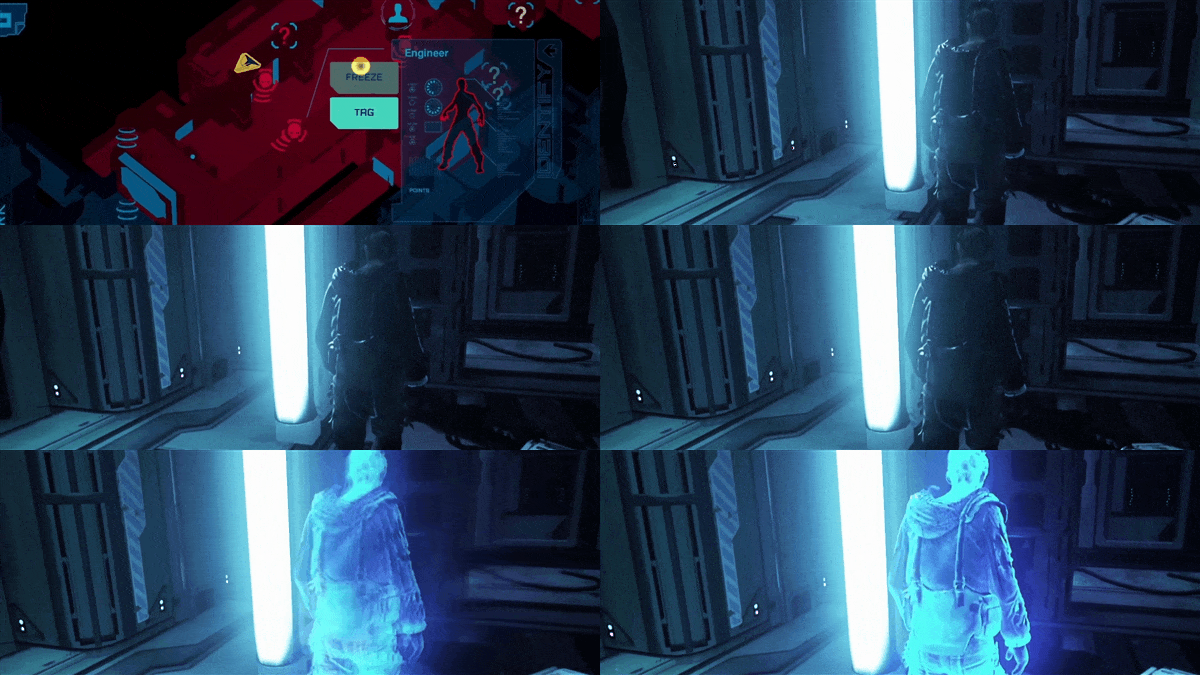
The app can be downloaded here on the Apple App Store and from Google Play and includes an exclusive The Persistence artbook.
With the app, you connect directly into your friend’s game where you get to see the procedurally generated layout of the ship. You have powerful ways to interact in their game world. The more points you score, the more powers you will be able to unlock. Including:
- Open doors
- Lure mutants (towards or away from the player)
- Spawn in enemies or helpful things like weapons and health packs
- Turn the lights out!
- Tag enemies so the player can see them through the walls
- Freeze enemies to give the player a chance to run (or win a battle)
- Incite enemies and force them to attack the player
The Persistence is out now on Steam with both non-VR and VR headset support for Oculus Rift, Oculus Rift S, HTC Vive and WMR headsets.
Follow for More:
Can You Survive The Persistence?
[previewyoutube="7tteNQBH-uE;full"]
The problem is... The ship is completely overrun with your mutated ex-crew members and your journey is a dangerous one!
Here’s what you need to know in order to increase your chances of survival:
Stealth is Important
The Persistence is totally overrun, and these mutants are out for your blood - keep out of sight and out of trouble. Sneak, scope-out and stalk to gain an advantage, take the time to learn enemy behavior and come up with new tactics for your next run.
Fight back
If you prefer to be the hunter rather than the hunted, you’ll want to seek out weapon fabricators. Here, you can unlock and upgrade a variety of different weapons carried on board, including firearms, melee, and even some top-secret experimental ‘dark matter’ powered prototypes…
Upgrade and Enhance
Enhance, upgrade and augment. 26th-century advancements allow for genetic augmentation and manipulation of dark matter technology. Resequence Zimri’s DNA to improve health, toughness and defensive stats or even harvest crew DNA to create cloned bodies of crewmembers to inhabit, each with their own unique abilities. Explore the decks of the ship and gather resources, weapons and suit upgrades to enable different tactical approaches; and customize an arsenal of firepower to aid survival as you journey deeper into the dark and terrifying depths.
The Persistence will be available this summer on Steam and will support both non-VR and VR headset support for Oculus Rift, Oculus Rift S, HTC Vive and WMR headsets.
Add to your Wishlist now!
Follow for More: