

The Sentient
.8.2 Pushed to live branch
Additional fixes with the save system and various memory fixes.
This build also includes the ability to rotate objects with R during the build process. UI is going to get updated to reflect this soon.
Whats next is now included in the build on launch.
WIP 0.8.2 Pushed to Unstable Branch
This includes the ability to rotate all of the ship objects along with a save game issue fix due to some of the new texture formatting. (For now press R or spacebar to rotate while in the build menu)
There are several zFighting issues with the sprites so I want to clean that up before it goes to the main branch.
Save files in the unstable branch will not always work in the main branch so be careful of that however save files in current branch should work to the previous version.
0.8.0 Now Live
0.8.0 Notes
New Build System
- Place objects wherever you want (Rotations to come in separately)
- New door placements to move objects around
New Animation System
- Cleaned up the animation system to allow for quicker turn around times and polish. Small updates can now be pushed quicker impacting all animations at once.
- This is still a WIP but it should allow for quick fixes now.
New ISO Game Objects
New Pathing/AI
- New pathing system, simplified but shouldn't cause any outstanding issues.
- Overall AI has been simplified so quicker updates now and code fixes can occur
- Crew will no longer complain or ask for help via dialog. This will be due to a new change coming in .9.0
Ship Selection
- Additional ships and fighter squads will be flying around the Ark now during ship selection.
Bug Fixes
A lot but to name a few
UI
Bottom Bar
- Various fixes to overall bottom UI options.
- Many Code Fixes
- Leveling Healing skill in should update properly
- Repair skill in bottom menu should update properly
Top Bar
<*>Removed Hull amount text and moved it to mouse over.
<*>Replaced the Hull text with the current shield amount visually as well to view at a quick glance.
Recruitment Menu
<*> Simplified Attributes
<*>Redid several of the background and foreground icons
Crew Selection Menu
<*>Simplified Level up system and setup
<*>Cleaned up skill
Settings Updates
- Cleaned up several mouse over issues in the settings panel.
- Rearranged objects and ensured proper mouse over functionality.
Loading
- Cleaned up mouse over and selection system for loading
- Fixed an issue where animations were not playing during loading.
.8.x will continue to be a full update on the build system with additional polish alogn with animation fixes, combat graphic improvements and any fallout from bug fixes. The additional ships will also be coming back on line shortly.
The .9 branch has some additional AI fixes planned to come in along with a new research tree. Crew members should more clearly showcase what they need instead of having to read their dialog which is the current issue now.
Thank you all again for your patience.
8.0 Progress - Build Update- Code Complete In Polish
For a quick update the code is 90% completed and fully operational as it really just requires the final polish once all the graphic changes are fully complete.
Keep Track With Progress Here
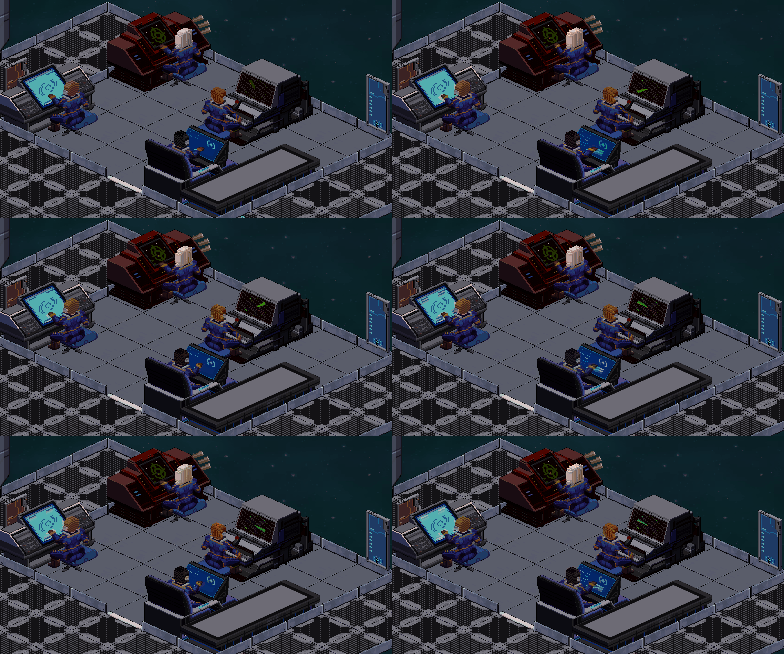
WIP Command Room
Build System Status Update
What took so long between updates?
I'm sure this is a question but there was a huge knot that had to be fixed with some layering issues and the way crew members, doors, and objects all overlayed properly on the game world. This has now been cleared up and should be a great working solution. Also a bit of illness caused some slowdown to be transparent but everything is back going full speed.
The next step is now getting the AI (crew members) to adhere to all of the new changes and to respond accordingly. Then making sure all of the art is in its finalized form and not just the blocked out art you see as things just need to be smoothed out.
Personally I am extremely passionate about getting all these changes into everyone's hands as quickly as possible but want to make sure the experience feels great so there is a great base to build onto for the additional content. This may ruffle some feathers but I'm committed to getting the game to the quality level I am happy with so patience is needed but from what I have played I think everyone will be very happy with the change.
A lot of this is a massive rehaul of a lot of the overall systems. All of this isn't a really fast quick change or taped on so remain patient and will try and get more images and pics up soon to showcase the changes. Feel free to ask any questions on the forums and I will try and get to them.
New Build System Preview

Just a quick preview of the build system in action. You will continue to be able to build rooms to your own customized size and layouts. This should give a lot more freedom overall making the ship feel like your own. Here you can see the command deck being built to your own custom size along with the ability to move the door to wherever you choose. No longer will you be blocked by the door getting in the way.
In the event an item is no longer accessible there will be an icon indicating it is invalid along with if the overall room is inaccessible like putting the door directly against a wall. In some cases this can be fixed by simply moving the door to ensure the walk paths are corrected.
Overall this is just a quick update to show things are progressing as it is quite a big overhaul but already the difference in gameplay and feel is becoming apparent.
To get these changes into everyone's hands sooner rotations and other quality of life changes will come in later so will send out more details about that soon.
7.3.5 Status Update
Due to the overall build changes a new UI for the build system is needed which will come with the ability to change door location in rooms now. Hoping to get these changes out very soon as it gives the game a much needed boost. There is also now an icon when an item can not be reached so it should aid in any confusion.
I want to get this into everyone's hands sooner rather than later so the initial ship layout may be the first to make it into the build and temporarily disable the others to get feedback faster. Next update will have more graphics and show off progress a bit more but progress is being made and very excited to show it off soon.
7.3.5 Sneak Preview
This is a little ahead of when I wanted to announce it but I want to avoid just working in the background without any verbal communication while things are hammered out so instead I think actions/visuals at times speak louder than words.

(The test ship size isn't final or indicative of a real ship this is just testing the full functionality)
For anyone that may be confused the game's main gameplay view is being changed to full isometric view. The current status of the update is all walls and objects have been blocked out and proportioned properly. The characters are still in progress but the art isn't final so for now things may appear more blocky than normal. Hoping to clean this all up before it gets into your hands.
The main reason for this change is there have been a lot of things that I want to do with the game that sadly with the current view just didn't allow for in a clean way. It felt like things were being tacked on or had to be worked around in unoptimal/clumsy ways which I didn't enjoy having to compromise over.
Now of course anyone who has purchased the game or bought it now will get this free update. I also plan on leaving the old version up for anyone who still wants to play that style.
Unstable Branch Updated to 7.3.3.b
In the meantime.
0.7.3.3.b Notes
UI
<*>Various fixes to overall bottom UI options.
<*>Bottom Bar Code Fixes
<*>Leveling Healing skill in should update properly
<*>Repair skill in bottom menu should update properly
Top Bar
<*>Removed Hull amount text and moved it to mouse over.
<*>Replaced the Hull text with the current shield amount visually as well to view at a quick glance.
Recruitment Menu
<*> Simplified Attributes
<*>Redid several of the background and foreground icons
Crew Selection Menu
<*>Simplified Level up system and setup
<*>Cleaned up skill
Unstable Branch Updated to 7.3.3.a
While in the ship selection you will see fighters and other battleships flying out from the ark as well. This is showcasing more of the regular human vessels that are out while you are focused on your mission. Long term this will likely showcase ships that are unlocked and more animations to spruce it up a bit.
There is a lot of code in the actual games's UI. This is going to be the next step in cleaning up as there is a lot of unnecessary pieces that don't quite scale well so that will be the next step. Then really want to clean up a lot of bugs and issues so things are in a good state and add more polish along the way. The entire build system was redesigned 3 times so there is a lot of old code that causes those weird collision issues so I really want to untangle that knot.
Thank you all for your comments on the forums and your bug postings as that truly does help as well.
7.3.3.a Notes
Ship Selection
- Additional ships and fighter squads will be flying around the Ark now during ship selection.
UI
Settings Updates
- Cleaned up several mouse over issues in the settings panel.
- Rearranged objects and ensured proper mouse over functionality.