Version 3.8 is now almost ready, and we have started its internal testing phase. For the last two weeks work has been focused into making the planet station prototype code into a playable system, and the results are satisfactory.
Full model and tool (re)making for the new build system
The new wall system is now fully integrated into the game, and a new build tool and system for walls has been implemented. A new concept of "room" has been introduced, and a damage model for walls as a mixed tile/object entity.
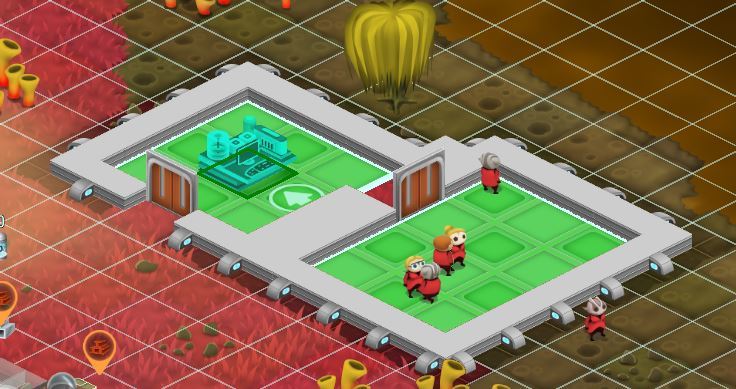
3.8 rooms are different from former rooms. In 3.8 a room must be 100% composed of:
- Floor tiles over its entire surface
- Entirely delimited by walls or doors
The game checks these conditions on every tile change and auto detects all correct rooms in the map. These are visualized when inside a build tool as green polygons:
This is important because in 3.8 most objects can only be constructed inside a room. The object build tool won't let the player build most objects outside of such a properly formed room.
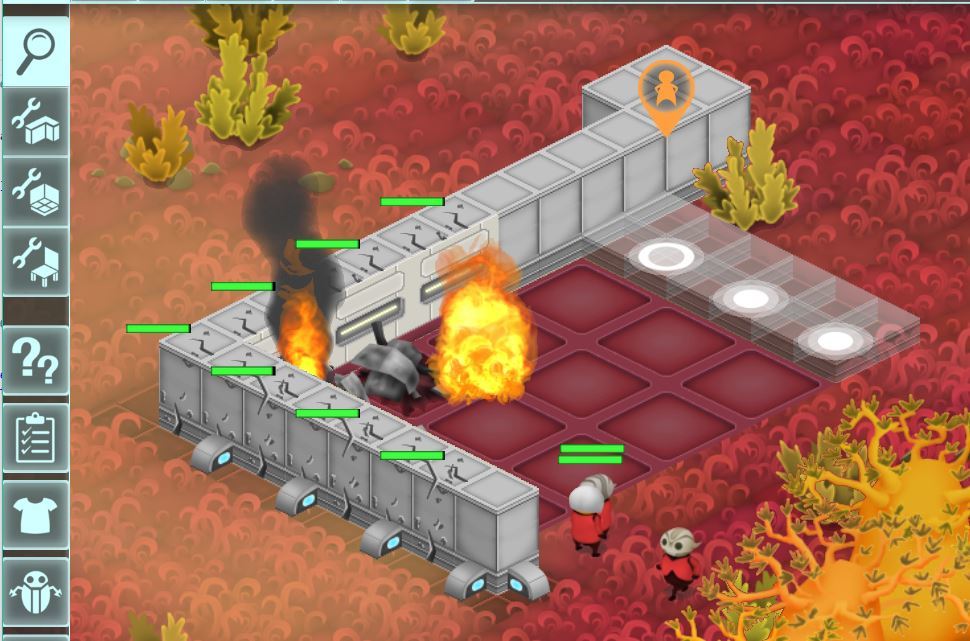
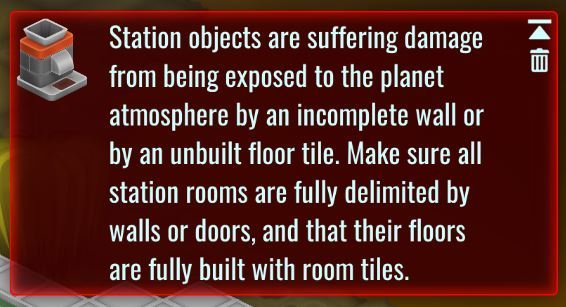
Since a wall, door or floor tile can be removed at any time, be it from player orders or by damage destruction, a new "environment attrition" system has been introduced:
This is not meant to be a punishing disaster, the damage will be slow, but still annoying enough to make the required repairs to the room structure desirable.
New game options
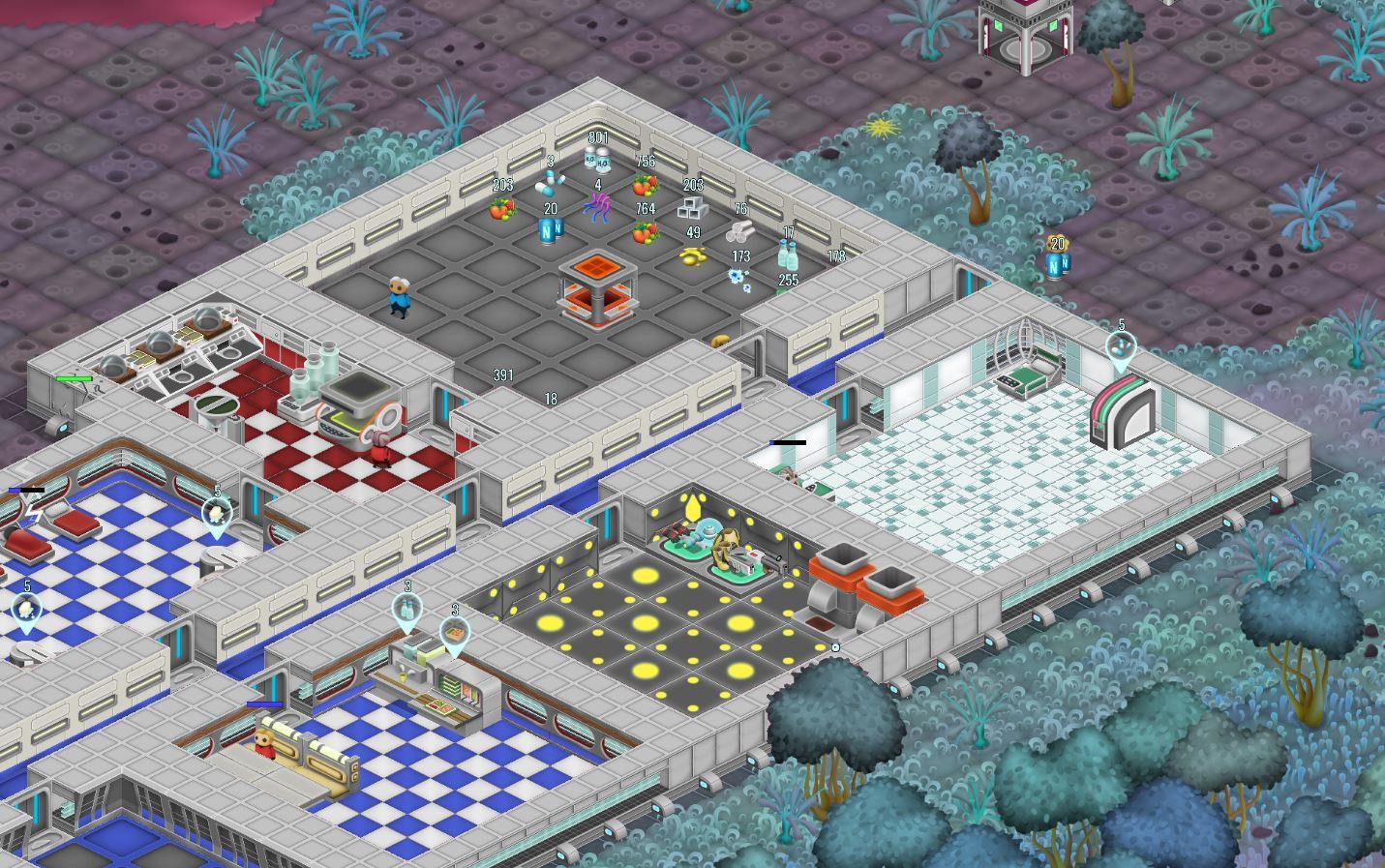
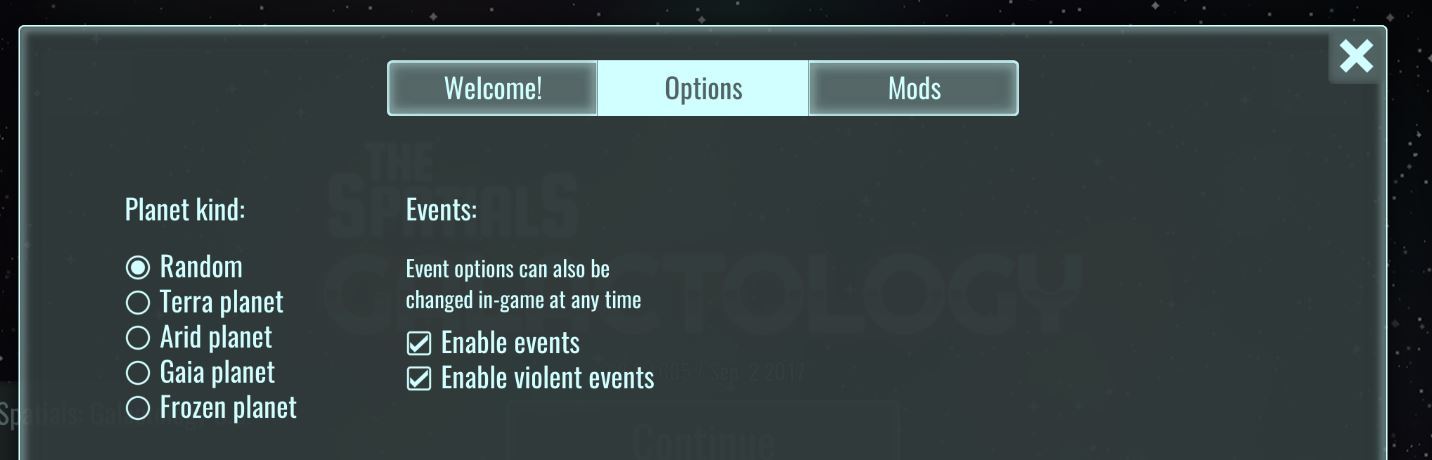
Since stations are now built on planets, a new game options tab has been introduced. The planet kind selector allows to pick the general planet archetype:
It also allows to disable events from the very start. Once a game has been started they can be re-enabled in a new tab inside the options screen.
Development update 2017-08-16
Work continues steadily on version 3.8. The development time was mostly devoted to work on the backlog of small enhancements, while at the same time prototyping the major new feature for 3.8: planet stations.
Planet stations
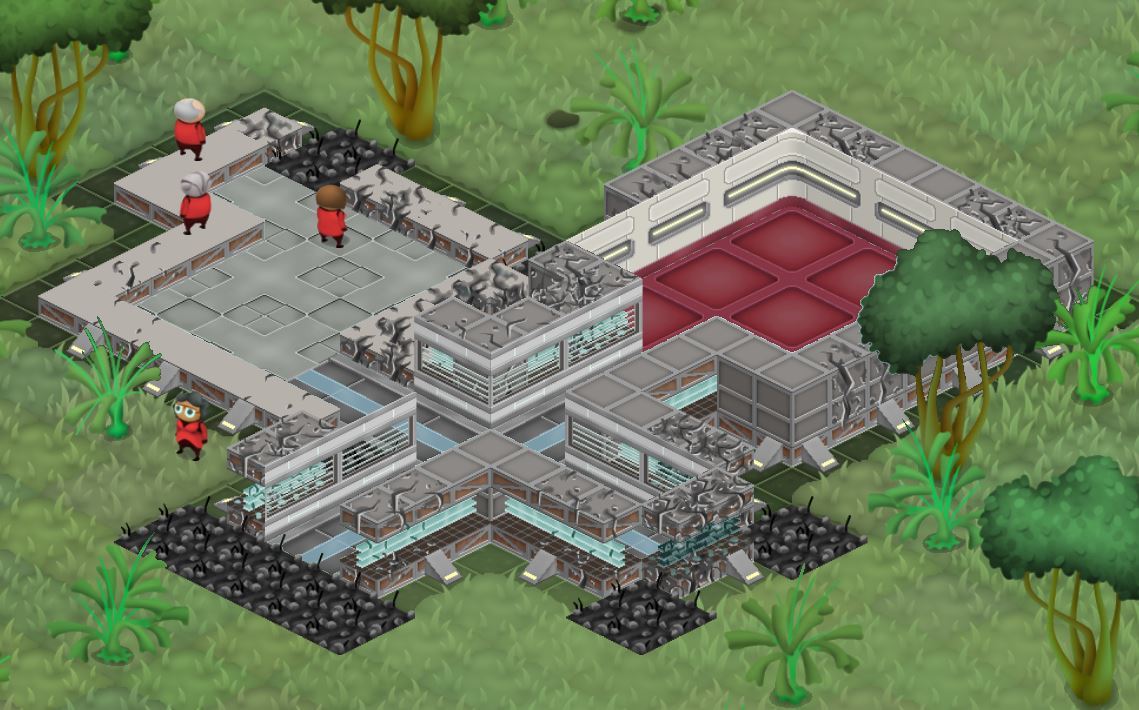
After the last update sneak peek, and the feedback thread in the forums, we are now fairly sure having stations on planets is doable and that it will result in a net positive from a gameplay POV. Here's the latest prototype:
It shows (randomized for testing) wall damage, which was the last feature to test. The aesthetics are also a lot better compared to the original cubes. Development focus will now center on bringing this prototype to the actual game, and adding the new separate wall and flooring systems. Once that's finished and tested we will have 3.8 ready for release.
Per-role combat target actions with selection
The player can now instruct their officers AI to focus on a group of targets instead of one, by using a combat target action and then dragging a rectangle over a group of enemies. This even works if the initial selection was a group of officers. So now it's possible, in 2 clicks (or 1 key and 1 click), to order any arbitrary group of officers to attack any arbitrary group of enemies. Quite a difference compared with the older system!
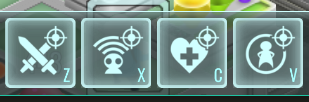
The target action has also been divided into 4 actions that only apply depending on the role of the officer, so you can keep your big heterogenous group of officers and still give target orders only to healers, for example.
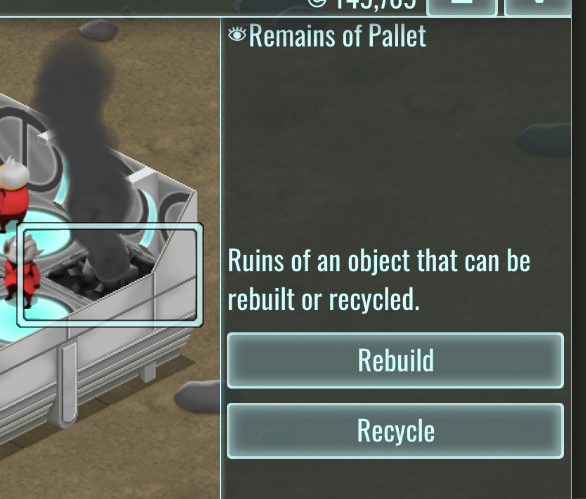
Rebuild option for object ruins
One of the most asked for features is finally here. When an object is destroyed, its ruins, instead of being auto flagged as recyclable, now offer an option to rebuild the object. The new object will also remember all the pallet and factory options.
I have to say that I don't fully agree with this feature. I consider it goes against the spirit of a building sim, but I decided to implement it because pallet and factory re-configuration is not fun. What could be next, a tool to autorebuild all rubble without even clicking on it? Or why even a tool, why not a single button to rebuild the entire station? I have to draw a line in the sand. And the line is that this feature won't get any more automatic than it is now, and if anything it may be restricted further (and the future walls won't support it).
Enhanced ship autopilot
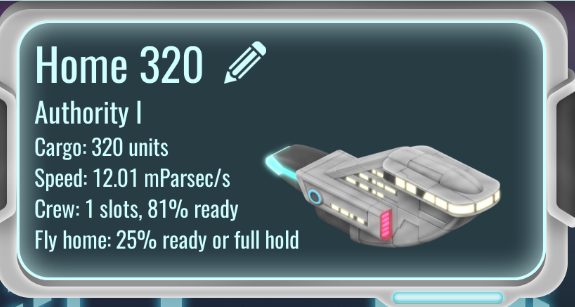
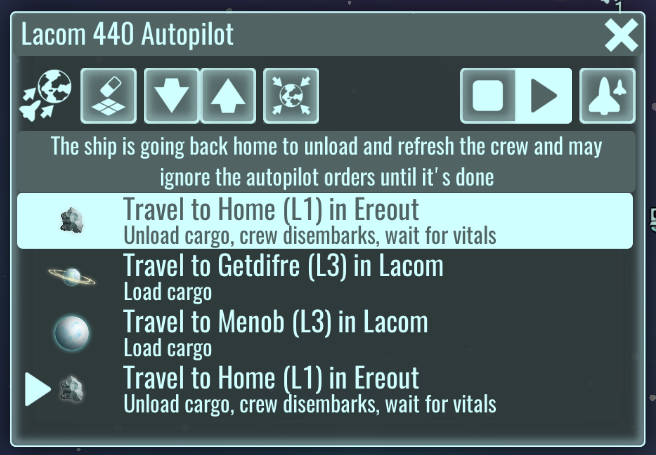
The ship autopilot now monitors the vitals of its crew officers and how full its cargo hold is, and decides on its own to visit back home to unload and let the crew satisfy their vital needs. Once they feel refreshed it resumes its orders in the same spot.
This also means it's not necessary anymore to include orders to go back home, and that there's no need to set a stay time in any order. It's both simpler and more efficient!
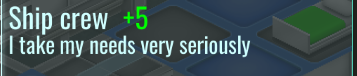
Also crew members get a new buff (or debuff, depends on how you look at it):
This means that when an officer is part of a crew they will care a lot more for their own vitals and will be much eager to interrupt station work to go have lunch or take a shower. This also means their refresh time while the ship aways to resume the autopilot will be shorter.
Robot inventory
It's finally here! You can check how many robots of each (unlocked) kind you have, and click on them to focus a random one. It will also display the total count, and something new, the max allowed amount. You'll now be limited in how many robots you can have depending on how advanced your research tier is.
Per-ship cargo filters
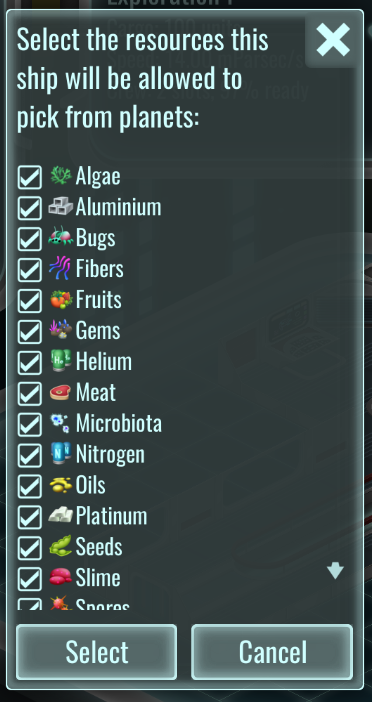
It's now possible to select which cargo resources are allowed to be picked by a ship when it visits a planet. This way you could save your faster ships for food ingredients for example.
Contemplation
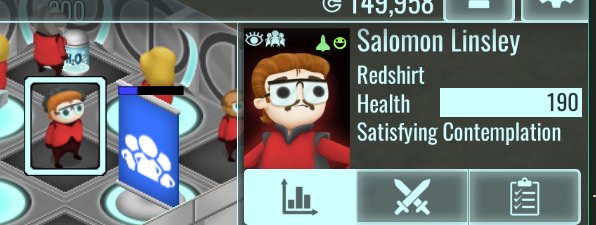
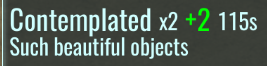
Officers will now, from time to time, stop and marvel at your decorations and other higher aesthetics items. They will also prefer owned objects, so they will trek back to their room to look at their fancy possessions.
Shops are actual shops now
A very old issue is visitors just grabbing items from storage areas or pallets, ignoring the shop objects. They are just going there because it's closer or more convenient! But it's not right. The game was working around this issue by charging visitors for the items only once they sat down to consume them. This looked strange.
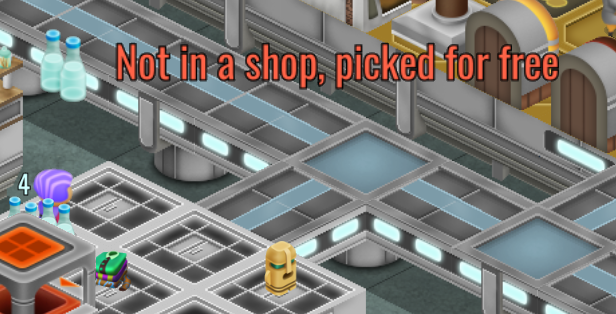
Now that 3.8 has doors with filtering, we can do the right thing. The game will charge visitors for items when they pick them up, and allow them to get them for free if they somehow manage to find some not stored in a shop (and show the message you see in the screenshot). And how is this right?! Because it's now also possible to enclose your visitor area with doors that don't allow visitors to pass, but allow officers and robots. The player can now build the storage and production areas inaccessible to visitors, while allowing shop stocking tasks to work just fine.
New combat mode
Combat mode is now on a 1 minute timer, and it will disable itself if the officer hasn't participated in combat. Once it engages, or when the player gives the officer a direct manual order, it will bump itself again to 1 minute. This will hopefully stop the problem with forgetting to disable combat mode. It still needs to be toggled manually for the AI to consider to apply it.
Development update 2017-07-31
With 3.7 wrapped up and bug-squashed it was time to start work on 3.8. In fact work started a bit earlier than the 3.7 launch, so there's plenty of interesting stuff to show by now.
3.8 has, for now, no major content theme. It's meant to be a version that adds a lot of small missing features and fixes some others. Our small and medium feature backlog has gotten quite long and it's better to finish it now than to continue adding major blocks of content, and to prototype and test some new ideas.
Filtering door system
Doors can now filter which entities they allow to pass through:
This is a very often requested feature, and it's finally here. Keep in mind the notes in the UI: enemies don't care about which sign is hanging on a door.
Path finding display
Selected entities will now display an overlay line over the map in case they are in the middle of a pathfind walk. Very useful to see where those pesky enemies are going or to figure out why your officers are ignoring certain route.
Multiselection with rectangular area
The game finally has proper multiselection:
Just drag with the left mouse button and a rectangle will appear, changing the selection live as you drag the rectangle corner.
Multiselection is only enabled for officer entities. The idea is that there's rarely a need to issue mass orders to any other kind of entities, with the exception of robots. I will look into adding robots to multiselection later on.
This is how the right column looks when using multiselection:
All buttons are live with item cooldowns too. The role grouping reflects the currently equipped item by the officer, not their spec.
Actions still work as usual. If you issue a walk order with 30 officers selected, all 30 of them will make a formation around the position you click on. For target orders I'm still deciding what to do, and I will probably introduce 4 separate target actions for each role. For players who want to micromanage their units this will give combat a very RTS flavor, and I believe it's a better fit that my previous designs.
Squads and the squad bar are no more, and combat mode is pending a redesign or a removal too.
RTS-like grouping
In the same vein it's possible to make ad-hoc groups like in any RTS-like game. First make a group, then press Ctrl-1 to store the group. From that point on pressing 1 will select again the same group of entities. Keys 1 to 6 are available for this.
One more thing...
Could it be true?! This is just a prototype implementation for now, I'm gathering feedback about this in the forums in this thread:
The focus of 3.7 is new station events plus some much needed small and medium enhancements.
Unlike earlier releases 3.7 is save compatible with its previous release, 3.6. This has been done so testing the new events can be done with mature saved games that have bigger stations. The frequency and severity of events is part of the game balance and it may be untuned, so tell us what you think about it in the forum.
The main new enhancement is the staff screen which is now vastly improved, along other quality of life and UI improvements.
You can find the development updates for 3.7 in the rest of this post, in case you missed them.
New art for civs screen
Max has prepared new header art for the civs screen, and a small redesign was also done to better fit and prepare the screen for future UI work:
All civs have now unique background art and their full detail, full sized logos and advisors are prominently displayed. The new layout will also enable us to fit the future diplomacy UI in the lower area with a much nicer look and feel.
Top bar redesign and new alert features
The alert system will become more important since it will be the UI mechanism to report and track ongoing events, so more space was required to display alert icons:
The right side of the top bar is now more compact. The guide access will be moved to the tutorial system (when the guide is ready), and the report screen will be moved somewhere else (in 3.x that screen was half-working and mostly useless).
Many events have an "ongoing" mechanic that defines a start and an ending condition. The alert system is now prepared to show this information, and to express some alerts as persisting.
A persisting alert is displayed with an "ongoing" progress, meaning its duration or progress is not fully known (yet). Persisting alerts are always displayed to the left of all alerts:
A persisting alert displays the progress of an event (in this case the % of pirate invaders dead, it was captured just after the last one died). Both the alert icon in the bar and the alert popup display the completion %:
When an event is done its alert is turned into a plain alert and can be deleted normally:
Persisting alerts have an additional visual cue to make them stand out:
Event: Space worm
A huge worm from space is annoyed enough with your advanced technology to come pay a visit. Why? Nobody knows, but it's here and it's pissed off:
The worm has a devastating, fast melee attack with extra long range, but it's rooted in place. It will burrow and surface again every 30s.
Event: Space octopus
Space megabeasts keep attacking you, sigh. It's just the reality of space-ing I guess. The space octopus has a similar melee attack to his pal the worm, but it can move (slowly). It can also pull closer any station defender into its melee range.
Event: The pest
Dozens of fluffy animals are spawning around your station. They look cute but are crowding everything. They only attack when attacked, but in any case they have to go. Kill enough of them to force their queen out of hiding and end the pest for good.
Event: Xenomorphs
Short of Augustus showing up to make some omelette, you better hurry up and deal with those ominous looking eggs before it's too late...
This event also introduces a combined system of progress and countdown timer.
Enhanced fire
Fires are now more dangerous, do more damage and can expand faster. Additional smoke effects are now spawned alongside, and there's more conditions that can spawn a fire. Some bomb-like effects have been refactored to offer more variety and, you guessed it, more FIRE. The xenomorphs from the last update also love it:
New small events
Two new malfunction mini-events have been added. Showers now have an obvious failure mode:
And since this is space and the year is 5781, things can explode sometimes for no reason. Anything:
New event: meteor shower
A devastating new event, whose effects are too horrible to picture (they involve plenty of fire too). You'll have one minute to try to lock doors and move your officers away from the area.
New event: miasma cloud
Accidents happen even in the best kept stations. Rush to repair the malfunctioning factory, or trigger its self destruct mechanism (for a chance of starting a fire, of course).
New event: medical emergency
Your hospital area will struggle to treat this many patients, but if you manage to expect a nice reward. This is the first goal-like, rewarded event and more will come.
New event: somebody set up us the bomb
(I'm old enough to remember that meme).
Another possibility for your enemies to annoy you: a random, hidden hostile can now spawn in your station and it will also spawn a bomb nearby. The bomb is not directly focused by clicking on the alert but it will always be near the hostile. After you find it it's possible to disable it by destroying it (it's a neutral object, so your officers and defenses won't auto attack, you have to find it and give attack orders). If your run out of time, well, more FIRE.
Small enhancements
A counter is now displayed in the staff listing in the staff screen, including both your total officer count and the current filtered count.
In the same vein the filter menu now has counters for all categories, to quickly get an idea of how your work force is distributed.
A very often requested feature is now in: the staff picker for ships now includes a basic overview of the officer vitals, to make a more informed decision about your crew picks.
The orange warning icons on top of objects were often confusing, so they are now smaller and inside the standard object icon bubble.
Proper autosave system
Autosaving in previous versions was poorly conceived, requiring manually saving often the game. The game only autosaved when landing or taking off from a planet. In 3.7 autosaves are now much better implemented.
First, there's now 5 autosave slots per galaxy, which automatically rotate based on the save age.
Second, autosaves are now on a timer, and do not depend on visiting planets or any other gameplay action. Since our save system is UI-blocking, the timer is flexible and tries to sync the saving with major UI transitions, like changing the game screen. This starts after 15m of the latest save (manual or automatic). If 30m or more pass without any screen change, the autosave system will block the game for a few seconds and save it anyway.
Save picker remake
The save picker has nearly been unchanged since our first pre-1.0 prototypes back in 2014, receiving only minor improvements since then. It was time to bring it up to a better quality standard:
Saves are now grouped by galaxy for a much more tidier interface. And it's also finally possible to name your manual saves, the game will prompt you for a name when manually saving a game.
Staff screen enhancements
A picture is worth a thousand words:
The goal is to finally make the staff screen an useful information resource rather than a place to put UI that it's too big for the station inspector. It should offer the same level of information plus any other specific features.
New event: Bernice
VIP reward events are in, and Bernice is the first one. She's your manager back in HQ and will inspect your station from time to time, then give you a random timed goal:
And if you manage it:
Failing the goal has no negative consequences (there's plenty of events with big time negative consequences, so for this round things are much more chill).
New event: Augustus
The crazy robot chef from V2 is back! He's mellowed out quite a bit (or has he?) and he's here to help you with your cooking orders. He's a maxed out master spec chef with a special double production bonus.
New event: Кошка
Another V2 protagonist, Кошка is back too! Our beloved socialist cat and her robot army will patrol around a bit in your station, and they will help you with any task a robot can perform, except they are capable of all of them at the same time.
New event: Liberty
The USA couldn't be left behind when it came to sending live animals to test in space, and in our lore Liberty was one of them. She's just as much a mystery as Кошка survival for 38 centuries. She will roam your station, curious as any dog, and quickly increase the Morale of any visitor or officer she comes across. Good dog!
Staff screen: new Spec tab
The Staff screen overhaul continued, and a new Spec tab has been introduced:
The spec progression is now much more clearer, and it manages to show more information in less space.
Staff screen: new Jobs and XP tab
Jobs and XP for officers is available to consult in the job matrix tool, but there was no focused way to do so on an officer by officer basis. This is now fixed:
The XP tiers of each job are clearly displayed, plus the speed bonus and ratings. It's also possible to toggle the jobs or edit manual priorities without having to use the job matrix tool.
The same per-officer toggles are now also displayed in the station info inspector, so there's no need anymore to go hunting for an officer in the job matrix:
New tool: per-officer-per-slot item picker
In the same vein as the job tool additions, there's now a new dialog to directly equip items into an officer equipment slot, by picking from the station stocks. Using the equip matrix was suboptimal when you were directly manipulating an officer, so now you can do the same task, in a more focused way. This tool can be open by clicking the small t-shirt icon in the right side of the equipment slot in both the info inspector and in the new Basics tab in the Staff screen.
Improved inventory window
The inventory window is now based on a listing, and it can also be filtered to focus down on a single kind of resource.
Logistics after production
In previous versions, when an officer was done producing something in a factory, the result was thrown on the floor. They now will look for a non-busy, non-full pallet, shop or storage area and transport it there. They will do this even if they don't have the delivery job enabled (just as they do for ingredients).
Version 3.7.1
- last minute event toggle settings in main menu
Version 3.7.2
- add more counters for event gating (built area, built objects, hired officers)
also use them to disable beatrice tiles request
- decrease overall event frequency
- add note about upgrading officer items for enjoying violent events
- add a bit of randomness to individual event interval calculation
- force delay for events for players starting from a 3.6 save
this already exists for new 3.7 games
- disable meteor event, for now
- nerf xenos
- make fire less spread-y (75% less, smaller area considered)
- make firefighter robots very fast (for newly built ones)
- make all (player) robots impervious to fire
- clarify text of events involving neutral entities that need manual targetting for combat
- add labels to empty equipment matrix cells
- look into issues reported by translators, add some more strings
use proper utf8 strlen for input dialogs
reduce some font sizes
- fix: rare crash where the game attempts an autosave just after a manual save is done
- allow use of old icon matrix in invetory window
Version 3.7.3
- fix manysick, xenos: possible wrong ending condition
- fix: vital object selection randomization is sometimes overriding owned objects preference
- fix: officers are picking then dropping items while working
vital procs should avoid interferring with held items until they are allowed to take busy status
also optimize vital SM to enter wait mode after it issues a walk order
- fix manysick
don't allow slowpox
make amount of visitors proportional to amount of doctor desks
make reward proportional to amount of visitors
Version 3.7.4
- fix stuck invasion events
WARNING: if you have stuck invasion events some or all will pop at the same time after upgrading to 3.7.4. If you want to try to avoid fighting them press space to pause the game as soon as possible when the game finishes loading (you have at most 2 seconds, depending on your RNG luck) then disable violent events from the main menu. Resume the game and the stuck invasions will disappear. It's alpha, sorry about this!
If the stuck invasions remain even after upgrading to 3.7.4 you can force remove them with a bit of code.
Make sure you have no combat in the station, nothing is selected, and that the only ongoing events are the bugged invasions, then copy-paste as-is this code in the developer console and press enter (the default key for the developer console is `/~ in the US keyboard, it's the key to the left of the number 1 in the numeric row):
local s = game.station.body.world:getSystem("events-system")

local todel = {}

for k,_ in pairs(s.ongoing) do

    todel[#todel+1] = k

end

for _,v in ipairs(todel) do

    events_stop(s, v)

end

local r = ecs_query({world=game.station.body.world,must=list(bridge_hash("simple_draw_component"))})

for _,e in ipairs(r) do

    ecs_destroy_entity(e)

end
Development update 2017-07-19
Version 3.7 is almost ready! All the planned features have been implemented and now we are testing the game. Unlike previous versions v3.7 will keep save compatibility with v3.6, so you can keep playing you current save. This is done since the focus of v3.7 is random station events and testing them will benefit from a developed station.
New event: Bernice
VIP reward events are in, and Bernice is the first one. She's your manager back in HQ and will inspect your station from time to time, then give you a random timed goal:
And if you manage it:
Failing the goal has no negative consequences (there's plenty of events with big time negative consequences, so for this round things are much more chill).
New event: Augustus
The crazy robot chef from V2 is back! He's mellowed out quite a bit (or has he?) and he's here to help you with your cooking orders. He's a maxed out master spec chef with a special double production bonus.
New event: Кошка
Another V2 protagonist, Кошка is back too! Our beloved socialist cat and her robot army will patrol around a bit in your station, and they will help you with any task a robot can perform, except they are capable of all of them at the same time.
New event: Liberty
The USA couldn't be left behind when it came to sending live animals to test in space, and in our lore Liberty was one of them. She's just as much a mystery as Кошка survival for 38 centuries. She will roam your station, curious as any dog, and quickly increase the Morale of any visitor or officer she comes across. Good dog!
Staff screen: new Spec tab
The Staff screen overhaul continued, and a new Spec tab has been introduced:
The spec progression is now much more clearer, and it manages to show more information in less space.
Staff screen: new Jobs and XP tab
Jobs and XP for officers is available to consult in the job matrix tool, but there was no focused way to do so on an officer by officer basis. This is now fixed:
The XP tiers of each job are clearly displayed, plus the speed bonus and ratings. It's also possible to toggle the jobs or edit manual priorities without having to use the job matrix tool.
The same per-officer toggles are now also displayed in the station info inspector, so there's no need anymore to go hunting for an officer in the job matrix:
New tool: per-officer-per-slot item picker
In the same vein as the job tool additions, there's now a new dialog to directly equip items into an officer equipment slot, by picking from the station stocks. Using the equip matrix was suboptimal when you were directly manipulating an officer, so now you can do the same task, in a more focused way. This tool can be open by clicking the small t-shirt icon in the right side of the equipment slot in both the info inspector and in the new Basics tab in the Staff screen.
Improved inventory window
The inventory window is now based on a listing, and it can also be filtered to focus down on a single kind of resource.
Development update 2017-07-06
Enhanced fire
Fires are now more dangerous, do more damage and can expand faster. Additional smoke effects are now spawned alongside, and there's more conditions that can spawn a fire. Some bomb-like effects have been refactored to offer more variety and, you guessed it, more FIRE. The xenomorphs from the last update also love it:
New small events
Two new malfunction mini-events have been added. Showers now have an obvious failure mode:
And since this is space and the year is 5781, things can explode sometimes for no reason. Anything:
New event: meteor shower
A devastating new event, whose effects are too horrible to picture (they involve plenty of fire too). You'll have one minute to try to lock doors and move your officers away from the area.
New event: miasma cloud
Accidents happen even in the best kept stations. Rush to repair the malfunctioning factory, or trigger its self destruct mechanism (for a chance of starting a fire, of course).
New event: medical emergency
Your hospital area will struggle to treat this many patients, but if you manage to expect a nice reward. This is the first goal-like, rewarded event and more will come.
New event: somebody set up us the bomb
(I'm old enough to remember that meme).
Another possibility for your enemies to annoy you: a random, hidden hostile can now spawn in your station and it will also spawn a bomb nearby. The bomb is not directly focused by clicking on the alert but it will always be near the hostile. After you find it it's possible to disable it by destroying it (it's a neutral object, so your officers and defenses won't auto attack, you have to find it and give attack orders). If your run out of time, well, more FIRE.
Small enhancements
A counter is now displayed in the staff listing in the staff screen, including both your total officer count and the current filtered count.
In the same vein the filter menu now has counters for all categories, to quickly get an idea of how your work force is distributed.
A very often requested feature is now in: the staff picker for ships now includes a basic overview of the officer vitals, to make a more informed decision about your crew picks.
The orange warning icons on top of objects were often confusing, so they are now smaller and inside the standard object icon bubble.
Proper autosave system
Autosaving in previous versions was poorly conceived, requiring manually saving often the game. The game only autosaved when landing or taking off from a planet. In 3.7 autosaves are now much better implemented.
First, there's now 5 autosave slots per galaxy, which automatically rotate based on the save age.
Second, autosaves are now on a timer, and do not depend on visiting planets or any other gameplay action. Since our save system is UI-blocking, the timer is flexible and tries to sync the saving with major UI transitions, like changing the game screen. This starts after 15m of the latest save (manual or automatic). If 30m or more pass without any screen change, the autosave system will block the game for a few seconds and save it anyway.
Save picker remake
The save picker has nearly been unchanged since our first pre-1.0 prototypes back in 2014, receiving only minor improvements since then. It was time to bring it up to a better quality standard:
Saves are now grouped by galaxy for a much more tidier interface. And it's also finally possible to name your manual saves, the game will prompt you for a name when manually saving a game.
Staff screen enhancements
A picture is worth a thousand words:
The goal is to finally make the staff screen an useful information resource rather than a place to put UI that it's too big for the station inspector. It should offer the same level of information plus any other specific features. The spec tabs will also be re-done and a new one will also be added to have a better look at XP and jobs. Stay tuned for the next update!
Development update 2017-06-20
After the pretest release of 3.6 a lot of issues were found, so most of late May and early June were devoted to finding and fixing them. One particular very obscure crasher delayed the start of 3.7, but it has finally been squashed and I was able to move on and start the new version (3.6.7 contains the fix and it is the current published default build, but saved games started with earlier 3.6.x versions may still be corrupted, keep it in mind!)
The main new content theme for 3.7 is events. Galactology has contained some test events for months now, the familiar invasions, sneakers and impostors. Events are meant to keep station gameplay more varied than a pure min-maxed machine. They will cover a variety of systems so it's not all pew-pew and explosions, but, since the current events are the basis for the new work, I started implementing new invasion-like events for the past three weeks. There's still more than twenty event ideas to explore and implement!
New art for civs screen
Max has prepared new header art for the civs screen, and a small redesign was also done to better fit and prepare the screen for future UI work:
All civs have now unique background art and their full detail, full sized logos and advisors are prominently displayed. The new layout will also enable us to fit the future diplomacy UI in the lower area with a much nicer look and feel.
Top bar redesign and new alert features
The alert system will become more important since it will be the UI mechanism to report and track ongoing events, so more space was required to display alert icons:
The right side of the top bar is now more compact. The guide access will be moved to the tutorial system (when the guide is ready), and the report screen will be moved somewhere else (in 3.x that screen was half-working and mostly useless).
Many events have an "ongoing" mechanic that defines a start and an ending condition. The alert system is now prepared to show this information, and to express some alerts as persisting.
A persisting alert is displayed with an "ongoing" progress, meaning its duration or progress is not fully known (yet). Persisting alerts are always displayed to the left of all alerts:
A persisting alert displays the progress of an event (in this case the % of pirate invaders dead, it was captured just after the last one died). Both the alert icon in the bar and the alert popup display the completion %:
When an event is done its alert is turned into a plain alert and can be deleted normally:
Persisting alerts have an additional visual cue to make them stand out:
Event: Space worm
A huge worm from space is annoyed enough with your advanced technology to come pay a visit. Why? Nobody knows, but it's here and it's pissed off:
The worm has a devastating, fast melee attack with extra long range, but it's rooted in place. It will burrow and surface again every 30s.
Event: Space octopus
Space megabeasts keep attacking you, sigh. It's just the reality of space-ing I guess. The space octopus has a similar melee attack to his pal the worm, but it can move (slowly). It can also pull closer any station defender into its melee range.
Event: The pest
Dozens of fluffy animals are spawning around your station. They look cute but are crowding everything. They only attack when attacked, but in any case they have to go. Kill enough of them to force their queen out of hiding and end the pest for good.
Event: Xenomorphs
Short of Augustus showing up to make some omelette, you better hurry up and deal with those ominous looking eggs before it's too late...
This event also introduces a combined system of progress and countdown timer.
Version 3.6 is now available!
Finally! After two grueling months of technical work version 3.6 is ready to play. This is an unusual version. It contains very little gameplay additions. You can read about them in this March post:
So what happened in the two months since that post was made? A massive rewrite of all the gameplay code in order to port it to LuaJIT, from a completely different programming language.
After version 3.5 was released it was clear the game performance was bad once your station grew a bit. This was specially relevant in 3.5 since it added enough content and fixed enough balancing for players to build a bigger station.
At that point I decided to stop adding new features and concentrate on fixing the performance. Otherwise the game future viability and quality would suffer a lot. It was a gamble since there's a lot of abandoned half finished games in Steam and doing this would make Galactology look like just another one, even while I was working my hardest on improving it. But I decided to take quality over appearances.
Version 3.6 is the result of that work, and I believe it's successful. Moreover it also means mods can now be written in Lua, making it much easier for moders to work on our game if they desire so.
Technical details
40K lines of code have been rewritten (some manually, some with the help of a custom transpiler tool developed just for the task) from Scheme to l2l, a Lua-based language similar to Lisp. This allows the very sizable scripting side of Galactology to be based on LuaJIT, for the maximum possible performance for this kind of programming languages. sol2 provides the C++ binding layer for Lua.
The performance improvement is roughly 4x to 6x. In addition GC pauses are dramatically shorter thanks to Lua(JIT) incremental collector.
Next version
Version 3.7 will be a return to our feature roadmap, and you can bet I missed it!
Update 3.6.7
- fix crash when rich text code parses some user input with "@"
- force memory pool clearing before delayed lua delete during new/load game (tentative fix for crash)
- fix decor counter for goals
- fix factory inspector not updating its state when an interaction happens
- fix display of item recipe info
- corpse text descriptions on planets should not mention recyclers
- make load/save deserialization errors fatal
- update example mods in workshop
- fix error when deleting the blueprint of a just created floor build job before its state is initialized
- fix corruption bug: Tool objects had their destruction delayed too much and were invalidating sessionID in newly loaded games
Update 3.6.6
- fix mac build: change luajit.dylib to use @loader_path
- fix ocasional crash when selecting categories in the object build tool after some research has been completed
stop resetPanel on activate_delegate, just use a change listener like goals does
- add brief planetarium tutorial to the planet tutorial
- linux port using beta runtime GCC 5
Steam Trading Cards are now available
Steam Trading Cards have been uploaded and are now dropping while playing Galactology! Max finished the card artwork some months ago and I (Carlos) finally got around to write the copy and upload them for review and publication. One more step towards a finished game! And speaking about that...
Current development status
I've been quiet for the past months. As I mentioned in our last development update back in March, 3.5 highlighted an important performance problem once a game hit the mid to end game and your station grew up a bit. This was rooted in a very core decision to adopt certain scripting language plus its VM. While that language is very performant for its category (as a purely interpreted Scheme, it's probably the fastest non-JIT Scheme), it became clear it wasn't performant enough. And the remaining optimizations promised improvements in the order of a 20%, not the order of magnitude required to support truly big and complex stations.
For this reason I decided to target LuaJIT instead. This requires a massive rewrite of 37K lines of code. Fortunately there's already a Lisp-like transpiler for Lua (l2l), and my own transpiler had a relatively easy job of transpiling from two different Lispy languages. This part of the work, statically translating from a language to other, is done.
Now comes the part where that new code has to be loaded into LuaJIT and the game has to run from it. Just translating the source is not enough, since the scripting-facing API has to be rewritten, and many semantics are not the same (1-based counting in Lua, for example). This is the current development task, and it will still take some weeks to progress and then stabilize. But I can say that now I'm past the 50% mark!
The details of these tasks are very technical (much more than the previous paragraphs) so I haven't keep a public log of the work, since my status updates are meant to highlight gameplay additions and changes, not techno babble. But rest assured that regular features status updates will resume when the translation work is finished and stable.
This work is delaying 3.6 and thus advancement into our development roadmap, but it's required if we want the game to live to its full potential (and yes, it will enable Lua mods, making it much easier for modders). For this reason I may do a 3.6 pre-release after the translation is mostly working, to find out all the problems with the help of our players. We will see in some weeks!
The Spatials anniversary sale!
Happy two year anniversary to The Spatials! To celebrate get our game 50% OFF this week!