

The Wizard: WizHarder Edition
Hotfix v0.5.0f5
Hotfix v0.5.0f4
- Fixed map drag bug in first levels when tutorial is enabled
- Fixed possible deadlock withing the tutorial
Hotfix: Game breaking level loading bug
v0.5.0f2
- Updated SteamworksNet Api
- Updated project name from "The Wizard: WizHarder Edition" to the proper "The Wizard or: How I Learned to Stop Worrying About My Face and Love the Tactical Dungeon Crawl"*
*This means your saves folder has also moved from e.g.
"C:\Users\[YOUR USER NAME]\AppData\LocalLow\Hypnotic Owl\The Wizard_ WizHarder Edition"
to
"C:\Users\[YOUR USER NAME]\AppData\LocalLow\Hypnotic Owl\The Wizard or_ How I Learned to Stop Worrying About My Face and Love the Tactical Dungeon Crawl"
and you might have to move your saves from the old to the new folder to continue with the saves.
Update v0.5.0: New Tutorial & Scores
After a long time of testing and improving on our Preview Branch, we are finally able to bring you the new, interactive tutorial and a completely rewritten scoring system!
Unfortunately this means we had to reset your saves. But don't worry! We saved a backup of the saves in your saves folder (e.g. C:\Users\[YOUR WINDOWS USER NAME]\AppData\LocalLow\Hypnotic Owl\The Wizard_ WizHarder Edition\Saves) and you can continue with the old save, if you switch over to the v0.4.x branch we added just for this case.
To do that go to the game in your Steam client, right-click on the game, select "Properties..." then navigate to "BETAS" and select the v0.4.X branch in the dropdown menu. Then rename your last "Slot1Story.backup" to "Slot1Story.save" and you should be able to continue right where you left off!
Anyway, go check out the new tutorial and score!
Here is the full change log for v0.5.0:
- Added new tutorial!
- Added new level scores!
- Added brightness setting
- Added contrast setting
- Added bloom setting
- Added lens distortion setting
- Added postprocessing effects to main menu
- Added settings to skip tutorial, cinematics, story
- Added enemy sleep marker and setting
- Improved setting menus
- Fixed player keeps walking after getting hit
Thanks for reading and as always, if you want to be more involved with the development, or just to hang out, come have a chat with us on our Discord server!
<3 Your Hypnotic Owl Team
Update v0.4.1: Animated Level Intros!
- Added animated level intros
- Added teleporting effect and sfx
- Added cool parallax effect to main menu
- Added pretty fireflies to the main menu
- Added casting delay + sfx to enemies
- Added more bloodmagic sfx
- Improved fading in and out of scenes
- Improve camera bounds and movement
- Improved Text Bubble overlap handling
- Improved loader and scene loading logic
- Gave black rats blue eyes (cause immune to ice)
- Updated to Unity 2019.4.29f1
- Fixed deleting current save slot wouldn't update loaded content
- Fixed enabling/disabling of continue button
- Fixed splash screen catching cursor even if game is not in focus
- Fixed enemies to walk over each other
- Fixed camera still following projectiles hitting walls
Test v0.4.1 in the new Preview Branch!
It's been a few weeks since the last update, hasn't it? Well, it'll probably be a few more until v0.4.1 will be released fully. The reason is simply that scripting individual intros to each level takes some time.
Fortunately, we're introducing the new preview branch! The preview branch allows us to upload updates earlier without feeling bad about delivering an unfinished or potentially buggy build. So, if you want to get these preview builds, all you need to do is open the games page in your Steam client, open the properties window, select BETA on the left and then select the preview build from the dropdown menu!
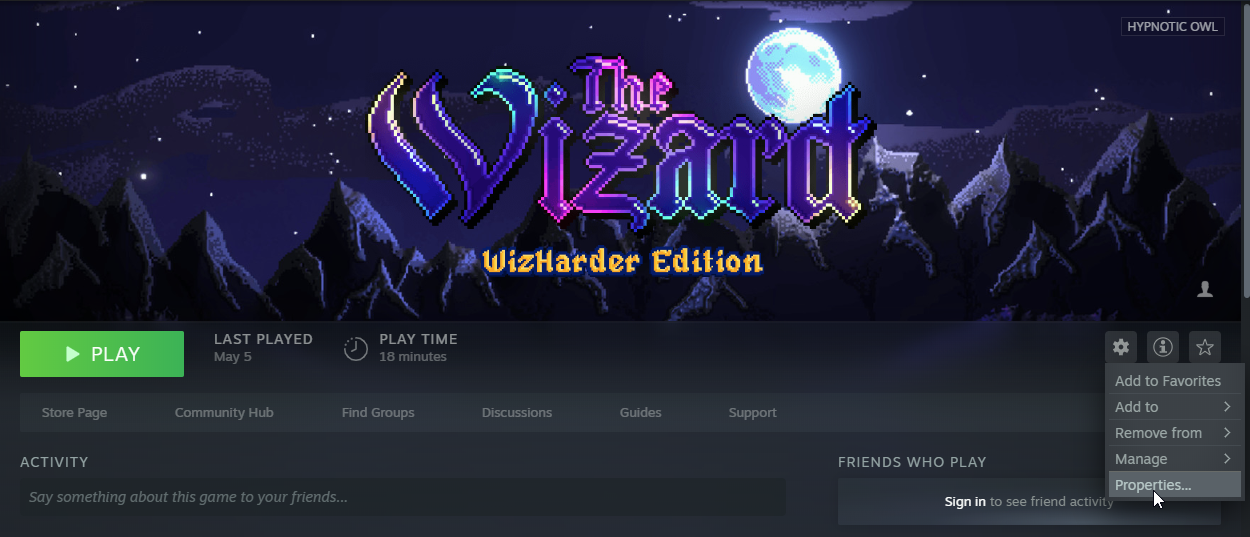

You can revert this at any time should you change your mind.
And this is what awaits you today, should you decide to make the switch:
Preview Update v0.4.1
- Introduced Level Intro Animations (level 1-1 to 2-2)
- Added teleporting effect and sfx
- Added cool parallax effect to main menu
- Added pretty fireflies to the main menu
- Improved fading in and out of scenes
- Improve camera bounds and movement
- Improved Text Bubble overlap handling
- Improved loader and scene loading logic (maybe improving load times)
- Gave black rats ice blue eyes (cause they're immune to ice!)
- Updated to Unity 2019.4.26f1
- Fixed deleting current save slot wouldn't update loaded content
- Fixed enabling/disabling of continue button
- Fixed splash screen catching cursor even if game is not in focus
In any case, thanks for reading and as always, if you want to be more involved with the development, or just to hang out, come have a chat with us on our Discord server!
<3 Your Hypnotic Owl Team
The Laboratory
We're happy to announce our first major update to The Wizard: WizHarder Edition! It's the Laboratory!
The attentive students among you might be surprised that this wasn't even on the Early Access Roadmap, and that's right! We decided it would be a good idea to have an easily-accessible sandbox for all of you to play around in. This is also where new features and mechanics will be available for testing before we add them to the other modes.
Additionally. we added save slots to make it even easier to do different playthroughs and try things out without fear of losing progress.
So please, play around, break some stuff, and let us know if you find any bugs or have thoughts on features you'd like to see!
Here is the full change log for v0.4.0:
- Introduced Laboratory Mode
- Introduced Save Slots
- Added Run in Background setting
- Added Statusbar position setting
- Added granular Screenshake setting
- Tweaked camera positions at level start
- Tweaked Screenshakes
- Tweaked Main Menu animations
- Updated to Unity 2019.4.25f1
- Fixed Ingame Menu could be opened multiple times
- Fixed casting Invisibility while invisible resulted in becoming visible
- Fixed some effect SFX issues
So, that's that! The next bigger update will probably be something of the Roadmap, but who knows? Life is mysterious and weird, and so is game development.
In any case, thanks for reading and as always, if you want to be more involved with the development, or just to hang out, come have a chat with us on our Discord server!
<3 Your Hypnotic Owl Team