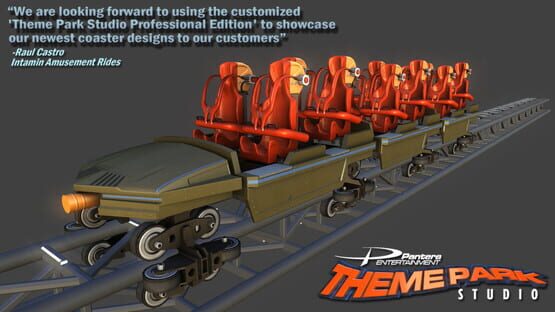
A new update has been uploaded and it contains many great new features.
We are pleased to announce that this new build integrates Oculus Rift support. This is a feature many of our Kickstarter backers have been looking forward to, so we set aside time during this development stage to add Oculus support and fulfill our Kickstarter commitment. We sincerely thank our backers for their continued support. To activate Oculus Rift from within Steam, simply right click on Theme Park Studio from within your game library and click 'Properties'. Next click 'Set Launch Options', type in -oculusfullscreen ( for fullscreen mode) or -oculus for windowed mode.
In addition, this build also contains the following new features:
Four new coasters (Giga, Dragster, Floorless, and Inverted)
Animated brakes transport tires, and new LIMs
Block segments
Multiple trains per coaster
Dynamic track selection (change coaster track type even after you build your design)
Dynamic train length
Advanced Properties Panel
Custom Train Importing
Brake hold time
Fullscreen mode
These enhancements will greatly improve on the quality and realism of your coasters.
Most of the audio has been recorded and over 200 samples created. Audio will be integrated over the next couple weeks. We will also be finishing wood coasters for the final Stage 3 release.
In case you missed it, here is the September Park of the Month by EMC2.
We look forward to continuing to work with you during Early Access and appreciate your support!
Theme Park Studio Team
*** Custom Train Importing & Park of the Month Winner ***
Hello Everyone,
One of the more exciting features Theme Park Studio offers is coaster train construction and importing. This is a feature found exclusively in Theme Park Studio.
Custom train construction is as easy to use as our new Express Coaster Editor. This feature will roll out with the next stages. For a demonstration of its ease of use, refer to this video:
https://www.youtube.com/watch?v=lYD2CbvKr7k
For the ultimate in customization, Theme Park Studio's other unique feature allows you to import any model you design. It will apply physics and animate based on simple naming conventions. There is no need to setup hierarchies, or apply joints. All you need to do is assign a tag to the name. During import, Theme Park Studio does all the work parsing your file and setting the hierarchy, links, and animations for you. If you want to get started building a custom train from scratch, we have added a new manual 'Importing Custom Trains' which can be found under Help/Documentation. This will explain the tags you assign and how train pieces are broken up.
Remember, if you are a casual user, and do not want to build trains from scratch, it is no problem. We will soon be rolling out our custom train construction set. Using this tool you can assemble a custom train within Theme Park Studio, with no need for external software.
With both these features being unique to Theme Park Studio, we offer the casual gamer and the advanced user the ultimate in custom train design.
On a final note: Congratulations to Jcat for being August Park of the Month Winner (seen here).
His park is available for download in Steam Workshop. 'Park of the Month' winners will be selected using a combination of community votes and careful internal review. Parks will be chosen based on creativity, park layout, environment, and coaster design. Winners will be presented on the Steam Announcement page, Facebook, Youtube channel, and in our newsletter.
If you would like to submit your park as a September Park Of The Month candidate, email support@themeparkstudio.com
Thank you all for your continued support
Theme Park Studio Team
*** Custom Train Importing & Park of the Month Winner ***
Hello Everyone,
One of the more exciting features Theme Park Studio offers is coaster train construction and importing. This is a feature found exclusively in Theme Park Studio.
Custom train construction is as easy to use as our new Express Coaster Editor. This feature will roll out with the next stages. For a demonstration of its ease of use, refer to this video:
https://www.youtube.com/watch?v=lYD2CbvKr7k
For the ultimate in customization, Theme Park Studio's other unique feature allows you to import any model you design. It will apply physics and animate based on simple naming conventions. There is no need to setup hierarchies, or apply joints. All you need to do is assign a tag to the name. During import, Theme Park Studio does all the work parsing your file and setting the hierarchy, links, and animations for you. If you want to get started building a custom train from scratch, we have added a new manual 'Importing Custom Trains' which can be found under Help/Documentation. This will explain the tags you assign and how train pieces are broken up.
Remember, if you are a casual user, and do not want to build trains from scratch, it is no problem. We will soon be rolling out our custom train construction set. Using this tool you can assemble a custom train within Theme Park Studio, with no need for external software.
With both these features being unique to Theme Park Studio, we offer the casual gamer and the advanced user the ultimate in custom train design.
On a final note: Congratulations to Jcat for being August Park of the Month Winner (seen here).
His park is available for download in Steam Workshop. 'Park of the Month' winners will be selected using a combination of community votes and careful internal review. Parks will be chosen based on creativity, park layout, environment, and coaster design. Winners will be presented on the Steam Announcement page, Facebook, Youtube channel, and in our newsletter. If you would like to submit your park as a Septembers park of the candidate, email support@themeparkstudio.com
Thank you all for your continued support
Theme Park Studio Team
Park of the Month
Hello Everyone,
Even though we've only just started rolling out the coaster stages, already we have seen some pretty amazing work from the community.
Now would be a great time to start posting "Park of the Month" winners.
Parks will be selected using a combination of community votes and careful internal review. Parks will be chosen based on creativity, park layout, environment, video editing, and coaster design. Winners will be presented on the Steam Announcement page, Facebook, Youtube channel, and in our newsletter.
If you would like to receive the official Theme Park Studio newsletter, simply enter your email address by clicking here. http://visitor.r20.constantcontact.com/d.jsp?llr=l8adtypab&p=oi&m=1116443083627&sit=5yo5p6pib&f=b219f7d2-23aa-46ce-8874-41fdf8a5dd8c
This month's winner is JCat. His clever use of the castle, lighting, and coaster design made it a TPS favorite.
In the latest build, there is a new option in your Steam Workshop toolbar that will allow you to download all park of the month winners.
If you have a park you would like to submit, simply upload it to Steam Workshop and add a comment announcing it as a Park Of The Month submission.
In the meantime, we will continue developing the final coaster stages and additional phases, which will make future parks even more spectacular.
Thank you for supporting us.
Theme Park Studio Team
Coasters Stage 1 Now Released!
Hello Everyone,
We are very excited to start rolling out our roller coaster construction tools.
The new Express Coaster Editor allows you to quickly build amazing coasters in minutes. With this power editor you can bend, stretch, twist, and pull rails into almost any shape imaginable/ There is also a specialty segment library for easily dropping in Loops, Cobra Rolls, Helix, Batwings, and more! There is also a full support library allowing you add additional supports of your choosing through a simple point and click method.
Once finished, you can upload your coaster to Steam Workshop, or download coasters from Steam Workshop built by the community.
As we mentioned in our last newsletter, coasters will be released in 3 stages. Coasters are clearly the largest, and most exciting part of Theme Park Studio, and require extra effort to give them the attention they deserve. We wanted to get a copy into your hands, so we broke it up into 3 stages.
This build represents Stage 1 and has the bulk of the functionality included.
Stages 2 and 3 will be released next. Much of the functionality in the upcoming stages is complete, and will be released as we finish.
Also, over the next month additional coaster trains and rail types will be released including:
Inverted
Floorless
Wooden
Mine Train
Classic
And More!!!
Click here for a video showing the amazing coaster models already built:
https://www.youtube.com/watch?v=6oaYmkhWejs
Stages 2 and 3 will also include Rail Smoothing, POV physics, Multiple trains per coaster, Audio, and Accelerators/Brake objects
Click here for a video tutorial that demonstrates just how easy it is to build a coaster with the new Express Editor:
https://www.youtube.com/watch?v=HIyiHabQen8
This new module allows players to build amazing coasters easily and quickly. Advanced users still have access to specific rail position, heading, pitch, roll, tension, accelerator, and brake properties for additional customization.
Both the Express Editor and Advanced Properties panel will allow both the casual gamer and advanced coaster enthusiast to build almost any coaster imaginable.
Thank you for supporting us during Early Access, we look forward to seeing all the amazing coasters the community will create!
Steam Workshop Now Available!
Hello Everyone!
We are excited to announce Steam Workshop has now been integrated into Theme Park Studio. You can now browse through libraries of Parks, Rides, Custom Scenery, and Environments built by the community, without ever leaving the program. There is also a new 'Publish' feature, for uploading your creations directly from Theme Park Studio.
We also enabled the 'Enter Park' button, which adds a new dimension by allowing players to take a virtual tour of community built parks.
With Steam Workshop, casual players can now simply browse through libraries of parks and custom content, and with a couple clicks, become immersed in a virtual theme park world!
Instructions for Steam Workshop can be found here:
http://forum.themeparkstudio.com/index.php?topic=1521.0
Meanwhile, things are progressing well with phase 3. In addition to the existing controls and functionality seen in the videos, we are adding an additional quick start interface for casual designers. Now Theme Park Studio will have the best of both worlds, custom track curvature for the advanced users, and a simple point and click panel for the casual coaster builder. This is in addition to the custom train designer already built for phase 3.
Finally, our Oculus Rift Dev Kit 2 will be arriving in the near future, and that will take the virtual park experience to a whole new level.
Very exciting updates lie ahead in the next few months, and we look forward to continuing in the Early Access program with the community.
Thank you for your continued support!
Theme Park Studio Team
Phase 2 - Custom Ride Designer And Animator - Now Released!
Hello,
We are very excited about the Phase 2 release of our custom ride designer and animator, with ultra realistic physics.
*** Please check out the new video on our store page. It demonstrates some of the great animations you can create with this new update!
This module is one of our finest. It includes proprietary tools and technologies that allow players to build custom rides from scratch, with amazing realism, using patent pending technology.
For casual gamers, this update means that rides now include embedded animations. Simply click on the ride you want, move it into position, press the new 'Test Park' button located on the top tool bar, and watch your ride come to life.
For moderate users, it means any object can be animated through our powerful keyframer.
And for advanced users, this update means custom rides can be 'Jointed' then animated by applying physics' forces, for accurate real life representations.
In this build we have animated some of the existing rides, plus added a few new ones. We have also included 5 new build sets, totaling almost 50 ride pieces you can mix and match to create your own custom ride. They can be found in the Build Set 3 folder. Using the scenery builder, you can now piece together your own ride and bring it to life in a way never done before.
We have attempted to break new ground with our approach and technology. We've even added a few extra bells and whistles, not found in the original videos, to help players build their custom rides more efficiently.
We look forward to continuing to work with you during Early Access, and of course thank you for all your support.