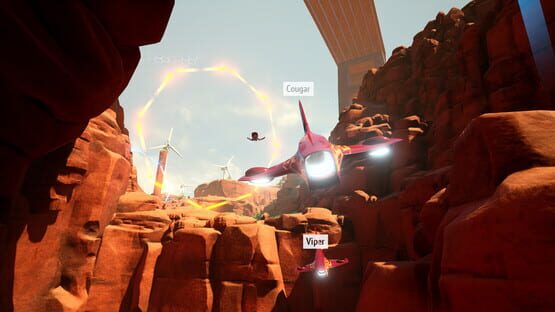
Hello everybody, we got a minor update today including:
for those of you who want more precision - sensitivity slider for each axis in control customization panel
for our VR streamers - fullscreen wide 16:9 mirror mode
for our VR players - visible motion controllers in-game with controls mapping drawn over them, you can turn them off in VR menu
we also fixed page switching in options menu with MC, you can switch pages with left/right grip buttons
Panther "wheels" visuals! ːsteamhappyː
bunch of small fixes
GLHF and see you in 2017,
PeopleGottaPlay team
Thick Air Alpha 0.2 is finally here!
It took much longer than anyone expected but the scale is so huge it was totally worth the wait. All in all, it feels like a completely different game now, so let's recap what have changed.
First and foremost,
PERFORMANCE
After several rounds of optimization, we've managed in get up to 100% FPS increase in both VR and standard modes. We didn't, however, switch to UE's new forward renderer, so the visuals are the same quality.
CONTROLS
Alpha 0.2 introduces controls customization system and HOTAS support (actually any DirectInput controller). We ditched prebuilt control schemes except for arcade, which is now default - you are free to build your own control scheme in any fashion you like.
We've also added support for Vive motion controllers. You can play using thumbpad or the entire MC as joystick (hold grip button for that), but be warned, as with any other controller that doesn't have a point of reference (zero), it's not precise at all and extremely exhausting for your hands/arms. The recommended control device is gamepad - still.
GAMEPLAY
No more loading, no map in hangar (which should make sitting VR users happy) - just pick a drone and fly out of the hangar. Introducing semi-open world travel - you are free to fly on your own through the canyon (more locations coming later). There are race points scattered in the canyon - fly up close to one to start the race.
Next, we've made all drones a bit faster, AI a bit smarter, and added gates - you won't miss them (pun intended) but if you do, you'll get disqualified. We've made them big enough, don't worry and get your flying skills up.
EVERYTHING ELSE
We've fixed a bunch of small stuff here and there. I hope I'm not forgetting anything important, but if I am, you'll probably find it on your own. As usual, if you happen to find bugs or glitches, tell us about it in the comments here on on community forum.
Oh, and demo will be updated too, once goddamn script kiddies stop messing up Steam - it's full featured, but not full content. You have access to one drone model and one race track, but you are free to fly in the canyon on your own for however long you want.
Cheers, people, and Merry Christmas ːsteamhappyː
Yours truly,
PeopleGottaPlay
Booooooost!
Hey y'all how ya boostin' ːsteamhappyː
We got some boost changes today - it is now more powerful, shorter and rechanges 20% of the battery on every checkpoint (not visible now, but every lap has 9-12 checkpoints) in addition to the usual recharging when flying on high speed. In our experience, that made the race a lot more dynamic and a lot more FUN! We also tweaked pitch/roll speeds to be on par with quite fast steering, see if it helps you do some crazy tricks.
As usual, tell us what you think and what we should address in the next update.
Important controls update!
We've been able to locate the biggest source of frustration with Thick Air controls - lack of stabilization on turning and maneuvering thrusters. The stabilization has been implemented in the latest update and it does wonders to controllability. Thruster stabilization is turned on by default and you can turn it off anytime you want from the options menu.
All credit for steering/maneuvering thrusters stabilization feature goes to /r/gamedev community and specifically to /u/nomnaut for taking the time to test and figure out the source of the problem.
Another important part of this update is arcade control scheme (now set as default) - steering and height controls bound to left stick and pitch/roll to right, but one left stick is more than enough to fly at high speeds and make all the crazy turns.
The update is live right now both for the game and the demo. Tell us what you think!
A guessing game!
A'ight people, we gonna do some keys giveaway!
Next 4 drone pack is based on cars from famous 80s movies and TV shows. First 10 participants to guess all 4 cars get Thick Air Steam key. Send your guesses to peoplegottaplay@gmail.com and keep your fingers crossed!
Keyboard and mouse controls revised and fixed
First of all, keyboard prompts are now shown properly if you don't have gamepad and/or using keyboard instead.
Second, we revised keyboard/mouse controls and changed it to the simplified scheme, same as for gamepad - vertical/horizontal maneuver axes and steering, 3 axes total. You can also steer with mouse, plus mouse buttons work as throttle, left for acceleration, right for braking.
Tell us how it works for you!
Simplified controls!
Due to numerous complaints about all control schemes being too hard and unplayable, we introduce simplified gamepad control scheme - pitch combined with vertical thruster and roll combined with horizontal thruster on left stick, yaw on right stick, implemented both in game and the demo. Updates are live now.
Tell us what you think!
Meanwhile, HOTAS support in Thick Air has been tested and it works with all DirectInput joysticks. It's going to be released along with complete settings menu overhaul and controls customization system mid-October or earlier.
Untitled
Patch notes for 9/20/2016
We are introducing new flight mechanic - close-to-ground speed up. It makes the race much more dynamic and brings a risk-reward tactic to play - flying low is risky and requires a lot of skill but the speed advantage is invaluable.
Tell us what you think!
Patch Notes for 9/17/2016
Inverted pitch and vertical thruster axis options now work as they should.
Lap times and best lap time are now correctly calculated and displayed.