Support for hosting and joining multi-user network sessions for cooperative scene building.
Any user can host a session and get a simple 4-digit server code to share with friends.
Other users can enter the code to join the session as a client. Each user is assigned a random color when they enter the session.
Voice chat is supported for network sessions.
The physics simulation is run independently for each user, however dynamic objects are synced to the host's state when they sleep.
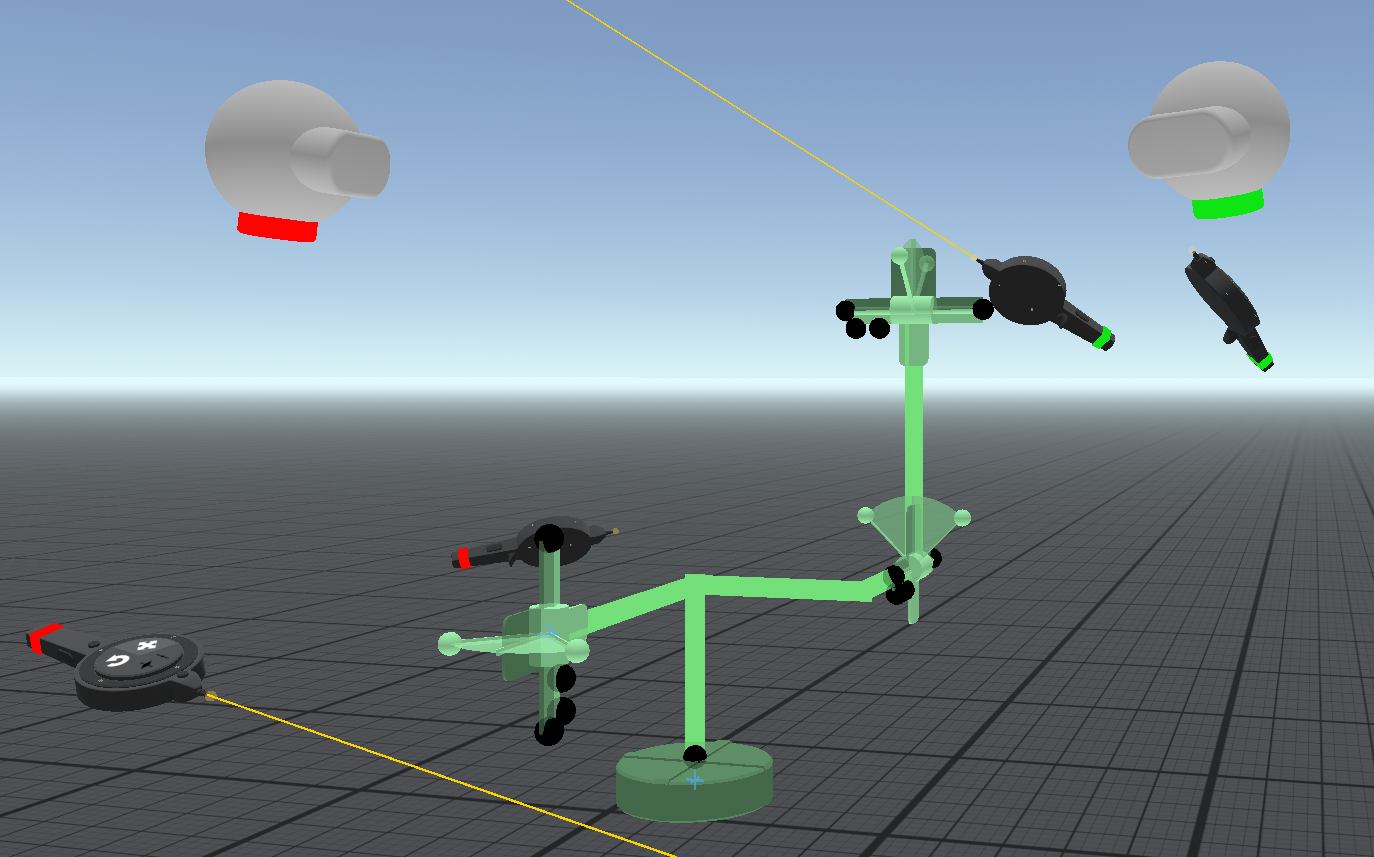
New joint system: Arm Joints
Arm joints are ideal for chains of joints comprised of hinges or sliding joints.
Arm joints can be hierarchies, but loops are not supported.
New arm joint tool to create and modify joint chains. Arm joints can be re-linked to other joint chains.
Pose mode disables joints and allows positioning them to define the rest pose.
Arm joint specific snap assists with joint layout.
Arm joints can be dynamic or target specific joint values. A motor mode allows moving joints at a specific speed.
Arm joints support friction (and tension in motor mode)
Physics
Physics tool now indicates when a group of objects have mixed mass settings. Objects can be set to different mass densities and grouped.
New system to calculate inertia, mass, and center of mass supports rigid bodies with mixed densities. Improvements to the Physics tool's touch finger to make it work better with objects of different mass and scale.
Minor improvement to the way friction is handled.
Reverted the solver back to Projected Gauss-Seidel (PGS) instead of Temporal Gauss-Seidel (TGS). TGS is better in many cases, but is also rigid in a way that can be unstable. The new arm joint system provides tighter joints and so TGS is less necessary.
New Object locking system
Visibility tool now has modes to lock and unlock objects.
A locked object is visible, but can not be selected with tools and generally is not modifiable.
Locked objects still interact with the physics simulation and animation.
A group can contain both locked and unlocked objects. The group can only be gripped via unlocked objects and any locked objects in the group will move with it.
The visibility tool shows the number of locked and hidden objects in its tool tip when resting a finger on one of the touchpad buttons.
Both locking and visibility are now saved in the scene file.
Wire socket workflow improvements
Nearby sockets are now see-through behind geometry making them easier to select.
Sockets are also given selection priority
Thingamajig Early Access release 11
New Features:
Updated the version of Unity used to build Thingamajig. Previously we were using 2019.4 LTS, but we have now switched to 2020.3 LTS.
For physics, switched from the Projected Gauss-Seidel (PGS) solver to the Temporal Gauss-Seidel (TGS) solver. This should improve the stability and quality for joints in particular.
Slight change to how Thing definition works. Previously a new Thing definition would use the coordinate system of one of the selected objects to define the orientation of the resulting Thing. Often this would be some arbitrary rotation and not a useful alignment. Now newly defined things use world space orientation and choose the front side from the six major axis-aligned directions (based on the orientation of the tool) to determine the "front" side of the Thing.
Fixed a minor issue with the material editor's friction adjustment sliders. Previously it was possible to force one of the values out-of-range when static and dynamic friction are locked. Now both are clamped to stay in range.
Improvements to the way joints are handled in some cases, which should improve physics interactions overall.
Now hinge, sliding, and ball joints use forces and torques to make the joint reach its target when the joint is not dynamic, but one of the attached bodies is. Previously this would have been done kinematically (i.e., the bodies would be "teleported" to their expected positions), which in many cases didn't produce realistic physics reactions.
New "motor" options for hinge joints. When motor is enabled, the hinge rotation parameter becomes rotation speed, which controls how fast the hinge turns. Note that if the hinge is dynamic the motor option will still cause it to spin, but allow it to spin faster than the target velocity (i.e., freewheel). If the joint is not dynamic, the motor option will cause the spin to slow down if necessary to achieve the target velocity.
New tension parameter for hinge and sliding joints. When these joints are not dynamic, but their attached bodies are, forces and torques are used to achieve the target. Lowering the tension makes the joint more "springy" and increasing it makes it tighter and track the target closer.
Wire workflow improvement: now the socket on a wire parameter panel can be used to wire the socket it is attached to. This can make it easier to access sockets that end up embedded in geometry (like a hinge). Place a parameter panel for a hard to reach socket and then use it to access the socket rather than the socket directly.
New Rotation Sensor gizmo, which can be used to detect the orientation of a group of objects, or the rotation required to point at a particular group of objects from the position of the rotation sensor.
New Rotation Decomposer gizmo, which separates a rotation into latitude, longitude and twist/roll.
New Rotation Combiner gizmo, which can be used to combine two rotations in different ways.
New Collision Trigger gizmo, which can be used to trigger collision detectors even when there are no physics/dynamic objects involved.
Two new options for materials that affect physics, which can be found in the "Interaction" section of the material editor:
mass checkbox - when checked, objects with this material contribute to the group's total mass. It is checked by default, but can be turned off to add objects to a group that don't affect its mass.
collides checkbox - when checked, objects with this material collide with other physics objects. It is checked by default, but can be turned off to add objects to a group that don't collide but rather pass through other surfaces in the same space.
New Time Smoother gizmos for scalars, colors, and rotations. Time smoothers have "raw" and "smooth" sockets where the smooth value tracks the raw value, but changes are smoothed over time. An amount parameter controls how aggressively they are smoothed.
New Blend gizmos for scalars, colors, and rotations. Blend gizmos blend between two values based on a scalar value where 0% results in the "left" value, 100% results in the "right" value, and in-between values proportionally blend between the two.
New Ray Pointer gizmo, which casts a ray in a particular direction and provides information about the surface hit. A "detected surface" on/off socket indicates if any surface is found along the ray direction up to a user-adjustable limit. The distance to the hit surface is provided along with the horizontal/vertical position on the surface.