

Thrive
Thrive is now on macOS
As we hinted at in recent progress updates, we have been working in the background on making a Thrive build that is fully supported on Mac. And that work has now been completed and there's a fully signed and notarized version of Thrive for macOS. This should work on both Apple Silicon and Intel Macs, however most testing has been done on Apple Silicon, as that's the more likely platform capable of running Thrive well. It is possible to run Thrive on older Intel Macs, but you will need to use a lot of resolution upscaling to get reasonable FPS.
Thanks to everyone who showed their support for getting the Mac version fully supported by wishlisting on Steam with the Mac platform selected. It took a while to get this done as there's various extra costs related to a Mac version and also the time commitment that takes programming resources away from other features. The Steam version of Thrive now includes this Mac version of the game.
Thank you for the continued support.
Thrive Patch 0.8.2.1
Patch Notes
- Fixed the tutorial and chemoreceptor guidance lines always being black and hard to see
- Improved background brightness for OpenGL mode when microbe background blur was enabled (it is still not as correct looking as Vulkan mode)
- Fixed the mouse being unable to click in the top left corner of the screen due to a always present node that was not set to mouse ignore
- Fixed process panel speed indicators not speeding up in double game speed mode
- Clear the selected cell type in macroscopic when the type is deleted
- Added a command line flag to skip initial mod loading
- Some native library build tweaks
- Updated unit testing packages
- Updated translations
Devblog #47: Current Events

Another three months have passed, and another Thrive release has arrived - Thrive 0.8.2 is now available for download!
The headliners for this update include currents, bioluminescence, additional environmental events, a tutorial revamp, and more. Less experienced players can rely on a more comprehensive tutorial to breakdown how to make your organism Thrive; currents will give movement to the waters you inhabit, livening up the world; and players of all skill level will have to contend with meteor impacts and Snowball Earth events.
Many of these features have been requested for multiple years, held back by incomplete concepts, graphics work, and programming focus. The result of their implementation is a more alive, accessible, and beautiful Thrive.
Read on for more details, or play the release now.
See our patch notes for full details at the end, or read on for some of the highlights.
Water Currents

Adding more life into the world, currents have finally been implemented.
Players and other cells will now be affected by currents, pushing in a direction indicated by moving water particles. Currents vary by patches, becoming more or less powerful depending on the region of the ocean you inhabit. Before this update only chunks were slightly moved by currents, but now the currents are much stronger and move other types of things as well.
This makes interacting with your environment more dynamic, and makes predation and movement require more coordination; you don’t want to get caught in a stream while running away from something!
New Patch Events
Glaciation events and meteor impacts - crucial phenomena in the story of life and the planet it inhabits - are now represented in Thrive.
Global glaciation events involves a rapid, widespread cooling of the planet, resulting in widespread freezing. There have been at least three such events in our planet’s history, with one - commonly referred to as “Snowball Earth” - resulting in a significant amount of our oceans being frozen over.
In Thrive, a Snowball Earth Event has a likelihood of being triggered once your planet’s atmosphere becomes oxygenic. All surface patches reach freezing temperatures, have reduced light levels, and spawn in ice chunks in Snowball Events, drastically shaking up life on your planet.

Meteor impacts are also influential events in the history of a planet. Early on in Earth’s history, meteors often introduced important resources to the atmosphere and surface, shaping the evolution of our planet’s climate.
In the Microbe Stage, there are six possible types of meteor impacts which generally impact light availability, carbon dioxide, and introduce resources to surface patches. The most common impact events result in changes to local atmospheric conditions, while rarer meteors can spike resource availability, such as phosphate or radioactive material. Meteor impacts can vary in size, impacting single patches, all surface patches in an entire region, or across multiple regions.
New Tutorial
Confused about an aspect of Thrive? Tutorials will be back the time you play - unless of course you have completely disabled them. Now the default way to turn off the tutorials is to only turn off tutorials you have seen before, which will be a lot better for returning players who may have been otherwise tempted to turn off all tutorials to avoid the first few tutorials you before always had to play through. In general, a lot of work has been put into reworking the tutorials, better explaining our fundamental mechanics.
The tutorial is now more direct, slowly introducing additional layers of information in an approachable manner. Focus is primarily on explaining metabolism, clarifying some common areas of confusion we see in keeping your organism from starving. Additional love has been put into introducing the Auto-Evo Report and Microbe Editor piece by piece, making sure players understand what pieces of information are most appropriate.

Much of this development cycle was put into the tutorial, which has been a source of constant discussion within the team for years. As such, we are itching to put a rubber stamp on the topic and move on. If you have any feedback on the clarity of the tutorial, we ask that you let us know soon. Though, we are no longer going to consider another entire rework, but smaller tweaks can be done.
Bioluminescense
The bioluminescent vacuole has been hanging around in the list of our organelles for almost a decade now always waiting to be implemented. As it was on our microbe roadmap, our lead programmer finally took care of that. So now you can add pretty lights to your cell:

It doesn't do much in gameplay terms but at least it looks pretty, right? It does offer some oxygen resistance, which is also a new feature in this release that completes the environmental tolerances system that didn't have enough time to cook for the previous release.
Additional Features
- More polished environmental tolerances with organelles now affecting the tolerances
- Added resolution scaling options to render at lower resolutions for more performance
- Added a loading screen for stages during which graphics are loaded and shaders compiled to reduce stuttering during gameplay
- Upgraded to Godot 4.4.1
- Added a button to play the game at double speed
- Reordered the organism statistics panel to put less important stats at the bottom and make the compound balances visible without scrolling down
- Balancing tweaks and made AI members of the player species dying affect the population
- Various graphics and GUI tweaks
What’s Next
This release has been slightly lighter on new features than the previous one, mostly because we focused more on fixing things and reworking the tutorial. The next release will again be more focused on new features. Though, we are planning on making a small patch release 0.8.2.1 which will make Mac support official and add that version to Steam. We are still focused on the goal of releasing the completed microbe stage this year.
As always remember to join us for our developer Thrivestream later today, where we’ll cover the changes in this release and answer any questions you might have about the future of development. We'll also answer the usual question of what's coming in the next releases. You can visit our feedback thread on our forums to give your thoughts on this update, or you can comment below.
Watch the stream:
Patch Notes
Full patch notes:
- Added water currents that affect microbes and particles that visualize the currents
- Added a global glaciation event that reduces light on all surface patches and adds ice chunks
- Added meteor impact events
- Added resolution scaling options to render at lower resolutions for more performance
- Added a loading screen for stages during which graphics are loaded and shaders compiled to reduce stuttering during gameplay
- Implemented the bioluminescent vacuole, though the gameplay impact is minimal so far (the lights look pretty, though)
- Added an option to change the world size when setting up a new game
- Upgraded to Godot 4.4.1 (from 4.3) which has fixed many bugs we had with Godot 4
- Tutorials now have a new mode where only tutorials that haven't been seen before are shown. And the old option of completely turning off the tutorials is now only in the options menu. We hope that this will help returning players who have historically skipped all new tutorials that they hadn't even seen before.
- Added a popup after the welcome tutorial prompting the player to select their preferred 2D movement mode. Hopefully with this change there won't be more feedback on the default movement mode.
- Added 7 new tutorials covering some extra parts of the microbe editor as well as the microbe stage
- Fixed incorrect randomness sampling in the chromatic aberration effect which caused some weird looking edges
- Reordered the organism statistics panel to put less important stats at the bottom and make the compound balances visible without scrolling down
- Removed percentage symbol from the compounds chart
- AI members of the player species dying now affect the population and reproductions give population bonuses
- Added a button to play the game in double speed
- Made organelles in the cell affect environmental tolerances, now the tolerances feature is more strategic as organelles can save on MP that would otherwise be needed to be used in tweaking tolerances
- Increased maximum tolerance debuffs and MP costs
- Added optimal value markes to the tolerances GUI
- Made higher firerate toxins consume less toxin per shot
- Lowered the volume of sound effects from non-player entities by 30 percent
- Reduced player species spawn rate by 50% to make it less likely to experience the player's species overcrowding them
- Increased the radius at which AI cells are no longer forced to move towards the player to "get on stage"
- Buffed chloroplasts 20% to make them a more tempting upgrade from thylakoids
- Iron metabolism no longer depends on co2
- Fixed realism issues in the wording of iron metabolism
- Added a large sulfur chunk variant
- Added a button to view the classic text-based auto-evo report
- Added instant kill protection for the player when the player's health is above a few units of health to prevent deaths from large single damage events
- If the player moves to an empty patch an AI species is now forced to teleport there to ensure the player always sees other species in the environment, even if auto-evo hasn't managed to spread there yet
- Added a 'T' suffix to primary displays of population to finally try to solve the confusion some players have that think that a population of 100 microbes literally means just 100 individuals, whereas in reality there has always been an abstract multiplier for the numbers as entire oceans have very high number of bacteria
- Added an auto-save the first time the editor becomes available
- Tweaked ice chunk visuals
- Updated the look of the hydrogenase organelle
- Added HUD message warnings when binding or engulfing mode ends due to running out of ATP
- Added a graphics option to use low quality background blur for more performance
- Added anti-aliasing type selection to allow switching to other kinds besides MSAA
- Added anisotropic filtering options
- Removed option to turn off passive reproduction as that mode was not balanced and was not going to receive any balancing work
- Disabled tolerance warnings in multicellular as tolerances are not implemented for multicellular yet
- Improved the performance of the patch map redraw logic to reduce lag when clicking on patches of the map
- Added a tutorial prompting the player to place a nucleus after many generations in the editor in case the player forgot the early goal
- Fixed the news feed no longer working with our new main website
- Fixed tolerances making it harder to survive after getting a patch extinction and having to return to a previous patch. The game now helps out by adjusting tolerances automatically to not get debuffs in the new environment.
- Fixed lag on the patch map with large maps
- Fixed jittery particle emitters in main menu background 3 by enabling interpolation
- Fixed some process input numbers not showing enough decimals and instead showing up as 0 when they are in fact above 0
- Fixed temperature compound inputs never showing any decimals
- Fixed ATP consumption bar to show 3 decimal places like the production bar already did
- Fixed at noon light level label not using rounding
- Fixed light level bar sizing in the editor
- Fixed incorrect indicator colour not applying to save name text box
- Fixed the radiation damage effect not being audible
- Fixed initial compounds in multicellular not giving glucose correctly. A fix had been made earlier to the microbe stage but was forgotten to apply to the later stage as well.
- Fixed incorrectly sized ground plane in the industrial stage
- Fixed sizing of some tutorials
- Fixed wording in toxin tooltips claiming they use oxygen by default
- Fixed a typo in the auto-evo explanation popup
- Fixed Easter Egg chunk causing warnings
- Fixed fossilization buttons not taking screen distortion into account, their positions are more accurate now
- Fixed an extra horizontal separator being visible in the rigidity tooltip
- Fixed extra horizontal separator visible in the organelle upgrade tooltips
- Fixed lysosome upgrade GUI being slighty too short
- Fixed the auto-evo explanation popup being slightly too short by default when using a single energy source
- Fixed art gallery sounds that were paused resuming on closing it
- Fixed microbe benchmark using a bad seed and not generating interesting species
- Fixed damage on touch system trying to deal 0 chunk damage
- Added a safety workaround for loading saves with invalid compound cloud system state (the state is reset on load)
- Added safety code to the evolutionary tree to allow displaying it even if some generation's data is missing. The tree can display itself now but the missing data will still be missing.
- Fixed our shuffle bag implementation to shuffle bags with just 2 items
- Fixed a crash when directly starting an editor scene through the Godot Editor
- The game window clear colour is now set to to black in exported versions to hopefully avoid some bugs where a grey background is sometimes visible on Windows
- Tweaked the minimum size of the process panel
- Added a tooltip for the process panel toggle buttons
- Improved multicellular growth code to not use a method for iterating that required extra memory each time
- Added Mac build signing and notarization to our build script
- Updated our style guide to begin with a brief section on special considerations as Thrive is a game
- Updated code checking tools
- Fixed some code warnings from new checking tool versions
- Fixed localization update script looking in some folders it shouldn't and finding unintended build files
- Enable automatic running of gdUnit4 tests by our CI pipeline
- Fixed technical issue where Dependabot had deleted the Jolt submodule
- Did various tweaks to our CI pipeline to try to share used disk space more efficiently
- Updated setup instructions regarding .NET and Godot version
- Updated System.IO.Hashing from 9.0.2 to 9.0.4
- Updated System.Numerics.Vectors from 4.6.0 to 4.6.1
- Updated Harmony from 2.3.5 to 2.3.6
- Updated AngleSharp from 1.2.0 to 1.3.0
- Added a new language: Alemannic
- Updated translations
Thrive 0.8.2 Release Candidate Available
To access the beta build, right click Thrive in Steam and opt-in to the "beta" branch of the game.
As usual please post any feedback you have on this test build on our forums, or in the comments below. We will try to then fix as many found high priority issues before the full 0.8.2 release as possible.
Thrive Patch 0.8.1.1
Patch Notes
- Fixed multicellular cells after the first one immediately starting to die. This should make multicellular now playable again.
- Doubled decay of radiation when taking damage to reduce overall taken radiation damage once it starts
- Fixed units of compound types shown in the GUI for how many seconds the storage lasts
- Fixed extra horizontal separators being visible in the membrane tooltips
- Added safeguards against cell colony members with missing components, now those colonies are force disbanded to allow the game to continue
- Updated translations
Devblog #46: (Environmental) Tolerances Update
Also in this release we finally have a fully finished thermosynthesis gameplay, though it might not be exactly fully balanced yet as we didn’t get that much balance feedback on the public test build last week. And of course along with the major new features we have a ton of small tweaks, graphics and GUI improvements as well as bug fixes. One highlight is that we now have an exclusive fullscreen option which should help anyone wanting to play in fullscreen mode on Windows.

Read on for more details or play the new update now.
Freezing, Crushed, And Overheating – Environmental Tolerances
A long awaited feature, environmental tolerances are now implemented in Thrive. Life in Thrive now must adapt to different conditions across their planet, simulating an important aspect of your species’ evolutionary story.
There is now a section of the editor devoted to environmental tolerances, where players will be able to examine and control their preferred environmental conditions. Inhabit a patch with unfavorable conditions, and you will suffer penalties in gameplay and auto-evo performance. Adapt well to a patch, and gameplay bonuses will be received by your species.

This feature will make patch migration and player movement more strategic in nature, and – combined with other features in 0.8 – will provide an engaging simulation of life’s story on a young, changing planet. Balancing is an important part of making this feature as fun as possible, so feedback is deeply appreciated.
Radiation-Eating Cells

Be wary of a strange, green light: radiotrophy is finally in Thrive.
Radiotrophy – a unique metabolic strategy undertaken by some fungal species here on Earth – involves the generation of energy from captured radioactivity. In Thrive, we have introduced radioactive chunks, found in hydrothermal vents and caves.
Absorbing too much radiation is dangerous, especially to unadapted cells – however, cells with melanosomes are able to metabolize a certain amount of radiation, providing a powerful source of energy. Be careful though: even cells with melanosomes can overdo it. Though, with enough melanosomes extreme amounts of radiation can be overcome.
Along with being an engaging metabolic pathway, radioactive material also serves as an interesting environmental hazard. So if your organism lives in a patch with radioactive material, tread carefully!
Full Thermosynthesis Implementation

Along with radiotrophy, thermosynthesis represents another unique metabolic pathway added to Thrive.
Thermosynthesis generally involves the use of heat gradients in order to generate energy. In Thrive, players with thermosynthesizing proteins are now able to toggle a thermal display of their environment showing local fluctuations in temperature. Players must navigate between cold and warm spots in order to generate energy – going from colder to warmer spots specifically generates energy.
Thermosynthesis is currently a theoretical diet, and thus is only accessible in non-LAWK playthroughs (toggleable setting when starting a game). However, thermosynthesis is theorized to have been very important for the most ancient of lifeforms on Earth – so future research might make this diet available in a standard, LAWK Thrive playthrough.
One of our developers evolved an organism fully dependent on radiotrophy and thermosynthesis, calling it an exciting yet challenging existence. We challenge our community members to replicate such a fad diet!
Improved Patch Map

Some work has been put into our patch map to better increase player accessibility. Most notably, connections between patch regions are now much more visible, allowing players to better understand where to move in order to escape a region. Graphs in the report have also been moved around in a way approximating importance in order to increase readability.
Additional Features
- Added microbe background blur and enabled distortion effect by default
- Added an option to select between the different fullscreen modes supported by Godot Engine. When using exclusive fullscreen mode this fixes a one pixel border problem on Windows.
- Late multicellular was split into its own full stage: Macroscopic
- Implemented multicellular organism statistics panel
- Various improvements to auto-evo to allow it to evolve new organelles / upgrades. And improved the microbe AI to be able to use newer features of the game.
- Fixes to the organelle suggestions feature to make it not suggest the nucleus too early
- Improved cell image generation to make it less likely for the images to be cutoff
- Tutorial and Thriveopedia tips page improvements
A full list of changes is at the end of this post.
What’s Next
As always remember to join us for our developer Thrivestream later today, where we’ll cover the changes in this release and answer any questions you might have about the future of development. We’ll also answer the usual question of what’s coming in the next releases.
You can visit our feedback thread to give your thoughts on this update or post your feedback in the comments below. And to report the sure-to-still-exist bugs in the tolerances system.
p.s. if someone missed our previous art contest, the results were published here.
Full Patch Notes
- Added environmental tolerances, which means cells need to be adapted to the temperature, pressure and other stats of the patch they live in or otherwise they get various negative effects. Conversely perfect adaptation leads to bonuses.
- Added radiotrophy as a new food source, which allows using radioactive rocks to generate energy
- Thermosynthesis is now finally fully implemented. The feature now requires moving between local hot and cold areas to generate energy only when the cell's temperature is going up.
- Added microbe background blur and enabled distortion effect by default
- Added region connection lines to the patch map and tweaked its visuals to make it clear which patches link together
- Added an option to select between the different fullscreen modes supported by Godot Engine. When using exclusive fullscreen mode this fixes a one pixel border problem on Windows.
- Late multicellular was split into its own full stage: Macroscopic
- Implemented multicellular organism statistics panel
- Added per cell type ATP balance bars to the multicellular editor
- Increased auto-evo population change effect strength on the player from 20% to 50% and made it a configurable difficulty option
- Changing organelles back to their base state no longer refunds the upgrade cost. This fixed an infinite MP exploit with the refunds
- Improved the accuracy of the algorithm used by organelle suggestions, this should make the suggestions more accurate and no longer suggest adding a nucleus too early
- Made environmental light match the gameplay light cycle to make the environment darker during the night
- Marine snow density now depends on existing species instead of always being there
- Improved microbe AI to be able to use the feature to enter engulf mode even if out of ATP
- Tweaked thermosynthesis related text and icons
- Updated various icons to be SVG files to no longer be blurry at high resolutions
- Added displays in the editor to show reproduction cost in terms of ammonia and phosphates
- Improved cell image generation to make it less likely for the images to be cutoff
- Updated various tooltip and tutorial text to be more clear and accurate in relation to new game features
- Added a new overall tips Thriveopedia page to help new players
- Added the miche viewer to the auto-evo prediction explanation popup
- Added sulfur chunks as energy sources to auto-evo
- Added a new sulfur chunk variant
- Auto-evo can now evolve the slime jet
- Auto-evo can now evolve the mucocyst
- Added lysosome effects to auto-evo and made auto-evo able to evolve them
- Added a tutorial about early goals to the microbe editor (finding a good patch and then getting the nucleus)
- Added a tooltip for the cell rotation rate stat to explain that organelle placement affects it
- Added an option to the growth order menu to show organelle coordinates, which now defaults to off for clearer look
- Reordered the charts in the report tab to have more important ones at the top and environmental conditions last
- Increased efficiency of organelle position finding code for organelle growth so that big cells don't cause lag spikes
- Added Banana Biome Easter Egg
- Changed migration button to say "Migration Manager" to hopefully clear up the functionality
- Increased efficiency of position calculation for new organelles in auto-evo which should increase overall simulation speed by about 20%
- Fixed the organelle suggestions system sometimes suggesting unavailable organelles like myofibril
- Fixed the alternative compound balance mode not working at all
- Fixed membrane stat comparisons in tooltips and made them only show stats that are different to the currently selected membrane
- Fixed auto-evo prediction not updating on patch change or on behaviour slider change
- Fixed tutorial lines that pointed to nothing by allowing tutorials to temporarily hide the lines if there is nothing to point to
- Fixed the editor sometimes needing multiple clicks after closing a popup menu by making sure our input manager always forwards key up events to all listeners
- Fixed patch events showing on undiscovered patches
- Fixed sprint strain bar continuing to go up when engulfed
- Fixed the lysosome upgrade GUI being slightly too short and having a scrollbar
- Fixed hitting floating toxins in engulf mode triggering a message about being too small to engulf them
- Fixed the game getting locked up when trying to move the rigidity slider when you have exactly 0 MP
- Fixed inventory icons being behind some windows when dragging them
- Fixed patch notes popup not grabbing focus correctly
- Fixed modal popups staying open when moving on from an editor component
- Fixed an error in multicellular editor when clearing the cell selection
- Fixed an issue in our native lib management tool incorrectly checking for Mac libraries in certain usage situations
- Refactored MP system to calculate things as floats to make smaller edits work better (especially with lowered mutation cost)
- Endosymbiosis processes are now cleared when entering multicellular to not permanently lock the player out of a potential food source
- Added clarification in chemoreceptor tooltip that it can also be used to detect cells
- Added a tooltip for the compound handling modes in the new game setup to try to explain the rough idea behind each mode
- Improved zoom behaviour in the evolutionary tree and tweaked the dragging limits
- Updated all of the social media buttons in the main menu
- Removed an unnecessary memory allocation in auto-evo organelle upgrade attempt code
- Made our custom modal dialog manager close open dialogs when changing scenes as the old parent GUI is deleted
- Changed direct multicellular starter cell to work with the new no oxygen environment
- Removed extra data calculations from auto-evo energy balance calculations
- Refactored code related to the microbe editor organism panel
- Removed trailing spaces from the chromatic shader
- Steam: updated the wording on our thanks for buying the game message to avoid negative undertones. The thanks popup also now defaults to being permanently dismissed after clicking OK once.
- Added a new translation: Japanese. Only a little bit of the game has been translated yet so please help out if you can.
- Added Tatar language to be selectable, though the translation work hasn't started yet. If anyone can help out this translation, please do.
- Updated Thriveopedia content
- Updated setup instructions to tell to install dotnet 9
- Bumped license year to 2025
- Tweaked Dependabot configuration for dependency updates
- Updated AngleSharp from 1.1.2 to 1.2.0
- Updated Harmony to 2.3.5
- Updated Nix build flake
- Updated System.IO.Hashing from 9.0.0 to 9.0.2
- Updated translations
Thrive 0.8.1 Release Candidate Available
This testing build is a bit more raw than we would have preferred as the environmental tolerances feature was literally “finished” just a few hours ago. So please don’t be too harsh on it. But do report back how it changes the feel of the game. There is a known problem where the tolerances GUI gets messed up when loading a save made in the editor, so please don’t report that again as we are aware of it. Also it is very easy to get into negative MP when using the tolerance sliders. There's been multiple reports about that already so we don't need more, thank you.
To access the beta build, right click Thrive in the Steam client and in the properties opt into the "beta" branch.
As usual please post any feedback you have on this test build on our forums or the comments below. We are especially interested in the current game balance as many of the new features haven’t had time to be balanced well so we expect them to be unbalanced currently. We will try to get the game balance as good as possible before the full 0.8.1 release in one week.
Devblog #45: Suggestion of an Update
In the editor, two major tools make their debut. The organelle suggestion system offers strategic recommendations based on auto-evo, guiding players on which organelles will benefit their organism’s evolution. And the split order tab which gives you precise control over ATP production by letting you customize the sequence of organelle reproduction, adding a new layer of strategic depth to cell development.

Give the new version a try now, or if you don't have Thrive yet there's a sale on Steam right now for 25% off, so this is the perfect chance to grab a copy if you don’t have one already or to gift one to a friend.
Organelle Suggestion System
This update introduces the Organelle Suggestion System, a helpful tool that offers recommendations based on auto-evo analysis.
While in the editor, the system suggests which organelles to add to your organism in order to guide you towards optimizing its evolution. By analyzing your species’ needs and environmental conditions through the lens of auto-evo, it provides valuable guidance for both new and experienced players to make strategic decisions. While certainly useful it may make some seemingly unusual suggestions for now, as auto-evo itself can sometimes have a warped view on what makes a successful species at this time.

Organelle Split Order Tab
With this update comes a powerful new feature in the editor: the Organelle Split Order Tab which allows for greater control over the reproduction process in your cell!
The Split Order Tab gives players the ability to customize the order organelles split during the growth-phase, providing players with greater control over their cell’s life cycle. Players can optimize their organism’s efficiency and better plan for cell growth by determining what parts are reproduced at each stage of reproduction. This addition adds a layer of depth to the editor, allowing for a more flexible and realistic cell reproduction.

If you feel this might be too complex to handle, do not worry! Use of this feature is entirely optional and players can still enjoy the original experience of cell-growth by simply ignoring the feature.
Revamped Visuals for Membranes & Organelles
This update continues to enhance Thrive’s visuals with improved graphic effects and texture reworks!
Each membrane texture has been completely revamped. While 3D membranes have been in the game for a while, their textures were originally very similar which made differentiating membrane types impossible. Now, each cell membrane and wall has a distinct look which allows players to more easily identify what they may or may not be able to consume.

The organelle 3D models have also undergone a major overhaul, improving their design and granting a vibrant look to cellular life in Thrive.


Additional Features
- Reintroduced Mac builds of Thrive. Thrive is again playable on macOS but this is not official full support yet.
- Added sulfur chunks.
- Added an underwater vent eruption event that creates extra hydrogen sulfide and carbon dioxide in the patch.
- Made nitrogen dynamic.
- Added two new multicellular loading screen artworks.
- Reduced base endosymbiosis time costs by one.
- Lowered hydrogenase ATP output by 10%.
For the full patch notes see the end of this post.
What’s Next
As always remember to join us for our developer Thrivestream later today, where we’ll cover the changes in this release and answer any questions you might have about the future of development. We’ll also answer the usual question of what’s coming in the next releases.
You can leave feedback in the comments below or visit our feedback thread to give your thoughts on this update.
Full Patch Notes
- Added an organelle suggestion that is shown in the editor which gives info on what auto-evo would like the player to add
- Added a new tab in the editor to control organelle split order for more fine tuned control over ATP during reproduction
- Reintroduced Mac builds of Thrive. Thrive is again playable on macOS but this is not official full support yet.
- Balancing changes to microbe storage: most organelles now give much less storage to make storage an actual gameplay mechanic that needs planning
- Created new membrane textures that help make the 3D membranes of different types more easily distinguishable (as the change to 3D membranes made all the membranes look very similar)
- Reworked all organelle 3D models
- Added sulfur chunks
- Added a bloom strength slider and enabled it by default
- Added an underwater vent eruption event that creates extra hydrogen sulfide and carbon dioxide in the patch
- Added a miche viewer to the patch map tab
- Improved gas update logic to make sure gases don't add up to over 100%
- Made compounds move much more freely between patches
- Made nitrogen dynamic
- Added hydrogen sulfide compound consumption by species
- Added iron chunks being oxidised by oxygen making them less common once oxygen starts spreading through the world
- Removed experimental compound production mode as it was too unbalanced and didn't get any work done on it since the last release
- Improved the microbe AI in terms of when it uses sprinting
- Mucocyst can now be used by the AI to defend itself
- Added difficulty options for what to do with stored compounds after reproducing
- Added disk caching for generated species images. This makes displaying species images a lot faster after restarting the game and loading a save. By default the cache aims to use at most 1 GB of disk space.
- Reduced unlock requirements of gas-dependent organelles
- Reduced base endosymbiosis time costs by one
- Lowered hydrogenase ATP output by 10%
- Made slight balancing tweaks to photosynthesis glucose production and glucose use of a few ATP-generating organelles
- Renamed Nitrogen-Fixing Plastid to Nitroplast
- Made glucose reduction text only apply to discovered patches to make the percentages higher to make it look like a more important message
- Added a warning tooltip for the speed stat in the editor about how it is not fully accurate
- Added an icon for the mucocyst upgrade
- Reworked the experimental siderophore feature action icon
- Made engulfing info be last in the membrane tooltips like it was previously (before tooltip refactoring broke it)
- Added a new and more visible cell membrane animation
- Increased visibility of engulf wave effect slightly
- Added bigger warning when enabling experimental features mode
- Added tooltips for chemoreceptor upgrade GUI amount and distance sliders
- Updated nitrogen icon to not have glow anymore to be more consistent with other compound icons
- Tweaked some GUI element alignments to be more similar to what they were before we upgraded to Godot 4
- Added a tip in the unlock tooltip that endosymbiosis is an alternative unlock method
- Fixed process toggle buttons not always matching the underlying process states and fixed processes re-enabling by themselves when organelles reproduced
- Fixed hex popup menu being able to operate on deleted hexes which could be exploited for infinite MP. Also fix a related bug in the prototype editors.
- Fixed not all patches showing up in the editor report patch selector dropdown
- Fixed a bug in the volcanism effect that caused it to add way more CO2 than originally intended
- Fixed non-LAWK unlocks showing after loading a save
- Fixed aspect ratio of sunlight icon in daytime selection bar
- Fixed chemical equation arrow to be vertically centered
- Fixed a bug where compound diffusion between patches could move too much compound
- Fixed auto-evo migration usefulness calculations using the wrong miche tree
- Fixed organelle scale-affecting upgrades not applying while moving that organelle to a new location
- Fixed bug with osmoregulation cost being shown on upgrade tooltips
- Fixed osmoregulation showing in rigidity slider tooltip
- Fixed lag when zooming out a draggable container while it is still displaying its initial animation
- Fixed the timeline incorrectly claiming some species to be extinct
- Fixed moved cell in body plan editor being invisible if no cell type to place was selected
- Fixed a missing wordwrap on a label in the mod manager
- Fixed multiple bugs in our species visual hashing algorithm that made memory caching also less efficient
- Fixed extinct species not having previews in auto-evo exploring tool
- Made auto-evo exploring tool show patch events, note that historical view for events doesn't work yet
- Disabled temperature miche being generated when in LAWK mode (no species could occupy it but for clarity it is entirely disabled now)
- Added two new multicellular loading screen artworks
- Tweaked PhotoStudio image capture distance math
- Made organelle tooltips not constantly try to refresh their displayed chemical equations
- Added an energy icon for the later stage prototypes
- Linked late multicellular prototype jump force to mass to make jumping speed more consistent
- Added proper content for the Thriveopedia page of ferroplast
- Added code for UV unwrapping of macroscopic creatures, but there's no textures yet so the code isn't enabled
- Native lib install tool now prints full paths to try to reduce potential confusion
- Started backend work on allowing more kinds of unit tests for Thrive using gdUnit4
- Added workaround in the C# interop code to work with newer native library compiles
- Added a few explicit garbage collector calls when the game is loading to hopefully reduce chance that it runs during gameplay
- Updated to .NET 9
- Updated YamlDotNet from 16.1.3 to 16.2.1
- Updated System.Numerics.Vectors from 4.5.0 to 4.6.0
- Updated automatic code checking tools
- Improved a few aspects of our CMake files
- Fixed workshop upload dialog not showing all error conditions
- Updated translations
Thrive 0.8.0 Release Candidate Available
Also as a major feature the experimental Mac support is back! This means that for the first time in a year people on macOS can play the latest version of Thrive. This isn’t yet a fully supported platform for us and as a result this build is not part of the Steam version but can be downloaded separately if someone on Mac is wanting to give it a go. Hopefully we can make the Mac version a fully supported platform next year. See here for a wishlist goal we’ve had for a long time for people to show support for wanting to Thrive fully support Mac. So if you are on a Mac and would like to see Thrive there, please make sure you've wishlisted Thrive and set your platform preference in the Steam options correctly to be counted.
To access the beta, right click Thrive in the Steam client and in the properties select "beta" as the active beta version.
As usual please post any feedback you have related to this build in the dedicated feedback thread or the comments below. We are especially interested in any game breaking bugs or regressions that have accidentally slipped in. We hope to correct as many of the found problems before the full 0.8.0 release as possible.
Devblog #44: Oxygenating

Brace yourselves for another feature-packed update: 0.7.1 is here! Along with enhancements to the various reports available to the player in the editor, a lot of visual improvements to our cells, backgrounds, icons, and textures are here.
Furthermore, oxygen is now dynamically simulated, being introduced by photosynthetic life forms on your planet. This has an immense effect on gameplay and progression throughout the Microbe Stage. Your organism, which now starts its journey on an anoxygenic world, must now strategically evolve its metabolism around the pace at which oxygen is introduced to your atmosphere. A significant chapter in Thrive’s development has begun – the introduction of a changing, scientifically accurate world that evolves with the life on your planet!
Thrive 0.7.1
Read on for more details, or just jump in the latest version and play it.
Food Chain Tab, Auto-Evo Report, Thriveopedia Revamp
Consistent with the theme of our roadmap items for version 0.7.x, significant work has been put into reworking and adding upon our auto-evo reports. Players will now have a better understanding of what exactly is going on in the world they inhabit.
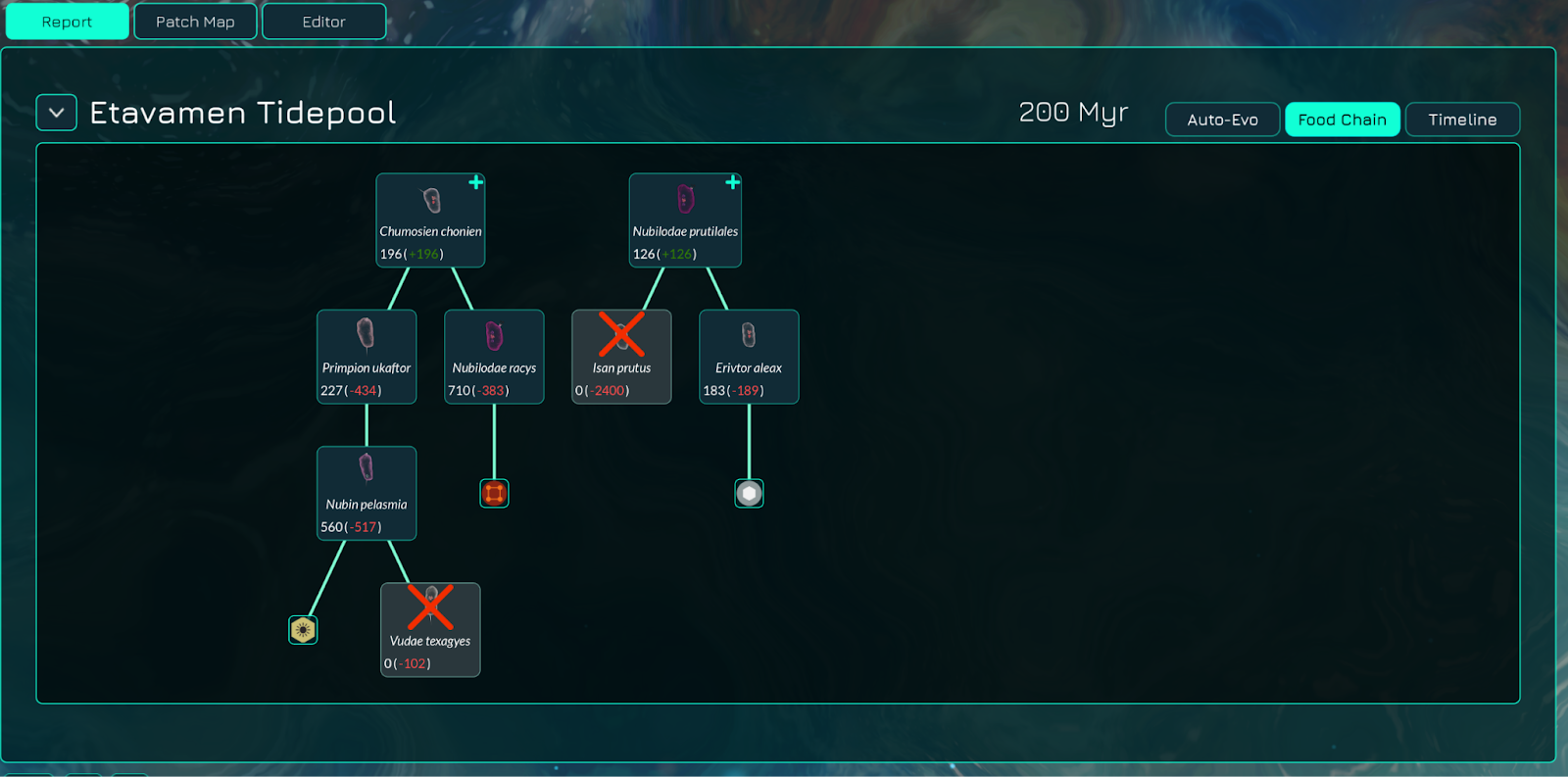
Among the most notable additions is a long requested feature: the Food Chain Tab! Players will now have a chart of the food web within a patch, letting them know the distribution of organisms across different trophic levels. You will be able to see what metabolisms each organism utilizes, the primary producers in an environment, the top predators in an ecosystem, and overall predator-prey relationships.
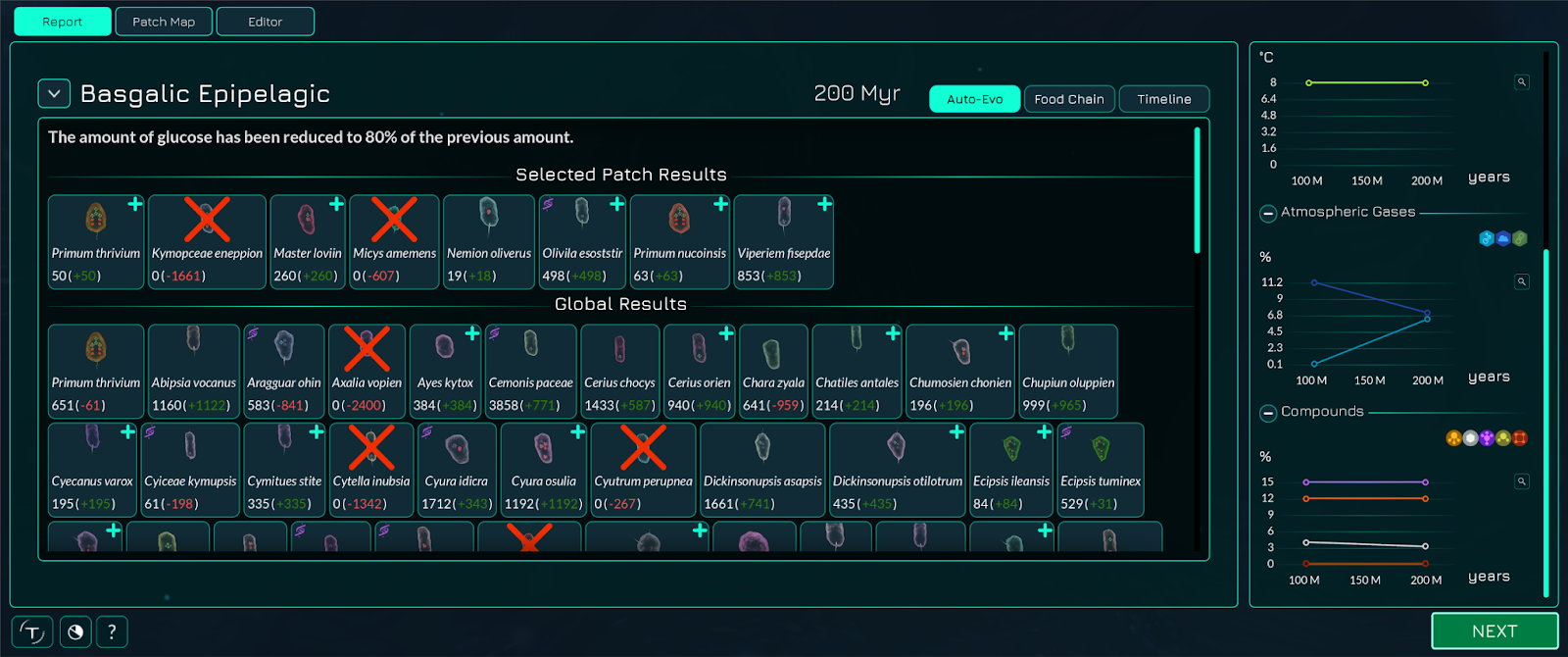
Various other important changes have also been made to make information more accessible. The auto-evo tab is now much more visual, allowing players to know exactly what organism is being referred to, their population, and other notable characteristics important to performance.
Finally, the Thriveopedia has also been expanded, bringing much more relevant information from the developer wiki into the game. This will allow players to have an in-game reference regarding important mechanics, parts, and strategies.
More work has been done on information accessibility as well – for example, the microbe editor has additional functionalities, allowing the player to see net production at rest and at maximum movement, their cellular processes, and their energy balances with or without specific metabolisms. We hope that players now have much more relevant information, and are now better able to understand exactly what is happening.
3D Membranes, Backgrounds, Bloom, and More
With improved backgrounds, graphic effects, and texture reworks, this update continues to bring significant improvements to Thrive’s visuals!
First, our membranes are now fully 3D, making cells look more realistic. Cells are now represented with membranes that have height – creating a visually-pleasing appearance of depth and shape. A different normal map has also been applied to our membranes, making their texture stick out more and creating a realistic look to our cells. Their opacity has also been altered slightly, which helps to make it so that cells look distinct.
Second, our backgrounds are much more dynamic, with the introduction of mobile background elements like bubbles, and a new optional distortion effect. Rather than a simple parallax display, layers which contained elements that should move around a bit have some independent motion. A toggleable distortion shader (accessible in the “Graphics” option menu) is also applied to the layers below, resulting in distortion similar to that of light reflecting through fluid. Furthermore, a bloom effect is now available, making colors pop and, combined with the background, creating a feeling of “depth” in a previously flat visual landscape. Like the distortion backgrounds, bloom can be turned on and off, though performance should not be significantly affected on most PCs.
More subtle work has also continued in increasing visual richness. New ice chunks have been introduced, resulting in more variety in frozen ocean patches. Some work on the assets of the later stage prototypes, such as the Societal and Space Stages, has also been completed.
We would like to note that several visual improvements, such as those to the membranes, backgrounds, textures, and bloom, are going to see more work. The distorted background will likely eventually be enabled by default. If you have feedback after playing the update, please share it with us in the comments below or on either our forums or our Discord!
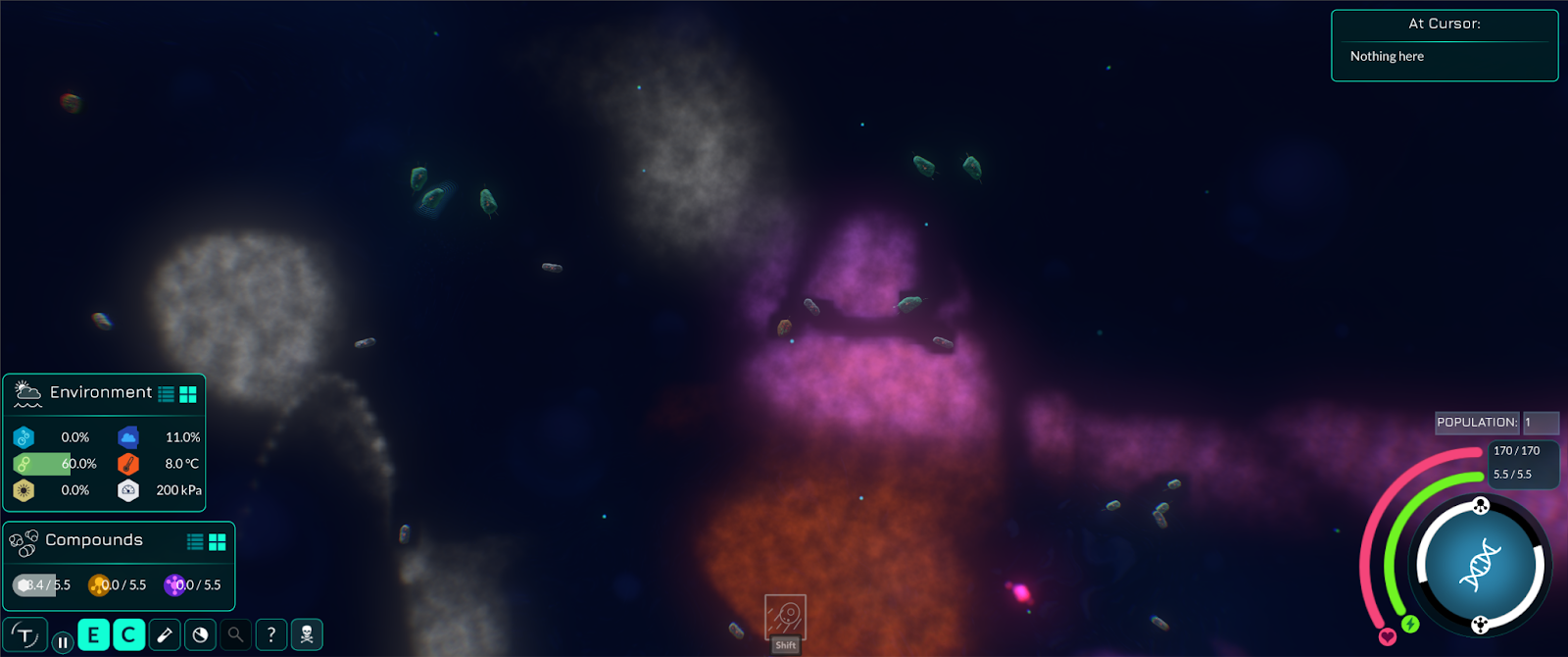
Bloom, enhanced backgrounds, and 3D membranes resulting in a more polished look for the Microbe Stage.
Oxygenation Events
After many years of conceptualization and development, a highly requested feature – oxygenation – has finally been implemented!
Similar to Earth’s history, players will now initially spawn in a world without oxygen. However, as photosynthesis emerges, oxygen will be slowly produced by the lifeforms on your planet – either from other cells, or your own.
Tweaks to existing metabolisms, such as iron respiration, have been implemented to provide options for the player. A new anoxygenic metabolism has also been introduced in the form of clostridial fermentation, represented by the Hydrogenase part. With time, oxygen will increase to the point of allowing more powerful, aerobic forms of respiration to form, and ultimately, more complex life. In other words, the Great Oxygenation Event can now be simulated.
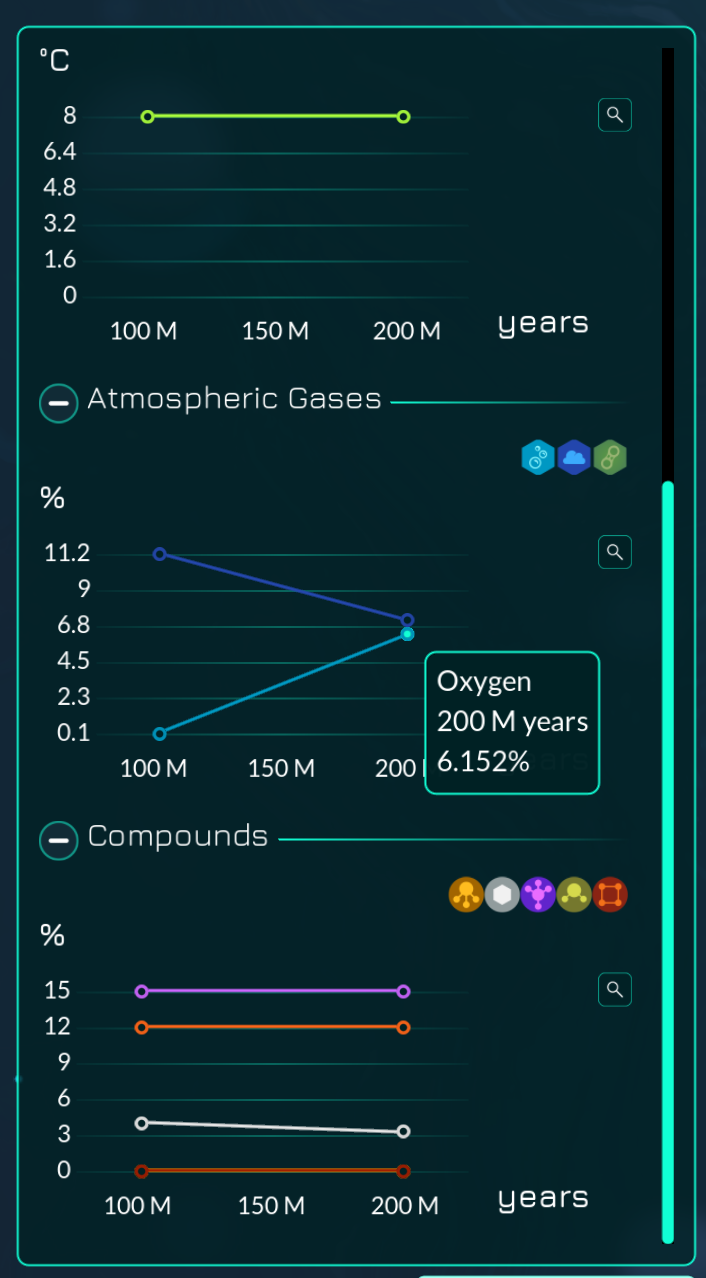
A picture of the atmospheric auto-evo report tab, indicating changing oxygen levels in light blue. The dark blue line represents carbon dioxide levels, which also dynamically changes based on the organisms present within a patch.
Dynamic oxygenation represents the first of a string of new features which will culminate in a fully dynamic world that changes from generation to generation. These updates will likely require a lot of fine-tuning and balancing to get just right, so feedback is always appreciated. A more dynamic simulation of the environment is available as an experimental feature (needs to be enabled when starting a new game), though the experimental version is less balanced.
Additional Features
- Flagellum length can now be modified: longer flagellum length results in faster speed but use more ATP, while shorter flagellum results in slightly slower speed but uses less energy.
- Two new patch-specific themes have been added, one for ice shelves, and one for tidepools.
- An improved “wiggle” animation for cells has been introduced, making membranes look more dynamic.
- Balancing and bug fixes related to engulfment and the strength of currents generated from cilia while engulfing.
- Reworks of certain compound icons, such as those for Nitrogen. And many more icons have been redone as SVG images.
- Improvements to rendering of macroscopic organisms, allowing smoother high-poly meshes with minimal performance impact
- And many more changes
A full list of changes is at the end of this post.
Art Contest Winners
After a long time coming, we have hosted our first Thrive art contest in years on both our forums and discord. We had some amazing submissions, and we are proud to show off the winners below!
First place: Zorkman

“All stories have to begin somewhere, and ours did so an unfathomable amount of generations ago when we first peeked beyond the water’s surface.” – Enarosat Xööday, renowned biologist and archaeologist from the Avoreth Academy of Natural Sciences
The runner ups are highlighted on our website at: https://revolutionarygamesstudio.com/devblog-44-oxygenating/
What’s Next
Most items under section 0.7.x have been knocked off the roadmap through this update, a great sign of progress for the completion of the Microbe Stage. Some items remain however, so it is likely that our next update will be named 0.8, and might contain some features listed under the next phase of Thrive’s development.
Development focus will likely switch towards fleshing out the world the player lives in, particularly related to dynamic environments and compounds. Again, such a feature will likely require thorough balancing to get just right, so it could be a very iterative process.
Remember to join us for our developer Thrivestream that's starting very soon, where we will answer questions asked by you, the community, and cover the results of our latest community art competition!
You can leave feedback in the comments below or visit our feedback thread on the community forums to give us your impressions on the release.
Full Patch Notes
- The world now starts off with no oxygen and photosynthesis, once evolved, will add oxygen to the world. This effectively locks many organelles that require oxygen during the early game.
- Created a new much more graphical auto-evo report screen
- Implemented the food chain tab in the editor
- Added 3D membranes for microbes
- Improved the Thriveopedia with various new pages
- Converted the old help menu to open a relevant Thriveopedia page with links to important pages
- Upgraded to Godot 4.3
- Added a microbe background distortion shader effect that can be enabled in the options (this may become the default in the future)
- Added an experimental bloom effect that can be enabled
- Added mesh subdivision for the convolution surfaces to make them look better
- Metabolosomes are now locked until reaching a patch with oxygen
- Added hydrogenase as an early game glucose to ATP converting organelle
- Switched default toxin type to cytotoxin and modified the toxin creation process to not always require oxygen
- Renamed oxytoxy to just toxin in general toxin contexts where other toxin types are also used
- Iron respiration no longer requires oxygen to keep it viable in the vents biome
- Added an upgrade for flagellum for picking between long and short variants that have different energy cost and speed
- Added a new music track for the tidepool biome
- Added a new music track for the ice shelf biome
- Buffed engulfing resource gain
- Increased engulf size requirement for big phosphate chunks
- Added multiple new ice chunk types for more variety
- Made AI wait behaviour not trigger as much when out of just one compound type to reduce unnecessary AI sessility
- Added resource limiting mode for the ATP bar to view what would happen if some resource was missing from the cell storage
- Increased opacity of microbe membranes
- Added a new bump map for the microbe membranes
- Changed membrane bump map UVs to not distort with the membrane animation
- Added new radio and check button icons as SVG images
- Added one new microbe loading screen image
- Added type icons for compound and environment panels
- ATP balance bar tooltips now show which compounds are required to produce that amount of ATP
- Tweaked editor GUI to be closer to what it was before the Godot 4 update
- Abbreviated per second as just "s" in chemical equation speeds
- Updated the space and industrial stage prototype visuals
- Reduced pulling cilia power a bit when there are many of them
- Added an animation for when something is digested so that it shrinks to a small size instead of just visually popping out of existence
- Redid compound icons as SVG images
- Reworked patch and some UI icons as SVG files
- Created priority levels for PhotoStudio image generation to avoid important images taking minutes to load on slower computers
- Added an in-memory image cache for the PhotoStudio to speed up displaying images of the same species again
- Added a GDExtension for Thrive that will be used in the future to improve various things
- Added a compound cloud benchmark
- Added experimental dynamic compounds feature where patches dynamically change their available compound amounts based on the species that are in it
- Fixed mucocyst to work in cell colonies
- Fixed water currents not affecting chunks correctly ever since the ECS refactoring probably
- Fixed loading screen loading spinner not spinning smoothly
- Fixed Thriveopedia search not working
- Fixed a bug where the editor showed patch compounds as they were during the previous generation
- Fixed initial species compounds calculation never giving iron due to calculating only with available compounds in the default biome type
- Fixed the strain system always taking movement ATP while not moving
- Fixed used matter storage size flickering when ejecting too big objects that no longer fit in storage
- Fixed some cases where ejected cells wouldn't properly die and despawn
- Fixed saving status text not fading out properly
- Fixed image sizes in concept art gallery cards
- Fixed clicking on a miche node that is empty not clearing the info box which was pretty confusing GUI behaviour
- Reduced lag spike on selecting different patch to show details for
- Added a limit to the recent patch notes shown to ensure it doesn't try to display truly ridiculous number of notes for someone who hasn't played Thrive for years
- Fixed editor saves failing to load with a completed endosymbiosis action
- Fixed right editor panel being able to be too wide in certain translations
- Fixed auto-evo being able to remove the nucleus as a mutation
- Fixed art gallery model viewer not working correctly with 3D menu backgrounds being enabled
- Fixed "x worlds" text not being translated initially in the auto-evo exploring tool
- Hopefully fixed some engulf digestion and cells dying during it issues that caused cell chunks to spawn
- Added missing models to the art gallery model viewer
- Reimplemented debug line renderer as a GDExtension to make it much faster than before
- Refactored our compound related code to use enum values to simplify a lot of our code that needed to define special operations for various compounds
- Added code project for running small code benchmarks easily in the future
- Organelle tooltips are now dynamically generated from the organelle JSON data
- Improved our setup instructions for compiling on Linux
- Added new automatic code style checks related to post-increment
- Updated YamlDotNet from 16.0.0 to 16.1.3
- Updated Jolt Physics Engine
- Tweaked the pre-commit hook to be much shorter
- Updated code checking tools
- Improved our wiki content updating script
- Updated wiki text content
- Updated translations