
- Fixed crash when selecting levels in PLAY+ mode that are in-progress in PLAY mode.

Thumper
Hotfix #2 for Practice Mode Update
Hotfix for Practice Mode Update
Fixed case where resume/restart appears (instead of start) on the level select screen when you start a level, complete the checkpoint, restart back to the first checkpoint, then return to the level select screen.
Practice Mode, Improved Restart From Checkpoint, and Other Fixes
- New Practice Mode: replay specific level sections without getting a score or rank
- Improved “Restart from Checkpoint” feature: restart from any previous checkpoint (not just current or previous). NOTE: you can only restart from any previous checkpoint on new level playthroughs after updating and not on playthroughs from before this update.
- Fixed “phantom turns” that can appear under certain conditions in Level 6-9.
- Checkpoint score/rank tally is displayed at the end of the final section of Level 9 if the level has been previously completed. This helps those attempting to S-rank Level 9.
- Minor menu appearance and behavior fixes and tweaks
- Fixed potential hang that can occur when spamming the pause or quick restart button at the end of a level, just before the score tally screen
- Fixed visual issues on pause menu when the game scene is partially faded out
- Fixed incorrectly swapped X/Y buttons on Nintendo Switch controllers
- Potentially confusing “save data corrupted” message changed for clarity. It will only appear in the very rare case when the game fails to recover the most recent valid save.
Steam Deck and Controller Compatibility Update
Here's what's changed:
- Fixed issues Steam Deck compatibility issues
- Added support for PS5 and Nintendo Switch controllers
- Adjusted trigger vibrations to feel better on Xbox Series S/X controllers
- Fixed single frame glitch of whiteness when game starts up
Maintenance Update (Resolution Options)
Thumper Maintenance Update (Keyboard Remap Hang)
Thumper Maintenance Update (VR issues)
- Fixed re-centering VR position and orientation (hold ESC key OR start/pause button)
- Fixed pausing via keyboard (ESC key) in VR mode
- Playing in VR mode no longer requires the Thumper desktop window to be focused. This was causing issues where the game appeared to hang when launching into VR mode.
Thumper Maintenance Update (DX9 Graphics Issues)
Thumper Soundtrack Updated for New Steam Experience
First, you can now browse, manage, and filter the soundtrack from your Steam library.
You can also play it directly from the Steam library:
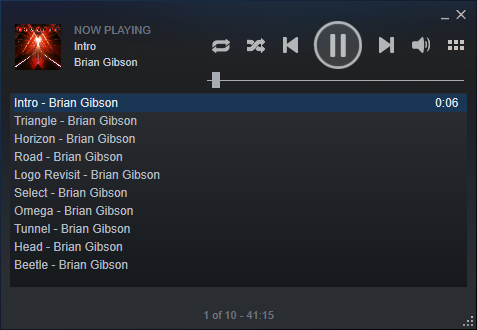
Finally, high-quality FLAC audio is optionally available for the soundtrack. To get it, make sure you've checked the "Download high-quality audio files" in your Settings > Music dialog. The FLAC files will be installed into a "flac" folder in your soundtrack installation directory.
