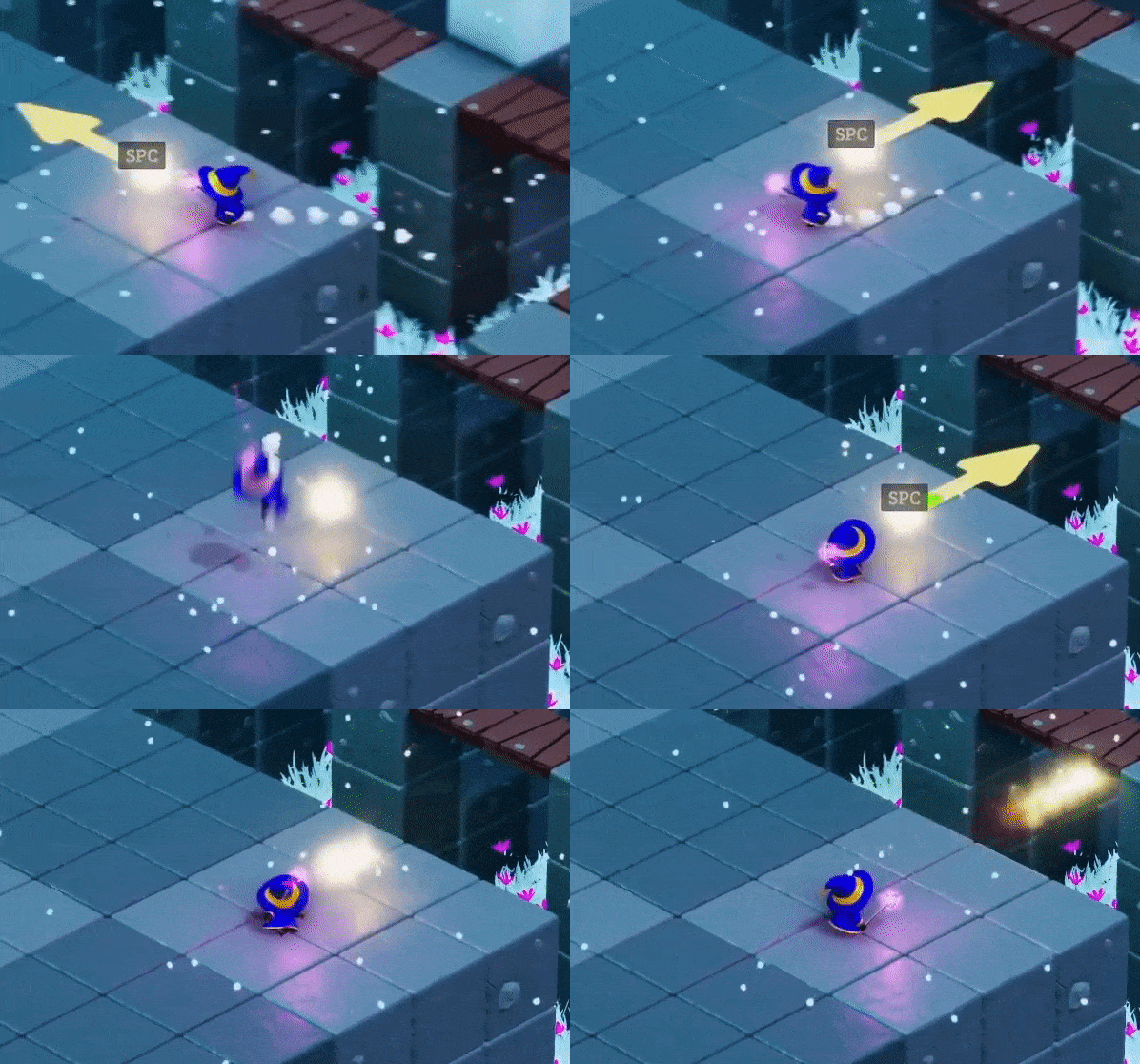
Despite my best attempts to fix it, SGRuri (Blake) managed to find an unintended solution in T42 in 3 different versions of the game. Sometimes admitting defeat is the best option. See the full exchange on our Discord.
Completing T42 in 13 seconds or less now awards a newly added achievement.
The exploit in the previous version was too hard to pull off, so I've restored T42's (formerly) unintended solution from 2 versions ago (before the Feb 8 update). Can you discover it?
If you've completed T42 in 13 seconds or less, you don't need to do so again. The achievement will be unlocked the moment you open the game. If it doesn't, complete T01 (or some other trivial level) and it should get unlocked.
The 3 star requirement for T42 is still the same (27 seconds).
Fixes
Linux controller hotkeys are now displayed correctly.
Certain types of xbox controllers are now getting recognized correctly instead of as Steam controllers.
It's no longer possible to double jump on a bridge.
Box pushing is now a bit smoother.
Fixed an unintended solution in T50.
8 Feb 2022 Update
No more
'Jump' and 'Cast spell / slide' are now on 2 different hotkeys. - The default hotkey for 'Cast spell / slide' is now Left Alt on they Keyboard and 'X' on Xbox Controller (or its equivalent on other controllers). For the mouse, it's still right click. - If you have hotkeys already assigned to either of these slots, your key bindings will get reset to default. - If you plan to change the default keyboard hotkey for 'Cast spell / slide', please be mindful of Keyboard Rollover, especially if you're using an 'Up moves North' scheme. It's recommended to keep it on a control key (Alt, Ctrl or Shift). - In case I missed a corner case and you're encountering strange hotkey assignment behavior, "Reset to Defaults" should resolve any issues. - It's no longer possible to put 'Jump' and 'Cast spell / slide' on the same hotkey.
UX Improvements: - Zeno's movement speed penalty from being next to a Fireball or a Frostball has been reduced by 50%. Context: the current penalty was meant to improve players' aiming precision, but with the hotkeys separated this is no longer a concern. - The voice line that Zeno says when starting a trial and after finishing the story will now play a maximum of 2 times once every 10 minutes instead of an unlimited number of times once every 10 minutes. Context: ~10% of players are attempting to earn 3 starts in all levels, which is 10 times more than my predicted 1%. I'm starting to pay more attention to the post-story experience, so if you have suggestions feel free to leave them in the #feedback channel on on Discord or in the Steam discussion board.
Eliminating unintended solutions: - Adjustments to prevent an unintended solution in T42 (do your best, Blake :P) - Adjusted bridge sizes in T27 to prevent an unintended jump. - Adjusted the height of one of the platforms on the west side in T32 to prevent an unintended jump.
Input: - The input system has been updated. More controller types are now supported (eg: PS5) and some controllers should now work more consistently.
Known issues: - I'm still investigating issues regarding xbox controllers not working in certain circumstances. - I'm investigating an issue on Linux where the controller button for navigating the menu is 'X' instead of 'A' on an Xbox controller.
24 Jan 2022 Update
Made some adjustments to prevent unintended solutions: - Extended the bridge lengths leading to fragments / pink crystals in T07 and T42. - Increased the platform size in T25. - Adjusted the teleporter platform height and the fragment platform location in T37. - Increase the gap size between the middle and the lower platform in T43. - Replaced some of the floor panels with pink barriers on the east side of T47.
If you've already solved / aced these trials using an unintended solution, your record will not be affected. If you enjoy solving trials merely for the challenge, you may want to give the ones above another try.
UX improvements: - Changed the structure of the ledge that enabled jumping on the ice block in T20 to reduce friction and make the jump height more consistent. - Reduced the frequency of Zeno's idle lines after spending more than 10 minutes in the trial from once every minute to once every 3 minutes. The current frequency seems to have caused a player to want to punch Zeno. - Added a "Disable Tutorial" option in the Settings screen.
Known issues: - Some players expressed a preference of having the option to have different hotkeys for "Jump" and "Launch Projectile". This is under way. - Some players reported issues getting certain types of controllers to work or at least work consistently. I'm still investigating.
Time Master is now available!
The time has come for the official release of Time Master! We’re grateful for all of the support we’ve received so far and can’t wait to welcome more time masters to the community. To celebrate the game’s launch, we’re currently offering 40% off the base game and 42% off the game and soundtrack bundle.
In case you need some help along the way in solving the trials for Zeno, we’ve put together a spoiler-free strategy guide that you can find here: https://store.steampowered.com/news/app/1486080/view/3149705520822228660 We would love your thoughts on what comes next for Time Master. We have ideas for a new game mode that gives Zeno new abilities enabling him to solve the trials in entirely new ways, having Sophia as playable character with her own abilities as well as adding a level editor. If you have suggestions we’d love for you to share your thoughts in our Discord.
Spoiler free strategy guide, tips and developer insights
Since launch is imminent, I thought I'd put together a spoiler free guide that can help with progressing through the game, as well as compile some key observations I've seen during play testing.
Completing Trials
General Tips
Think Paradoxes: In the context of the game, a paradox occurs when Zeno’s past and present selves do conflicting actions, such as attempting to put an object in 2 different states at the same time. The result of the paradox can be the key to solving the trial.
Explore Interactions: Interactions can happen between two objects in a trial, or between Zeno’s abilities and one of the objects. The most common type of hint I tend to give is of the form “What happens if you combine X with Y?”
Remember to use Time Freeze: Although any trial can be solved without it, freezing the past timeline can make timing Zeno’s past self a lot easier. If you find yourself thinking “ok, now I have to wait for a few seconds” before rewinding, remember: you can just keep going and use Freeze after rewinding.
Plan Ahead: While most trials in the game can be solved relying on intuition, some of the end game trials require being more methodical. Examining the whole solution before executing it can help save time and keep you focused on more promising solutions.
Rule out incorrect options: Identify the circumstances under which certain actions must be performed, and don’t bother exploring solutions that contradict these circumstances. For example: if the trial has a collapsible bridge that leads to an isolated area with a time fragment, then we can conclude that Zeno’s past self route must end in this area. No point exploring solutions where Zeno’s past self ends elsewhere.
Generate and test hypotheses: If the circumstances of a certain action can’t be immediately ruled out, make an assumption and test it. For example: “Let’s assume that in the correct solution, the blue switch is pressed by Zeno’s present self”. Spend time experimenting under this assumption, and if you reach a dead end, generate a new hypothesis.
Trial Specific Tips
T50: This trial took the longest during development. Despite my best attempts to guide play testers through level design to do otherwise, some still spent most of their time trying to get the physics system to do things it simply can’t do. The intended solution for this trial is very easy to execute, so if you find yourself trying to pull a convoluted move and you’re feeling that the game physics isn’t cooperating, odds are you’re not on the right track.
T60: The first step to solving this trial is realizing that there are too many paths to keep track of in the short term / working memory. One solution is to take a screenshot of the level and draw some arrows on top indicating the connections between the walls.
Defeating Lucix: Reuse what you’ve learned from T15, T18 and T38.
Acing Trials (Earning 3 stars)
The shortest path between two points is a straight line. Don’t limit your movements to the 4 cardinal directions; make sure to move diagonally as well. You can explore this in T03.
Check level info to know the target time.
Acing trials sometimes requires coming up with an entirely different solution. If you find yourself executing a solution perfectly and you’re still 3 seconds or more off, odds are you need to come up with a different one. The target time for the 2 star solution can act as a guide.
Don’t rewind if you exceed the target time during Zeno's past self route. This may sound rather obvious, but I’ve seen numerous attempts during play testing of the form:
The player starts a trial that requires 9 seconds to ace.
Zeno’s past self takes 11 seconds to pick up the last fragment in his route.
The player rewinds and completes the present self route flawlessly.
The player ends up with 2 stars and a surprised pikachu face.
Keep most of your experimentation before rewinding, and only rewind after you feel you have a solid plan. Iterate on the route of the past self while imagining the route of the present self. This can save a lot of time.
Oftentimes, acing a trial requires splitting the labor evenly between the past and the present self. Remember that Zeno's present self has the extra labor of having to head back to the teleporter, while his past self can end his route anywhere. When experimenting, it’s better to assign as many duties as you can to Zeno's past self as long as his route's duration is within the target time.
Progression
Progressing the story requires collecting fragments, not solving trials. This means you can skip a few trials and still complete the game. If you’re short on fragments and unsure how to complete additional trials, you can go back and ace the ones you’ve completed to recover more fragments.
The game accommodates various play styles, including:
Focusing on completing trials and not bothering to ace any of them.
Giving acing each trial a quick attempt or two before moving on; basically only acing the trials that are easy to ace.
Aim to ace every single trial before proceeding.
Since the most common playstyle I've observed during play testing was #2, I've tuned the game’s pacing to match it.
If your goal is to complete the story as soon as possible: solving new trials advances the story faster than acing ones that have already been completed.
Controls and Input Devices
Keyboard
By default, “Up” moves north. You can change it to “Northeast” from the controls screen. Although “Up moves Northeast” is what I would recommend and how I personally play the game, most play testers were thrown off by it and they were happier with “Up moves North”, so I kept it as default. Choose the style that suits you best.
You may think: “The shortest path between 2 points is a straight line. A keyboard is limited to 8 directions while the Mouse and the Gamepad give more control over Zeno’s direction. Using a keyboard would lead to suboptimal solutions”. Worry not: this has been explicitly handled. Keyboard players are NOT at a disadvantage when it comes to how fast they can travel between 2 points.
Mouse
I’ve seen some players rush to click “Rewind” after they’re done with Zeno’s past self route in hopes of saving a second or two. If you think about it, this is unnecessary - time spent after Zeno’s past self collects the last fragment in his route has no effect on the total time.
Moving the mouse to click Freeze / Unfreeze will add a few seconds to your solution. If you’re trying to ace a level that can benefit from using Freeze, I recommend using a keyboard for this ability. If you have a programmable mouse with extra buttons, you can use its software to have it emulate the "Freeze" keypress (default: R). If you’re just trying to complete the level, moving the mouse around to click Freeze should be fine.
Gamepad
Some play testers did not like the default hotkey for “Restart Level”. This wasn’t prevalent enough to warrant redesigning the default controls, but if you found yourself accidentally pressing it, you can change it from the Controls screen.