
- Fixed an issue where parts of maps with wooden planks would not load and appear black
- Made Moonlight Pixies a little bit quicker to turn and fight when damaged
- Fixed an issue where cave goblins would heal themselves without a visual indicator
- Pixies drop more dust when moving now

Tinkertown
Early Access 0.11.0b
The Tinkertown "NPC & Housing Update" is live!
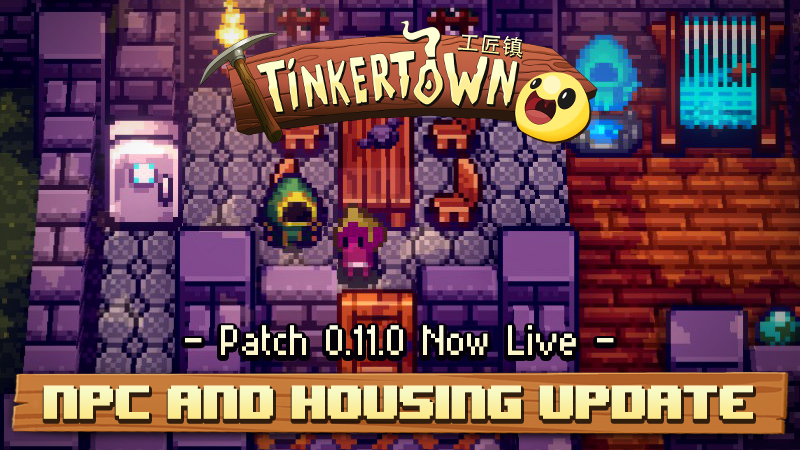
Come in, come in dear Tinkerer!
It is time to unveil the latest content we’ve cooked up: The NPC & Housing Update. Tinkertown is getting busier with the all-new NPCs, lovingly called “Townians”, populating the world and moving into your village! And they bring many new features with them:
5 friendly NPCs:
- All of them can be found within the first Biome, either somewhere on the Overworld or within the Dungeon
- Find them and they will give you a quest to have them join your village
- you may need to build one!
- Each NPC has a trinket they will share. This is their treasure and it will share info about what you need to build in order for them to move in
A Story and a red thread!
- The first NPC you will find shall be your guide through this world and might share some insights about it too!
- Follow the Quests and….
Ah yes, QUESTS
- Every NPC has Quests for you to take on
- And each Quest will reward you!
Services:
- Once an NPC has moved in, they might be able to provide help in some way or another and soon in the future they can gather resources for you too!
A bunch of new Stuff:
- Decoratives
- Useful tools!
- New recipes
- New Enemies
IMPORTANT: To find all of the new Townians, create a new world! We recommend finishing their quest lines in this fresh world, but you can transport them over to old worlds after collecting their Soul Trinket.
We hope you'll enjoy the new additions; and in case you're wondering - Yes! More NPC:s are on their way to Tinkertown and will offer new opportunities to learn about the world, collect more amazing stuff, and give you new things you can do.
Tinkertown will also receive a 35% discount to celebrate the arrival of the new Townians. Now is the best time to dive into the world of Tinkertown and meet all the new characters!
Last but not least: your feedback is important! So feel free to leave a review on Steam, write to us in the Steam Community Hub or join our Tinkertown Discord community!
Have a nice Tinker-Thursday,
The Tinkertown Team
https://store.steampowered.com/app/1276660/Tinkertown/
Sneak into the Multiplayer Sandbox World of Tinkertown at WASD in London!
Dear beloved Tinkerers and Tinkerers-to-be,
We would like to welcome you all to the resurgent world of physical events! Tinkertown is going on a small tour this month, stopping in the UK and at the end of April in the USA.
First up is WASD in London, which opened its doors today! There, from April 7-9, you can try out a freshly tinkered version of Tinkertown and test-dive into the world of our snadbox multiplayer game. So, if you don't have anything better to do come and join us at the Thunderful Publishing booth!
There you can also take a look at four other games that can also be played: LEGO Bricktales, Cursed to Golf, Swordship and Hell Pie!
See you all the the WASD in London!
Your Tinkertown Team
https://store.steampowered.com/app/1276660/Tinkertown/
Early Access 0.10.1e
- More improvements to key rebinding
- Walk & interact in inventory and walk & interact in game will now be rebound at the same time
- Fixed flickering placement mode grid
Early Access 0.10.1d
- Can now move and interact with other interactables while in inventory (again)
- Moved quick actions in inventory to default to button north (Y/Δ) on controllers (due to the interact feature above)
- Moved movement in inventory to default to right stick / d-pad on controllers (due to the movement feature above)
- Fixed several issues regarding keybindings, including rebinding multi-button-actions like movement.
- Fixed some issues with camera movement, and added settings for it
- Fixed visual issues in menus
- Minor fixes
Early Access 0.10.1c
- Fixed indestructible tiles, such as chili's & fences
- Fixed an issue where the server would crash during map generation, leading to incomplete maps and / or the client never loading
- Fixed an issue where the cursor was invisible after sending chat messageMinor fixes
Early Access 0.10.1b
- Fix cursor issues
- Fix mini map issues
0.10.1 Controller & Keybinding goes Live
the Controler & Key-Rebinding update is live!
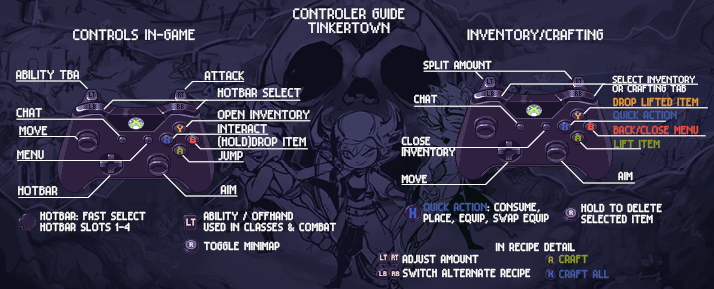
There are no big changes between the Beta Build and the Live Patch, so this is what the patch will include:
- Controller Support
- You can play with every modern controller that uses a similar layout and button/key/trigger number to that of an Xbox 360 controller
- You can play with every modern controller that uses a similar layout and button/key/trigger number to that of an Xbox 360 controller
- Virtual Keyboard support
- No need to switch to your Keyboard when entering a character name, or choosing one for your world
- For those of you who tried the beta branch: Chat is back and enabled for use with the virtual Keyboard too!
- No need to switch to your Keyboard when entering a character name, or choosing one for your world
- Rebinding
- Whether you are using an AZERTY Keyboard, or any other device that supports buttons, you now have the option to rebind the keys!
- Whether you are using an AZERTY Keyboard, or any other device that supports buttons, you now have the option to rebind the keys!
- UI-Rework
- Due to the new changes, we also overhauled the user interface. We will carry out extensive tests of the new UI during this Beta Phase and will steadily improve and optimise to make handling the game as comfortable as possible
- Due to the new changes, we also overhauled the user interface. We will carry out extensive tests of the new UI during this Beta Phase and will steadily improve and optimise to make handling the game as comfortable as possible
Next stop: NPCs! We’re really really excited for this one as it will gradually fill the world with more things to do and to find :).

All the best,
your Tinkertown Team!
0.10.0 Controller Support Live in Preview!
The moment you’ve been waiting for…
It’s time to introduce the highly requested Controller & Key-Rebinding Update to the Beta Branch!
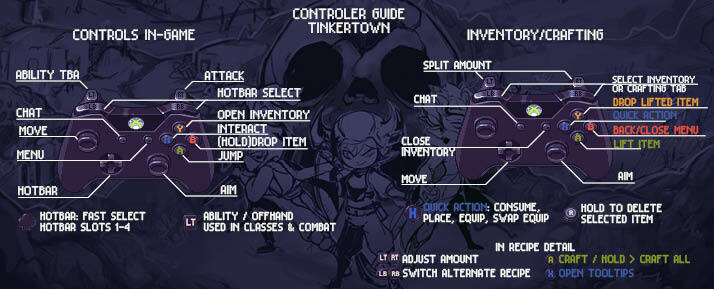
We are still working on Tinkertown, it has been quite a ride to get to this current build. Nevertheless, this is what the Beta Branch will include:
- Controller Support
- You can play with every modern controller that uses a similar layout and button/key/trigger number to that of an Xbox 360 controller
- Virtual Keyboard support
- No need to switch to your Keyboard when entering a character name, or choosing one for your world
- Be aware: the Virtual Keyboard is not set up for use in chat yet however, will be implemented soon
- Rebinding
- Whether you are using an AZERTY Keyboard, or any other device that supports buttons, you now have the option to rebind the keys!
- UI-Rework
- Due to the new changes, we also overhauled the user interface. We will carry out extensive tests of the new UI during this Beta Phase and will steadily improve and optimise to make handling the game as comfortable as possible

Due to the current setup, we had to deactivate the chat for the first beta build but will patch it back in within the next updates before we go live.
To get to the Preview Branch:
- Go to your Steam Library in the App and Right-Click on Tinkertown
- In the Drop-down select “Properties”
- Within the Pop-Up go to the Section “BETAS”
- Choose “Preview” as the beta you would like to opt in
- If you would like to go back to the Live Version, please select “none” again
- Wait for the update to finish and start the game as usual
This update is a very important step for us and we would really love for you to keep sending us feedback so we can achieve the best experience for Tinkertown!
Feel free to use either the Tinkertown in-game Bug Report feature, Discord and the Steam Forum :)
Even though the Controller Update took longer than we anticipated, our release-schedule for the next update is still on time. Expect more when our Preview Branch goes live!
Last but not least, we would like you to take a look at our new Roadmap:

Much love,
your Tinkertown Team!
https://store.steampowered.com/app/1276660/Tinkertown/
Early Access 0.9.4c
- Fixed an issue where the mini map is not loaded correctly.