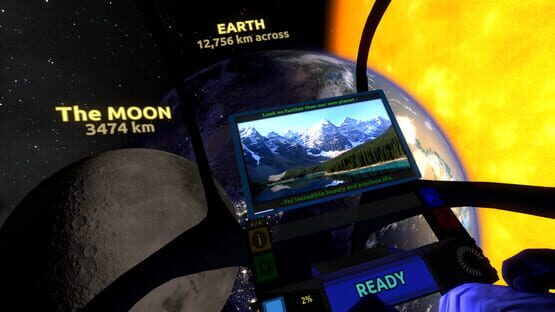
For those that like to spend time at each tour stop, the "real photos" feature may prove to be significant. Otherwise, this update does not contain a major content update, and instead brings in all of the improvements made while polishing up Titans of Space PLUS for the Gear VR, minus the narration. Details below!
Changelog:
REAL PHOTOS
Added real photos to most tour stops. These are curated images that highlight fascinating yet lesser-known features of the planet or moon in question. They can be viewed by paging through the additional info pages via the yellow "i" button on the left side of the dashboard.
In playtesting, I find that many players often miss out on the additional info pages, so I've taken steps to highlight this feature during the tour.
Also, for ease of browsing, I'd like to reiterate that info pages can be changed by:
HTC Vive: Clicking the left or right sides of the trackpad
Oculus Touch: Tilting a thumbstick left or right
Oculus Remote: Dpad Right
Gamepad: Button B
These controls are displayed in the app as well.
FACELIFTS
The following objects have received a significant facelift:
Earth
The Moon
Venus
Chariklo
Io
asteroid belt
orbit lines
... and the "vortex" at the end of the current tour.
Steps have been taken to avoid looking at a static scene while stationary at a tour stop. This means faster planet rotation in some places, small moons whisking around, and so on.
The first few screens have also received a cosmetic boost.
COCKPIT
Smoothed out the player's legs which were looking a little too low-poly in the past.
Updated the dashboard, and tweaked certain dashboard UI elements. More work is being done on the cockpit itself but it isn't ready for release yet.
MISC
Plenty of info text has been adjusted to be up-to-date with the latest news and discoveries.
Button rollover tick sound effect
Background cockpit noise can now be heard whenever the music intentionally dies down.
Update #3 - Bugfixes, and UI/UX improvements (Feb 2, 2017)
I was in the middle of freshening up the mobile VR versions of Titans of Space, and then someone told me that Oculus Remote support was sort of broken in Update #2. Oops! Decided to fix that and bring over the improvements I was working on back to PC right away.
Fixed Oculus Remote support.
Reorganized & simplified the first few menu scenes for a better user experience.
The old "Wait for Input" and "Automatic" button interaction types are now called "Point & Click" and "Point & Wait". And, in Point & Wait mode, all buttons now show visible timer progression.
Fixed the pixelly inner edges for Saturn's rings.
Lots of other bug fixes and UX adjustments.
I appreciate the patience of all those buying into early access!
This update mainly focuses on some of the feedback I've received regarding control issues, and comfort issues. The new comfort mode took a lot of time and research to get right, and I've written about the challenges I faced here. I've also thrown in some minor content additions and facelifts here and there.
Meanwhile, work continues on bigger content and features that begin arriving in the next couple of updates after this one.
Changelog:
TOUR:
New comfort mode! At the beginning, the experience will ask whether the player is sensitive to motion. The answer to this drives a ton of small changes as well as kicks in the new comfort mode. Note that you won't "lose" anything with either answer - the essence of the experience remains the same either way.
Added a new planet! (It's not in our solar system)
Made it more clear what you're getting when selecting Short vs Full tour.
Eliminated the weird sensation some players experienced when picking seated-only mode.
App loads more quickly.
Lots of dashboard/cockpit polish (but still a WIP)
For those using motion controls (Vive or Oculus Touch), controls should be way more obvious now since the controllers themselves are labeled appropriately at all times. Also, some controls have been adjusted based on player feedback.
Reduced music intensity at Uranus.
Added a motion warning to the Gravity Probe Launcher feature, as well as some clear instructions as to what to do.
Fixed some jitteryness in Gravity Probe Launcher mode.
Cockpit no longer visible in Gravity Probe Launcher mode.
The extended features on the dashboard are now labeled when hovering over them.
More obvious when additional pages of info are available, via indicator above the yellow icon on the left side of the dashboard.
Updated lots of info text at various planets and moons with new info, and to draw attention to various features that players often miss.
Improved responsiveness and feedback when trying the planet-spinning feature.
RIFT:
Oculus Touch support added. (Make sure you launch in Rift mode by right-clicking 'Titans of Space 2.0' in your library and selecting "Launch on Oculus Rift in Other VR Mode.")
Motion Controls:
Users no longer have to avoid pointing at buttons while viewing a planetary closeup!
Improved handling of hand controller disconnects and reconnects
Improved button activation behavior - each hand can now independently activate a different button without "crosstalk".
Can no longer physically activate the large "READY" button on the dashboard as players often accidentally hit this button before they were ready.
And many more small little boring improvements. :)
Update #1 is out! (June 15, 2016)
Changelog:
TOUR:
New "Closeup" feature. This replaces the Zoom feature. The right trigger on your gamepad or index finger trigger on either hand controller will cause the solar system body in question to come to you. This was done to increase comfort, and to allow the player to naturally inspect the planet or moon with head or hands.
Updated Sun & large star appearance with animated surfaces and other improvements.
Added auroras to several solar system bodies
Improved bumps on solar system bodies for a more natural look and to avoid bump mapping pop-in.
Additional dashboard/cockpit polish (still a WIP)
Io is now shaped as a slight ellipsoid.
Juno spacecraft is now spinning at real rate
VIVE:
Improved handling of controller disconnects, left/right detection, and overall consistency
Improved controller haptics when continuing to next tour stop.
CONFIG:
For those with unusual monitor configurations, a potentially helpful launch option has been added:
-noforceresolution This will leave the mirrored desktop window alone, allowing you to hold Shift while starting the app directly from its installation folder in order to configure desired resolution and display. Without this, the default behavior is an 800x800 window, or if -fullscreen is specified, it will be fullscreen at the highest detected resolution.
OTHER
Various UI improvements (still a WIP).
BUGFIXES
Saturn's ring debris is now hidden when viewing Solar System closeup.
May no longer fire up probe launcher while orbiting a body.
Thanks + clarification on VR versions + Monitor support
First of all, I'm really grateful for the outpouring of support! This has been a smooth launch so far and am looking forward to delivering more value to all of those that have jumped in so far.
So, just a quick note:
This app supports Oculus Rift *and* HTC Vive *and* playing on your desktop monitor, BUT right now you need to specifically tell the app what you want to do when you launch it. When you right click on Titans of Space 2.0 in your library, you will see some launch options:
Vive --> "Launch App..." Rift --> "Launch on Oculus Rift in Other VR Mode" Monitor (no VR) --> "Launch on Monitor"
Please note that if you launch the Vive version while using the Rift, the app will still run, but it is not the intended experience. Scales are different, user interface and instructions are different, etc.