Thank you for reporting that the Platinum achievement didn’t trigger. We’re happy to announce that… it does trigger now!
So, congratulations to all brave achievement hunters who will get it after updating the game. We suggest refreshing your Achievement Showcase by putting the Tools Up! achievements on display. Won’t it look fantastic?
Newsletter contest
Dear Renovators!
Join our newsletter and participate in an upcoming contest to win one of the games released by All in! Games.
We have just released a Tools Up! hotfix.! Enjoy meaningful fixes and improvements. Your support is greatly appreciated. Don’t stop being awesome!
Fixes:
Improved the dynamic controls setting method
The pause menu no longer flickers during multiplayer playthroughs (Steam Remote Play)
Notices of task completion now appear correctly even if players work on a few rooms at the same time
The Party Mode now displays clocks instead of stars to increase readability
It is no longer possible for a player to achieve a perfect score without finishing the level
As always, if you have any ideas or suggestions, don’t hesitate to let us know. We look forward to hearing from you on Steam and Discord.
Save 10% on Tools Up! and start renovating today!
Dear Renovators!
For a limited time, you can get Tools Up! with a 10% discount. It’s a great chance to see what players and reviewers are raving about!
Tools Up! is an exciting local co-op that tests your renovation and teamwork skills. Paint walls, tear off wallpaper, and move couches against the clock!
Tools Up! is a great way to spend time with your family and friends, playing together to start the New Year with lots of laughter… or shouting!
Today we have also released a brand new update, which introduces 4-player split keyboard support and No Time Limit Mode!
Get the game today and start renovating like there’s no tomorrow!
New update released! - 4-player split keyboard, new mode, and more!
Dear Renovators!
We have some great news for you. The much-requested 4-players split keyboard has been added to the game. And for those of you who are not fond of time pressure when designing apartments, we have implemented the No Time Limit Mode!
A bunch of meaningful fixes and improvements has also been implemented based on your suggestions and reports. Your continued support is greatly appreciated. Don’t stop being awesome!
4-player Split Keyboard Support
Thanks to this new control method, you can now play locally with up to three other players on a single keyboard! You can also attach another keyboard to make it more comfortable (recommended, unless you all have really small hands). You can enable the Split Keyboards Support in the Settings Menu. Dibbs on WASD!
Note: Due to hardware limitations, it might be impossible for some keyboards to maintain the number of inputs required for 4 players on a single keyboard.
This method works for Steam Remote Play Together as well. You can play with other players who own keyboards. How cool is that!
Join our Discord server and find other people willing to play online!
No Time Limit Mode
An alternative campaign mode in which you collect points for stars without time pressure. To finish the level you must either complete all tasks and clean up, or quit the level from the pause menu. You can select this mode when starting a new campaign.
Take your time and create stunning interiors while waiting for the delivery man who’s always late.
List of changes
⭐ Features:
Added 4-player Split Keyboard Support (described above)
Added a new game mode: No Time Limit Mode (described above)
⚙ Updates:
New wall building method—you no longer need to perform the object targeting action. From now on, just press the action button and the character will automatically place the first layer of the wall in the direction in which he or she (or it!) is facing.
Improved tutorial tooltips when actions are performed out of order.
Added a caption after completing a blueprint task
Players no longer lose stars in the Party Mode if they achieve a lower score than before
The delivery man now delivers materials after you tear down a wall, even if it’s not the required wall
Unified Win and Fail score screens
🔧 Fixes:
Players can now correctly scoop from a fallen container (bucket or paint) but they cannot put the item back unless the container has been picked up
If there’s a spot under furniture, a player who’s approaching the furniture won’t slip over the spot
Characters who step on spilled paint while carrying furniture now return to a neutral animation correctly
Reduced the number of cases when it’s possible to put blueprints inside a wall
Trash and materials can now be put back with the Pick Up / Put Down action rather than the Apply action
It is no longer possible to block input by choosing characters and levels in the Party Mode
Fixed an issue with registering points incorrectly on the level with two blueprints
When climbing down a ladder to the water, players will no longer be blocked by passing objects
Fixed misleading blueprint instructions on level 10
Fixed various level 25 issues
Fixed an issue with overlapping textures on level 9
Fixed an issue with blocking a character’s input on level 26 upon falling off the bridge after slipping
Fixed an issue whereby a character who was carried by another player would be teleported back upon falling off the bridge on level 26 instead of being delivered by a delivery man
Fixed an issue with a water field which was treated as an apartment field on level 6
Fixed a visual issue of trash and paint spots on lava
Fixed various UI issues in the Options and Controls menus
If you like the changes, please consider dropping us a review on Steam so we can continue to grow!
As always, if you have any ideas or suggestions, don’t hesitate to let us know. We look forward to hearing from you on Steam and Discord. Also, we don’t bite!
The ho-ho-holidays are here!
Dear Renovators!
Happy holidays from The Knights of Unity and All in! Games! We hope you’re on Santa’s “Nice” list and get everything you want! https://www.youtube.com/watch?v=rsCy-D2XYYE It’s been quite a year for us! We released Tools Up!, an exciting renovation local co-op game to play with family and friends. The game was shown at gamescom, PAX West, Tokyo Game Show and PGA, and it’s amazing how much you liked it! It was you that made the release of the game possible. Thank you so much for your continuous support! Stay with us next year too!
Now, how can Tools Up! make your holidays better? Well, we have some ideas!
Play with your family! Make the Christmas feast even more joyous.
Relax! And what’s more relaxing than renovating?
Spend time with friends! You won’t be bored this Christmas.
Only a little preparation! All you need is a PC and a few controllers.
Firstly, thank you for the fantastic reception of Tools Up! Now, we’re using your feedback to make it even better!
For the past few days we’ve been gathering your suggestions and have rolled up our sleeves to put some of the ideas to work.
Here’s what’s new:
Improved object targeting priorities
Added new tutorial boards before the beginning of levels
Decreased action controls input lag
Changed the order of tooltips on the first level, to emphasize that it’s possible to rotate the camera without opening the blueprint
Paint spills can no longer occur on the first level
Throwing items is now easier
Blocked possibility to throw objects near the dumpster to prevent them from getting stuck on a wall
If you’re happy about the changes, please consider dropping us a review on Steam!
Now, we gotta go - there’s more work that needs to be done. You can expect more news from us next week. In the meantime, please don’t stop sharing your fantastic suggestions and ideas with us!
Have fun!
Ask us anything! AMA on Reddit is starting soon
Dear Renovators!
Today we’ll be answering your questions. Yes, today! So take a break from renovating and join us at 3:00pm UTC on Reddit. You can start posting your questions now to give us a head start. We’ll do our best to answer as many of them as possible!
Dear Players, We are impressed by the amount of support we get from you lately! Thank you!
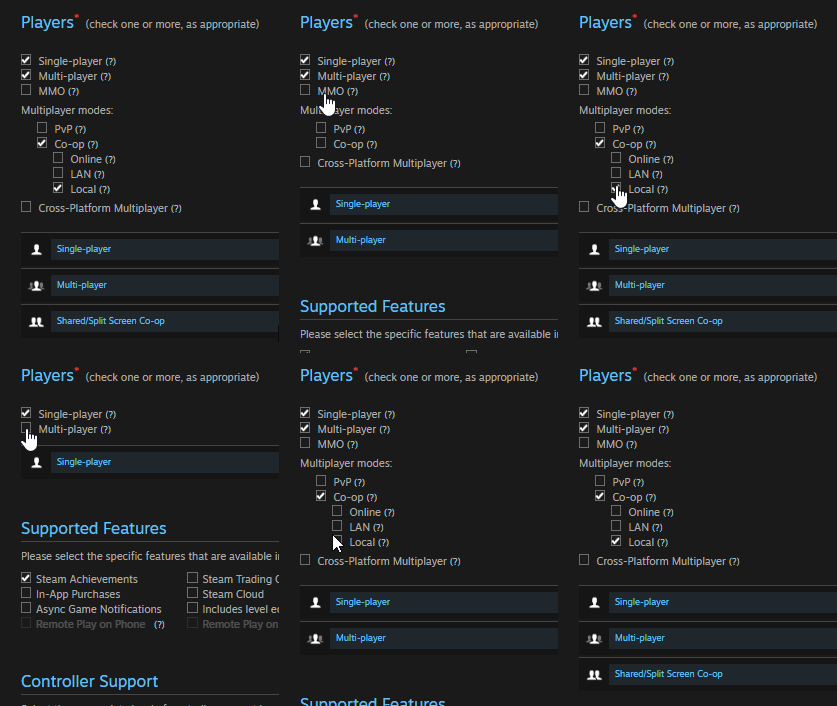
One of the insights we hear a lot and which seems particularly accurate is that some players might have been misled by the Multiplayer tag on Steam into believing that Tools Up! is an online co-op game.
We have no doubt that it could be the case here. Multiplayer is often associated with playing online (it's an understandable mental shortcut), even though it can also be local only, especially in the case of couch co-op games.
Now, the way tags work on Steam is that we can't toggle the Local Co-op tag without toggling the Multiplayer tag first. This leaves us with a quite unfortunate choice between:
having a Singleplayer tag only
having Local Co-op and Multiplayer tags
None of this really fits. We believe having Local co-op tag only would be the best.
Summing up, we just wanted to share this to let you know that, above all, we want to be honest and transparent with you.
Wish you all the best!
Steam Remote Play Together - FAQ
Dear Renovators,
Tools Up! was designed as a local multiplayer game and we have always advertised it as such. The recent news about Steam Remote Play Together feature came as a pleasant surprise and we really hoped it would let you play Tools Up! with your friends and family online.
Sadly, we hear reports about the poor performance of Steam Remote Play Together in some regions, especially Asia. This is a brand new feature, so there might still be room for improvement. We have already reported it to Steam and hopefully you’ll be able to take full advantage of this feature soon.
It pains us that there’s not much we can do in regard to this matter. We’re waiting for Steam to work this out on their end. Thank you for your patience while this gets worked out.
Lastly, we have prepared a short FAQ (Frequently Asked Questions) for you, in which we explain how this feature works, how you can improve its performance, and present alternatives to Steam Remote Play Together. You can find it below.
Thank you for playing Tools Up! We wish you lots of fun with the game and hope to stay in touch!
Cheers! All in! Games & The Knights of Unity
FAQ
Steam Remote Play Together is a brand new feature allowing people to play together online. Please refer to Steam Remote Play overview and Steam Remote Play Support for more information in your native language.
Q: How do I use Steam Remote Play Together? A: It’s easy! Just follow the three simple steps: 1. Launch Tools Up! 2. Open your Friends List and right-click to Invite your friends. 3. They accept the invite in the chat window and... That’s it! You're playing together.
To access your Friends List, you may need to open Steam Overlay (Shift+Tab by default).
Q: Can you play with two keyboards via Steam Remote Play Together? A: You can only play Tools Up! with a single keyboard and multiple controllers (Xbox One, Steam Controller, etc.).
Q: How does Steam Remote Play work? A: Steam Remote Play allows games to be launched on one computer, while being played from other devices connected to Steam. With Remote Play Together, you can invite your Steam Friends to join your local co-op sessions remotely, without having to own or launch the game themselves.
Q: We’re experiencing poor Steam Remote Play Together performance. What can we do? A: Below are a few solutions Valve recommends. Please refer to Steam Remote Play overview and Steam Remote Play Support for more information in your native language.
Hardware:We recommend a minimum of a quad-core CPU for the computer running the game. The client has more modest requirements, but should have a GPU that supports hardware accelerated H264 decoding. Any recent laptop or PC should meet the client requirements.
Network: We recommend using a wired network for the best streaming experience. People have had some success with powerline networks and wireless N and AC networks with good signal, though your experience may vary.
Game Settings: To improve your streaming experience, you can go into your game settings and lower your resolution and turn off vertical sync.
Steam Settings: In the Remote Play settings you can change a number of things that can affect your experience. You can change your preference for speed vs quality, limit the network bandwidth, and adjust the maximum capture resolution.
Q: What network ports does Steam Remote Play use? A: Streaming uses UDP ports 27031 and 27036 and TCP ports 27036 and 27037. Please make sure Steam can listen on these ports in your firewall software.
Q: Should I update video drivers? A: A number of bugs have been fixed in the latest video driver releases that may affect streaming. If you are getting poor performance, graphical glitches or black screens please make sure you have the latest drivers installed from your video card vendor's website.
Q: What are alternatives to Steam Remote Play Together? A: Members of the Tools Up! community have recommended using Parsec, a third-party software, which lets you invite your friends to play games with you online even if the game doesn't have online multiplayer. We don’t officially support this solution, but we hear reports that its performance can be better than Steam Remote Play Together