

Tower of Fantasy
Version 2.2 Updates
Thank you for supporting Tower of Fantasy! To enhance your gaming experience, we will be shutting down our servers for maintenance, during which you will not be able to log in to the game. We apologize for any inconvenience this may cause. The details of the update and compensation are as follows:
◤Update Time ◢
December 22 05:00–10:00(UTC+0) (Depending on maintenance conditions, the server may be back online later or earlier than scheduled)
◤Update Method◢
Server-down maintenance: We suggest that you log off 15min before updating commences and stop all top up activities 5 mins before in order to avoid negative gaming experience and losses of your in-game properties.
PC & Mobile: Restart the client after exiting the game to automatically apply the updates
◤Compensation◢
Maintenance compensation: 500 dark crystals & radar detector*2
Client update compensation: 200 Dark Crystal
Compensation eligibility: Reach Wanderer Lv. 6 before the update
We will deliver the aforementioned compensation to you via mail within 2 hours after the maintenance. Do remember to check your mailbox and claim them
◤Updates◢
◆ New Content
1. Mirroria District B/C Unlocked
a) Places like the Mirramoon Street, Treasured Garden, Aquaria Palace, Coolyland, Entertainment Center, Tower of Tomorrow, Star Apartments, Mirafleur Hall Guest Room, Oasis Club, etc. are available
b) A large number of interior scenes and interactive content are now open. Wanderers can experience various everyday interactions such as settlement, amusement, racing, and audio-visual entertainment in Mirroria
c) New spacerift IN Mirroria: Entertainment Center Balcony/Mirramoon Street
2. New gameplay: Void Abyss (Unlocks on local server time 09:00 on January 1st, 2023 and when the Wanderer reaches Lv. 80 and after clearing Void Rift)
3. New team PvP gameplay: The Critical Abyss (Unlocks when the Wanderer reaches Lv. 80, and opens every day from 12:00–24:00)
4. New life entertaining gameplay: Fishing, Arcade Minigames, Fight the Landlord, Mahjong, Pet Feeding
5. Other New Content:
a) New equipment: Microreactor
b) New storyline for the research missions
◆ New Events:
We will launch a series of new events and activities after the update on the 22nd. For specific event rules, please refer to Ver. 2.2 First Event Preview
1. Supply Run - Christmas-themed sign-in: Available after the server is back online
2. Winter Festival series events: Available from (UTC+8) 2022/12/24 11:00
3. Yesterday Once More limited-time side missions: Available from(UTC+8) 2022/12/24 11:00
4. ToF Referral Program: Available after the server is back online
5. Tian Lang Limited Cache: Available after the server is back online
6. Lyra Limited Cache: Available after the server is back online
7. Claudia Limited Cache: Available from (UTC+8) 2022/12/26 11:00
8. A brand new set of 2.2 version gift packs will be available after the update and on the 24th, please see in-game for more details
◆ New Feature:
In order to bring you a better game experience, we will launch the server transfer feature, which is planned to be available in two batches according to the following time. For details, please refer to the follow-up server transfer instructions announcement:
a) The first batch will be opened on December 29, 2022;
b) The second batch will open on January 10, 2023.
◆ Optimizations and Bug Fixes:
1. Optimized instance difficulty (Spacetime Domain, Interstellar Exploration, Dimensional Trials)
2. Optimized the world boss combat experience
3. Optimized server lags
4. Optimized the issue where players could not enter the game after the game loading progress reached 90%
5. Fixed an issue where refreshing a web page on the PC may lead to crashes
6. Fixed the memory leaks found on some mobile devices
7. Optimized Thai fonts and fixed the problem of overlapping superscripts of some fonts
8. Fixed the text-overflow issue on the screens of Settings, Weapons, Simulacra, Mounts, and Relics
9. Fixed the missing translation of some mission dialogues in German, French, Spanish, Portuguese, Indonesian, and Thai
10. Supplemented the missing English, Japanese, and Portuguese dubbing of mission dialogues
11. Optimized the translation of some mission dialogues
12. Optimized abnormal codes revealed by text formatting changes
13. Updated the Special Order page
Sincerely,
Tower of Fantasy Team
Emergency Patch Notice - 10/22
The issues listed below have been fixed.
Issue: Log in failure on the PC client with the “Login failed. ID 32” prompt for some new players after the Vera 2.0 update.
If you have experienced this issue, please follow steps below to update launcher and log in again:
PC Client: Right click on the [check update] with in the launcher or re-open launcher again .
Steam Client: Please update on Steam store.
Compensation: 300 Dark Crystals
Compensation Eligibility: New register players from October 20th 2022 14:00 (UTC+8) to the issue has been fixed.
Compensation will be sent to the mailboxes of all affected Wanderers within 2 hours after the issues have been fixed. We apologize for any inconvenience caused. Thank you for your support and understanding!
Tower of Fantasy's Operation Team
Tower of Fantasy Steam version Frequently Asked Questions (FAQ)
Tower of Fantasy will be available on Steam from October 20. We welcome both new and existing Wanderers to enter Vera Sector via Steam and start a magical adventure in the desert and Mirroria. We have prepared a Steam version adventure guide just for you!
Frequently Asked Questions (Key Information)
Is there a difference between the Steam version and the official version?
No. All content, including modes, operation events, and purchases, are the same and updated synchronously.
Are the Steam version and official version synched?
Character information is fully synced between platforms. Your characters, progress, resources, and purchases on iOS, Android, PC: Official, and PC: Steam will be shared between all platforms.
Cross-platform is also enabled, allowing you to play with Wanderers on other platforms.
Can my existing progress and characters in the official version be accessed on Steam?
Of course. There are two ways to access your progress on Steam:
1. Directly log in to Steam version with your original account. Steam version will support customized email accounts login and third-party accounts login (we recommend using your original account first if you have one).
2. You can bind your official account with your Steam account to sync your characters over multiple accounts. Please note that account binding requires specific steps. In order to prevent losses that may arise from errors in the binding process, please make sure to read "How to bind a Steam account" included in this FAQ.
Frequently Asked Questions (Downloading/Installation/Updates)
How do I download Tower of Fantasy from Steam Store?
Just like any other Steam game that you've played, you can search for Tower of Fantasy in Steam Store and download it for free from its store page.
If you've received an Ad or email, you can click on the link provided to be redirected to Steam Store page and download the game.
Why can't I download Tower of Fantasy from Steam Store, or do I receive a prompt that Tower of Fantasy is unavailable in my region?
We regret to inform you that we may be unable to provide our services on Steam in your country or region at this time due to local regulations or platform policies. Due to the varying policies adopted by each platform, you can try using other platforms (e.g., the official PC version) to play the game.
I have the launcher and client from the official version. Do I have to re-download the game?
Yes. The launcher and client for the official and Steam versions are not interoperable. Even if you have the Official version, you must download the launcher and client via Steam Store to access the Steam version.
Is there a difference between the launchers of the Steam version and the official version?
The launcher is required for account registration, logging in, and launching the client. In addition, you can view the latest news and announcements in the launcher. But unlike the official version, you will be downloading, updating, and repairing Tower of Fantasy via Steam Store.
Frequently Asked Questions (Registration & Logging In & Account Binding)
What are the avenues available for logging in via Steam version?
The Steam version allows logging in via email, Steam account, Apple ID, Google, Facebook, Twitter, and Line.
When not using a Steam account to log in, the overall login process is similar to the Official version. Follow the steps to complete email or third-party account verification and login.
When using a Steam account to log in, your current Steam account will be used to log in immediately. Please note that if you haven't bound your existing account to your Steam account, registration will be completed automatically upon logging in for the first time. You will be unable to bind your existing account to your Steam account once that happens. If you need to bind an existing account, please complete the binding process before logging in.
How to bind a Steam account?
1. Log in to the launcher (Official version or Steam version), then click on Account Center in the top right corner.
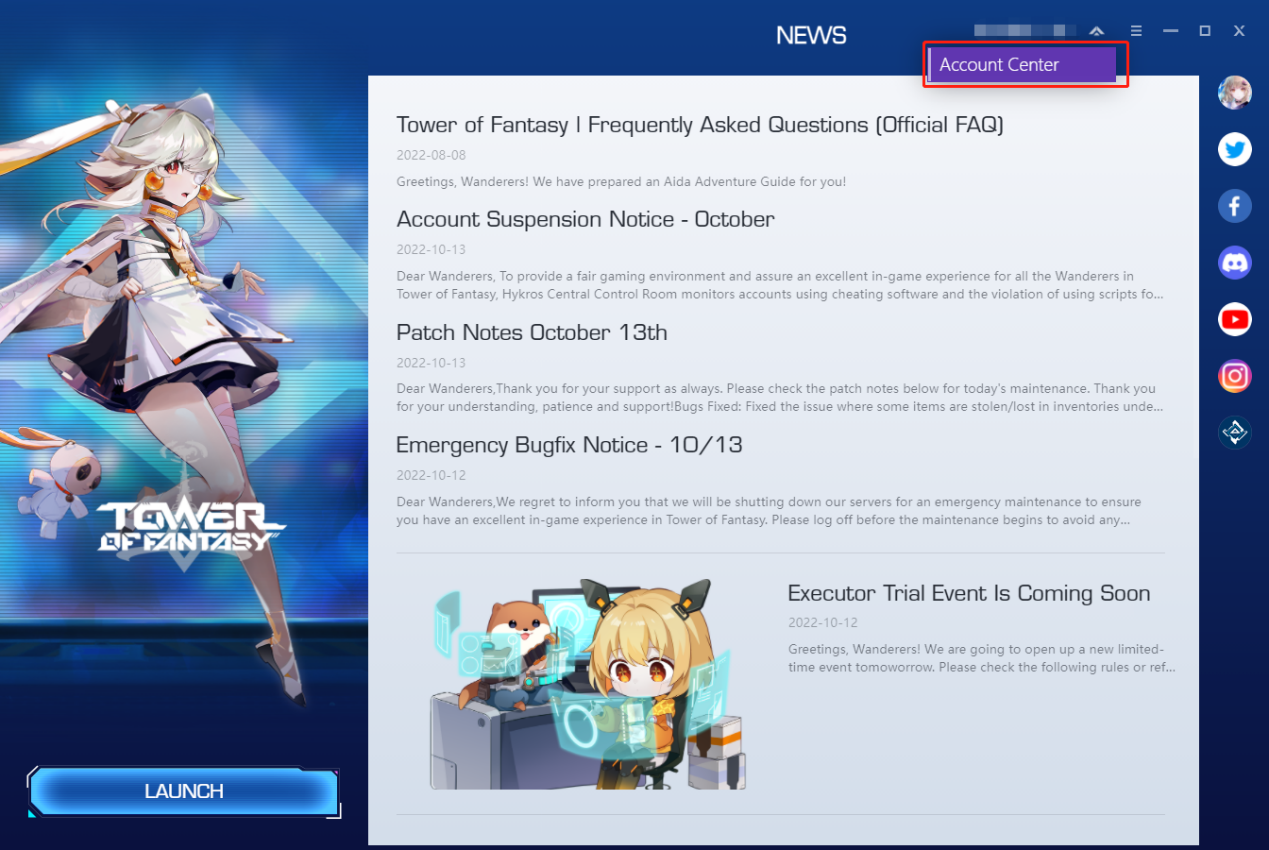
2. Select the Bind Account tab, then click on the Bind button to the right of Steam.

3. Complete the Steam verification process and bind the account.


Can I log in to the same account through different login avenues?
Yes, a single account supports logging in through multiple avenues. You can bind your account with all seven login methods in the PC version.
Frequently Asked Questions (Gameplay & Payment)
What are the supported game languages and voice-over languages?
The current version supports English, Japanese, German, French, Portuguese, Spanish, Indonesian, and Thai. Voice-over is only supported in English and Japanese. You can switch freely between supported game languages and voice-over languages in the in-game interface Settings - Language.
Will my Steam friend list be synched with my in-game friend list?
We regret to inform you that Steam friend lists are not supported for now. You can still add friends and play together in-game.
Are Steam achievements and trading cards supported?
We regret to inform you that Steam achievements and trading cards are not supported for now. We will complete the development of these features as soon as possible.
How do I make payments in the Steam version. Is the Official version's MidasPay supported?
Regardless of which login avenue you use, Steam Wallet is the only payment processor supported by the Steam Client (however, since account data is synched, purchases made in the Official version will be accessible in the Steam version).
The payment process is as follows:
1. Select an item in-game and click on the icon to open the Steam payment page.

2. Verify the information displayed is accurate. (Please note that due to real-time exchange rate fluctuations and currency support issues, the currency and price displayed in your bill may differ from the currency and price displayed in-game. Please refer to the bill for the accurate currency and pricing.)

3. When your Steam Wallet balance is sufficient, click on [Add Funds] to deduct the corresponding amount and complete the purchase. Once completed, you can return to the game and check if your purchase has been credited to your account.
4. When your Steam Wallet balance is insufficient, click on [Add Funds] to select your preferred payment method to add funds to your Steam Wallet and complete the purchase.


You can also opt to make purchases for your account via other platforms, including iOS: App Store, Google Play: Google Wallet, PC Official: Midas Pay, Official Website: MidasBuy (https://www.midasbuy.com/tof/toweroffantasy-global).
I have encountered an issue. How do I contact you?
You can contact us directly via Steam's Community Discussions and Customer Service. Our Official Communication Channels are also open to Steam users.
1. Customer Service Email: support@toweroffantasy-global.com
2. Customer Service: In-game via Settings - Customer Service. You can also contact our customer service personnel via the Customer Service Feedback option at the top right corner of the PC launcher.