Hello Tractorballers!
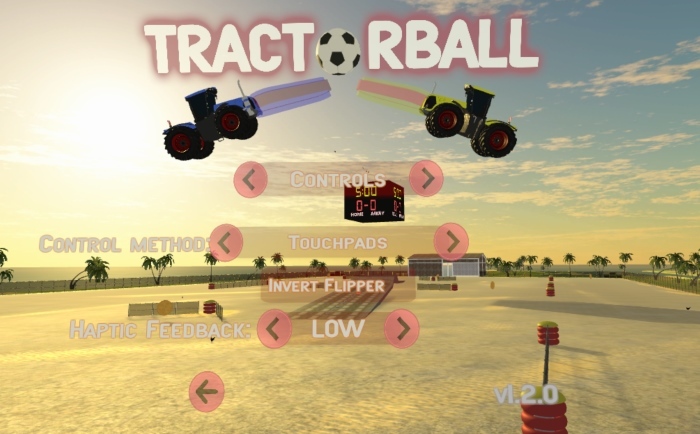
We've received some requests to add additional control methods for VR controllers, and we have found a way. You are now able to control the tractors using the sticks on Oculus Touch or the touchpads on Vive and an additional option to use the triggers for throttle or not.
If you use these new options you will no longer see the message previews (shoot, pass, I got it, w00t), but you are still able to send them by clicking the stick/touchpad.
Have fun!
Local co-op, human identifiers, gamepad haptics and more!
Hello everyone!
It's update time and we have decided to add local asymmetric co-op to the game. This means a VR player can play with a non-VR friend on the same computer. The VR player uses the tracked controllers and the non-VR user uses a gamepad. Hold Start on a gamepad to join any season or exhibition match.
To make it easier to understand what tractors are human controlled, we have added a hat to the human controlled tractors.
Added some flags to the winter arena fences. Let us know if you want us to add your country's flag in the comments!
Squatted some small bugs and other minor fixes.
Hope you have fun playing in asymmetric co-op!
Tractorball Demo Available
Did you think Tractorball looked interesting, but weren't sure if you could handle it? The demo is here for you!
We are committed to get the game out there so we can gather a larger player base for our multiplayer community. That's why we have decided to make a small part of the game available as a free demo. You will be able to see if you get used to the handling of the tractor and controlling the ball, and check performance on your system. The demo gives you access to an exhibition game, but you are limited to a single course and the AI is locked to easy mode. You do get to play with all the dirty tricks.
Press the "Download Demo" button on the store page to give it a go!
Tractorball update 1.0.2
First of all, thank you all so much for taking an interest in our little game. This is the first update since release and there are more to come. We have been listening to your feedback and we have adjusted accordingly:
New audio settings
We have added some audio settings to the options menu. You can now adjust volume and choose between speakers/headphone output.
Quick Match region search
If you choose a Quick Match and there is no running match in your region, the game will ask if it should search other regions. If there are no matches to be found the game will create a new match in your region.
New Haptic Feedback setting level
Added more settings for the Haptic Feedback. You can now have it "On", "Off" or "Low". Low means there are no engine vibrations.
Partial support for gamepads and XInput
We have added support for gamepads. You should be able to play the game using a gamepad or joystick, but there are some issues with some of the menus and more improvements are coming.
Fixed performance spike on first time overtime
There was a loading spike when going into overtime for the first time. This should now be resolved.
We have also fixed a few minor bugs and made some adjustments to the AI.
Hope you enjoy the changes.
Have fun!
We Are Live!
We are proud to finally announce the release of Tractorball.
Creating this game has been a fun and instructive experience, and the time has come to share the fun and games with you. It is our greatest hope that you will enjoy yourselves as much with playing Tractorball as we had with its creation!
Learn more about the Dirty Tricks here:
http://steamcommunity.com/sharedfiles/filedetails/?id=1149046067
We invite you to let us know how it goes and leave feedback in the
feature request and bug reporting threads.
Join our Discord channel to find other people to play and talk with:
https://discordapp.com/invite/FCMNN54
Have fun!
Beta 9 update
We have been hard at work and we've got some new stuff for you.
We have added a method to send quick messages to your teammate. This is a feature that has been requested a lot and it will make the communication in matches a lot better. This is relevant in both single player and multiplayer matches, as even the AI will react to commands and send messages to you. Currently there are four commands to use during matches, and another four to use when the match is completed.
How to use it:
Vive: Press the right touchpad up, down, left or right. You can preview the messages by resting your thumb on the touchpad.
Oculus Touch: Move the right stick up, down, left or right. You can preview the messages by slightly pushing the right stick in a direction. Message will be sent when you move the right stick all the way to one side.
We had to redo some of the button layout to make room for it. The reset tractor button is now a button inside the cockpit, next to the mirror, and you can also reset the tractor from the pause menu.
Hold the right grip button to display some in game stats and ping.
And here's some more stuff:
When grabbing the joystick or the flipper rudder, it will now move to where you grabbed it. We added this because we thought it would be easier understand that you can reset the controls in any position. Please let us know if you like it better this way, or if we should bring back the old way as well.
Added an option to invert the flipper controls in the options menu.
Added new Quick Communication options.
Adjusted the launch platforms; Should not flash on reset any more.
Activated Steam Cloud Save.
Have fun!
Tractorball BETA Update
First of all, thank you very much for the great feedback from the BETA testing. It sounds like most of you are having a lot of fun with the game and that warms a developers heart. We have received a lot of useful feedback and we have made some important changes.
By popular demand we have added the option to lock-on the joystick and flipper rudder. You can now double click the trigger to lock on, and you don't have to hold the trigger all the time. Click once more to release it. This is an additional way to control it, the old way to do it is still intact.
We have also done some significant changes to the networking system. We have started a process to split matches to certain regions. When connecting it will first try a direct connection, if that fails it will automatically switch to a regional relay server.
Right now you should choose your region in the options menu before playing multiplayer. You have to be on the same region to see each others matches. Default region is US.
Other Beta 8 changes:
Added a new dirty trick: Russian Hack. Trick requires a target. When activated you hack the targets credits, stealing all the coins the victim has.
Added the option to turn on/off the haptic feedback in the options menu.
Renamed "Find Match" to "Quick Match"
Adjustments make to the tractor. It will now not wheelie as much.
Decreased the amount of coins slightly to balance the amount of dirty tricks
Made the flipper on client side less stuttery and more smooth.
General optimisations and bug squatting.
We would like to remind you that you can re-press the triggers to reset the control position on the joystick and flipper rudder. That way you can reset it in a comfortable position. The position used for controls will be reset every time you press the trigger or lock on.
Another thing to mention is that leaning helps. If you are in the air or on two wheels, you can lean to the sides to rotate the tractors back.