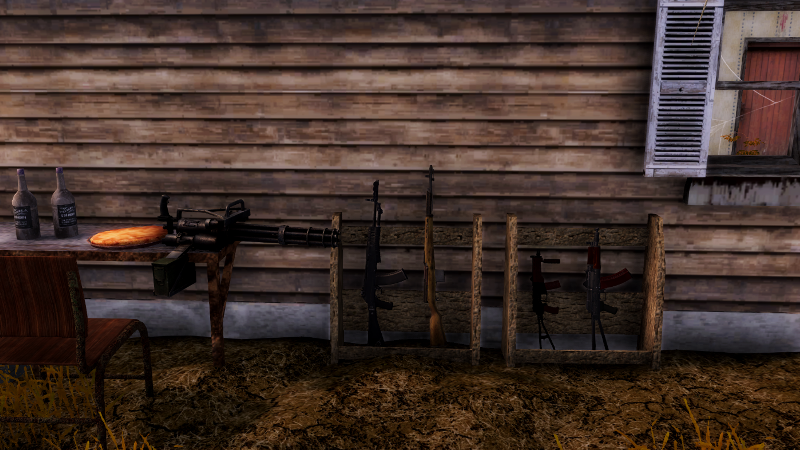
Announcing the Dead Zone DLC (High Challenge Playthroughs)
Dear Ghoul Hunters,
Happy New Year!
So, there have been a LOT of new weapons and gears that I wanted to add to the game, but the challenge was that I couldn't find a way to merge them into the gameplay to not mess up the progression or making it unrealistic. After all, it makes no sense to see a bunch of NPCs who are supposedly trying to get by in the Zone suddenly wielding miniguns.
But my fans gave me an idea - add these new content in second and third playthroughs! So I came up with the following strategy:
- After you complete the first playthrough (leave Tunguska), you will be presented with an option to start 2nd playthrough (Nightmare mode). You will retain all the skills you earned, and whatever equipment you have on you (not counting what's in the backpack) will be hidden in a stash for you to grab.
- In Nightmare mode, game becomes more difficult, with stronger enemies and tougher survival rules. But at the same time you will find these new weapons and gears as reward!
- After Nightmare mode, you can enter Dead Zone mode, where enemies will be armed to the teeth against you, and you'll find even better gears to defend yourself.
All these will be part of the new Dead Zone DLC, which I'm hoping to release within one or two months. Stay tuned :)
P.S. a few fixes included in 1.59-4 patch:
- Buffed VSS vintorez
- fixed a bug where loading a save game after Jacob dies causes incomplete load
- fixed a bug where a melee weapon equipped on primary weapon slot blocks your own bullets
Update 1.59-3 Patch Notes
- You can now hold R (reload) button for 0.75 seconds to quickly switch to another ammo type (such as AP) in your backpack.
- Added 7.62x54r Armor Piercing Ammo
- Fixed a bug with movement "springing" when holding LMB while aiming and strafing
- Fixed a bug with mouse click move "dragging" the player
- Fixed a bug with player character stucking in the middle of air after arriving at a new location
- Added 3 new background ambient music
- If you receive an item from NPC during dialogue, and there is no room in the backpack, causing the item to drop to the ground, you will receive a warning about it so that you won't miss the item.
Respun 1.59-1 Update Patch Notes
Added following fixes to 1.59-1:
- Improved gamepad lock-on of objects near the player
- When crouching, guns will have slightly lower recoil
- When panting from exhausting stamina, guns will have slightly higher recoil
- Hiding HUD (` key) will only hide the left bottom corner and right bottom corner HUD, leaving the rest of the displays intact
Update 1.59-1 Patch Notes
- Made some improvements on locking on targets with controller RS. There's still an issue of being difficult to lock on to target (with the RS) if it's really close to the player. But until I figure that out, if you stand back 3 meters away, it should be a lot easier to lock on targets now.
- Controller button mapping now shows the proper XBOX controller button names rather than Button0 Button1 etc.
- When hovering/locking on doors, they will glow to indicate that they are being selected. (Let me know if you see a door that doesn't glow, since I had to manually modify every door lol)
- Fixed a bug with switching between melee weapon and sawn off shotgun
- Fixed a glitchy animation when switching between guns while aiming down sight, where the character is not aiming but still in the aiming animation.
- Slug rounds now have extended range.
- Skorpion can now be equipped on both primary slot and side arm slot
- If you create a high quality permanent effect serum, the effect will be increased a lot based on the quality
- When you attack loners like Artyom, you won't get a warning about it
- Fixed a bug where dosimeter and sit button mapping for controller are inverted
Update 1.59 Patch Notes
- Integrated full controller support in the base game! Please visit the in-game Options menu and ensure that the gamepad support is set to "Full". Also it's recommended to disable Steam's controller support for this game. More improvements are coming in subsequent updates!
- I tried to make the two zoom mode (with Z) a little easier to distinguish by blurring the surrounding that's a little further away from the character while zoomed in, like a "Macro" photo effect.
- Now you can use - and = to adjust UI zoom at any time, not just while the menu is closed.
- Significantly reduced the cost for fast travel (guide)
- Fixed a major bug that would cause a cleared enemy camp to respawn in just two days.
- The railroad handcart's storage is now much bigger.
- Added a different display name for the shipping bin in Ravenwood player's house, when you hover mouse on it, so that you don't think it's a normal crate and accidentally sell items.
- When the save game is corrupted, you will receive a message while in game explaining how to restore the backup save
- Drastically increased the armor piercing quality of slug rounds.
- Added a wood pile next to player house's kitchen as a storage.
- Added some ways to slowly increase the medical (increase as you use medicine and some serums) and gunsmith skills (increase as you repair weapons).
Full Controller Support Beta Is Live!
Hi everyone, thank you for patiently waiting! I finally finished the first draft of full controller support (XBOX controller), and I released a beta version "1.59beta" which contains this new feature. It includes:
- Able to customize all the button controls (axis controls like D-pad or thumb sticks are hardcoded and cannot be customized)
- Shortcuts for each UI, for example when you open the sleep UI, you can use D-pad left/right to adjust hours. Or, when you in the dialogue UI, you can use the D-pad to select responses, and right stick to scroll. Or, when you try to split items, all the D-pad keys and right stick provide different speeds to move the quantity bar.
- When UI is open, left stick is used to move the mouse cursor. A is left click, and B is right click.
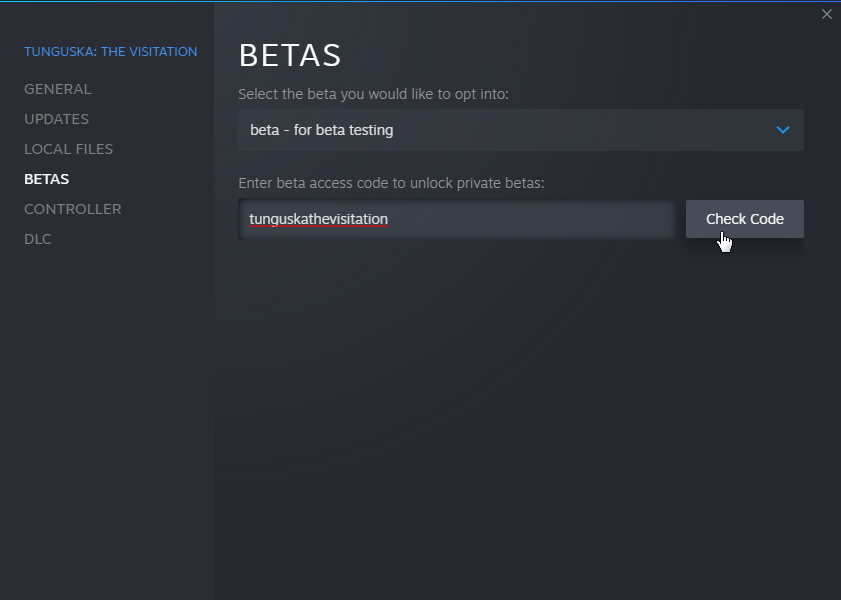
To enable the beta, simply go to Properties of the game, click on the Betas tab. In the access code text field type "tunguskathevisitation" and click "Check Code".
I also removed the "Steam" mode for controller support, since now we no longer need to rely on Steam's native controller support.
Please let me know if you run into any issues or have suggestions on improving the controller gameplay :)
Thank you!
Full Controller Support Coming!
I’m in the process of implementing full controller support. That is, you can customize all of the key functions to controller buttons while in-game. However, Im not a controller player because i have really sucky thumbs that can’t even type text messages properly :). So i’m look for volunteers to play the beta build, and let me know how it goes and if anything can be improved. If you go to the settings of the game on Steam library, you should see a Betas tab, and once the beta build is ready (most likely Dec 15), you can just add the beta with password “tunguskathevisitation”.
The public update for Dec 17-18 will also contain the full controller support. This update will add quite a bit of quality-of-life improvements as well.
Thank you, and stay tuned!
Update 1.58-7 Patch Notes
- You can now go to Haruko to translate the research records
- Fixed a model clipping issue with AETHR armor
- Fixed a newly introduced bug with strangling moving enemies
- Fixed an issue with game repeatedly warn you about damaging friendly NPC
- Completed Italian translation (Thank you Tamaster!!)
Update 1.58-6 Patch Notes
This is a small update that adds two things:
- Increased the weight of breakable boxes, to prevent it from flying too far
- When melee weapon hits terrain, it will no longer make the sparkling "ding". Instead it'll look like hitting dirt.
Update 1.58-5 Patch Notes
- You can now equip secondary weapon (double barrel, pistol, melee) on primary weapon slot.
- You will now see 4 attachment slots, with 2 disabled. This is to prepare for the Nightmare/Dead Zone difficulty mode (available in the future) where you will unlock these slots.
- Improved tree fading mechanisms. If you aim at anywhere that's covered by a tree, that tree will also fade, making gunfights in wooded area a little easier.
- Fixed an issue with tire stacks that would make player stuck inside
- To produce makeshift mines from Jackhammer, you must now hold SHIFT and right click the weapon. This is to prevent accidentally create mines when player wants to unload the gun. To unload simply right click the equipped Jackhammer.
- Fixed a bug with knife-throwing Scythes not able to hurt you with the knives.
- Slightly improved the strangling mechanism. Player character will no longer hop forward really far. Instead, both player and the victim will meet at a middle point, hoping to avoid situations where player will get stuck with the surrounding objects.
- Reduced the weight of scrap metal
- Changed the default difficulty in Normal mode to 50% damage instead of 70%
- Fixed an issue with player getting stuck when interacting with a stash in Lake Cheko water treatment plant.
- When activated, the Acoustic Sensor will protect you from Valentin's scream attack.