Please be aware that this version is a 'release candidate,' which could contain severe glitches that may break your save. Please make a backup of your save locally, as you usually should, regardless of Steam Cloud Save!!!
Save file locations
macOS
On Finder, press Shift+Cmd+G and paste the following:
The "saves" folder is what you want to back up. If two or more Steam accounts share the same macOS user account to play TH, saves for all the users will be backed up.
Even if you get the message that this path does not exist, don't panic - it should be somewhere within AppData. If you find it elsewhere, please get in touch with us so that we can document it.
To join the public beta, click the 'Cog' icon > 'Properties...' on the Twin Horizons page within the Steam client, proceed to 'Betas,' and select 'public_beta!'
Chart Radar
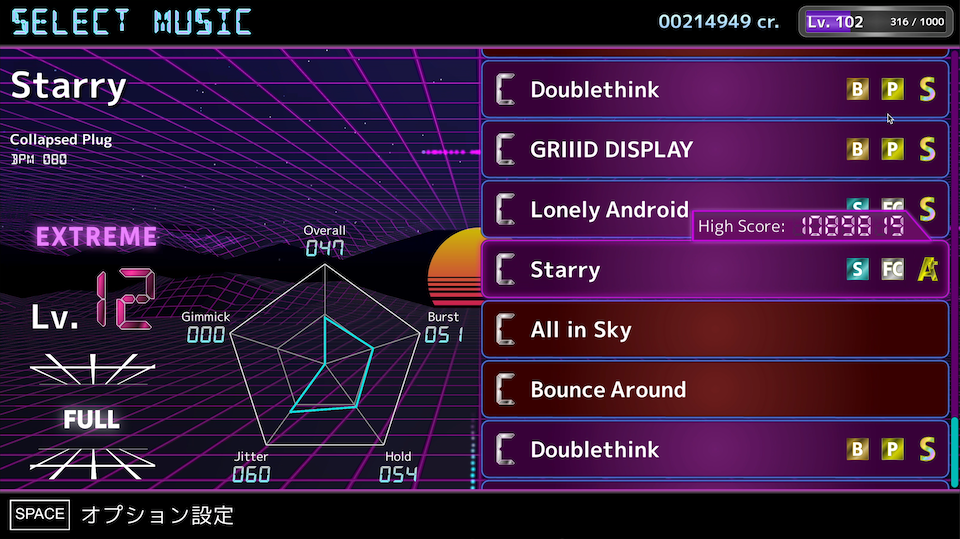
The music selection screen now comes with a radar that shows the aspects of the chart.
Overall: "Overall" note density
Burst: Maximum local note density
Hold: Hold quantity
Jitter: How convoluted the notes are placed on upper and lower lanes
Gimmick: Gimmick quantity
The play screen has got a background update!
The background will change color according to how well you do in the game. (When the score is below the clear threshold OR getting the red gauge while using risky play options)
Bugfix and more features for the grouping & sorting!
Fixed a bug where the previously-selected grouping & sorting rules were not restored upon returning from the gameplay to the music selection screen.
You are no longer restricted from changing the difficulties using left and right arrow keys while using specific grouping rules! However, please note that doing so may change the folder you are currently viewing. [expand type="details"] Example: The Full-Extreme chart for Twin Horizons is a level 13 chart. When you select that song while using the "By Level" grouping rule, you would open the "Level 13" folder. If you switch the difficulty to Full-Hard at this point, you will automatically be transferred to the "Level 9" folder because the chart is rated level 9. [/expand]
Also, pressing (and holding) the L key will instantly switch between the lane styles!
[RESOLVED] The game server is under maintenance!
[EDIT] The maintenance is over! The feature unavailable at the time of maintenance should be back up. If you experience any problems, contact us!
----
The server we run our game server is currently undergoing a maintenance session. The following features will be unavailable for a while. We thank you for your patience!
Sharing results on Twitter
Creating challenges
Receiving challenges
Changing your replay anonymity
Viewing/deleting your past replays
Estimated time of recovery: 6th Jun, 2022, 9:00 JST, 0:00 GMT.
Version 1.3 Beta Testing is Here!
Version 1.3 feature is available as public beta!!
Beware of the save before proceeding!
Please be aware that this version is a 'release candidate,' which could contain severe glitches that may break your save. Please make a backup of your save locally, as you usually should, regardless of Steam Cloud Save!!!
Save file locations
macOS
On Finder, press Shift+Cmd+G and paste the following:
The "saves" folder is what you want to back up. If two or more Steam accounts share the same macOS user account to play TH, saves for all the users will be backed up.
Even if you get the message that this path does not exist, don't panic - it should be somewhere within AppData. If you find it elsewhere, please get in touch with us so that we can document it.
To join the public beta, click the 'Cog' icon > 'Properties...' on the Twin Horizons page within the Steam client, proceed to 'Betas,' and select 'public_beta!'
Here is the list of the functionality available in version 1.3!
Replay Sharing & Challenge
Here are more bragging opportunities for your gameplay!
The "Twitter Share" functionality will be improved, and gain the ability to upload the replay itself!
Press the R key in the result screen to upload the replay to the server.
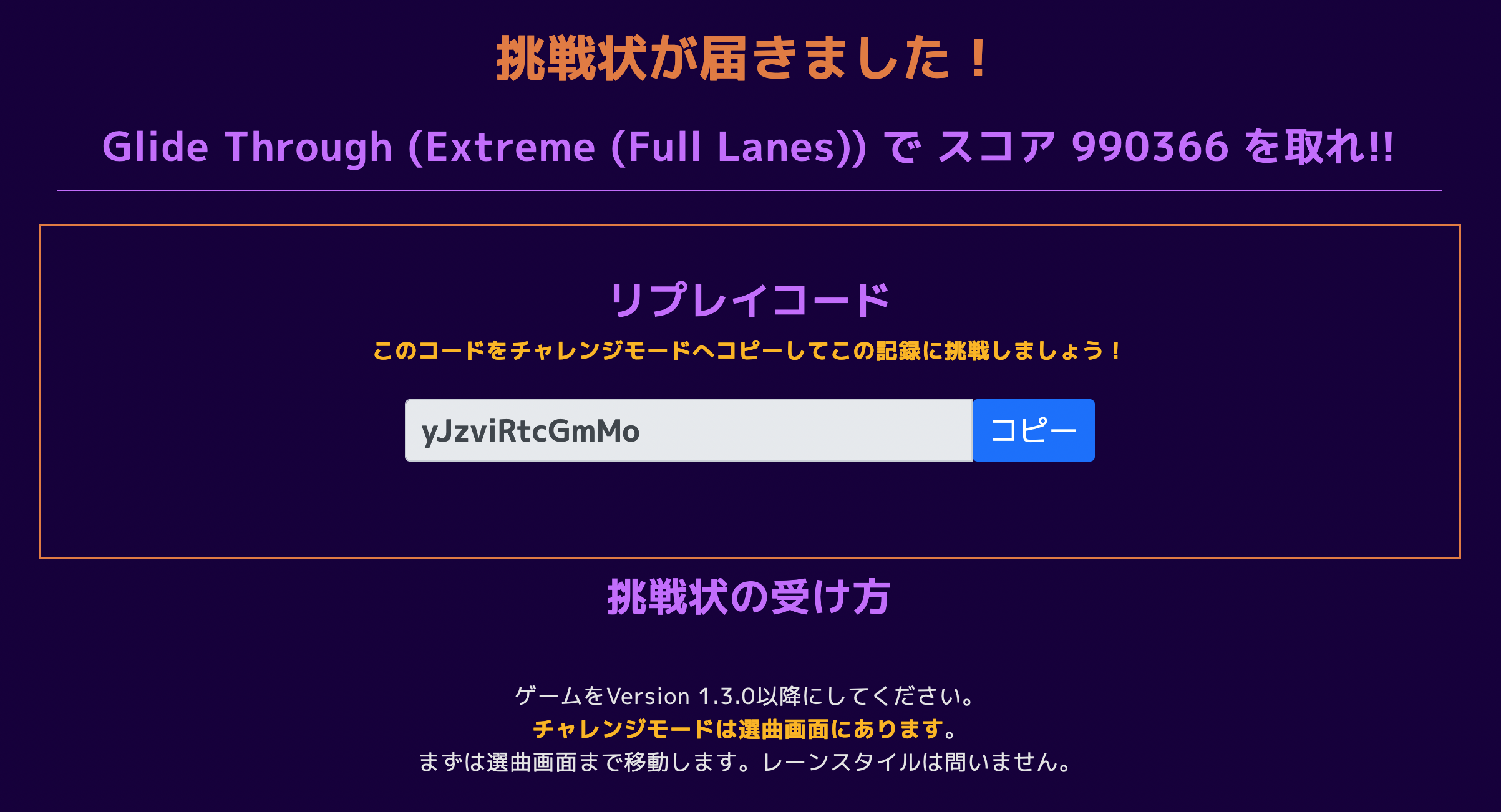
As always, you get a URL; this URL leads to the page where your replay is posted as a 'challenge!'
This page will have a replay code that you can load into the game to challenge the gameplay. Refer to the challenge page about loading the replay into the game.
The great thing about this? YOU CAN TRY THE CHART YOU HAVEN'T UNLOCKED YET! In this case, a part of the cost to unlock the chart normally will be deducted from the play reward. If you have already unlocked the charts further into the game, share your replay NOW and everyone can try what's to come!
We have created a staff replay for you to try! Check it out here: https://play.exploding-cable.com/twin-horizons/replay?uid=yJzviRtcGmMo
Attention: We have updated our privacy policy to indicate that the server will record your play data at your request. More info here: https://www.exploding-cable.com/twin-horizons/privacy.html
"FLAT" Skin!
Some of the note colors were hard to distinguish from the background. Therefore, we have implemented the "FLAT" skin, which turns all the notes yellow! If you like the previous color scheme, go to the play option and set the "Skin" option to "CLASSIC." This "CLASSIC" skin also got an update so that they appear brighter than the previous one.
Group folder & Sorting
Another update to the music selection screen!
Hold the G key...
G key will reveal the option to group the music differently! Have you got a chart you forgot to FC but cannot find it? Then, This feature is for you!
Hold the S key...
S key reveals the option to sort the music within the group! With this feature, you can tell which chart has the best score close to the next rating!
1.2.2 Patch Notes
Version 1.2.2 is released, which fixes the following issues.
Fixed an issue where there were some cases where Steam achievement progress fail to save at the correct time.
Fixed an issue where failing the stage without any Risky Play Option (i.e. getting the score less than 800k) causes the rating letter to fail to show up.
1.2.0 Update Notes
New Features
Player Rate
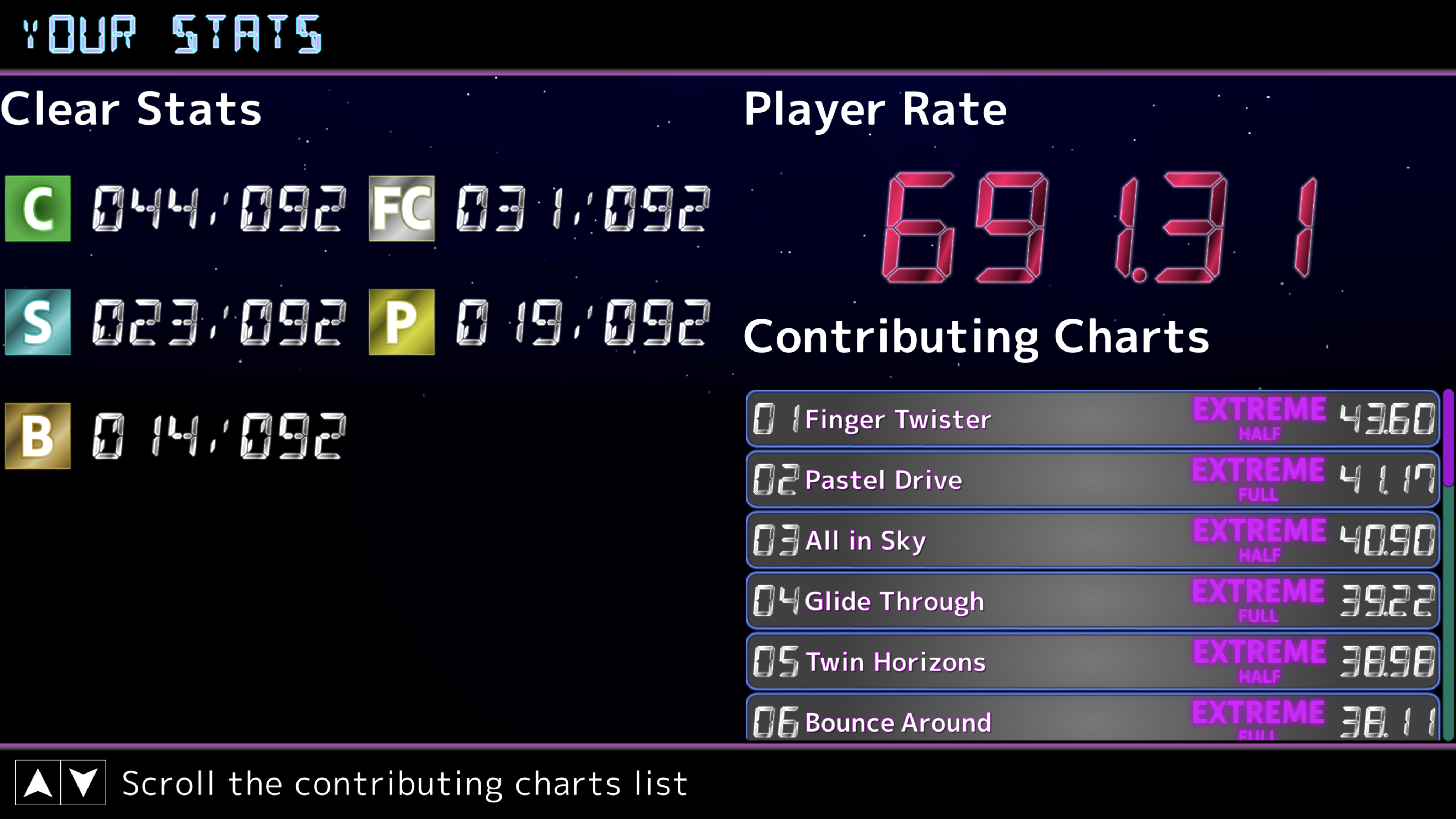
This version adds a Player Rate, which is calculated based on your best scores and clear types.
Your current Player Rate can be accessed via the new "Statistics" screen from the Mode Selection screen. Check your current rate there! (If you are an existing player, your rate will be automatically calculated from your past records.) You can also check out how many charts you have cleared with the specific clear type.
The rate will be calculated on a chart-by-chart basis. The best 20 charts contribute to your Player Rate. If you want to see how much rate does a chart have, press and hold R in the music selection wheel.
It is said that you can improve your rate not only by getting better score, but also getting better clear types.
Result Screen is Updated!
The Result Screen is updated to contain more information about your gameplay! There are two diagrams that are added in the center.
The upper one is the Timing Histogram. This is the most detailed breakdown of the judges you got in this gameplay. The left side of the histogram is the chips you got earlier than intended, and the right side means the later ones.
The lower diagram is the Gauge Transition. This only shows up if you use one of the Risky Play Options, and is a record of how your gauge went up or down. You may see how close you came to failing!
Not only that, but also your clear type is displayed! If you use e.g., Brutal Mode and clear the chart, the result screen will also say "BRUTAL CLEARED!"
Others
The lane divider lines now pulse together with the target line!
The pulses will occur even before the chart starts.
Library & SDK updates
Some performance optimization measures were taken on the main game.
New Song Update #3!
The final update for the song update week adds a...
Oh shoot, here comes the boss!
What boss? Not your boss, it's the BOSS SONG! This song is so challenging, even the 'easier' charts may pose big trouble for you!!
Usually, we present you with six charts (Half Basic ~ Hard, Full Normal ~ Extreme.) But because this tune is a boss tune, we are pleased to announce that this song comes with the Half-EXTREME chart!!!