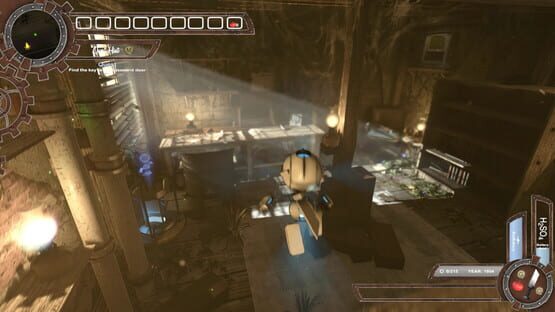
Tyler: Model 005 Alpha 1.2 is now live.
You may need to reset the steam client to receive the update.
Whats in Alpha 1.2
The New Controller System:
Free Camera Movement.
The new system will run much like a role playing game giving you free camera movement allowing you to rotate your view around Tyler.
Open 360 Combat.
From now with the new controller system you will have full 360 combat allowing you to attack enemies in any direction.
Improved Free Running Controls.
Until now Tyler would only attach onto climbable objects that are at a 60 degree angle from his facing position.
With the new controller system Tyler will be checking at 170 degrees.
All jumping and free running is now binded to the controller (A) button,
(Tap for jump/ hold to free run)
(keyboard = space to jump / hold shift to free climb)
Sprinting.
Tyler is now able to sprint by clicking down the left analog stick
( Shift on keyboard)
Visual Improvements:
Added screen space reflections (SSR), this option has to be enable from the settings menu at launch (Mild performance impact)
Improved Screen space ambient occlusion (SSAO)
Distance based soft shadows.
New Cards And Collectibles
Bolt blade upgrade to MK1.
Rapper card.
Thanks for the support during early access.
Alpha 1.2 Releasing On The 10th
Hi Community,
Since release i have been reading your review and comments and watching your game-play on YouTube.
The big thing i noticed is the control system could be much better, so i have been working on a completely new controllers system that will release on the 10th along with the content update.
The New Controller System:
Free Camera Movement The new system will run much like a role playing game giving you free camera movement allowing you to rotate your view around Tyler.
Open 360 Combat
up until now you have only been able to attack enemies that are in front of Tyler and having to turn Tyler to pick off the left overs.
On the 10th with the new controller system you will have full 360 combat allowing you to attack enemies in any direction.
Improved Free Running Controls
At this point in time Tyler will only attatch onto climbable objects that are at a 60 degree angle from his facing position.
With the new controller system Tyler will be checking at 170 degrees.
All jumping and free running will also be binded to the controller (A) button,
(Tap for jump/ hold to free run)
(keyboard = space to jump / hold shift to free climb)
Sprinting
Tyler will be able to sprint by clicking down the left analog stick
( Shift on keyboard)
along with this update will be
new content including collectable and side missions.
UI improvements.
New visual features.
Bug fixes.
A little gift for early access players.
Big thanks for your support,
Reversed Interactive
Alpha 1.1f Released
Hi Community,
Since launch, we have been listening to your feedback and improve the game-play mechanics of Tyler: Model 005.
We have just released our second patch for Tyler: Model 005
that should improve your game-play experience.
fixes:
*footstep Audio Adjustments.
*Improved collision detection to reduce the chance of passing
through objects.
*Improved climbing controls and GUI for more seamless climbing.
*Hint trail is now 100% accurate .
Changes:
*Remapped buttons on controller input for an easier control layout.
*increased Controller sensitivity for smoother combat.
*Decreased light volumetric intensity from Tyler for better viewing.
*Changed the tutorial to match the new controller layout.
Additions:
*Invert Controls option now selectable from the settings menu.
*Added a selfie came for players to be able to show of there character on the community page (Num Pad 4).
*Disable and Enable HUD for awesome screenshots or to increases the difficulty (Num Pad 7).
Please remember to restart the steam client to receive this update.
Thanks again and we hope you all enjoy the changes.
Alpha 1f Released
Hi Community,
First of all we would like to thank everyone for there support and feedback
so for. We have just released a small patch to fix some important issues but you might need to restart your steam client to receive this update.
This small patch will fix:
Save Game fix. This will fix issues with save games not loading.
Save progress. Tyler Model 005 saves at quick rate so people don't lose
any progress if a crash or accidental shutdown was to happen.
Stairs:
Climbing stairs is now easier as a lot of people found it difficult.
Thanks
Tyler: Model 005 Release Notes.
Hi community,
Here are a few notes to help you set up Tyler: Model 005 from your first launch.
Controller Support:
Tyler: Model 005 come with partial controller support so at menus you will need to revert back to keyboard and mouse.
When launching Tyler Model 005 the game will detect if a controller is present and notify you to either keep your controller plugged in / switched on to play using a controller.
if you get a notice saying controller detected but you would prefer to play on keyboard and mouse just unplug or switch off your controller at this point.
Graphics Settings:
When you first launch the game you will be asked to set your screen resolution and quality settings
Standard texture quality (Minimum system requirements)
High texture quality (Recommended system requirements)
GTX 1070+ (Improved shadows and rending quality)
The first time you launch Tyler: Model 005 the visual settings will be set up to run at the best visual quality. if you experience a frame rate less than 40fps we would recommend reducing the quality settings for the best gameplay experience.
We hope you enjoy.
If you have any question feel free to ask on the community page.
If you experience any issues during play please do let us know using the Early access bug and glitch submission on the community page and we will get it fixed.