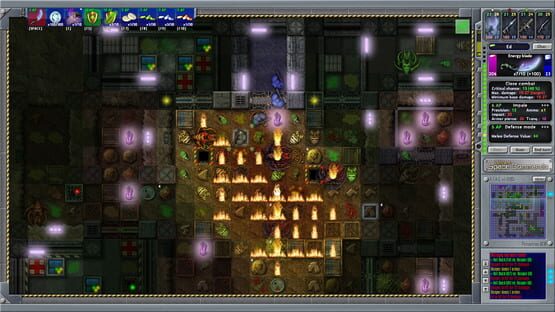
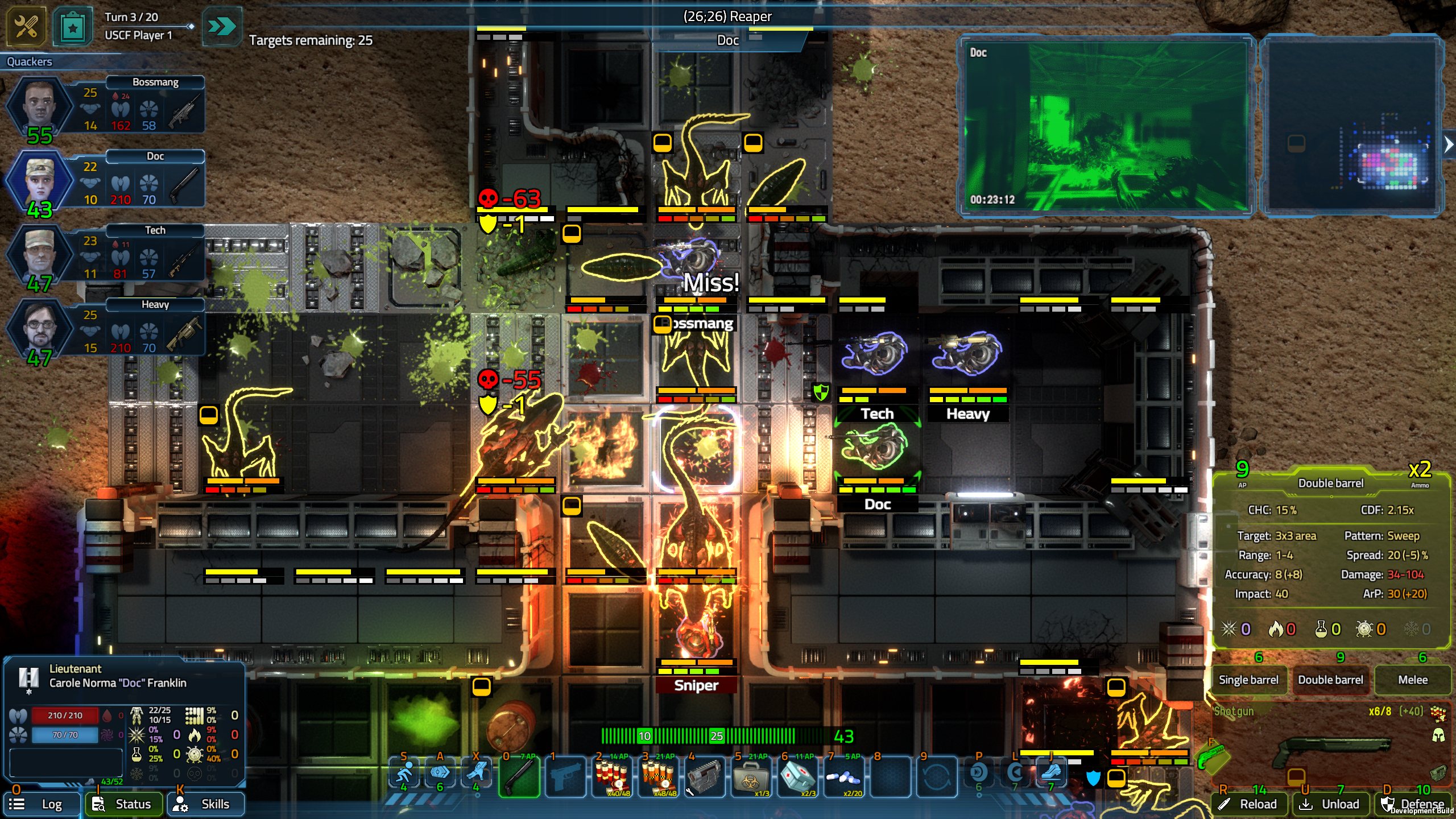
We're happy to announce that the upcoming sequel of Ultimate Space Commando, USC: Counterforce is now available on Steam as a pre-early-access, alpha version DEMO. You can go to the Steam page and download the Demo here. Some of you may already know that a sequel is in development, but now is the time to make this information public! When we released USC six years ago on Steam--many of you'd already played the game even before in its alpha/beta stages since 2013--, we always hoped a sequel could be made someday. USC: Counterforce not only carries on with the story, the deep, complex combat mechanics, and the fully customizable squads, but is a great step in means of graphics, too, with a lot of exciting new gameplay features also coming during the Early Access that will start some time Q2 or Q3 this year.
The Alpha Demo you can now try for free includes the following major features:
Single Mission mode with customizable random maps and difficulty settings for 1 or 2 squads;
Customizing squads and carrying on with statistics & merits through all missions played;
5 ranged weapons and a lot of medical supplies
3 enemy types (a LOT more will be added later)
The core gameplay features are all up and running, and though there's really a lot of extra content coming soon, and the Demo may feel a bit "pale" right now, we already feel the game offers quite a bit of fun for experimenting with squads and testing out new features.
The Demo doesn't have an in-game Tutorial, but we prepared (a rather lengthy) video for you if you're interested: https://www.youtube.com/watch?v=q_M0hzHsf8w We plan to release the game in early 2023. Until then, new game modes (Defend the Base!, Operations), the Campaign, 10+ new enemies, a gazillion of gadgets and weapons, new gameplay elements (multi-layer maps, hacking, alien nests, reactors, new environments like mines and spaceships), new objectives, etc. will be gradually introduced in the game. Keep an eye on the start of Early Access!
I hope you're as excited as I am! :)
Happy hunting!
Aliza (still coding & designing solo)
& Csaba (helping a lot with testing & PR)
A call from another dimension...
Commanders,
Let me divert your unrelenting focus on dispatching alien hordes for just a moment! While working on a new, bigger project, this year I (and my good friend Derwen, also in part responsible for USC) "accidentally" ended up participating in GameJolt's Adventure Jam, where we had no more than 2 weeks to make an adventure-ish game! As off-topic (and off-genre) as it is, please let me bring our #AdvJam2017 title Mimic Hunter to your attention!
https://youtu.be/NXN_8xWqryo
It's--of course--in early access, but by all means a complete--if yet not too long--game. And it's completely free for now! It's also almost sure that we're not done with it yet, and it will be worked on in the near future, as we're very happy with it and still have a lot of great ideas we had to cut due to the lack of time in the jam.
Thank you for your kind attention! And now go back and dispatch some more of those slimy little space wurms! ;-)
A call from another dimension...
Commanders,
Let me divert your unrelenting focus on dispatching alien hordes for just a moment! While working on a new, bigger project, this year I (and my good friend Derwen, also in part responsible for USC) "accidentally" ended up participating in GameJolt's Adventure Jam, where we had no more than 2 weeks to make an adventure-ish game! As off-topic (and off-genre) as it is, please let me bring our #AdvJam2017 title Mimic Hunter to your attention!
https://youtu.be/NXN_8xWqryo
It's--of course--in early access, but by all means a complete--if yet not too long--game. And it's completely free for now! It's also almost sure that we're not done with it yet, and it will be worked on in the near future, as we're very happy with it and still have a lot of great ideas we had to cut due to the lack of time in the jam.
Thank you for your kind attention! And now go back and dispatch some more of those slimy little space wurms! ;-)
Season 2 now live!
Commanders,
It is the 2nd Anniversary of USC on Steam, and a new opportunity has arisen to prove your worth! Season 2 is now live with 4 challenge missions to put your skills to the test!
To celebrate this epic occasion :-), USC will be on a 66% SALE between May 12-19! Don't miss it if you were planning to get into the game! Ducky approved! :rd1:
What's in the Season?
With every Season comes the chance to unlock in-game rewards and to win exclusive items by being the best Commander in USC Forces!
Players with a Profile can participate in the Challenge game mode (accessible through Profile controls at the top of the screen), and any Single Mission they play (provided they're logged in) earns them experience toward their next rank and a chance to be displayed on the Single Mission leaderboards.
Season 2 unlockables:
There are four Challenge Missions. These all have a fixed random seed and almost all other parameters are pre-set and locked, so all players and all attempts will face the exact same odds.
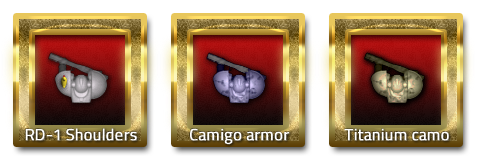
:rd1: Completing all four--regardless of what score you get--will earn you the 'Titanium camouflage' armor customization!
'Carnage in the Mines': This is a 2-squad Seek & Destroy mission that will put your assault skills to the test. The difficulty level is adjustable, but to get the highest score, you'll surely need to ramp up things!
'Low-budget tactics': What can you do with 50,000 Credits? With an adjustable difficulty and a fairly uncommon map layout, your expertise of using low-end gear to the best will be tested.
'A databank too far': A tough data acquisition mission in a surface base where time runs short--a true test of tactics.
'Hardcore survival': Help a low-rank squad survive 20 turns of hell while struggling to secure all databanks. Saving disabled. This will hurt ;-). :uscdogtag:
:rd1: At the end of the Season, the five top ranking players per each Challenge will be awarded with the 'RD-1 Shoulders' insignia, as well as with a public token that will identify them as top ranking Commanders.
Challenge activity will be monitored based on game and squad data. Attempts to cheat will be dealt with effectively. Please ensure to remain on-line when playing a ranked mission, otherwise your efforts will be lost. With any related question & issue please write to support@uscthegame.com.
Good luck, and happy hunting!
1st Anniversary!
Fellow Commanders,
USC celebrates its first Anniversary of the final release this weekend! It's been a long and amazing journey, one that will still go on!
As a special celebrational gift, the game will be 50% off in the store this weekend from 13th to 16th May. Don't miss the chance if you haven't enlisted to United Space Command Forces already! ;-)
Happy hunting!
End of Season 1 & minor update
Fellow Commanders,
Season 1 of Ultimate Space Commando has now ended. We didn't have as many competitors as we had hoped for, but nevertheless, congratulations to everyone who participated and succeeded to get onto any of the leaderboards with a successful mission. All of these players have now been given their RD-1 insignia! :rd1: (Don't forget to select it in your profile if you want to use it.)
The winner of Season 1 is Lt. Commander Bozdo, who--with a truly exceptional performance, I might add--also earned the Titanium armor customization and the Season 1 Champion ceramic mug! Hear, hear!
A new Season is being planned, so keep your eyes peeled for more information. Until then, all four challenges remain playable as an UNRANKED mission--that is, you can complete them for a general place on the custom leaderboards, but naturally they won't affect the leaderboard of Season 1 anymore.
We've also deployed a minor update, see the changes below.
USC v1.0.9.2
-- Pressing 'M' for minimap when it's not visible due to screen size/interface scale settings will now automatically switch to secondary GUI. You can now also use 'M' to switch back.
-- If you're on the secondary GUI, pressing 'P' for personal data, 'I' for inventory, F1-F4/1-4 for select unit or 'O' for general objectives/mission info will now automatically switch back to the primary GUI. Note: you can always use TAB to switch to the secondary GUI for the minimap and the log if they are not visible.
-- Fixed a minor bug with some mission log entries in Act V.
Other minor changes, fixes and optimizations are also being worked on, thanks to the abundant and caring player feedback.
Until next time--happy hunting!
Season 1 ending soon
Commanders,
Season 1 of the online ranked leaderboard will end on 8th February 5 p.m. GMT. If you were planning to compete and haven't yet, this is your last chance to prove your worth and claim the exclusive armor customization and the RD-1 insignia! :rd1:
The next season won't begin immediately after this, keep your eyes open for information about it and other updates ;-).
Happy hunting!
v1.0.9.0 Now Live
Fellow Commanders,
With the winter holidays upon us, we're happy to announce the next major update to the game! As always, it is Ducky approved ;-). Read on for detailed information about the new features and minor changes, as well as for a peek into what the next update will bring.
Revamped HD interface
The interface of USC was originally designed with low-res displays in mind for compatibility with smaller laptops and older systems: main elements always fit in a smaller area so that all functions are accessible. But now the time has come to upgrade the interface to much better accomodate the needs of HD and full HD displays!
An option in the Settings menu is now available to set the scaling of all the main GUI elements (all dialogues, control panels, and the ATAC) to 1.0x (original), 1.2x, 1.4x, 1.5x or 1.6x factor. All GUI textures have been re-rendered to provide a pixel-sharp look even on the greatest scaling. While (almost) all functions remain unchanged, you can now set the GUI to fill in almost the entire screen, making it more easier to read text in upscaled fonts, click buttons, view the minimap, etc.
A few remaining elements (item & weapon icons) will be updated to full HD resolution later.
IMPORTANT! Remember that you can switch to the secondary in-game GUI containing the minimap and the combat log by pressing the TAB key if they don't fit under the main ATAC controls due to screen size/scaling settings. You can also toggle the scaling factor with the numeric + and - keys while in-game.
If you encounter any problems or doesn't need/like the new looks at all, you can force the game to use the legacy GUI by adding the following line (case and space sensitive) under the
[Interface] section of the USC.cfg file in the game's main folder:
disableResizing=1
Further recommendations and reports of issues about the interface are more than welcome on the forum under the new 'Interface & controls' category.
New interface functions
1.) The ready/holster weapon (engage/disengage attack mode) and the defense mode/reload/unload functions on the ATAC now both have a separate, orange button displaying the AP cost. Clicking this button is identical to the legacy right-clicking on the corresponding function. To switch attack modes/support functions, just left-click on the info area as before. A few display elements have been changed: ammo cost now only reads as "x[N]" (not "Ammo: x[N]"), "range:" as "r:", and "tranquilization:" as "t:".
Remember that you can always use [SPACE] to toggle attacking, "D" to initiate defense mode, "R" to reload and "U" to unload if you don't want to always use the mouse.
2.) Instead of right-clicking, you can now also use the new "Use" button in the inventory to activate/use (or deactivate) the selected item with an appropriate function.
3.) Only in Campaign mode, there's now a button to field salvage the selected item.
Field salvage feature & considerations on inventory space
We've received a fairly large amount of constructive feedback about the (lack of) inventory space, mostly in regard to picking up loot or crafting materials. We took the time to carefully re-evaluate this question, and we decided to introduce the "field salvage" option ONLY in Campaign mode.
What does it do? Simply enough, field salvage lets you to instantly salvage any item (weapon, ammo or equipment) currently not in use for 25% of its normal Credit value. These Credits are immediately added to your Campaign Credit pool, even if the mission is a "far site" and your squad(s) won't return to HQ right after it. 25% doesn't sound too much, but considering that you can now literally pick up *all* items for a profit and that many items have a 5000-10,000 Credit normal value, we think it is quite fair and yet it doesn't ruin the overall economy of the Campaign.
Crafting materials (screws, integrated circuits, transistors, microchips, screwdrivers, wire cutters, crystals and rubber duckies) are already automatically picked up from the ground and added to your resource pool when you complete either a Campaign or single mission. You only need to pick up and carry them with you if you plan to fall back (and need them pronto), or it is a multi-map mission and you don't want to leave something behind accidentally.
Blueprints are very valuable strategically, and carrying them home is part of the struggle you are awarded for afterwards. Don't leave them behind if you want them. This won't be changed.
Targeting modes
Many weapons in USC have special, "unrealistic" targeting rules ("star", "sweep"), and the topic has been discussed several times on the forums. To sum it all up, these "unrealistic" modes exist for multiple reasons, including weapon strength and value balancing, compensation of the lack of some real-life micro-movements that arise from the game being grid- and per-player turn-based, and in general, because USC is not designed to be "realistic"--it is designed to be a board-game like turn-based game with its own set of rules.
Nevertheless, I've been convinced that it wouldn't hurt to implement an option to override these special rules for players who really don't want to use/accept them. I understand this. To enable the override, open USC.cfg and add these lines to the end of the file, then (re)start USC:
[Rules]

forceFreeTargetingMode=1
Attack modes with a "star" or "sweep" targeting pattern will use "free" instead; "arc" and "passthrough" modes won't be affected.
IMPORTANT! Using the override will flag your Campaign/DTB/single mission save permanently, and you'll get a -0.15x/-250 per Wave/-10,000 Score penalty, respectively.
Miscellaneous
-- A full, re-edited transcript of the in-game tutorial pop-ups (Basic Tutorial.pdf) can now be found in the "docs" folder.
-- You can now also use CTRL on the squad assembly screen to switch between a hybrid weapon's two main modes (useful for checking ammo status for both clips).
-- Server functions will be now automatically disabled for the session if initial connection times out/fails, to prevent program hanging. REMEMBER that you can disable all on-line functions if you don't need/want them by adding the line "disableServer=1" under the [Engine] section of USC.cfg. (This does not affect direct TCP/IP connections with other players.) Server functions/options will be further improved in the future.
-- Fixed an inventory tooltip text glitch accidentally introduced in the previous update.
-- Fixed a few minor interface glitches/issues.
-- Yet again, no rules were changed.
What's next?
Another update is scheduled to be deployed some time in January. It will further enhance the HD redesign, fix any potential issues with the new features (feel free to give us feedback!), and enable touchscreen-friendly control features. It will also prepare the game for Season 2...
Thanks for reading, and happy hunting!
Live now: enhanced squad customization features
Fellow Commanders,
Giving in to public demand, Update v1.0.3.2 is now live with enhanced squad customization features, as I completely understand how important this can be for immersion! ;-)
There are two major changes:
1.) All squad and unit customization features are now also available in Campaign mode:
-- Click the squad logo to load a custom one.
-- Click a unit portrait in the main squad assembly screen to load a custom one.
-- Click the name of a unit (e.g. Edward Johnson) to edit their first- and family name.
-- Squad names, colors, and unit callsigns were always customizable.
-- You can access these features right after the tutorial mission.
-- Remember that if you have profile customization unlocks (insignia, armor appearance), playing Campaign mode while logged in will enable you to use them in the Campaign!
2.) You now only have to provide one image of any dimensions and the game will take care of the rest!
-- Squad logos must be placed in the "data_user/custom_logos" folder, in .PNG format. Recommended resolution is 192x192 or greater in 1:1 aspect ratio.
-- Unit portraits must be placed in the "data_user/custom_portraits" folder in .TGA format (preferrably 24- or 32-bit). Recommended resolution is at least 115x200 pixels. An aspect ratio of 1.15:2 is used. (Smaller images will be upscaled, larger ones downscaled).
-- Both formats can work with opacity/alpha channels. See the sample images for further reference.
Enjoy and happy hunting!
Season 1 has begun!
Note: scroll down to the comments section for the latest hotfix & minor update news!
Update v1.0.3.0 is now live! Among various minor fixes & enhancements (see the Change Log), it finally brings you the new Profile system and the Seasonal Challenge mode!
Let's start with the most interesting stuff before getting technical! ;-) :wunderwurm:
To celebrate the start of Season 1, USC will be on a 50% SALE from 31st October to 7th November! Don't miss it if you were planning to get into the game! Ducky approved! :rd1:
What's in the Season?
With every Season comes the chance to unlock new in-game rewards and to win exclusive items by being the best Commander in USC Forces!
Players with a Profile can participate in the new Challenge game mode, and any Single Mission they play (provided they're logged in) earns them experience toward their next rank and a chance to be displayed on the Single Mission leaderboards. (Scroll down to find more information about creating a Profile.)
Season 1 unlockables:
:rd1: Players who helped beta-testing the profile system automatically get the 'Camigo' (camouflage indigo) armor customization. A few select players who helped a lot also get the RD-1 Shoulders. They will be notified in e-mail.
There are four Challenge Missions in Season 1. These all have a fixed random seed and almost all other parameters are pre-set and locked, so all players and all attempts will face the exact same odds.
:rd1: Completing all four--regardless of what score you get--will earn you the 'Titanium camouflage' armor customization!
'Carnage in the Mines': This is a 2-squad Seek & Destroy mission that will put your assault skills to the test. The difficulty level is adjustable, but to get the highest score, you'll surely need to ramp up things!
'Low-budget tactics': What can you do with 50,000 Credits? With an adjustable difficulty and a fairly uncommon map layout, your expertise of using low-end gear to the best will be tested.
'A databank too far': A tough data acquisition mission in a surface base where time runs short--a true test of tactics.
'Hardcore survival': Help a low-rank squad survive 20 turns of hell while struggling to secure all databanks. Saving disabled. This will hurt ;-). :uscdogtag:
:rd1: At the end of the Season, the five top ranking players per each Challenge will be awarded with the 'RD-1 Shoulders' insignia, as well as with a public token that will identify them as top ranking Commanders.
:rd1: The best player in the Season will receive an exclusive, physical USC Season 1 Champion ceramic mug! The Champion will be determined by the average of the four Challenge rankings (not scores), lowest wins. Not completing a Challenge will count as a ranking of 20. In the case of a tie, the sum total score of the four Challenges will decide.
* Illustration only; actual mug will have a Season 1 Champion caption and may have different art.
Other rules: Since it's the very first season, you can use your veteran custom team(s) with all bonuses. Some of the Challenges are configured to use an uncommon team setting, so you may need to re-gear, but you may use your crafting materials and prototypes freely. The next season will probably contain Challenges that require a completely new team, but it will also feature missions for veteran squads.
Season 1 will be 1,5-3 months long, based on activity, but it will end no sooner than 1st December 2015 and no later than 31st January 2016. All players will be notified at least 1 week prior to the end of the season.
Challenge activity will be monitored based on game and squad data. Attempts to cheat will be dealt with effectively. Please ensure to remain on-line when playing a ranked mission, otherwise your efforts will be lost. With any related question & issue please write to support@uscthegame.com.
The Profile system
The Profile system is a new optional on-line feature that keeps track of your mission statistics, enables you to earn ranks, achievements, and various in-game rewards, and lets you participate in the Seasonal Challenges! To use it, you only have to create a USC profile in a few very easy steps. Whether you are a seasoned mission specialist or just playing for fun, playing with a profile will be rewarding over time!
Creating a profile
1. Click the "Log in / Create profile" button in the Profile gadget at the top of the Main Menu.
2. Enter your desired username and password, and click OK.
3. Fill out the additional fields—we only ask for an e-mail address for technical reasons, no other personal information needed!
4. Click OK—a confirmation e-mail will be sent with a final link to activate your profile.
Voilà! After you’ve activated your profile, you can log in by clicking “Log in / Create profile” and entering your data. If the process is successful, you will see your name and rank, and a button called “View profile & challenges”. Click it to enter the Profile menu with all the Seasonal Challenge features.
The Profile menu
The Profile menu is the central hub for all your statistics, achievements, and challenge participation functions, as well as for profile controls (change username, password, e-mail, or deactivate your profile in the “Edit profile details” menu). With time, we plan to add even more features to it, but for our very first Season, it does what’s needed!
On the left side you can review your most important Single Mission statistics. Your rank depends on your best and total performance—the more you play and the higher “best mission score” you earn, higher a rank you will be granted. For now, it is mostly a matter of prestige (it is displayed next to your name in the leaderboards), but we have many plans for the next Season, depending on our experience and your recommendations!
On the right side you find the Challenges of the current Season with a button to play them, and one to view the leaderboards. Your personal best score and current overall ranking are also displayed.
The Profile menu also lets you to select your active Insignia (if you have any). These are profile-bound tokens of expertise granted by completing a greater challenge or some other specific activity, displayed both in-game as a kind of visual addition to your units’ gear, and next to your name in all leaderboards.
Update v1.0.3.0 Change Log
Build 0342b -- 30.10.2015
-- Added v1.0 version of the Profile system with Season 1 features.
-- Various menu and interface-related minor fixes and improvements.
-- No changes were made to game rules on any level this time.
What's next?
A mostly interface-related major update will come in the next few months (probably synced with the beginning of Season 2). It will contain improvements to both menu and in-game interface usability and support for touch screen input. It will probably also include some balancing based on Season 1 experience and a few new gameplay elements (surprise!).