

Unknown Planet
Unknown Planet 1.0
Thanks to everyone who played the game in early access and gave feedback, reported bugs, tested it on the Steam Deck and provided gameplay suggestions. Thanks to the youtubers who played the game on their channels and thanks to everyone who left a review.
The 1.0 build was released more than a month ago and features some crafting and mining rebalances as well as some small QOL improvements over the last build. If you have a save file from the early access versions, you can continue to use it with the 1.0 version.
And as always, have fun playing the game.
Update 18 and leaving early access
Update 18 brings achievements. In total, there are 16 achievements that can be unlocked by accomplishing different in-game tasks.
All the buildings, tools, weapons, resources, items, recipes, etc. from the crystal tier have been fully implemented. The new collector building can be used to automatically collect materials from the ground and pools instead of manually collecting them by hand. The new replicator building can replicate any item in the game, but it requires 5 ion batteries. And the spacecraft needs to be built in stages and fueled to be able to launch it and get off the planet.
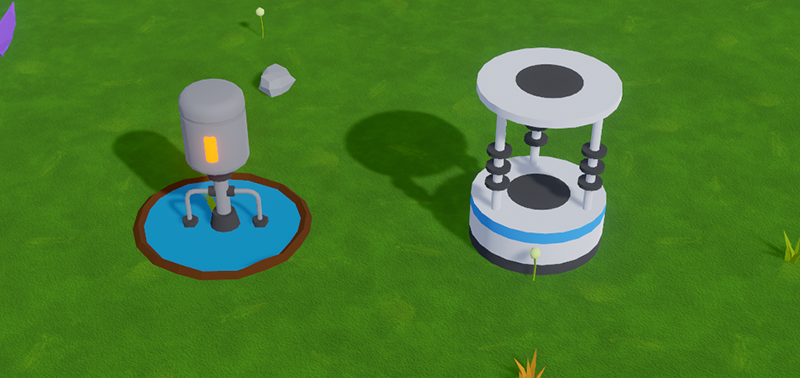
New equipment in the crystal tier include the highest tier melee weapon and armor as well as a new ranged weapon, a new ammo type and a new healing item called medigel.
There is also a new boss called Guardian and is located in the lava biome. In order to finish the game, the Guardian needs to be defeated because it drops some items that are required to get off the planet.

Some of the new resources in the game include the alien vat and the freezer. The freezer can only be mined with the laser miner and it drops a new food item called synthetic meat, which can be cooked both in the campfire and the cookers. The lava biome has a whole set of new resources which include the magnet membrane and the emberphene pool, both of which produce items for late game crafting and building. It also has a gel vine which produces membrane gel. Membrane gel can also be obtained from the new gel pods in the crimson biome.

QOL improvements include gameplay, audio and UI improvements. There is new background music that reflects the gameplay and style of the game a bit better. The UI now has a button that transfers everything from a building’s output to the player inventory.
There are teleporters in the game now, which are spread out and used for fast travel. However, they need to be reached first and activated before they can be used.

Cookers now have their own inventory which only accepts cooking ingredients and you can cook whatever recipe you want as long as the cooker has the ingredients. The UI displays all the cooking ingredients that the cooker can use if you hover over an empty cooker slot. The vegetable garden also shows all the vegetables you can grow if you hover over an empty grow spot.

The solar thumper unearths materials faster and the solar station recharges empty batteries faster (including the new ion battery). There is also an upgraded collector tool which can collect 2 materials at once, which can be crafted in the blacksmith bench and the player animation for collecting materials is faster now.
The 3D models for some enemies, bosses, resources, items and other objects have been updated, which also improves the collision in the game and when objects get destroyed, mined or collected they emit particle effects.
Each biome has a specific type of enemy spawner in it and there are a bunch of new enemy spawners. There are two new enemies in the game: drone and cloaked acolyte which deal a lot of damage to the player.

Enemies and bosses are now tougher to fight in general. Enemies behave a bit different, compared to the previous versions of the game. They deaggro when the player is far away from them and some of them now aggro when the player gets near them. They spawn occasionally to attack the player and they spawn even more frequently when the spacecraft is built.
The game now has an ending, which means that it can be played from start to finish. This is a good point to leave early access. So, this patch will be the last one before the game is fully released. Other than rebalancing some recipes, there shouldn’t be any changes between this update and 1.0. The full release will be some time in September but I don’t know the exact date yet.
Let me know if you encounter any bugs and have fun playing the new update.
Update 11
Input
- The game, now has full gamepad support (including the PS5 controller).
- From game start, it can be played without touching a mouse or a keyboard.
- Automatic switching between gamepad and keyboard & mouse. Just press any button on any input device and the game will automatically switch.
- New backend input system.
- In addition to using the attack button to mine a resource, you can also use the action button (Spacebar) to mine a resource.
- Single click attack. No need to hold the attack button for the first attack animation cycle to finish.
Content
- Introduced the lava biome (still a work in progress).
- Introduced 2 new buildings.
- New crystal resource which can be mined now.
- Added the Laser miner, Ion stick and Arc welder tools.
- Removed the Silicon recipe from furnace.
- Rebalanced some crafting recipes (increased the output stacks or made them cheaper).
- Increased the crafting speed for a lot of recipes.
- A bunch of resources and items are updated with new 3D models and sprites.
- Increased a lot of items’ max stacks.
Other
- Fixed a bug from update 10 where sometimes multiple different bosses would spawn when you load a save file.
- New game logo.
- Moonlight now casts shadows.
- Updated the equipment UI.
- Reintroduced the ammo slots. But now there are 3 ammo slots.
- Increased the movement speed buff from boots.
- Updated tooltips to include an HP bar.
- No more multiple save files per game. Only 1 save file per 1 game. And updated the UI to reflect this.
- Tiers are now color coded in tooltip and the equipment buffs UI.
- Reworked some of the collision, so tools clip through resources properly when mining them.
- Mouse pointer is locked inside the game window.
Updates 9 & 10
Electronics tier
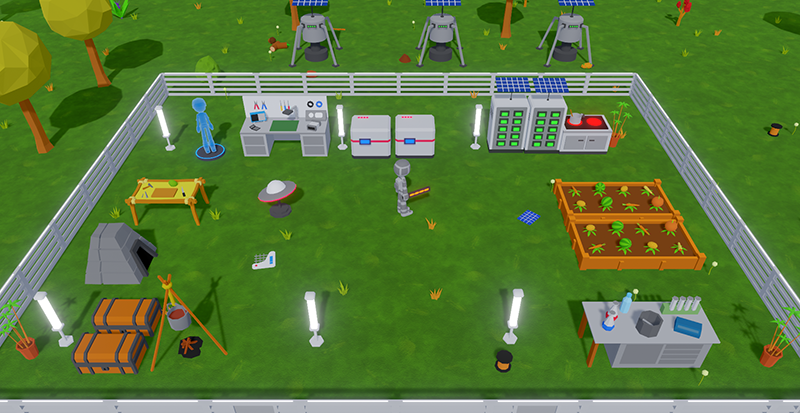
The electronics tier is now implemented in update 10. It adds higher tier buildings, resources and items like electronic components, batteries, solar buildings, etc. It also introduces new types of buildings, a new armor set and weapons. Each tier, now has a decorative building which is used only as a decoration and doesn't do anything else. There is a new biome and a set of new resources. One of those new resources are Glowflies, which are required for crafting lights in the metal tier. There is also a new boss in the new biome.
Map icons
In the previous updates, finding the boss spawn points was unintuitive and relatively complicated. In update 9, the boss spawn points have icons on the map. So now it's pretty straight forward to find them. And the building icons are now simpler and fit better with the overall look of the map UI.
Controls
Starting with update 9, you no longer need to hold the button to pickup items or collect resources. Just press and release. Attacking however, still requires holding the button (this might change in the next update). The baseline player movement speed is increased. And the animations for picking up items and collecting resources are faster.
I watched Rye Games play Unknown Planet on YouTube and at one point in the video, he was trying to pickup an item behind a palm tree and thought he couldn’t pick it up, even though he could. So, if you are a new player and you read this: you don’t need to point the mouse to an item, to pick it up. You just need to be near it.
Timestamped at 12:37
https://www.youtube.com/watch?v=NidvHTFVst0&t=757
Inventory slot
The controls for interacting with an inventory slot are now rebindable in the settings. And there are a couple of new QOL controls. Middle Click grabs a half stack. Right Click equips and de-equips weapons, tools and armor equipment. Left Shift + Left Click quickly transfers an item between the player’s inventory and an opened building (storage chests, crafters, etc.)

Graphics
The graphics for some of the existing biomes have been updated and have higher resolution textures. The game now uses a different renderer and tonemapper and it looks brighter. The UI was revamped and has new icons, colors, buttons, rounded corners, etc.
Plants
The plants don’t have a generic 3D model anymore. They each have their own miniature version of the 3D model which grows over time. That way, they are distinguishable right away at a glance. The plant collision was reworked as well, so now you can plant them in a grid even if they overlap with each other. You can hold Left Ctrl while planting them to snap them to a grid.

Enemies
Enemies that spawn periodically to attack the player, now spawn pretty close to the player and have a spawn animation, rather than just appearing out of nowhere. They also attack buildings if they get near one.
Food and water
Update 9 introduced 3 new types of items for cooking: vegetable, food and water. The cooking mechanic has been revamped and cooking is done by combining types of items, rather than specific items. So, you can combine food + water or vegetable + vegetable, etc. There is a new building in the electronics tier, where you can cook meals. Some of the campfire recipes are different, and you can also cook the vegetables in the campfire.
Update 9 also introduced a new vegetable garden in the metal tier, where you can grow vegetables. It’s a nice way of streamlining the food and water mechanics of the game, so after a while, you don’t have to spend time running around picking up fruits, mushrooms, meat, etc. The vegetable garden, combined with the new cooking mechanic, makes the survival aspect of the game easier, once you unlock the metal tier.

World generator
Sometimes, the world generator would generate a biome that doesn’t have enough space for all the resources that go into it. And the game would log an error in the console saying there is not enough space for all those resources. In update 10, the world generator now automatically adjusts the number of resources based on the size of the biome, so this error should not appear anymore in the console.
Conclusion
The next update will add some of the end game content and revamped NPCs and combat mechanics. As always, if you encounter any bugs or have some feedback, let me know in the discussions forum and have fun playing the new updates.
Update 8 - Bosses
- Added bosses to the game
- 2 bosses and 2 boss lairs (spawners)
- Defeating bosses is now required to unlock building and crafting tiers
- 2 bosses and 2 boss lairs (spawners)
- Added electronics tier
- Electronics workbench
- Battery powered buildings
- Hand drill
- Welding torch
- Electronics workbench
- QOL
- Map is now full screen
- Floors and walls no longer have icons on the map
- Map icons scale with zoom level so they are visible when zoomed out
- New indicators for player rotation and highlighting objects
- Boss spawners can be located by hovering the mouse over locked building buttons
- Floor remover tool for removing floor tiles
- Floors and walls are now forced to snap to grid
- Any builder tool can build any blueprint tier, but at different speeds
- Shadows cast by lights (in some cases) are higher resolution
- The camera is positioned at a lower angle
- UI improvements
- Map is now full screen
- New world generator
- Generates rivers and landmasses
- New biomes
- New resources
- Generates rivers and landmasses
- New crafting recipes
Bosses
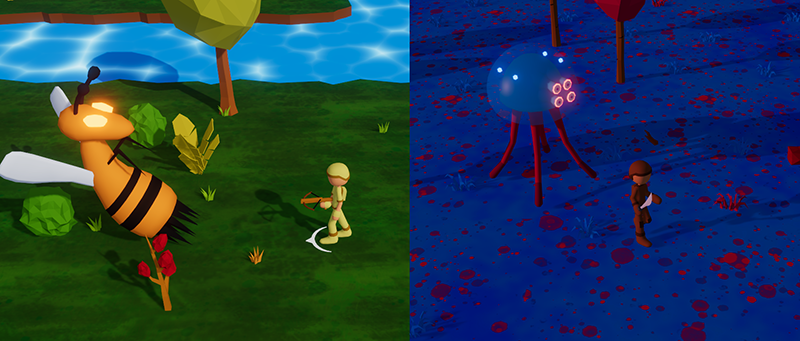
The game now has bosses which are larger and beefier than normal enemies and they have an additional attack besides melee. They can only be spawned by damaging their lair. And each boss can only be spawned 4 in-game days apart. The building and crafting tiers are now locked and you have to defeat a specific boss to unlock a specific tier. The boss lairs can be located if you hover the mouse over the locked building button and an arrow will point you in the right direction.
Electronics
The base electronics crafter, now introduces the electronic tier in the game. And also introduces battery powered buildings to the game. These types of buildings have to be recharged with a battery. New tools include the hand drill and welding torch. The hand drill mines resources much faster than any axe or tool and the welding torch is for constructing blueprints faster.

QOL
The map panel has been reworked. It’s now full screen and the zoom level doesn’t affect the icons sizes. So even if you zoom out, you can still see the player and the buildings on the map.

The player has a new rotation indicator which is an arrow that points in what direction the player is attacking/mining. And highlighting objects no longer highlight the whole object, but rather there’s an indicator on the ground.

Floors and walls are forced to snap to grid when being placed and floors can now be removed with a special tool. Builder tools can construct a blueprint from any tier, but the higher tier tools construct faster.
World generator
The world generator was reworked completely from scratch and it now generates a terrain with rivers and landmasses and bridges that connect the landmasses. It also generates biomes differently including 2 new biomes. One of the new biomes is empty (as of right now) and the other one has new resources in it.

New items
At this point I’ve lost track of what is new in the game and what is not, so these are all the items in the game, so far.

As always, feedback is appreciated.
And have fun playing.
Update 7
Update 6 was released about a month ago, but that update contained only QOL and UI updates. It didn’t have any new content so I didn’t post about it. I’ll include some of the new things in update 6 in this post.
Structures
This update introduces structures to the game. Structures are fences, doors, floors, and torches. Currently there is the primitive and metal tier versions of these structures.
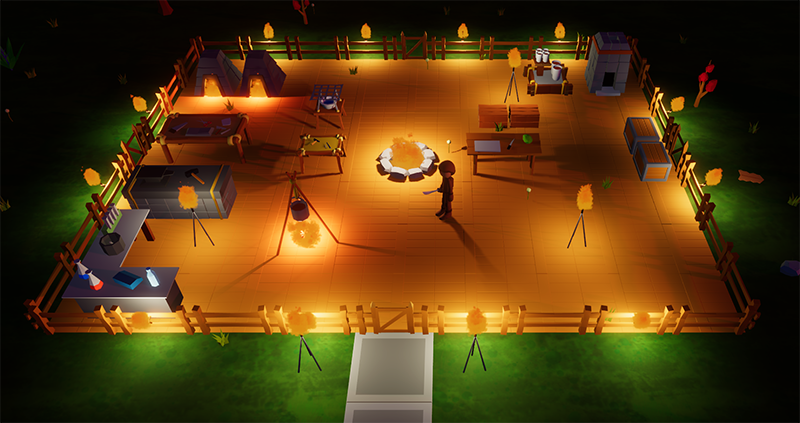
You can build them free form, or you can snap them to grid for a nice layout. The structures are designed to build seamlessly when they are snapped to the grid. Every tier contains a fence, fence with torch, floor and a standalone torch.

Fences with torches and standalone torches don’t consume any fuel, so they can be used to light up the environment at night without having to pay attention to fuel consumption. And they can be set to automatically turn on during the night and turn off during the day. So, light at night is less of an issue.

Buildings are now organized in tiers. Different builder tools can build different tiers of buildings. There are currently 2 tiers in the game: primitive and metal. These are the current available buildings in the game:

Buildings now have hp. And you can damage them with anything that deals damage except for builder tools. Builder tools can be used to repair buildings of the same tier as the tool itself.
New UI
The UI was updated across the board. It has a new color scheme, new icons, tooltips and scrollbars to make some things clearer, and some elements were moved around to make the UI more organized.
Tooltips now contain a bit more information. And some text is color coded to make it easier to read important things at a glance. Tooltips now contain the hp of an object. Enemies are highlighted when you hover the mouse over them and they have a tooltip which includes their hp.

When you open the map, you can now drag it around and zoom in quite a bit. There 2 buttons on the map, one that zooms out and resets the whole map and the other button, zooms in and focuses on the player. The player icon now rotates according to the player rotation. Buildings that are placed are now also visible on the map.

Rotation indicator
When the attack button is pressed there is now an indicator that shows the exact point that the player is rotating towards. And if the mouse hits an object, then the rotation of the player snaps to the base of the object.

Other stuff
- Over the last 3 patches or so, I refactored the saving/loading system in the game, because the previous system was causing a lot of issues for maintaining save files compatibility between updates. Because the game is changing so much from update to update, maintaining save file compatibility became very time consuming. The new system however doesn’t have those issues and in update 7, this new system is done. Hopefully, this means, now I can spend more time adding new things to the game rather than doing backend coding that nobody cares about.
- Ammo now has a dedicated slot found in the equipment UI. If you want to use your ammo, it needs to be put in that slot.
- Every non-UI button in the game can now be rebinded in the settings. There are 2 new input buttons: snap to grid and rotate, which are used for rotating buildings and plants and placing them on a grid.
There are a bunch of new items, crafting recipes and other new things, but I don’t want to spoil everything, so I’ll just leave it at that.
As always, have fun playing.
Update 5
This is a smaller update that features mostly backend changes and improvements, which lay the foundation for some of the new mechanics that will be coming in future updates. So, from the players perspective, not much has changed in the game.
However, there is one important thing in this update. Starting with next patch (update 6), the game will only be able to load save files that were saved with this patch (update 5) and later patches. So, if you want to keep playing your old save files, make sure you load them with this version and save them again.
Even though the backend changes took up most of the development time for this patch, some new content did make it into this update.
Light sources (besides the sun) now cast shadows.
Here is how it looked before and after.
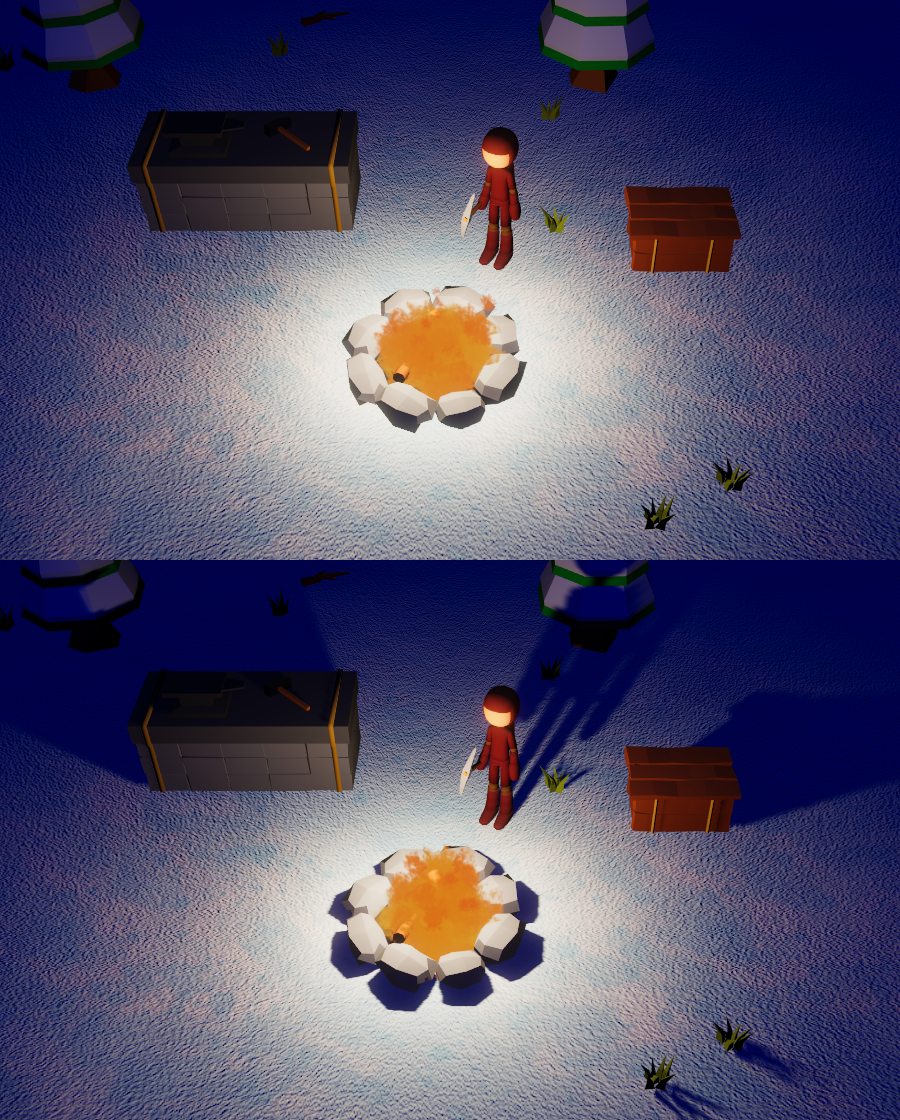
There are 8 new items.

There is 1 new building.

One new resource and resource type: Water pond (resource) and liquid pool (resource type).
And a new mechanic in the game: collecting liquids from pools.

Other stuff
- The procedural world generator was updated and optimized. It now takes a couple of seconds to generate a new world or load a game. Previously it took 15+ seconds. Although this depends on your pc's processor.
- There are 2 new item types: Liquid and material collector.
- Liquid items disappear when dropped, so you need to keep them in (any) inventory at all times.
- The shovel was removed and replaced with a material collector, which can be used to collect materials from the ground and liquids from pools.
- Camera zoom in/out keys can now be rebinded in the settings.
- The UI now scales with the resolution (previously the UI stayed the same size, no matter what resolution you were using).
- And a bunch of new crafting recipes.
As always, have fun playing.