To accompany you in your USC: Counterforce progress, every week we're sharing a new guide for you to become a true pro! For the fourth wiki section, we are focusing on the Campaign.
Here you can find in-depth details about the campaign. The Campaign mode offers a rich and challenging experience, especially for those new to the game or genre. This guide will walk you through the basics to ensure you get off to a strong start. Check out our "Campaign" section:
Here is the table of contents of our Campaign section:
Starting Your Campaign
Begin with the Tutorial
Explore other game modes
Adjusting difficulty
Read the Encyclopedia and online Wiki
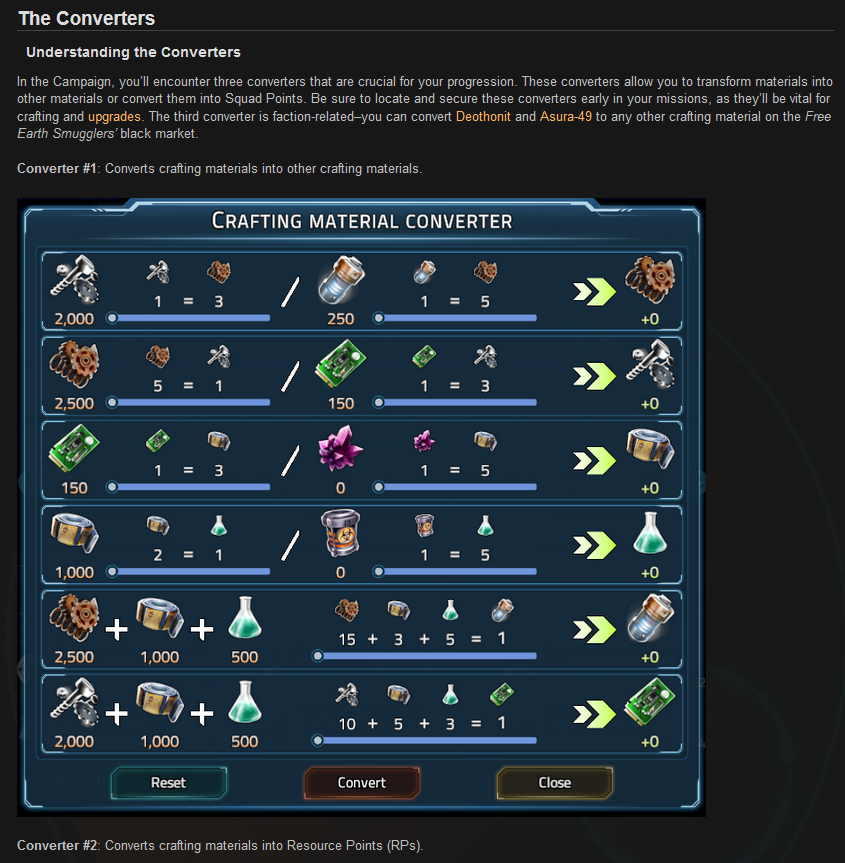
The Converters
Understanding the Converters
Deothonit (Crafting Material)
Deothonit Mining and Looting
Tips and Strategies
Squad Assembly
Skills
Weapons and Equipment
Avoid Large Hordes/Nests Early On
Use Nukes in Desperate Situations
Maximize Loot
Loot Databanks for Prototypes
Favor a Faction
Know when to Extract
Assess Mission strength
Study Tactics
With these tips and strategies, you’ll be well-prepared to tackle the challenges of USC: Counterforce's campaign mode. Remember, each mission will test your strategic thinking and adaptability, so keep learning, experimenting, and refining your approach. Good luck, Commander!
Here is an example of the information you can find, here "The Converters"
As always, if you have any questions feel free to ask them in the Steam discussions. We're always attentive and will do everything we can to help!
The USC: Counterforce team
Wiki: Weapons & Ammunition
Hello Marines,
To accompany you in your USC: Counterforce progress, every week we're sharing a new guide for you to become a true pro! The third week we are focusing on Weapons & Ammunition.
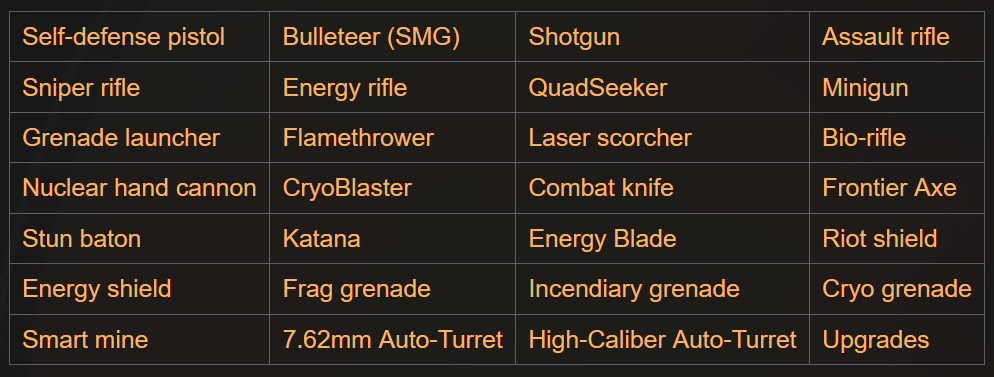
Here you can find in-depth details about Weapons and Ammunition, including recommended/possible Skills and Specializations, along with tips and hints that are valuable during encounters with the Horde. Looking to learn more about your gears and how they work? Check out our "Weapons & Ammunition" section:
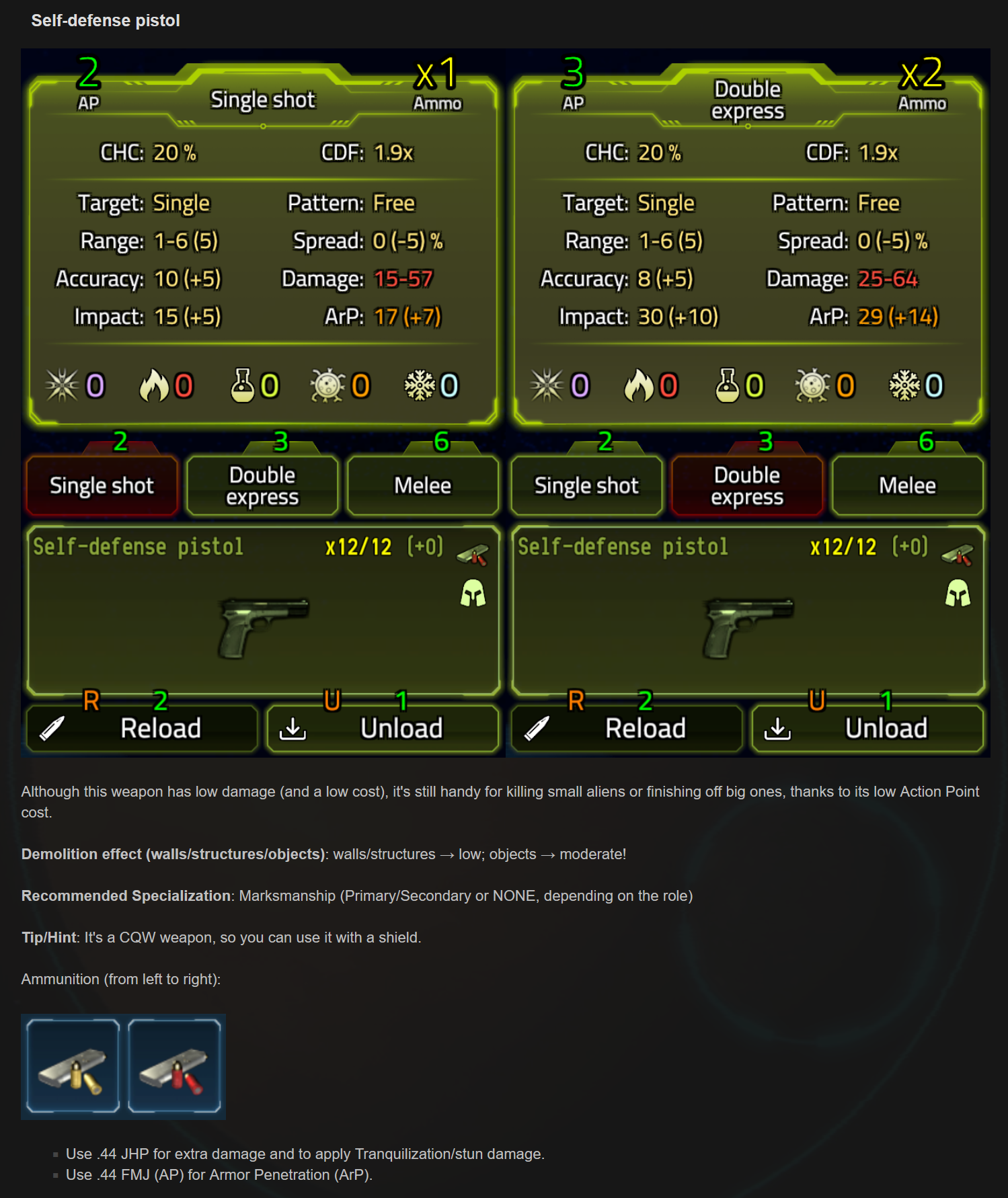
Here are the different roles detailed in the guide: Here is an example of the Self-Defense Pistol entry: As always, if you have any questions feel free to ask them in the Steam discussions. We're always attentive and will do everything we can to help!
The USC: Counterforce team
Wiki: Xenology
Hello Marines,
As you might know USC: Counterforce is very deep in terms of strategies and has a lot of intricate designs. To help you in your progress, every week we're sharing a new guide for you to become a true pro at USC: Counterforce! The second one is focusing on Xenology.
Here, you can find information on the types, strengths, weaknesses, and tips to consider about the aliens you will face during the game. Looking to learn more about the different enemies and aliens? Check out our "Xenology" section:
Here are the different enemies detailed in the guide:
Wurm
Alpha Wurm
Crawler
Alpha Crawler
Skitter
Swarmer
Scorpion
Alpha Scorpion
Wormpig
Alpha Wormpig
Organ Shepherd
Reaper
Alpha Reaper
Reaper Mother
Shadow Envoys
Wunderwurm
Nest gland, eggs
Environmental Hazards + The Service tunnel hatch
Here is an example of what the "Wurm" info are:
As always, if you have any questions feel free to ask them in the Steam discussions. We're always attentive and will do everything we can to help!
The USC: Counterforce team
Minor Update -- v1.00.7a (b240823)
USC:CF v1.00.7a, build 240823
CHANGES
The game will now also auto-save every Turn during missions when playing with the "Drill" session type
FIXES
Campaign: fixed a critical bug where you couldn't reload base defense missions in a very particular case (dead marine in sector from a previous defense session)
Fixed a critical bug where you couldn't start a Reach extraction point or Acquire data Single Mission with Fog of War turned OFF
Fixed a rare critical bug where the game would become stuck on the "Saving..." screen in some cases when a dialog was also being displayed
Minor Update -- v1.00.6a (b240820)
USC:CF v1.00.6a, build 240820
BALANCE/GAMEPLAY CHANGES
Multiple changes to general Campaign difficulty/progression:
Alien aggression (resulting in more Envoys and Greater Envoys) will now taper off more rapidly, especially in the first half of the Campaign
Alien aggression will no longer gain an *extreme* spike after nuking a big horde
The overall grand total number of active aliens in hordes is now "capped" at a lower limit than before, especially on harder difficulties
Scorpions, Skitters, and Acidyas are now introduced more gradually during the first 15-25 Mission Phases (retroactive if you're still relatively early in your playthrough)
Organ Shepherds, Envoys, and Greater Envoys are now introduced a bit later and more gradually (in their numbers) than before
The outdoors insertion phase of derelict sites and surface faction operations will now feature about 30% less aliens, and more cover (bigger buildings if there are less rocks)
Campaign: a unit of collected Asura-49 item (dropped by dead Wunderwurms) will now yield 25 Asura-49 crafting material (up from 15)
Campaign: a unit of collected Deothonit item (from destroyed crystals in mines & caves) will now yield 10 Deothonit crafting material (up from 5)
FIXES
Campaign: fixed a bug where some missions could be very similar in map structure due to a small error in RMG configuration
Campaign: fixed a minor UI bug where the Requisitions Credit income display was not immediately updated when your renown with USC changed during a transaction on the Comms screen
Campaign: fixed a minor bug where you could receive multiple (false) notifications about a mission being completed when you extracted a unit without the datadisk in the 3rd phase of particular operations
Fixed a bug where some melee weapon upgrades (base and roll damage bonus) were giving flat additive bonuses instead of percentages
Additional minor UI fixes
Wiki: Squad Roles
Hello Marines,
As you might know USC: Counterforce is very deep in terms of strategies and has a lot of intricate designs. To help you in your progress, every week we're going to share a new guide for you to become a true pro at USC: Counterforce! The first one is focusing on Squad Roles.
This entry covers the possible roles in a squad, including their Skills, Weapons, Equipment, and more, with examples, advice, and other details. Looking to learn more about the different Marines' roles? Check out our "Squad Roles" section:
Here are the different roles detailed in the guide:
Bastion
Sniper
Medic
Technician
Heavy arm specialist
CQW
General role
Here's an example of what you can find in the wiki, for the Bastion:
As always, if you have any questions feel free to ask them in the Steam discussions. We're always attentive and will do everything we can to help!
The USC: Counterforce team
Hotfix -- v1.00.5b & v1.00.5c (b240814)
USC:CF v1.00.5b, build 240814 (hotfix for v1.00.5a b240813)
(note: build number in-game remains unchanged)
FIXES
Fixed a rare critical bug related to nests/eggs in mines/caves maps that could cause the game to become stuck on "Alien nest activity"
The fix is retroactive (i.e. if you have a save where ending the turn caused the issue, it should now work properly)
Thanks to all players who helped to resolve the issue by reporting it and providing additional data!
USC:CF v1.00.5c
(note: build number in-game remains unchanged)
FIXES / GAMEPLAY CHANGES
Campaign: when ending a base defense, any turrets that are auto shut down and can't fit into unit inventory will now be added to the stock instead
Minor update -- v1.00.5a (b240813)
USC:CF v1.00.5a, build 240813
BALANCE/GAMEPLAY CHANGES
Campaign: further adjustments to alien reinforcements spawn rate in horde eradication missions
Campaign: the "middle phase" of the Campaign will now trigger sooner on "Story" and "Normal" complexity settings
Note: depending on the complexity setting, story progression to Dream #5 should now trigger after MP 13/23/33 at the latest (pass the MP a couple of times if you're already there and suspected a bug [not corfimed] before this update)
Adjustments to alien reinforcements spawn rate in planet surface missions (Operations, Single Mission)
Victory still requires that you kill (almost) everything, so if there are reinforcements spawning, you'll need to deal with them as well, even if there were 0 aliens left when ending the turn -- this is not a bug!
Alien reinforcements were never and are NOT infinite, though--the rate of the remaining aliens spawning has been now increased significantly to speed up (and give more excitement at) the end of these missions (turn 11+)
FIXES
Campaign: fixed a critical bug where nests could "grow infinitely" and cause issues on starting a mission
The fix is retroactive; if you have encountered this bug, but have a save where you can select the sector to go on a nest mission, it will now behave properly!
Note: use a save where you haven't yet tried to actually start the mission (not an ExitSave, etc. that were made after the game locked up partially)
Campaign: fixed a potential ammo exploit where you could stock already used turrets and then get a brand new one with refilled ammo just by taking it from stock. You can no longer stock turrets that have been ever deployed.
Campaign: fixed faction-exclusive items in the "shop" staying available/not becoming available when you didn't have actual access to the item, but removed/added one from/to stock
Campaign: fixed faction-exclusive items that were only available in the "shop" due to being already in stock having their req./craft buttons & info misleadingly displayed (did not affect gameplay)
Campaign: fixed the crafting material display on the Communications screen sometimes not being refreshed correctly after leaving Squad Assembly
Campaign: fixed sector info panel displaying only half the actual Deothonit yield for mining sites since the last update (did not affect gameplay)
Campaign: fixed a bug where you couldn't save the game on the Squad Assembly or Communications screens (in non-Hardcore)
Campaign: map screen music will now properly stop before playing the dropship cutscene
Fixed an extremely rare critical bug where the game would lock up on "Alien nest activity" [speculative/preventive fix while we're waiting for report details/repro]
Regular update -- v1.00.4a (b240802)
USC:CF v1.00.4a, build 240802
NEW
Added tactical map legend feature
Toggleable with a new information "(i)" button next to the minimap
Added a special shortcut to the Campaign map (F7+F) that toggles the recently added free aim mode ON
Players who have already started a Campaign prior to the last update can use this to play with free aim mode on
Once you press F7+F, free aim mode is permanent in that playthrough from that point forward. It can't be switched back and forth.
Note: if you (re)load a save that still doesn't have free aim mode enabled, you need to activate it again!
The shortcut only works on the Campaign map, not during a mission.
CHANGES
Campaign: alien reinforcements in Horde eradication missions will arrive more consistently and in greater numbers, especially if the Horde is really large (150+)
Additional aliens will now start to arrive when 50% of the alien already in combat have been killed
Reinforcements per wave: (remaining reinforcements / 3) + small default value (1-6, difficulty dependent); min. 11, max. 36
Campaign: the number of alien reinforcements still incoming in Horde eradication missions is now displayed in the objective info
Changed the icon for Armored Beta aliens to a different looking shield icon
BALANCE/GAMEPLAY CHANGES
"Seek & Destroy" missions (in Campaign: Horde eradication and some sub-missions in sites or spec. ops) no longer require that you kill ALL enemies:
The last alien, or the last few aliens if they are below "Reaper threat" overall, combined, won't count as mandatory targets
The "Targets remaining" display will still reflect their total number, but you can expect the mission to end when it's 1, or just about 2-4 with confirmed smaller targets
Nests won't count as mandatory targets at all
Their number will still be shown in the objective info ("Nests: #") so you know, but this won't affect mission completion
Campaign: aliens in Horde eradication will start to flee towards the map edges and leave the area (leading to a quickened victory) once their total number is greatly culled:
This works in tandem with the general update to S&D objective changes
You can expect the aliens to withdraw once their sum total starting Action Points are less than 500 (about 10 larger units), so this depends on situation and difficulty level
Aliens that were able to flee are considered defeated in global Campaign mechanics, so they won't linger around or return in some way in the sector
Campaign: rate of amortization of structures & objects built in bases has been reduced to 15% per MP (down from 20%), and will stop at 40% of nominal value (was 5%)
Note: the same values for non-Campaign "Defend the Base!" games remain unchanged
Campaign: mined raw Deothonit to crafting material conversion rate increased to 50:1 (from 100:1)
Campaign: Asura-49 are now only worth 15 materials per piece (was 25)
Deothonit fragments (loot from crystals in nests & mines) are now only worth 5 materials per piece (was 25)
OPTIMIZATION
Improved the way the game detects screen resolution:
If there are any issues during auto-detection and the display supports it, initial resolution will default to 1920x1080
Resolutions with a "portrait" alignment (greater height than width) will not be falsely auto-detected, and will also not be an option in Settings
Note: please check your screen resolution settings after the update!
Added a way to manually force a particular screen resolution:
0. Please start the game once just briefly after the update so it can create the new "display.ini" file
1. Open the "display.ini" file in any text editor from "c:\Users\[your OS username]\AppData\LocalLow\Angry Cat Studios\USC Counterforce\"
2. Change "forceResolution=0" under "[Resolution]" to "forceResolution=1"
3. Change "width=1920", "height=1080", and "refresh=60" to the values you want
4. Restart the game client
If you experience any issues, you can just delete the file (it will be auto-created with default settings) or set forceResolution to 0, and start the game with auto-detect as before
Note: when forcing a resolution, in-game resolution settings will still remain usable, but will revert to the forced resolution on every game client start
Added a way to manually force a particular UI scaling (independent from resolution):
1. Open the "display.ini" file (see above)
2. Change "forceCustomScaling=0" under "[UI]" to "forceCustomScaling=1"
3. Change the value of "scalingFactor" to a value between 0.7 and 1.
Note: setting "scalingFactor" to 1 will FORCE DISABLE UI scaling.
FIXES
Fixed a bug where the 15 extra bleeding from the Heavy arms primary specialization was sometimes applied to attacks with other weapons
Campaign: fixed Resource Points to Deothonit conversion ratio inflation, preventing some exploits. Now there is a hard cap of max. 200 on selling and a min. 250 on buying.
Campaign: fixed a regression introduced in the last hotfix that prevented managing a sector before you visited the Squad Assembly screen at least once (sorry!)
Various minor UI/localization fixes
Hotfix -- v1.00.3b (b240727)
USC:CF v1.00.3b, build 240727
This is a hotfix addressing some critical issues. (The build number in the main menu won't change, don't fret.)
FIXES
Fixed a regression that prevented the Tutorial mission from starting (sorry!)
Campaign: fixed the second phase of spaceship missions not having an insertion/extraction zone (retroactive)
Campaign: fixed the third phase of spaceship missions where you could extract at insertion (not retroactive)
Campaign: fixed "weapon properties preview" being stuck when starting a mission if a weapon from the "shop" remained selected