Added a "Copy Build Version" button to the console UI.
FIXES
Fixed an issue where passenger and mail transportation income was not affected by inflation.
Fixed various errors that could prevent saves from loading in rare cases.
Fixed an issue where the passenger/mail indicator could remain visible even when disabled.
Update 0.89.0.17
IMPROVEMENTS
Restore previously opened vehicle window tab after vehicle replacement.
FIXES
Fixed option to skip depot not being saved after replacing or copying a vehicle.
Fixed vehicles remaining disabled after replacement if their schedule included a depot.
Fixed vehicles having incorrect cargo setup after replacement.
[beta] Update 0.89.0.17
This changelog is for the beta branch. These changes are not yet live in the stable version.
IMPROVEMENTS
Restore previously opened vehicle window tab after vehicle replacement.
FIXES
Fixed option to skip depot not being saved after replacing or copying a vehicle.
Fixed vehicles remaining disabled after replacement if their schedule included a depot.
Fixed vehicles having incorrect cargo setup after replacement.
Update 0.89.0.16
GAMEPLAY
Scheduled depot stop now has a new option to skip it entirely if no maintenance is needed.
Replacements no longer split vehicles by storages; use routes to separate replacements if needed.
Updated exchange rates for all in-game currencies.
IMPROVEMENTS
Replacement recipes now auto-complete when no matching vehicles remain (e.g., vehicle sold, destroyed, or rerouted).
FIXES
Fixed businesses can stop consuming goods in some cases.
Copied/replaced vehicles now preserve the selected service interval.
Fixed vehicles not picked up by replacement recipe when bought during the same pause as the recipe's creation.
Fixed replacement money threshold input disappearing at 110% UI scale.
MODDING
Added fallback horn logic: if the lead unit has no horn effect, the first unit with a horn will now play it.
Updated Unity to 6000.0.45.
Update 0.89.0.15 beta
FIXES
Fixed businesses can stop consuming goods in some cases.
Update 0.89.0.14 beta
GAMEPLAY
Scheduled depot stop now has a new option to skip it entirely if no maintenance is needed.
Replacements no longer split vehicles by storages; use routes to separate replacements if needed.
Updated exchange rates for all in-game currencies.
IMPROVEMENTS
Replacement recipes now auto-complete when no matching vehicles remain (e.g., vehicle sold, destroyed, or rerouted).
FIXES
Copied/replaced vehicles now preserve the selected service interval.
Fixed vehicles not picked up by replacement recipe when bought during the same pause as the recipe's creation.
Fixed replacement money threshold input disappearing at 110% UI scale.
MODDING
Added fallback horn logic: if the lead unit has no horn effect, the first unit with a horn will now play it.
Updated Unity to 6000.0.45.
Update 0.89.0.13
IMPROVEMENTS
Imrpoved support for very old GPUs.
Update 0.89.0.9
IMPROVEMENTS
Vehicles now attempt to go for maintenance only from stations. This change significantly reduces "can't find way to depot" issues.
Vehicles now remember their next scheduled task after replacement, preventing potential "I'm lost" situations.
The number of 'Vehicle can't find depot' notifications has been significantly reduced
Trains that are flipped while heading to a depot will now cancel the "go to depot" task.
Treat vehicle service costs as part of the vehicle's running costs.
Tooltips no longer get hidden by key presses, making it easier to take screenshots with tooltips visible.
FIXES
Fixed various cases where vehicles failed to find a path to a depot.
Fixed regression where MU edit controls didn't appear.
MODDING
Fixed MU units not remembering chosen liveries for optional units.
MU recipes can now define custom liveries for specific subsets of units (previously, a custom livery had to be set on the first unit for the color scheme to appear in the picker).
Fixed asset loading failure when a vehicle unit asset is missing the Livery property entirely.
Added --no-mods and --no-remote-mods command-line arguments (useful for testing a local mod while subscribed to its remote version).
Update 0.89.0.4-0.89.0.9 beta
IMPROVEMENTS
Vehicles now attempt to go for maintenance only from stations. This change significantly reduces "can't find way to depot" issues.
Vehicles now remember their next scheduled task after replacement, preventing potential "I'm lost" situations.
The number of 'Vehicle can't find depot' notifications has been significantly reduced
Trains that are flipped while heading to a depot will now cancel the "go to depot" task.
Treat vehicle service costs as part of the vehicle's running costs.
Tooltips no longer get hidden by key presses, making it easier to take screenshots with tooltips visible.
FIXES
Fixed various cases where vehicles failed to find a path to a depot.
Fixed regression where MU edit controls didn't appear.
MODDING
Fixed MU units not remembering chosen liveries for optional units (thanks @liptun.red).
MU recipes can now define custom liveries for specific subsets of units (previously, a custom livery had to be set on the first unit for the color scheme to appear in the picker).
Fixed asset loading failure when a vehicle unit asset is missing the Livery property entirely.
Wear & Tear Update
This update brings a brand new layer of challenge to how you manage your transport empire. With the introduction of the wear and reliability system, keeping your fleet in good shape becomes more important than ever. You'll now have to think not just about routes and schedules, but also long-term maintenance and strategic replacements — all while staying ahead of potential traffic jams and extra costs. If you want to dive into the full list of changes, you can find the complete changelog here, as usual.
Under the Hood: Wear and Maintenance
Let's start with the most obvious addition: the new vehicle wear and reliability system. From now on, vehicles will wear down as they're used. Performance reduction kicks in if the vehicle isn't serviced regularly. This makes proper maintenance not just a good idea, but a critical part of your transport strategy. Unserviced vehicles also wear out faster, amplifying the issue.
Once a vehicle becomes fully worn out, it'll demand more frequent services just to stay operational, leading to increasing maintenance costs and longer periods of reduced performance. If left unchecked, this can trigger traffic jams and cascading delays.

Each vehicle now displays detailed wear information in the UI, making it easier to stay on top of these issues. Since a train can consist of multiple locomotives, each one wears down independently — meaning different locomotives in the same train may have varying levels of wear. Wear is also shown in the Fleet Window (based on the most worn-out part of a consist), allowing you to quickly assess each vehicle’s condition at a glance.
To keep everything running smoothly, you'll need to schedule regular maintenance by sending vehicles to depots at appropriate intervals. Service intervals are configurable per vehicle, so you're in full control over how often your fleet visits the depot.
That said, there might be situations where choosing a longer — or even no — maintenance interval could make sense. It all depends on your immediate goals and broader strategy. Whether you're squeezing every last mile out of a vehicle before replacement or minimizing downtime in a critical supply chain, there's room for experimentation.

And speaking of depots, you can now add them directly to a vehicle’s schedule — just like regular stations. This gives you full control over when and where maintenance happens, making it a seamless part of your transport flow.
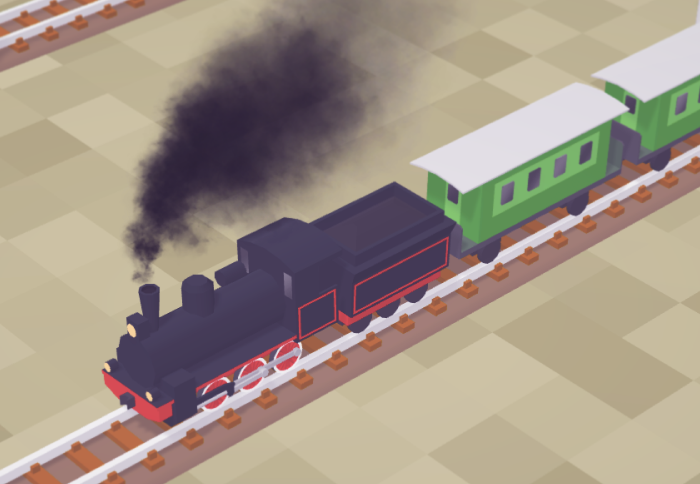
On the visual side, wear comes with a cosmetic touch: smoke emitted from the vehicle darkens as wear builds up, giving a clear visual cue that something's not quite right. In addition, worn-out locomotives and trucks become visibly tilted, further emphasizing their deteriorating condition.
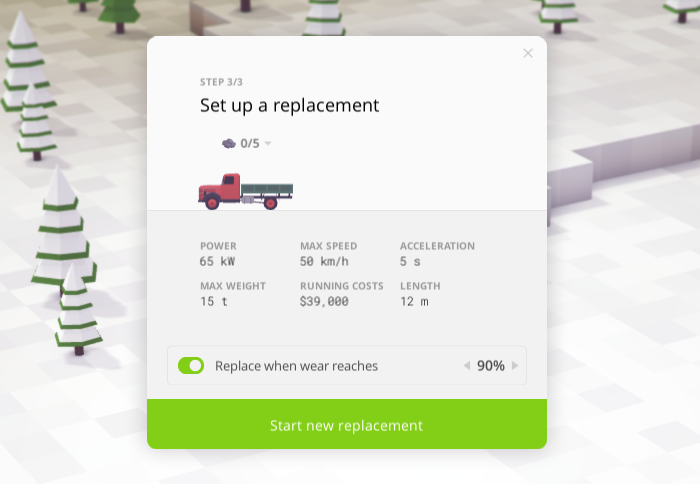
We've also introduced vehicle replacement based on wear levels. You can now set a threshold for when a vehicle should be replaced due to wear. When this setting is enabled, you can also enable self-replacement, effectively allowing vehicles to automatically replace themselves when worn out.
A New Generation of Trucks

Fleet variety has gotten a major boost. We've added brand-new trucks for each generation and reworked older ones to better match today's standards. Shoutout to @scailman for the amazing help with this overhaul!
Each vehicle has also been rebalanced to offer unique strengths and weaknesses. This means your transport strategy will matter more than ever — whether you're prioritizing reliability, speed, or capacity.
Smarter, Smoother, and More Intuitive
Vehicles and buildings are now clearly categorized as "current" or "obsolete" as you progress through research, making it easier to keep track of what's relevant for your tech level.
Higher-tier vehicles are no longer locked behind Tier II depots — instead, those depots now come with the perk of lower maintenance costs. This change also resolves a long-standing source of confusion: many players would research Depot II expecting access to new vehicles, only to discover that those vehicles were gated behind separate research. That disconnect caused unnecessary frustration, and we're glad to be putting it behind us.
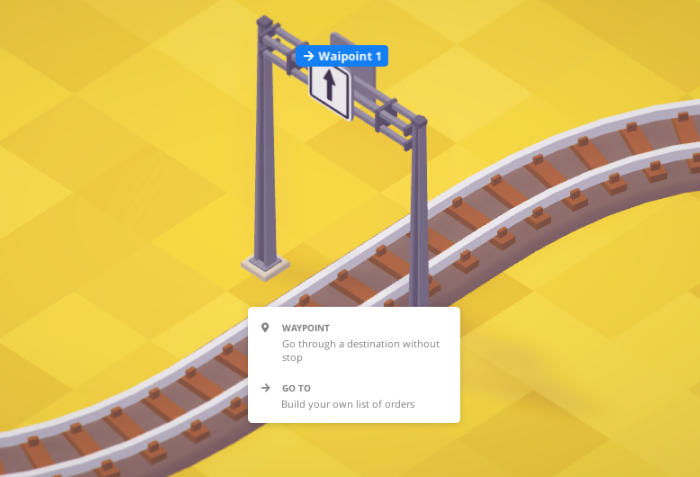
We've also cleaned up the vehicle scheduling experience by removing confusing options that didn't make sense for waypoints.
Another ongoing effort we'd like to highlight is performance optimization. It's something we never stop working on — even if the results aren't always flashy or immediately visible. With this update, we continued the optimization work that began in earlier updates and specifically targeted the Builder Tool window. If you play with lots of mods installed, you should get better performance here: fewer lags, less FPS drops, and reduced memory consumption.
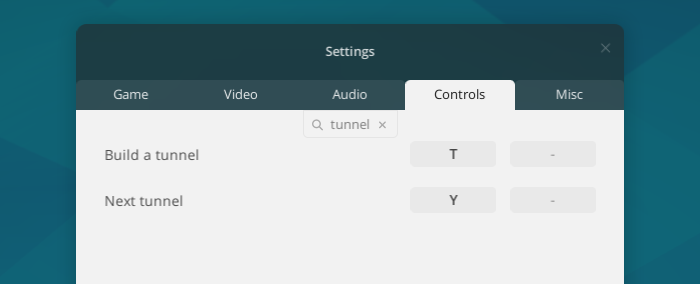
We’ve also made a couple of quality-of-life improvements. When placing signals, the regular signal is now selected by default instead of the pre-signal, making construction more intuitive. Additionally, the Settings window now includes a search function — just start typing to quickly filter and find the option you need.
Squashed Bugs and Polished Gears
We've tackled several stubborn bugs. First up, a rare issue where the UI could become completely unresponsive has been fixed. We also resolved a visual bug affecting heap item storage rendering.
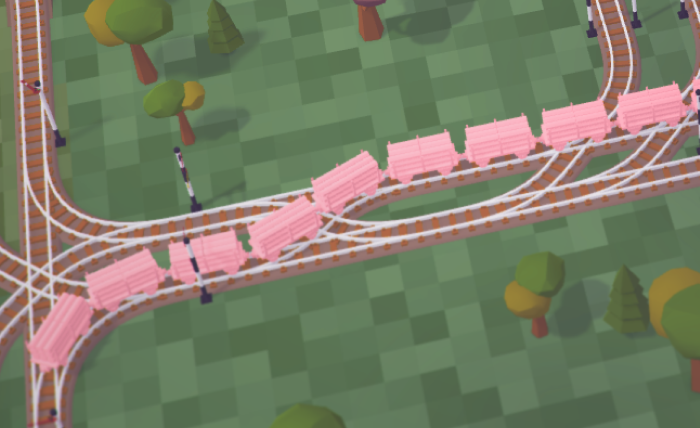
One of the more infamous bugs — the so-called "Worm Train" issue — caused a pink tint to remain after using the vehicle picker tool. That's gone now.
The Worm Train case.
Trains should also behave better when leaving depots. We fixed a case where they couldn't find their path, and another rare but amusing bug where trains could explode when turning around while still partially inside a depot.
For the Modding Wizards

There's something here for modders to enjoy. Most notably, you can now repaint assets directly in the game world using the new Paint Assets tool. To enable it, open Settings while holding Shift, go to the Misc tab, and toggle Asset Paint Tool (you can type Asset to find it). Then reload your save file — the tool will appear in the Toolbar under the Other category. After painting, click on the changed mesh in the list above the color picker to save changes to disk or revert them.
Note that enabling this setting introduces a performance overhead that will persist until you reload the world, even if the tool is no longer in use — so be sure to disable it once you're done, and reload your save file.
Pro Tip: Hold Alt to pick colors from any other asset in the world.
We've also added a new Generation property for buildings, cars, and trains, as well as a Reliability property for cars and trains. There's now a new Experimental vehicle engine type too. Storage definitions have been simplified with a new Bounds property that automatically handles Resolution and Keyframes. Auto price calculation now takes both max speed and reliability into account, making for more accurate pricing behavior.
Thank you 💜
That's it for now! We want to take a moment to say thank you. Thanks a lot for all the thoughtful feedback — it really means a lot that people are still thinking about the game, whether you're actively playing or just keeping an eye on things.
The game is being developed — slowly, but surely. As some of you rightly guessed, it's a passion project, and we're a very small team doing our best to build something meaningful and long-lasting. We always aimed for a steady, honest approach instead of rushing features.
We totally understand if some of you expected things to be further along by now. Truth is, we wish we could move faster too, but we also don't want to compromise the quality and vision we had from the start.
The Rails and Roads Rework is indeed our next major milestone, and we all agree — it's a big one. It's a foundational update that touches core gameplay and will open the door to many long-awaited features and improvements. We're genuinely excited about it, and we think many of you will be too once it lands.
For those of you who joined us recently: what is the Rails and Roads Rework (RRR), exactly? In short, it's a comprehensive overhaul of how railways and road networks are built, managed, and interact with each other. One of the most exciting additions will be proper level crossings — something many of you have asked for. It's a huge technical task, but we're building it to support a more flexible, immersive transport system in the long term.
Again, thanks for your patience and continued interest. Whether you have 900+ hours or you're just discovering the game, we really appreciate you being here.
If you'd like to stay in the loop, ask questions, or just hang out with fellow players, feel free to join us over on Discord — we'd love to have you.