Thank you so much for playing VR SHOOT AROUND!! We updated following contents today.
Version 1.8.7
Bugfix : - The pointer no longer penetrates the ball when grabbing it. - Fixed a bug where the "Settings >> Adjustment >> Analog button press threshold" setting was not reflected correctly depending on the environment.
The current recommended settings are: [Vive Wand] Analog button threshold : 0.5, Throwing power multiplier : 1.2 [Oculus Touch] Analog button threshold : 0.8, Throwing power multiplier : 1.2 [Valve Index Controller] Analog button threshold : 0.02, Throwing power multiplier : 1.0
Please enjoy!! Thanks!!
Update version 1.8.5
Thank you so much for playing VR SHOOT AROUND!! We updated following contents today.
Version 1.8.5
Bugfix / Addition : - Fixed a bug that the ball would not come off if you grab the ball with your hand while grabbing the ball with the pointer. - Fixed a bug that the holizontal rotation of the ball during pull-up shooting was incorrect. - Added "Vertical rotation assist" to the Settings >> Game. When this function is enabled, the direction of vertical rotation of the ball will be corrected to be closer to reality during pull-up shooting.
Please enjoy!! Thanks!!
Update version 1.8.4
Thank you so much for playing VR SHOOT AROUND!! We updated following contents today.
Version 1.8.4
Bugfix : Fixed some tips text in Settings.
Please enjoy!! Thanks!!
Update version 1.8.3
Thank you so much for playing VR SHOOT AROUND!! We updated following contents today.
Version 1.8.3
Addition / Bugfix : Added the function to fine-tune the position of the grabbed ball in Settings >> Adjustment. Fixed a bug where free play rim-net physics would be incorrect after playing 9-hoops.
Version 1.8.2 and 1.8.3 are integrated due to internal reasons.
Please enjoy!! Thanks!!
Update version 1.8.1
Thank you so much for playing VR SHOOT AROUND!! We updated following contents today.
Version 1.8.1
Bugfix : - Fixed a bug where lists would overlap when switching between leaderboard tabs quickly.
Please enjoy!! Thanks!!
Update version 1.8.0
Thank you so much for playing VR SHOOT AROUND!! We updated following contents today.
Version 1.8.0
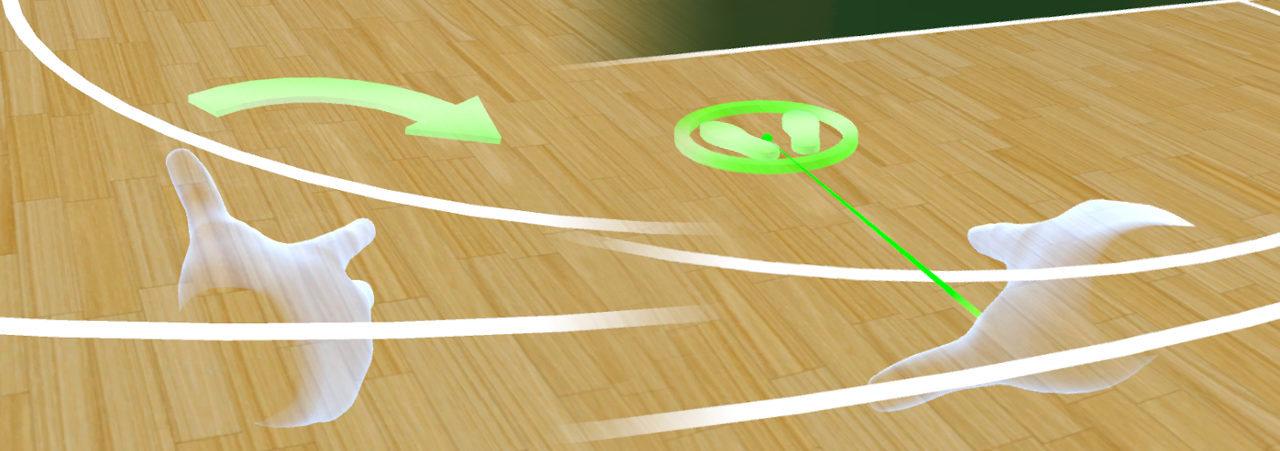
Addition : - The move marker is now displayed when you point the pointer at the destination and press the Up or Down side of the Touchpad (or Thumbstick). - Now possible to rotate the standing position by pressing the right or left side of the touchpad (or Thumbstick). - Now possible to grab the ball with the pointer. (Even if you throw it in that state, it will not be added to the score) - Added the Settings >> Adjustment and moved some setting items between pages. - Added analog button threshold settings to Settings >> Adjustment. - Added the setting to multiply the rotational power of the thrown ball in Settings >> Adjustment. - Added settings for hand object size and rotation to Settings >> Adjustment. - Added controller vibration ON / OFF setting to Settings >> Game. - Added texture quality settings to Settings >> Quality.
Fix : - The display of the controller has been unified to the object of the hand. - Changed so that the pointer is displayed by touching the Touchpad (or Thumbstick). - Height offsets are automatically disabled in mini-games as you may not be able to pick up the ball from the rack.
Bugfix : - Fixed a bug where the teleport destination was incorrect. - Fixed a bug where the UI button couldn't be pressed under certain circumstances. - Fixed a bug where the dropdown button was hard to press. - Fixed a bug where the file list button was hard to press. - Fixed a bug where some reflections were incorrect. - Fixed a bug where Rim-net Physic was behaving unexpectedly. - Fixed a bug where pressing the start button of a mini-game many times would prevent it from proceeding properly. - Fixed a bug that freezes when trying to play an unsupported format video on the video screen.
Other : - The 1.7.2 version that was released has been deleted because it has finished its role.
Almost all features have been revisited and rebuilt for more stable multi-device support and many minor bugs and improvements. The physical behavior is slightly different, so after launching the game, try a series of adjustments with the newly added the "Adjustment" in the "Settings".
Recommended settings : [HTC VIVE] Analog button threshold : 0.5, Throwing power multiplier : 1.2 [Oculus Rift] Analog button threshold : 0.5, Throwing power multiplier : 1.2 [Oculus Quest] Analog button threshold : 0.8, Throwing power multiplier : 1.2 [Valve Index] Analog button threshold : 0.8, Throwing power multiplier : 1.0
And regarding the operating status of OculusQuest, with this update, playing with OculusLink (using OculusLink-cable) is more stable than before, so you can play without problems. We also plan to continue develop an OculusApp version that can be played by OculusQuest2 alone after this update is complete. (Development period is still unknown)
Please enjoy!! Thanks!!
Update version 1.7.6
Thank you so much for playing VR SHOOT AROUND!! We updated following contents today.
Version 1.7.6
Addition/Fix : - Added "Height offset" slider on "Game settings". - Fixed the default value of "Throw power multiplier" from 1.0 to 1.2. - Fixed the default value of "Receive settings". - Fixed the color of the ball. - Fixed some UI design. - Fixed rim-net physics.
Please enjoy!! Thanks!!
Update version 1.7.5
Thank you so much for playing VR SHOOT AROUND!! We updated following contents today.
Version 1.7.5
Addition/Fix : - Added "Valve Index" support. - Added "Throw angle offset" slider on "Game settings". - Changed the name of "Throw power assist" to "Throw power multiplier". - The numerical value of the throw power multiplier has been corrected so that the previous 0.5 becomes 1.0 (For example, the previous 0.7 will be 1.2) - Fixed the maximum value of "Throw power multiplier" from 2.5 to 2.0 - Fixed rim-net physics.
To be honest, I was hesitant to deal with Index officially because the trajectory when throwing the ball using the Valve Index (probably Index controller) was unnatural (flying too high in my environment). However, with this update, we have added a slider for finely adjusting the trajectory of the ball, so I think that you can get closer to the natural trajectory. Sorry for your inconvenience but when playing with Index, please adjust the throw power multiplier and the throw angle offset first.
Please enjoy!! Thanks!!
Update version 1.7.4
Thank you so much for playing VR SHOOT AROUND!! We updated following contents today.
Version 1.7.4
Fix : - Fixed a problem that could not be load if the path contains special characters on "Logo controller". - Minor fixes for memory management on "Logo controller" and "Video screen".
Please enjoy!! Thanks!!
Update version 1.7.3
Thank you so much for playing VR SHOOT AROUND!! We updated following contents today.
Version 1.7.3
Addition/Fix - Added "Correct thrown ball rotation" toggle on game settings. - Moved "Brightness" setting to quality settings.
Note: Due to change specification of the settings, all settings (throwing strength, coat color, etc.) will be reset if you have never upgraded from Version 1.6.10 or earlier. If you want to take over the settings, please install Version 1.7.2 by the following method.
[Steam client] > [Library] > [VR SHOOT AROUND (Right click)] > [Property] > [Beta (Tab)] > [1.7.2 - For taking over settings] > [Close]
By starting and exiting the application once after installation, the settings will take over correctly. After that please return the tab from [1.7.2 - For taking over settings] to [NONE - Opt out of all beta programs] and install the latest version.