Welcome to VRChat 0.12.0p12! We’ve got a few changes and fixes.
Before we get started, just so you know, VRChat released on Steam one year ago as of yesterday! Insert cake and confetti emoji here
On to the patch! Here’s a summary.
Invite and Invite+ Instances
We talked about this in an announcement a few days ago. This is how Invite instances will now function:
Invite : These are very private. The owner can accept invite requests and send out invites. Occupants can get notifications that people want in.
Example: Tupper owns an Invite instance, and Ron is in the instance with him. VRPill wants to join the instance, and sends an invite request to Ron. Ron gets a notification without any ability to invite, and must tell Tupper that VRPill wants an invite. Tupper can send VRPill an invite, and VRPill can join.
Invite+ : Somewhat private. The owner and any occupant can accept invite requests to let people join.
Example: Tupper owns a Invite+ instance, and Ron is in the instance with him. VRPill wants to join the instance, and sends an invite request to Ron. Ron can click "Accept", and VRPill will be invited into the instance.
Updates
Friends list is now sorted alphabetically.
User lists on the social page are now expandable.
The small Red Arrows that allow expanding of rows in menus have been replaced with Expand and Collapse buttons to make that functionality more clear. Try it out in worlds, social or avatar menus.
You can now join off friends in Friend instances if the owner is also your friend.
Technical Changes/Fixes
Object owner disagreement between clients has been fixed. This was causing pickups to fly around worlds.
Fixed notifications showing up blank in some cases.
The forced audio source falloff curve in the SDK has been fixed.
Please keep in mind that our systems may be changed and improved in future patches.
Close VRChat and restart Steam to get the latest update! Look for Build 507 at the bottom of your Quick Menu to ensure you’re on the right version. Also, make sure you update your SDK! https://vrchat.com/home
As always, we thank you for your patience and continued support!
The VRChat Team
VRChat Patch 0.12.0p11
Dear Community,
This patch has ongoing server and security updates which should improve the overall experience for everyone in VRChat. We've also fixed some bugs and updated a few systems to improve usability. In addition, we've begun to lay the groundwork for future features and systems now in progress. We care about our awesome community and want to thank everyone for their help and patience. We look forward to some very exciting things coming soon.
The VRChat Team
RELEASE NOTES
Eye simulation works again!
Audio bug progress. Should be less frequent but if you encounter it please send us video or steps to reproduce.
Fixed issue where certain pickups only could be picked up by master.
Fixed issue where static portals didn't take users to the same instance.
Local testing has been fixed (requires new SDK, which can be dowloaded after logged in from https://vrchat.com/download/sdk).
Fixed issue where objects deleted caused performance drop.
In the world details we now show 20 automatically selected instances of a world that are sorted to be more meaningful to users, instead of all instances of that world.
Fixed bugs and updated the automatic instance selection where users were loading into an empty hub or other worlds.
Fixed bug that caused you to not be able to invite people whom where in a private instance
Automatic instance selection is used in the following cases:
- when joining the HUB (or any room) on launch
- used to select the instance that appears in the upper left on the worlds menu
- used to pick the instance that a dynamic portal goes to
- used to pick the instance that a static portal goes to when someone walks through it
And finally...
Due to security updates, you can no longer request invite from people in private instance. In the last patch for various reasons we deliberately and temporarily enabled a user to request an invite from anyone in an invite only instance. However, that meant invite only instances weren't truly controlled by the author/owner. We are aware that might be slightly confusing or frustrating. Going forward some systems, including instances and notifications, will be getting updates to improve VRChat travel and flow.
An open letter to our community.
Hello everyone.
The VRChat Team would like to take a moment to speak to our rapid community growth in the past month along with some of the issues we’ve faced along the way. We’d also like to share with you some insight into our team and our vision for the future.
First off, we’re dedicated and passionate but we’re not a very large team. We all work extremely hard but, like most people, we have families and real world responsibilities to manage. Most of our growth began at the start of the holiday season. That meant portions of our already small team were spending time with family and on vacation. The timing of explosive growth could’ve been better but we managed it as best we could. As we’ve returned in the new year and with the team back at full strength we’ve been working hard to address issues and get pieces into place for a better VRChat future.
So why did we grow all of a sudden? There are many factors but some that have no doubt contributed to it. To name a few, thanks to many talented Twitch streamers like Pokelawls, TSM_Dyrus and Youtube creators like Nagzz21 we’ve become one of the most watched apps/games on Twitch, YouTube and Social Media (more at list below). Many others have joined the party and all have helped grow our popularity. They share out daily their VRChat fun and adventures to thousands of viewers around the clock. We went from sort of known to everyone knowing about VRChat almost overnight. We’ve gotten to know that community well and our hats are off to them for their ongoing contributions and help.
Another reason for our growth is we continue to attract lots of creative and talented creators. They have not only been adding their own content but also forming groups and helping in various ways from our discord, from making tutorials on how to create avatars or build worlds to organizing events. We’ve also gone global. Our discord community has many channels now for various languages around the world. The core of VRChat is an amazing hotbed of community creativity, sharing of knowledge, connections leading to collaborations, events, learning and more. We’re thankful to everyone involved for all their passion and creations. Coming soon we’ll be adding Playmaker (https://www.assetstore.unity3d.com/en/#!/content/368) which will help users add even more interactivity to their worlds.
With our rapid growth our server tech had to also scale up at an insane pace over the holiday season and that’s kept us on our toes for the past few weeks. Our server team has been very hard at work attempting to fix all the issues and improve the quality of connections for everyone going forward. We’re grateful for everyone's patience during this effort and will hopefully have more stable and more efficient servers very soon.
One of the biggest challenges with rapid growth is trying to maintain and shape a community that is fun and safe for everyone. We’re aware there’s a percentage of users that choose to engage in disrespectful or harmful behavior. It is our top priority to address the quality of the VRChat experience, especially for new users, and our team will continue to work toward improving that. We have a trained and dedicated moderation team that monitors VRChat constantly. They are actively educating or removing users from the system for bad behavior as called out here https://www.vrchat.com/community. Additionally, we’re working on new systems to allow the community to better self moderate and for our moderation team to be more effective. We are confident we can achieve a higher quality experience for new users in the near future.
For the time being, please use all the available tools to keep yourself safe in VRChat. We know these are far from perfect.
Use the Mute / Block feature (https://www.youtube.com/watch?v=nDOtvWuUbhQ)
Mute all Toggle found in the system menu which will mute everyone except those you are friends with
Hang out in Friends or Invite Only Instances if you wish to insulate yourself from the general population
Create a link to an invite only world or navigate to worlds through www.vrchat.com.
You can also report users for offensive behavior and violations of the community guidelines (https://www.vrchat.com/community) at https://goo.gl/forms/c58w1QptpKbv4yEV2.
All of us on the team are users of VRChat. We listen to our community. We care about the issues. If you are reading any of this and feel that you’d like to help, there are many things you can do. We have an active discord (https://discord.gg/vrchat) and canny (https://vrchat.canny.io/feature-requests) which can be used to get involved in the community and provide feedback and ideas for VRChat. Canny is like a mini Reddit that allows user to post ideas which can be voted on and commented on. We scan all feedback including the canny a few times a week and try and include as much as we can into our roadmap. You can also email us directly at hello@vrchat.com. Please be patient with us responding.
We’re excited to have so many passionate people joining our community. We look forward to working with you to make VRChat a better place.Thank you for your patience as this wonderful community continues to grow.
It was been a busy winter for VRChat, with concurrent users now reaching 12,000 and more. People from all over the world also celebrated New Years Eve in VRChat from Virtual Time Square, which we will be improving every year with new features. If you missed the event, you can stop by VRChat Times Square and experience it, including a live Twitter feed on one of the billboards.
We've been busy reading the support feedback coming in, and starting now we will be bundling all VRChat core worlds into the Steam download. What does that mean for you? No more waiting for official worlds like the Hub, bowling, etc. to download upon entering VRChat! This won't go live until a few days after this patch.
Avatar Pedestal Optimizations
Avatar pedestals have become increasingly popular in the past few months. Dozens of users have rooms set up where players can browse through sometimes hundreds of avatars to change into. We've received feedback from players that many of these rooms were causing performance issues, thus have set avatar pedestals to now show a floating image. We may make this an optional setting in the future.
Email Verification on non-Steam Clients
All non Steam accounts will need to verify their emails to login to the client. You can resend your verification or update your email address from www.vrchat.com/home/profile.
A full list of features and fixes can be found at https://www.vrchat.com/release
Going Forward
Playmaker is right around the corner! Don't forget to fill out our Playmaker scripting app on the VRChat Discord at discord.gg/vrchat pinned to the #scripting channel.
Patch 0.12.0p3 - True Friends Only Instances & Community Moderation Tools
Hello VRChatters!
Things have been getting busy over at VRChat, with the community growing fast than ever these past few months. In order to accommodate the needs of this rapid growth, we have been focusing heavily on expanding the community moderation tools available to our users. A lot of what we are bringing with this patch will give our community more control over how they want to experience VRChat.
True Friends Only Instances
Due to overwhelming community demand you can now create a new instance called “Friends”. In Friends instances, only friends of the instance creator can join the room. We still have Friends of Friends instances, which are now called Friends of Guests, which you’ll see displayed in some locations as “Friends+”. In Friends+ instances, if you have a friend in the instance, you can join it.
The Public Ban
We’ve added a new moderation feature we are calling “The Public Ban”. We feel that some behavior, while not appropriate for Public or Friends+ instances, doesn’t always warrant a timed or permanent ban. This will allow us to remove users from Public or Friends+ instances temporarily but still allow them to remain in VRChat and use Friends & Invite only instances.
Further bad behavior will result in a review including a full ban. Those that are public banned will be taken to a public ban world to watch a video and learn more about what a public ban means. From there they can still connect with friends until the public ban period has expired.
Website Features
You will now be able to change your email and password from your VRChat homepage.
Send invite-only links to instances from the website. No longer do you need to be online for your friends to join your invite only instances!
Need to search for another user? You can now do it from our website.
Our team has been busy these last few months working on a replacement for the hub we have had since release. We are happy to announce it is now out and is the new default area you load into upon launching VRChat!
The old hub is still available to visit as a regular room, but for now we want to describe some of the amazing features that the new Hub is filled with. We also want to thank all of the community who helped test out the new Hub prior to release.
Let's break down each section of the new Hub.
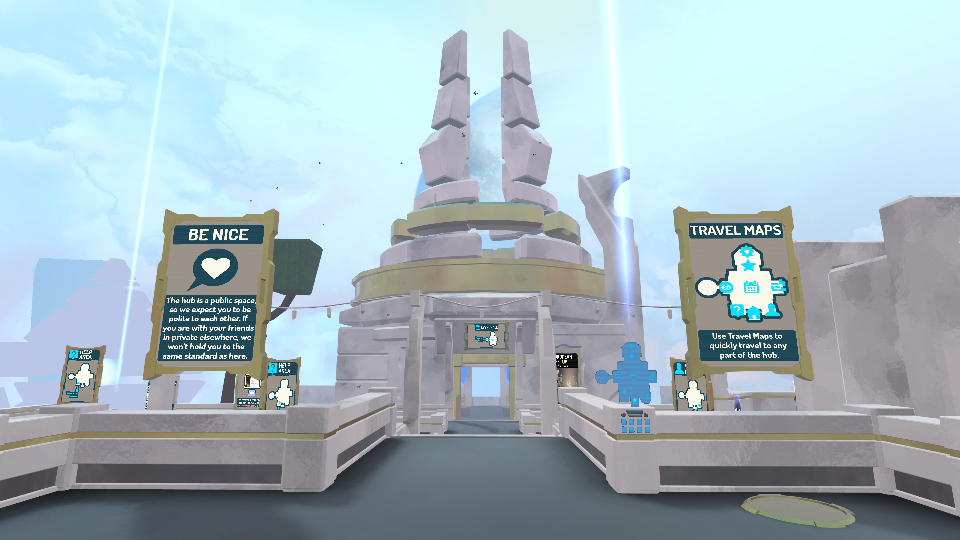
The Hub Entrance
While users now spawn all over the Hub, you can still visit the entrance via convenient travel maps in each section. The entrance has two bulletin boards with up to date information on what to expect in future patches, as well as a friendly reminder to well, be friendly.
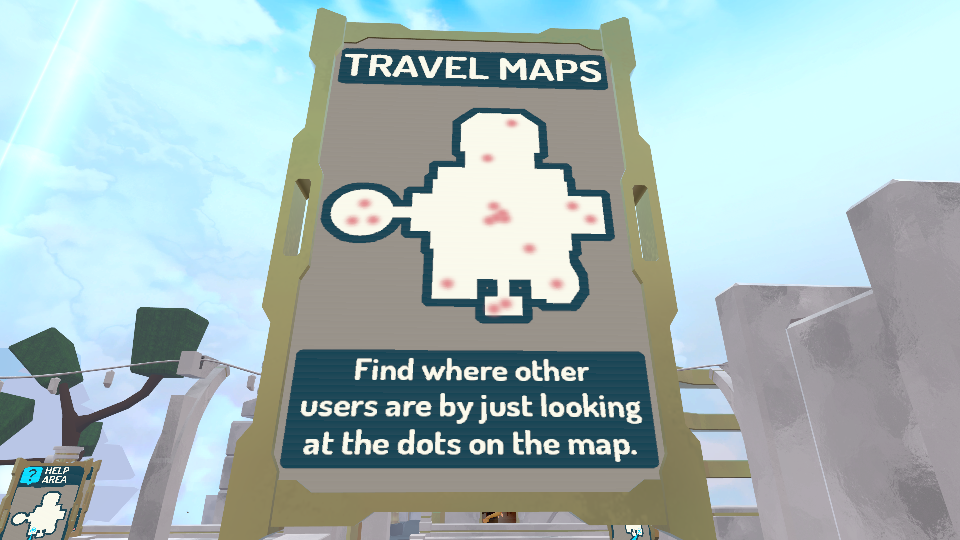
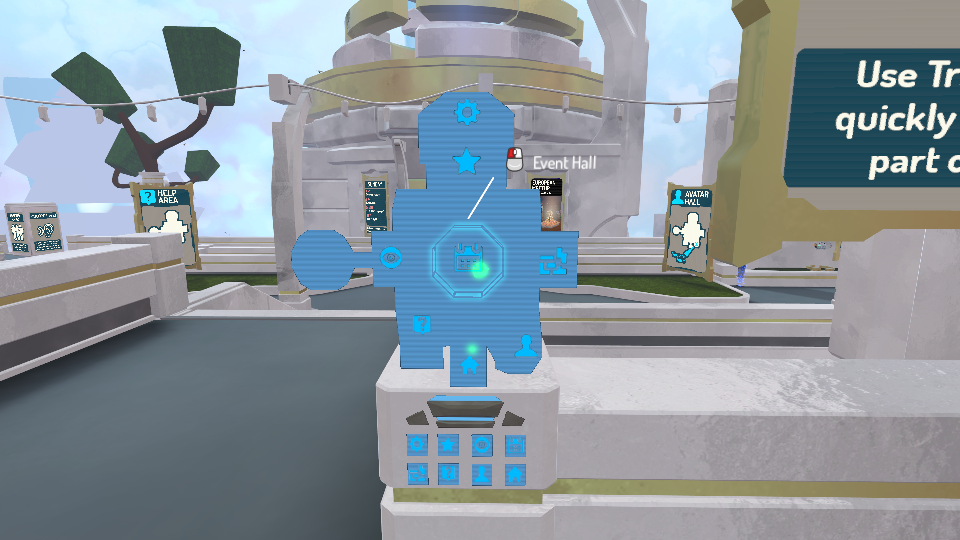
Travel Maps
The new Hub is much larger than the old one, which is why we have included travel maps in each section. You can see where everyone is at any time by looking at the dots on the map. Feel free to also teleport quickly around the Hub by clicking on each area on the mini map.
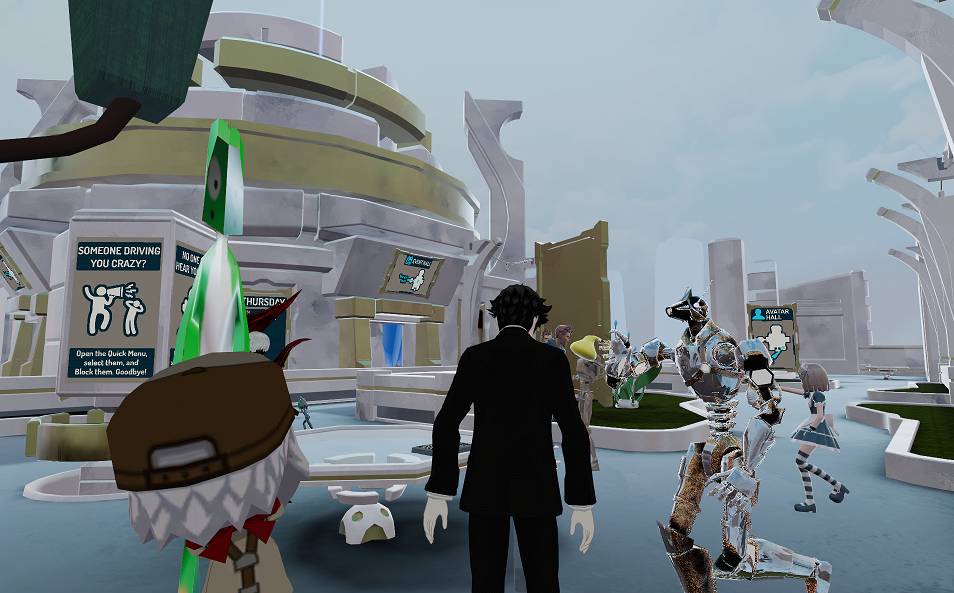
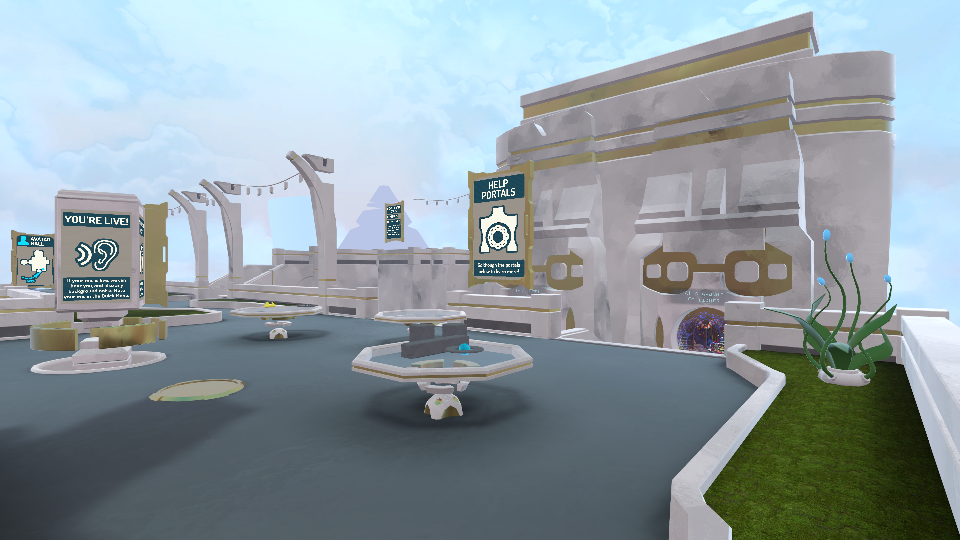
Help Area
Our new help area has informative signs to help new users out, as well as a portal to our new "Help Videos" area. Here you will be able to watch tutorial videos on using VRChat. We have also provided never-ending food to satiate your virtual hunger along with anti-gravity pickup objects.
Avatar Hall
Our Avatar Hall was made to highlight community created avatars as well as direct users towards useful ways to make their own custom avatars. We frequently update it with a different community avatar spotlight, along with information on how to get in touch with the creator. Also highlighted is our partner Morph3d, an easy way to bring in custom avatars into Social VR with no skill required. You can try out their beta at https://morphid.com/. Our Avatar Hall also carries on the tradition of the mirror room, an always popular spot in VRChat hubs.
Event Hall
One of our goals with the new Hub is to make it easier for players to find the community events that are happening all the time in VRChat. Approved events are displayed in spectacular fashion with our Event Hall. During the event, the Hub pylons will activate and a giant beam will be visible from all areas of the hub. There are also signs with our calendar of events, and the 4 most active rooms are shown here, so you always will know where the action is happening.
Featured Worlds
We have countless great worlds in VRChat. Some of our top user created content will be featured here and changed every few weeks. If you have a creation you think qualifies, just keep making great worlds and make sure to request to make them public. The VRChat team is always exploring new areas and keeping an eye out for potential future featured worlds.
New Worlds
Finding a new world in VRChat is now easier than ever. Our New Worlds section contains a constantly changing set of portals that update right as new public worlds are uploaded.
VRCHIVE Panosphere
For quite some time you could take a 3-d panorama in VRChat all thanks to VRCHIVE, a VR image hosting platform. Panoramas taken could always be viewed only on VRCHIVE. Now you can step inside the panosphere in the Hub and experience these panoramas in fulls stereoscopic 3-d in VR. Got a cool panorama you took in VRChat that you want in the panosphere? Post it in our #vrchat-vrchive-panos channel at our Discord, which can be found at discord.gg/vrchat.
Social Sculpture
Our Social Sculpture area provides a space to let your imagination run wild as you create sculptures out of blocks that react to falling water. We can't wait to see what you come up with!
The Birds
We have added advanced AI robotic birds to the Hub. Upon getting close to them they might sometimes fly off. Sometimes they will sit silently. They have a mind of their own. Also you can notice the birds sometimes glitching in the Matrix. This is totally normal. Don't worry at all. Birds are subject to secret upgrades in future patches.
The Fish
We have unique aquariums placed in the new Hub. You can feed the fish by pressing the button located beneath where they swim. Fear not, as there have been no reports of bird attacks on the fish. Their stomach's are endless so don't be shy to keep feeding them.
Jump!
Due to popular demand we have added jump back into the Hub. Some call it a jump, others a hop. Most importantly you are no longer limited to the x and z axis. Enjoy!
That's All
The new Hub is ever evolving, so stay tuned for future updates. We built this for the community. If you have any feedback we want to hear it! Our next patch will include more moderation updates geared towards community use.
Patch 0.12.0p2 - Halloween “Scared to Reality”, Improved Moderation Tools, and VRCHIVE 360° Panorama fixes
Happy Halloween Week!
A month ago we put together our Halloween Contest, “Scared to Reality”, where entrants created custom worlds and avatars for their chance to win prizes including an HTC Vive and more. The submissions are in and the judges will be looking through them this week. On Sunday, October 29th starting at 3pm PDT and going all day and night will be our Halloween event. This event will take place in our Halloween Hub, with portals to all the Halloween rooms, both from the contest and outside of the contest. You will also be able to try out all of the avatar submissions.
Nametags will be temporarily turned off for select Halloween worlds by VRChat.
Author of a world is now able to sticky kick a user from the world for 1 hour, as well as warn a user in the world / instance.
Moderation Improvements
We will be implementing further improvements and moderation features in the upcoming patches. With this first patch, we have made a big change to the moderation nametags. Previously you would noticed a mod by the host tag next to their name. To further clarify the role the mods have in VRChat, we have change the tag from “host” to “mod”.
In addition to this, after receiving feedback about our “Request Host” button, we have changed the naming to “Report Abuse”. After receiving a community request about the vote-kick prompt breaking immersion, we have made it so only the initiator of the vote-kick receives the display user kicked / not kicked message.
Hub Performance Improvements
Due to a huge surge of new users, there were some recent performance issues with the hub people have been experiencing. The dynamic portals were causing unusually long load times. We have fixed this, and you should now notice much faster loading times upon launching VRChat.
Polaroid Time!
The mod polaroid camera is back and better than ever! If you see a mod, feel free to ask them for a polaroid camera. Pictures come out just like with a real polaroid camera. Any pictures you take with the polaroid are saved to your Pictures/VRChat folder on your PC.
Disclaimer: All spawned polaroid cameras go away as soon as the mod leaves the room.
VRCHIVE Panorama Fixes
In VRChat, you can take 360° panoramas and view them on VRCHIVE, a 360° image hosting site for VR content. Our previous 5.6 update introduced a few bugs with taking panoramas in VR mode, which have been fixed in this patch. The image quality of panoramas taken should now also be much higher resolution
Help Videos
We’ve created a batch of helpful videos to walk you through some of the core features of VRChat. You can check them out in the new “Help Videos” world under the featured row in the menu or find the portal in the hub. They are also posted in the #vrchat-guides section of our discord.
Going Forward…
We are getting very close to the release of the new Hub. We started to beta test it with select members of the community. Until it’s out, enjoy this teaser image!
Thanks and Enjoy!
The VRChat team
Patch 0.12.0p1 - Improved Video Sync, Optimizations, and Ethan's Departure
Hello VRChatters!
First off we had some big news last week as we announced a key partnership with HTC who led our Series A investment round of $4,000,000. You can read more about it here on HTC Vive's Blog.
Our most recent patch comes with a ton of optimizations. Our Video Sync has also been updated, adding support for a huge number of video sites including Dailymotion and Vimeo. We are continuing to improve upon our video player in future updates. Ethan, the standard avatar in our SDK, has left us and been replaced with a new very special custom avatar!
VRC_SyncVideoPlayer works with lists of YouTube urls (SDK change)
Optimized some avatar animation components
Optimized performance for dynamic bone on avatars
Added VRC_CustomRendererLogic in SDK (adds RealtimeGIUpdated) (SDK change)
Video sync supports Vimeo and Dailymotion links in addition to YouTube
Halloween Builders Contest "Scared to Reality"
There's still time to win some great prizes, including a HTC Vive and more, with our Halloween Contest "Scared to Reality". The deadline for submissions on worlds and avatars is October 21st.
Stay tuned as we are inching closer and closer to the release of our new Hub. We are excited to share it with you soon.
Thanks and Enjoy!
The VRChat team
Let’s Dance! The 5.6 Update is here!
This is one has been a long time coming and brings compatibility of Unity 5.6.3p1 to our SDK, so your custom content in VRChat will be even better! It also includes a lot of under the hood work that will improve any updating of Unity versions in the future.
The largest improvement you will notice is the better framerate overall in VRChat, along with Vive Tracker support for full body tracking! For those with less than ideal internet connections, we got you covered too, as we have dramatically improved support for people with severely degraded connections.
The HTC Vive Trackers are now supported for additional motion tracking. We support a single tracker for hips, or three trackers for hips and feet, allowing a full range of body motion including sitting down, crossing legs, laying down, kicking and dancing! (note: This feature is still in development)
Future-proofing your upload ensures your content will be upgradable to newer Unity versions without your intervention.
New avatar menu allows a full 360 preview of your avatar. Confirmation with the “Change” button allows you to browse gracefully without interfering with other users until you've made your selection.
Added a new international compatible keyboard, so you can type in all sorts of languages.
Full SDK support of the new Unity VideoPlayer component, that allows for synchronization, playlists and interactive control of the video playback.
Avatar animations can now be fully customized. Change how your avatar walks, crouches, emotes and gestures by replacing any animation with your own.
Mirrors now show your facial animations including eye look and blink as well as lipsyncing.
Voice prioritizing that lets you better hear the voices of those you’re focused on in crowded rooms.
Web Panels
While we work on bringing you a new and improved video viewing experience, our web panels are not working in this update. We’re aware they’re used by the community in various key content. We’ll have more news on this in the near future.
Going Forward…
Now that this major update is out of the way we’d like to give you a glimpse into some of the fun things we’re working on next.
We’ll be starting our visual scripting beta soon to bring even more interactivity to our user created rooms. News of that we’ll share out with the community in our Discord when we’re ready.
Also coming soon - keep an eye out for our brand new built from the ground up Hub! The new hub is designed to put the spotlight on user created content, events and helpful information for all users.
Events are an important part of VRChat and we’re in the process of updating systems to hook into the HUB and the menu that will make events easier to find, request and more.
Thanks and Enjoy!
The VRChat team
Important Notice for non-Steam account VRChat users
Greetings from Graham, Jesse, Ron & VRPill from VRChat.
We have big things coming including the upgrade to Unity 5.6 that many of you have been waiting for. But before then we need to make sure a few matters are taken care of.
Our terms of service and privacy policy have changed to better protect both you and VRChat as well as to better explain what we’re doing to protect your privacy. This is more than just a formality as we take this issue very seriously. Any non-Steam VRChat user that does not accept our new terms of service by June 14, 2017 will have their account, personal information and uploaded content permanently deleted.
This means it's really important for all non-steam VRChat users to login to the website https://vrchat.com/login or the VRChat client before June 14th and accept the new terms of service.
We're sorry for the inconvenience, and wouldn't do this if we didn't feel strongly that it was the right thing to do to protect our users. Please share this information with your friends and we'll try to get the word out to everyone who may be affected. If you know someone who's account is removed on the 14th, please let them know that they merely have to create a new one and they are back to the party - or they can log in to VRChat through Steam.
If you have any questions, please reach out to us at hello@vrchat.net.