As you might've guessed from the name, there's a bunch in here! This release focuses on a few things.
First off, we've done a bunch of polishing to the UI 1.5 update. You'll notice a lot of work to the new Quick Menu, mostly in regards to fixing bugs, adjusting annoyances, and other stuff. We've also slipped in some fixes to the Camera while we were in there. This release was always planned to be the "Hey, our community's had a bit to test stuff out, let's tweak things based on what they said." So, here we are! We're doin' it!
Next, we've introduced VRChat Plus Gifting!
You can now send a non-recurring gift of a month or a year of VRChat Plus to your friends! Open your Quick Menu, click your friend, then click "Gift VRC+". 🎅 We plan on getting this working on Oculus as soon as we can, hopefully before the holidays. Fingers crossed! 🤞
We've also introduced the US East region! We've got new servers running in Virginia, USA, which not only should help people living in that area with a bit of improved voice and IK latency, but also allow NA and EU bridge the Atlantic gap a little bit more reasonably! You can choose to create a new instance in the US East region the same way you'd choose to create an EU or JP region instance.
There's also some new FBT menu options, UI tweaks, camera fixes and... uh... okay, there's a LOT in this update. Kitchen-sink style. Fixes, improvements, changes, all that jam. I could go on and on, but really, you should just read our patch notes. Which you were going to do anyways, right? 🙃
Added VRChat Plus gifting! Click on a user, click "Gift VRC+", and spread the love!
- For now, only Steam users can purchase, but any VRChat user can receive a gift - Users with an active subscription cannot receive a VRChat Plus gift - Gifts can be a 1 Month VRChat Plus credit, or a 1 Year VRChat Plus credit. They do not recur - Working on bringing gifting to Oculus soon!
Added the Camera to VRChat on Quest!
- Unfortunately, due to performance issues, the "depth of field" focusing effect is not available - Images are saved in the Quest's Pictures folder under VRChat, and can be accessed via the Quest's OS. They can also be accessed via connecting your Quest to your PC and looking under the `Pictures/VRChat` folder
Added the US East region!
- Added a text indicator on portals to differentiate between US East and US West
We've added support for a variety of Oculus/Meta Quest social features!
- There is now an expanded Rich Presence system on Oculus/Meta Quest - Users in VRChat can send invites to Oculus/Meta Quest friends that are online but not in VRChat
Improvements
Added Full Body Tracking settings section to the Quick Menu!. This menu allows you to adjust your user height, recalibrate quickly, and disable/re-enable Full Body Tracking with a button press 🎉🎆🎇🍾
The VRChat UI is now rendered such that it will no longer be affected by avatar or world shaders, post processing, or other effects!.
Added a new safety / debug feature: If you hold down both Quick Menu buttons for the duration of loading a world, your avatar will be reset upon load-in! Hold down the buttons until your avatar loads and you'll be in a gray error robot. Then you can freely change avatars as you see fit. This also works for Desktop users if you hold down the backslash `\` key
👩💻 Creators: Improved the Shader Fallback System! Check out our newly-augmented Shader Fallback System documentation for more info.
Holding right-click in Desktop Mode will cause the reticle to temporarily appear
Added collapsable sections to the Here, Selected User, and Settings tabs in the Quick Menu
Clicking "Avatar Details" in the QM will now open the details in the Quick Menu rather than in the Main Menu
Added a button in the Camera tab to open the Picture save directory in Windows
Added the user's current world info to the User Profile section of the Quick Menu
Added an info panel to the Camera tab to explain where pictures are saved
Added an error message to a situation during Oculus VRC+ purchases that would previously error with no message
Reduced animation motion in the Quick Menu when using arrows to cycle between users in the instance
Unavailable avatars are now displayed in grayscale in the Avatars wing
Updated AVPro to version 2.2.4
We gave VRCat a bunch of pats and now they're doing all the stuff they should've been. patpatpatpatpatpatpatpatpatpatpatpatpatpatpatpat
Fixes
The following issues were fixed:
Logging out of an account and logging back into another would cause some information to be incorrectly retained
In some worlds, a "goggle" overlay effect would appear in the camera
The camera did not display the skybox color correctly
Remote lenses would not have their orientation correctly shown
Some avatars would not appear in the avatar wing of the Quick Menu
The "Letters" user icon (as in, no icon selected) in the gallery was missing the letters
Some worlds would cause the Quick Menu audio to loop abruptly
SDK2 avatar emote names would not appear in the Quick Menu Emotes wing
Scrolling in the Main Menu had some issues
"Return to Default Home" button would not work properly in VR
Some UI could stick after closing the main menu
The Quick Menu offered incorrect options when a user was blocked
Only the first 16 images would appear in a Gallery in some cases
Buttons to Flip and Move image in the icon and image cameras weren't working properly
The Action menu could mess with the UI mouselook
Some visuals in the Expression wing had incorrect colors
The Clone Avatar button wouldn't update properly in some cases
A variety of safety and security fixes
Various small fixes were applied to:
VRC+ favorites in the Quick Menu Favorites Wing
HUD element render order
Sounds and haptics when selecting user capsules
Udon
Improvements
General performance improvements to Udon
UdonBehaviour Interact text has been exposed to Udon via `Set InteractionText` and other methods
`PostProcessVolume` has been exposed to Udon via:
`Get` and `Set blendDistance`
`Get` and `Set priority`
`Get` and `Set isGlobal`
`Get` and `Set weight`
Fixes
The following issues were fixed:
Manual sync sometimes would get "stuck" and `OnDeserialization` would not fire for remotes until someone else joined. More precisely, we fixed a bug that caused synced variables to not be properly received on UdonBehaviours that implemented `OnOwnershipTransferRequest`
VRChat 2021.4.1
We've just released VRChat 2021.4.1, build 1149. This is the first half of the VRChat UI update-- UI 1.5! We've redesigned and rebuilt the Quick Menu from the ground up to be functional, accessible, quick, and sleek all while feeling familiar to VRChat veterans!
In addition to all the familiar functions, you've got access to the brand-new Quick Menu Wings, which are customizable side panels on your Quick Menu. Keep your favorite avatars in a Wing to quickly access and wear them, or put your friends on a Wing to see at a glance who's online and which instance to join!
Want to keep up with the goings-on of VRChat? Check out the new Info Banner across the top of the Launch Pad! These clickable banners will be updated with all kinds of info, including notifications of new versions, blog posts, events, and more. Clicking on them can open up UI panels, open websites, and more.
Desktop users rejoice! The cursor now behaves properly and no longer locks your mouse to the VRChat window. When opening the Quick Menu, the cursor in Desktop mode moves into "screen space" mode, permitting easy movement and usage. Hold down Shift to temporarily hide the Quick Menu and enable a "reticle" to easily select a user near you for interaction.
We've added a few new features to the Quick Menu here and there, like the always-useful "Rejoin World" button, the super-popular "sort by location" friends list from the VRChat Home website, and more. However, we've got more plans!
In the future, we're going to open up access to custom Quick Menu Wings and tabs for world authors to add functionality via Udon! Want a menu of locations to teleport to in your world? A list of mirror toggles? A button to spawn a new jet to replace the one you just wrecked? All right there, one click away, in a custom, world-author-defined Quick Menu section. Coming soon!
Of course, the Quick Menu's just one half of the new VRChat UI. Main Menu, you're up next! Expect to see a rebuilt and redesigned Main Menu in an upcoming VRChat release, likely in early 2022.
Dang, that's a lot! How about we show instead of tell? Here's a look at the new Quick Menu!
[previewyoutube="IrpBox4FyFI;full"]
Oh, that last bit? While we were at it, we *also* redesigned and rebuilt the VRChat Camera. nbd.
- The Quick Menu has been completely redesigned and rebuilt! - The Launch Pad gives you quick access to several common menu sections and actions - The Info banner across the top of the Launch Pad shows you the latest information on VRChat happenings, like new releases, blog posts, and more - The "cursor" has been redesigned both in the menus and in world space to be easily visible, but not large and in the way - The Wings on the side of the Quick Menu give you a place to show and quickly access your own Profile, your Friends (and their locations, like the website!), your Avatars (including favorites, and the ability to sort them!), Emoji, and your available Expressions! - The tabs across the bottom give you quick access to your notifications, the "Here" menu, your Camera options, your volume sliders, and some common settings - The "Here" menu lists info and provides actions contextually relevant for your current location, like the brand new "Rejoin World" button - The Camera tab gives you access to camera-related functions... like the brand new Camera! - The Audio tab gives you access to volume sliders for Master, Voices, and World, as well as a way to quickly select your mic from a list of devices, and adjust your own mic volume - The Settings tab gives you access to common toggleable settings, like nameplate display, - In Desktop mode, click "Select User" on the Launchpad tab to put yourself into a selection mode to easily select a user near you... or just hold down Shift to quickly mouse over and click your target user - In Desktop mode, your view is now locked in place when your Quick Menu is open, and your mouse moves in screen-space rather than turning your head - Quickly swap into and out of Safe Mode without wiping your custom Safety settings (*finally!*) using the Safe Mode button in the bottom right - The Camera has been completely redesigned and rebuilt! Tons of new Camera features: - A brand new model for the camera and camera lens! - A brand new UI for the camera, which lets you select options with the laser instead of clicking buttons! 🙏🙏🙏 - Depth of Field! Choose between several lens modes to give your photos a stylistic touch by blurring objects out of focus - Go with Auto Focus for auto-magic! Click the screen with your selection laser to move the focus circle. Click the circle again to re-center it. - Use Semi-Auto to permit some Aperture and Focal Length adjustment - Go full Manual to adjust the Focal Distance yourself! - Of course, you could just turn it off completely too. - You can now grab the lens when its detached to adjust its position. The lens has a small pin light to show which way is up when it is disconnected - Click the selfie button to quickly flip the lens around to face you - Use the Lock button to lock the camera in place - We're looking into getting the Camera on Quest! Keep an eye out in future releases
Improvements
- The Main Menu has new theming with sharper, more crisp graphics - A full Main Menu redesign and rebuild is already in-progress, keep an eye out for it in future updates - The Fallback "Feather" icon is now always visible on nameplates of users wearing a fallback even when the Quick Menu is closed, letting you quickly see if someone's in a Fallback avatar. This can be turned off in the Quick Menu (in the settings tab) or by turning off nameplates entirely - The camera now saves pictures in folders in the format YYYY-MM to aid with organization (and to prevent Windows from crying out in pain any time it opens a Pictures folder with more than a few hundred images in it) - Old photos won't be organized in this manner, only new ones taken going forward - Blocking users now comes with a confirmation dialog - Updated multiple loading screen graphics to reflect new UI - "Users Blocking You" and "Blocked Users" are now visible at the bottom of the Here tab. This list starts collapsed but can be expanded and made visible - All users will see "Blocked Users", but only world authors and instance owners will see "Users Blocking You" - "Vote to Kick" notifications now have a unique icon - The maximum world size for Quest worlds has been raised from 50MB to 100MB - AVPro upgraded to 2.2.1
Fixes
- Fixed: First Person View steady-cam wouldn't reload the camera settings properly upon loading a world - Fixed: The player collider was not able to pass under colliders less than 2m tall, despite being 1.65m tall. The player collider is now 1.65m tall - Fixed: Seeking behavior with AVPro was buggy - Workaround: The "Auto Resync" option on video players was causing crashes, so we've temporarily disabled it
VRChat Account Security Update
We've been seeing a lot of rumors going around about passwords and account security. Let's start with the most important part: Thanks to our vigilant security team, we are not aware of any account or data breaches for VRChat.
VRChat takes account security very seriously. Your credentials are stored and sent using industry standard security practices. If a breach ever occurs, we will inform our players ASAP.
That being said, there are still many ways that people lose access to accounts. For VRChat, it is usually by having very weak or reused passwords, or sharing passwords-- yes, even with your friends!
In addition, modified clients (which are in themselves a TOS violation!) are a known way for account theft to happen, as is importing malicious UnityPackages. Never put your VRChat password into software you don't trust!
You can mitigate this a few ways: Use a long, unique password. Never re-use passwords! Use 2FA, when offered. Never give your password to anyone else-- no, not even to your friends! Never install untrusted software. Never import untrusted Unity Packages. Use a password manager!
As a refresher, this system sends a non-reversible part of your password hash to a service called Have I Been Pwned to see if your password has been exposed in any data leaks from other services.
If that partial hash matches any other full hashes, HIBP sends back a list of them so we can check on our servers. If your full hash is present in that list, your password is insecure! This way, your password hash remains secure and never leaves our own data stores.
We realize this might be inconvenient for our players, but we want to ensure that your account remains safe while hanging out with your friends in VRChat. Thank you!
VRChat Spookality 2021
The meter is beeping, you can see your breath in the cold air, and you're on your last roll of film... feels like it's Spookality time, once again!
[previewyoutube="HWBu_tdbhGY;full"]
Spookality is one of the biggest events of the year for VRChat! You can submit your avatar and world creations to the Spookality Jam to compete for some HAUNTED¹ prizes!
The theme is open-ended! Make something spooky to share with your friends and everyone at VRChat. Once your submission has been accepted and checked, your hard work will show up in VRChat!
The last week of the month, we'll select the winners and put them on display!
Check out the itch.io submission page for all the prizes, details, and full terms and conditions.
---
¹Prizes not actually haunted. Or are they? They aren't.
OR ARE THEY
VRChat 2021.3.4p2
We've just released VRChat 2021.3.4p2!
This release upgrades VRChat to Unity 2019.4.31f1, bringing along a few bug fixes and improvements.
This update brings the new and improved Avatar Fallback System! Seeing an avatar that exceeds your Minimum Displayed Performance Rank no longer results in a gray robot, but instead their customizable Fallback avatar. As before, you can choose from many of our default avatars for your Fallback, or you can upload your own custom Fallback avatar.
Check out the details of the improved Avatar Fallback System in our docs... or just watch this video I made at 2AM last night.
[previewyoutube="Bm0lkuN_T6g;full"]
Also, we moved to Unity 2019.4.30f1. Don't worry, the upgrade process is literally "install the new version and open your project". You can put off this upgrade for a little bit if you like.
If you're too lazy to click that link like I am, here's a summary:
Client
Features
Fallback Avatars now work for both the "Platform Missing" and "Performance Blocked" cases, for all platforms! See more details in the Avatar Fallback System guide in our docs
Improvements
Updated VRChat to Unity 2019.4.30f1. This upgrade is minor, and is aimed at addressing some known issues; content uploaded on 2019 does not need to be updated. This Unity upgrade fixes some issues, namely a VRAM bug with Realtime GI as well as the "Unity crashes with multiple monitors with different scaling values" issue
New Blue Feather icons are used to indicate fallback state. This icon will indicate many states, including "Performance Blocked", "File Size Blocked", "Error", "Loading", and "Manually Blocked". All of the new states are listed in the Avatar Fallback System section of the documentation
Station sync has been rewritten to fix a myriad of bugs and make them more reliable overall
You can now view Fallback Author and Fallback Performance Rank
Fallback state can be seen in user name plates when in "Full View" (Quick Menu open)
New config file option that allows you to customize field-of-view of the first-person Steadycam option
Fixes
Fixed login issues for people with Oculus subs on non-Oculus versions of VRChat
Fallback avatars can no longer be cloned
Fixed an issue where certain WMR headsets would have incorrect camera clipping values due to large changes in clipping ranges between world changes
Udon
Improvements and Fixes
Added "None" sync to Udon. This can be used for any UdonBehaviors that do not need to sync, reducing overall data use
Fixed OnAnimatorIK not firing on UdonBehaviours
VRChat 2021.3.3p2
We've just released VRChat 2021.3.3p2!
This is a small patch that addresses some major issues users have been reporting lately.
Client
Fixed an issue that could result in excessive logging causing performance loss in some situations
Fixed an issue for the Oculus Quest that would cause frequent, consistent frame drops
VRChat 2021.3.3
We've just released VRChat 2021.3.3, build number 1128.
Client
Changes, Fixes and Improvements
Implemented VRChat Plus purchases on Oculus Quest
Fixed the 'Other' avatar row not appearing in some cases
VRChat 2021.3.2 - The Unity 2019 Upgrade!
We're releasing VRChat 2021.3.2 (build 1121) right now!
That's right, the VRChat Unity 2019 Upgrade is now Live!! VRChat is now using Unity 2019.4.29f1. Farewell, 2018!
This upgrade has been in Open Beta testing for several weeks!! Thanks to our industrious and helpful Open Beta testers, we've been able to track down and handle most issues with this release. However, as is normal with Unity upgrades, we expect to find some issues. Expect a patch release or three!
If you're interested in helping us out with Open Beta testing (including testing your own content) check out #open-beta-info on our Discord.
Before we give you the patch notes, let's get to the important parts.
I don't make VRChat worlds or avatars!
No worries, you don't need to do anything!
The only thing you might have to do is clear out your cache.
In VRChat, go to "Settings".
Click "Advanced Settings" in the top right.
Click the top button on the left, labeled "Clear Downloaded Content Cache". Click Yes to confirm.
Restart VRChat. You're done!
This is done to prevent old 2018 content from being improperly loaded when a 2019 version exists.
Probably not. I'm hand-waving a number, but ~98% of content works with no issue in 2019. However, even if you don't need to re-upload, you're going to need to upgrade anyways eventually. You should get ahead of the game and backup your project.
How do I upgrade my Unity project?
Read our Migration Guide. We've spent a lot of time trying to cover as many cases in this guide as possible. Follow it closely. BACK UP YOUR PROJECTS.
Pay special attention to step 2.5 if:
Your project uses Cloth
Your project uses Udon Sharp / U#
I'm having issues with my avatar/world.
Try upgrading and re-uploading first. If that doesn't work, you might want to try consulting with other creators on our Discord. If you're still having problems, you might've found a bug, and you should let us know by posting on our Feedback boards. Of course, if things go south, you can always restore from that backup you made.
Should I re-upload anyways?
Won't hurt. Most problems we've seen are solved by re-uploading. You should definitely back up your projects beforehand.
Should I upgrade my project to 2019? Why?
YES!! There's no reason not to, and it doesn't take too long. Unity 2019 has a lot of editor upgrades and is generally a ton nicer to use in editor:
Dark Mode!! For EVERYONE!!!
Much-improved Progressive GPU lightmapper with ML-powered denoising, better lightmap UVs. Also, dang, it's fast. A good warp 9.3, at least.
Updated UI
Refined icons, fonts, layout improvements, and better controls for WASD flying through scenes
Editor Shader Compilation is now asynchronous. Less shader compile hitching when working in the editor!
FileSystemWatcher fixed! This was a Unity bug back in 2018. With it fixed, we’ll be able to speed up testing for Worlds and Avatars with our SDK
Quick Search
Component Presets
Lots more
Not just that, but the engine's got a bunch of cool new stuff too:
64 Local Keywords and increased global keyword limit! Global keywords go to 384 from 256, and now you get Local Keywords!! Hey shader wizards, learn about the changes in Unity’s docs! Using local keywords will require a small change to your shader, but will ensure you never run into keyword issues.
Upgraded Physics systems! A new version of PhysX brings a variety of improvements.
Incremental Garbage Collection! This means fewer hitches as Unity cleans up unneeded memory and data in a more efficient manner.
Anyways, you should definitely upgrade. 2019's nice. Make sure you backup your projects before you upgrade.
Should I back up my project?
Yes. You should.
OK, where's the patch notes?
Right here!
Client
Changes, Fixes, and Improvements
Updated VRChat to Unity 2019.4.29f1! Check out our Migrating from 2018 LTS to 2019 LTS guide to see how to upgrade your projects. BACK UP YOUR PROJECT BEFORE UPGRADING.
Upgraded Cinemachine (2.8.0), PostProcessing (3.1.1), and TextMeshPro (2.1.6)
Made changes to keyboard input that make intended keypresses use keys in the same location, regardless of locale or input system. You no longer need to switch to QWERTY to use VRChat. As a result, the keybinds for debug menus should now be usable on foreign keyboard layouts
Updated some loading screen graphics and added a few new ones
Added in-app setting to change between graphics quality presets, available under the Advanced Performance Settings
New "Build & Relaunch" option in the SDK Control Panel for easily reloading open clients into new builds
Added SDK check and auto-fix for cases where Mesh Read/Write is disabled
Adjusted quality settings to match the VRChat application
Made adjustments to increase SDK upload speeds
Udon
New 'TrackingData.Origin' type in 'VRCPlayerApi.GetTrackingData' to get a player's tracking space origin
Udon can now sync 'String' arrays and 'VRCUrl' arrays
Const nodes with multiple fields will now render correctly ('Vector3', 'Quaternion', etc.)
Constructor nodes will now list their type along with the label "Constructor" instead of "ctor"
Calls to 'SetVariable' with 'sendChange' turned on will now actually become 'SetProgramVariable' calls under the hood so that both methods of triggering 'OnVariableChange' events work the same now. Fixes an issue where the 'old' variable value was incorrect on first access, and an issue where value types were never copied over
Comments are editable again
Fixes display of nodes where you could no longer see outputs ('GetTrackingData', 'SendCustomEvent', others)
Fixes issue where 'VRCUrl' always reported it was different when serialized (would always fire 'OnVariableChanged' for a synced 'VRCUrl' even when it wasn't changed)
Variables will no longer always have '_1' appended to them
Includes new UdonSyncPlayer graph using 'OnVariableChanged' instead of 'OnDeserialization', and drastically simplifying the logic. Should use less bandwidth as well
VRChat 2021.3.1
We've just released VRChat 2021.3.1 (build 1113)!
This release is a little small. That's because we're clearing things out to prepare for our next big release, where we're upgrading to the Unity 2019 LTS engine!
VRChat on Unity 2019 has gone through long-term internal testing and is now in the Closed Beta stage. There's no action required on your end quite yet and we're expecting most existing content to work fine after the upgrade.
Significant improvements to networking behavior. In particular, this should fix issues where people experience "choppy IK" after remaining in an instance for some time
Fixed: Video players in SDK3 worlds would experience audio / video desyncing after experiencing hitches
Fixed: "Allow Avatar Cloning" setting may be out-of-sync between users
Fixed: Holoport cursor would appear on launch until any other input was received
Fixed: Users can be unintentionally kicked from worlds with specific world configurations
Fixed a bug with unfavoriting worlds (we're aware of the avatar favorites problems!)
Fixed some crashes related to unloading content
Fixed jump not working with Holoport
Upgraded AVPro to 2.1.5
Improvements to reduce hitching
Improvements to avatar unloading
Udon and SDK
The new video player sync is disabled by default! The SDK will prompt you and let you know you should enable it. This is done because the new sync method will have issues if you resync too much (as in, multiple times per second). You really shouldn't be syncing very often. A check every few seconds should be sufficient.
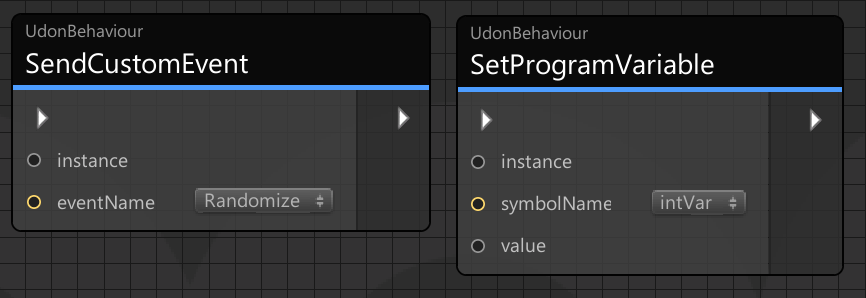
Added dropdown menus to SetProgramVariable, SendCustomEvent, GetProgramVariable and their variations. You can now see a list of target variables and events if the node references a valid UdonBehavior
The "Set Variable" node now has a sendChange checkbox, which will trigger an OnVariableChanged event for that variable if it's been checked.
Added OnVariableChanged Event Node which provides the new and old values of the variable when it is changed via SetProgramVariable or SetVariable with sendChange turned on. This change also works for synced variables! Access this event in the Node Graph by holding down the Alt key and dragging a variable onto the graph.
Changed behavior to reload graph after renaming or deleting a variable
Added PostLateUpdate, an event that will happen near the end of the frame after IK has been calculated. Getting bone positions at this time will give you the most up to date positions so that they are not a frame behind
Updated UdonExampleScene to use OnVariableChange events instead of OnDeserialization wherever possible.
Fixed Udon crashing with a NullReferenceException when checking destroyed instances of classes that inherit from UnityEngine.Object for null. Thank you to Merlin for the help!
Moved expensive UdonBehaviour events to components: OnAnimatorMove, OnCollisionStay,
OnTriggerStay, OnRenderObject and OnWillRenderObject will only be called if your program uses them. Thanks to Merlin for the initial work on this!