AS ALWAYS, WE HIGHLY RECOMMEND RESETTING THE DEFAULT KEYBINDS AFTER EACH PATCH.
The keybinds for opening and closing the Buildings menu for Villagers has been condensed to a single hotkey.
Selecting buildings through Hotkeys will now cycle properly if you already have one of that type selected.
Clicking a unit in the grid will now select it, rather than change the highlighted unit.
Units on the grid are now displayed horizontally instead of vertically.
Gameplay
Aggressive Stance will now make units attack at 50% vision range instead of 100%.
Defensive Stance will now make units attack at 30% vision range instead of 50%.
Attack Move aggro range reduced from 50% vision range to 30% vision range.
Attack Move priority system has been reworked to function as follows: Military Units > Healing Units > Villagers > Trade Units > Buildings > Aggressive Wild Dinos > Neutral Wild Dinos.
Units will now switch targets according to the priority system when a new target enters the aggro range. This occurs both when performing an Attack Move or when no manual Attack command has been given.
Units will no longer automatically attack Neutral Dinos, unless they’re performing an Attack Move or if the Neutral Dino are already provoked.
Reduced the “leash” range for Defensive Stance from 30 to 10. This is how far they will wander from their point before returning to it.
Units will now take the size of Buildings into account to determine if they’re within attack range.
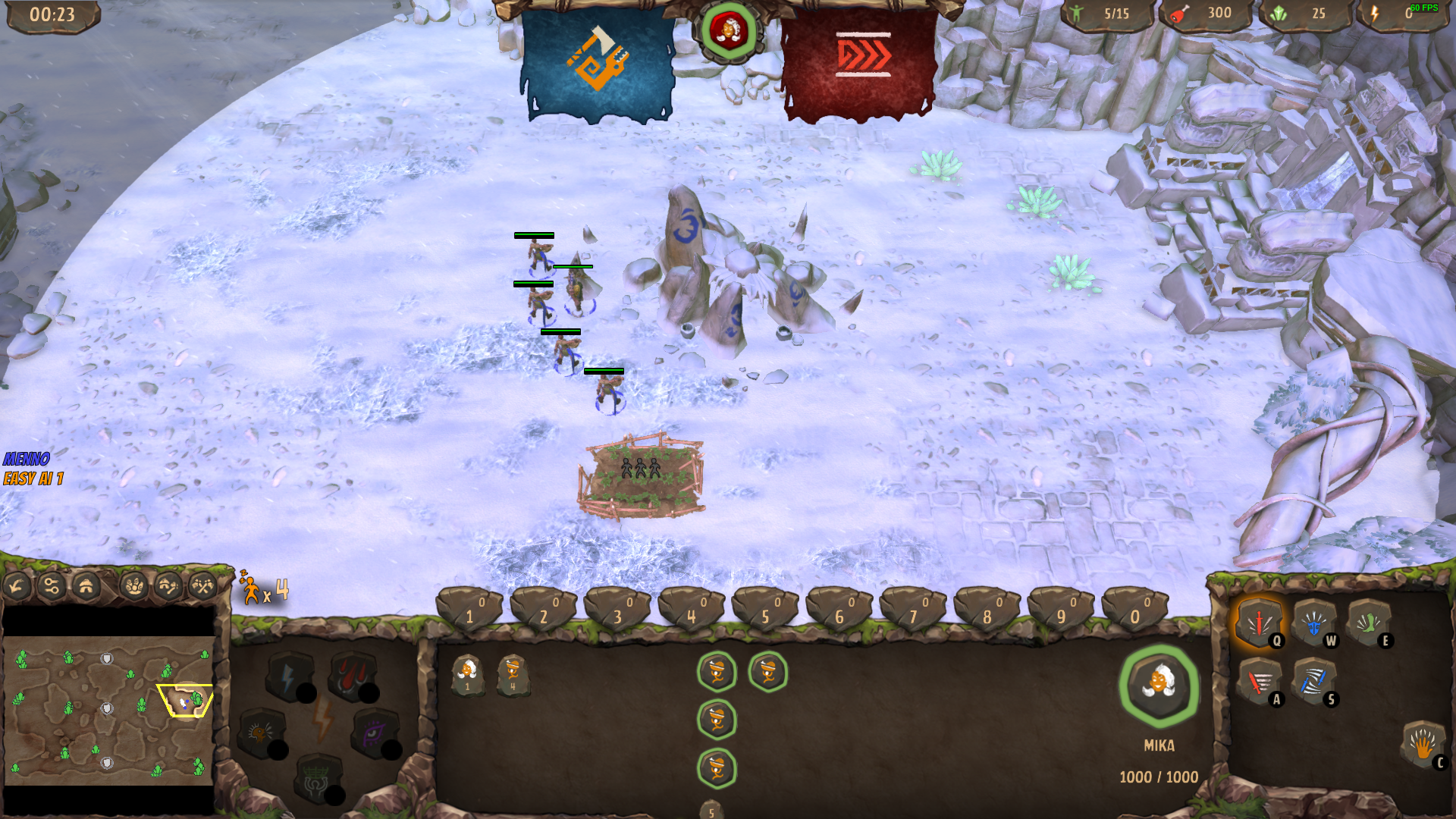
Starting amount of Villagers for default settings increased from 2 to 4.
Default Game setting for “Starting Resources” set to “High”. The setting for “Default” has been renamed to “Medium”.
Hunter Health reduced from 200 to 150.
Hunter vision range increased from 15 to 25 to conform with other units.
Medic vision range increased from 15 to 25 to conform with other units.
Shrines will now only be lost if an enemy stands on it and the original owner or their teammates has no units standing on it.
Building construction sites refund a percentage resources when destroyed before completion. The percentage is based on the amount of time until completed. (e.g. 5% progress will refund 95% of the resources).
Bugs
Removed an unused Hotkey from the menu (since last hotfix).
Changing unit stances and stop commands work on client now.
Fixed a bug where the Attack Move and automatic Aggro logic was not working properly.
Fixed a bug where buildings set to Defensive Stance would spawn units that are permanently in a return state.
Fixed a bug where the Trade Post rally flag could not be set when it is under construction.
Fixed a bug where units moving towards a Rally Flag on a different unit would stop movement when upgraded.
Fixed a bug where clicking on any entity with the Attack Move selected would cause the units to perform a normal Attack or Move Command.
Fixed a bug where units would not proceed their Attack Move command upon killing a target.
Fixed a bug where building construction yards would not remember the unit stance they were set to after completion.
Fixed a bug where issuing attack commands to Defensive units would cause the to go idle near the enemy.
Fixed a bug where you could select and cancel queued objects in a building not owned by you.
Fixed a bug where pressing the “Select all Military Units” hotkey would not select Healers.
Fixed a bug where you could select and cancel the units in a building you didn’t own.
Fixed a bug where Villagers would have the same armour as a previously selected building.
Fixed a bug where villagers weren’t marked as idle when assigned to a Farm when no available farm spaces are available.
Fixed a bug where the HUD would remain visible after a game.
The HUD elements in the upper corners will now stay there when scaled.
Fixed a bug where pressing a hotkey and Right Click in the same frame would cancel units in the queue.
Fixed a bug where pressing the “Select Trade Post” hotkey would not work.
Fixed a bug where switching different categories in the “Controls” menu would cause graphical issues.
Miscellaneous Improvements
The HUD can now be scaled (since last hotfix)
A button was added to join us on Discord on the Title Screen.
Fixed a typo in the AI Surrender Message.
Improved the algorithm for Medics to search for targets to heal.
Control Groups now only appear when they have something in it, except for one empty control group so it can still be clicked.
Added a setting to hide all Control Group buttons.
Added a setting to disable UI Tooltips.
Added a setting to disable Game related Tooltips.
Pressing the “Select Chieftain” hotkey should no longer snap the camera to them.
Having unfinished buildings in your selection will no longer set these as the primary building, preventing you from creating units in the ones that are finished.
Switching categories in the “Controls” menu will now reset the slider to the top.
Hovering over the population UI element will show how many Military and Villager Units you own in the tooltip.
Beta Patch 0.9.18
WARPARTY Beta Patch Notes 9: The great UI overhaul!
We’ve been working hard on creating a better UI to give more control and information to the player, along with other popular requested features directly integrated. As such, we had to postpone working on other suggestions and bug-fixes for a while to fully commit on this task. Starting next week we will return to these tasks as we’ve done previously. We also understand a lot of optimization work is in order to get the game running more smoothly as it progresses, and thank you for your patience as we’re working on this.
Chieftain Selection
Chieftains can now be selected in the lobby and are available immediately at the start of the game. You can also select “Random” if you like surprises.
Talents
In regards to upcoming changes we’ve decided to reduce the amount of Talents to 2 for each Settlement tier. It was clear that not all talents were equally useful and we decided to remove these for now, with reworks being planned in the future.
This also allows us to better incorporate the talents through a new bar at the top of the screen, that will flash when upgrading your Settlement.
The removed talents are:
Mika - Harmony - Mika returns damage on hit and powers are 25% cheaper.
Mika - Frenzy - Mika gains a damage increasing aura for 20% extra Damage.
Char - Overpower - Char does 50% extra damage to buildings and gains +10 Armour Penetration.
Char - Unholy Allegiance - Every third attack Char does stuns the target. Allows trading food for Crystal at the Settlement
We opted to keep talents that change units and buildings and remove things that have been replaced (i.e. Char’s ability to exchange food for crystal).
Your chieftain icon is also shown here, along with a radial Health bar to keep track of the Chieftain’s health.
Military Commands
We’ve received a lot of requests for more ways to control your units. Thanks to the new UI this is now accessible through both visual buttons as well as custom hotkeys.
Unit Stances Units can now be assigned 3 stances.
Aggressive: Attacks all enemies as soon as they enter vision.
Defensive: Attack enemies when they get close.
Stand Ground: Do not move, but still attack enemies if they are in range.
Note that villagers are exempt from this behaviour, and will always act as if they were on “Stand Ground”.
Commands The “Attack Move” command now has a visible button. A new one has also been added for a “Patrol” command, which has units move back and forth between their current and assigned positions, while attacking enemies they encounter.
Finally, we added a “Cancel Command” option for all units to stop what they’re doing. Note that units in certain stances will resume as their stance dictates.
Build Commands We were asked to allow Villagers to attack and perform attack moves. This was added in an earlier patch but caused some hotkey issues as many players want the ‘A’ key to be the default key for Attack Move, but also use it for buildings.
With the new UI, you can switch between Build Commands and Military Commands when you have villagers selected, and the hotkeys will respond based on which menu is open.
Production Commands
Stances Production buildings have received the same stance buttons as units and are set to “Aggressive” by default. Units produced from these buildings will come out in that stance.
Unit Production Buttons Units production buttons can now be right clicked to remove the unit type from the group. Shift + Right Click will remove one from each of the selected buildings, or 5 from the current building if only one is selected.
Minimap
The minimap features new buttons giving more control over what is displayed. We also added a direct “Main Menu” button.
Minimap Filters We added 3 new buttons above the minimap, each, enabling certain filters.
All View: Shows everything. (enabled by default)
Economic View: Only shows economic buildings and units.
Military View: Only shows Military units and buildings.
The Bottom Bar
By far the biggest change is how we display info on the selected units. The old UI was simply not able to display a large amount of selected units, nor could it support proper info regarding Multi-Queue or other features.
Powers Powers have been given a new home at the bottom bar with new buttons.
Units Units are displayed a circular buttons with a radial health bar. One unit is displayed larger than the others and represents the currently highlighted “unit type”. You can switch between the highlight by clicking the Unit Type buttons or pressing the “Cycle Unit Types” hotkey (default: TAB).
Up to 25 units can be displayed at once, with overflowing units being accessible through up to 12 tabs at the bottom of the bar. Clicking these will not alter the selection, only what is shown on the bar.
Selection manipulation is possible through the SHIFT and CTRL modifiers and clicking. CTRL + Click will only select units of this type. Shift + Click will remove units of this type from the selection. The same can be applied to the bottom tabs and the Type Buttons on the left.
Buildings Buildings have been the most challenging task to get right.
With a single building selected, you can now see a more detailed queue showing the percentage left towards completion as well as incorporating the new radial design. Due to the changes we have decided to limit the maximum queue to 5 objects to make sure everything that is displayed is correct.
With multiple buildings, new circle indicators have been added to the entities to show which queue slots have been filled.
Thanks to the new “Cycle Unit Types” hotkey, you can now cycle through different types of buildings and see different commands for all those buildings.
Control Groups Control groups are now a visible button at the top of the bar. These buttons feature full interaction to add to, remove from and create new groups. They also feature an icon of the most occurring unit in that group as well as the total amount of units.
This will help keep better track of how many units are in each control group, as well as offer newer players a way to use them if they aren’t comfortable with hotkeys.
Controls
AS ALWAYS, WE HIGHLY RECOMMEND RESETTING THE DEFAULT KEYBINDS AFTER EACH PATCH.
A variety of new hotkeys has been added to accommodate the UI changes.
Gameplay
A new Trade Post building has been added! This building is available in at Settlement Tier 3 and can produce Stegosaurus Caravans.
Stegosaurus Caravan unit has been added. These units will walk between a Settlement and a Trade Post to generate crystals, with longer distances generating more crystals. This allows players to generate crystals when the mines have been depleted.
Warrior Health reduced from 300 to 200.
Warrior Armor reduced from 10 to 5.
Fire Warrior Health reduced from 350 to 250.
Medic Healing range increased from 10 to 15.
Bugs
Fixed a bug where the Rally Point for Settlements would reset after upgrading.
Fixed a bug where double tapping a building hotkey as a Client would make it disappear.
Miscellaneous Improvements
The camera on Desert Flower now has less limitation towards the edges to better see crystals and dinos near these edges.
The rally point visual has been changed since people had trouble seeing it near villagers.
The red circle indicator for Sages has been removed as it would not display relevant information in large numbers and caused unnecessary clutter.
Final Notes
With the new UI done, we’re aiming to focus more on smaller improvements across all aspects of the game based on the generous feedback we’re receiving through various channels, while we’re also preparing everything for the next big change.
We’re aware some of the reported issues are still in the game and will tackle as soon as possible. We also expect the new UI and features to require thorough testing before it is optimal.
Optimization and performance improvements are also on the list, and we do keep a lookout for opportunities everywhere, but it is easier to first make sure everything is working right and then optimize it, than it is to create optimized stuff that works.
A big thank you and kind regards from everyone here!
- The Warcave Team
Beta Patch 0.9.17
Controls
AS ALWAYS, WE HIGHLY RECOMMEND RESETTING THE DEFAULT KEYBINDS AFTER EACH PATCH.
Clicking the Chieftain portrait now only selects the Chieftain.
Double clicking the Chieftain will now focus the camera there.
The camera no longer tracks the chieftain automatically when clicking the portrait.
Gameplay
Poison Archer health increased from 120 to 150.
Poison Archer Penetration increased from 0 to 5.
Poison Archer cost reduced from 80 Food to 70 Food.
Panther Damage reduced from 22 to 18.
Panther Health reduced from 400 to 350.
Panthers cost increased from 80 Food to 95 Food and 10 Crystal.
The delay for the first attack after running for Sabertooth Riders has been reduced.
Sabertooth Rider Movement Speed reduced from 8 to 7.
The attack range for Golems, T-Rex and Triceratops Riders has been increased by 15%.
The sage can now heal from range just like Medics.
Sage Healing Aura range increased from 3 to 5.
Sage Healing Aura effect reduced from 4 health per second to 3 health per second.
Sage cost increased from 50 Food and 15 Crystals to 65 Food and 25 Crystals.
Mika’s Damage Aura from the Frenzy talent effect reduced from +50% to +20%
Mika’s personal Damage bonus from Natural Selection talent adjusted from +25% to +10 Damage.
Maximum amount of Settlements is now limited to 4.
Go’n Extractors now cost 200 Food and 50 Crystal.
You can now build up to 3 Go’n Extractors.
Go’n Extractor Power Generation speed reduced from 1 Power / 5 Seconds to 1 Power / 7.5 Seconds.
Fertility Totems now cost 200 Power instead of 400.
You can now build up to 2 Fertility Totems.
Fertility Totems now increase your population maximum by 10 instead of 20.
Storage Hut cost reduced from 100 Food to 50 Food.
Warcry effect reduced from +50% Damage and +25% Movement Speed to +20% damage and +10% Movement Speed.
Thunder now does 350 damage to a single target.
Thunder Power cooldown increased from 10 seconds to 15 seconds.
The Meteor Power has a 2 second delay now.
The vision power radius has been increased by 50%.
The 200 Crystal Gather nodes now contain 300 Crystal.
The icons for Crystals on the minimap are now visible at the start of the game. (Due to limitations regarding the Fog of War implementation, we cannot show the entity yet without it giving away information about it’s status.)
The score can now be set visible and invisible in the lobby.
The first unit in the production queue now already counts towards the population cap.
Bugs
Fixed a bug where the AI would surrender when the game was already over, resulting in a softlock.
Fixed a bug where you could not queue actions for villagers after building a settlement.
Fixed a bug where the Villagers would not attack during an Attack Move command.
Miscellaneous Improvements
The sizes of all military buildings has been reduced by 20%.
The cutout size for Settlements has been decreased slightly.
Farm size has been increased by 10%.
Villager Size increased by 10%
Frost and Fire Elemental Size increased by 10%.
New tooltips for buildings with a build limit.
The colliders for Golems, T-Rex and Triceratops riders has been reduced 15% in size.
Selected units will now appear as white dots on the minimap.
Dead units no longer block constructions sites from being placed.
WARPARTY:: Beta Patch 0.9.16
Controls
AS ALWAYS, WE HIGHLY RECOMMEND RESETTING THE DEFAULT KEYBINDS AFTER EACH PATCH.
Shift clicking on the unit grid will now remove the unit from the selection.
Right clicking a unit with a building selected will place the rally point on the unit.
Dragging a box over units while holding SHIFT will only add units to the selection, unless all the units inside the box were already selected, in which case, they will be removed from the selection.
The controls settings window has been reorganized for a better overview of conflicting keys and finding various commands.
The default hotkeys for units and buildings has been temporarily shifted one key to the right to allow “Attack Move” to be on ‘A’ without conflicting with building commands for Villagers. With the UI update this will be addressed so ‘A’ can be used both for buildings and using “Attack Move” with Villagers.
Submenus in the Keybindings menu have been added. They can be collapsed and expanded by clicking them.
New camera settings are available, allowing you to create Camera Locations and instantly move the camera there.
Gameplay
A new 1 vs 1 map is available for play! Fight a battle on two fronts on the beautiful beaches of “The Ring”!
The Fog of War has received an overhaul! We got rid of the unexplored black territory and vision now has a much sharper and clearer edge.
The contrast between the Fog of War and vision on the minimap has been increased.
The minimap is fully revealed at the start of the game.
Melee units now have a minimum and maximum range. They can only start their attacks if the target is within the minimum range, but will continue them until the target leaves their maximum range. We will make adjustments later for individual units if needed.
You no longer start with a Watchtower near your Settlement.
The amount of Watchtowers or Go’n Towers you can build has been limited to a maximum of 5.
Watchtowers and Go’n Towers no longer take up population.
Settlements have been given an ranged attack that scales up with every Settlement Upgrade.
Settlements now increase your maximum population cap by 45, up to 180, and provide 15 population capacity.
Houses now provide 10 population capacity instead of 12.
The Fertility Totem increases your maximum population capacity from 180 to 200 instead of from 100 to 110.
The maximum population cap is now 200. We will aim to improve performance along the way of development.
The aggro range for wild Dinosaurs has been increased to make them more dangerous in groups and prevent long range units from killing them without retaliation.
To better accommodate these changes, the AI will now train slightly larger groups before setting out to hunt.
Shrines can now only be captured when the nearby dinosaurs have been killed.
The vision range of all buildings has been increased.
Villager Boost I and Villager Boost II now cost 100 Food and 50 Crystal instead of only 100 Food.
A player / AI is now automatically marked as defeated if he/she does not have any units left and isn’t in the possession of any buildings capable of producing units.
The movement speeds of the War Raptor and Panther have been reduced by 1.
Villagers are now able to attack and fight back, but are not aggressive by default unless given an Attack command or Attack Move command.
Archers are only available in the Barracks when the Settlement has been upgraded to Tier 2. This is to prevent them from dominating so early on as their main counters are unlocked at the second Settlement tier. We may adjust this later with improved design.
Poison Archers no longer have 10 penetration.
Reduced Poison Archer Health from 150 to 120.
Poison Archers cost increased from 65 Food to 80 Food.
Fire Warrior cost reduced from 85 Food to 80 Food.
Axe Throwers now take up 2 population instead of 1.
Axe Thrower cost increased from 80 Food and 20 Crystal to 80 Food 35 Crystal.
Fire Elemental will now also counter other Ranged units, dealing 50% bonus damage to them.
Reduced Fire Elemental Penetration from 10 to 5.
Wild Triceratops are no longer aggressive. They will still fight back when provoked however, and must be defeated if they protect a shrine in order to capture it.
Wild Triceratops will alert nearby friends to help fight when provoked now.
Bugs
Fixed a bug where Medics would exhibit strange behaviour when issued Attack Move commands.
Fixed a bug where selecting all units through clicking (default: ctrl + click) would not work if you already had units selected.
Fixed a bug where the camera would jump if you tried to select an unassigned Control Group.
Fixed a bug where the construction marker would remain stuck to the cursor.
Fixed a bug where Medics would be unresponsive to commands.
Fixed a bug where Medics would heal units that were already at full health.
Fixed a bug where Medics would not heal units until they defeated their enemies.
Fixed a bug where Watchtowers and Go’n Towers would not attack.
The “Show Full Healthbars” setting will now save properly.
Fixed a bug where units would not move onto a Shrine properly.
Fixed a bug where Villagers would stop building a Settlement when you upgrade to the next tier.
Miscellaneous Improvements
The Navigation Mesh quality has been increased slightly on all maps to allow better building placement and pathfinding.
The lobby chat box will remain selected after entering a message.
In a 1vs1 situation, the game will now end when the client disconnects.
The AI will now notice Medics healing and Villagers repairing buildings, and switch targets when possible.
The chieftain will always spawn towards the center of the map instead of the north-east corner.
[
}Right clicking with a villager selected will ignore friendly units, making it easier to assign them to farms and crystals.
There has been feedback regarding unit types being unclear. For example, Cavalry units aren’t always mounted humans, but simply involved some sort of Beast. As such, we’ve renamed the previous “Melee” units to “Infantry” units and “Cavalry” units to “Beasts”. The combat triangle (Infantry -> Beasts -> Ranged -> Infantry) remains unchanged.
The size of HP bars of all entities has been significantly reduced in size to give a better overview.
The logic for dragging selection boxes around units has been improved to be more responsive.
The camera on all maps has been limited to hide the large “void” areas.
Char has been given some coloured highlights to make it easier to tell his team’s colours.
Beta Patch 0.9.15
Controls
Shift + Enter now opens the chat window in the “All” channel.
Enter will now always open “Team” chat.
Attempting to create a new control group with nothing selected will no longer clear an existing control group.
Default hotkeys for unit production and buildings have been altered to represent their position on the grid and using the left side of the keyboard.
The order of building and unit hotkeys in the Hotkey Menu has been altered to represent their location on the in-game grid.
Gameplay
Buildings now have about 25-33% increased Health.
You can now queue units in unfinished buildings so they start production when finished.
You can now set rally points on incomplete buildings.
Attack Move and regular Attack commands can now be queued.
Smart queue logic has been implemented. When holding down this key (default: Shift) and clicking to train a unit, it will have different effects. With 1 building selected, queues 5 of this unit type. With multiple buildings selected, queue 1 of this unit type in every selected building.
Crystal clusters on all maps that originally contained only 200 crystals have been increased to either be a group of 3 (600 crystals total) or a 1000 crystal cluster.
The crystal cost for Char’s Elite Berserkers has been increased from 10 to 25.
Char’s Witch Doctor units now take up 2 population space instead of 1.
We’ve received feedback on how (Poison) Archers outclass Warriors due to their ranged attack, lower resource cost and lower population cost. Large groups of Archers dominated the early and mid-game. As a result, (Poison) Archers now take 2 population cost.
War Raptors have their population cost increased from 1 to 2 to prevent them from replacing the Archers as a “spam unit”.
Bugs
Fixed a critical bug where double tapping control groups while hovering the cursor over a unit in this group would cause a jumping camera, as well as occasionally drop a unit from this selection.
Another side effect of the previous bug prevented hotkeys from being used on units in this group. This has also been addressed.
Fixed a bug where fire and smoke particles appeared in the center of Desert Flower when a certain base was attacked.
Fixed a bug where the villager build menu does not show if you had selected a mix of military units and villagers.
Fixed a bug where Attack Move would conflict with a Villager building hotkey and remain stuck.
Fixed an issue where a disconnected player’s score would not be cleaned up when starting a new game.
Fixed a bug where some particles were visible through the Fog of War.
Fixed a bug where damage numbers were visible through the Fog of War.
Fixed a bug where you can pause the game during the loading screen.
Tooltips of buildings in the Construction Window now show the finished building’s Health and Armour instead of the building site’s.
Fixed a bug where clicking the red unit type button above the unit frame would not show healthbars for those selected units.
Miscellaneous Improvements
The icon size for the House has been slightly reduced.
The icon size for the Settlement has been increased to better reflect its importance.
A lot of assets now pre-load in the game to prevent lag spikes when something is created the first time in a match.
Captured Shrines on the minimap now change colour to the player that captured it.
The icon for shrines has been slightly altered to be more clear.
Farms now use box colliders to make them easier to click.
The size of units has been further increased.
A small icon in the top right corner of the minimap has been added to indicate whether or not you are locked on. (default key: spacebar)
Settings have been added to change to colour of the selection drag box.
Unit Healthbars now show when they’re inside a selection box.
Beta patch 0.9.14
Controls
Buttons in the Villager building menu now have a fixed location and are better categorized.
Selecting all buildings of one type no longer selects building sites of that type.
Villagers can now be queued and ordered to drop off resources at a drop-off point.
Gameplay
The base Movement Speed of all units has been increased by 1.
To better fit the new Movement Speed, Char’s aura buff has its effectiveness reduced from 25% to 10% extra Movement Speed.
Powers are no longer usable when the Chieftain is dead.
Villagers will now drop off Crystal at a nearby drop-off point when a Crystal Cluster runs out.
Attack Move will now prioritize enemy military units, then villagers and finally buildings when multiple targets are available.
The AI will always try to fight back now when under attack, even if outnumbered.
Ordering units to attack something that has died while they’re traveling changes their command to an Attack Move command.
Cooldowns on Powers have been adjusted to better reflect their strength.
Crystals can now be farmed by more than 3 Villagers to prevent the slots being occupied by Villagers who are walking miles away to drop off resources. Further balancing may be done if this has unforeseen consequences.
Villager gathering is no longer tied to animation.
The Villager Boost research now increases the gathering speed by 25% instead of 100%. Villagers can carry 5 extra resources now instead of 10.
Villager Boost can now be researched a second time when your Settlement is at Tier 3.
Attack Move commands will now make units continue to their assigned destination after defeating enemies along the way.
Bugs
Fixed a bug where the particle effect for Meat dropped by Dinos was visible through the Fog of War.
Fixed a bug where the camera zoom would be reset when alt-tabbing out of the game.
Fixed a bug where the camera resets when focusing units through double tabbing their control group.
Fixed a bug where the Fertility Totem button did not re-appear in the Villager building menu when the blueprint was cancelled until you reselect a Villager.
Fixed a bug where the Psittacosaurus would not move to pursue a target if it goes out of range.
Fixed a bug where Villager could get stuck when moving to a Blueprint, preventing it from being constructed.
Fixed a bug where Warriors and Archers would stop attacking and not re-aggro after being upgraded.
Fixed a bug where Control Groups could not be selected when the cursor was hovering over the production grid.
Fixed a bug where units would not obey move commands when under attack or when enemies are nearby.
Fixed a bug where an empty black progress bar would appear if a building site was at the edge of the screen.
Fixed a bug where cooldowns on Powers did not function properly.
Fixed a bug where the cursor did not update when scrolling in the same direction twice.
Fixed a bug where Villagers could not be tasked to drop off resources.
Fixed a bug where the Thunder Power did not have a cooldown.
Fixed a bug where a disconnected player was replaced by multiple AI and created multiple obsolete score tags.
Fixed an AI bug where it would send all of its villagers to repair a damaged structure.
Fixed a bug where random buttons would appear on screen after restarting a match.
The cursor now reverts back to the default one if you track a unit while panning the camera through the edge of the screen.
Fixed a bug where medics coming out of the Medic Hut would not heal nearby units.
The villager starting amount filter in the lobby list is now consistent.
The scrollbar in the controls menu would show a graphical glitch when switching between tabs. This has been fixed.
Fixed a bug causing strange Villager behaviour when queuing multiple commands.
Miscellaneous Improvements
The Power cooldown has been improved with more visually pleasing graphics.
The tooltips when hovering over a button in the Villager building menu now appear 25% faster.
The fire particles on destroyed Houses and Berserker Huts has been scaled down conform with the smaller buildings.
The hitbox for Farms and Villagers have been adjusted to make it easier to select villager.
The cursor has been improved and changes based on what is being hovered over to give better feedback on what is active or highlighted.
Detection on whether or not an enemy has been defeated has been optimized to trigger much quicker.
When a human player disconnects, he/she will now be replaced by an AI that continues playing.
Minor tweaks and improvements to AI.
Hovering over a crystal cluster or holding down the “Show interactor Indicators” will show a bar indicating the amount of crystal left.
The font and buttons in the controls menu have been made more crisp.
The chieftain portrait will be grayscale when they are dead.
Windowed mode now doesn’t do a full resize, but only resizes in height for fullscreen resolution types.
The storage hut model has been reverted to the original state in preparation for future plans.
Queued movement now renders the full line on the minimap.
Extra optimization in netcode.
Closed Beta patch notes 0.9.13
Controls
Villagers can now be queued to help construct a building foundation.
Queued actions end when the villager starts gathering Food or Crystal.
Removed some leftover smoothing on the camera movement.
Gameplay
Your Chieftain’s health bar is now displayed in the HUD next to their Portrait.
A time clock has been added above the Minimap.
AI thinking logic has been improved.
The chat system has received an upgrade. Channels have been added for [All], [Team] and [PostGame] so everyone in-game and after the game can chat.
Powers now have cooldowns. We will adjust these values in the future based on feedback.
Bugs
We found a large number of issues with the AI, partially due to the new Pathfinding algorithm that was implemented. A lot of these issues have been addressed with better AI performance as a result.
Fixed a bug where Fire particles were visible through the Fog of War.
Fixed a bug where units on clients spawned with a black health bar.
Fixed a bug where the “Select all Military Units’ hotkey merely highlighted the units but did not actually select them.
Fixed a bug where the second AI in a Skirmish didn’t receive a strikethrough through their name upon defeat.
Fixed a bug where a crash occurred when someone disconnects from the game or leaves a Multiplayer lobby.
Fixed a bug where the character artwork at the Talent selection screen disappeared.
Fixed an incorrect tooltip on “Unholy Exchange”, displaying the trade being 50 Food for 50 Crystal when it’s 50 Food for 25 Crystal.
Fixed a bug where Cavalry Units spawned facing the wrong way.
Fixed a bug where Rally Point Flags could not be set when selecting a building through hotkeys or Control Groups.
Fixed a bug where movement speed for some units was set to 4 and updated only when moving.
Fixed a bug where localization for the notifications didn’t update properly and remained in a different language.
Miscellaneous Improvements
The rally point flag now has the same colour as you.
All units are now 10-15% larger to make them stand out more and easier to click.
Sound and Music sliders now have percentages instead of basic floats.
A small delay has been added when holding down the Attack Move hotkey to prevent it immediately becoming active again.
The fire and smoke particles on buildings now fade out slowly.
A sound effect now plays when someone enters your lobby.
Beta patch 0.9.12
Controls
The camera now moves at a constant speed. No more acceleration.
The Controls window in the settings is now split up into different categories.
Added hotkey customization for creating and editing Control Groups.
Hotkeys for selecting and creating units and building can now conflict based on what is and isn’t selected.
Hotkeys can now be unbound by right clicking the button.
The default hotkeys are revamped to conform with existing RTS games (note: Local Settings are still applied. Reset keys to default for this change to take effect).
Releasing the Queue Command Key (Default: Left Shift) when placing buildings will automatically remove the building Blueprint from the cursor instead of having to manually cancel it.
The Attack Move Key is now a toggle and no longer needs to be held down.
Gameplay
A new movement algorithm was implemented, with better pathfinding for all units. This will increase the viability of melee units as they’re no longer pushing and struggling to reach their target.
You can now set the starting amount of Villagers in the lobby. (since last Hotfix)
Removed a T-Rex near each large Crystal Cluster on the Desert Flower map. It should be slightly easier to access the Crystal they protect.
A few extra crystal nodes have been added across all maps
The crystal nodes containing only 50 Crystal have been removed as they run out too fast.
Bugs
Fixed a bug where rebinding escape prevents the menu from being opened permanently.
Fixed a bug where holding down the the move command key repeatedly creates the movement indicator.
Some geometry on the Winter Canyon map was suspended in mid-air. They’ve been grounded now.
Fixed a bug where enemy units could be assigned in your control groups.
Fixed a bug where the AI would not perform actions.
Destroyed Houses and Berserker Huts would appear larger than their original state. They now have the same scale.
Fixed a bug where selecting the “Power Hungry” perk as Char and restarting the game would still give the bonus Power Points over time.
Fixed a bug where the Quit button disappears from the menu.
Miscellaneous Improvements
Selecting a group of units with Control Groups or Hotkeys no longer plays their sound.
Food Pickups now have a particle effect, and a slightly larger collider to pick them up more easily.
The Talent Window has been temporarily redesigned to be more compact and can now be closed. Future design changes will lead to further rework. The initial Chieftain Talents window is unchanged.
The new Movement algorithm works better over the network and should smoothly attempt to fix desynchronization issues.
Removed some geometry interfering with the Navigation Mesh to give more space for buildings to be placed.
The “Attack Move” indicator when clicking has been changed from default green to red.
Beta patch 0.9.10
Controls
The camera no longer bumps up and down high terrain. As a result, several maps have their heights reduced to better accommodate this change.
Minimap Flare now works with left click instead of right click.
Changed the default camera controls from WASD to arrow keys.
Constructing Buildings is now tied to each building instead of the button slot in the Villager UI.
Creating and Upgrading units can now be tied to keybindings.
Double tapping a control group will now focus the camera on that group.
Shift-clicking with villagers allows you to queue other actions such as gathering instead of only buildings.
The creation of Control Groups can now be customized to different hotkeys.
Gameplay
The “Desert Flower” map has been revamped to allow more aggressive gameplay and harass other players. Spawn location has been altered so the map is less defensive and gives more space to expand.
The Berserker Hut and Houses have their size reduced by 20%.
Starting resources for “Default” increased from 250 Food to 300 Food and 25 Crystal.
To prevent players from immediately upgrading their settlement with these resources, the costs for settlement upgrades has been increased. Tier 1 to Tier 2 is now 350 Food and 100 Crystal. Tier 2 to Tier 3 is now 650 Food and 250 Crystal.
Chieftains now train faster, from 120 seconds to 60 seconds. Training a Chieftain now costs an additional 50 Crystal on top of the original 100 Food.
Bugs
Go’n Towers spinning animation no longer reset when panning the camera around.
Fixed a bug where the language dropdown menu can become transparent.
“Fullscreen Windowed” in Video settings is now properly displayed as that setting when selected.
The Go’n Tower construction site on Winter maps was 30% larger than the finished building. This has been fixed.
Miscellaneous Improvements
The tooltips on powers now show their exact effect in numbers.
Added a sound effect for chat messages.
Older Chat messages are visible when opening to type.
Changed the text “Find Match” to “Custom Games” in the multiplayer lobby to avoid confusion with “Quick Match”
Moved crystal clusters further away from walls to prevent characters from getting stuck behind them.
Changed starting resources text from “Medium” to “Default”.
Villagers are now 10% larger to select them more easily.
Removed the “Metric” option from settings.
The movement indicators have now been condensed to a single indicator.
Beta Patch 0.9.9
Controls
Fast Box dragging has been improved for a more responsive feel.
The hotkeys to select buildings will now go through all owned buildings of this type instead of just the first one.
Changed the default hotkey for Attack Move from ‘A’ to ‘Q’ so it no longer conflicts with the camera.
Having multiple buildings of the same type selected when training units will queue one unit as it cycles through the buildings rather than one unit for each.
Buildings can now be grouped.
Tapping a group key now focuses the camera on that group.
Units can now be assigned to more than 1 group.
Ctrl + Click now selects all units of a type.
Gameplay
Farms, Barracks, Stables, (Go’n) Watchtower, Medic Hut and the Witchdoctor Hut now cost crystal to construct.
Fire Warrior and Poison Archer upgrades now cost crystal to research.
Triceratops Rider, Sabertooth Rider, Fire Elemental, Frost Elemental, Witchdoctor, Medic, Sage now cost crystals to train.
Reduced the amount of crystals near Player bases from 600 to 300.
Increased the amount of crystals found outside bases (guarded by wild Dinos).
Farms now produce infinite food.
Bugs
Scores should now reset when restarting a Skirmish vs AI match.
Team Score and Player Score now update simultaneously.
Sages now have a circle indicator to display their AoE healing range.
Deleting a building that was training units now refunds the resources for these units.
Fixed some issues that occurred when tabbing out of the game
Fixed a crash when using the Thunder Power.
Fixed a bug where attacks were performed repeatedly when spamming the Attack Move command.
Fixed a wall on the “Winter Canyon” map that units could walk through.
Fixed a bug where the game froze when trying to start a lobby through Quick Match.
Fixed an issue when creating an AI player in a lobby.
Fixed some bugs regarding AI Behaviour.
Units are no longer removed from a group when upgrading.
Fixed a bug occurring when grouping units together.
Fixed a Steam matchmaking bug.
Linked the description for Go’n Towers in Localization.
Miscellaneous Improvements
Improved the camera on the “Desert Flower” and “Land Bridge” maps to use anti-aliasing properly. No more overly shiny crystals.
The “Winter Canyon” map’s western base is now more accessible as the northern entrance has been widened.
Increased the size for the rally point flag.
The HUD font for descriptions of buildings, upgrades and units has been adjusted to be more readable.
“Fullscreen Windowed” is now available in the Video settings of the game.
Added a key to highlight Farms and Crystals indicators showing how many villagers are assigned to them.
Upcoming features
We’re preparing a building dedicated to more military upgrades. As such, the Storehouse got a new model while we’re decorating the old one for this new purpose.
We’ve also planned a way to generate crystals after all resource points on the map are depleted. This way, when the “unstoppable force” meets the “immovable object” in a PVP scenario, it doesn’t end on units that can be bought with just Food.
We’re looking into offering more control over unit behaviour.
We’ve also received a lot of feedback regarding hotkeys and controls and are working on various improvements.
The economic buff “Villager Boost” will get hit with a nerf hammer into smaller bits later once we’re done preparing the villager gather logic for this purpose.
Fog of War hides a bit too much at the moment, so we’re looking to make it more open for various purposes (e.g. Crystals being visible).
We’re still researching Elephant DNA to see if it can be altered to recreate Mammoths.
Certain maps were considered to have too many choke points and not enough space. We’ll look into creating more dynamic maps for harassing your fellow player from multiple directions, but not rule out maps specific for people who like to turtle every now and then.
The in-game chat system will get some improvements so players can give each other words of encouragement when they’re adversaries, or discuss the game after it is over. Or you can just drop a “GG EZ” at the end.