Community Update #3: Pre-Weekend Status - 1.0.8 Update
Rejects,
We are one week into the pre-order beta and less than a week from the full release of Warhammer 40,000: Darktide, set for November 30th. Many of you have already had a chance to play. In fact, on average, players have played over 11 hours so far, with some highly devoted rejects (12%) spending more than 30 hours! The Emperor Respects.
It is exciting to see, but we clearly have more work to do.
An area of focus this week was improving the online service stability and connection, and - based on the current state - we have made a lot of progress in this area. That isn’t to say it's perfect. In fact, we are focusing on a set of connectivity issues that some of you are experiencing, often requiring you to use a VPN to play the game. While we appreciate the extra effort from our players, this isn’t an ideal state and something we plan to solve.
For the 1.0.8 update, our focus was to improve overall game stability and slowly introduce new progression & economy features. This is outlined below and then followed with a summary of the patch notes:
Game Stability
We went into the pre-order beta with the idea that this is an opportunity to test, find new issues and solve them. We also said in our earlier update that we were not happy with the game's stability and that we have work left to do. That said, we have made progress in this area since the last patch, and the one deployed today. We hope this translates to a much more stable experience. That isn’t to say we are done, and there are still a few pesky issues out there we will continue to work through as we look to have a stable release.
New Features: Progression & Economy
We are introducing more features as part of our progression system(s) and economy. For this update, we will introduce new cosmetics into the Armoury Exchange, an improved end-of-round experience, and launch the first element of the crafting system.
The first batch of character and weapons cosmetics are now available in the Armoury Exchange. Expect a small variety of items (e.g., upper and lower body, head slots, and weapons) with access to more items growing as a player’s level progresses.
To improve the player feedback of the progression system, we are also now highlighting what becomes available to players (weapons and feats) via new end-of-round cards.
Hadron Omega-7-7, the Mourningstar's resident Tech Priest, will now be offering her services at the Shrine of the Omnissiah - located in the hub just adjacent to the Psykhanium. The Shrine will be open to all Rejects with a trust level of 4 or higher.
With today's patch, we're introducing the Consecration ability, allowing you to upgrade the Tier of a Weapon or Curio you have available. As the item’s Tier is upgraded, a random Perk or Blessing will be added, depending on the Tier it has been upgraded to. Consecration uses crafting materials, with the cost increasing for higher Tier weapons.
Crafting materials are now available throughout the missions you undertake on Tertium. Be sure to explore the world, and you may find the materials to pick up. The resources collected are awarded to the entire team equally (everyone gets the same amount of resources, and there is no split depending on team size). As you explore the Hive City, you will find Plasteel, an exceedingly common material in the Imperium, and Diamantine, a much rarer material only seen on higher difficulty levels.
Gameplay Balancing
As we said before, we will continue to balance the gameplay based on player feedback. In this update, we are trying to balance effortless kite-dodging and maintaining the nimbleness of our lighter weapons that live and die by the dodge. Beyond that, we are also monitoring the current dodge and toughness configuration and will continue to tweak it leading up to release.
1.0.8 UPDATE SUMMARY
The 1.0.8 update focuses on continuing to improve the stability of the game along with the introduction of new features. Below is a complete outline of the changes in this update.
New Features
Crafting Feature
UI for interacting with the workshop is available
Consecrate functionality is available for players.
Players can earn crafting materials from missions via pickups.
Hadron’s Workshop as an interaction point is also available.
Armoury Exchange updated - Buy Character and Weapon Skins in the store!
Quality of Life
Added EOR (end-of-round) Cards to show better what you unlock.
Sire Melk’s Requisitorium should provide better items overall by only having pristine/mastercrafted items.
Made Zealot’s Penance tier 1 and 2 pants more distinct.
UI/UX
We’ve added better interfacing for some cases where invalid names are entered during character creation, making it clearer that the chosen name/input is not accepted.
Fixed unlocalized strings in the settings menu.
Fixing some localization on some cosmetics items.
Improved item sorting by rarity - should now consider item rating too (shouldn't crash now either!).
Fixes & Tweaks
Fixed an instance where players could not use weapon special when ADS with the Lucius Mk III Helbore Lasgun.
Fixed issues with some audio on the Excise Vault Spireside-13 mission.
Turned down the light emitted by the Zealot. The Zealot calmed down, and their overly bright aura will serve as a flashlight no longer.
Fixed it so the Convict Garb no longer clips when having a specific face.
Fixed an issue with some gloves not looking correct while sprinting.
Fixed an issue where several of the enemy stagger animations clipped a lot.
Can now use weapon special when ADS on Headhunter Autoguns and Braced Autoguns.
Fixed some flickering in some prologue cinematics.
The camera would jump through geometry when switching between players in spectator mode. Now, it’ll jump between players to remove those unsightly geometry collisions.
Weirdly, ammo increased indefinitely when reloading during the prologue, which could cause a crash. This was fixed, and you can reload as much as you need.
Fixed some issues with buffering melee attacks when playing as Ogryn. No attack was triggered when players held the button "too early" in a chain. We have now adjusted this a little to make the overall feel better.
Better Variety of grunts when pushing multiple enemies. We know you love a good grunt.
Some voice-over was unintentionally canceled by players placing world markers or using the comms wheel - we fixed that for ya.
Players can no longer stand on top of the elevator in Chasm Logistratum and render the mission impossible to complete.
Re-entering an airlock after using it no longer triggers the ‘group up’ VO, as this is no longer the objective.
Fixed an issue where stacking crit bonuses would break the crit calculation, rendering the weapon unable to crit. Say “crit” one more time…
Fixed the Force Staff sometimes having a +x% reload speed property - despite not being reloadable. It’s a staff, after all—no need to reload it.
Fixed an issue with the Accatran Mk VIIa Lasgun, where shots would disappear after traveling around 45 meters / 147.6 feet / 49 yards / 0.0045 Swedish Miles.
Made some minor tweaks to the minion melee movement.
Tweaked ranged minions range switch from melee to ranged override when players are kiting them not to occur too close to players.
Fixed some broken stagger animations for various minions and some sound tweaks.
Fixed animation on fuel hose NPC character being frozen at the beginning of the level 18 Path of Trust cutscene.
Prologue cinematic fix for Zolas wound not looking like a wound, but something…else.
Made some voice-over tweaks so that we always play a line when deploying a health pack or ammo crate.
Fixed issue causing two, or sometimes fewer, items to appear in the credits store on refresh.
Improved stability of end-of-round rewards finalizing.
Balance Adjustments
Setup separate weapon-specific dodge curves for light melee weapons, tune-up separate zealot baseline:
Setup separate dodge curve for Zealot class, increase baseline dodge distance to 2.75m over 0.4s (was 2.5m over 0.4s).
Increase dodge slide friction speed threshold to 5.5m/s (from 4.5) - we don't break down as hard on dodge-sliding.
Setup weapon specific curves for agile dodge profiles to allow customized behavior:
For Atrox Tactical Axes and Maccabian Duelling Swords: Custom curve 2.75m over 0.35s with fine-tuned end of curve for chaining.
For Catachan Mk III Combat Blade: Custom curve 2.9m over 0.35s with fine-tuned end of curve for chaining.
We keep working on Warhammer 40,000: Darktide, and will keep optimizing the experience. We’re nowhere near done, and hope you appreciate the improvements we’ve already managed to implement. Please let us know your thoughts, and keep sharing your feedback. We appreciate you all.
Performance Blog - A detailed look at our approach on performance alongside helpful hints to tweak your performance
Twitch Drops - What you need to do to link your account and receive Twitch Drops
When does the pre-order beta end? The pre-order beta will end on the 29th.
Will I still have access to the beta if I pre-order now? All pre-orders will have access to the beta until it ends, so long as the game was purchased before the close of the beta.
I received the game as a gift, will I be able to access the pre-order beta? So long as you have a normal game key, you will be able to access the pre-order beta.
I recently bought an NVIDIA GPU, where is my promotional Darktide key? NVIDIA is currently hosting a promotion where new purchases of qualifying RTX cards will also receive a key for the Darktide Imperial Edition.
If you have not received your key for the Darktide Imperial Edition, please contact NVIDIA directly.
The easiest way to do this is by using the 'Ask us a question or 'Live chat' buttons at the bottom of NVIDIA's Support page here: https://www.nvidia.com/en-us/support/consumer/
More information on this promotion can be seen on NVIDIA's website: https://www.nvidia.com/en-gb/geforce/campaigns/pc-game-bundle-warhammer-40000-darktide-imperial-edition/
When will more detailed weapon stats be available? We understand the way information is presented for weapons stats is unclear.
We hear you and are working on changes we will be implementing post-release.
When will I be able to access my pre-order bonus items? When will I be able to access the Devoted Rejects cosmetics? Players will be able to access these items when we launch the full game November 30.
Will crossplay and cross-save be available? We see the value in cross-play and cross-save and fully intend to support cross-play shortly after launch. Cross-save is more complex to execute and still being investigated.
When is Darktide coming to consoles? We know this is one of the top questions console players have.
We will have more news on the release date for Xbox Series X|S as soon as possible and likely immediately after the release on PC.
At this time, Darktide has only been announced for PC and the Xbox Series X|S.
Will progression persist between the pre-order beta and the full game? Our goal is to ensure all progression will carry over from the moment you start playing through full release - but we cannot fully guarantee at this moment. The reason is that we are still using this period to test our progression systems, and we want to reserve the opportunity to change or reset things in the event something unforeseen or critical happens.
But we assure you that we will do our best to ensure all your characters and progression carry over!
Will I be able to refund the game on Steam if I play the pre-order beta? Yes, we believe you will have the ability to refund with the same refund rules applying once Darktide launches and after November 30th. Please send an email to (steam support) for further details or additional clarification.
Pre-Order Beta: What to expect?
Hello Rejects!
We are finally closing in on the start of the pre-order beta period and the lead-up to the final launch of Warhammer 40,000: Darktide. Many of you have been with us on this journey – whether participating in the technical test, closed beta, or just by consistently engaging and providing feedback in the community. For that, we are thankful. Darktide will be a better game because of your help.
WHAT WE ARE ADDRESSING
Since the Closed Beta, the team has been working hard to address many, but not all, issues. Here’s what we’ve fixed, along with a few things we’re still working on:
New in the beta:
Improved optimization and performance.
Added mouse sensitivity.
Added the ability to turn off wobble for players with motion sickness.
Added the ability to skip the tutorial after initial character creation.
We are working on adjusting the sensitivity of the chat filter so that calling out “snipers” no longer looks like you’re calling your teammates something only Nurgle could love. Please let us know how this is working for you.
We’ve added the Meat Grinder to the Mourningstar’s Psykhanium so you all can test your weapons before going into a mission. Just don’t shoot the servitors. They’re expensive.
We’ve worked on general connectivity issues so you all can consistently stay connected to games.
We’ve adjusted the difficulty of the “Cooling” mission, so it is more in line with the other maps’ difficulty levels.
Some work has been done to lighting and to help players better see and identify enemies.
We’ve implemented a new HUD so players can access more transparent information on their teammates.
We’ve increased weapon handling for the Veteran Sharpshooter’s starter weapons, so your reject doesn’t handle their weapon like only a heretic would.
We’ve separated enemy tagging input from the smart tagging wheel so players can more easily tag enemies.
Malice difficulty has been locked to players until their character reaches level 3. Let’s not thin the Mourningstar’s ranks too quickly, Reject!
Players in full strike teams can play the highest difficulty level that at least one party member has unlocked, even if the rest of the team hasn’t yet unlocked it.
Chaining weapons, specifically push into attacks, should now be smoother.
There’s been some fine-tuning on weapon swaps, but they depend on the weapon's size and weight. For example, switching between a 2h chainsword and a bolter will not be immediate. Switching to melee should always be instant, while ranged weapons have a “ready-up” time.
Tuned some dodges and dodge timings.
Player stun and hit reactions have been tuned to avoid instances where players could be stun-locked by riflemen. But remember to take cover!
Working on, but not in the beta:
We are working on how best to implement an end-of-screen scoreboard that rewards the cooperative behaviors we aim for in Darktide’s gameplay
We know walking to the mission board every time was a bit of a workout, so we are working on spawning players returning from a mission closer to the board.
We are working on a detailed view of weapon stats.
WHAT TO EXPECT IN THE PRE-ORDER BETA Let’s face it: Launching a game is not easy. More often than not, day-one issues will prevent many people from jumping right in. We cannot guarantee our launch will be as smooth as an Ogryn’s forehead, but our Pre-Order beta aims to help optimize the launch experience. We plan on doing this by slowly ramping up our service over the next two weeks.
In practice, this means that joining us on November 17th, you and your friends will pick your class, create your characters, and then dive into 4 missions, across 4 zones, at several difficulty levels available. We will also give you access to an entirely new zone to explore: Dust.
Now, that’s not all, Rejects. You will get the whole experience of our training grounds to familiarize yourself with the game mechanics, 60+ weapons to choose from, 4 random conditions that’ll impact your in-game experience (from power outages to… worse) - and we will increase the number of missions regularly. Here’s a high-level rundown:
WEEK ONE (November 17 - 20)
Full access to the game hub and mission board.
4 changing missions across 4 zones
We will regularly run in-game events (Conditions), namely Power Supply Interruption and Ventilation Purge. We don’t want to spoil them too much. We encourage you to experience them for yourself :)
WEEK TWO (November 21 - 27)
Up to 8 changing missions across 4 zones
In-Game Events, other surprise additions we do not want to spoil right now
WEEK 3 (November 28 to 30)
Up to 10 changing missions across 4 zones
Downtime to get the game ready for wide release: Tuesday Nov 29, 202219:00 UTC
NOVEMBER 30 (LAUNCH)
13 missions across 5 zones
1 New Zone (We do not want to share its name yet)
New Conditions (In-Game Events)
We will also deploy hotfixes as we carefully monitor the Pre-Order Beta feedback and respond accordingly.
CARRY OVER PROGRESSION
Our goal is to ensure all progression will carry over from the moment you start playing through full release - but we cannot fully guarantee at this moment. The reason is that we are still using this period to test our progression systems, and we want to reserve the opportunity to change or reset things in the event something unforeseen or critical happens.
But we assure you that we will do our best to ensure all your characters and progression carry over!
TIME TO RISE, REJECTS
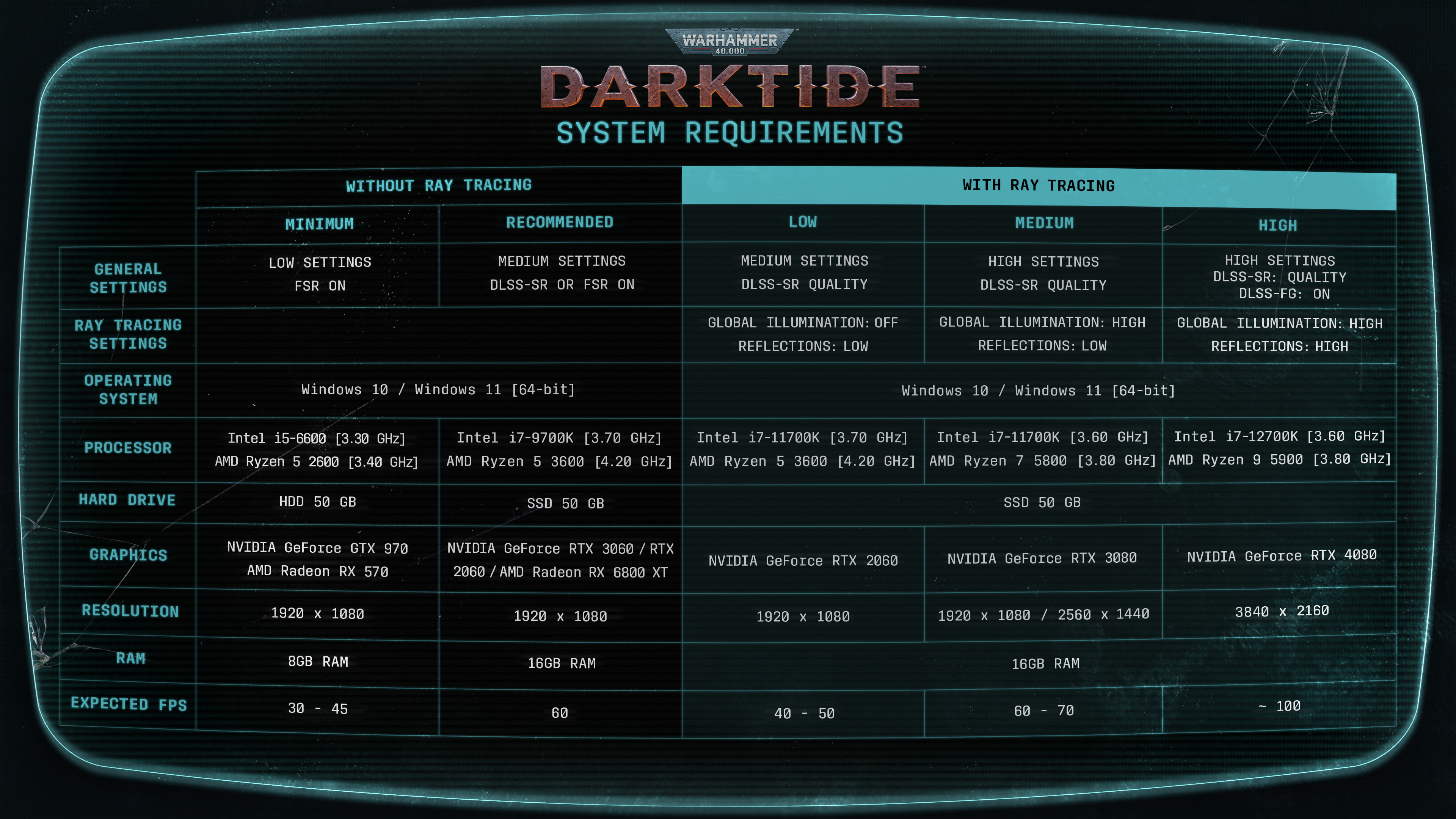
Oh, if you are interested in the performance and system requirement, click here and read our Performance Devblog
Pre-order Beta - What to expect
Hello again Rejects!
We are finally closing in on the start of the pre-order beta period and the lead-up to the final launch of Warhammer 40,000: Darktide. Many of you have been with us on this journey – whether participating in the technical test, closed beta, or just by consistently engaging and providing feedback in the community. For that, we are thankful. Darktide will be a better game because of your help.
WHAT WE ARE ADDRESSING
Since the Closed Beta, the team has been working hard to address many, but not all, issues. Here’s what we’ve fixed, along with a few things we’re still working on:
New in the beta:
Improved optimization and performance.
Added mouse sensitivity.
Added the ability to turn off wobble for players with motion sickness.
Added the ability to skip the tutorial after initial character creation.
We are working on adjusting the sensitivity of the chat filter so that calling out “snipers” no longer looks like you’re calling your teammates something only Nurgle could love. Please let us know how this is working for you.
We’ve added the Meat Grinder to the Mourningstar’s Psykhanium so you all can test your weapons before going into a mission. Just don’t shoot the servitors. They’re expensive.
We’ve worked on general connectivity issues so you all can consistently stay connected to games.
We’ve adjusted the difficulty of the “Cooling” mission, so it is more in line with the other maps’ difficulty levels.
Some work has been done to lighting and to help players better see and identify enemies.
We’ve implemented a new HUD so players can access more transparent information on their teammates.
We’ve increased weapon handling for the Veteran Sharpshooter’s starter weapons, so your reject doesn’t handle their weapon like only a heretic would.
We’ve separated enemy tagging input from the smart tagging wheel so players can more easily tag enemies.
Malice difficulty has been locked to players until their character reaches level 3. Let’s not thin the Mourningstar’s ranks too quickly, Reject!
Players in full strike teams can play the highest difficulty level that at least one party member has unlocked, even if the rest of the team hasn’t yet unlocked it.
Chaining weapons, specifically push into attacks, should now be smoother.
There’s been some fine-tuning on weapon swaps, but they depend on the weapon's size and weight.
For example, switching between a 2h chainsword and a bolter will not be immediate. Switching to melee should always be instant, while ranged weapons have a “ready-up” time.
Tuned some dodges and dodge timings.
Player stun and hit reactions have been tuned to avoid instances where players could be stun-locked by riflemen. But remember to take cover!
Working on, but not in the beta:
We are working on how best to implement an end-of-screen scoreboard that rewards the cooperative behaviors we aim for in Darktide’s gameplay
We know walking to the mission board every time was a bit of a workout, so we are working on spawning players returning from a mission closer to the board.
We are working on a detailed view of weapon stats.
WHAT TO EXPECT IN THE PRE-ORDER BETA
Let’s face it: Launching a game is not easy. More often than not, day-one issues will prevent many people from jumping right in. We cannot guarantee our launch will be as smooth as an Ogryn’s forehead, but our Pre-Order beta aims to help optimize the launch experience. We plan on doing this by slowly ramping up our service over the next two weeks.
In practice, this means that joining us on November 17th, you and your friends will pick your class, create your characters, and then dive into 4 missions, across 4 zones, at several difficulty levels available. We will also give you access to an entirely new zone to explore: Dust.
Now, that’s not all, Rejects. You will get the whole experience of our training grounds to familiarize yourself with the game mechanics, 60+ weapons to choose from, 4 random conditions that’ll impact your in-game experience (from power outages to… worse) - and we will increase the number of missions regularly. Here’s a high-level rundown:
WEEK ONE (November 17 - 20)
Full access to the game hub and mission board.
4 changing missions across 4 zones
We will regularly run in-game events (Conditions), namely Power Supply Interruption and Ventilation Purge. We don’t want to spoil them too much. We encourage you to experience them for yourself :)
Full access to the game hub and mission board.
WEEK TWO (November 21 - 27)
Up to 8 changing missions across 4 zones
In-Game Events, other surprise additions we do not want to spoil right now
WEEK 3 (November 28 to 30)
Up to 10 changing missions across 4 zones
Downtime to get the game ready for wide release: Tuesday Nov 29, 2022 19:00 UTC
NOVEMBER 30 (LAUNCH)
13 missions across 5 zones
1 New Zone (We do not want to share its name yet)
New Conditions (In-Game Events)
We will also deploy hotfixes as we carefully monitor the Pre-Order Beta feedback and respond accordingly.
CARRY OVER PROGRESSION Our goal is to ensure all progression will carry over from the moment you start playing through full release - but we cannot fully guarantee at this moment. The reason is that we are still using this period to test our progression systems, and we want to reserve the opportunity to change or reset things in the event something unforeseen or critical happens.
But we assure you that we will do our best to ensure all your characters and progression carry over!
TIME TO RISE, REJECTS
Oh, and if you're interested in learning more about recommended specs, do give our Performance Devblog a read
DEV BLOG: PERFORMANCE
Darktide Performance Deep Dive & System Requirements
Hello!
I am Rikard Blomberg, Chief Technical Officer and co-founder of Fatshark. The first computer I did programming on (or even had access to) back in 1983 was an ABC80, on which anything resembling graphics was what we nowadays consider ASCII art. The development since has been mindblowing.
Today, we are releasing our extended system requirements for Warhammer 40,000: Darktide that covers higher-end machines and those looking to enable NVIDIA-supported technologies such as RTX and DLSS 3. At the same time, we wanted to dive a bit deeper on the performance of Darktide, what to expect and provide guidance on how best to get the optimal experience with your hardware.
Ever since starting to make first- or third-person games, going back to the days of Lead and Gold, performance in terms of end-user framerate and the game experience has always been on our mind. That said, I can’t name a game we released where we were fully satisfied with the performance. Why? Because as a game developer, you are very seldom one hundred percent happy with any specific aspect of a game since there is always a “tug-of-war” between them.
At Fatshark, we believe that the best games result from striking a balance such that no single aspect is given priority over all others. This does not mean that there is no room for improvement over time; rather, we must always be mindful of our priorities.
Games like Vermintide, Vermintide 2, and Darktide are all good examples of this approach. In no way are they perfect in terms of having a high and steady framerate, but that was the approach we chose rather than, for example, making too big compromises regarding the number of enemies or the graphical quality of levels. We believe that most players can accept a short temporary loss of frame-rate to be able to get the overall gameplay we offer. We know this is a harder sell in a competitive game, but felt that this was a necessary trade-off for games in our category - cooperative play. But then - are we satisfied with the current level of performance in our games? No - we aren’t and will never be. It is and will continue to be, an ongoing battle for as long as we have people on the project.
Given this context, one needs to understand that we put in an incredible amount of work to make our games as performant as possible both before release but also after when we can use actual player data and feedback to set our priorities.
Generally speaking, our games have faced similar challenges. We have a lot of stuff going on in the game world, many enemies, all having detailed rigs and attachments and an AI to guide them. We also have to rely heavily on physics simulation to handle primarily melee combat, where countless entities move and interact with each other.
With modern processors, there has always been the promise of parallelism using the many cores that have become commonplace in recent hardware. As any game developer would tell you, this is in no way a silver bullet. The thing with parallelism is that it requires things to be conducted in parallel instead of in a sequence, which means that they need to be independent of each other. Large parts of gameplay code - especially involving the player and her direct interactions with the world can be tough to parallelize because the rules governing those are typically highly interconnected as opposed to independent. In our games, parallelized things are rather systems that one might consider more low-level, like updating animations, resource handling, dispatching of commands to the GPU, etc. But even with those things done, our games still tend to be heavy on the CPU side.
Let us take a step back here. What exactly do we mean by CPU-side, and GPU-side, and how does this relate to the framerate? Most of you, being kids of today, probably learned these things in kindergarten; I didn’t. Also, being a stiff old sog, I revert to my general principle that no question is too dumb to ask.
The framerate is the number of frames rendered to the target display per second. As a developer, though, it is more practical to talk about the frametime - which is the inverse of the framerate, i.e., the time it takes to render one full frame to the target display. We usually measure frame time in milliseconds. In other words, a framerate of 60 frames per second equals a frametime of roughly 16.7 milliseconds.
To achieve a frametime equal to or less than 16.7 milliseconds, everything the game does in one of its discrete updates (i.e. a frame) must be handled within that time. That means that the CPU at this time must handle all updates of logical entities, physics, collisions, AI, sending and receiving networking messages, constructing and dispatching instructions to the GPU, etc., etc. Similarly, the GPU must be able to handle all the instructions from the CPU applying code to transform and place objects, tessellate surfaces, render shadows, apply lighting and postprocessing, etc. If one of the two parts (GPU or CPU) is slower than the other, it will be that one deciding the framtime/framerate.
To get the most out of any specific set of hardware, you like the CPU and GPU to have similar frametimes so that no part needs to wait for the other. Typically when optimizing, we look at the slowest of the two and try to figure out what we can do to make it faster.
As mentioned earlier, parallelization is a big thing on the CPU side. We try to identify as many tasks as possible that don’t have interdependence and let another thread on the CPU handle them, thus more or less removing that time from the total frametime. We also try to find things that maybe don’t need doing or should not be done all the time. Perhaps it is enough to do it every 10th frame instead of every single one. Then there is a plethora of more specific tricks, patterns to avoid, patterns to use, etc.
Reducing GPU frame times are usually easier than cpu time for us. Specifically we already expose a long list of render settings for the user that affects GPU times significantly.
Reducing resolution, turning off advanced visual effects and utilizing hardware specific scaling and anti-aliasing options are all things that the user can do themselves to reduce the GPU frame times and increase their framerate.
That said, we generally put a lot of effort into tweaking our content and rendering features to make sure we keep our frame times as low as possible on the GPU.
Reduce the amount of draw calls we issue every frame. - Manually remove objects from levels - Improve culling in our levels to not draw things when we don’t see them - Create lower resolution mesh lods with fewer materials on them - Combine multiple objects into larger single meshes. - Utilize instancing to combine draw calls
Reduce time to render individual objects - Create lower resolution mesh lods - Remove unnecessary features from shaders that may not be needed in certain circumstances
Optimize and improve our advanced rendering features such as post effects, material/lighting models to make better use of the hardware.
With every new game we make we have the ambition to push the capabilities of our technology and game engine a notch. This is not solely for the betterment of that single title but also for driving the overall level of our technology. A new feature that at the time seemed unnecessary or a strange priority might prove essential for future updates and games.
In terms of technology there were several areas that we wanted to improve or re-invent that were identified at the start of the Darktide development. Some of the major things were:
We wanted to change and improve our network model (this is a large subject and hopefully will get a blog post of its own).
Transition to a DX12 only rendering backend to utilize more of the new DX12 featureset.
Improve the visual quality of our lighting as well as our lighting workflows.
Newer, less code-focused way of authoring and handling content in the game such as weapons, cosmetics and other items.
Build our levels from larger building-blocks that could be more effective across multiple levels.
Improve our technical bundling strategy to optimize the size of game downloads and the disk size requirements.
To stay true to the world of Warhammer 40,000 one has to make the grim world of the far future dark. But how do you do dark, darkness just being the absence of light? Our answer to that question would probably be - you do it by making the few light sources there better, more living and eye-catching.
Thus, we needed to improve our ambient lighting model which in Vermintide 2 mostly consisted of very sparse baked probe information and global ambient light overrides. In essence we wanted to get global illumination into our scenes and make sure objects placed in our worlds felt like they contributed to the lighting in the scene accurately. With more accurate ambient lighting one also cannot forget about the specular lighting and reflections which play a big role in making our scenes feel coherent. It became obvious that we had to make big improvements here to make sure that we live up to everything that makes Warhammer 40,000 the grim dark world it should be.
Luckily there was a good candidate technology for solving this problem. ray tracing and specifically RTXGI for global illumination (GI).
Ray tracing just started to become a well established component for rendering in games, especially with an explosion in terms of hardware support. Ray tracing is also compelling from a rendering development standpoint because it provides a unified solution for complex corner cases that arise when doing more traditional rasterized rendering.
NVIDIA DLSS 3 AND RTX SUPPORT
Partnering up with NVIDIA we opted to support ray tracing in our renderer and ended up implementing both RTXGI and raytraced reflections to boot. This also lays the groundwork needed for us to continue experimenting with additional ray tracing features down the line which carries the promise of further improving things like shadows, transparency rendering and VFX (visual effects such as particles). We also decided to support other RTX features like DLSS and Reflex to further improve frame times and response times of the game.
Another added benefit of the RTXGI implementation we ended up going with is actually that we decided to replace our baked ambient light solution with baked RTXGI probe grids. This allows us to use RTX cards on our development machines to quickly bake GI that can be applied to our scenes even for gpus that do not have enough power to push advanced ray tracing features like this. You won’t get the added benefit of the GI being fully dynamic that you get if you have a powerful gpu in your machine of course but the static GI still retains the nice dark feeling in our scenes that would otherwise be very flat and boring.
Building very expensive features like ray tracing doesn’t make much sense without having performant super resolution features so we decided to also go with supporting DLSS and to throw in Reflex for good measure.
We actually started out implementing DLSS 2.1 but as the project got extended and we started slipping into DLSS 3 territory we immediately jumped at the chance to easily integrate DLSS 3 into Darktide as well. With the new frame generation features it is actually a very good fit for our games as we very often see ourselves being CPU bound and since we already had Reflex integrated to handle any concerns of increased latency we were very happy to see DLSS 3 giving us huge improvements in frame rates across the board.
(*) Typical for most situations, but one might occasionally experience brief degradation in the most complex and intense scenes, primarily due to CPU-constraints.
OVERALL PERFORMANCE
Pushing quality and quantity of things make Darktide a demanding game, but we nevertheless are keen to support as wide range of hardware as possible. To be able to do this we have to make many features and fidelity of features configurable. We acknowledge that understanding exactly what settings to choose to get the optimal experience might not be trivial to many players. Thus, we have tried to compile explanations, suggestions and tips below on how to think of and use the different settings in the game. We hope you find this helpful.
With Darktide being capable of over a hundred on-screen enemies, some settings tweaks may increase framerate specifically during combat. Reducing the number f maximum amount of ragdolls (MAX RAGDOLLS) increases CPU performance (due to a lesser amount of local physics objects being simulated) while reducing the amount of weapon impact and blood decals (MAX WEAPON IMPACT DECALS, MAX BLOOD DECALS), as well as their lifetime (DECAL LIFETIME), increases the GPU performance in similar situations.
A majority of the options tend to affect mostly the GPU so the ways of increasing framerate when constrained by the CPU tends to be more limited. For the CPU constrained scenario there are but a few options to point at, namely:
MAX RAGDOLLS (can have a huge impact depending the number)
SCATTER DENSITY
LENS FLARES (just the highest option “all lights” have CPU impact though)
FIELD OF VIEW
SETTINGS MAINLY RELATED TO PERFORMANCE
DLSS / FSR
Image enhancement and upscaling techniques are highly recommended for increasing GPU performance. For GeForce RTX cards we've integrated NVIDIA DLSS, a technology framework that outputs high resolution frames using AI. We've also added support for two of AMD's FidelityFX Super Resolution upscaling techniques that can be used by any GPU. Their different settings balance speed against quality, but note that the most performant presets are rather tailored for resolutions higher than 1080p. Only one of the three available techniques can be used at any one time.
Running the game at high resolutions without using one of these techniques will have a huge impact on performance.
NVIDIA DLSS Super Resolution
DLSS Super Resolution uses AI to output higher resolution frames without compromising image quality or responsiveness. This feature requires a GeForce RTX graphics card. The different variant goes from QUALITY (having the least visual impact) to ULTRA PERFORMANCE (giving the highest boost in performance) where the latter is best utilized when running the game in higher resolutions like 4k. There is also an AUTOMATIC version that tries to decide the best version given the circumstances.
Available options in order of least visual impact and least performance gain to highest visual impact and most performance gain. OFF ⇒ QUALITY ⇒ BALANCED ⇒ PERFORMANCE ⇒ULTRA PERFORMANCE
AMD FidelityFX Super Resolution 1.0 (FSR 1.0)
AMD FidelityFX Super Resolution 1.0 is a cutting edge super-optimized spatial upscaling technology that produces impressive image quality at fast framerates for any GPU. The most performant settings reduce image quality and are recommended mostly for higher screen resolutions.
Available options in order of least visual impact and least performance gain to highest visual impact and most performance gain. OFF ⇒ QUALITY ⇒ BALANCED ⇒ PERFORMANCE ⇒ULTRA PERFORMANCE
AMD FidelityFX Super Resolution 2 (FSR 2)
AMD FidelityFX Super Resolution 2 is a cutting edge temporal upscaling algorithm that produces high resolution frames from lower resolution inputs. The different variant goes from ULTRA QUALITY (having the least visual impact) to PERFORMANCE (giving the highest boost in performance) where the latter is best utilized when running the game in higher resolutions like 4k. FSR 2.0 generally works better across a higher variety of resolutions than its predecessor, but with the downside of being a bit more expensive, especially on older hardware.
Available options in order of least visual impact and least performance gain to highest visual impact and most performance gain. OFF ⇒ ULTRA QUALITY ⇒ QUALITY ⇒ BALANCED ⇒ PERFORMANCE
NVIDIA REFLEX LOW LATENCY
Technology used to measure and improve the latency of the game. Having this enabled reduces system latency and increases PC responsiveness. It has a very limited effect on performance. The BOOST option overrides the power saving features in the GPU and can provide small additional increases in latency reduction.
Available options: DISABLED ⇒ ENABLED ⇒ ENABLED + BOOST
Framerate Cap
Locks the framerate to a maximum value and might be used to achieve a more steady framerate. Only used in conjunction with NVIDIA Reflex Low Latency.
Available options: 30 ⇒ 60 ⇒ 120 ⇒ UNLIMITED (DISABLED)
ANTI-ALIASING
Anti-aliasing improves the appearance of jagged polygon edges, so they are smoothed out on the screen. TAA increases quality over FXAA but at a higher GPU usage.
Available options in order of increased load on the GPU, from least to most: OFF ⇒ FXAA ⇒ TAA
SHARPEN
Used together with TAA to improve edge quality. Increases GPU usage slightly.
OFF ⇒ ON
VERTICAL FIELD OF VIEW
Controls the extent of the observable game world that is seen on the display at any given moment. Measured as an angle for the vertical component of the field of view. Raising the field of view can have a significant negative impact on the performance. Field of view has an impact both on GPU and CPU.
Can be set to a value between 45°(narrowest) to 85° (widest)
SETTINGS RELATED TO RAY TRACING
RAY TRACING PRESET
Enable DirectX Raytracing (DXR) for life-like reflections and global illumination. Sets the individual ray tracing options according to the scheme below. Ray tracing can have a significant impact on GPU performance depending on the exact setting. It might also have a smaller effect on CPU performance.
RAY TRACED REFLECTIONS
Enable DirectX Raytracing (DXR) for life-like reflections. LOW preset combines DXR with SSR. The HIGH option has a significant impact on GPU performance and is only recommended on higher-end hardware.
Available options in order of increased load on the GPU, from least to most: OFF ⇒ LOW ⇒ HIGH
RTX GLOBAL ILLUMINATION
Enable this option for life-like global illumination using ray tracing to give more accurate lighting within the game. Impacts mainly GPU performance.
Available options in order of increased load on the GPU, from least to most: OFF ⇒ LOW ⇒ HIGH
GENERAL GRAPHICS SETTINGS AND PRESETS GRAPHICS PRESET (GRAPHICS QUALITY) Sets all the more detailed (advanced) settings according to three predefined schemes. This does not affect any settings related to field-of-view, ray tracing, performance etc. Using these presets is generally a good starting point for most users. For each of the three presets the corresponding settings can be found in the table below.
Changing any of the advanced settings after setting the GRAPHICS QUALITY preset will result in that being set to CUSTOM. Note that changing this setting from CUSTOM to any of the defined presets will result in all custom settings being reset.
Available preset options in order of increased load on the GPU and CPU, from least to most: LOW ⇒ MEDIUM ⇒ HIGH
ADVANCED SETTINGS
AMBIENT OCCLUSION QUALITY
Ambient Occlusion is a model for calculating indirect light in a scene. We use Combined Adaptive Compute Ambient Occlusion (CACAO) as an ambient occlusion model. Increasing AO quality creates a higher load on the GPU
Available options in order of increased load on the GPU, from least to most:
OFF ⇒ LOW ⇒ MEDIUM ⇒ HIGH
LIGHT QUALITY
Effect the quality of light and shadows. Higher settings increase memory consumption and load on the GPU.
Available options in order of increased load on the GPU and memory consumption, from least to most:
LOW ⇒ MEDIUM ⇒ HIGH ⇒ EXTREME
VOLUMETRIC FOG QUALITY
Sets the visual quality of fog in the game. Increasing fog quality means a higher load on the GPU.
Available options in order of increased load on the GPU, from least to most.
LOW ⇒ MEDIUM ⇒ HIGH ⇒ EXTREME
DEPTH OF FIELD
Adds a camera focus effect with different quality settings. Increases GPU usage.
Available options in order of increased load on the GPU, from least to most.
OFF ⇒ MEDIUM ⇒ HIGH
BLOOM
Bright in-game glow effects through post-processing. Increases GPU usage slightly
OFF ⇒ ON
SKIN SUBSURFACE SCATTERING
Realistic skin effect on characters through post-processing. Increases GPU usage.
OFF ⇒ ON
MOTION BLUR
Simulates a blur effect for movement through post-processing. Increases GPU usage.
OFF ⇒ ON
SCREEN SPACE REFLECTIONS
Generates in-game reflections through post-processing. Increases GPU usage.
Available options in order of increased load on the GPU, from least to most.
OFF ⇒ MEDIUM ⇒ HIGH
GLOBAL ILLUMINATION
Baked simulation of indirect bounce lighting. This is replaced by ray-traced global illumination when running with ray tracing and the setting does not have any effect in such scenarios.
LOW ⇒ HIGH
LENS QUALITY
Enables post-processing effects for both Lens Quality Colour Fringe and Distortion. Increases GPU usage.
OFF ⇒ ON
LENS FLARES
Adds lens flare effects for sunlight or all light sources. Increases GPU usage. ALL LIGHTS has a small effect also on the CPU.
Available options in order of increased load on the GPU, from least to most. OFF ⇒ SUNLIGHT ONLY ⇒ ALL LIGHTS
SCATTER DENSITY
Scales the in-game density of detailing elements such as debris. More scatter increases CPU usage.
Can be set to a value between 0.0 and 1.0
MAX RAGDOLLS
Decides how many enemy ragdolls are active. More ragdolls significantly increases CPU usage.
Can be set to a value between 3 and 50
MAX WEAPON IMPACT DECALS
Decides the amount of concurrent weapon impact decals. Increases GPU usage.
Can be set to a value between 5 and 100
MAX BLOOD DECALS
Decides the amount of concurrent blood decals. Increases GPU usage.
Can be set to a value between 5 and 100
DECAL LIFETIME
Decides the lifetime (in seconds) for decal being drawn in the game. Increases GPU usage.
Can be set to a value between 10 and 60
IF HELP IS NEEDED
The great variance in consumer hardware and software makes it hard to predict the GPU and CPU performance for all player configurations. If you encounter performance issues we encourage reporting those through our forums so that they can be forwarded to the dev team. When reporting, please take some time to describe the issue, especially if it is gameplay situational or is dependent on a settings change, and include information on relevant hardware and setup. Taking a bit of extra time to provide information and context helps us greatly, and will hopefully help us figure out your problem much quicker.
Class Spotlight - Psyker: Psykinetic
Surprise! Another spotlight for your viewing pleasure.
We know you’ve been itching for more information about the Psyker, so today, we’ll delve deeper into the Psyker: Psykinetic. If you missed the other spotlights, you can find the Zealot: Preacher here, the Veteran: Sharpshooter here, and the Ogryn: Skullbreaker over here.
THE PSYKER
"It seems that no matter how low I set my expectations, it can always get worse... A lifetime spent in the mire, hiding from the witchseekers and the bigots in the most desolate places the Imperium of Man has to offer. Forced to sell my incomparable skills to smugglers, hive gangers, bounty hunters, and all their blockheaded ilk merely to survive.
Alas, such has always been the way for my kind. If we are not slain out of hand, dissected, drafted, or dragged aboard unmarked vessels, never to be seen again, we are forced to treat with our obvious inferiors as equals … or even as our betters, laughable though that sounds. But I mustn’t complain. After all, it can always get worse."
Psykers’ formidable mental powers channel the raw stuff of the Immaterium – the very essence of daemons and gods. Should their discipline waver for even a moment, they risk a grisly, explosive demise … or worse, possession by the unspeakable entities of the Immaterium.
As such, Psykers are hated and feared by the ordinary run of humanity. They are culled, controlled, and victimized at every level of society – despite the Imperium's inability to function without them. Psykers alone see the Imperium as it truly is: a mass of contradictions, bigotries, and horror fashioned in the name of survival.
Unsurprisingly, this makes Psykers insular and untrusting. They see danger in every shadow … assuming that they haven’t already been driven mad by the combination of mistrust, whispering voices, and the ever-present danger that their brains might melt out of their ears.
Pictured: Early concept art of the Psyker: Psykinetic
AN INCOMPARABLE MIND
A Psyker’s every waking hour brings fresh opportunities for victimization and betrayal. Accordingly, they don’t trust anyone – including other Psykers, who are surely either mad, unstable, or willing to offer up one of their own in the hopes of living a quiet life, right? Nevertheless, shared hardship does create a bond between all Psykers – a spiritual siblinghood that binds them even in the heat of battle.
As for the others? Psykers are most comfortable in the company of Ogryns, who lack the deviousness for betrayal, and whose malice is of a childish, uncomplicated sort. Veterans are tolerated for their skills and derided for their limited (by Psyker standards) mental capacity. And as for the Zealots? Zealots, who hound and harry all Psykers as abominations, witches, and freaks? Clearly, such individuals are not to be trusted or tolerated in the slightest …
Psykers’ abilities are tied to the disciplines they learn to stave off madness and control their otherworldly gifts. Such disciplines run the gamut from showstopping to subtle, depending on the Psyker’s personality and tutelage.
Psykinetics manipulate empyrean forces with the power of their mind, repurposing it to crush heads and inflict gnawing agony on their victims. They leave a trail of mangled bodies in their wake … most of whom never had a chance to react to their danger.
Pictured: Snapshot of the Psyker: Psykinetic's Progression Gear
PERILS OF THE WARP
The Psyker: Psykinetic draws upon its connection to the Warp in battle. This perilous and devastating force may bring any wielder of such powers to ruin if they do not exercise caution.
This incredible power and damage output come at a price, however. Lacking in brawn and toughness compared to other classes, the Psyker: Psykinetic must learn how to position themselves at a distance away from the hordes lest they become overwhelmed by the swarming masses.
As they use their psychic abilities in battle, Psykers slowly build their level of Peril. If you don’t manage Peril wisely – by taking a moment to meditate and thus Quell the roiling energies within – you are sure to explode in spectacular fashion.
A Psyker: Psykinetic gains Warp Charges by killing their enemies – growing more powerful but rapidly increasing their Peril. In place of the grenades carried by the other classes. The Psyker: Psykinetic’s power is Brain Burst … which does pretty much what it says. Stand well back.
[/tr] [tr] [td]Starting Loadout[/td] [td]- Melee: Combat Sword - Ranged: Stub Revolver [/td] [/tr] [tr] [td]Psychic Ability[/td] [td]- Brain Burst[/td] [/tr] [tr] [td]Passive[/td] [td]- Killing an enemy with Brain Burst stores a Warp Charge. This bio-energy increases the damage of your smite ability while active. - Peril generation is reduced proportionally to the number of Warp Charges. [/td] [/tr] [tr] [td]Class Ability[/td] [td]The Psyker discharges their accumulated Warp Charge, knocking enemies away.[/td] [/tr] [tr] [td] Coherency Bonus [/td] [td]Increased damage against Elite enemies.[/td] [/tr] [/table]
PREMIERE - Darktide 'World Intro' Trailer
Short story: The Psyker
Loyalty's Price
by Victoria Hayward
Ekoh was watching a battle unfold. Astra Militarum soldiers in grey drab charged onto a killing field as the corrupted cultists roared toward them in a hideous tide of bile and bone. Ekoh frowned. The image was patchy, dragged as it was from an unwilling mind. He willed the interrogatee to focus, but she was paralysed with fear as the battle-scene replayed. The memory juddered, and the faces of the other Wyrdvane psykers she’d been deployed with came into focus. A combat-coven of Scholastica Psykana rejects too powerful to terminate, but too insane or uncontrolled for other service. Some were catatonic, unaware of the descending horde and others were caged, howling with terror. All were watched warily by a stony-faced Commissar, her pistol trained not on the attackers, but on the psykers.
Inside the memory, Ekoh saw the interrogatee look down at her hands, pale and shaking. Strands of energy crackled around her fingers as a chant started up amongst the more lucid Wyrdvanes. He felt a static vibration and smelt a metallic burn as the Wyrdvanes reached for one another’s minds, and their powers began to harmonise. The enemy horde grew closer and the interrogatee moaned in pain, her body sparking with dangerous warp energies. The Commissar called a warning as the air pressure changed. Ekoh focused. This had to be it. They’d finally see what happened…
Then the memory shattered, and the battle-scene split into fragments.
‘That’s enough,’ came a brusque voice.
Ekoh pulled off his blindfold and blinked, dazzled by the brightness of the interrogation chamber. He was back on Atoma, not that he’d really ever left. His master, Explicator Zola had her hands clasped behind her back, expression stern. Frost bloomed on the table to which the interrogatee was strapped, indicating dangerous levels of psyker activity and the candles around the small shrine to the Emperor had guttered out.
‘Did you progress any further?’ Zola asked.
‘No, Lord,’ Ekoh said. ‘She resists.’ His head ached from the hours of interrogation.
Zola’s lip curled as she addressed the Wyrdvane interrogatee. ‘You’ve been given the opportunity to serve the Imperium despite your abnormality, and this is how you reward us? We lost an entire company in the attack on Nox Alpha, and yet you survive. Why?’ She yanked the woman’s head up by the hair to glower at her. ‘What are you hiding? Are you in league with the cultists?’ Disgusted, the Explicator dropped the woman’s head back onto the metal table. ‘You fled to Atoma thinking you could escape, but there is no safe harbour in Tertium Hive or any of the Moebian Domain for a traitor witch.’
Ekoh watched as the Wyrdvane sobbed silently, her face a rictus of fear. He’d learned a long time ago to remain impassive. An unsteady psyker was a dead psyker.
Zola breathed heavily. ‘And,’ she added, ‘We lost an Interrogator in the attack. Someone will pay for that.’ Now her fury during this interrogation made sense. An instrument of the Holy Ordos she might be, but in Ekoh’s estimation Zola had always been the most humane of Grendyl’s retinue.
‘Sir,’ Ekoh said. ‘If I may?’
Zola waved a hand.
‘Please,’ Ekoh said softly to the Wyrdvane. ‘My Lord only wishes to know the truth. She’s fair to our kind, else I wouldn’t be in her service. Please, just tell her what happened.’
The Wyrdvane swallowed. Her lips were cracked and pale.
‘Shall we try again?’
She nodded.
The familiar battle scenes rushed past, but they didn’t stop as they had before. The memory continued and the Wyrdvanes unleashed their attack. Ekoh felt their power scream out in vast, arcing bolts of lightning, cracking violently into the ranks of the heretics and leaving charred corpses in their wake. Traitor tanks ruptured, howling shards of metal skyward. The cultists faltered, and the Wydrvanes intensified their attack. Ekoh felt their elation at their victory - but it was only momentary.
They’d overreached. They were only as strong as their weakest number, and one of the caged psykers had begun to shudder at an unnatural speed. The others began to scream, and bleed from their mouths. Then with a hideous crump of organic matter, the skulls of those closest started imploding.
The Commissar was just as efficient and lethal as her rank demanded, but she’d only terminated half a dozen of the beleaguered psykers before a ripple of malevolent energy hit her, and her head inverted with a wet crack.
The caged Psyker screamed, jaw wrenched open unnaturally. Smoke rolled from his eyeballs in greasy coils and Ekoh watched on in horror.
Ekoh knew, as did the Wydrvane whose memories he rode, exactly what was happening. From the moment the Black Ships took young psykers from their families, the dangers were drilled into them. When they reach into the Immaterium to draw on its powers, psykers not only became vital tools for the Imperium, but conduits through which the nightmare horrors of the Warp could stream. Normally the Commissar’s pistol would end any instability before it took hold, but something terrible was about to happen here.
Ice formed around the interrogatee’s feet. Ekoh saw her raise a trembling hand toward the stricken psyker, pulling down on whatever reserves of energy she still had.
In the corner of the memory, he saw the Interrogator running towards them, but knew he would be too late. The air around the caged psyker shimmered, boiling blood flowing from his nose and ears.
Screaming with effort, the interrogatee threw a crackling blast of power towards her stricken comrade. The explosion ruptured the battlefield, throwing the interrogatee to the ground. The memory faded to darkness, and scorch filled Ekoh’s nostrils.
Ekoh pulled his blindfold off.
‘Well?’ Zola snapped.
‘There was going to be a breach,’ Ekoh said. ‘She terminated the corrupted psyker before it happened. Regretfully, the Interrogator was too close to the blast to survive.’
‘So she acted in good faith, and hid her actions from us through fear’ Zola nodded, looking down at the interrogatee. Tears of blood streamed down the exhausted Wyrdvane’s face. The interrogation process was not gentle, although Ekoh always tried to reduce the hurt. ‘Then she shall have mercy.’
Ekoh breathed a sigh of relief.
‘The Emperor’s Mercy,’ the Explicator said, drawing her pistol and firing two rounds directly into the woman’s skull.
Ekoh froze in shock as the woman’s body went limp.
‘A waste,’ the Explicator said grimly. ‘But there’s no coming back from exposure to a corrupted element. Termination is the only way.’
Ekoh stared blankly.
‘This must be difficult for you,’ Zola said. ‘But fear not. Should your abnormality ever threaten your ability to serve Him on Terra, I’ll not hesitate to end your suffering. Isn’t that a comfort?’
‘Yes Lord. Thank you Lord,’ Ekoh replied tonelessly, shame and fear incised on his heart.
The Explicator nodded as she left the chamber. ‘Only in death does duty end. Remember that.’
Ekoh glanced back at the Wyrdvane’s body as he followed her out. ‘I won’t forget, Lord.’
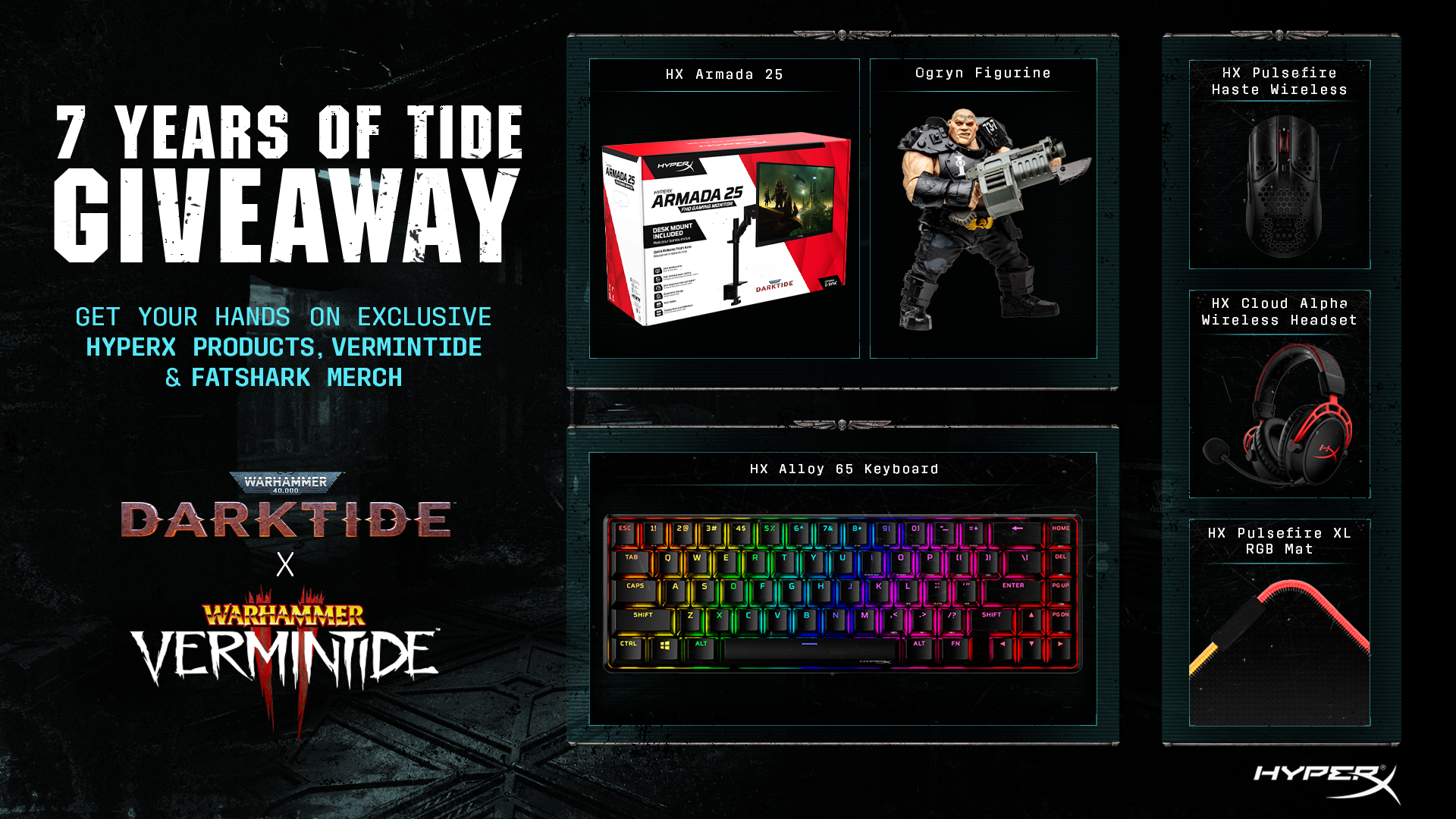
Join the 7 Years of Tide giveaway
Rejects!
Seize the opportunity to win some cool stuff prior to the release of Darktide - click here to join the giveaway!
7 years of Tide
Rejects!
November 30th marks the release of our next game Warhammer 40,000: Darktide, an intensely brutal cooperative game set in the Warhammer 40,000 world. This release will be the 3rd installment of “Tide” releases over the past 7 years and adds to the already critically acclaimed Vermintide series.
Throughout November, leading up to the release of Darktide, we'll host activities and updates to celebrate its launch. This includes a free copy of Vermintide 2*, a free update to Vermintide 2 (Trail of Treachery DLC), access to play Darktide early for pre-order players, and a free download of the Devoted Rejects DLC for all Vermintide 1 or 2 players who jump in and play Darktide.
For all the information on the promotions and events, please visit the dedicated space on Steam celebrating '7 Years of Tide':
https://store.steampowered.com/sale/vermintide2giveaway For the best viewing experience, visit this page on your PC
*Vermintide 2 is available for free from November 3rd-7th as part of a Free to Keep offer on Steam
Dev Blog: Mission Terminal
The Mission Terminal is the centerpiece of the Mourningstar hub. Here, players share the space with others, and access a variety of missions. We want all players to find a few missions at any point in time that are relevant to their character’s competency. Missions get dynamically populated on the Terminal according to either predetermined narrative or emergent events that happen inside the world.
We’ve learned a lot from our work on the Vermintide series, as well as from looking at similar titles. With that knowledge, we built something suited to the W40K universe while making the system a bit more dynamic than what you’re used to when coming from our -Tide games.
Inspired by the analog nature of the technology layer present in Warhammer 40,000, the Terminal emulates the space cop fantasy where the world is alive, and the Mission Terminal is ever-so-changing, reflecting the perils and urgency of its contents.
In terms of presentation, we chose to go more diegetic: Fewer floating menus and more of an in-world setup where everything “lives” on the Mission Terminal. This makes the whole experience feel better grounded into the universe and more distinct and easy to understand for players (some early feedback helped us steer the ship right in the sweet spot between clarity and immersion). Missions are displayed in different ways:
In a small panel: where users get a very condensed idea of what they have to expect about the selected mission
In a medium panel: where users get access to quick play (a fast way to queue in missions) or events of critical nature get displayed; this panel also acts as a legend for better explaining the small panel's iconography
An expanded panel is also present when you select any particular small or medium mission panel, where users get all the information they need to embark on said mission.
Furthermore, as you prove yourself to The Inquisition, the more trusted you become on the Mourningstar. This progress follows through in the Mission Terminal, unlocking higher difficulties, and better rewards following that trend. However, with the co-op nature of the game, it was essential for us to allow the possibility to play missions together, even if players are way apart in progression.
As for missions of critical timing, these get highlighted in the middle of the Mission Terminal. These urgent encounters have better rewards and higher intensity in combat, so in true grim-dark fashion, you might not survive :).
You will first be introduced to the Mission Terminal, during the prologue once you have completed basic training. When the Mission Terminal is accessible, players can team up and start a mission. The first player that selects a mission initiates a vote for the other Strike Team members in their team, with the possibility of any player in the Strike Team being able to start voting on a mission.
Missions send you and your Strike Team deep into the Tertium Hive. A mission follows this structure:
Mission Difficulty: - Relates to the power/strength of the enemies
Mission Name: - Flavor-name for the mission
Mission Location: - Where this mission is taking place
Mission Type (Objective): - What are you doing inside of the mission (note: some missions can have side objectives)
Rewards: - What will you get for playing the mission; we have various types of rewards that fuel progression:
Experience: The driving source for empowering your character. Ordo Dockets: Can be used to buy new weapons and apply modifications to them. Weapons: The player by succeeding a mission has a chance to be rewarded with a weapon to add to their arsenal.
Mission Timer - How long is a certain mission available (upon expiry of a timer, new missions “populate” the Terminal)
Some missions can have modifiers; we call them Special Conditions. An example of this is a Power Supply Interruption. Missions with this Special Condition, will be (as the name suggests) darker and add a unique way of playing the level. A Special Condition could also apply on a more global scale in Tertium Hive, and we call this a Global Condition (pinned at the top of the mission board). During a Global Condition, the game will alter the missions more frequently. There could, for example, be a blackout in the hive, and therefore almost all the missions available are affected by Darkness.
Given all the specs that missions can have, this makes the world transcribe its dangerous and chaotic nature while allowing us to expand on it more easily in the future.
Thanks for reading and see you in the Mourningstar!