Wayward Strand announces a July 21st, 2022 release date!
You’re here!
Welcome!
It’s thrilling for our little team to see so many of you coming to visit our Steam page. We’ve just announced our launch date, and we can’t wait to finally be able to share the game with you.
I’m Georgia, one of the lead writers for Wayward Strand.
First things first:
The game will launch here on Steam, on Thursday 21st July, 2022!
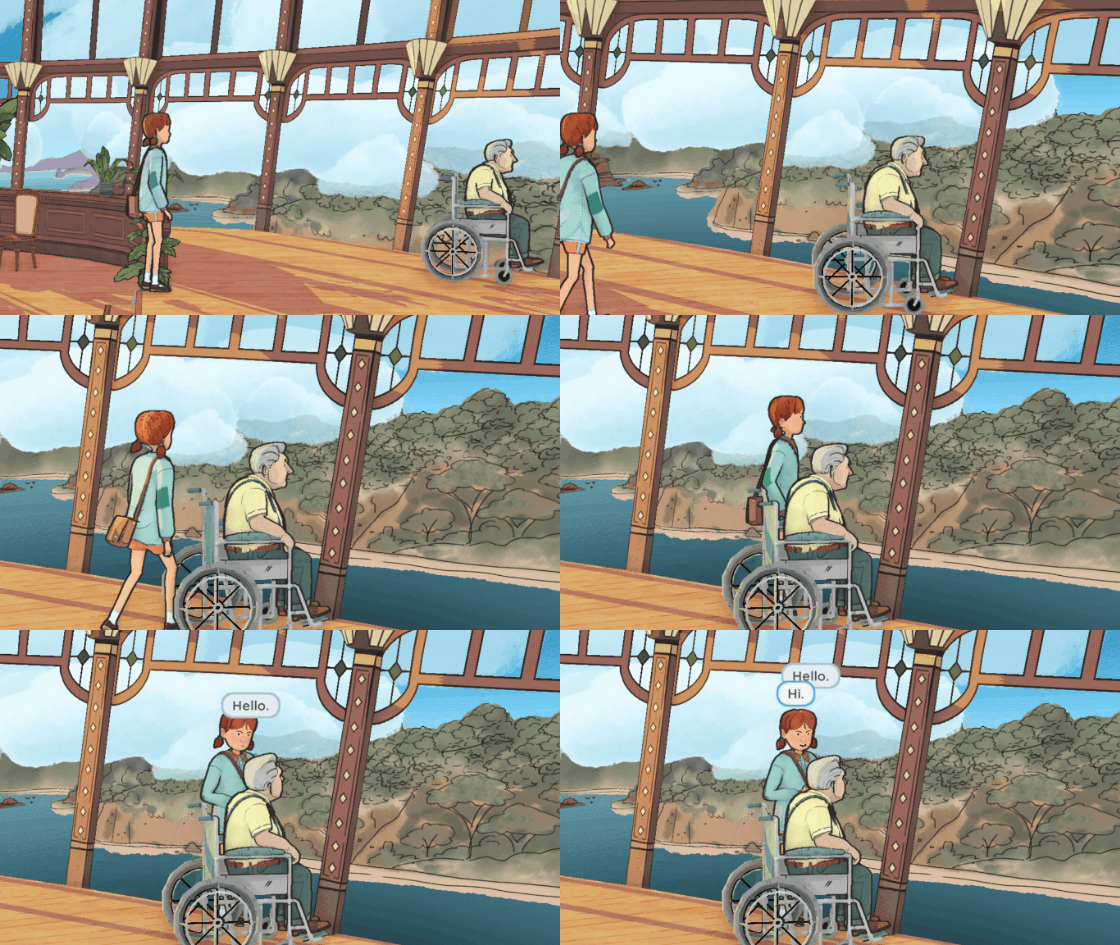
For any newcomers, Wayward Strand is a heartfelt narrative game developed in Melbourne, Australia. It’s set here in Australia, in the 70s. You play as Casey, a curious and compassionate 14-year-old who’s spending a few days helping her Mum at the local hospital - which just happens to be on a floating airship above a small regional town.
For me, this game is all about care. Casey’s task is deceptively simple - sit with the patients in the elderly ward, and take care of them. Like other adventure games, there is the occasional mystery to uncover or puzzle to solve. But the beating heart of the game is an experience of listening, of gentleness, and of the distinct rewards of discovering that everyone around you has their own rich interior world.
Our team at Ghost Pattern is tiny. Starting with a core team of 5 back in 2016, we’ve roped in a handful of local collaborators to bring this enormous game to life. Featuring 15 characters, over 20,000 lines of voiceover dialogue and a richly illustrated four-storey hospital environment to explore, the final product looks like the work of a much bigger team! But we’ve all poured our guts into this game, because we know it’ll be unlike anything you’ve ever played before.
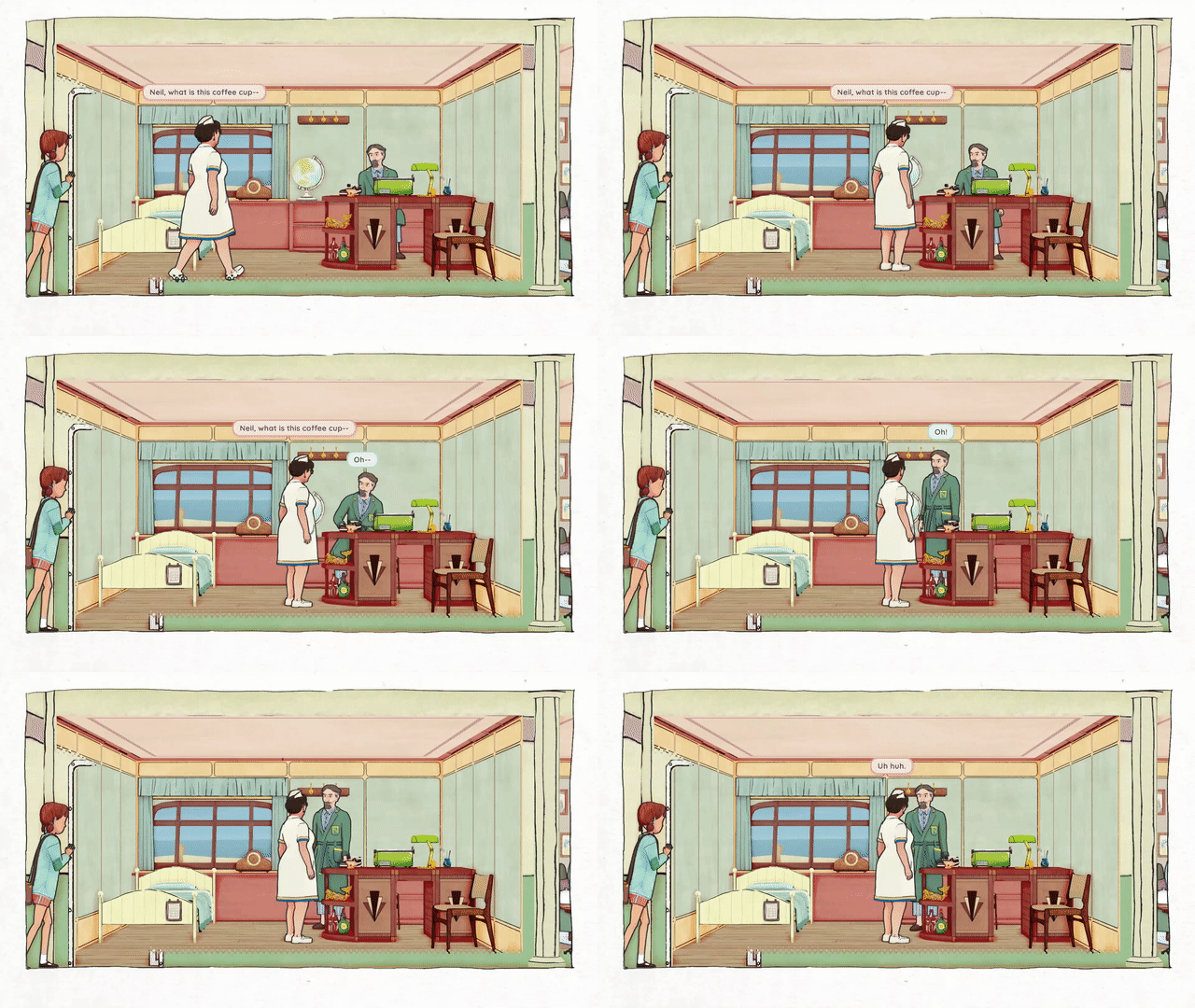
Please enjoy these latest screenshots!
Something exciting about this game is that we have carefully designed it with first-time players in mind. Got someone in your life who thinks they’re “not a gamer” or couldn’t enjoy video games? Our game is the perfect place to dip your toe into the world of narrative games.
With a simple and intuitive UI, you could sit with a younger sibling, a parent or a grandparent, and explore the gentle world of Wayward Strand together. You could even play together over a cup of tea!
Finally, Here's a short video we prepared which shows off some of the new VO in the game. https://youtu.be/0Q1Wu0o1Avg So go ahead and wishlist the game, if you haven’t done already, and have a think about who in your life you’d like to share the experience with.
We can’t wait to share it with you on Thursday 21st July!
Thanks for your support, everyone. Georgia
Wayward Strand featured in the Big Adventure Event! Live-stream, demo, and more
Hi everyone! We're chuffed to announce that we're being featured, along with a bunch of other really exciting games, in the upcoming Steam Big Adventure Event, organised by Hitcents!
As part of the event, we'll be doing a live-stream to our Steam page and to Twitch - we'll hopefully be doing something a bit different, being interviewed by a lovely person (yet to be announced), as well as playing through the demo live, and discussing it! We feel like this is a great way to introduce the game to all the wonderful BAE folks who might be hearing about Wayward Strand for the first time.
If you're visiting us from the Big Adventure Event, hello, and welcome to the hospital! We'd love you to add Wayward Strand to your Steam Wishlist if it looks like an experience you might be into.
The live-stream will be happening on Sunday 23rd @ 7pm PDT / Monday 24th @ 2pm AEDT - you can add a reminder for it on Steam by Setting a Reminder using the buttons next to this post.
As usual, if you have any questions you'd like us to answer on stream, just send them through on our Discord, or send a message or reply to @WaywardStrand on Twitter, and we'll do our best to answer them! We'll also be keeping an eye on the chat during the live-stream, so you can just ping us on there too.
If you didn't get a chance to try our new demo last October, we'll be making it available again for a limited time for the Big Adventure Event. We're really excited for you to try it out and let us know what you think! We'll make it available on January 20th, and will probably keep it live for a few days after the event too, so that you get a chance to try it out.
As soon as the Big Adventure Event kicks off, we'll also start looping some our previous live-streams on our Steam page, in case you haven't checked them out yet! We've done live-streams for quite a few different Steam events over the past couple of years, and each stream explores a different aspect or element of Wayward Strand - the character design, the audio, the art, or the research that's gone into the past six (wow) years of development.
It's already only a week away now - the team is really looking forward to sharing more Wayward Strand with you all.
Melbourne International Games Week - NEW DEMO!
First of all:
We have a new demo, available to play right now!
Wayward Strand is a part of the Melbourne International Games Week (MIGW) showcase, which is starting now - Sep 30th, 10am PDT / Oct 1st, 3am AEST. We'd love to invite you to check out our demo, which is available from the start of the event. Here's a handy widget thingie that you can use to go to our page to download it:
It's been quite a while since we updated our demo (our last one was built in October 2019!) so there's a lot of new features in there to have a look at. I've written more about the new demo features further down this post, but I'll tell you about MIGW first.
Melbourne International Games Week
Affectionately known as MIGW (Mig-Wuh), Melbourne International Games Week is an annual celebration of all things Australian games. During MIGW there are loads of events and parties, sales, conferences and so on. Developers use it as an opportunity to catch up or get together at the pub, and it's also the time when all sorts of industry folks from Asia, Africa, Europe, The Americas and Oceania travel 'down under' to meet or give talks, and to do business (sometimes also at the pub!)
Specifically, MIGW highlights games made in Victoria, which is one of Australia's largest states, and definitely the most prolific for game developers - mostly because there's some funding support available for developers here. Lots of game developers from around Australia and even New Zealand move to Melbourne to chase their development dreams, and Wayward Strand wouldn't be able to be made without support from both Film Victoria and Creative Victoria. These are state-government bodies here, and both do a lot to bolster the entire industry from the ground up.
Some of the events which happen during MIGW include PAX Australia, and the amazing Parallels Showcase, which is part of the Freeplay Independent Games Festival.
The Freeplay Parallels Showcase is our favourite games event each year. It puts a spotlight on some incredible local games, and always fills us with inspiration and hope for videogames. I'm sure this year will be no different - and even better, it's free! You can register for a ticket here, and I've embedded this year's trailer too, to whet your appetite!
[previewyoutube="uMyrR5NqXW0;full"]
We want to thank Creative Victoria for putting together this special Steam Event as part of MIGW 2021. It will be highlighting several Victorian-made games, including ours - there are so many fantastic developers here and I really hope you can find time to dig through the demos, through the sale and through all of the great streams and talks happening.
Streaming
We'll be doing a live stream - a playthrough of our new demo and it's features, as well as looping some of our other streams from other events, such as LudoNarraCon, so be sure to check them out.
If you'd like to catch our live stream...live, it'll be happening on the MIGW event page as well as on our steam page at:
11AM AEST October 1st 5PM PDT September 30th
(You can just subscribe to the event linked to this post, and you'll get notified when the stream is about to go live!)
There are seriously so many great games and developers to check out during the event. It’s impossible to cherry-pick our favourites without just showing our mates off - so please explore it yourself. I really think your type of game will be there, whatever it is, because there’s so much good and diverse work being made here in Victoria!
Now, about that new demo...
The Demo:
New demo! New demo!!!
We decided to make a new demo for this event. We've actually been working really hard on some other things, mostly on what we're calling a 'Day One Playable', which will serve as a production guide for us as we head towards release. Knowing how long it takes us to make 'Day One Playable' will hopefully tell us how long it'll take us to make Day Two and Day Three playable too. Then we will have 3 days playable, which is a finished Wayward Strand.
SIKE!!!!!
Nah, there's always more to do. We're working on the beginning of the game too, and the ending (both have been really exciting work, it's fun to develop bits of the game outside of the time spent on the ship). We're also busy working on some exciting VO stuff which I am sure we will blog about when that process starts, and as always we are working with our accessibility and cultural consultants to make sure Wayward Strand can be enjoyed by as close to everyone as possible.
The new demo has a few tastes of what we've done for Day One Playable so far, including some lovely new UI improvements, a bunch of new scenes (and even new characters). Various visual improvements here and there, although most of that will plop together like baking a cake which we'll share once it's finished baking. Trust me, it's yummy, (and yes I licked the bowl.)
Does the new demo have bugs? Probably! Hopefully not too many. With a game like ours which has so many moving parts I can't help but wonder, as I write this (about a week before we finish it), if we'll find some weird stuff in there.
As I mentioned, we’re going to be doing a live stream during the MIGW event, where we’ll be playing the new demo and exploring some of the new features - so come along to see those from our perspective, or watch the replay as it loops throughout the event.
Thanks so much for following along as we make this beautiful game.
I hope you enjoy the new demo, and I also hope you enjoy the MIGW Event on Steam. Thanks again to Creative Victoria for the initiative.
Goldie, and ghost pattern.
Directing Virtual Characters in Wayward Strand, Part 1
After my last post, on how we’ve integrated ink and Timeline, there was some interest in how we use Unity’s Timeline tool to do things like trigger animations on characters.
Over the course of making Wayward Strand, we've developed a solution for this that we're pretty happy with. Put simply, we use Timeline to set parameters on our characters' Animator Controllers - but we've developed quite a bit of scaffolding around this, as well as a useful categorisation structure for our animations.
There's quite a bit that goes into all this, so I'll cover it over a couple of posts - this first one will focus on the Animator Controllers, and I'll start by going into the reasoning behind why we went for this approach.
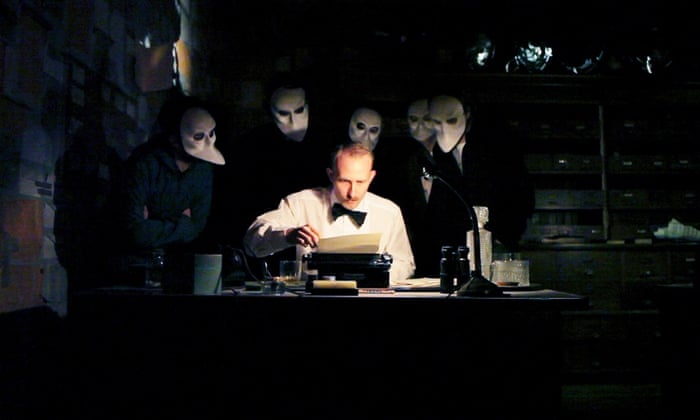
Our problem space for animations in Wayward Strand is borne out of our game’s unique, simultaneous story structure. We wanted Wayward Strand to feel like an interactive theatre experience like Sleep No More, where the continuous location and physicality of the actors is such an important part of what makes that experience unique.
You see the character in their highlighted, plot-critical moment, where they perform the key action, or have that impactful interaction, that their story is structured around - but you also see the character after this moment, when they have to move, in character, from one location to another. You also see them in their quiet moments, where they spend time in a room or space feeling satisfied, confused, expectant, or disconsolate - sometimes for considerable stretches of time.
In a real-time, criss-crossing story structure, these wobbly, windy arcs of heightened action and quietude/reflection are a joy to experience, and part of that joy comes from the choice you make in who to follow - who to spend time with at any point in the story.
In a linear storytelling format, like a film, whenever you have a quiet moment, it’s because the director decided that you’ll have a quiet moment at that specific point in the story. Your moment-to-moment experience has been foreseen; planned; designed. But in a simultaneous storytelling format, you’re choosing to have that quiet moment, or happening upon it, while still existing inside the story’s world.
In attempting to capture this feeling in a videogame, we knew that we wanted our characters to live as continuously as we could manage within the world. This means that they’re generally not snapping from one state to another - the camera isn’t cutting away from them and then cutting back, allowing you to snap their animation state, or even load in an entirely new version of the character to handle a particular story moment.
Our characters exist in the world - performing a variety of actions, participating in scenes, having their quiet moments - and they do so continuously throughout each day, regardless of whether the player is near them or not.
The solution we landed on for Wayward Strand was a structure where we split most animations into belonging to one of two categories - BodyPose and Activity. Using this logical structure, we realised that we’d be able to run a lot of complex character movement through systems, without having to worry exactly about how the movement is managed on the code-side. This categorisation also helped significantly in determining which animations to develop, and what their requirements were.
I want to give a shoutout to Kalonica in particular here, who really came up with this logical solution as we were discussing our requirements and desires for the game, and convinced me of certain elements which I had thought would be limiting, but haven’t been in practice, and have actually turned out to be a really important part of having a feasible system come together that actually works.
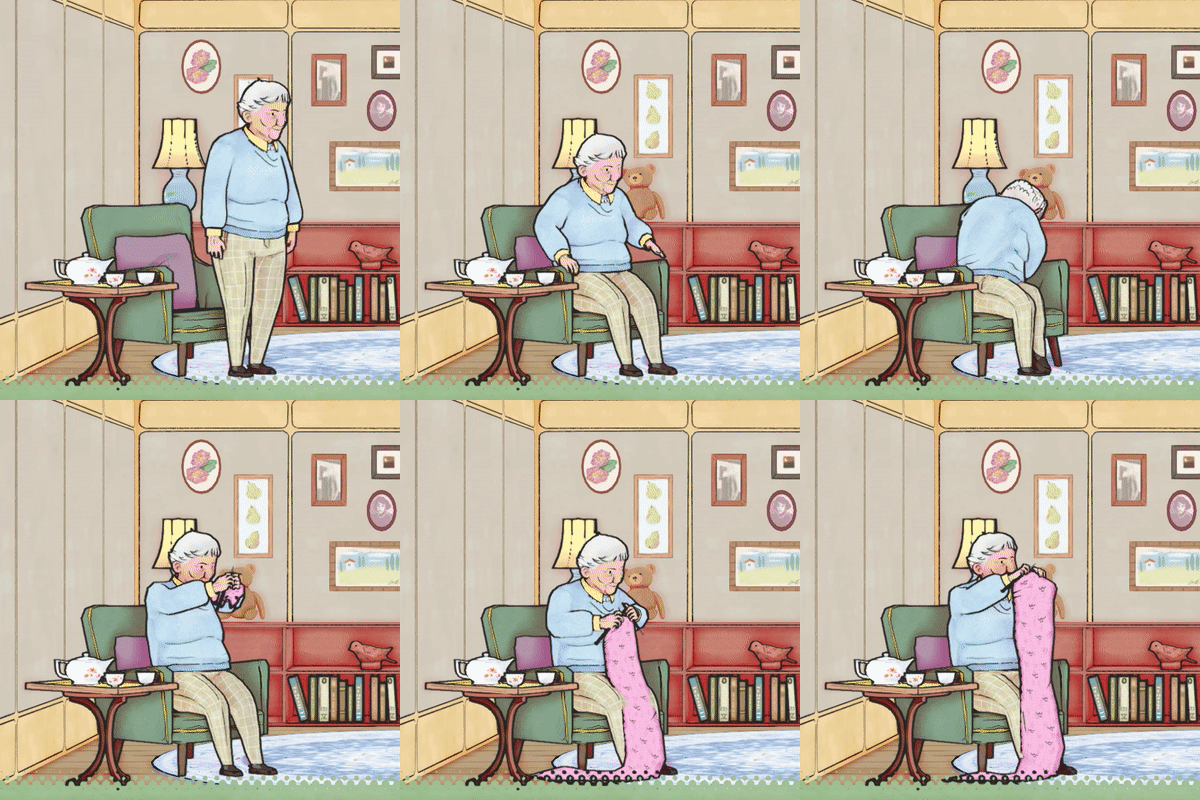
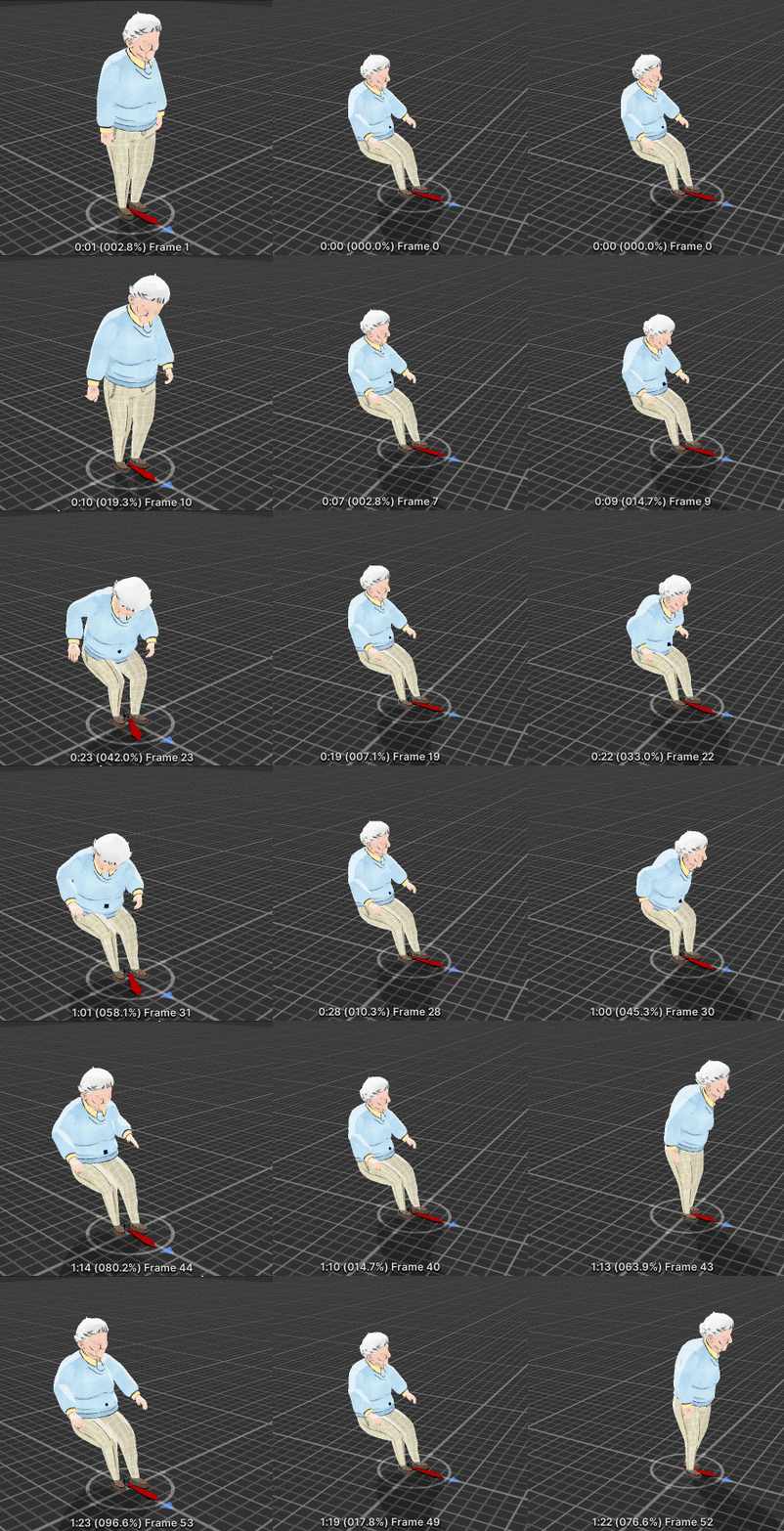
The BodyPose/Activity solution required a very specific structure inside Unity’s animator controllers, and a setup where there is one Parameter directly linked to each BodyPose/Activity, named exactly the same as that BodyPose/Activity. There’s a bit to go over, so I’ll describe the way we set up the AnimatorControllers, then we’ll go through the parameters and how we trigger transitions between different states, and finally we’ll see the whole system in action. We’ll be looking at the animations of Ida, one of our characters, and by the end, we’ll be breaking down this set of transitions, where Ida goes from standing, to holding her knitting up to inspect it.
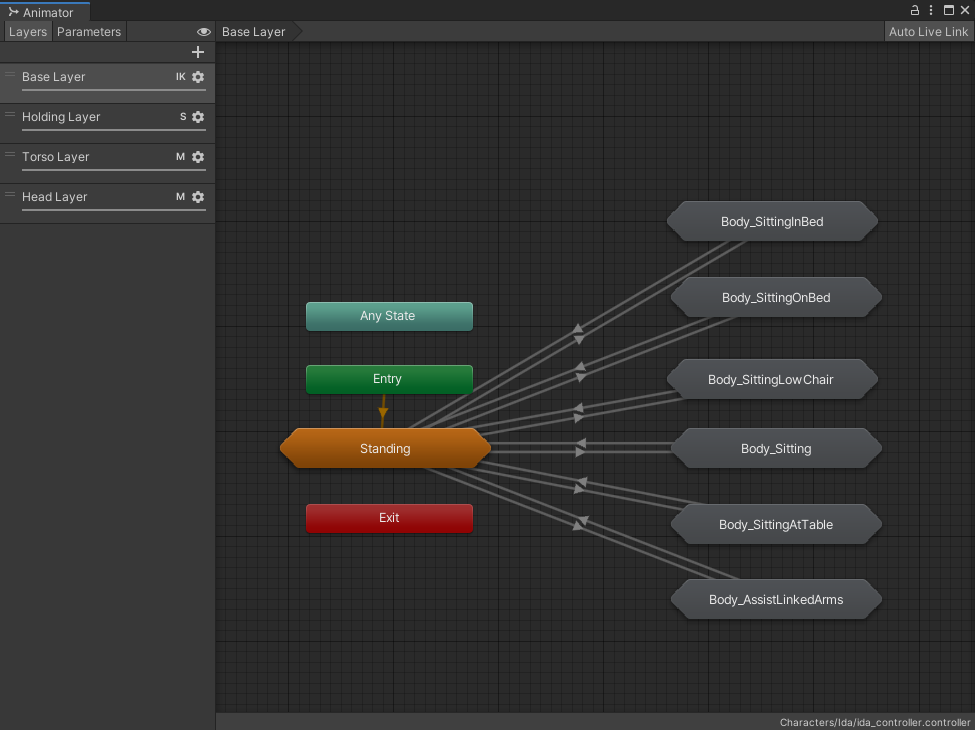
A BodyPose is generally a fixed state in which a character could do a lot of different things - Standing, Sitting, Lying in Bed, etc. These BodyPoses live at the top level of the hierarchy, and each is represented by a StateMachine.
A general rule that we follow for BodyPoses is that they go through their default BodyPose when transitioning from one to the other (the default is Standing for ambulant characters). I think we’d be able to break this rule if we needed to, but so far, it’s made sense - because if a character is transitioning from one BodyPose to another, generally they’re moving from interacting with one prop, to interacting with a different one.
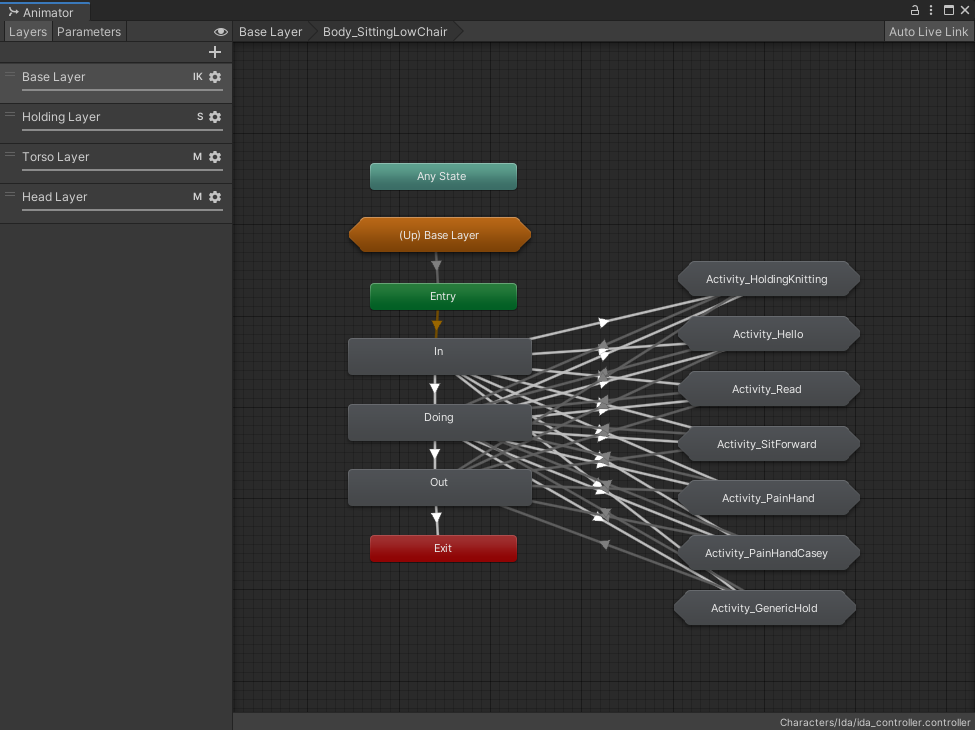
Let’s have a look inside the Body_SittingLowChair StateMachine.
Each BodyPose (except for Standing) is generally structured in this way - there’s an In State/Animation, a Doing State/Animation, and an Out State/Animation. The In plays its animation almost to the end, then transitions to Doing, and Doing plays a looping animation, and will transition to Out when the Body_SittingLowChair parameter is no longer set.
From the In and Doing states, there are transitions also set up that go to each of the Activities that are in the BodyPose - and from the Activities there are transitions back to Doing, or directly to Out, to allow for smoother transitions when going from a BodyPose+Activity to an entirely different BodyPose.
I can see most people looking at this (especially if you’ve worked with Unity’s AnimatorControllers before), and those overlapping transition arrows, and thinking “oh god, that looks like a nightmare”. And.. it kinda is! Which is why, after we had defined this structure and decided to invest in it for the majority of animations across all characters, we developed some EditorScript tools to help us automate the process.
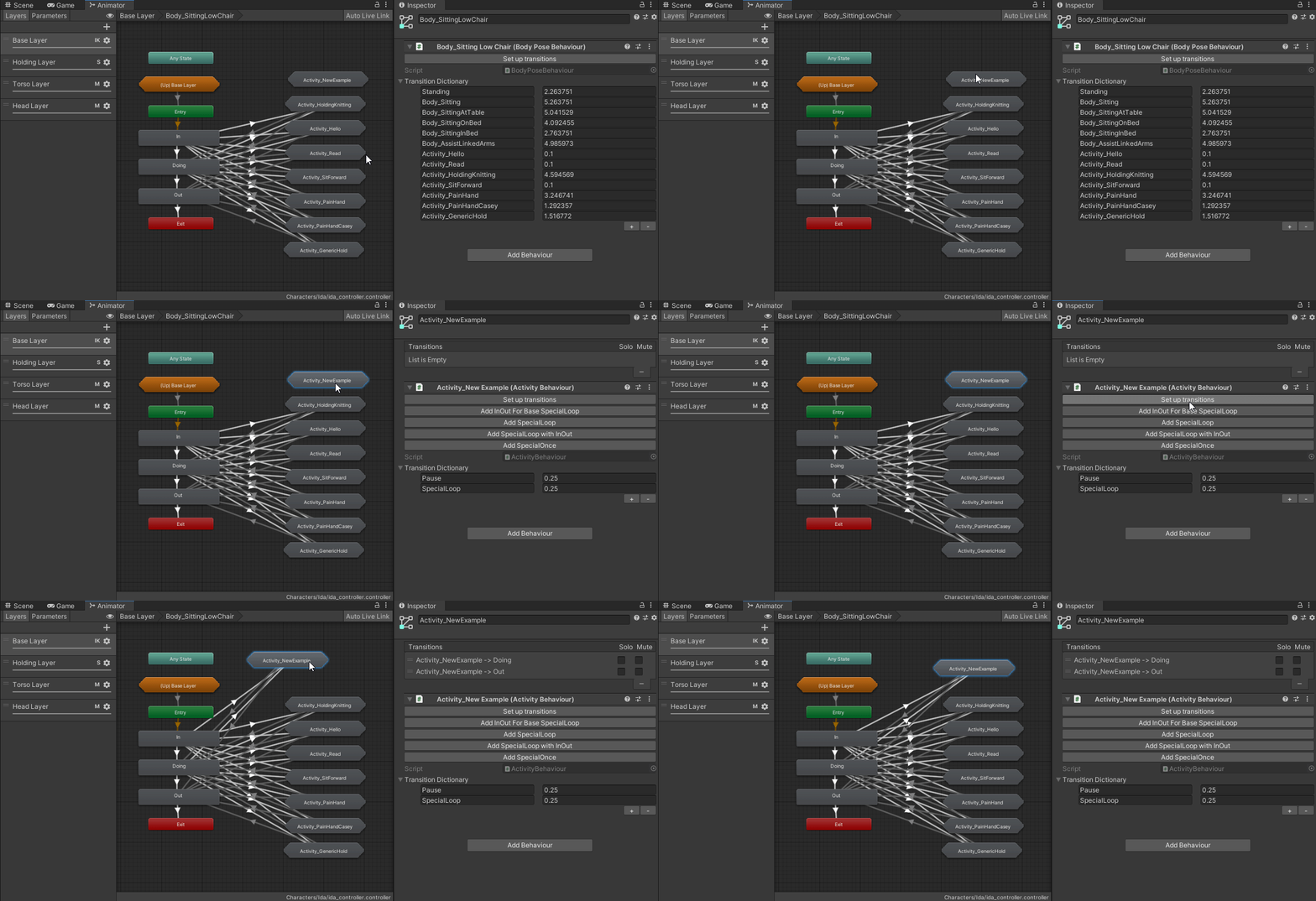
In the following gif, I’m using one of the buttons we’ve added through EditorScripts to set up the default transitions for the Activity - the transitions to and from, including those additional ones from In and to Out. (The script also adds any relevant parameters to transitions where necessary.)
Even though it takes some time to figure out and implement Unity’s editor scripting, automating these kinds of processes is really handy, because it ultimately saves time, reduces the chance for errors that you have to track down, and gives you some good defaults to work with - each of those states/transitions can still be modified after the script has gone through and done that initial set up, but you’ve got a baseline that will work in game.
Okay, let’s go one layer deeper, into the Activities themselves. One of our most complicated examples is Ida’s animations for doing her knitting.
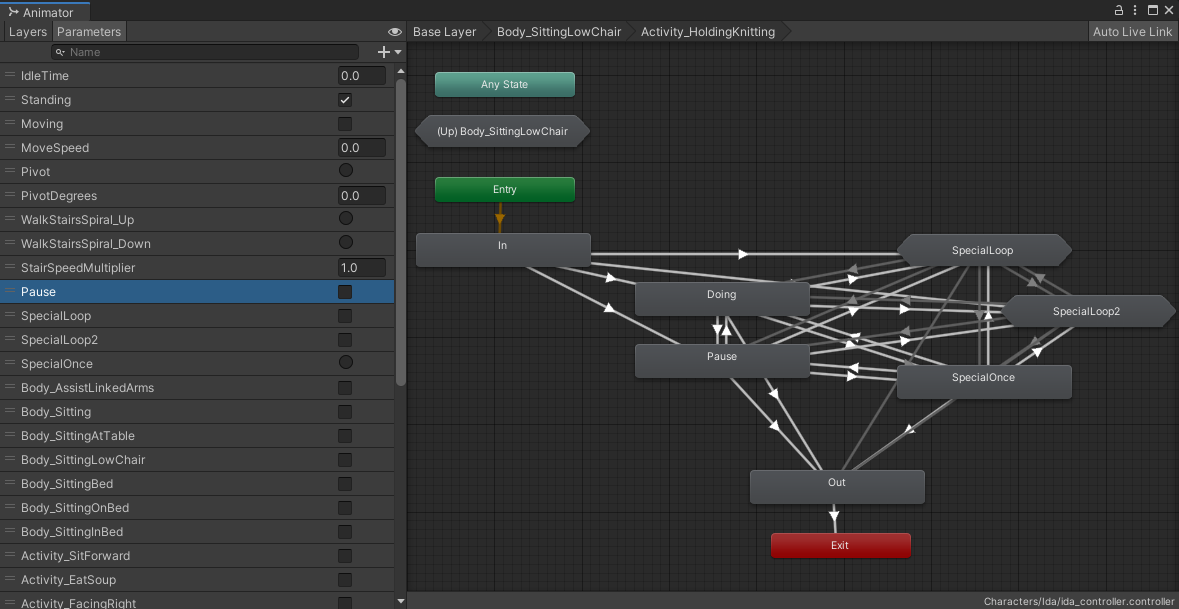
You can see that we start out with a similar structure to the BodyPoses - In -> Doing -> Out - but that instead of a deeper level of specificity in here, we have a bunch of States/StateMachines that are linked to generic parameters - Pause, SpecialLoop, SpecialOnce, etc.
For the additional States at this level beyond Doing, we’ve landed on the term ActivityModifier - these animations “modify” the Activity, but the character is still fundamentally, logically within the Activity (and the associated BodyPose, one level up). ActivityModifier is a bit of a fiddly name, but works for our purposes. We start out all of our Activities with this basic structure, which allows us to add specific animations that are driven by generic parameters.
For Ida’s knitting animations, she can start knitting (In), loop knitting (Doing), and stop knitting (Out). She can also rest from her knitting loop without exiting the Activity (Pause). This Activity also has 3 special states - Ida lifts the knitting up to inspect it (SpecialLoop), Ida puts the knitting down into her lap (SpecialLoop2), and a SpecialOnce State that isn’t currently used, but could be used for a ‘once-off’ animation, like one where Ida sighs while knitting, or realises she’s made a mistake and back-tracks in her knitting a bit.
The reason these states are named in this generic way, and use generic parameters, is so that we can trigger the parameter regardless of what BodyPose/Activity the character is in. For example, the modifier we use most often is the Pause modifier - it’s great to have these Activities set up such that a character can doing an Activity (like knitting, or reading, or eating), and then pause the doing of that activity so that they can eg. respond to someone, or can just pause to take a moment within a scene.
In Wayward Strand, there are scenes that are triggered by the player’s presence (by Casey asking a character a question, or a character talking with Casey because she’s in the room), where we don’t know exactly when the scene might play out. But, by using generic parameters like Pause, we can still direct Ida within the scene, during a conversation, to Pause or resume Doing, regardless of whether at that time she happens to be knitting, or drinking tea, or doing something else.
This means we can create nuanced portrayals of characters, even when we don’t know what they’re currently doing, through using these generic ActivityModifiers, along with other elements of character direction, like specifying which way their head is facing (whether Ida is looking at Casey or whether she’s looking at whatever she’s doing), and other animations which might only affect characters’ heads, like talking, sighing or nodding.
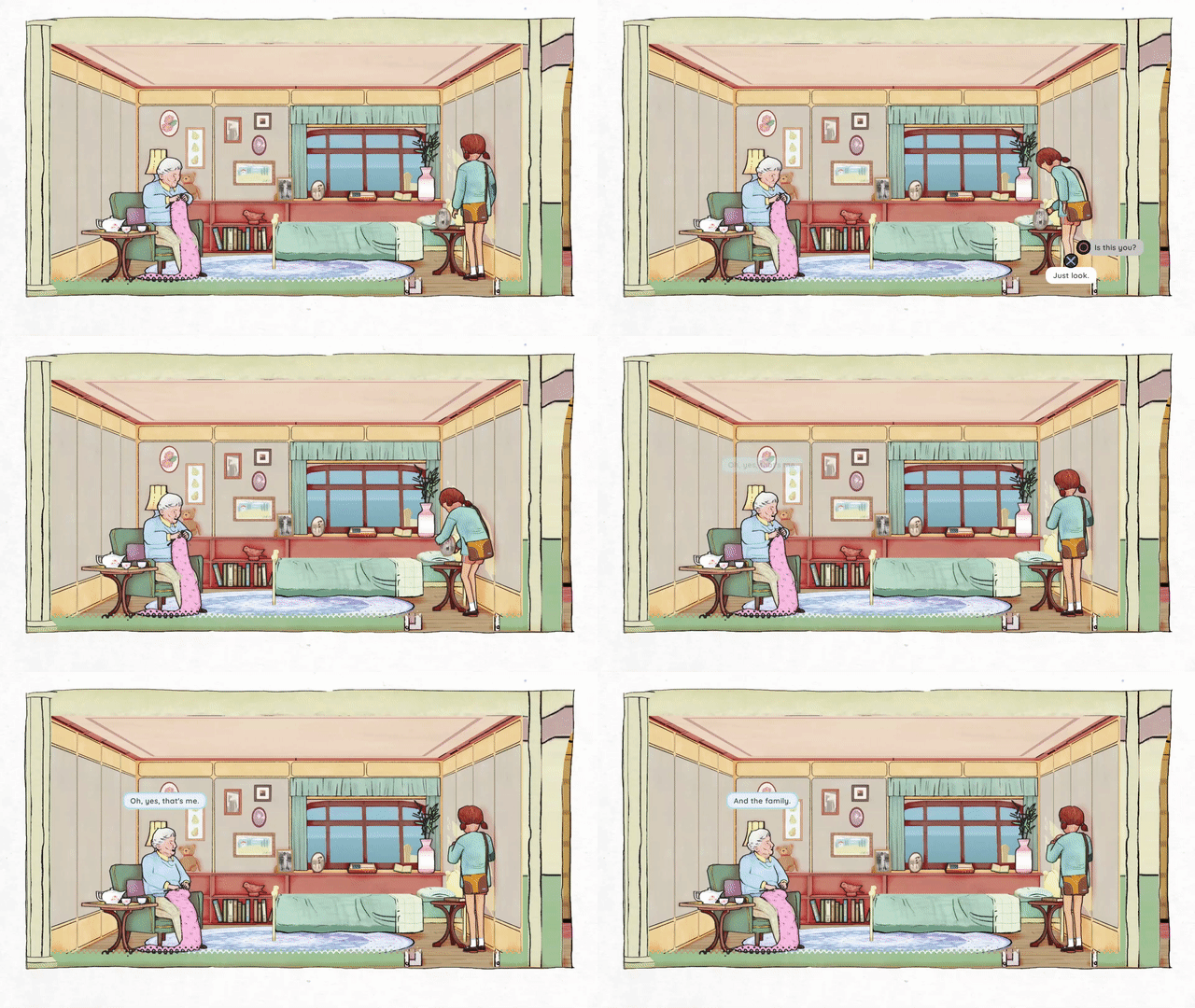
Returning to the gif from the start of the post, we can see this in practice. When Casey asks Ida about the photograph in her room, she first pauses her knitting, then puts it down into her lap as she responds.
In the next post in this two-part series, we’ll explore the parameters that drive the transitions inside the Animator Controllers, as well as how all of this integrates with Unity’s Timeline tool.