Since we released we've been getting a lot of questions about various features, bugs, and additions to the game. We've created a roadmap so you can see what we plan to add for our 1.0 release.
This does not include bugfixes or small improvements that we will continue to work in as we go along. It's also, to be honest, just our best guess, in terms of exact features and also in terms of timing. So expect it to change over time as we learn more.
Wildermyth Roadmap to 1.0
Note: this will be updating as time passes! But as of December 2019, this is where we are:
Imminent Work
Happening over the next couple months
Deepist Campaign
Finish opportunity quests
Refine/update old & unsatisfying events
"Legacy Hero" mode for generic campaigns
Develop tech for translations
Some modding improvements
Deepist ability rework
Follow-ups for TurtleGuardian (mortal choice + tidings)
UI art reskin
Overland map UI cleanup
Advance transformations during intervals
Bigger fonts for high DPI monitors
A Bit Later On
Happening through spring-ish
Thrixl campaign
Intro/capstone/finale events for generic campaigns
"Undo" system in-mission
Upgrade graphics library
Borderless window
Cross-class abilities rework
XP more visible
Back button in comic panels
Better resource-get comic panels
Revisit incursion/defense comic art
Customize pronouns & orientation for heroes
Customize facial hair
Persist family relationships across legacies
Eventually... Before 1.0 Launch
Happening over the summer
Drauven campaign
More combat maps
Performance improvements
Drauven ability rework
Legacy Improvements (sorting, using as NPCs, weapon unlocks)
Ironman mode
Controller Support
Steam Achievements
Major modding improvements
Ongoing
Sprinkled in between the other bigger chunks of work
More events: parent/child
More events: lost lovers/rivals/parents/children
More events: follow-ups for heroes w/transformations
This is our second regular update since Early Access. We plan to ship updates every two weeks. This update focuses on balance and difficulty feedback that we've been getting both here on the Steam discussion boards and on Discord.
We've nerfed bows, because they were too dominant especially at higher difficulty levels. We've also removed wield. It was poorly understood and really just not making the game better.
There are a bunch of other changes that address feedback about the game (or particular monsters) being too deadly, especially on C.S. Lewis and J.K. Rowling difficulty. (Higher difficulties have not been impacted much, outside of a few particular monsters being adjusted.)
We have some exciting new boss music in the game, and we've also added two new stories that give you relationship choices, and fixed a bunch of bugs. Lots of stuff for everyone, we hope! Coming soon, we should be able to announce a roadmap for future work.
0.11+103 Opellia Bluster
New Story: Settling In
New Story: A Novel Decision
New Music for gorgon and morthagi boss fights!
Special Boss Death animations + sfx
Several new tidings & retirements
Overall Balance and Difficulty Changes
Reduce all bow and crossbow damage by 1!
Remove wield from the game!
Adjust various items in response to changes (dueling swords)
Fire abilities can now be blocked (mystic nerf)
Decrease monster damage generally in JKR and CSL difficulties
Nerf specific outliers like Watchman, Batchby, Bartoth that were too lethal
Reduce calamity frequency in JKR an CSL
Getting a maimed arm now replaces 2H weapon with equivalent 1H version
Start with more LP in Age of Ulstryx and Enduring War on JKR and CSL
Stone Stunt now pins nearby units in addition to shred
Fire Stunt now deals magic damage pierce 1 instead of true damage
Nerfed Wardrobe - reduced health of spawned units
Open Door is now a swift action instead of totally free
All attacks that fail to get through armor now shred 1
Increased tier 0 mace knockback to 1.6
Snakestrike deprecated, riposte now happens on both block and dodge.
Removed possibility of dodging when walking through fire
Shieldshear no-longer benefits from ranged weapons - uses melee range
Now possible to delete player accounts from the account menu
New Hairstyle (reward - blame Jargo :-)
Fire Chicken SFX
Mystic abilities like splinterblast now properly take advantage of flanking
Fixed a bug where recruited legacy heroes would not have their levels or stats
Fixed a bug where legacy heroes would get different off-hand items
Legacy heroes now only keep off-hand items if recruited in chapter 2+
"Blinded" now correctly affects all AOE targets (e.g. Drathix)
Fixed a bug with Starheart
After chapter end, secure/research/repair jobs are removed (will be completed)
Fixed a bug where monsters spawned by summoning did not have calamities applied
Fixed targeting on wolfFriend tiding
Fix a bug where gear pop ups in combat lab would cause a soft lock
Fix a bug where editing an event from in game would cause a soft lock
Spirit capture dialog more clear
More clear that Seacave fight is endless and escape is the only option
Reduce difficulty of Enduring Ch2 capstone (poison gas) on JKR and CSL.
Fix a bug where riposte would keep attacking
Fixed a bug where some item stat boosts would affect other (non-weapon) attacks
Fixed a bug where the name of the wrong town would show in a tooltip
Fixed a bug where the generic gorgon campaign said "Age of Ulstryx"
Fixed many typos, missing tags, and instances of dev text
Several improvements to Steam Workshop integration (edit image, name/blurb, tags)
If you're enjoying the game, please consider leaving a review!
How to: Add an Event to Wildermyth
How to: Add an Event to Wildermyth
Wildermyth is a mythmaking tactical RPG currently in Early Access. Our philosophy is to put as much storytelling power into your hands as possible, and part of that is exposing our tools so that you can craft your own stories inside the game.
The tools I'm going to show you today are under active development, but they work right now and they're only getting better. Some of this stuff is documented on the wiki, and some needs to be. If you decide to give this a shot, find me on Discord. We have a tools-and-modding channel just for this, and I'll be thrilled to answer your questions and help however I can.
You'll Need: * Wildermyth * An idea for an event
Step 1. Make a mod to hold your event(s)
Wildermyth supports mods via steam workshop or direct download. Mods are stored in their own folders, and the folder structure mirrors the structure of the main game. Here are the steps to create your own mod.
From the main menu, select Tools,
then Open Editor
And open up the Comic Editor.
Use the Mods button in the upper left
to open the Mods dialog.
Press 'Create New Mod' and fill in the details. Mod Id is mostly for your use, when you upload it to Steam Workshop it will get a number. You also don't have to worry about load order. It's there in case mod authors ever need to use it to make sure mods load in a particular order - you can leave it as is.
Press CREATE! This creates a new mod folder at [install]/mods/user/[yourModId]. And it should open this folder in your OS file viewer so can see where it is. All of your mod files need to be placed here, which should happen automatically if you tell the editor to place them in your mod. Go back in to the mods dialog and make sure your mod is selected:
Step 2. Plan your event.
Before you start working in the editor, it really helps to have a plan, including a rough script and an outline of your choices and outcomes.
For this article, I want to make a little story called "A Novel Decision." It will center on Bookish and Friend talking about what they're reading, with a side-gag for Volunteer who is lighting the fire for the night. There will be a relationship choice where Bookish and Friend can choose romance, rivalry, or to simply stay friends.
Cast of characters 1. Bookish - bookish is at least 80, no lover. 2. Friend - friend of bookish, no lover, similar age (within 15 years), 3. Volunteer - prefer fire theme, fire chicken, tree theme, vine theme, or wolf theme, then snark. 4. Npc - a famous highbrow author 5. Npc2 - a popular novelist
Prompt: Bookish, nose in a book, volunteer in the background, sun setting. Volunteer makes the fire, says something relating to theme/pet if any. Friend shows up also holding a book. Bookish: Oh, what, are you reading? Friend: Oh, it's that new book by ! I really love it, it's about a young [sameGender] that finds out they're really a [prince/princess] and has to choose between their family and their new kingdom. Also, there are dragons. What are you reading? Bookish: Oh, this, well, this is by , it's a history of . Well sort of history mixed with speculation and theorizing. But I thought it might be useful. Awkward Turtle - Um. Oh. (Friend feels embarassed at not being serious enough, wanted to impress Bookish but clearly failed.) (personality dependent?) Volunteer: (skeptical) ? Really? Bookish, what do you think about ? (personality/theme dependent?)
Choice 1: Bookish: Oh I love ! I didn't realize this was out, can I borrow it when your done? (Romance)
Choice 2: Bookish: I've heard those are pretty good, I've been meaning to give them a go one of these days (Stay friends)
Choice 3: Bookish: Please don't read that garbage. I'll lend you a real book. (Rivalry)
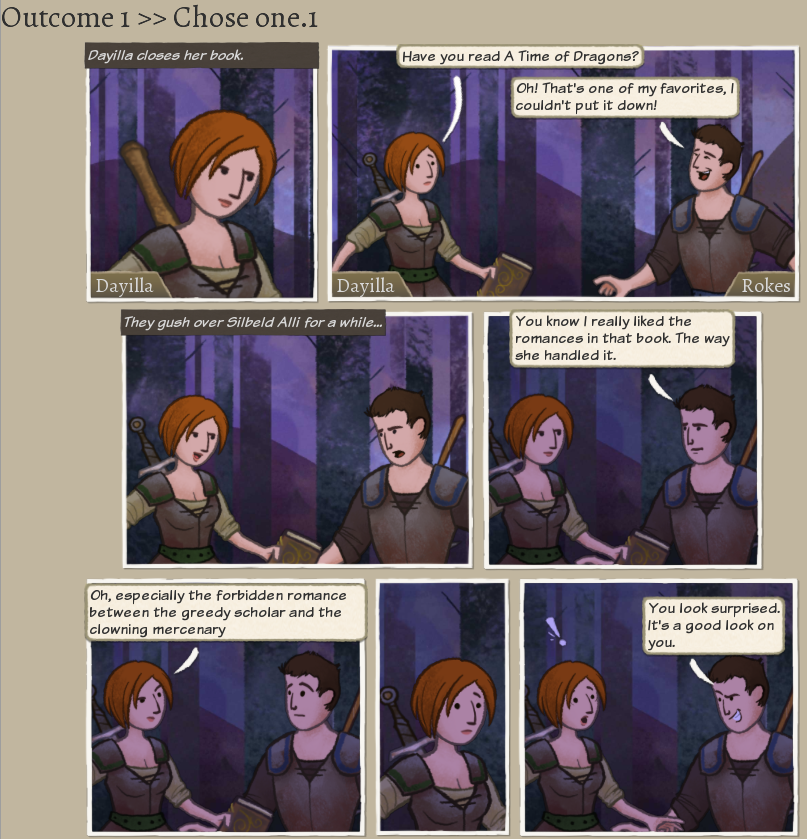
Outcome 1: bookish puts down book both gush over npc2 allusion to romance in previous novel of npc2 (class/personality variation) lovey eyes volunteer disgusted
Outcome 2: Friend: yeah, I'd be happy to lend it to you when I'm done with it. Bookish: thanks! (keeps reading) Friend: (reading) Volunteer: Anyone hungry? Food's ready.
Outcome 3: Friend: I thought you'd be happy to see me reading Bookish: not reading trash. We should be preparing for battle Friend: Oh I'm prepared for battle all right! (weapons out) Volunteer: Hey guys dinner's ready. Also keep it down.
Step 3. Create your event
Go to the Effects tab (Control+2) and Press the New... button in the upper left.
This will show the New Event Dialog. Fill in the name of the event you want to create. We're creating an "Arrive at Hostile Site" event, which should already be selected. Make sure to select your mod, instead of Core. If you don't see it listed, check to see that it's being loaded in the mods dialog, (and you might have to restart the tool to make sure it loads?) Fill in the name and the author field.
Press 'create' to create the Event! Now go to the comics view (Control+1) and save your work (Control+S).
Step 4. Create Targets
Now we're going to add targets (story roles) for our cast of characters. We need 3 heroes from the present party. First we'll select Bookish. Press the New Story Role button.
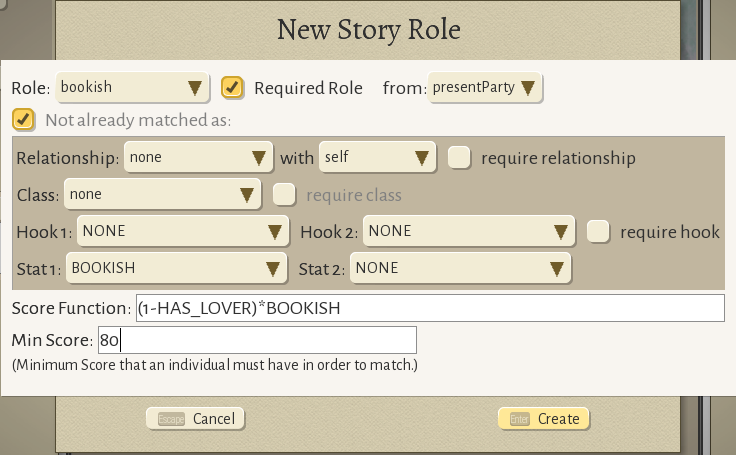
This brings up the New Story Role dialog. We'll select the role "bookish" which auto-selects the bookish stat.
We'll multiply their bookish score by (1-HAS_LOVER), and set a threshold of 80. HAS_LOVER is a special lookup that evaluates to 1 if the hero has a lover, and 0 if they don't. So this score overall targets a hero with a bookish score of at least 80 and no lover.
Go ahead and click create. You can see the new story role is inserted right after foes and before choiceTarget. (ChoiceTarget is where the user will make a choice, and it includes the prompt for the choice. It must be last, because otherwise the prompt would not be able to use the other targets in comic panels. So, the tool inserts new story roles at the end, right before the choice target.)
Next we'll create Friend. Click New Story Role again. Select the friend role. Select Relationship: "is friend" with "bookish", and check "require relationship."
We'll also make sure that friend doesn't already have a lover, like so:
Finally, we'll create volunteer. I want to do a gag where Volunteer talks about lighting the fire differently depending on their theme, so we'll build a score function to prefer (but not require) someone with one of a few themes. Start out by clicking New Story Role, select the volunteer role and the SNARK stat.
Press create. Now click on the "volunteer" button that was inserted on the left.
This will show the details of the volunteer target. We're going to modify the scoreFunction. (It might be hard to click on, you can expand the edit panel, or check the box to put it on the left if your screen is small.) Click on the value of the scoreFunction (it should say SNARK right now).
I'll enter this score function: SNARK+100*(theme_wolf+theme_tree+theme_vine+theme_fire+theme_petFireChicken) We should get validation that these are all known aspects and the expression is valid:
I'll leave the score function at 0, but if we wanted to guarantee a theme we could set it to 100. But I think the event works fine without a theme so I won't require it. Cool, that's the heroes taken care of!
Step 5. Create NPCs
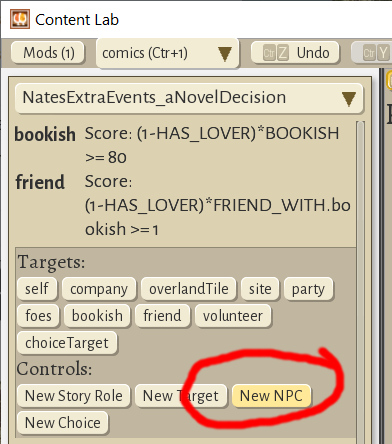
We also need to create 2 authors, one highbrow, and one popular. For this, we can press the New NPC button. (If the panel editor is obscuring the left-column, press Esc or click close.)
Since these NPCs won't ever show up in panels, and we just need their names, we can use the default setup. Make another one, so we have npc and npc2.
Aside: Though, if you wanted to remember these npcs for a later followup, it might be fun to give them an npcId. If an npcId is specified, the game will first search for an existing npc, and if not found, will create one and give it the id. So it would be possible, for example, to create several events that reference the popular novelist npc2, and as long as they all use the same npcId (e.g. npc_popularNovelist) they will all be consistent. Which is a great way to create persistent characters, running gags, etc. without having to hard-code names.
You should now have two npcs listed under Generated Targets, like so:
Generated Targets means that these will be generated on the fly when the event is fired. Unlike regular targets, they don't have to exist ahead of time. Nice!
Step 6. Create Choices
Now we'll move on to the structure of the event itself. We'll have three choices which lead to a single outcome each. Let's create them. Press the New Choice button.
Put bookish on point for these choices.
This will place them in the panel. Click Create. Do this 2 more times and you should see all the comic panels laid out like so:
Step 7. Make the Panels!
Alright, this is the fun part you guys! Let's make it happen!
I went ahead and recorded this part because there's a ton of little clicks and I think it's easier to just watch someone do it, and I don't want to make a million little screenshots. Part one shows the prompt, including panel splits.
Part two includes the choices and outcomes, including some personality splits and other fun.
[previewyoutube="2qOMzwfDyww;full"]
But basically, use the Add Panel button to add panels, use the Compose (cmp) button to make big panel changes. Lots of things can be edited visually in the panel itself, and everything can be edited in the panel editor.
So now we have a prompt, choices, and outcomes all laid out like this:
Remember to save!
Step 8. Make it do stuff
Let's go back to the Effects view (Control+2) to define what happens when you make these choices. Scroll down in the middle pand and you'll see the outcomes section with three outcomes laid out like this.
Under outcome 1, we'll press the "Add Outcome..." Button to bring up the New Outcome Dialog. Click on the "RelationshipPoints" outcome in the left panel. In the right panel, select bookish and friend for "who", and set forceChangeRelationshipTo to "lover"
Press create and you'll see the relationship outcome right below the Description for outcome 1.
From here we can just copy it and paste it into the other two outcomes. And, in fact we could have found another similar and copied the outcome from there, that's a totally legitimate approach. Press the Copy button on the RelationshipPoints outcome, then press the Add Outcome button under the second outcome. The copied value should be in the middle column, and you can click it.
Create the final relationship outcome under the third choice, and set it to rivals.
We also need to add a fight outcome, since this is an arriveAtSite event! Scroll back up a bit to the "outcomes" row, and click the New Entry btton.
Select the "Mission" outcome. This will create a fight. Click
You'll see a warning in yellow at the bottom that the mission must define a goal, so let's do that. Scroll to the bottom, expand our mission object, and set the goal to liberate.
Step 9. Enable the event
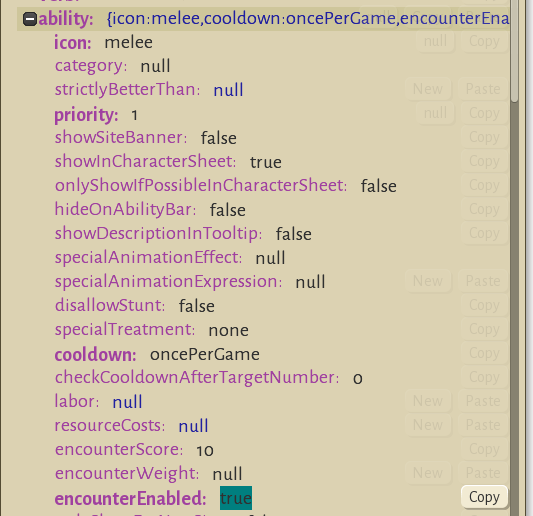
In order for the event to show up in-game, it must be enabled. Scroll to the top and open up the Ability object and set encounterEnabled -> true.
Save your work!
Now, as long as this mod is loaded, the game will try to use this event in the Arrive At Hostile Site rotation.
Step 10. Test it using cheats
Create a (blank) file in your install folder called devMode.txt. This will enable cheats, which will make it much easier to test your event.
Start a new game. A three or five chapter generic story is easiest. In the Campaign Options step, choose Pick Mods and make sure your mod is selected.
And make sure cheats are enabled and the Pick Events is enabled:
For your starting party, make sure you have a bookish character. You can use the personality adjustments to get it right. Start the game. You'll see the pick events dialog come up whenever there's a potentially random event.
You can press the "random" button to let the game pick an event for you. Make sure to leave your bookish hero and a friend without a romance, so you'll have the right heroes to see the event.
Fight or cheat through the first mission, then scout a tile. After you reveal an enemy site, pro tip, save the game. Then click the assault banner and take a look. If all went well, your event should be in the "possible" list.
If you don't see it at the top, scroll down and check to see if it's in the "FAILED" section. If it is, there might be something wrong with the targeting, or your current party simply isn't eligible (need a bookish > 80 with no romances but 1 friend, who also has no romances.) If the event is not in the list AT ALL, then it's most likely you forgot to enable it (see step 9.)
Go ahead and click your event and it should work!
Step 11. Upload your mod
You can use the Steam Workshop lab to upload your mod.
Or share it via nexus or whatever your prefer. (I think I'll probably just go ahead and add this event to the main game, maybe after a bit more tweaking.) Happy storytelling!
Patch Notes: 0.10+98 Ryvio Wartmarch
Since Early Access release we've been focusing on fixing bugs and making small improvements in response to your feedback. This is our first regular update, we plan to ship updates every two weeks.
The major focus for this patch is bugs and crashes. We fixed several crashes and several memory leaks, and we think things should be a bit more stable now. We also had time for some small features and some content, too.
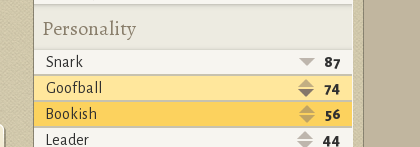
One thing people have asked for is more customization options, so we added personality customization. You can swap personality stats around from within the character sheet. Go ahead and make that Cowardly Hothead or that Goofish Leader you've been thinking of!
Here are the full patch notes:
0.10+98 Ryvio Wartmarch
Can now customize hero personality stats
Reworked Story: Drifters
New Theme: Sylvan
Fixed several memory leaks
Fixed a bug where augments (rings, cloaks, pauldrons etc.) would get wrong stats on load
Added a tutorial panel for Legacy Points
Changed shooting star to magic damage
Fixed a bug where evading fire damage would show an extra animation
Removed interfusion slot requirement for compulsion
Differentiate "Swift Actions" from free actions in UI. Swift are "free once per turn."
Crossbows now correctly give +5 accuracy
Nerf Bartoth speed to 4 instead of 5
Fixed wrong "retake the station" being triggered.
Fixed a bug where it was sometimes impossible to secure 2 sites at once
Fixed a bug where sacrificed hero could show up in party select during next chapter
Fixed a bug where promotion events for retired heroes could block the game.
Ulstryx Chapter 2 (Seacave Escape) now easier on Rowling and Lewis
Don't show continue button if most recent save is a completed game
Clean up some log spam, including "skeleton fire is missing animation attack"
Improved layout of "customize mods" dialog
Additional tiding for wolf theme
Fixed a bug where fire stunt could go through walls
Jumpjaw now correctly a swift action
Use correct monster for Library of Light
Use origin town name instead of "Bunch of Farmers"
Fixed a bug where Enduing Mortificer would show up as a human in combat.
Fixed (most/all?) cases where dead heroes could show up in the credits
Fixed: Comic editor did not work in countries where , is used for decimal separator
Fix a couple small bugs with Labors screen
Fixed a bug where choosing the same legacy hero twice in recruit popup would fail
Fixed various typos and missing text
Fixed a couple of tool crashes
Wiki: get rid of Ability: and Event: prefixes for wiki links
And we shipped this tiny patch a few days ago, but we didn't announce these changes here, so, here they are too:
0.9+94 Cathryn Del Hunt
Calamities now correctly buff monsters on GRRM Difficulty
Enduring War chapter 4 hero now correctly added to legacy
Engaging now removed if engaged enemy is killed
Added particles for Stalwart
If you're enjoying the game, please consider leaving a review!
Hotfix: 0.9+93 Cathryn Del Hunt
0.9+93 Cathryn Del Hunt
Mystic Nerf:
Interfusion abilities no longer use Potency for accuracy
Steal Fire is now turn ending, but increased range
Updated Story - Spirit of the Forest
Reworked Story - Great One
Hovering over enemy portrait now shows their movement range
Now possible to edit History text for characters.
Defense maps now always put escape zone near hero start zone
Fixed crash when crafting offhand items
Fixed crash related to mods with no scenarios
Corrupted player accounts should no longer crash the game
Increase logging around some mysterious crashes :-(
Fix various typos / missing tags
Ulstryx chapter 2 now provides 2 prebuilt bridges / passes instead of 1
Modding: Monster mods are now done via monsterTweaks, tweak data now lives in mods
Modding: Can now put a preview.png in the mod folder to be used as workshop preview image
Wildermyth Early Access is Live!
After each chapter in Wildermyth, the map grows and opens up new lands for your heroes to explore. And after years of development and months of beta, we're finally ready to let the heroes loose on Steam!
Huge thanks to our Discord and all of the beta players who have helped bang this game into shape over the last year. Hearing the crazy stories about the characters you've made and your experiences in the Yondering Lands—it's what this whole endeavor is all about. <3
The "Early Access" part of this release is to let everybody know that we're still actively working on making Wildermyth better. We're adding stories and art, we're balancing combat, we're polishing our interface, and we've got at least three more villains/campaigns planned for the coming months. We're aiming to release updates pretty regularly, and we love getting feedback, so don't be shy—get in touch!
Patch Notes: 0.9+88 Cathryn Del Hunt
This is our last regular patch before Early Access launch! This patch focuses on high-difficulty game balance, improving the warrior's utility a bit, and fixing a bunch of bugs.
0.9+88 Cathryn Del Hunt
New Story: Avenger - TamTroll's contest reward!
New loading screen art!
Fixed a bug where certain battles would crash when launched
Adjust several town recruit events
Recruit and Station jobs show LP cost in tooltip, appear disabled if you can't afford
If an event replaces an arm causing a hero to have no weapon, give them a basic weapon.
Improved monster descriptions for spawn cards
Fixed a bug where spectral lantern and spellshard didn't function properly
Spellshard no-longer craftable
Updated some dialogs to put Done or Confirm on the right, for consistency
New FX for concussed, hobbled, and mindwormed.
Renamed Prophet to Shadow Hunter
Fixed a bug with calamity and incursion UI on resize
Removed incorrect history line for Crag Eagle fail case
Job Banners look more clickable now
Fixed several free actions that were preventing the turn from ending
Control the pace of "2 spectiks", "3 spectiks" calamities so they can't happen too soon
Nerf Bard - no longer gives LP per battle. reduces recruit cost by 1 instead.
Fixed bug where heroes could show up naked in gear popups in some cases
Show +3LP on retirement
Increase the cost of wands
Decrease warrior XP thresholds
Warrior: Engage now has no cooldown, grants +1 armor per engaged foe, added particles
Limit free action from water stunt to once per turn
Leaving behind gear now grants a crafting resource instead of a legacy point
Can now view current calamities from "Calamities!" popup
Fix a bug where Through Shot would grant an extra action via Thornfang
3 New recruit events
Tier 3 weapons and Tier 2 armor cost a bit more now
Swords now correctly give a small accuracy buff
Dueling swords now give +5 stunt chance
Added a healing rate indicator to hero portraits, with tooltip explaining factors
Secure Site now shows a time estimate when choosing party
Fixed a bug where mortal choice sound would keep playing if interrupted to load game
Fixed a bug where winning a battle with riposte caused a soft lock
Tweaked defense jobs - now give class-oriented speed buffs
Fixed a bug where the game would auto-save right before a game over.
Game now defaults to windowed mode for new users
Patch Notes: 0.8+86 Grifwit Marten
0.8+86 Grifwit Marten
As we get ready for Early Access we're moving to a quicker pace for patches. Here's a Halloween update with a couple new stories and some big combat changes that we've been mulling over for a long time.
Updated main menu art
New main menu option: Tools
Now possible to launch editor from main menu
Now possible to launch Battles without being in dev mode
Can now adjust text size from interface options (make bigger or smaller)
Rename Edgar Allen Poe difficulty to H. P. Lovecraft
Reworked Story: To Humble Ends
New theme - Oldwane Curse (Skeleton)
New Story: Dreams and Bones
Swapping weapons now always completely free - Deftness is now obsolete!
Warrior Abilities:
Centurion becomes Stalwart: +3 armor to self or ally for 2 turns.
Zealous Leap no longer combos with Engage
Shieldshear now shreds two armor as a free action every other turn
Paladin is now a passive that enters guardian whenever you end your turn with a move.
Thundering Challenge - free action once per combat to terrify an enemy, forcing them to flee.
Broadswipes - melee attacks deal Bonus Damage to all other foes within range.
Quickfuse now obsolete, removed from ability deck:
Interfuse is now a free action
Interfusion range is reduced from 8 to 6
Heroism: now grants 1 action point and attacks don't end the turn that turn.
Fire Stunt: now sends up to 3 fireballs at nearby enemies
Stone Stunt: now shreds 1 armor from all foes within 2 tiles of target
Heroic Death (defend) now properly grants +3 armor for 2 turns.
Flame Cone damage now based on level instead of potency
Added animation to indicate saving the game
Shield text shows up at the right time.
Auto-build discovered/ruined stations during intervals (but don't get resources from them)
Fixed several small bugs with item tooltips and stat blocks
Fixed some lingering tooltips
Fix some bugs where resizing could cause botched text
Fix misc bugs
Add some tutorials for idle heroes
WIP on Steam Workshop integration
How to: Write your own Villain for Wildermyth - Part 3
This is part 3 of a series where I'll teach you how to write and implement your own "main story" for Wildermyth.
Wildermyth is a mythmaking tactical RPG currently in beta. Our philosophy is to put as much storytelling power into your hands as possible, and part of that is exposing our tools so that you can craft your own stories inside the game.
That's our goal, anyway. The tools I'm going to show you today are under active development, but they work right now and they're only getting better. Some of this stuff is documented on the wiki, and some needs to be. If you decide to give this a shot, find me on Discord. We have a tools-and-modding channel just for this, and I'll be thrilled to answer your questions and help however I can.
How To: Create a Custom Monster in Wildermyth
You'll Need: * Wildermyth Beta * Java (64 bit) in order to run the dev tools (for now - we're working on this) * A picture of a monster?
Step 1: Make a Plan
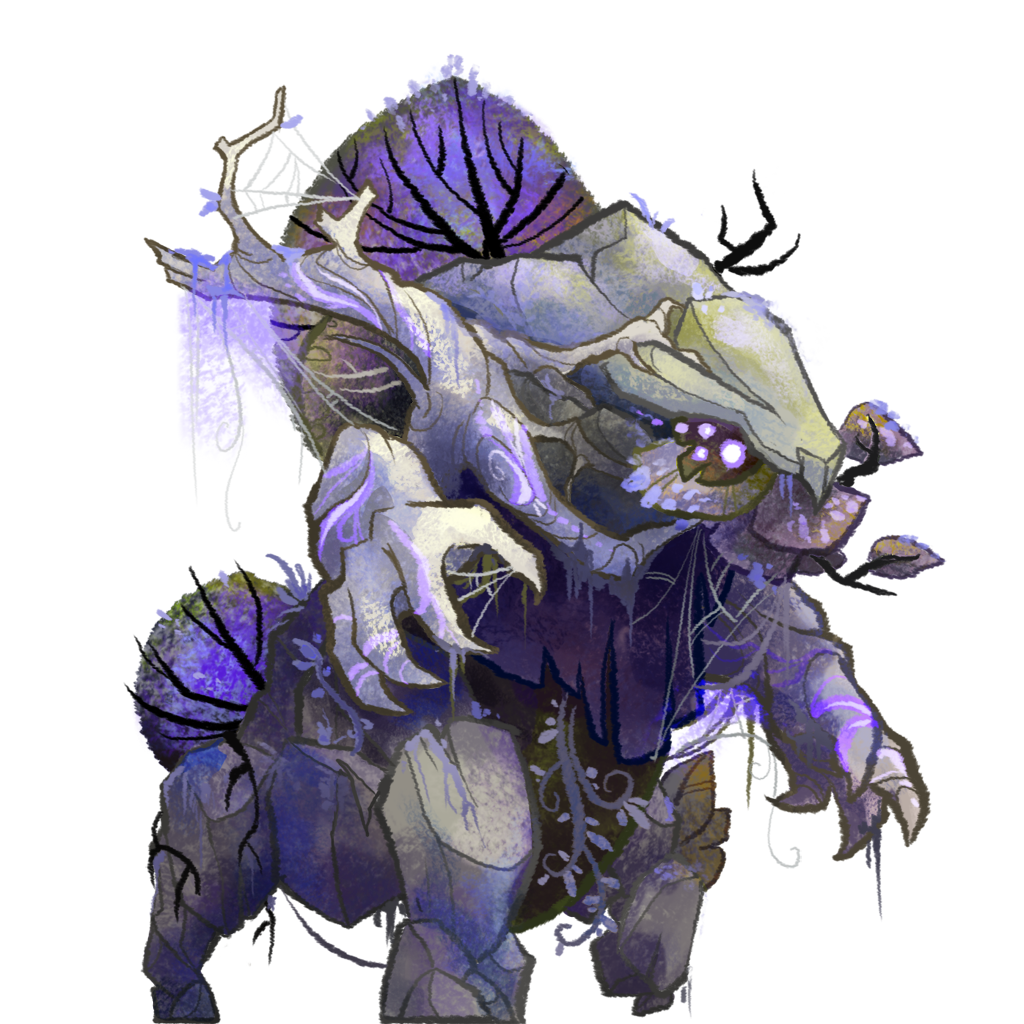
For this article I want to make a "corrupted forest guardian" to insert into our "Heart of the Forest" fight from part 2. You should be able to make your own unique monster by following the same basic process.
My corrupted guardian will use this art:
The monster image should be a square .png file, usually 512x512, or 1024 x1024 for larger monsters, and should be placed in the mod under /assets/figures/images/
I want the forest guardian to have a free attack based on Wild Grasp, that can pull heroes out of position, and a standard melee attack to follow up with. The gaurdian should have about 16 health, 2-3 armor, take up 2 tiles, and otherwise be a fairly standard mob.
Combat Lab is great for testing out monsters and combat abilities, because you can control both sides of the fight. Press F10 or click Content Editor to open up the editor view.
Make sure that the Heart of the Forest mod is enabled in the Mods control in the upper left.
Go to the Monsters view (Control+7). From here you can see all the monsters that are defined in the game. The best way to make a new monster is to base it on an existing monster. Let's start with the actual Forest Guardian.
On the very top row, to the right there are three buttons, Copy, Duplicate, and Delete. Click Duplicate.
That will bring up the New Monster dialog. Let's call it "hotf_corruptedGuardian." Make sure to save it to your mod, as well.
Go ahead and create it. It will be using the new ID, but otherwise it's a total copy of the old monster. Now we'll change the image to use our "corrupt" version. At the very bottom, expand the skin->0->image-> nodes.
click on the misc/forestGuardian line. That will bring up a big list on the left of all the "figure" images in the game. Use the box at the top left to search for our image by name:
Select it. The picture in the upper left should now show our version:
Step 3: Edit the Stats
You can edit the guardian's stats in the stats section by clicking on the values and entering new values.
press Enter to confirm. I'll edit the stats, set the scale to 1, and also enter a name and blurb:
Save your work! (Control+S)
Step 4: Make a new Ability
Next, I want to add a new ability, "grasping vines," based on the mystic "wild grasp" recipe. In the aspects section, let's add an entry called "monster_GraspingVines".
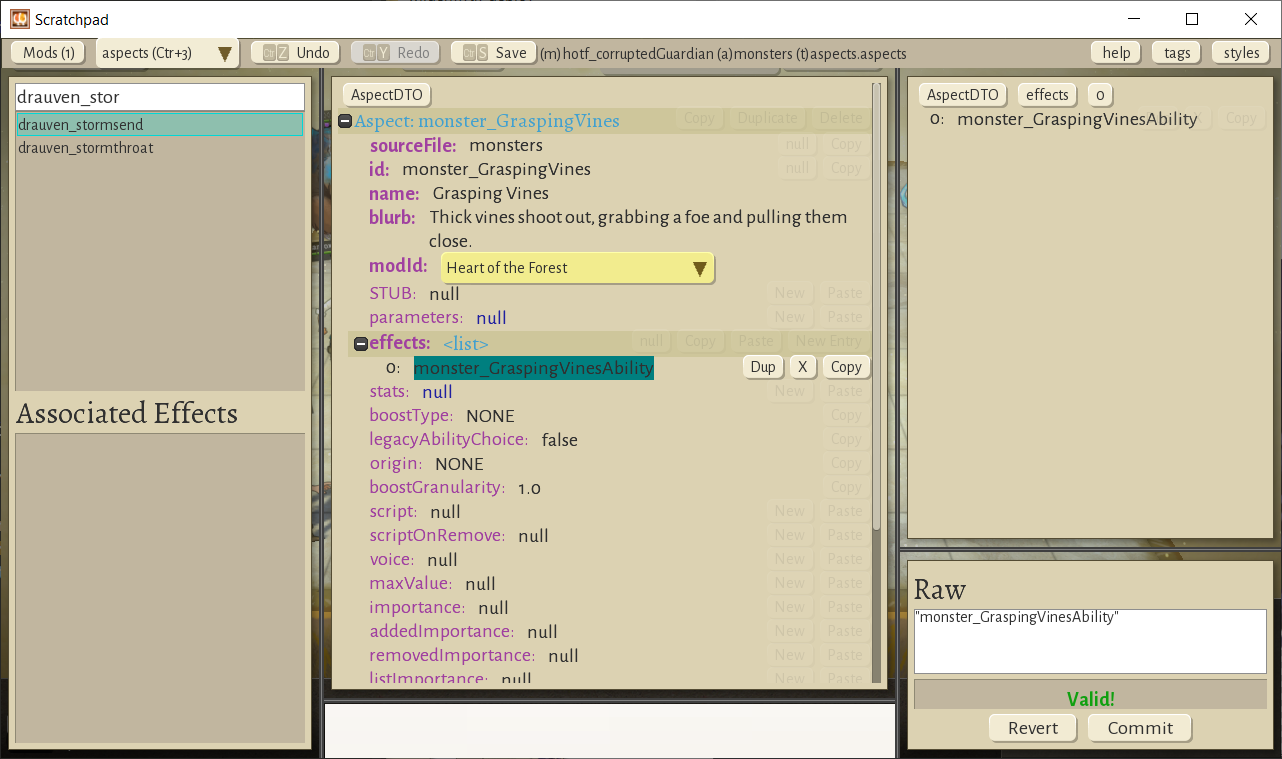
This aspect doesn't exist yet. That's ok, we're going to create it now. Head over to the Aspects view (Control+3) and find an aspect to duplicate. I'll use "drauven_stormsend", because it's a simple ability. Press the duplicate button
And fill out the New Aspect dialog. We'll use the exact name we entered before, "monster_GraspingVines". Make sure to save the aspect to your mod.
Edit the name and blurb to be more appropriate, and edit the effects->0 node to say "monster_GraspingVinesAbility". This is referring to the ability, which we're about to create.
Save your work! Now go to the Effects view (Control+2) and search for "mysticRecipeWildGrasp". This is the effect we're basing our new attack on. Find the duplicate button on the top line.
Click Duplicate to bring up the misleadingly named "New Event" dialog. Type "Grasping Vines" into the Long Name field, and use "monster_GraspingVinesAbility" for both the id and file.
Then press create. There's a fair number of changes to be made to this ability. Normally you'll iterate on this a fair bit, changing some things, testing them out, and adjusting. For now I'll just run you through all the changes I've decided to make. Some of this stuff might not make sense at first, so I'll list them one by one and explain them as I go. Also, I'm not gonna take a billion screenshots of this, sorry. But let me know if you'd like to see videos of this sort of stuff I guess?
name -> "Grasping Vines" - this is the name that shows on the Ability Button. blurb -> "Thick vines shoot out to grab and draw in an enemy." - this shows up in the tooltip info.aiPriority -> 2500 - this tells the AI to prioritize this over a regular attack (which is 2000). info.tags -> null - this is not an interfusion recipe, just a basic ability ability.cooldown -> oncePerTurn - we'll be making this a free action, so we need to put a cooldown on it or else the AI will just spam it. targets[0].cost -> null - make it a free action delete targets[1] (source) - in Wild Grasp, this would be the interfused plant, we don't need it. When we delete this, a lot of errors pop up. Cool! We'll need to fix all those... targets[1](target).relativeTo -> self - find an enemy that's within range of self (not the scenery that we're not using) targets[1](target).minRange -> 2.1 - don't pull an enemy who's already adjacent. targets[2](sourceTile).relativeTo -> self - find targets nearby self. outcomes[0] (AttackRoll).intermediateRole -> null - there's no intermediate role anymore, just a simple attack. outcomes[0] (AttackRoll).particles[0].setPosition -> self - vine particles should originate at self. outcomes[0] (AttackRoll).particles[1].setPosition2 -> self - vine particles should travel back to self. outcomes[0] (AttackRoll).flankMarkOrigin -> self - controls where the flanking mark originates outcomes[0] (AttackRoll).always -> null - we don't need to damage scenery outcomes[0] (AttackRoll).onHit[0] (Damage) -> delete - we don't want to damage the foe, just pull them close. targets[0].missionFeedback.orientTo -> target - self should orient towards the target of the attack when hovering, animating.
So now it should look something like this.
Let's save our work.
Step 5: Test it out!
Let's test it out. (Due to a bug, you may need to close Scratchpad and re-open it in order to refresh the data.) Head over to Combat Lab (press Esc to close the Editor.) Where it says "Farmer" in a dropdown in the upper left, pick our new monster:
Press F2 or click the button just below to spawn the monster on side B (the heroes are side A). The unit should show up. Click on it to select it. (in combat lab, use SHIFT+CLICK to select a unit on the other team from the one you have currently selected.)
You should be able to select Grasping Vines, and target as hero, and pull them over!
Sweeeeeeet!
Step 6: Set up difficulty levels
Let's open up Content Editor again (F10) and go back to the monsters tab (Control+7) and find our guy.
Monsters can have different stats and abilities depending on the difficulty level the player selects. The base stats we set before are for "George R. R. Martin" or "Hard" difficulty, and are the default vaules for other difficulties. To make our monster easier for "C.S. Lewis" players, let take a look at the "mods" section of the monster definition. If you expand those three mod nodes, you'll see one for C. S. Lewis (easy), One for J. K. Rowling (Medium), and one for Edgar Allen Poe (very hard). You can override stats for any of these, and you can see there are already entries that override the main attack of the guardian.
I'll set these up like so:
Step 7: Add the monster to a fight Let's put our new monster into our fight so we can see how it feels. From Combat Lab, We'll hit the "back" button (lower left) to get back to the Lab Selector screen, and head over to "Site Lab"
We'll use the selector on the top right to find our fight.
And then down at the bottom where we spawn the Thrixl ambush, we'll add our monster by specifying the mosnter id.
And let's set "combatantCards" to false while we're here, so that we won't also spawn some random Thrixl.
Step 8: Playtest Load up the game and choose the scenario from the New Battle menu (you have to be in dev mode to see this)
Start the scenario and play through. Our monster should spawn, and use its devastating wild grasp on us!
So, this is how we make new content for Wildermyth. Hopefully we've got your imagination started. The tools are still getting better, so let me know what you'd like to see improved. Our dream is for it to be a really powerful and flexible content creation tool. Thanks for reading!
Coming to Early Access November 13th!!
We've been in development for something like 5 years, depending on how you count, and we are downright thrilled to be able to finally announce a release date for Steam Early Access.
-- November 13 2019 --
Early Access means certain things are not totally finished, and we're still actively working on adding content, but overall the game is in a great state, and we're proud of our work.
We've built a new trailer as well, since the old was starting to show its age. [previewyoutube="X9xQQfGvXSU;full"]
Once Early Access begins, you can expect regular updates including features, bugfixes, and content. We have a lot more ideas for this game, and we're very excited to be working on it for quite a while to come.
Wildermyth aspires to be a lot. We call it a myth-making tactical RPG, and it has strong roots in both D&D and XCOM. Over the course of several campaigns, you'll build up your own unique cast of iconic legends. We want you to really care about your party, even though they're randomly generated, and we've done a ton of work on writer-driven procedural narrative to make this all work the way you want it to.
And we're not done yet. There's a lot more content to add, and we want to improve and polish the content we've got. Come join us!