Ys IX 1.1.3 - Nobody Expects the Surprise Performance Patch
Hi everyone,
I bet you didn't expect an Ys IX performance patch!
Some background: while working on the upcoming release of Trails from Zero, and specifically looking to keep it at a solid 60 FPS on all maps on the Nintendo Switch, I implemented an optimization which I thought might also be helpful for Ys IX.
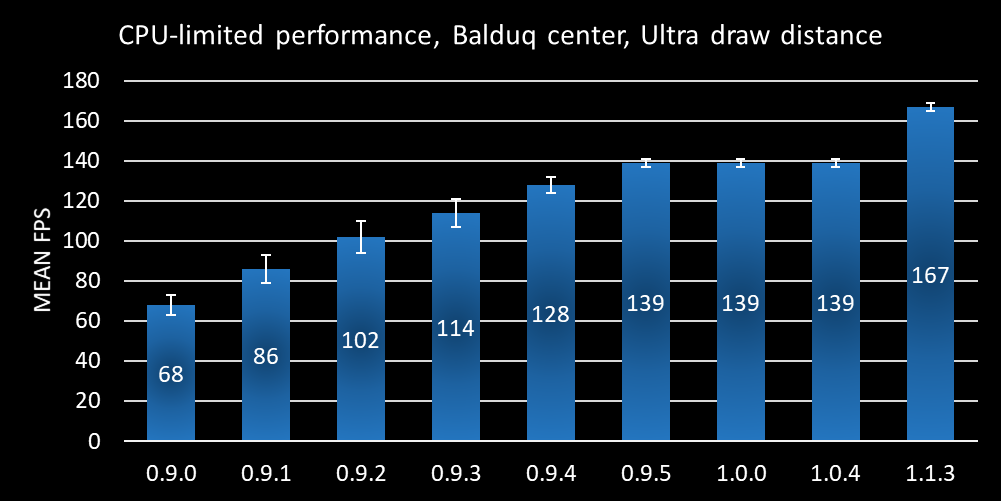
So I ported it over, and depending on the hardware and in-game scenario, some testers saw improvements of 25% in CPU limited scenarios. As such, it seems worth releasing publicly. I've also updated the performance chart from the original release with this new version:
Note that this improvement requires Direct3D feature level 11_1. If you are using some very old hardware or operating system version which does not support this, the game will automatically fall back to the previous rendering path.
We also included a few other minor changes in this update. Here are the full patch notes:
Improved CPU-bound performance. The degree to which you will notice this depends on the specific in-game scene, settings, and your hardware GPU/CPU balance.
Adjust the refresh rate selection algorithm to more reliably pick the available refresh-rate closest to the one desired.
The game executables are now signed. This should hopefully reduce the antivirus false positives that sometimes pop up for some players.
Fixed the English item description of the Holy Sword's Hilt accessory to correctly reflect its capabilities.
While we do not expect this patch to introduce any regressions, with the great variety of hardware and software configurations available on PC this is not always guaranteed in all circumstances. As such, you can return to previous versions of the game by selecting any of the public “version_*” branches on Steam.
It has been a while, but today we are very happy to announce a major update to Ys IX: Monstrum Nox. The most important new feature this update introduces is local co-op. Two players can join together to not only fight monsters and explore dungeons (as in Ys VIII), but also explore the city of Balduq. Beyond co-op, this update also brings support for aspect ratios narrower than 16:9 -- which is particularly useful on e.g. the Steam Deck's 16:10 screen -- and a number of more minor bug fixes which we have accumulated since the release. These will be detailed at the end of this announcement.
Local Co-op
The local co-op feature allows two players to play Ys IX together, at every point in the story where more than one character is available.
Note that there is an in-game co-op setting which you need to enable in order for co-op to be available. Once this setting is enabled, the co-op player can drop in and out of the game using the "Start" (or equivalent) button on any non-primary controller, while the "Select" button on the secondary controller toggles the player ID indicators ("P1" and "P2") on and off.
Unlike Ys VIII, where co-op was mostly limited to combat, the second player is largely equivalent to the primary player in terms of capabilities in Ys IX, including movement and combat abilities, using Monstrum Gifts, discovering and triggering landmarks, enemies and events, opening chests, picking up collectibles, and initiating dialogue. Only interacting with menus and the map is restricted to player one. Another significant improvement over the co-op feature in Ys VIII is that character switching is implemented individually for each player: that is, if there are 3 characters in the current party, players one and two can both independently switch to the currently-unused character without affecting each other.
Of course, given the experimental nature of this feature, there are some constraints and restrictions to keep in mind:
You need two controllers to play in co-op (or one controller each for Steam remote play together), and it is not possible to re-bind the controls for the second player.
There is shared camera control, and while the co-op camera code does its best to keep both players on screen, this takes some getting used to and requires a different approach to camera control than the single-player mode.
The co-op mode is experimental, and in select situations sequences of specific actions could lead to a softlock (e.g. triggering some device which closes doors with the character controlled by player 2, and then logging that player out). Please keep this in mind.
We have completed 100% of the game in co-op at Nightmare difficulty during testing, and I personally think that it is an incredibly enjoyable way to experience Ys IX.
16:10 Aspect Ratio Support
Previous versions of Ys IX used letterboxing for any resolution aspect ratio narrower than 16:9. In this version, all 3D scenes render at full resolution for aspect ratios such as 16:10 (even down to 4:3). 2D elements such as the menu or map screens will still be letterboxed as, just like for ultrawide, the effort to redesign all of these to be aspect-ratio-independent is prohibitive.
As you can see above, the Steam Deck benefits from this change with its 16:10 screen.
Full Changelog
New Features
Local co-op support
Support for narrow aspect ratios
The "Equip Screen Supersampling" graphics setting now also applies to the "Ritual Relics" screen
Fixes and Improvements
Make sure that traps behave functionally the same at high framerates (>>60 FPS) as they do at the default framerate
Fix timing of fades after video playback before Grimwald battles
Fix spikes at Dry Moat Ruins boss not being shown with some settings
Fix crash on startup when no audio devices are available
Fix UI animation speed of Grimwald result screen at high FPS
Fix a long-standing bug causing NPCs to get stuck on some ceilings after wall run
Fix some English spelling issues
I am personally very much a fan of local co-op in games, and feel like too few RPGs in particular offer the option to play their main campaign in co-op. I hope this update brightens the day of my fellow co-op aficionados out there, as well as anyone playing on a 16:10 monitor or who is planning to get a Steam Deck of course.
- Peter "Durante" Thoman, PH3
PS: As always, you can use the "Betas" feature on Steam to revert to a previous version of the game in case something goes wrong on your system with this patch.
Patch 1.0.6 Release Notes
Hi everyone,
we have fixed various minor issues with Ys 9 and implemented some new features:
Input / Controls
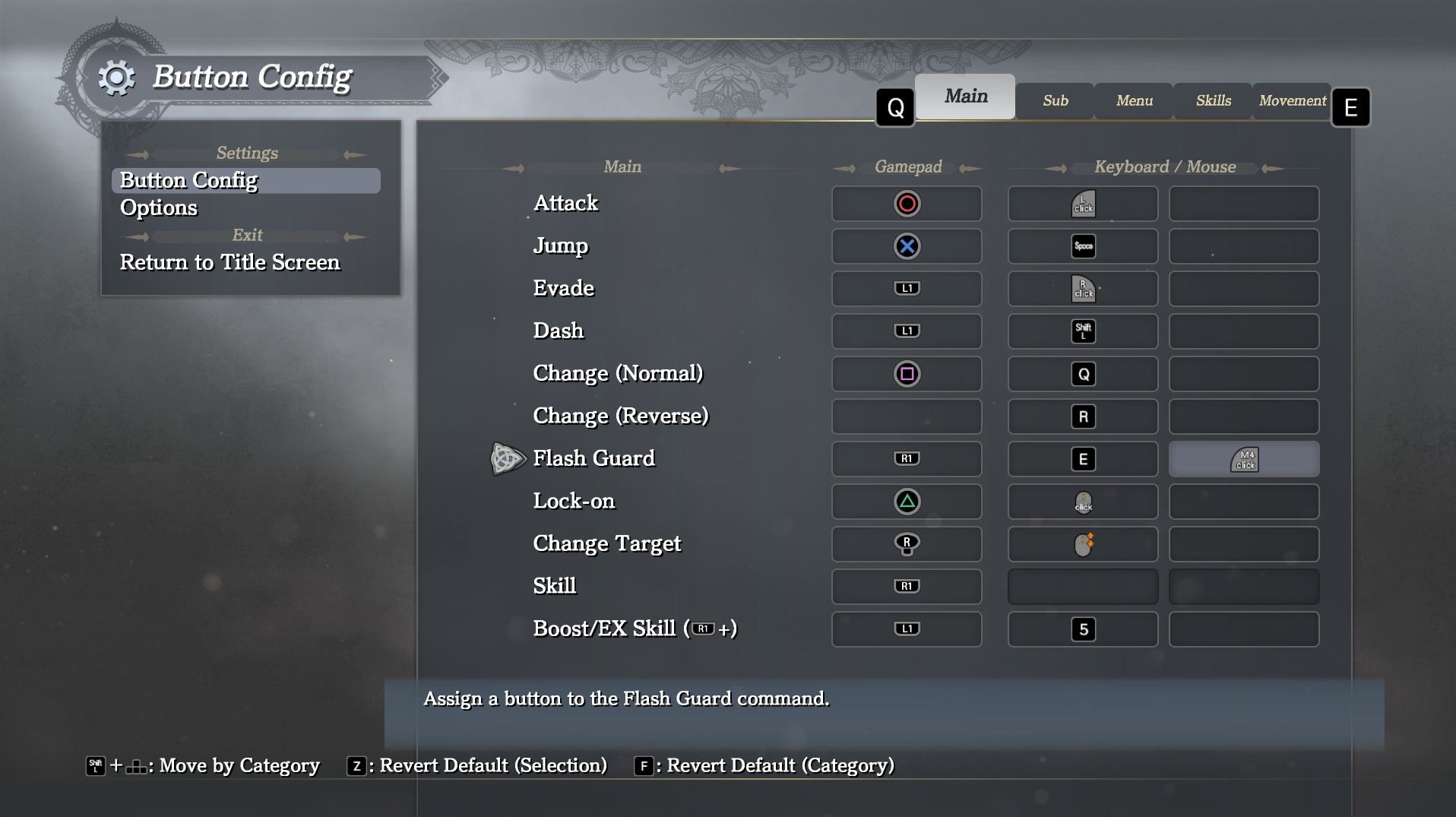
added remapping of confirm and cancel actions
added mouse wheel support for scrollable lists and journal when mouse menu navigation is off
added mouse wheel support for message log
fixed vibration only working for controller with ID 0
improved save game menu navigation by disabling page-wise scrolling for left stick
Monitor / Display
properly support Borderless mode on non-primary screens
save used monitor for multi-display setups
prevent screensaver from activating while the game is running
Draw Distance / LoD
added "Lunatic" draw distance setting (higher than Ultra, see notes below)
made draw distance setting apply to sub-map level of detail selection (see notes below)
make draw distance setting apply to more object types (see notes below)
fix calculation of draw distance applied to objects when changing the setting in the menu
fix distance fadeout of objects being closer towards the center of the screen than at an angle
Miscellaneous
fix specific boulders not starting to move in some situations at framerates ~>100 FPS
updated credits
Note: Due to the additional graphics improvements now associated with the draw distance setting, higher levels will have a somewhat higher performance impact than on the previous version. Also, the "Lunatic" setting is strictly intended for very high-end systems and future proofing.
While we do not expect this patch to introduce any regressions, with the great variety of hardware and software configurations available on PC this is not always guaranteed in all circumstances. As such, you can return to previous versions of the game by selecting the any of the public "version_*" branches on Steam.
Updates to pricing in Argentina and Turkey
We will be implementing the following price changes for Ys IX: Monstrum Nox and its associated content for customers in Argentina and Turkey regions:
These changes will apply to our game listing on Steam® starting July 9 at 12:00 PM PT.
We also want to apologize to customers who had purchased Ys IX: Monstrum Nox at the previous pricing and want to offer a chance to purchase the game at the new pricing as well. If you had previously purchased Ys IX: Monstrum Nox and wish to take advantage of this update, you must request a refund by July 23 at 5:00 PM PT. You can do so by contacting Steam support through https://help.steampowered.com/. No refund requests will be accepted after this date.
Regarding our limited time Launch Week Special bundle, you must purchase it (or re-purchase if refunded) by July 13, 10:00 AM PT. If you request a refund for Ys IX: Monstrum Nox after July 13, 10:00 AM PT, you will be unable to purchase the Launch Week Special bundle.
Thanks for reading! For the latest updates, please follow NIS America on Facebook and Twitter.
Patch 1.0.5 Release Notes
Hi everyone,
there were several reported issues which could be fixed quickly, so we pushed out a minor patch:
added missing DLC content: Ecliptic Errant costume and Melodies of the Macabre FLAC files
fixed crashes when opening the options menu using certain screen resolutions
improved behavior when running with specific screen settings (i.e. resolution) on a screen that doesn't support them (esp. useful in multi-screen scenarios).
Note that, in the rare case that the menu does not offer a desired combination of resolution and refresh rate that you know your platform supports, you can always manually edit the file %LOCALAPPDATA%/Ys9/settings.xml and adjust the corresponding entries.
While we do not expect this patch to introduce any regressions, with the great variety of hardware and software configurations available on PC this is not always guaranteed in all circumstances. As such, you can return to previous versions of the game by selecting the any of the public "version_*" branches on Steam.
Ys IX on PC - Behind the Scenes
With Ys IX finally releasing on PC, we've reached the most critical point of one of the most challenging porting projects we have undertaken so far. Some of these challenges were unavoidable, while others were of our own making, but we believe we've overcome the vast majority of them and are ready to provide a great version of the game. In this article we'd like to go into a bit of detail on some of PC-specific features and the optimization work which went into this version of the game.
Feature Overview
Some of us here at PH3 are PC gaming enthusiasts. While this is hopefully a good thing for everyone who plays our ports, it also means that we frequently create substantial workloads for ourselves by introducing features that weren't strictly necessary -- and that is certainly the case for Ys IX.
Full Mouse/Keyboard Support
In porting Ys IX to PC, we implemented full mouse/keyboard support. This includes not just the basics of controlling the game (with raw mouse input for camera control!), but also rebinding of all actions with up to two bindings each, pointer controls in all menus, mouse wheel scrolling where appropriate, and adaptive prompts depending on your preferred input device and binding. These might sound like trivial changes, but in a game with a substantial amount of custom UI that was only ever designed for a controller, they are more laborious than you might think.
Support for High Frame Rates
Ys IX was originally designed for 60 FPS, but in an action game having the possibility to reach higher framerates is always desirable, especially for those with a high-end PC. Our beta testers helped us find all the large and small ways in which the game could break when going beyond 60 FPS, and step by step we managed to make everything work at up to 144 FPS with full support.
Ultrawide Aspect Ratio
Many console games are built with the assumption that 16:9 is the only aspect ratio which needs to be supported, and going beyond it can introduce all manner of issues, especially related to UI but also with other rendering such as special effects. As such, fully supporting wider aspect ratios, including UI, in such games is much more than just a small hack, but we committed to this for Ys IX and hope you'll love the result.
Other Features and Options
Here is a list of additional features and options added to the PC version:
Arbitrary resolution support (tested up to 8k)
Camera field of view adjustment setting
General Sampling Rate option (supports sub-sampling for low-end systems and supersampling for high-end systems)
Draw distance and Foliage Density settings to go beyond console on the high-end or gain extra performance on the low end
Shadow Filtering (including PCSS) and Shadow Resolution options
Various individual Postprocessing options, including HBAO+ ambient occlusion
Color blindness accessibility filters
Performance Optimization
With the initial state -- fundamentally improved since -- of Ys VIII on PC still in mind, performance was a key concern when bringing Ys IX to PC. This is doubly important as Ys IX is actually an inherently far more challenging game to run than its predecessor, as the latter was still designed to also work on the PlayStation Vita.
By the time we were ready to ship an initial version of Ys IX to our PC beta testers, we had already improved performance by around a factor of 2 compared to the very first version on PC, by fixing various of the more obvious bottlenecks. We labeled this initial closed beta version 0.9.0.
But still, reaching roughly 68 FPS in the CPU limit on my development PC (Intel 9900k) seemed quite lacking, even taking into account the increased draw distance compared to console and the fact that this measurement was taken in the most challenging location in the game from a performance perspective.
This started a deep investigation of the game's performance characteristics, and improvements and sometimes outright rewrites of several aspects of it. Before we go into a bit more detail for each version, I'd like to note that all of these are true optimizations: the output and behaviour of the game remains exactly the same.
In 0.9.1 we introduced various parallelization and asynchronous execution features to optimize the DX11 drawing process. Nsight systems was a really invaluable tool for this purpose, since it provides insight into the behaviour of each thread at each point in a frame. While this parallelization provided a very substantial performance improvement, it actually slightly increased frametime instability as well.
Version 0.9.2 re-implemented the way in which the engine deals with sampler states, pre-generating them and using this set of pre-generated samplers rather than re-generating new ones on demand during each frame, as well as a few more minor optimizations.
When comparing FPS, version 0.9.3 doesn't seem like too big a step, but it included the replacement of the game's memory allocator with the excellent rpmalloc, which also lead to a more consistent performance profile and decreased loading times.
In version 0.9.4 we completely reimplement D3D11 buffer handling for both dynamic geometry and instancing-related memory buffers. Not only did this significantly improve performance, it did so while allowing us to get rid of one of the threads introduced in the earlier parallelization.
Finally, in 0.9.5 we reduced the latency of the graphics pipeline and resolved some clipping issues, getting rid of a few unnecessary drawing operations. No changes which could be expected to affect performance were made after this point, which is also confirmed by the benchmark results.
Video Comparison and Performance in Special Situations
This FPS comparison alone does not tell the whole story of course. The difference in stability can also be substantial, as illustrated in these videos of version 0.9.0 and version 0.9.3.
Beyond that, there are some particular situations which show an even more substantial improvement, such as the infamous "black fish fog" incident -- pointed out by one of our beta testers above -- which prompted the investigation and ultimate replacement of the D3D11 buffer handling infrastructure.
Limitations and Expectations
After reading the above, you might be tempted to think that Ys IX is now a masterclass in performance, and that everyone will be able to run it at maximum settings without any issues. That is decidedly not the case. The game still has substantial GPU performance requirements, and several of the settings we introduced exact a very severe performance toll -- above all the general supersampling option.
But even with those options disabled or scaled back, and all the performance optimization discussed above, it is still a game which is inherently substantially more difficult to run well than Ys VIII. However, we did introduce some options that should make it possible for those on lower-end systems to have a smooth experience, including the possibility to fully disable dynamic shadowing, reduce the sampling rate of the 3D rendering, decrease the draw distance, and reduce the density of foliage.
Conclusion
This port would not have been possible without the fantastic work of our indefatigable beta testers, the excellent contributions of my fellow developers at PH3, and the support of NISA. Hopefully it will be an enjoyable experience for you.