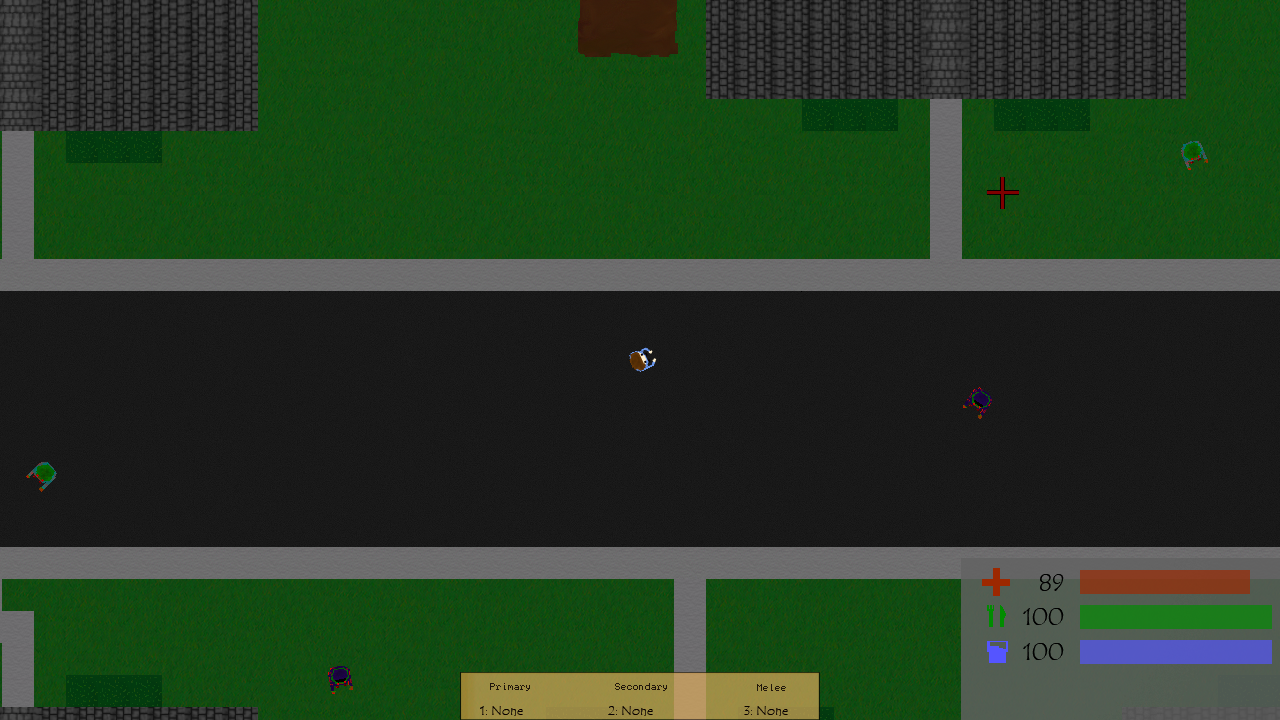
New textures, food replacements, damage changes, and more!
Textures:
Lots of textures have been remade or improved.
- The trailer and diner roofs have been adjusted to look more metallic.
- AC units have been added to the roof of the store.
- New sidewalk texture.
- New grass texture.
- Improved log texture. Make it darker and added moss.
- New Papso and Cloud Beer box texture.
- Trailer floor has been changed to brown.
- Slight changes to oven texture.
- New metal and stone bag textures.
- Changed sand barrier textures.
- Zombie Cop texture.
- Fixed 1911 Pistol hotbar texture.
- Other minor texture changes and improvements.
Food/Medical Changes:
The orange has been replaced with canned peaches, and the banana has been replaced with canned soup. The food and water values for these and other foods have been adjusted as well. A bloodbag has also been added which increases health by 20 when used, but it does not stop bleeding.
Zombies:
Zombie spawns have been adjusted so they should spawn a bit more often. Zombies will also despawn if out of the players site too long which should increase the action a bit. The default health of zombies has also been increased to 50.
Weapons:
The damage weapons do is no longer based on RNG, it is now just a static number. For example the AK used to do 35-40 damage, it now does 40. The damage of weapons has also been increased a bit to balance the new zombie health.
World Changes:
A construction site has been added down the road from the trailer park. Resources and low tier weapons and tools spawn here.
Minor Fixes and Changes:
- Fixed inventory sounds playing when invisible
- Adjusted some spawn locations
- Decreased number of zombies initially on the map
Devblog 25
Game data log, new weapon, menu changes, new hotbar, and more.
Game Log:
Z can now log game and some PC data to a file. If enabled it will do this every 10 seconds. Currently it logs active processes, some PC specs, and some game data. All of this is stored wherever the game is installed. This is intended to help diagnose players issues with the game. The log can be sent via the contact page on the site or by sending an email to contact@ridgelinestds.net. This feature is disabled by default.
Wooden Bow:
You can now craft a bow and arrows in the crafting menu. Like melee and silenced weapons it does not attract zombies when used. The bow is crafted with 3 wood and 3 cloth. Arrows are 3 wood and 3 stone and you get 5. Arrows can be retrieved after being shot at a zombies but they do have a chance to break.
Zombies:
Zombie detection has received some minor changes, you now need to be a bit closer for them to detect you. They have also been made slightly faster so when you are detected you're in a bit more trouble.
Hotbar:
The hotbar has received a facelift, it now displays the gun as well as the name. If you liked the older one you can switch back to it in the settings if you'd like.
Menus:
The settings menu buttons have been changed to more like other games where you click arrows to change settings instead of the previous "toggle" system. Most settings also display some information when moused over to give an idea as to what they do. There is now also a Game settings page for game related options like the Hotbar, Tips, and Game log.
Minor Changes:
- Character hair textured
- Changed fonts for each section on How to play screen
- Changed wording on death screen
- Ridgeline Logo changed
- Fixed some settings getting reset
- Stopped game from loading from config twice
Patch 0.5.3
Patch time! This patch fixes a few bugs and adds support for Steam cloud saves! It may also improve performance a bit for those with a dedicated GPU.
Fixes:
Using a bandage no longer uses 2 bandages. Items will no longer appear craftable if you don't have the resources.
Steam Cloud:
Saves will now be backed up in the cloud so your save should stay if you play it on another computer or after deleting and reinstalling.
Performance:
The game will now try to force the use of your dedicated GPU. So if for whatever reason the game wasn't using your GPU it should now.
Key Requests
Since launching into Early Access I’ve been receiving a bunch of emails and messages requesting keys. Now I have no problem giving keys to youtubers, streamers and such every once and a while. It’s great to see some excitement for the game but this comes with problems, scamming and impersonation. To prevent this or at the very least help, keys will only be given out through keymailer unless its for a giveaway or something.
So if you would like to request a key, the only way is through keymail. Here’s a link to Z on keymailer. https://www.keymailer.co/g/games/57986
Patch 0.5.2
Another small patch that addresses some of the issues with the game as well as making it more responsive to your actions.
Inventory:
When clicking items in the inventory to equip or use them it now makes a clicking sound. Food and drink items will eventually make an eating and drinking sound. As well as that the inventory now makes a sound like a page turning in a book when opened and when switching between the tabs. These sounds were also added to the build and craft menus.
Tips:
The tips have now been adjusted to display for 8 seconds which will give you more time to notice and read them. They now also display every 30 seconds.
How to play:
The how to play section has been remade, cleaning it up and adding more details. Most importantly the button actually works now... oops.
Patch 0.5.1: How to Play
This is small little patch which adds a how to play section to the main menu. All of the keys and their actions are listed. For the slightly more “complex” actions or something that isn’t bound to a key gets a more detailed explanation. All of this will also be listed below.
*Notice* If you rebind the keys some of these may not apply.
Actions:
W – Move Up
A – Move Left
S – Move Down
D – Move Right
R – Reload
E – Use/Pickup
Tab – Open Inventory
C – Open Craft Menu
B – Open Build Menu
1 – Equip Primary
2 – Equip Secondary
3 – Equip Melee
Esc – Open Pause Menu
Inventory & Menus:
Change inventory tab –
To change the current tab in the inventory just click on a different tab
Equip Weapon/Tool –
To equip a weapon or tool click on the name in the inventory and it will. 1 is for primary weapons like rifles and shotguns, 2 is for pistols, and 3 is for melee weapons and tools.
Eat/Drink –
To Eat & Drink click on the name of the item in your inventory
Crafting: To craft something first bring up the crafting menu with C, if you have the materials needed to craft the item the button will be green. Click it and it will be added to your inventory.
Building: To build something first bring up the build menu with B, if you have the materials needed to build the item the button will be buildable. Left clicking places the item, right clicking cancels. If the item becomes discolored you can not place it there.
Devblog 24 + Early Access Release
Steam Early Access, building/crafting overhaul, new textures, buildables, and more!
Steam:
The time has come, Z is now available on Steam. The road leading to this point was long and bumpy at times. But the road doesn’t end here.
I’d also like say thank you to all of my friends, family members, and playtesters for supporting the development and helping test the game. The constructive criticism and bug reports have definitely helped better the game.
Building:
Building has been redone, instead of crafting a part then placing it down you craft/build at the same time. As well as that there is now a new building tier, stone. Stone has two times more health than wood. So 200 for the wall and 300 for the floor and ceiling.
Floor
Wall
Roof
Crafting:
With the removal of building items from the crafting menu it was blank so I added 3 craftable items. Bandages can be crafted with 2 cloth, axes can be crafted with 2 wood and 2 metal, and sledgehammers can be crafted with 2 wood and 3 metal.
Textures:
The textures for player build wood builds have been redone to look a bit more natural and less manufactured. The floor in trailers has been changed to a dark red tile. The lake texture has been remade and is now animated.
Wall
Roof
Floor
Trailer Floor
https://youtu.be/ktLWyHrgUAQ
Minor Changes and Fixes:
- Fixed random clicking sound
- Added click sound to build/craft menu
- Removed test keys
- Loot no longer instantly spawns at start
- Changes to 12ga and 9mm textures
- Darkened log texture
Z - Early Access Launch Trailer
https://youtu.be/A-6InYrr1Bk
Devblog 23
Building, Crafting, Harvesting, and more!
Building:
It is now possible to build your own base and or reinforce other buildings. Currently you can only build out of wood but other materials will be usable in the future. You can build spikes, walls, floors, roofs, and doors. To build you must open the build menu by pressing the build key which by default is B. Once in the menu you can build as long as you have the parts. All of the parts must be crafted. If you have the parts they will be place-able and the button will be blue. Once you hit button you will be able to build until you run out or you cancel it by Right Clicking.
Crafting:
Crafting is now possible by accessing the crafting menu, the default key is C. Crafting is pretty much the same as building but instead of placing anything it just adds it to your inventory. Currently you can only craft buildings parts, other craft-able items will be added in the future.
Harvesting:
So how are you supposed to get all these materials to craft and build? Some materials do spawn as loot in places but the best way is to go and harvest it yourself. You can now find logs and large rocks that can be harvested for 10-30 wood or stone. These resources spawn in the woods so if you can see trees you should be able to find some. To gather these resources you must use tools. Use the axe on the wood and the new sledgehammer on the stone.
Destruction:
With building comes destruction. Misplace something? If its wood tear it down with the axe. If stone use the sledgehammer. As well as you being able to break stuff down so can zombies, but don’t worry too much because currently they can only break down doors.
Build Saving:
For saving your buildings I had to implement a different method of saving. This was probably the hardest part of this update and this method might not even stay. I actually had to completely remake the saving today as the old method was too buggy. Previously saving and reloading a few times caused some items to vanish. With other items it would place a bunch in the same spot. Other than ruining your building is also cause performance problems as it could spawn thousands of items in one spot. The new method is better items disappear and stack far less but it can still be a problem. Due to these problems this will likely be a temporary method that will be replaced in the future.
New Building:
A few small sheds have been placed throughout the world. Currently they resources like wood, stone, metal, and concrete. Stone, metal, and concrete do not have a use as of yet.
Minor Changes:
The ammo tab in the inventory is now for ammo and resources.
The HUD has been made smaller so it doesn’t take up as much precious screen space.
Removed unused code.
Fixed minor bugs with the player model where it could be invisible.
Removed credits for now.
Slight improvements to zombie attacks
Join our Discord! https://discord.gg/RtEGDYZ
Devblog 22
Tips, new zombies, new weapon, new building, and more!
Tips:
There are now tips that appear at the top of the screen if left enabled. Every 25 seconds it displays one of currently 10 tips. If you have any tip suggestions let me know.
New Zombies:
Three new zombie textures have been added. A male wearing black, a male wearing white, and a female wearing pink. I’m like the variety so expect even more in the future.
New Weapon:
I’ve added a silenced M92 which I’ve named the M92-S. Unlike other weapons the M92-S does not attract zombies when shot so feel free to unload on the zombies. But its a tier 2 item so don’t expect to find it anywhere except the military base. Along with the new pistol the old pistol has received a facelift and rename. It is now a M1911, everything else is the same though.
New Building:
A Church has been added to the right of the graveyard. Its pretty big, about the size of two normal houses.
HUD & Inventory:
The HUD has received some minor color changes to make the bars a bit less vibrant. The bars are also slightly transparent now. The weapons tab in the inventory used to be red, now its orange. I didn’t like having two red tabs.
Optimization:
Sidewalks have been changed to be one large tile instead of a bunch of small tiles. This has reduced Active item count from ~2400 to ~1200. This should provide ~9% boost in performance.
Minor Changes:
Buttons in the settings have been remade so one button can have multiple actions. Previously you had to click one to enable the FPS counter and another to disable it. Now its just one button click.
Zombie spawners have been adjusted to account for more variables like such as more collision detection, if one was recently spawned, etc. They now also properly set the type of zombies spawned.
Zombie attacks have been adjusted to be a bit stronger and more effective as they would previously miss much more often.
The model for pistols while held is slimmer.
Bug Fixes:
– Sound attraction now properly works. No more random resets.
– Fixed zombie attacking bugs
– Fixed items not being saved
– Fixed bug with M24 and Magnum causing each other to be unable to fire
– Fixed sound bug in trailers