This update includes the default waypoint modification feature, a new coordinates system based on latitude and longitude, 2 airports, 13 airlines, and 2 aircraft types.
Default waypoints (outer waypoints) can be modified.
Waypoints and holding fixes can be relocated using latitude and longitude.
Added a minimap.
Added a search bar in the object lists on the management window.
A very challenging map since the Sion Airport is located on the most complex terrain in the game.
Ctrl + click a nav point name or a route name in the management window will redirect the page to the selected object.
You can use approach speed as the speed restriction of a nav point.
Decrease the distance to trigger the aircraft heading snap.
You can hold the shift to increase the zooming and panning speed.
Added ADS-B mode. In this mode, you don't need any radar to track an aircraft.
Added Phenom 100 and ATR-72-500.
Routes are not updated after moving a holding fix.
Routes marks overlapped the aircraft data block.
Sometimes the route segments will be colored incorrectly.
Game crash when trying to upload content that was created before v2.14.1.
Thank you all for your support, feedback, and bug report. If you have questions, suggestions, or bug reports, join the Discord server, or start a new discussion in the steam community.
The Separation Update Released
Hello controllers!
The primary objective of the v2.14.2 update is the same runway separation mechanics overhaul.
Departures The time interval between departures now depends on the wake turbulence category of both the preceding and following aircraft. If the following aircraft is heavier than the preceding aircraft, the time interval will be relatively short.
Arrivals
An aircraft can land once the runway is cleared(Preceding aircraft exiting the runway or passing the runway threshold). No time interval is required anymore.
Difficulty tweaks.
The time label on the flight strips now displays the scheduled time instead of a timer.
The index of the flight strip starts from 1.
The flight strip content on the bottom of the screen can be edited.
The dedicated flight strip list will be refreshed automatically when the cursor is not in the window.
Aircraft icons won't be hidden when editing map marks.
The warnings on the toolbar will be hidden automatically once the risk no longer exists.
Change the length of the aircraft vector line. Now it projects where the aircraft will be within 30 seconds.
Added a 90 seconds vector line option on the Options-Interface-Aircraft.
Added map layer presets.
The achievements of major airports are now required to handle 1000 flights instead of 5000 flights. Secondary airports are required to handle 500 flights.
Departure options didn't update when loading a save.
The custom waypoint list in the Management screen scrolled to the top after changing a custom waypoint name.
Thank you all for your support, feedback, and bug report. If you have questions, suggestions, or bug reports, join the Discord server, or start a new discussion in the steam community.
V2.14 Patch 2 Note
Added an alternative to the Shift + MMB. You can now use Shift + Ctrl + double-click(LMB) the data block to reset its position.
Added a Skip button in the tutorials.
Routes are not redrawn when the order of the routes has been changed.
Routes are not redrawn after a color change.
V2.14 Patch 1 Note
Hi controllers,
The primary purpose of this patch is to fix the issues related to replay. To make maintenance easier in the future, the game version will be changed to v2.14.1. This patch won't affect the existing replays and saves.
You can use an image file as a workshop item preview.
Now the "Add nav point by clicking" button in the Management-Routes window can still be pressed when any default waypoint or runway exists as a nav point.
The maximum approach speed was increased in previous versions. Since the missed approach point is much closer to the runway, the additional margin is removed.
Added some additional cues when adding the nav points.
FPS drops along with the increase of flights in the replay.
The auto-save takes too long when a number of flights in the area.
Loading the content(saves, replays, and presets) list takes too long.
Custom waypoints and holding fixes can be deployed in the replay.
Some buttons in the Management window are not disabled in the replay.
The changes in the departure procedure were not written in the replay file.
The final approach point changes were not written in the replay file.
Due to the route speed restriction, an aircraft can be slower than the min speed.
Minor UI bugs.
The Approach Update Released
Hello controllers!
The milestones in the v2.14 update include approach mechanics overhaul, arrival procedure, presets, Steam Workshop, and UI improvements.
The following settings can be saved as a preset file, which can be used in the future: The custom waypoints, holding fixes, routes, departure procedures, arrival procedures, runway configurations, obstruction marks, and map marks. All presets, saves, and replays can be shared through Workshop. In short, almost everything you can change in the game can be saved and shared.
You can now resize the game window to fit any resolution. Which also allows you to stretch the game window across monitors. The panels on the bottom of the screen can be stretched, collapsed, and ordered.
Other UI changes:
The font size in the NAV panel, landing panel, and waypoint panel can be changed.
The Deploy, Management, Forecast, and Flights buttons on the top of the screen use icon instead of text.
The flight count shown on the top of the screen can be toggled to display the number of flights by type.
The wind conditions shown on the top of the screen can be collapsed.
The transcript window can be closed.
The airport status window and holding fix status window can be opened on the bottom panel.
The altitude and speed labels on the bottom of the screen can be hidden.
The compass image changed. Added four direction buttons beside the compass that can use the true or the magnet directions.
You can now add a nav point to a route by clicking it on the map.
When starting the application in borderless mode, the game window will be moved to the position when last time you exited the game.
A text hint will be shown on the screen when Shift, Ctrl, or Alt is pressed.
When hovering on a flight strip, the aircraft data block on the map will be highlighted.
The steps during deploying and moving are more clear.
Wind direction and speed changed gradually instead of changing once per hour.
The color of custom waypoints and holding fixes can be changed.
The altitude and speed cell in the Management screen can be drag-and-drop to apply it to another cell.
A color cell can be drag-and-drop to apply it to another cell.
You can search for a certain text in the drop menu.
Holding fixed can be placed between nav points in a route.
The length limit of the custom waypoint name and holding fix name is now 3 to 5.
The name of a custom waypoint and holding fix is now generated using a name base instead of random letters.
Holding fix, route, and departure procedure unlocked after reaching a certain RP.
Reduce the minimum time interval between runway operations.
You can assign an altitude and speed to all nav points in a route.
Random color with one click.
You can add multiple rulers on the map.
Flights won't be handoff when holding.
A route or departure procedure can be disabled without being removed permanently.
A custom waypoint or holding fix can be moved without being removed permanently.
Thank you all for your support, feedback, and bug report. If you have questions, suggestions, or bug reports, join the Discord server, or start a new discussion in the steam community.
Devlog December 2022
Hi controllers,
Happy holiday! It's been a while since the Key Mapping update.
In early November, I made a series of mistakes that wiped out some parts of the codes and backups. As a result, almost all game mechanics changes after the Traffic Flow Update (v2.11, in September) are history. As rewriting identical codes is nearly impossible, some details, like the aircraft maneuver, will differ slightly from the current version in the next update. However, since I had to do it all over again, I made some changes to add new features. Here are the major changes in the next update, which is planned to be released in January.
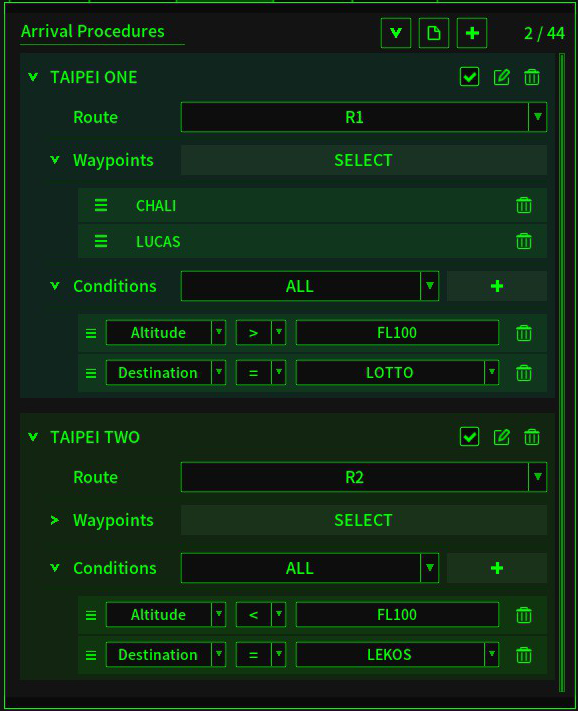
Arrival Procedure Procedures for arrivals and transits. It's similar to the entry route setting in the Waypoints tab. In addition, you can set specific conditions for the arrival procedure. For example: In this screenshot, all flights entering the map from CHALI or LUCAS, above FL100, and the destination is LOTTO, will join route R1 after crossing the map border.
Workshop & Presets
Workshop contents include game save, replay, and preset. Presets include holding fix preset, custom waypoint preset, route preset, departure procedure preset, airport & runway preset (under the Management-Airport tab in the current version), obstruction marks preset, and map marks preset.
In short, almost everything you can change in the game can be saved and shared.
Approach
In the new version, flights start decent on the final approach fix but initial the missed approach only after reaching the missed approach point. And the final approach fix can be moved to get a longer or shorter final.
And some relatively minor changes like:
The game window can be resized to fit any resolution.
The panels on the bottom of the screen can be stretched, collapsed, and ordered.
Wind direction and speed changed gradually.
The color of custom waypoints and holding fixes can be changed.
You can assign an altitude and speed to all nav points in a route.
Random color with one click.
You can add multiple rulers on the map.
New compass.
Flights won't be handoff when holding.
V2.13 Patch 1 Note
Crashes caused by accumulated path offset in 100x replay.
The Key Mapping Update Released
Hello controllers!
The Key Mapping Update includes new features to improve accessibility and fix bugs that cause game crashes in the replay.
Management - Overview Screen The Management Overview screen shows information and statistics like punctuality, the number of flights in the area, the average number of flights completed per hour, and the changes in the past 6 hours.
Management - Runways Screen
The Runways screen is a visual version of the Airports screen, making changing the runway rules easier, especially for complex airports.
Key Mapping
Now you can set any shortcut you like on the Options-Controls screen.
Change Game Settings
You can now change the difficulty after the game has started.
Pin
In the previous game version, the only way to prevent a window be closed was to change it to transparent. The pin provides the same function but keeps the window background visible.
Initial Speed and Missed Approach Speed
You can now change the initial and missed approach speed in the Airports or Runways screen.
The aircraft data block shift when moving it.
The title buttons in the Flights screen can be clicked outside of the window.
Incorrect route change logs caused the game to crash in the replay.
The message is not shown when a flight joins a route that the nearest nav point is a waypoint.
Added Management - Overview screen.
Added Management - Runways screen.
You can set shortcuts on the Options-Controls screen.
You can change the game settings after the game start on the Management - Settings screen.
Added the window pin.
You can set the initial and missed approach speed on the Management - Airports screen or Runways screen.
Change the default aircraft icon colors.
The name of a custom waypoint or holding fix can now include numbers.
Added statistics: scheduled flights, completed flights, accuracy, and accuracy.
Thank you all for your support, feedback, and bug report. If you have questions, suggestions, or bug reports, join the Discord server, or start a new discussion in the steam community.
The Low Countries Update Released
Hello controllers!
The Low Countries Update includes 3 maps, 5 airports, 7 aircraft types, 44 airlines, and 5 achievements.
The Low Countries is a coastal lowland region in Northwestern Europe consisting of three countries: Netherlands, Belgium, and Luxembourg.
Amsterdam, Netherlands
Amsterdam Schiphol Airport (EHAM)
Rotterdam Airport (EHRD)
Brussels, Belgium
Brussels Airport (EBBR)
Brussels South Charleroi Airport (EBCI)
Findel, Luxembourg
Luxembourg Airport (ELLX)
Aircraft Log The aircraft Log shows all essential events of an aircraft and factors that affect the RP. You can open it by clicking the aircraft on the Flights Window or holding Space and clicking a flight strip.
Added new maps: Amsterdam, Brussels, and Findel.
Added new airports: EHAM, EHRD, EBBR, EBCI, and ELLX.
Change the minimum step of the altitude changes from 100ft to 500ft.
Increased the range of radars at a default waypoint.
Fixed: When picking a color by changing the RGB, the last change was ignored.
Fixed: The enter altitude of an aircraft did not match the heading.
Thank you all for your support, feedback, and bug report. If you have questions, suggestions, or bug reports, join the Discord server, or start a new discussion in the steam community.
V2.11 Patch 3 Note
The saves and replays before this patch are still working, but patch 3 includes changes that may affect the existing games and replays. It's recommended to start a new game.
If you want to play the replay in the previous game version, a new branch, v2.11.patch2, has been added. You can change the game version by:
The game crashes when loading a save or a replay while the current game has any aircraft on final.
Performance issue caused by flight strips.
Parallel entry to a holding pattern sometimes departs from the original flight path.
Incorrect text in the Layers window.
Thank you all for your feedback and bug report. If you have questions, suggestions, or bug reports, join the Discord server, or start a new discussion in the steam community.