Hello Captains! We have fixed the following known issues:
Fixed the error pop-up while clicking “Upload Creative Workshop" in the map editor
Fixed the issue that maps in the Creative Workshop could not be displayed in custom games
Fixed the problem that Bilson's attack power did not increase after learning the "Eagle Eye" skill in the Last Stand mode.
Fixed the problem where the ranking scores are displayed beyond the UI interface in the endless mode leaderboard of the Last Stand mode.
Fixed the problem that some computer models would crash while the game was in progress.
Merry Christmas Captain!
Official Streaming Test
Hello Captain,
This is only a Streaming test.
Early Access Update v.1.0.2.26080
In this update we fixed some issues and added some optimizations
BUG FIXES:
Fixed the Last Stand map material error.
Fixed the Crystal Converter display error.
Fixed the game crash issue due to many units.
Fixed the cancellation of the upgrade of the defense tower caused by the inability to attack.
Fixed the abnormal fog see-through issue.
OPTIMIZATIONS:
Adjusted special effects performance.
Adjusted sound performance.
Added 2 official custom levels.
Optimized the physical performance of the map environment.
Optimized AMD graphics card frame rate.
Early Access Update v.1.0.
This version has a new stat editing module, use the customized featured units to create levels!
1. Go to the [Edit Attributes] tab
2. Select the content to be edited, including "Combat Units - Combat Stats" "Construction Units - Combat Stats" and "Construction Units - Functional Stats”
3. Select "Combat Units - Combat Stats" to edit the Stats of all combat units. The data list on the left side contains all editable units, select a unit to edit;
4. After editing the stats, the changes take effect instantly. The editable attributes of combat units include: HP: Basic HP, the unit will die when it reaches 0 ATK: Basic ATK ATK Range: Unit attack range(units: meters) ATK SPD: Unit attack speed (units: second/time) DEF: Defense rate, final damage value = ATK *(1-DEF) Recovery: HP recovery speed (unit HP/s) Movement SPD: Unit movement speed (units: m/s) Vision Range: A radius of a circle centered on the unit that will automatically attack when an enemy appears within that range (units: meter). Fog Dispersal Range: The radius of a circle centered on the unit, within which no fog will exist Resource Occupied: The resources deducted when the unit was recruited (generally affecting the resources themselves) are returned when the unit dies Resource Used: The resources deducted when the unit was recruited (generally affecting the resources themselves) are returned when the unit dies
5. "Building Unit - Combat Stats" and "Building Unit - Functional Stats" are also similarly edited, where "Combat Stats" are removed compared to the combat units, and a barrier value is added. Barrier: buildings are infected when the barrier value is gone (buildings are not infected if the initial barrier value is 0).
“Stat functions” include: Construction time: the time required to complete the construction of the building (in hours). Power grid range: range of the power grid brought by the building (in meters). Resource collection range: the collection range of a collection building (in meters). Max. number of buildings that can be built: the maximum number of buildings that can be built, cannot build more buildings once you reach the limit. Pre-research: fill in the research id, the building can only be built after R&D Pre-build: fill in the building id, the building with this id must exist on the map before the building can be built. Upgradeable building: fill in the building id, the building can be upgraded to a building with the corresponding id after it is built. Resource occupied: the resources deducted when the building is constructed (generally affects the resource output), returned after the building is destroyed. Resource consumption: the resources deducted when the building is constructed (generally affects the resource output), returned after the building is destroyed. Construction costs: resources deducted once when constructing a building, generally returned 50% after the building is destroyed. Construction reward: resources granted upon completion of building construction, deducted after building infection/destruction. Power-up bonus: resources granted after building construction is completed and deducted after the building is powered off/infected/destroyed. Collection efficiency: the length of the building's production cycle (in hours). Collection rewards: the resources produced by each production cycle of the building, deducted after the building is powered off/infected/destroyed. List of units hatched after infection: enemy units that appear after the building is infected. Ignore the split matrix skill - [Sandworm Disaster]: This skill will periodically summon sandworms to randomly destroy non-essential buildings in the base, if this option is selected, the building will not be targeted by this skill.
Early Access Update v.1.0.2.25244
1. Fixed Layton's attack and skill sound effects 2. Fixed the tank's attack sound effects 3. Optimization of miracle building models
Early Access Update v.1.0.2.25161
Hello Captains, in this update we have brought brand new content to the Map Editor and also made minor adjustments to the existing game content.
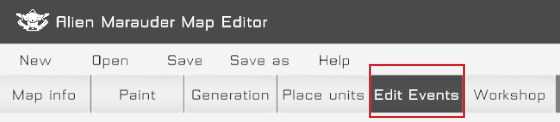
Map Editor: In the new version, we bring you the Event Editor template, so now you can create unique gameplay by defining unique rules!
1. Tap the [Event Edit] button to enter the corresponding page.
2. A list of triggers is shown on the left: 2.1 Trigger template: 2.1.1. In the drop-down list, you can select different trigger templates, clicking on the + on the right will create the corresponding trigger, it is recommended that you use the template to build it first so that you can have a better understanding of our trigger mechanism.
2.2 There are three types of triggers: Standard, Round, and Timed. 2.2.1. All three triggers have the same functions, both round and timed come with their own templates, if the requirements are consistent with the template, it is recommended to use the corresponding triggers directly for easy classification management 2.2.2. Round trigger: The default trigger event is "at the end of each frame" 2.2.3. Timed trigger: The default trigger event is "when the game time changes" 2.2.4. game_initer: Comes with a trigger that will perform the initialization behavior at the beginning of the game and is recommended to be kept.
3. The right side is the trigger configuration interface: 3.1. Trigger name: Fill in the trigger name (every name is unique and cannot be duplicated) 3.2. Trigger event: The trigger will be activated when the corresponding event is triggered during the game and will enter the "condition check" process (some events with their own parameters will be displayed next to them) 3.3. Condition check: fill in the expression, when the result of the expression execution is true, it will enter the "execution behavior" process (if not filled in, the default is true) 3.4. Execution behavior: fill in the expression, and the expression will be executed sequentially
4. In the upper right corner of the trigger configuration interface, there is a data query button, click on it to open the data table (excel), which contains all available expressions, event descriptions, descriptions of relevant variables, etc. You can imitate the form of the template and use the table to configure more triggers!
Balance patch: Adjusted the difficulty of vexan waves in Frostland, Jade Swamp, and Golden Desert. Adjusted the difficulty of vexan colonies in Jade Swamp
Please wait a little longer
Greetings Captains,
The event editor is nearly good to go and will present itself in its complete form shortly.
P.S. We're focusing on more new commanders, so stay tuned for more info!
Something new about map module!
Greetings Captains,
This week, we've introduced more sub-modules for the event editor: Several sets of basic trigger templates that allow micro-managements even after application. This will serve as a great time-saver in further map editing, so stay tuned for more coming modules!
We have returned! (And more)
At long last! Good to see you again, captains!
Even suffering from the local outbreak of COVID, our development has never ceased (with inevitable slowdown, though), and here we have more new content on the schedule. So now, let us see the latest content and mechanism for the future updates:
Event Editor First of all, allow us to introduce a new Alien Marauder map editor module: The event editor! With the event editor, trigger creating will be enabled to edit the maps further. With which players would be able to develop their original rules and mechanisms and do unfathomable wonders with the editor! The module is now a coming-soon, so stay tuned for the latest news!