With a built-in audio engine, time-stretching, looping, audio FX, VFX, video and social collaboration all in the box.
ASIO output comes to AliveInVR in v1.0.4.4
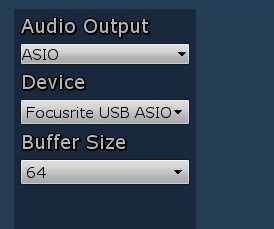
AliveInVR now supports ASIO output. This means you can get low latency playback direct to any ASIO device.
To select ASIO output go to the audio MIDI settings tab in the menu and change the output driver to ASIO.
On changing the driver and/or buffersize, AliveInVR will automatically restart.
v1.0.2.11 released!
v1.0.2.11 released!
This is a maintenance release.
Samplerate change
You can now change the samplerate from the Audio/MIDI settings tab
This will restart the app automatically when changed
Features and fixes
Haptics added for WMR devices
Auto Screenshot taker. Click the screenshot button in the environment menu, after 5 Seconds, several screenshots will be taken in Steam
Bloom now defaults to on
Teleport UI made more subtle
Fixed clipping issues in multiplayer audio when overloaded
Fixed hand controls not being displayed outside the main area
Fixed intermittent gating of multiplayer voice
Social VR and Spatial Mixing comes to AliveInVR!
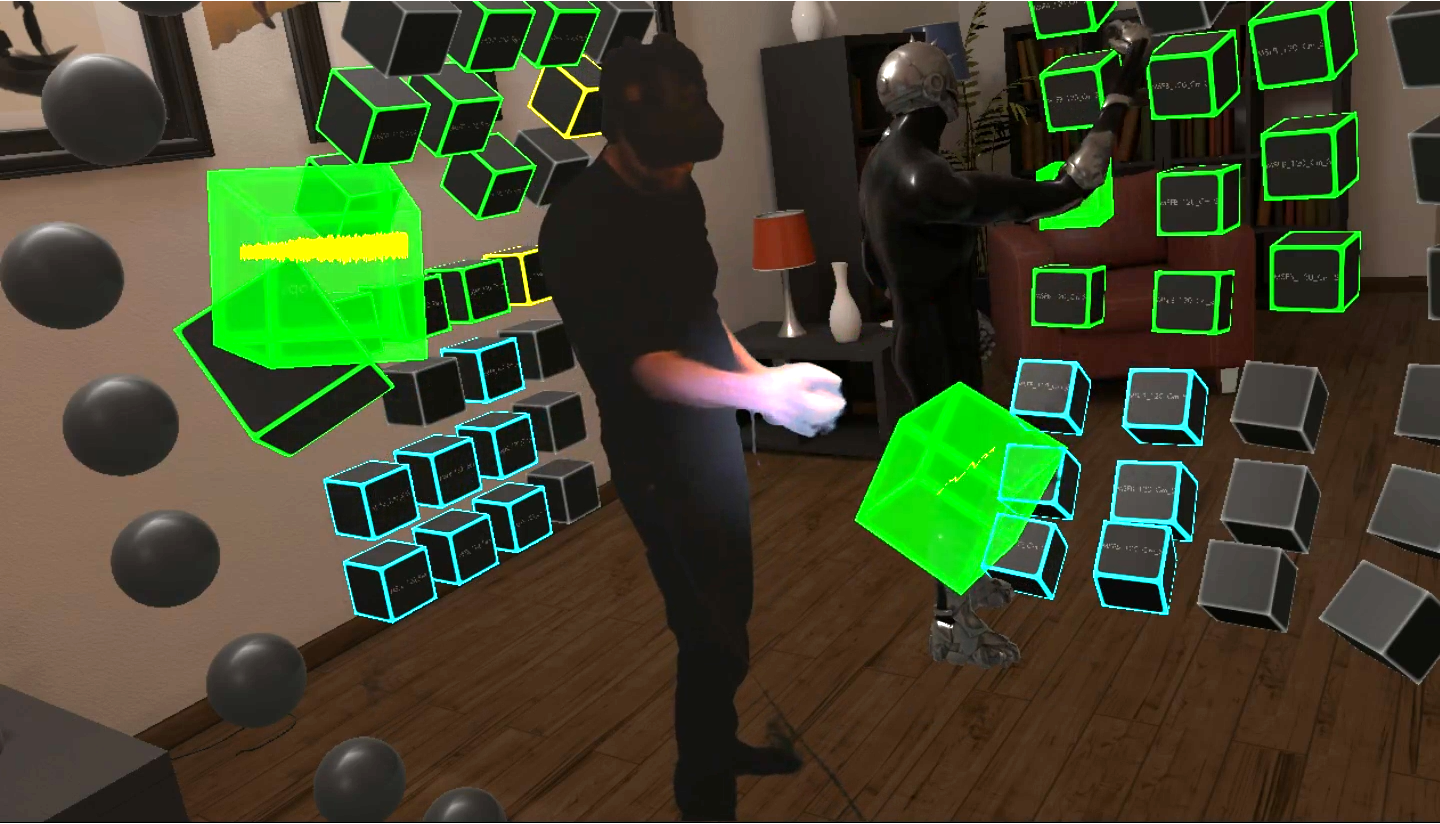
You can now collaborate or spectate with multiplayer sessions!
Social/Multiplayer
Choose Social in the menu. Make sure you route audio through the AliveInVR ASIO driver in Ableton.See tutorial
Hosting a Session gets your audio and Ableton Session control shared to all players.
Finding and joining a Session lets you collaborate or spectate on someone else's Session ( whoever hosted the multiplayer session)
Voice chat in VR with full avatar control
Voice waveforms appear above the head of each player
Mute or hide other players, this only affects your view of the player
A high quality audio feed is used to send music to all players. Lower quality is used for voice chat.
The owner of the session can change the scene/time of day and this will apply to all players.
Non realtime controls such as triggering clips and scenes or editing the step sequencer can be controlled by anyone. Realtime controls such as drumracks and instruments work for the host of the session only. A latency will occur if clients (non-hosts) trigger drums or instruments.
When in a multiplayer Session, go back to the Social menu and you can send invites to friends on Steam.
Spatial mixing
Turn on Spatial Audio in the Audio/MIDI menu.
Make sure you route audio through the AliveInVR ASIO driver in Ableton.See tutorial
Each clip playing will generate audio spatially based on it's position
Waveforms are displayed when clips are playing
Three waveform types can be chosen in settings (or turn off waveforms)
When playing instruments or drum racks, the waveform for the entire track will be displayed in the triggered block and be spatialised from the triggered block.
If all channels are mono in the Ableton Session, full spatialisation is applied (binaural). If channels are stereo in Ableton, panning and proximity is applied.
Waveforms are not sent to client players in multiplayer due to bandwidth limitations.
Features and fixes
New tabbed menu system
In game mirror/camera preview is now optional in the menu
Much better GPU performance when in game cameras and mirrors turned off +100%
Improved avatar animation and control
2 New Avatars
New foggy scifi scene - stand behind the blocks to see shadowed fog effects
Run without VR if no headset is connected. This is experimental and has no interaction with blocks but you can spectate a session. Hit Esc to get to the menu system. Use WASD controls to navigate.
Added help
Better bounding on the indoors scene, you can no longer teleport outside
When the camera is turned off a single eye view is shown on the desktop mirror. When the camera is on, a smoothed headcam is mirrored on the desktop unless 'show the camera output on the desktop' is enabled in the menu.
Avatar support added!
1.0.0.11 Avatar support!
Avatars
Select from 10 Avatars using the Avatar button in the menu.
Defaults to the original reflective helmet Avatar.
All other Avatars have full motion control of arms, head, hands and digits.
Features and fixes
Indoor scene spotlights less bright so that the Scene is less washed out.
Windows Mixed Reality Support Added!
v1.0.0.4 Released
Adds support for Windows Mixed Reality headsets.
Note that Windows Mixed Reality SteamVR beta doesn't support haptics/force feedback yet. This is the case for all WMR SteamVR games right now.
Now out of Early Access!
AliveInVR is now out of Early Access.
Many thanks to all those early adopters!
0.0.1.15 Step Sequencer Support Released!
0.0.1.15 Step sequencer support!
Step Sequencer
Additional step sequencer mode added - choose step from the mode controls
Select a pad from the drum rack then turn steps on and off above
Use the quantize scene button to adjust quantize level
Re-arrange the steps anywhere in 3D space
With eye candy mode on, steps emit effects when triggered
Features and fixes
Clipnames now displayed inside clips
KB shortcuts Ctrl + 1,2,3 and 4 for Session, Note, Step and Mixer.
Mirror, transport, controls and camera positions saved and restored on startup
Menu is now animated
Mirror is now higher resolution
The camera now ignores the mirror
Fixed bug where after first starting and then changing a setting and restarting, the scene was not loaded correctly leaving a dark scene
When showing the menu, controller help is displayed beneath the menu
Camera animation track is now lower down to capture more of the blocks
Minor patch released 0.0.0.36
0.0.0.36 Bug fix release
<*> Minor bugfixes
Menu appeared out of visible range if the player teleported a long way from the blocks and then changed the scene.
Player initial location is now centered on the blocks and closer to the blocks at startup and loading/changing scene.
Extended Transport controls - Added Push style session recording workflow.
Session record, New and Duplicate to create clips and loop record.
Includes Fixed/Unfixed length recording mode, Automation record on and off.
Smooth first person desktop mirror - If the camera is turned on and mirror to desktop is off, the first person camera is now a smoothed follower camera.
Minor bugfixes
Fixed teleport destination near blocks which was inconsistent in the previous release.
Hitting blocks and controls is now more accurate.
Pulling a block out of the wall and letting go close to the wall no longer sucks the block back into the wall.
When loop recording, notes colour the entire block red, previously the block was framed red.
There will now be a pause of about a month in feature releases (they have been mostly weekly up to now). Bugfix/stability releases will be made if needed. This is to make space for the next phase of development/test.
Come and see AliveInVR at the WeAreRobots show in November!