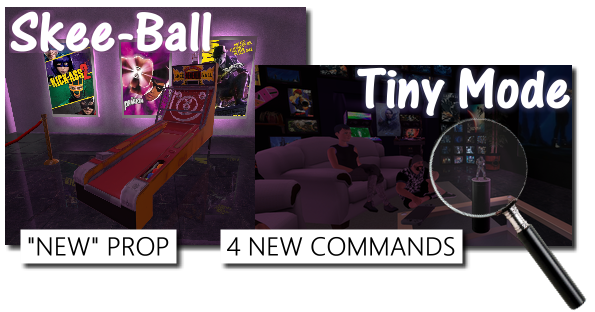
The classic skee-ball prop is now included among your props! You can search search your Advanced Library Browser for "Skee" to find it in your props.
Tiny Mode (+more new commands)
Tiny Mode makes you about 2 inches tall. A couple screen overlay effects & some other goodies have been added to the Commands Menu. Just hold down TAB to access the Commands Menu.
Social Mode
Checking the Social Mode checkbox on your Main Menu will allow you to chat with other AArcade users even if they are not in your session. This will make it easier to see how many people are online & interested in socializing, plus let you talk to them to organize games. You press the Y button to open your chat box.
Change Log
Added Social Mode as a checkbox on the Main Menu. Users who are in Social Mode can all talk to each other even if they are not in a session together.
Added tabs to the Chat Menu so you can choose to send your chat to only the people in your lobby, or to all the users in social.
Added the following to the Commands tab of the Tab Menu: Tiny Mode/Tiny Mode Reset, Black & White Mode, Overlay Combine Vision/Overlay Reset, Camera 1st/3rd Person, All Guns Off.
Added a Wizards tab to the Advanced Library Browser.
Added the ability to hide wizards.
Added Skee-Ball prop to the default library.
Added a Debug Info button onto Source engine menu for beta testers to help track down a bug.
Improved multiplayer mode to sync head pitch too.
Improved accuracy of all sliders in the Transform Menu while placing objects.
Improved the Continuous Play button to use what ever item you're looking at (IF you don't have one selected already.)
Improved AArcade's stability when exiting multiplayer sessions in non-conventional ways as a client.
Improved the DuckDuckGo Images & Bing Images scrapers to automatically change https addresses to http instead.
Improved Auto Save to purge newly created library entries when discarding changes.
Fixed a bug that caused chat messages to be hidden when event notifications were disabled.
Fixed an issue that caused AArcade to not properly pause when launching shortcuts from the middle-click menu.
Fixed a bug that causes in-game tasks to close when props were selected / deselected.
Fix an issue that causes AArcade to attempt to load arcades on maps that you have since deleted.
Fixed a purple checkerboard texture that would appear when viewing newly created web tabs in fullscreen mode.
Fixed an issue where guests of your arcade didn't have avatars.
Reduced the reflection intensity on the screen & marquee materials.
Hid the node, missing, & teleport models in cabinet select lists because they aren't useful.
Removed the Scrapers button from the Advanced Library Browser because there is a Wizards tab now.
NOTE
I pushed a hotfix at 9:46PM Pacific time so that the Skee-Ball prop would properly be added to everybody's library.
Today's update fixes the issues with meta_hood, oververse, hub_highrise, sm_acreage, and Dralloc's new map dralloc_gallery! You'll also be able to launch other Source engine games from AArcade as expected, such as L4D2 or CSGO!
Added the new DraLLoC map, dralloc_gallery.
Added a new world called Meta Flats as the default in the Worlds tab of the Maps menu. It has the 5 new meta_ maps in it.
Added a fix that allows other Source engine games to launch from Anarchy Arcade.
Change the default color scheme to Windows Wannabe (blue).
Renamed Starter Land to Old Town in the Worlds tab of the Maps menu.
Removed the "Reload UI Page" little white dot from the top-right corner of all UI menus.
Fixed an issue that caused the counts on the Tab menu to be incorrect.
Fix an issue that caused the previous UI menu to show for a split second when loading up a new UI menu.
Fixed issues with the following maps: meta_hood, oververse, hub_highrise, sm_acreage.
Fixed the cubemap reflections in the 5 meta_ maps.
NOTE
AArcade can now launch other Source engine games again! For now, it will take you back to AArcade's Main Menu when you launch other Source engine games. This, too, will be improved in future updates so that it works as well as it did in Legacy!
NOTE 2
At 8:05 AM Pacific, I pushed a hotfix that corrected some issues in meta_haze & meta_zen.
Lots of exciting new content & features in today's update!
New Map
You can find the new map by going to Main Menu > Maps and searching for Dralloc. (NOTE: This map is currently delayed while we make some last-minute optimizations to it!)
New Cabinets
The new cabinets will be in your Transform Menu when spawning shortcuts. They are the Record Plaque, Record Sleeve, and Record w/ Sleeve, DVD Case, and Flatscreen TV Wall.
New NPC Props
The new NPC props can be found in your Advanced Library Browser's Props tab by searching for their names: Hacker Haley, Ninja Nancy, Cowboy Carl, Fit Frank, & Zombie Joe!
New Animation Menu
Props that support animation will list all their available sequences in the new Animation tab of the Transform Menu when spawning them.
Have Fun!
I found myself spawning all 5 of the new NPCs in every one of my old arcades that I loaded up, which was a lot of fun! Also, many addon player models can now be posed using the Animation tab for even more character companions! If you have any questions, need help with anything, or just want to get in contact with me or the rest of the AArcade community, feel free to join us in Discord at https://discord.gg/Nshzn2q or drop into one of my live Twitch streams at http://www.twitch.tv/AnarchyArcade. Party on, dudes!
Shout-Outs
AArcade's development is guided by user feedback. Most of the updates are in response to feedback, requests, & suggestions given to me by users in the Discord, the Twitch, or in Steam PMs.
I just want to recognize Wolfen for his latest requests for prop animation, autoplaying items, and some others that I've already implemented from him in the past couple weeks. N00bVader for suggesting the vinyl record music cabinets, Pux420 for requesting the DVD Case cabinet, and all the other great testers & users who have been feeding me bug reports, feedback, & suggestions to help guide my development of this project over the years. Thanks ya'll!
Change Log
Added the ability to animate props.
Added an animation sequence selector to the Transform Menu for props.
Added 5 animated human NPC props for you to spawn in your arcades: Ninja Nancy, Hacker Haley, Cowboy Carl, Fit Frank, and Zombie Joe.
Added another new map named dralloc_gallery, created by DraLLoC, the author of classic maps such as Party Cabin (sm_acreage) and Nightclub (sm_primo).
Added the following cabinets: DVD Case, Flatscreen TV Wall, Record Plaque, Record w/ Sleeve, Record Sleeve.
Added thumbnail images for all remaining default cabinets & many popular addon cabinets.
Added cabinet category tabs to the Transform Menu for quickly finding the cabinet you want.
Removed the DVD case from the default Tabletop TV cabinet.
AArcade will now automatically (re)add all default library entries after a new client update (so the update's new stuff will be in your library automatically.)
Fixed an issue that caused AArcade to crash-to-desktop when spawning certain scaled models while Scale Collisions was active.
Fixed an issue with the Source Engine Options button in the Options menu.
Fixed a bug that allowed props to be set to autoplay.
Fixed a bug that prevented you from searching from the Main Menu unless you had favorites already.
Fixed an issue that caused map hiding / unhiding to misbehave.
Fixed the off-centered crosshair at AArcade start.
Fixed the missing multiplayer icon on the Main Menu.
2 New Maps - Client Update 3/17/2018
Meta Shine Features
Brightly lit w/ lots of colors (mostly yellow)
Retro room
2 prop stages
10 poster stages
Modern-style TV entertainment center
Rainbow colored walls & ceiling
Connected to meta_hallway's gold door
Meta Zen Features
Brightly lit w/ green
TV grid wall w/ 30 slots for TVs
Music pylons for CDs
Optional shadow boxes for prop diorama
Auto-animated pylon & shadow box doors
Manual buttons for pylon & shadowbox doors
Acoustic-style ceiling
Connected to meta_hallway's green door
These 2 new maps are connected to meta_hallway through the gold & green doors! Now ALL colored doors in meta_hallway are linked to their own map. Soon this area will be added to the Worlds tab and be the new set of maps shown to players by default.
Be sure to set your favorite automatic mood music in each of your arcades by middle-clicking on your music object & choosing Autoplay! Party on!
Change Log:
Added new maps meta_zen & meta_shine.
Added a Manage Hidden Library Entries button to the UI tab of the Options menu.
Added Use Raw Mouse Input to the General tab of the Options menu.
Added Scale Collision Models to the General tab of the Options menu.
Fixed the icon shown for autoplay in the context menu.
Improved the Multiplayer icon.
Improved multiplayer to hide the placeholders of any missing props.
New Map & Autoplay - Client Update 3/11/2018
Search your maps for "haze" to find the new map! It is connected to the hallway map with a loading door. The green & yellow doors in the hallway will get rooms next update!
Also, you can now set 1 object in your arcade to auto-play every time you load your arcade! Middle-click on the object you want to set to auto-play & then click the "Mark as the autoplay object" button:
NOTE
At 2:29pm Pacific time I pushed a hotfix so the new map is now in everybody's map list!
Change Log:
Added a new map, meta_haze, that is connected to the meta_hallway's purple door.
Added a DuckDuckGo images wizard.
Added a button to the middle-click menu that lets you set the object under your cursor to auto-play when the arcade loads.
Added an Advanced Tab to the Edit Instance menu that lets you change which map is assigned to the instance.
Fixed a bug that caused the wrong project name to be shown when testing level design projects.
Client Update 3/8/2018
Added a Level Designer tab to the Maps menu.
Added a new map, meta_hallway, that is attached to meta_gallery with a map transition door. (Press E on the door w/ a star on it to transition!)
Renamed the Play menu to the Maps menu, so it matches its label.
Renamed the Maps tab to the All Maps tab.
Added a launch option for testers to disable game mounts: +mounts 0
NOTE
At 4:16PM Pacific time I pushed a hotfix so that players always spawn in the correct position when transitioning between maps.
Client Update 3/5/2018
Added a new map: meta_gallery
Fixed an issue with multiplayer that prevented some objects from spawning.
Go to Main Menu > Maps and search for meta to load the new map!
Client Update 3/2/2018
Fixed an issue with achievement stickers on cabinets being forgotten after restarting AArcade.
Fixed the 360 Screenshot button for multiplayer hosts.
Added Auto Save to the General tab of the Settings menu. When OFF, changes are NOT saved until you confirm. Note that auto-save is
always* turned OFF if you are a guest in a multiplayer session.
Enabled texture clamping on all dynamic textures by default.
Added a launch option to DISABLE texture clamping, which fixes certain addon cabinets. +clamp_dynamic_textures 0
Added the ability to search wizards for NEW items on the Main Menu.
Replaced the Google Images wizard with a Bing Images wizard.
Added a Bing wizard.
Improved the PAUSED screen to be cooler looking.
Fixed an issue with screenshots not working as teleports in maps w/ capitol letters in the map name.
AArcade: Source clients can now join multiplayer sessions.
Added a Multiplayer menu that has tabs for all multiplayer related features.
Added an About tab to the Multiplayer menu that explains the details about how AArcade's multiplayer works.
Updated the Servers tab of the Multiplayer menu to connect to servers in-game (unless the popout icon is clicked instead.)
NOTE: At 6:35PM PST I pushed a hotfix for this update to resolve some crashing issues people had. :ily:
This update brings in-game multiplayer! It is also still cross-platform compatible with the AArcade: Web client for people just using Google Chrome.
Note that Steam workshop support has not yet been added to multiplayer, so any missing models used in the arcades you join will just show up as the default tablet for now.
I'll be streaming to http://www.twitch.tv/anarchyarcade and will be in the AArcade Discord at https://discord.gg/Nshzn2q if anybody needs help or has questions. Party on!
Client Update 12/30/2017
Happy New Year everybody! Here's the changelog for this week's update:
Added support for custom sticker PNGs.
Added support for using Steam achievement icons from games as stickers on their cabinet.
Renamed Steam Shortcut to Steam / Internet Shortcut in the Windows Browse Dialog menu.
Fixed the positioning of stickers on various image sizes.
Added the ability to search for & spawn props from the Main Menu.
Added support for playing back shortcuts to MP3 files in-game.
Partially fixed support for some addon cabinets that broke in the previous AArcade update.
NOTE
At 8:07PM Pacific I pushed a hotfix for some people who's Library Browser had a bug.
Client Update 12/21/2017
Stickers
These are little pre-made PNGs that you can stick onto your items' marquee images however you want! There's only a handful of PNGs to choose from right now, but more will be added soon.
The sticker system was created so we'd have something to give users as rewards for earning AArcade achievements. The idea is that most of them would start off locked, and you'd get to choose which ones you want to unlock as you earn AArcade achievements.
Note that all the stickers are un-locked by default for now, until the stats & achievements are fully implemented.
AArcade: Source
Added a Stickers tab to the Edit Item menu where you can apply stickers onto your item's marquee image.
Fixed cabinet & prop animations.
Improved texture filtering on all dynamic textures.
Removed purple checkerboard that showed when selecting an object.
Fixed the Show Windows Taskbar option to work again.
Fixed an issue that caused the Windows taskbar to remain on-top when it shouldn't have.
Partially fixed projector props.
NOTE
At 9:52am Pacific time I pushed a hotfix because I forgot to include the updated DLLs. All should be working now! :ily: