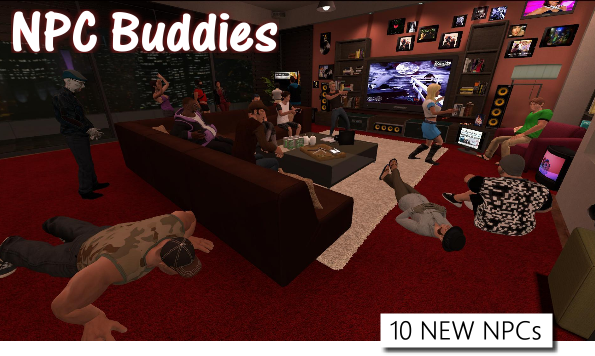
Today's update adds 10 all-new NPCs to spawn into your arcades! It also makes spawning NPCs (and other props) easier by organizing your favorites list in the Library Browser and the Main Menu into categories you can cycle through.
Be excellent to each other!
Change Log
Added 10 new NPCs called Dancing Dianna, Club Carol, House Hans, Shaggy Shane, Buff Berry, Gamer Gary, Tembo Tyson, Leaning Lana, Lazy Lex, Masher Mary, and Arcade Aaron.
Added categories to the favorites lists on the Main Menu and the Library Browser. Click on the arrows to cycle categories.
Fixed an issue with hosting certain multiplayer arcades.
(LEGACY) Fixed crash issues when loading maps.
NOTE: At 6:56PM Pacific time, I pushed a hotfix that should resolve crash issues that some LEGACY people were getting when trying to load *any* map. Thanks to Fox for helping troubleshoot!
Netflix Works Again
The web browser that displays content on the in-game screens is once again compatible with Netflix, thanks to a Steam client update.
This means that you'll be able to resume watching all your favorite Netflix shows & movies right inside your arcade again! :)
Keep in mind that you'll still need a Netflix subscription to watch Netflix, as will anybody in your multiplayer games that you want to watch Netflix with.
Today's small update fixes a few bugs with the chat boxes, plus adds in some debug launch options that testers can use to help me troubleshoot the instability when joining certain MP arcades.
If you'd like to help debug, just hit me (SM Sith Lord) up on Discord, Twitch, or Steam and I'll explain what bug we're trying to squash and how you can use the new debug launch options to help.
AArcade Discord: https://discord.gg/8cxtuKY
Party on!
NOTE:
At 10:15AM Pacific I pushed a hotfix that should greatly increase stability when joining multiplayer servers. Thank you testers! More fixes to come, if needed.
NOTE 2:
At 12:35PM Pacific I pushed another hotfix that fixes the last of the known crash-on-join issues for multiplayer, thanks to Xaphian for hosting the server while I debugged!
Change Log
Fixed real-time updating of Social & Lobby chat even when Twitch chat is disabled.
Fixed an issue that caused all props in multiplayer games to show hover text as if they were a video mirror.
Fixed a bug that caused (From Library) to show up when looking at other players in multiplayer games.
Fixed an issue with spawning links from the chat box.
Fixed an issue with the button that spawns in Twitch channels from your chat box.
Added the following launch options to help debug testers track down the cause of instability joining certain MP servers: +cloud_assets_download 0, +debug_disable_mp_models 1, +debug_disable_mp_players 1, +debug_disable_mp_items 1
Multiplayer Addon Model Syncing - Client Update 5/12/2018
Today's update allows you to see your friends' custom models when you join their multiplayer arcades! Note that it could take a minute or two for the custom models to transfer as you walk around the arcade. Custom models spawn in as soon as they are ready.
Party on, dudes!
Change Log
Added cloud syncing of custom models in multiplayer games.
Fixed mounting of the Legacy download folder, for old-school users who had content in that folder.
Pause Mode ~0% CPU/GPU - Client Update 5/9/2018
Today's update improves AArcade's pause mode so that it uses only about 0.1% of your CPU & GPU while you it is paused in the background as you play your other games!
Special thanks to Wolfen for helping find out how to make AArcacde pause more efficiently.
Change Log:
Improved pause mode so AArcade takes between 0.1% to 1.0% of CPU/GPU usage (approximately) when in pause mode.
Increased stability when joining multiplayer servers (fixed support for joining Moon's multiplayer arcade.).
More Multiplayer & Syncing Improvements - Client Update 5/8/2018
Today's update has various multiplayer improvements. You can now save the items that you see in multiplayer games into your personal library for later use, as well as lots of syncing improvements. Have fun!
Change Log:
Improved multiplayer syncing so items look like your friend's, but function like yours.
Improved multiplayer accuracy of matching your friends items to items in your personal library.
Improved the Servers Menu to allow you to search for other servers while you're already hosting one yourself.
Improved insta-purge of items that were only from a multiplayer server that you just left.
Improved jumping between multiplayer servers & singleplayer mode arcades often to be more stable.
Improved the Libretro GUI gamepad to remember its on/off state.
Added a small library icon to the context menu of items in multiplayer games that you also have in your personal library. (Also added "from library" to their hover-text.)
Added a Save Item button to the context menu that lets you save items & customizations from multiplayer into your personal library. Note that making changes to an item in a multiplayer server automatically saves your changes too.
Added support for this console command to strip your gamepad of non-essential controls for better with Libretro: exec strip_controller
Improved Social Mode & MP Syncing - Client Update 5/6/2018
Hey everybody! Today's update improves multiplayer syncing & social mode, squashes a few bugs that people reported, and adds an Instagram wizard for spawning stuff from your favorite Instagrams. Party on!
NOTE: You can hide wizards that you never use by going to the Wizards tab of the Advanced Library Browser.
Change Log:
Improved object syncing when building your arcade in multiplayer mode.
Improved Social Mode to show Steam avatars, show which map people are in, and have a JOIN button next to players that are in public servers.
Fixed sound stutter of coin drop when launching shortcuts + added a way to disable it completely in the Sound tab of the Settings menu.
Fixed an issue that caused hosting certain arcades in multiplayer to result in an infinite loading screen.
Fixed a bug that caused a crash if disabling weapons with no map loaded.
Improved the Main Menu to automatically collapse if you click away from it.
Added an Instagram Wizard that can spawn images or videos from Instagram. You can access it in the Wizards button next to the Search box on the Main Menu. Be sure to type your search term into the box prior to clicking the Wizards button for best results.
HOTFIX
At 4:50 PM Pacific I pushed a hotfix that further improves multiplayer stability and fixed the Dream Arcade bug.
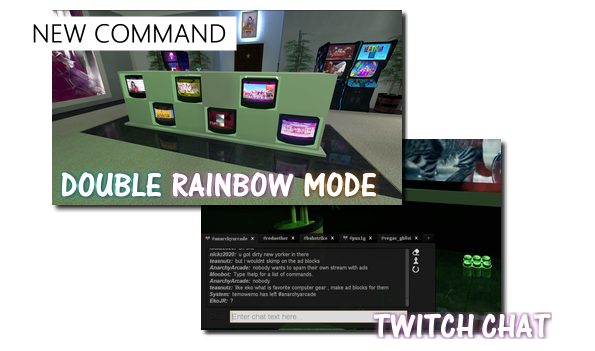
Today's update adds audio-responsive Double Rainbow Mode and Twitch chat support to AArcade.
Twitch Chat Support + Twitch Bot Commands
Now you can talk to the Twitch streams you watch or your own Twitch viewers. There are also 2 new Twitch Bot Commands you can enable in the Twitch tab of the Settings menu. You'll have to head there first to setup your Twitch info. Press the Y button to bring up the chat menu while walking around a world.
Double Rainbow!!!
Double Rainbow Mode can be enabled by holding down TAB and choosing it from the Commands tab. Every screen's reflections will flash a HUE-rotating rainbow that lights up according to your system audio output. You can further configure it in the UI tab of the Settings menu. It's called Audio Visualization Reflections (AVS).
Change Log
Added Double Rainbow Mode to the Commands menu.
Added Audio Visualization Reflections to the UI tab of the Settings menu. It allows you to turn the screen reflections into a light show that reacts to your system audio level.
Improved the Chat menu to update in real-time and behave more like a chat room.
Added a Twitch tab to the Settings menu.
Added Twitch chat support to the Chat menu (press Y while walking around to open the Chat menu.) You must first go to the Twitch tab of the Settings menu to configure it.
Added Allow Twitch Bot Commands to the Twitch tab of the Settings menu. Enable it to allow your own Twitch viewers to use commands like !map to see what map you are currently on or !linx to see the title & URL of item you are watching.
Note If you seem to have gotten disconnected from Twitch chat after playing a game for a long period of time, there is a Reconnect To Twitch button right on the chat menu.
Note 2 I pushed a hotfix at 7:30AM Pacific on April 27th that disables breakable props from actually breaking until I troubleshoot a crash bug they were causing.
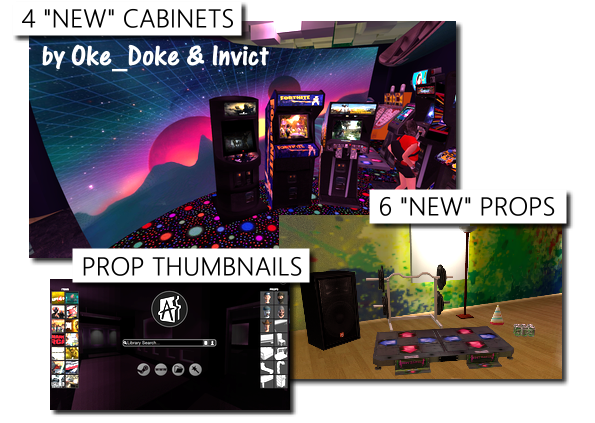
Today's update includes 4 community-favorite cabinet models now bundled with Redux. First there's the Curved Big Screen & Blaster cabinets created by Oke_Doke, and then there's the Revenge & Space cabinets created by the collaborative efforts of Oke_Doke & Invict. Now included with Redux for new players to enjoy out-of-the-box!
There are also 6 new props included with today's update that were previously
only available as addons. These include the Dance Pad, Big Speaker, Weight Set, Bowl Lamp, Party Hat, and, of course, the Beer.
Default & Manual Prop Thumbnails
Thumbnail images can now be set for props, making your favorite stuff easier to spot in the spawn menu. All the default models have thumbnails already too! And you can manually set what ever images you want for your addon models.
Social Mode Improvements
With today's update, there are now chat logs of what people have said in your session! No more speed reading or wondering if you've missed something! :D
You press the Y button to open up chat while walking around your arcade. HINT: If you are opted into "Social Mode", you'll be able to talk to people that are even in other sessions!
Also, the Social Mode chat box will now show you a list of online users so you know who's in the room with you!
Player Model Morphing
You can now morph into any model you're looking at by holding down TAB and going to Commands to use the new Player Model Morph command! Not all models will animate properly, but some will be fully rigged & working. If you turn into something dumb, you can use the new Player Model Reset command to fix yourself!
AArcade Community
If you're interested in joining the social side of the AArcade user community, you can join us in Discord ( https://discord.gg/Nshzn2q ) or lurk one of my Twitch streams ( http://www.twitch.tv/AnarchyArcade ). Until the next update, party on ya'll!
Change Log
Added the following cabinets contributed by OkeDoke & Invict: Blaster, Revenge, Space, and Curved Big Screen.
Added the following props to the default library: Dance Pad, Bowl Lamp, Party Hat, Big Speaker, Weight Set, and Beer.
Added chat logs to the Online Chat menu so you can read stuff you missed.
Added social chat notifications when users join or leave social mode.
Added a social chat notification when a player joins a multiplayer session.
Added a list of online players to the social chat tab (so you know who you're chatting to.)
Added support for custom model thumbnails.
Added model thumbnails for all default models.
Added Player Model Morph / Player Model Reset to the Commands menu.
Added a list of your favorite items & props to the EZ Library Browser.
Added a Launch button to the Advanced Context Menu.
Added Wizards to the Advanced Context Menu.
Improved the Search w/ Wizards menu.
Improved the favorites list on the Main Menu.
Improved the Clone ability to work on items.
Improved the EZ Library Browser to also work for searching & spawning props.
Fixed an issue that caused screenshots not to work properly on some maps.
Fixed scrolling through model sequence list w/ mouse wheel.
Fixed a bug that caused Fit Frank not to show up in everybody's default library.
NOTE: At 7:40PM Pacific time I pushed a hotfix so that the favorites list will work correctly on the Main Menu.